Best ABBYY FineReader Alternative for OCR & Document Processing (2026)
Looking for an ABBYY FineReader alternative? Compare features, pricing, and capabilities. See why teams switch to PDFSub.
PDFSub is best for:
- Teams needing OCR plus bank statement conversion, invoices, and 98+ PDF tools in one platform
- Users who want browser-based processing instead of a $599 desktop install
- International offices processing documents in 130+ languages vs ABBYY's limited language set
- Budget-conscious professionals - {{ plan.pro.price_monthly }}-{{ plan.business.price_monthly }}/mo vs ABBYY's $199-$599 perpetual license
PDFSub is NOT best for:
- Users who need best-in-class standalone OCR accuracy for complex historical documents
- Enterprises requiring on-premise deployment with no cloud dependency
- Organizations that need ABBYY's advanced document comparison and Bates numbering features
ABBYY FineReader has been the gold standard for OCR software for over two decades. If you've ever needed to convert a scanned document into editable text, there's a good chance someone recommended FineReader. And for pure optical character recognition accuracy, it's still one of the best desktop tools available.
But the document processing world has changed dramatically since ABBYY first carved out its niche. The rise of web-based platforms, AI-powered extraction, and cloud-first workflows means that a $599 desktop application - no matter how good its OCR engine is - may not be the best fit for how modern teams actually work with documents.
If you're paying enterprise prices for OCR-only software, dealing with installation headaches across your team, or simply need more than text recognition, this guide walks through the best alternatives and what makes each one worth considering.
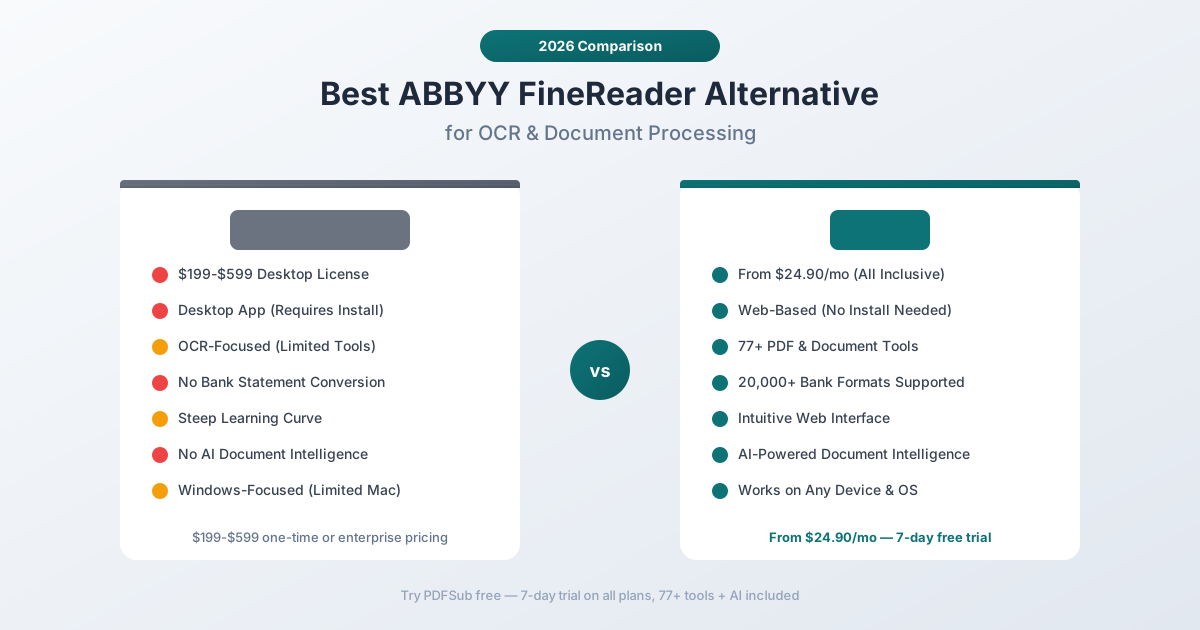
Why People Look for ABBYY FineReader Alternatives
ABBYY FineReader is excellent at what it does. The frustration isn't with OCR quality - it's with everything else. Here are the most common reasons professionals start looking elsewhere:
Expensive Licensing Model
ABBYY FineReader PDF comes in two tiers: Standard at roughly $199 and Corporate at roughly $599 (one-time purchase, though pricing varies by region and reseller). The Corporate edition unlocks features like hot folder processing, document comparison, and Bates numbering.
For individual users, that's a significant upfront cost. For teams of 10 or 20 people, you're looking at thousands of dollars in license fees - before you even factor in the ongoing cost of version upgrades. ABBYY releases major versions every 1-2 years, and upgrading is rarely free.
Enterprise and cloud (ABBYY Vantage, Timeline) pricing is custom-quoted and significantly higher, often running into tens of thousands of dollars annually for cloud-based intelligent document processing.
Desktop-Only Architecture
FineReader is a Windows-first application. There's a Mac version, but it's historically lagged behind in features and updates. There's no Linux version at all.
More importantly, there's no web-based version for the core FineReader product. In 2026, when teams are distributed across locations and devices, requiring everyone to install, license, and update a desktop application creates real friction.
IT teams have to manage installations, push updates, handle license compliance, and troubleshoot compatibility issues. A contractor on a Chromebook? Out of luck. A team member on an older Mac? Hope the version is compatible.
OCR-Focused, Not Document-Complete
ABBYY FineReader is, at its core, an OCR tool with PDF editing layered on top. It does text recognition, PDF creation, PDF editing, and document comparison.
What it doesn't do:
- Bank statement conversion - No ability to parse bank statement PDFs into structured CSV, Excel, or accounting formats
- Invoice extraction - No automated field extraction for invoices
- Receipt scanning - No receipt-to-data conversion
- AI-powered chat - No ability to ask questions about document content
- Document translation - No built-in translation capabilities
- Batch format conversion - Limited compared to dedicated platforms
If your workflow involves any of these tasks, FineReader covers maybe 30% of what you need. The rest requires additional software, additional subscriptions, and additional context-switching.
Steep Learning Curve
FineReader's interface carries decades of feature accumulation. For someone who just needs to OCR a few documents, the toolbar-heavy, panel-dense interface can be intimidating. The Corporate edition adds even more complexity with its automation features, editor modes, and workflow options.
New users consistently report spending hours learning the interface before becoming productive. That's time that adds up across a team, especially when onboarding new members.
No AI Intelligence Layer
Modern document processing has moved beyond "recognize text on a page." Users expect to ask questions about their documents, extract specific data points automatically, summarize long reports, and get structured output from unstructured content.
ABBYY has invested in AI through its separate Vantage platform (intelligent document processing), but that's a different product at a different price point - typically aimed at enterprise customers with dedicated implementation teams. The desktop FineReader product doesn't include these capabilities.
What to Look for in an ABBYY FineReader Alternative
Before comparing specific tools, here's what matters most when evaluating alternatives:
Web-based access. Can your entire team use it from any device, any browser, without installation? This eliminates IT overhead and makes onboarding instant.
OCR quality. Any replacement needs to handle scanned documents accurately. Look for multi-tier extraction that combines traditional OCR with AI vision for the toughest documents.
Document breadth. Does the tool handle more than just OCR? Bank statements, invoices, receipts, financial reports, translation, compression, merging - the more a single platform covers, the fewer subscriptions you manage.
AI capabilities. Can you chat with documents, extract structured data, summarize content? AI features are no longer a nice-to-have - they're what separates modern tools from legacy software.
Language support. ABBYY supports around 200 languages for OCR, which is genuinely impressive. Any alternative should offer broad language coverage, especially for non-Latin scripts.
Pricing predictability. Subscriptions with clear monthly costs are easier to budget than large one-time purchases followed by unpredictable upgrade fees.
PDFSub: The Best ABBYY FineReader Alternative
PDFSub is a web-based document platform with 98+ tools that covers OCR, AI-powered extraction, bank statement conversion, and everything else ABBYY FineReader doesn't - all accessible from any browser on any device.
Web-Based, Zero Installation
PDFSub runs in your browser. No downloads, no installation wizards, no license files, no IT tickets. Open a browser, log in, and start processing documents.
This means:
- Any device works - Windows, Mac, Linux, Chromebook, tablet
- No version management - Everyone always has the latest version
- No per-device licensing - One subscription, use it everywhere
- Instant onboarding - New team members start immediately
For teams, this eliminates the entire category of software deployment headaches that come with desktop applications like FineReader.
4-Tier Document Extraction
PDFSub doesn't rely on a single OCR engine. It uses a cascading extraction approach:
- Browser text extraction - If the PDF has selectable text, it's extracted instantly in your browser. No upload needed, maximum privacy.
- Server-side text extraction - For complex layouts with multi-column content and overlapping elements.
- Server OCR - Scanned documents get optical character recognition on PDFSub's servers.
- Vision AI - For severely degraded documents (faded thermal receipts, poor-quality scans, photographed pages), AI vision directly reads the image content.
Each document automatically gets the best extraction method. A clean digital PDF never leaves your device. A barely-legible 1990s fax gets the full AI treatment. You don't have to choose - the system cascades automatically.
98+ PDF and Document Tools
Where ABBYY FineReader gives you OCR and basic PDF editing, PDFSub gives you a complete document platform:
- Merge, split, compress, rotate, resize - All the standard PDF operations
- Bank statement converter - Parse statements from 20,000+ banks into CSV, Excel, QBO, OFX, QIF, MT940, and more
- Invoice extractor - Pull vendor details, line items, totals, and payment terms automatically
- Receipt scanner - Extract merchant, items, totals, tax, and payment method from any receipt format
- Financial report analyzer - AI analysis of balance sheets, income statements, and cash flow statements
- Chat with PDF - Ask questions about any document in natural language
- Translate PDF - Translate documents across 130+ languages while preserving formatting
- Extract tables - Pull structured table data from any document
- Summarize - Get concise summaries of long documents
- Convert - PDF to Word, Excel, PowerPoint, images, and back
One subscription replaces FineReader, plus the 3-5 other tools you'd need for a complete workflow.
AI-Powered Document Intelligence
This is the biggest gap between ABBYY FineReader and modern document platforms. PDFSub includes AI capabilities across its entire tool set:
- Ask questions about document content and get accurate, cited answers
- Extract structured data from unstructured documents automatically
- Summarize long reports into actionable bullet points
- Analyze financial documents with specialized understanding of accounting formats
- Smart extraction that understands context, not just character shapes
ABBYY recognizes characters. PDFSub understands documents.
130+ Languages
PDFSub supports 130+ languages across all its tools - not just OCR, but also AI chat, translation, extraction, and summarization. This includes right-to-left scripts (Arabic, Hebrew), CJK characters (Chinese, Japanese, Korean), and complex scripts (Hindi, Thai, Bengali, Devanagari).
ABBYY's ~200 language support for OCR is impressive, but PDFSub's language coverage extends across every function, not just text recognition.
Predictable Pricing
PDFSub is {{ plan.business.price_annual_monthly }}/month (annual; {{ plan.business.price_annual_total }}/year, saves $60) or {{ plan.business.price_monthly }}/month billed monthly, with a {{ plan.business.trial_days }}-day free trial. The All-In-One plan includes every tool, every language, and AI capabilities - {{ plan.business.ai_credits }} AI credits and {{ plan.business.bank_pages }} bank statement pages monthly. No per-device licensing, no upgrade fees, no feature tiers that lock you out of functionality.
Compare that to ABBYY's model: $199-$599 upfront per device, plus upgrade costs every version cycle, plus separate pricing for cloud/enterprise features. For a team of 5, FineReader Corporate licenses alone cost $2,995 - and that only covers OCR and PDF editing.
PDFSub's All-In-One plan is {{ plan.business.price_annual_monthly }}/month per user (annual) and includes team management with no cap on team seat count (each user billed per-user) - a team of 5 can share a single plan or scale as needed, with 98+ tools that FineReader simply doesn't offer, AI features, and {{ plan.business.bank_pages }} bank statement pages included.
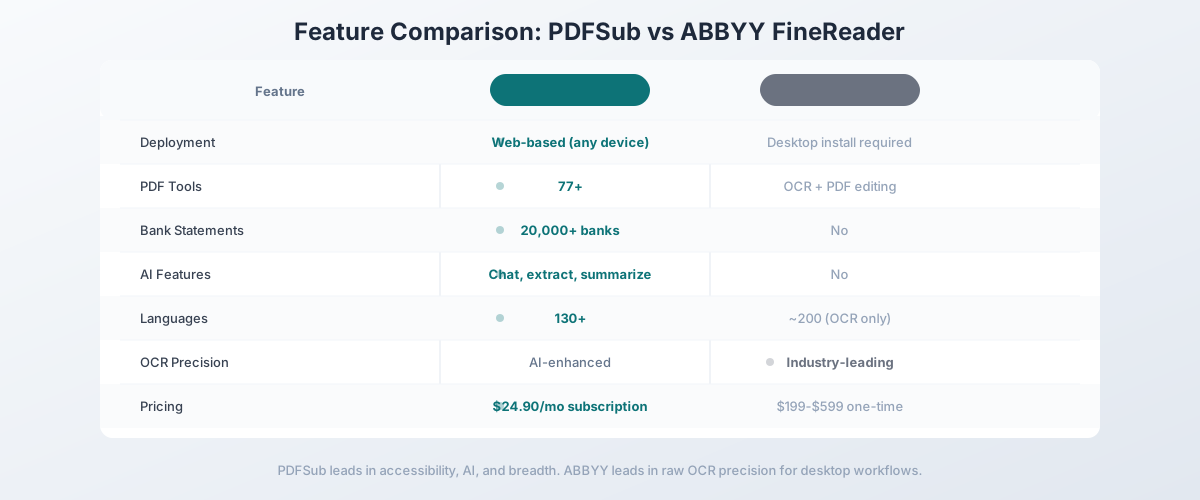
Head-to-Head: PDFSub vs ABBYY FineReader
| Feature | PDFSub | ABBYY FineReader |
|---|---|---|
| Deployment | Web-based (any device) | Desktop install (Windows/Mac) |
| PDF tools | 98+ | OCR + PDF editing |
| Bank statements | 20,000+ bank formats | No |
| AI features | Chat, extract, summarize, analyze | No (separate Vantage product) |
| Invoice extraction | Automated | No |
| Receipt scanning | Automated | No |
| Languages | 130+ (all features) | ~200 (OCR only) |
| OCR precision | AI-enhanced 4-tier | Industry-leading desktop OCR |
| Translation | 130+ languages | No |
| Privacy | Browser-first processing | Local desktop processing |
| Pricing | {{ plan.business.price_annual_monthly }}/mo (annual) | $199-$599 one-time per device |
| Free trial | {{ plan.business.trial_days }}-day full access | 7-day trial |
| Team deployment | Instant (browser) | IT-managed install |
Where PDFSub wins: Accessibility, AI features, document breadth, bank statement conversion, pricing predictability, and team deployment. If you need more than OCR - which most professionals do - PDFSub covers the entire workflow.
Where ABBYY wins: Raw OCR precision on complex scanned documents. ABBYY has spent decades refining its OCR engine, and for extremely challenging scans (degraded historical documents, complex page layouts with mixed content), FineReader's character recognition is still among the best in the industry. FineReader also processes everything locally, which some compliance environments require.
The value calculation: A single FineReader Corporate license ($599) costs roughly 30 months of PDFSub All-In-One access ($20/month annual x 30 = $600) - and PDFSub includes 98+ tools, AI extraction, bank statement conversion; add unlimited team seats at the same per-user rate that FineReader doesn't have. For most users, the math is straightforward.
Other Alternatives Worth Considering
PDFSub isn't the only alternative. Here's how the broader market compares:
Adobe Acrobat Pro - $22.99/month
Adobe's flagship PDF tool includes OCR, editing, and the newer AI Assistant:
- Strengths: Deep PDF editing capabilities, well-known interface, strong enterprise integration, AI Assistant for document questions
- Weaknesses: Expensive for what you get, no bank statement conversion, no specialized financial extraction, AI features still maturing, heavy desktop application
- Best for: Teams already in the Adobe ecosystem who need professional PDF editing with basic OCR
Readiris - $99-$199 one-time
IRIS (Canon subsidiary) offers a desktop OCR application:
- Strengths: Good OCR accuracy, lower price than ABBYY, handwriting recognition, cloud connector
- Weaknesses: Desktop-only, limited beyond OCR, no AI features, interface feels dated, no financial document tools
- Best for: Budget-conscious users who specifically need desktop OCR and don't need broader document capabilities
Google Document AI - Pay-per-use
Google's cloud-based document processing API:
- Strengths: Excellent OCR through Google's vision AI, specialized processors for invoices and receipts, scalable API, strong for developers
- Weaknesses: Requires development work to use (API-only), pay-per-page pricing can be expensive at scale, no end-user interface, no bank statement conversion
- Best for: Development teams building custom document processing pipelines who have engineering resources to integrate an API
Amazon Textract - Pay-per-use
AWS's document extraction service:
- Strengths: Good OCR and table extraction, integrates with AWS ecosystem, specialized for forms and tables, scalable
- Weaknesses: API-only (no user interface), complex pricing, requires AWS knowledge, no financial document specialization, no end-user tools
- Best for: Companies already on AWS who need to build custom document extraction into their applications
Smallpdf - $12/month
Web-based PDF platform with broad tool coverage:
- Strengths: Clean interface, 20+ PDF tools, affordable, easy to use, includes basic OCR
- Weaknesses: OCR accuracy below ABBYY/PDFSub tier, no AI features, no bank statement conversion, no financial document specialization, limited language support
- Best for: Users who need basic PDF operations and occasional OCR at the lowest possible price
Quick Comparison Matrix
| Tool | Price | Deployment | OCR | AI Features | Bank Statements | PDF Tools |
|---|---|---|---|---|---|---|
| PDFSub | {{ plan.business.price_annual_monthly }}/mo (annual) | Web | 4-tier + AI | Yes | 20,000+ banks | 98+ |
| ABBYY FineReader | $199-$599 | Desktop | Industry-leading | No | No | OCR + editing |
| Adobe Acrobat Pro | $22.99/mo | Desktop + Web | Good | Basic | No | Full editing |
| Readiris | $99-$199 | Desktop | Good | No | No | OCR + basic |
| Google Document AI | Pay-per-use | API | Excellent | Via API | No | API only |
| Amazon Textract | Pay-per-use | API | Good | Via API | No | API only |
| Smallpdf | $12/mo | Web | Basic | No | No | 20+ |
When ABBYY FineReader Is Still the Right Choice
To be fair, ABBYY FineReader remains the right tool for specific situations:
- High-volume scanned document processing where OCR precision is the absolute priority and you need the best character recognition available on desktop
- Air-gapped environments where documents must never touch the internet and all processing must happen on a local machine with no network connectivity
- Historical document digitization projects with severely degraded source material where ABBYY's decades of OCR refinement make a measurable difference
- Regulatory environments that specifically mandate local-only processing with no cloud components
If your workflow is "scan paper documents, convert to searchable PDFs, store in a document management system" and nothing else, ABBYY does that better than almost anything.
When You Need Something Better
Switch to an ABBYY FineReader alternative when:
- You need more than OCR. Bank statement conversion, invoice extraction, receipt scanning, AI chat, document translation - if your workflow extends beyond text recognition, you need a broader platform.
- Your team is distributed. Desktop software with per-device licensing doesn't scale for remote and hybrid teams. Web-based access eliminates deployment friction entirely.
- You want AI capabilities. Asking questions about documents, extracting structured data, summarizing reports - these are standard expectations in 2026, and FineReader doesn't offer them.
- Budget predictability matters. A {{ plan.business.price_annual_monthly }}/month subscription (annual; {{ plan.business.price_monthly }}/month monthly) is easier to budget and justify than a $599 one-time purchase per device with unpredictable upgrade costs.
- You work with financial documents. Bank statements, invoices, receipts, and financial reports need specialized extraction that understands accounting formats, not just character recognition.
Switching from ABBYY FineReader - What to Expect
The migration is simple because there's no data to migrate - ABBYY FineReader processes files without storing them long-term. Here's the typical 4-step transition:
Step 1 - Day 1: Spin up PDFSub in parallel. Start a free {{ plan.business.trial_days }}-day trial, no card-on-file requirement to test. Keep your FineReader install active so you have a fallback while you compare results.
Step 2 - Days 1-2: Run your hardest documents through both. Take three or four PDFs that represent your real workflow - a scanned contract, a multi-column financial statement, a mixed-language document - and run them through both tools. Compare OCR accuracy, table preservation, and how cleanly each output exports to Word or Excel.
Step 3 - Days 2-5: Test the capabilities ABBYY doesn't have. This is where the switch pays off. Try the bank statement converter, Chat with PDF, and document translation. These tools aren't replacements for ABBYY's OCR - they're new capability you'd otherwise need to buy separately.
Step 4 - Days 5-7: Cancel ABBYY (or downgrade to Standard). If PDFSub covers your day-to-day, cancel the FineReader renewal. If you still need ABBYY for one specific use case (high-volume historical OCR, Hot Folder automation), keep Standard at $99/yr as a specialty tool and use PDFSub for everything else.
Most users stop opening FineReader within the first week - except in rare cases where degraded scanned-document OCR is the entire workflow.
Common Questions About Switching
Can I migrate my ABBYY documents and settings to PDFSub?
There's nothing to migrate. ABBYY FineReader processes files locally without storing them long-term - there's no document library, project file, or workspace to export. You simply upload your existing PDFs to PDFSub when you need to work on them.
Can PDFSub match ABBYY's OCR accuracy on my documents?
For most documents, yes. PDFSub's 4-tier extraction handles the vast majority of business PDFs at comparable accuracy. For extremely challenging historical scans with degraded print quality, ABBYY's specialized desktop engine may have a slight edge. The fairest way to check: run three or four of your hardest documents through both during the {{ plan.business.trial_days }}-day trial.
Will my team need training to switch?
Far less than ABBYY required. PDFSub is task-oriented - pick a tool, upload, get the result. Most ABBYY users are productive in PDFSub within an hour. The migration friction is mostly habit, not learning curve.
Does ABBYY FineReader work on Mac?
ABBYY offers a Mac version of FineReader, but it has historically lagged behind the Windows version in features and updates. Some advanced features (like hot folder automation) are Windows-only. PDFSub works identically across all platforms since it runs in your browser.
Can ABBYY FineReader convert bank statements?
No. ABBYY FineReader can OCR a bank statement PDF to make it searchable, but it cannot parse the transaction data into structured formats like CSV, Excel, QBO, or OFX. For bank statement conversion, you need a dedicated tool like PDFSub's bank statement converter, which supports 20,000+ bank formats.
Is ABBYY FineReader cloud-based?
The desktop FineReader product is not cloud-based - it runs locally. ABBYY offers separate cloud products (ABBYY Vantage for intelligent document processing, ABBYY Cloud OCR SDK for developers), but these are different products at different price points, typically aimed at enterprise customers.
What happened to ABBYY FineReader versions?
ABBYY rebranded FineReader to "ABBYY FineReader PDF" and moved to a more subscription-oriented model, though perpetual licenses are still available in some regions. The naming and licensing changes have caused confusion among long-time users, with some reporting difficulty understanding which version they need.
Does PDFSub process documents locally?
PDFSub uses browser-first processing. When a PDF has extractable text, it's parsed entirely in your browser - the file never leaves your device. Server processing is only used when browser extraction can't handle the document (scans requiring OCR or AI vision). This hybrid approach balances privacy with capability.
Can I use PDFSub offline?
PDFSub requires an internet connection for login and server-side features (OCR, AI). Basic PDF operations that use browser-side processing work with minimal connectivity. If you need fully offline OCR in an air-gapped environment, ABBYY FineReader's desktop architecture is better suited for that specific requirement.
Still evaluating, not yet switching? This page is written for teams who've already decided to leave ABBYY. If you want a neutral feature-by-feature breakdown and pricing side-by-side, see the PDFSub vs ABBYY FineReader comparison.