PDF Tools for Insurance Professionals: Underwriting, Claims, and Compliance
Insurance professionals handle thousands of PDFs - applications, policies, claims, and compliance documents. Here's the complete toolkit mapped to every insurance workflow.
A single auto claim generates 20 to 50 pages of documentation. A commercial property claim with structural damage can easily exceed 200. A workers' compensation file that goes to litigation? Thousands.
Now multiply that by the volume. The U.S. property and casualty insurance industry processes roughly 40 million claims per year. Health insurers handle billions of claims annually. Every one of those claims starts with paperwork, moves through paperwork, and closes with paperwork - applications, policies, endorsements, declarations pages, loss runs, certificates of insurance, ACORD forms, proof of loss documentation, medical records, repair estimates, and settlement agreements. All PDFs.
And claims are just one workflow. Underwriters review applications. Agents issue binders. Policy administrators manage renewals. Compliance officers prepare for audits. Every role in the insurance lifecycle is buried in PDFs.
According to a 2024 Deloitte report, over 70% of insurers say manual document processing is a top operational challenge, leading to delays, increased costs, and compliance risks. Insurance professionals waste an estimated eight hours per week - a full working day - just searching for, interpreting, and processing information buried within documents. Claims adjusters spend 70% of their time on administrative tasks, with a large share of that devoted to manually extracting data from PDFs and re-entering it into systems.
This guide maps the critical PDF workflows in insurance to the right tools, organized by the work you actually do - underwriting, claims, renewals, COI management, and compliance.
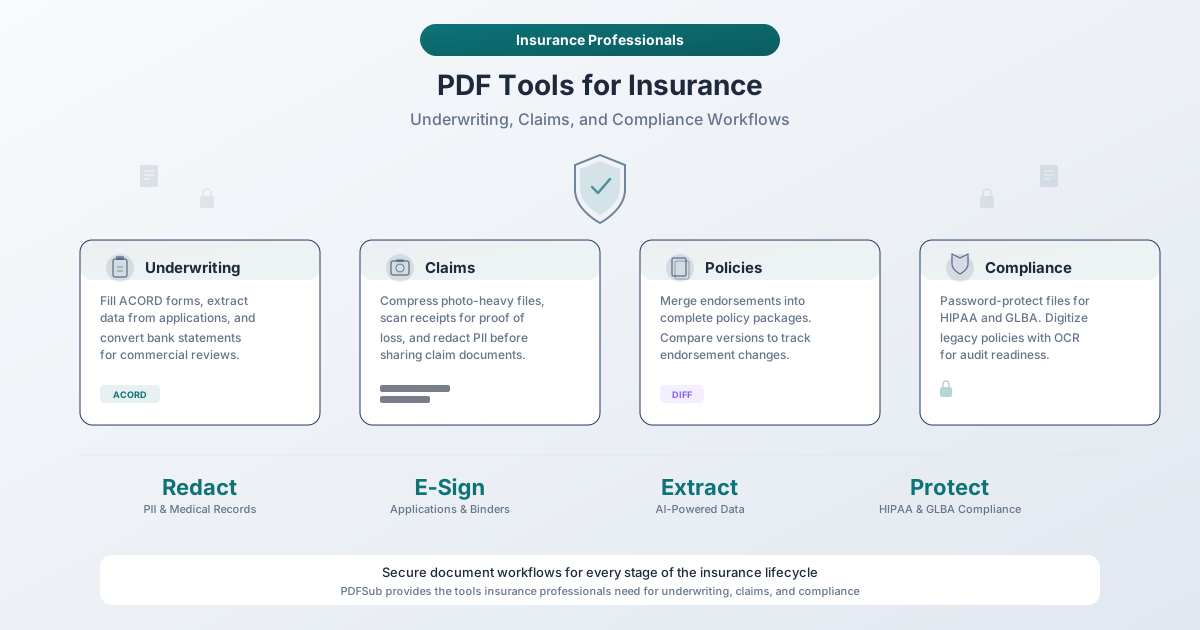
Why Insurance Needs Specialized PDF Tools
The Volume Problem
Insurance is one of the most document-intensive industries on the planet. Consider the daily document load across a typical mid-size agency or carrier:
| Workflow | Documents Generated | Typical Page Count |
|---|---|---|
| New business application | Application, ACORD forms, financial statements, loss runs, photos | 30–100+ pages |
| Policy issuance | Policy form, declarations, endorsements, schedule of coverage | 20–60 pages |
| Auto claim | First notice of loss, police report, photos, repair estimates, medical records | 20–50 pages |
| Property claim | Loss report, photos/video documentation, contractor estimates, engineering reports | 50–200+ pages |
| Workers' comp claim | Injury report, medical records, wage statements, IME reports | 100–500+ pages |
| Commercial renewal | Renewal application, loss runs, financial statements, updated schedules | 40–80 pages |
A single adjuster handling 100 to 150 open claims at any given time is managing tens of thousands of pages. A commercial underwriter reviewing 20 submissions per week is processing thousands of pages of applications, financials, and supporting documents.
Generic PDF viewers were not built for this. Insurance professionals need tools that can merge dozens of documents into organized packages, extract structured data from forms, redact sensitive medical information before sharing with third parties, and process it all without compromising the security of policyholder data.
The Compliance Problem
Insurance is one of the most heavily regulated industries in the United States. Every state has its own insurance department, its own regulations, and its own examination requirements. On top of state-level oversight, insurance companies face overlapping federal regulations:
-
HIPAA (Health Insurance Portability and Accountability Act) - Governs the security and privacy of protected health information (PHI). Health insurers, workers' compensation carriers, and any insurer handling medical records must comply. Penalties for violations range from $100 to $50,000 per violation, with a maximum of $1.5 million per year for identical provisions.
-
GLBA (Gramm-Leach-Bliley Act) - Requires financial institutions, including insurance companies, to explain how they share and protect customers' nonpublic personal information (NPI). The FTC Safeguards Rule under GLBA mandates that covered companies maintain an information security program.
-
NAIC Model Laws - The National Association of Insurance Commissioners publishes model regulations (including Model 670 for consumer privacy and Model 668 for data security) that many states adopt. These establish baseline requirements for how insurers handle personal data.
-
State Data Breach Notification Laws - All 50 states have data breach notification laws. Insurance companies that experience a breach of policyholder data face notification requirements, regulatory scrutiny, and potential fines.
Every PDF tool in your workflow is a potential compliance risk or a compliance safeguard. Tools that upload sensitive policyholder documents to cloud servers create data residency questions, third-party access risks, and potential breach vectors. Tools that process documents locally in the browser eliminate these concerns entirely.
The Security Problem
Insurance documents contain some of the most sensitive personal information that exists:
- Social Security numbers on applications
- Medical records and diagnosis codes on health and workers' comp claims
- Financial statements and bank records for commercial underwriting
- Driver's license numbers on auto policies
- Home addresses, building specifications, and security details on property policies
- Dates of birth, employment history, and income data across nearly every line of business
A single data breach can expose thousands of policyholders. And insurance companies are increasingly targeted - they hold exactly the kind of concentrated personal data that attackers find most valuable.
When you process a PDF containing a policyholder's medical records, where does that file go? If the answer involves uploading it to a third-party cloud service, you've introduced a risk that needs to be evaluated against your information security program requirements under GLBA and (for health-related data) HIPAA.
PDF Tools by Insurance Workflow
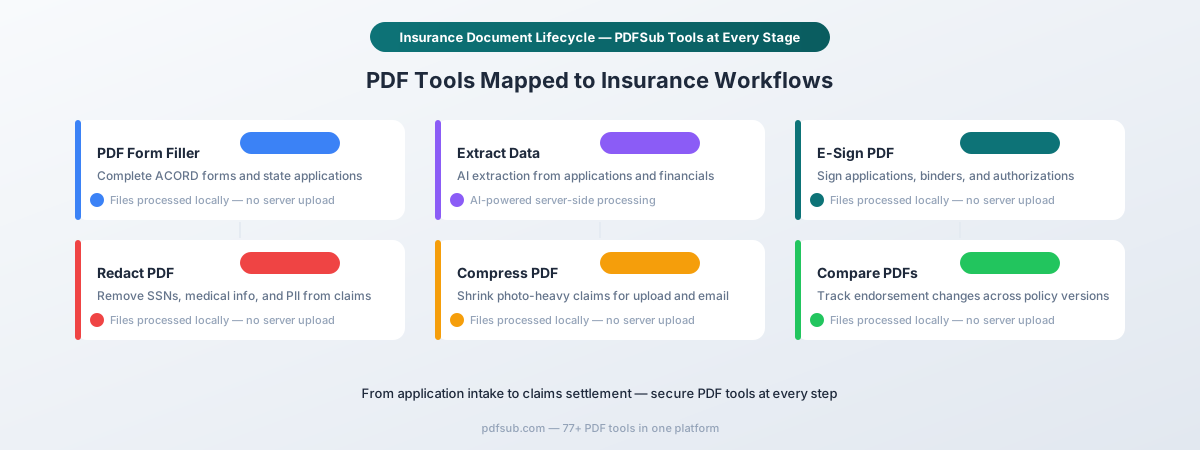
1. Underwriting and Policy Issuance
Underwriting is where the insurance lifecycle begins, and it is one of the most document-intensive stages. An underwriter reviewing a commercial submission might receive 50 to 100 pages of applications, financials, loss history, and supplemental forms - for a single risk.
Fill ACORD Forms and State Applications
ACORD forms are the lingua franca of insurance. The ACORD 125 (Commercial Insurance Application), ACORD 126 (Commercial General Liability), ACORD 130 (Workers' Compensation), ACORD 25 (Certificate of Liability Insurance), and dozens of other standardized forms are used across virtually every agency and carrier in the country.
These forms arrive as fillable PDFs - but filling them out accurately across dozens of fields, often under time pressure when a client needs a quote by end of day, is tedious and error-prone. Miss a field and the submission bounces back from the carrier. Enter a wrong code and the coverage is wrong.
PDFSub's PDF Form Filler detects interactive form fields in ACORD PDFs automatically. You tab through fields, fill in data, check boxes, and save the completed form - all in your browser. The form never leaves your device, which matters when you're filling in a client's Social Security number, EIN, or financial information.
Common ACORD forms you can fill:
| Form | Name | Use |
|---|---|---|
| ACORD 125 | Commercial Insurance Application | General commercial submissions |
| ACORD 126 | Commercial General Liability Section | GL-specific details |
| ACORD 130 | Workers' Compensation Application | WC submissions |
| ACORD 25 | Certificate of Liability Insurance | Proof of coverage (COIs) |
| ACORD 27 | Evidence of Property Insurance | Property coverage verification |
| ACORD 35 | Cancellation Request/Policy Release | Policy changes |
| ACORD 75 | Insurance Binder | Binding coverage |
Extract Data from Applications
When applications arrive as completed PDFs - whether from an insured, an agent, or a wholesale broker - the underwriter needs to pull key data points: named insured, business type, revenue, payroll, loss history, requested limits, and coverage details. Doing this manually for 20 submissions per week is a significant time drain.
PDFSub's Extract Data tool uses AI to pull structured information from insurance applications and supporting documents. Upload a completed application, and it extracts the key fields into organized data you can review, verify, and enter into your underwriting system.
Process Financial Documents for Commercial Lines
Commercial underwriting frequently requires reviewing the applicant's financial health. Financial statements, bank statements, tax returns, and profit-and-loss reports arrive as PDFs that need to be analyzed.
PDFSub's Bank Statement Converter extracts transaction data from PDF bank statements into Excel, CSV, or other structured formats. For commercial lines underwriting, this turns a stack of PDF bank statements into analyzable financial data - revenue patterns, cash flow trends, and payment history that inform the underwriting decision.
The Invoice Extractor does the same for vendor invoices and billing documents that may accompany a commercial submission.
E-Sign Applications and Binders
Getting signatures on applications, binders, and authorization forms is a constant bottleneck. The client is in a meeting. The agent is on the road. The broker needs the signed application back by 3 PM to meet the carrier's submission deadline.
PDFSub's E-Sign tool lets you add signatures directly to any PDF - sign applications, initial binder confirmations, or execute authorization forms without the print-sign-scan-email cycle. Electronic signatures are legally binding under the ESIGN Act and UETA, and they're accepted by carriers across all major lines of business.
The signing happens in your browser, so the application with the client's personal information doesn't need to sit on a third-party signature platform.
Merge Submission Packages
A complete submission to a carrier typically includes the application, supplemental questionnaires, loss runs, financial statements, photos (for property risks), fleet schedules (for auto), and any other supporting documentation. Sending these as 12 separate email attachments is unprofessional and makes it easy for documents to get lost.
PDFSub's Merge tool combines multiple PDFs into a single organized submission package. Drag and drop documents in the right order, merge them into one file, and send a clean, professional submission to the carrier. The merged file preserves all formatting and resolution.
2. Claims Processing and Adjustment
Claims is where the volume hits hardest. An adjuster managing a book of 100+ open claims is constantly receiving, reviewing, organizing, and sharing documents. Every claim has its own paper trail, and that trail grows with every new piece of documentation.
Redact PII from Claims Documents
Claims files contain some of the most sensitive personal information in the insurance ecosystem. Before sharing claim documents with third-party vendors, defense counsel, reinsurers, or regulatory examiners, you often need to remove personally identifiable information.
Information that typically requires redaction in claims:
- Social Security numbers
- Dates of birth
- Medical diagnoses and treatment records (HIPAA-protected)
- Financial account numbers
- Driver's license numbers
- Home addresses (in certain contexts)
- Minor children's names and identifying information
PDFSub's Redact tool performs true redaction - it permanently removes the underlying text data from the PDF, not just draws a black box over it. This distinction is critical. A visual cover-up leaves the data in the file where it can be extracted by copying and pasting, selecting text, or examining the PDF structure. True redaction destroys the data irreversibly.
For insurance professionals handling HIPAA-protected health information, this isn't optional. Improperly "redacted" medical records that still contain readable PHI underneath a visual overlay constitute a HIPAA violation.
The redaction happens entirely in your browser. The claims file with the claimant's medical records never leaves your device.
Compress Photo-Heavy Claims Files
Property and auto claims generate massive PDF files. A property damage claim might include 50 to 100 high-resolution photos of the damage. An auto claim includes photos of the vehicle from multiple angles, the accident scene, and any property damage. These photo-heavy claim files can easily reach 50 to 100 MB - far too large for email attachment limits and often too large for claims system upload limits.
PDFSub's Compress tool reduces PDF file sizes while maintaining visual quality. A 60 MB claims file with dozens of property photos can typically be compressed to 10 to 15 MB - small enough to email, upload to your claims management system, or share with contractors and adjusting firms.
Convert Property Damage Photos to PDF Reports
Field adjusters take hundreds of photos during property inspections. These photos need to be organized into professional damage reports - not dumped as a folder of JPEGs that nobody can navigate.
PDFSub's Image to PDF tool converts property damage photos into organized PDF documents. Combine inspection photos into a single PDF report with a logical sequence: exterior damage, interior damage by room, structural issues, and temporary repairs. The result is a professional document that can be attached to the claim file and shared with contractors, engineers, or counsel.
Scan Receipts for Proof of Loss
Insureds filing claims for personal property losses need to document what they lost and what it cost. Receipts, purchase records, and inventory lists arrive in every format imaginable - paper receipts, phone photos, email confirmations, and printed spreadsheets.
PDFSub's Receipt Scanner extracts key data from receipt images and PDFs: vendor, date, amount, and description. For adjusters processing proof of loss documentation, this speeds up the verification process and creates structured data from what would otherwise be a pile of unsorted receipts.
Process Premium Invoices
Insurance billing involves constant invoice processing - premium invoices from carriers, billing statements to insureds, commission statements for agents. Each document contains critical financial data that needs to be verified and recorded.
PDFSub's Invoice Extractor pulls structured data from premium invoices: carrier name, policy number, invoice date, premium amount, due date, and line items. This turns manual invoice review into automated data extraction.
3. Renewals and Endorsements
Policy renewals and endorsements are ongoing workflows that generate a steady stream of documents throughout the policy period. A commercial account with multiple lines of coverage might have a dozen endorsements issued between renewals, each one modifying the terms, conditions, or coverage limits of the policy.
Compare Policy Versions for Endorsement Changes
When a carrier issues an endorsement, the agent and insured need to know exactly what changed. Did the endorsement add a new exclusion? Modify a coverage limit? Change a deductible? Alter a definition? Missing a material change in an endorsement can leave the insured with a gap in coverage they don't discover until they file a claim.
PDFSub's Compare tool provides visual side-by-side comparison between two PDF documents, highlighting every difference - additions, deletions, and modifications. Upload the pre-endorsement policy and the post-endorsement version, and see exactly what the carrier changed.
This is particularly valuable for:
- Renewal comparisons - Comparing this year's policy to last year's to catch coverage changes, new exclusions, or modified conditions
- Endorsement review - Verifying that a requested endorsement was applied correctly and didn't introduce unintended changes
- Market comparison - Comparing quotes from multiple carriers to identify differences in coverage terms
Merge Endorsements into Complete Policy Packages
Over a 12-month policy period, a commercial account might accumulate 5 to 15 endorsements. By the end of the term, the "complete" policy is the original policy form plus all endorsements issued throughout the year. Having these scattered across separate files makes it difficult to understand the current state of coverage.
PDFSub's Merge tool lets you combine the original policy, all endorsements, and the declarations page into a single comprehensive policy document. This gives the agent and insured a single file that represents the complete, current policy - essential for claims handling, coverage disputes, and renewal preparation.
Convert Policies to Editable Format
Sometimes you need to work with policy language in an editable format - creating coverage summaries for clients, building comparison charts across carriers, or preparing policy review documents. PDF policies are locked down and difficult to work with.
PDFSub's PDF to Word tool converts PDF policies into editable Word documents while preserving formatting. This lets you extract specific policy language, create client-facing coverage summaries, or build comparison documents without manually retyping coverage terms.
4. Certificate of Insurance (COI) Management
Certificates of insurance are the most frequently issued documents in the insurance industry. A single commercial account might require dozens of COIs - one for every client, vendor, landlord, and subcontractor relationship. Large agencies issue hundreds of certificates per week.
COI management is a massive operational challenge. Teams managing significant vendor networks can spend 15 to 20 hours per week on certificate-related administrative tasks - tracking, issuing, verifying, and chasing down updated certificates.
Fill and Issue Certificates
The ACORD 25 (Certificate of Liability Insurance) and ACORD 27 (Evidence of Property Insurance) are the standard certificate forms. Agents fill these out constantly - for every new client relationship, every renewal, every coverage change, and every certificate holder request.
PDFSub's PDF Form Filler makes certificate issuance faster and more accurate. Fill the ACORD 25 or 27 form fields, add the certificate holder information, verify coverage details, and save the completed certificate - all in your browser.
Batch Process Multiple Certificates
When a policy renews, every certificate previously issued under that policy needs to be reissued with the new dates. A commercial account with 30 certificate holders means 30 certificates to update at renewal.
PDFSub's Batch Convert tool processes multiple documents at scale, which helps when you need to prepare multiple certificate-related documents simultaneously.
E-Sign Certificate Requests and Authorizations
Certificate holder requests and special endorsement authorizations often need signatures from the insured or the agent. Getting these signed quickly is important because the certificate requester - often a general contractor or property manager - is holding up work until they have proof of coverage in hand.
PDFSub's E-Sign tool eliminates the delay. Sign the authorization, complete the certificate, and deliver it - all within minutes rather than days.
5. Compliance and Audit
Insurance companies face regular examinations from state insurance departments, financial audits, and internal compliance reviews. Being audit-ready means having organized, searchable, complete documentation for every policy, claim, and transaction.
Digitize Legacy Policies with OCR
Many agencies and carriers have archives of older policies that exist only as scanned PDFs - paper documents that were photocopied to PDF but never made searchable. When a legacy claim surfaces on a 15-year-old policy, finding relevant coverage language in a 200-page unsearchable PDF is like looking for a needle in a haystack.
PDFSub's OCR tool converts scanned PDFs into fully searchable documents. The visual appearance stays the same, but now you can search for policy numbers, named insureds, coverage limits, exclusion language, and endorsement references. For audit preparation, this means you can quickly locate specific policies, endorsements, and coverage provisions without manually reviewing every page.
PDFSub supports OCR in over 130 languages, which matters for carriers writing international risks or agencies serving immigrant communities with documents in their native language.
Password-Protect Sensitive Files
When transmitting policyholder files - whether internally between departments, to reinsurers, to regulators, or to defense counsel - adding a layer of access control demonstrates the "reasonable safeguards" required by GLBA and HIPAA.
PDFSub's Password Protect tool lets you add password protection to any PDF before sharing it. This is particularly important for:
- Claims files containing medical records (HIPAA)
- Financial underwriting documents with bank statements and tax returns
- Personnel files in workers' compensation claims
- Any document containing Social Security numbers or financial account numbers
Password protection is processed entirely in your browser - the sensitive document never leaves your device.
Prepare Documents for Regulatory Examination
State insurance department examinations typically request specific policies, claims files, financial records, and procedure documentation. Being able to quickly locate, organize, and produce these documents is the difference between a routine examination and a prolonged, costly one.
A typical audit preparation workflow:
- Search - Use OCR'd document archives to locate the specific policies, claims, and records requested by the examiner
- Redact - Remove information that is outside the scope of the examination before production (e.g., medical details in a financial examination)
- Merge - Combine related documents into organized response packages
- Protect - Add password protection to examination response files before transmitting
- Compress - Reduce file sizes for electronic delivery
Each of these steps maps to a specific PDFSub tool, creating an end-to-end audit preparation workflow within a single platform.
Security and Privacy for Insurance Documents
Browser-Based vs. Cloud-Based Processing
Insurance documents contain exactly the kind of data that regulations are designed to protect. The processing model of your PDF tools matters - a lot.
| Processing Method | Data Leaves Device? | Third-Party Risk | Regulatory Concern |
|---|---|---|---|
| Browser-based (local) | No | None | Minimal |
| Cloud-based (upload) | Yes | Server breach, employee access, subpoena | HIPAA, GLBA, state privacy laws |
PDFSub processes approximately 28 editing tools entirely in your browser. Your files are not uploaded to any server. For tools that require server-side processing (AI-powered data extraction, OCR), files are processed in secure, isolated environments via the PDFSub Engine with no internet access and deleted after processing.
This matters specifically for insurance because:
-
HIPAA requires covered entities to implement "technical safeguards" for PHI. Not uploading medical records to a cloud PDF tool is the most effective technical safeguard possible - you've eliminated the transmission and storage risks entirely.
-
GLBA's Safeguards Rule requires financial institutions to "develop, implement, and maintain a comprehensive information security program." Browser-based processing that keeps NPI on the user's device satisfies the "reasonable safeguards" standard more cleanly than any cloud-based alternative.
-
State Insurance Department Examinations may ask how you handle policyholder data. "Our PDF tools process documents locally in the browser without uploading to external servers" is a much simpler answer than explaining your vendor's data retention policies, encryption standards, and access controls.
Data Handling Best Practices for Insurance PDFs
Beyond tool selection, insurance professionals should follow these practices when working with PDF documents:
- Redact before sharing - Always redact SSNs, medical information, and financial account numbers before sending claims documents to third parties
- Password-protect in transit - Add passwords to sensitive files before emailing or uploading
- Verify redactions - After redacting, try to select or copy text from the redacted area to confirm the data is truly removed
- Compress, don't split - When claims files are too large, compress them rather than splitting into multiple files that can get separated
- OCR legacy documents - Make scanned policies searchable now, before you need to find something in them during a claim or audit
Tool-to-Workflow Quick Reference
Here's a complete mapping of PDFSub tools to insurance workflows for quick reference:
| PDFSub Tool | Insurance Workflow | What It Does |
|---|---|---|
| PDF Form Filler | Underwriting, COIs | Fill ACORD forms and state-specific applications |
| Extract Data | Underwriting, Claims | AI extraction from applications and claims documents |
| Bank Statement Converter | Commercial Underwriting | Extract financial data for underwriting analysis |
| Invoice Extractor | Claims, Underwriting | Process premium invoices and billing statements |
| Receipt Scanner | Claims | Digitize proof of loss receipts |
| E-Sign PDF | All Workflows | Sign applications, binders, authorizations, and claims forms |
| Merge PDFs | Policy Management, Submissions | Combine documents into organized packages |
| Compare PDFs | Renewals, Endorsements | Track changes between policy versions |
| Redact PDF | Claims, Compliance | Remove PII, medical records, and financial data |
| Compress PDF | Claims | Reduce photo-heavy claims files for sharing |
| Image to PDF | Claims | Convert damage photos to PDF reports |
| Password Protect | Compliance, All Workflows | Secure files for HIPAA and GLBA compliance |
| OCR | Compliance, Audit | Make scanned legacy policies searchable |
| PDF to Word | Policy Review | Convert policies to editable format |
| Batch Convert | COI Management | Process multiple documents at scale |
Frequently Asked Questions
How does PDFSub handle HIPAA compliance for health insurance documents?
PDFSub processes approximately 28 editing tools entirely in your browser - files are never uploaded to any server. For health insurance documents containing protected health information (PHI), this means the data never leaves your device. For tools requiring server-side processing (AI extraction, OCR), files are processed in isolated environments with no internet access and deleted after processing. This architecture supports the "technical safeguards" required by the HIPAA Security Rule.
Can I fill ACORD forms with PDFSub?
Yes. PDFSub's PDF Form Filler automatically detects interactive form fields in ACORD PDFs - including the ACORD 25, 27, 125, 126, 130, and other standard forms. You can tab through fields, fill in data, check boxes, and save completed forms. The entire process happens in your browser, so sensitive applicant information stays on your device.
How do I redact medical records from a workers' comp claim before sharing?
Open the claims document in PDFSub's Redact tool, select the areas containing medical diagnoses, treatment details, SSNs, or other protected information, and apply the redaction. PDFSub performs true redaction - the underlying text data is permanently removed from the PDF file, not just visually covered. After redacting, verify by trying to select text in the redacted areas. If nothing is selectable, the redaction was successful.
What's the difference between compressing and splitting a large claims file?
Compressing reduces the file size while keeping all pages in a single document. Splitting breaks the document into multiple smaller files. For claims management, compression is almost always the better choice. A split claims file creates multiple documents that can get separated, misfiled, or lost. A compressed claims file stays as one organized document - just smaller. PDFSub's Compress tool can typically reduce a 60 MB photo-heavy claims file to 10-15 MB.
Can I compare this year's policy to last year's to find what changed at renewal?
Yes. PDFSub's Compare tool takes two PDFs and highlights every difference between them - additions, deletions, and modifications. Upload the expiring policy and the renewal policy, and you'll see exactly what the carrier changed: new exclusions, modified limits, altered definitions, and any other differences. This is critical for communicating renewal changes to insureds.
How do I make old scanned policies searchable for audit preparation?
Upload the scanned PDF to PDFSub's OCR tool. It recognizes the text in the scanned images and adds an invisible searchable text layer. The visual appearance stays identical, but now you can search for policy numbers, named insureds, coverage terms, and any other text. PDFSub supports OCR in 130+ languages for international policies.
Is e-signing legally binding for insurance applications and claims forms?
Yes. Electronic signatures are legally binding under the federal ESIGN Act (2000) and the Uniform Electronic Transactions Act (UETA), adopted by 49 states plus D.C. Insurance carriers widely accept e-signed applications, binders, and claims authorizations. The key exceptions are certain documents that may require notarization under state law - check your jurisdiction's specific requirements for powers of attorney and affidavits.
How should I handle certificates of insurance (COIs) at renewal?
When a policy renews, every certificate previously issued needs to be reissued with updated dates and coverage details. Use PDFSub's PDF Form Filler to fill new ACORD 25 forms for each certificate holder, then send the completed certificates. For agencies managing large certificate volumes, PDFSub's Batch Convert tool helps process multiple certificate-related documents at scale.
Does PDFSub meet GLBA requirements for protecting policyholder data?
The GLBA Safeguards Rule requires financial institutions (including insurance companies) to maintain an information security program with "reasonable safeguards" for customer information. PDFSub's browser-based processing model - where the majority of tools process documents locally without uploading to external servers - supports this requirement by eliminating transmission and third-party storage risks for most document operations. For the subset of tools that require server processing, encryption in transit and automatic deletion after processing provide additional safeguards.
Getting Started
PDFSub offers a 7-day free trial with full access to every tool discussed in this guide - form filling, data extraction, e-signatures, redaction, compression, OCR, comparison, and more. Cancel anytime.
For insurance professionals evaluating the platform, here's a suggested starting point:
- Fill an ACORD form. Test the PDF Form Filler on an ACORD 25 or 125 to see how it handles interactive form fields.
- Redact a test document. Use the Redact tool on a non-sensitive document and verify the redaction is permanent by attempting to select text under the redacted area.
- Compress a claims file. Take a large photo-heavy PDF and run it through the Compress tool to see the size reduction.
- Compare two policy versions. Upload two versions of a policy to the Compare tool to see the visual diff output.
The browser-based processing model means you can test every tool with real documents without any compliance concern - for the majority of tools, the files never leave your device.