Invoice Data Extraction: AI vs. Manual Entry
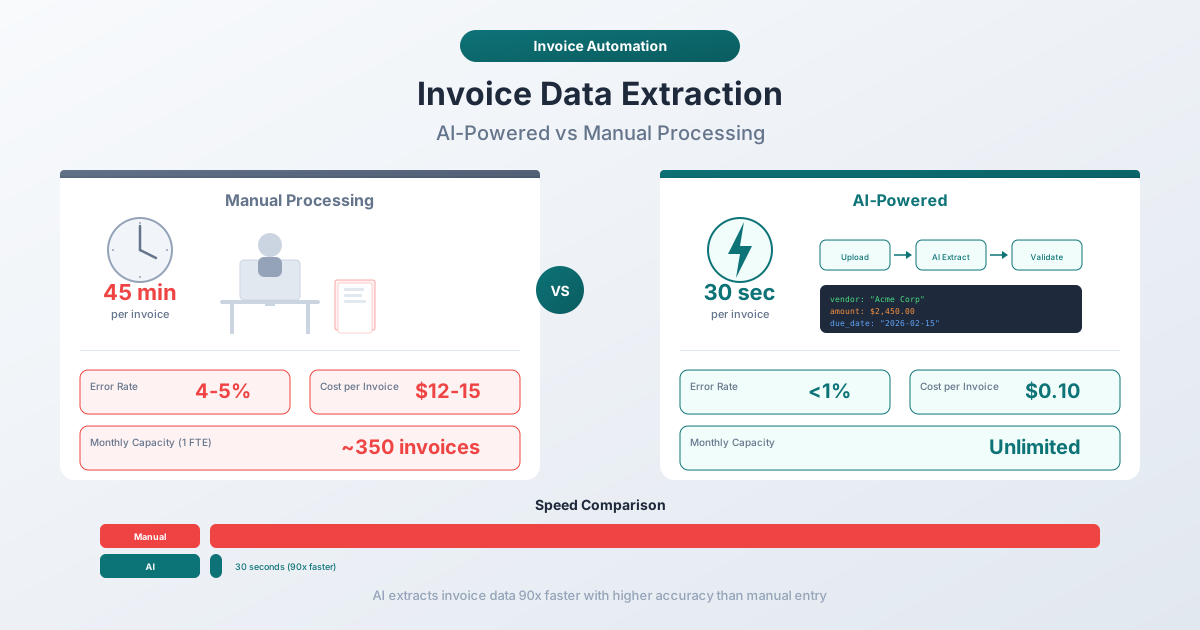
Manual invoice entry runs 96-98% accurate on a good day and costs $15-26 per invoice. AI extraction hits 95-99% in seconds. Here's the full breakdown - costs, accuracy, speed, and when each approach actually makes sense.
Your AP clerk processes 25 invoices before lunch. By invoice 18, they're transposing digits - $4,523 becomes $4,253. By invoice 23, they skip a line item entirely. They don't notice. Nobody does, until reconciliation reveals a $270 discrepancy three weeks later and someone has to trace it back through two dozen documents.
This isn't a failure of competence. It's a failure of method. Human beings were never designed to transfer structured data between documents for hours at a time. Fatigue, distraction, and sheer monotony degrade performance in ways that no amount of training can fully prevent.
AI extraction doesn't get tired. It doesn't transpose digits at 11:47 AM because it skipped breakfast. But it also isn't magic - it has its own failure modes, cost structures, and limitations.
This post puts both approaches side by side with real numbers. Not marketing claims. Not vendor benchmarks run on perfect sample documents. The actual performance you can expect when processing invoices from real vendors with real formatting quirks.
The True Cost of Manual Invoice Data Entry
Let's start with the number most businesses underestimate: what manual invoice processing actually costs when you account for everything.
The headline figure from APQC and Ardent Partners research puts the fully loaded cost per invoice at $12.88 to $26.00. That's not just the data entry person's hourly wage. It includes:
- Labor time - receiving, sorting, reading, keying data, verifying, routing for approval
- Error correction - finding and fixing mistakes after the fact
- Exception handling - invoices that don't match POs, have missing fields, or need clarification
- Duplicate payment recovery - chasing refunds when the same invoice gets paid twice
- Late payment penalties - fees incurred when processing bottlenecks delay payment past terms
The labor component alone accounts for roughly 62% of the total cost. An AP clerk earning $22/hour who processes 5 invoices per hour generates a direct labor cost of $4.40 per invoice - but the downstream costs of errors, exceptions, and delays nearly triple that figure.
The Hidden Time Tax
Processing time per invoice varies widely based on complexity. Industry benchmarks show:
| Invoice Type | Manual Processing Time | Key Bottleneck |
|---|---|---|
| Simple (single line item, domestic) | 3-5 minutes | Data entry + verification |
| Standard (5-10 line items, clear layout) | 8-12 minutes | Line item transcription |
| Complex (multi-page, international) | 15-25 minutes | Currency/format conversion |
| Exception (missing PO, discrepancy) | 25-45 minutes | Research + resolution |
At 200 invoices per month with a standard mix, that's roughly 40-80 hours of AP staff time. For context, that's half to a full FTE doing nothing but typing numbers from PDFs into software.
And here's the part that doesn't show up in time-tracking reports: the cognitive overhead. An AP clerk who spends 6 hours on data entry isn't available for vendor negotiations, early-payment discount capture, or cash flow analysis. The opportunity cost of manual entry extends well beyond the hours logged.
Error Rates Under Fatigue
This is where the manual method fundamentally breaks down. Research published in Computers in Human Behavior found that single-entry manual data entry produces error rates of 1% to 5% per field, with rates climbing as fatigue sets in. A meta-analysis in BMC Medical Research Methodology examining clinical data entry found error rates ranging from 4 to 650 errors per 10,000 fields for single entry.
For invoice processing specifically, the pattern is predictable:
- First hour: Error rates hover around 1-2% per field. The clerk is fresh, focused, and catching their own mistakes.
- Hours 2-3: Error rates climb to 2-3%. Digit transposition becomes more common. Line items get skipped.
- Hours 4+: Error rates can reach 4-5%. The clerk starts relying on pattern recognition rather than careful reading - which works until a vendor changes their layout.
Double-entry verification (having two people key the same data independently) reduces errors to 0.04-0.33% per field. But it also doubles your labor cost, which defeats the purpose if you're trying to keep invoice processing affordable.
The practical accuracy range for manual invoice entry is 96-98% at the field level on a typical day. That sounds high until you calculate what it means at scale: processing 200 invoices with 15 fields each (3,000 fields total) at 97% accuracy produces roughly 90 field errors per month. Some of those are harmless - a misspelled vendor name. Others are costly - a wrong total, a missed tax amount, a duplicate invoice number that triggers a double payment.
How AI Invoice Extraction Works
AI extraction approaches the problem differently from a human clerk. Instead of reading each field and typing it into a form, AI processes the entire document simultaneously and identifies fields based on contextual understanding.
The Two Generations of Automated Extraction
Template-based extraction (the older approach) works like a stencil. You define zones on the page - "the invoice number is always in this rectangle, the total is always in that one" - and the software reads text from those coordinates. This works well for invoices that never change layout. The problem: every new vendor needs a new template. Every layout change breaks an existing one. Companies with 50+ vendors spend more time maintaining templates than they save on data entry.
Template-based tools achieve 85-95% accuracy on invoices that match their templates perfectly. On invoices that don't match - 0%. The template either works or it doesn't.
AI-based (template-free) extraction uses machine learning models trained on millions of invoices to understand the semantic meaning of document elements. The AI doesn't look for "text at coordinates (420, 180)" - it looks for "a number near the word 'Total' that is formatted like a currency amount."
This is a fundamentally different approach. The AI understands that:
- "Invoice #", "Invoice No.", "Inv. Number", and "Factura N." all mean invoice number
- A date near the top of the document is likely the invoice date; a date labeled "Due" or "Pay by" is the due date
- Numbers in a column aligned with "Qty" are quantities; numbers in a column aligned with "Amount" are line totals
- The largest currency amount on the page, often near the bottom, is usually the grand total
Modern AI extraction combines multiple techniques:
- OCR (Optical Character Recognition) - converts scanned documents to machine-readable text. Digital PDFs skip this step since text is already embedded.
- Layout analysis - identifies the spatial structure of the document: headers, tables, columns, footers.
- Named entity recognition (NER) - classifies extracted text into field types: dates, amounts, names, addresses, tax IDs.
- Cross-field validation - verifies that line item amounts sum to the subtotal, that tax calculations are correct, and that the grand total is consistent.
The result: AI extraction works on invoices it has never seen before, from vendors in any country, in any layout. No templates to create or maintain.
What Fields Does AI Extract?
A capable AI invoice extractor identifies and structures two categories of data:
Header fields:
- Vendor/supplier name, address, phone, email, tax ID
- Invoice number and invoice date
- Due date and payment terms (Net 30, Net 60, etc.)
- Purchase order reference number
- Customer/bill-to name and address
- Currency code
Line-item details:
- Item descriptions and SKU/part numbers
- Quantities and units of measure
- Unit prices
- Line totals
- Subtotal
- Tax amounts and tax rates (VAT, GST, sales tax)
- Discounts and shipping charges
- Grand total / amount due
The best tools also perform validation checks on extracted data: do the line items sum to the subtotal? Does the tax amount match the stated tax rate applied to the taxable subtotal? These checks catch extraction errors before they reach your accounting system.
The Head-to-Head Comparison
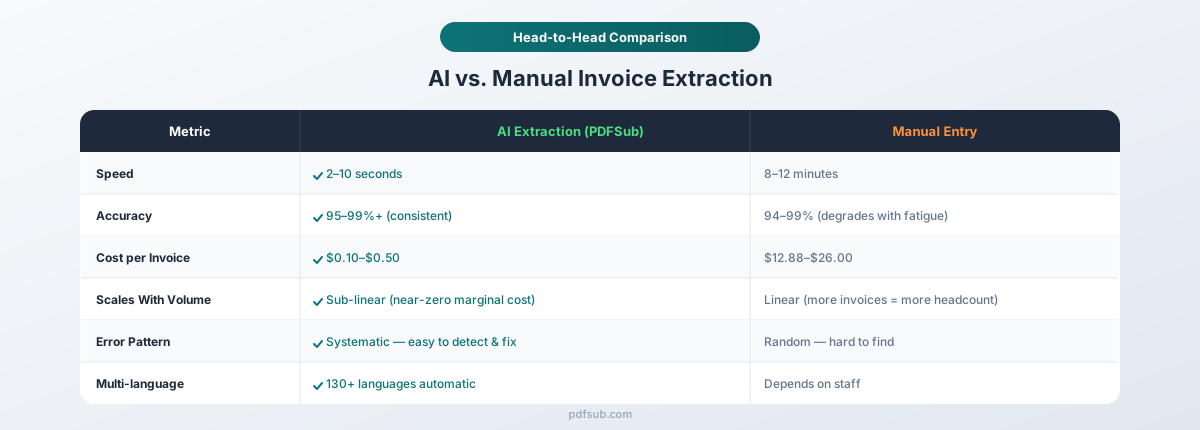
Here's where the data gets concrete. Let's compare manual entry and AI extraction across every metric that matters for an AP operation.
Accuracy
| Metric | Manual Entry | AI Extraction |
|---|---|---|
| Field-level accuracy (fresh clerk) | 97-99% | 95-99%+ |
| Field-level accuracy (fatigued clerk) | 94-96% | 95-99%+ (no degradation) |
| Line-item accuracy | 95-98% | 93-97% |
| Cross-document consistency | Variable | Consistent |
| Error type | Random (transpositions, omissions) | Systematic (layout-dependent) |
| Error detectability | Hard to find (random) | Easy to find (pattern-based) |
The accuracy comparison is more nuanced than most vendor marketing suggests. A well-rested, experienced clerk actually matches or exceeds AI on simple, single-page invoices with clear layouts. The human advantage is contextual understanding - if something looks "off," a clerk can flag it immediately.
But AI wins on two critical dimensions:
-
Consistency. AI extraction accuracy doesn't degrade at 4 PM on a Friday. The 200th invoice gets the same attention as the first. Human performance is a bell curve; AI performance is a flat line.
-
Error predictability. Manual errors are random - you can't predict which field will be wrong on which invoice. AI errors are systematic - if the tool misreads a particular vendor's layout, it will consistently misread that layout until the issue is addressed. Systematic errors are far easier to catch and fix than random ones.
For scanned invoices (photographed paper), AI accuracy drops to 88-95% depending on scan quality. Manual entry from scanned documents also suffers - poor print quality makes numbers harder to read for humans too - but a trained clerk with context can often infer correct values that OCR misreads.
Speed
| Volume | Manual Entry | AI Extraction | Time Savings |
|---|---|---|---|
| 1 invoice | 8-12 minutes | 2-10 seconds | 98-99% |
| 25 invoices | 3.5-5 hours | 1-4 minutes | 98-99% |
| 100 invoices | 13-20 hours | 4-17 minutes | 98-99% |
| 500 invoices | 67-100 hours | 17-83 minutes | 98-99% |
The speed difference is not incremental - it's orders of magnitude. AI extraction processes a standard invoice in seconds, not minutes. For a digital PDF with embedded text, extraction is nearly instantaneous. Even scanned invoices that require OCR processing complete in under 10 seconds.
This speed advantage compounds at scale. Processing 500 invoices manually requires roughly 2-3 full weeks of an AP clerk's time. AI extraction handles the same volume in under 90 minutes, including time for human review of flagged exceptions.
Cost Analysis
This is the comparison that drives purchasing decisions. Let's model three scenarios with realistic assumptions.
Assumptions:
- AP clerk fully loaded cost: $25/hour (salary + benefits + overhead)
- Average manual processing time: 10 minutes per invoice
- AI extraction tool subscription: $29-99/month (typical mid-market pricing)
- Human review time for AI output: 30 seconds per invoice
| Monthly Volume | Manual Cost | AI Tool + Review Cost | Annual Savings |
|---|---|---|---|
| 50 invoices | $208/month | $29-99 + $10 review = $39-109/month | $1,188-$2,028 |
| 200 invoices | $833/month | $49-99 + $42 review = $91-141/month | $8,304-$8,904 |
| 500 invoices | $2,083/month | $99-199 + $104 review = $203-303/month | $21,360-$22,560 |
| 1,000 invoices | $4,167/month | $199-399 + $208 review = $407-607/month | $42,720-$45,120 |
Even at 50 invoices per month - a volume many businesses consider "too low to automate" - the annual savings cover the tool cost multiple times over. At 200+ invoices, the ROI is overwhelming.
But the cost analysis understates the real benefit. The bigger win is what your AP team does with the recovered hours. Instead of transcribing numbers, they're negotiating early-payment discounts (typically 1-2% for paying within 10 days), catching duplicate invoices before payment, and managing vendor relationships proactively. These activities have a direct, measurable financial return that manual data entry never will.
Scalability
This is where manual processing hits a hard wall.
Manual entry scales linearly: twice the invoices means twice the time (or twice the headcount). There's no efficiency gain from processing more invoices. Invoice 500 takes exactly as long as invoice 1.
AI extraction scales sub-linearly. The fixed costs (subscription, setup, review workflows) don't change much whether you process 100 or 1,000 invoices. The marginal cost of each additional invoice is nearly zero - just the compute time and a few seconds of human review.
For growing businesses, this matters enormously. Doubling your invoice volume with manual processing means hiring another AP clerk ($45,000-$55,000/year fully loaded). Doubling your volume with AI extraction means... your existing team spends a few extra minutes per day on review.
When Manual Entry Still Makes Sense
AI extraction isn't the right answer for every situation. Here's when manual entry is genuinely the better choice:
Very low volume (under 10 invoices/month). If you process a handful of invoices from a few regular vendors, the setup and subscription cost of an extraction tool may not justify the time savings. At 10 invoices per month, you're spending maybe 2 hours on data entry. The break-even point where automation clearly wins is around 20-30 invoices per month for most tools.
Highly unusual document formats. Handwritten invoices, invoices embedded in email bodies rather than PDFs, or documents with unusual structures (blueprints with pricing annotations, for example) may stump AI extraction. These edge cases still benefit from human judgment.
Regulatory environments requiring manual verification. Some industries (healthcare billing, government contracting) have compliance requirements that mandate human review of every data point. In these cases, AI extraction still saves time as a first pass, but the manual verification step can't be eliminated.
When you need 100% accuracy on every field. If a single wrong digit triggers a compliance violation or safety issue, neither manual entry nor AI extraction alone is sufficient. You need both: AI extraction for speed, followed by human verification of every field. This hybrid approach is the gold standard for high-stakes invoice processing.
How PDFSub's Invoice Extractor Handles This
PDFSub's Invoice Extractor is built around a template-free AI approach that processes invoices from any vendor without configuration.
Here's what the workflow looks like in practice:
- Upload your invoice PDF - drag and drop or click to browse at pdfsub.com/tools/invoice-extractor
- Automatic field detection - the AI identifies and extracts all header fields and line items
- Structured output - review the extracted data in a clean, organized format
- Export - download as CSV for spreadsheets or JSON for system integrations
A few things that differentiate PDFSub's approach:
Privacy-first processing. For digital PDFs (the kind generated by invoicing software), PDFSub extracts text directly in your browser. Your invoice data doesn't leave your device unless the document is a scan that requires server-side AI processing. This is a meaningful distinction when you're handling sensitive vendor pricing, payment terms, or customer information.
Multi-language support. PDFSub handles invoices in 130+ languages with automatic detection of international date formats (DD/MM/YYYY vs MM/DD/YYYY), number formats (1.234,56 vs 1,234.56), and currency symbols. If you receive invoices from international suppliers, this eliminates the manual conversion step that trips up English-only tools.
Part of a complete financial toolkit. Invoice extraction rarely exists in isolation. PDFSub includes bank statement conversion (with export to Excel, CSV, QBO, OFX, and other formats), receipt scanning, financial report analysis, and 98+ other PDF tools - all under one subscription. Instead of paying for separate tools for invoices, bank statements, and receipts, everything is in one place.
7-day free trial. You can test the invoice extractor with your actual invoices before committing. Upload a few real documents, check the extraction accuracy against your own data, and decide if it meets your needs. Start your free trial here.
Integrating Extracted Data with Accounting Software
Extracting invoice data is only half the battle. The data needs to reach your accounting system - QuickBooks, Xero, Sage, FreshBooks, or whatever you use - in a format it can consume.
There are three common integration paths:
CSV Import
Most accounting software supports CSV file import for bills and invoices. This is the simplest integration: extract invoice data to CSV, then import the CSV into your accounting tool.
Works best with: QuickBooks Desktop, Sage, and any system with a bulk import feature. This is the most universal approach and requires no technical setup.
Limitation: CSV imports are typically batch operations. You extract a batch of invoices, generate a CSV, import the file. It's not real-time, but for most small and mid-size businesses, daily or weekly batch imports are sufficient.
JSON/API Integration
For businesses with developer resources or integration platforms (Zapier, Make, n8n), JSON output from invoice extraction can feed directly into accounting APIs.
Works best with: Xero (excellent API), QuickBooks Online (robust API), and any cloud accounting platform with a REST API. This approach enables near-real-time processing: invoice arrives, extraction runs, data flows into accounting automatically.
Limitation: Requires initial setup and maintenance. API formats change, field mappings need updating, and error handling adds complexity.
Manual Transfer with Structured Data
Even without automated integration, extracted invoice data dramatically speeds up manual entry into accounting software. Instead of reading a PDF and typing each field, you're copying structured data from a clean table into form fields. This cuts manual entry time from 8-12 minutes to 1-2 minutes per invoice.
Works best with: Any accounting system, regardless of import capabilities. This is the "no setup required" approach that still delivers significant time savings.
Matching the Right Integration to Your Volume
| Monthly Volume | Recommended Integration | Why |
|---|---|---|
| Under 50 | Manual transfer from extracted data | Minimal setup, still 80% faster than fully manual |
| 50-200 | CSV batch import | Good balance of automation and simplicity |
| 200-500 | CSV batch import or API | Depends on technical resources |
| 500+ | API integration | Volume justifies setup investment |
Making the Transition: A Practical Roadmap
Switching from manual to AI extraction doesn't have to be all-or-nothing. Here's a phased approach that minimizes risk:
Week 1: Parallel processing. Process your next batch of invoices both manually and with AI extraction. Compare the results field by field. This gives you a concrete accuracy baseline for your specific invoice mix - not vendor benchmarks, your actual documents from your actual vendors.
Week 2-3: AI-primary with full verification. Use AI extraction as the primary method but manually verify every field. Track the error rate. You'll likely find that AI extraction errors cluster around specific vendors or document types, not randomly across all invoices.
Week 4+: AI-primary with spot checks. Once you've identified which vendors and formats extract cleanly (usually 80-90% of your volume), shift to spot-checking those and only fully verifying the known problem cases.
Ongoing: Exception-based review. Most mature AI extraction workflows only require human review when the tool flags low confidence or when extracted totals don't pass validation checks. This is where the real time savings materialize - humans review 10-20% of invoices instead of processing 100%.
The Bottom Line: It's About Error Types, Not Just Error Rates
The AI vs. manual debate often gets reduced to accuracy percentages. But the more important distinction is the type of errors each method produces.
Manual entry errors are random and invisible. A transposed digit, a skipped line item, a misread date - these errors don't announce themselves. They hide in your data until someone stumbles across a discrepancy during reconciliation, an audit, or (worst case) a vendor dispute.
AI extraction errors are systematic and detectable. If the tool misreads a particular vendor's tax field, it will misread it the same way every time. This consistency makes errors easy to identify, easy to fix, and - with the right tool - easy to prevent on future invoices.
For most AP operations processing 50+ invoices per month, the math is clear: AI extraction delivers comparable or better accuracy at a fraction of the cost and time, with error patterns that are far easier to manage.
The question isn't whether to switch. It's how quickly you can transition without disrupting your existing workflows.
Try PDFSub's Invoice Extractor with a 7-day free trial. Upload your own invoices, compare the AI output against your manual process, and let the numbers speak for themselves.
FAQ
What accuracy should I expect from AI invoice extraction?
For digital PDFs (generated by invoicing software like QuickBooks, Xero, or FreshBooks), expect 97-99%+ accuracy on header fields (vendor name, invoice number, date, total) and 93-97% on line items. Scanned paper invoices are lower - typically 88-95% depending on scan quality. These numbers are consistent across vendors because AI extraction is template-free and doesn't depend on specific layouts.
How much time does AI extraction actually save?
A standard invoice takes 8-12 minutes to process manually (reading, data entry, verification). AI extraction handles the same invoice in 2-10 seconds. Even including 30 seconds of human review, that's a 97-99% time reduction per invoice. At 200 invoices per month, you're recovering 30-60+ hours of staff time.
Does AI extraction work with invoices in other languages?
Most basic tools are English-only. PDFSub supports 130+ languages with automatic detection of international date formats, number formats, and currency symbols. An invoice from a German supplier using DD.MM.YYYY dates and 1.234,56 number formatting extracts correctly without any manual configuration.
Can I use AI extraction and still verify manually?
Absolutely - and you should, at least initially. The most effective workflow uses AI extraction as the first pass and human review for verification. Over time, as you confirm which vendors and formats extract cleanly, you can reduce manual verification to spot checks and exception handling only.
What's the break-even point for switching to AI extraction?
For most tools in the $29-99/month range, the break-even point is around 20-30 invoices per month. Below that, the subscription cost may not justify the time savings (though even at 10 invoices/month, you save a few hours). Above 50 invoices/month, the ROI becomes substantial - typically 5-10x the tool cost in labor savings alone.
How does extracted data get into my accounting software?
The most common path is CSV export and import - extract invoice data to CSV, then import into QuickBooks, Xero, Sage, or any system with a bulk import feature. For more automated workflows, JSON output can feed into accounting APIs through integration platforms. Even without automated integration, copying structured extracted data into your accounting system is 80% faster than typing from a raw PDF.