How to E-Sign Real Estate Contracts Without DocuSign
DocuSign charges $25-65/month per user. For straightforward contract signing, PDFSub's free e-sign tool handles purchase agreements, counteroffers, and disclosures - right in your browser.
You represent a buyer who wants to counter at $415,000 on a property listed at $435,000. The seller's agent sent the purchase agreement as a PDF. Your buyer needs to sign the counteroffer addendum and get it back within 24 hours.
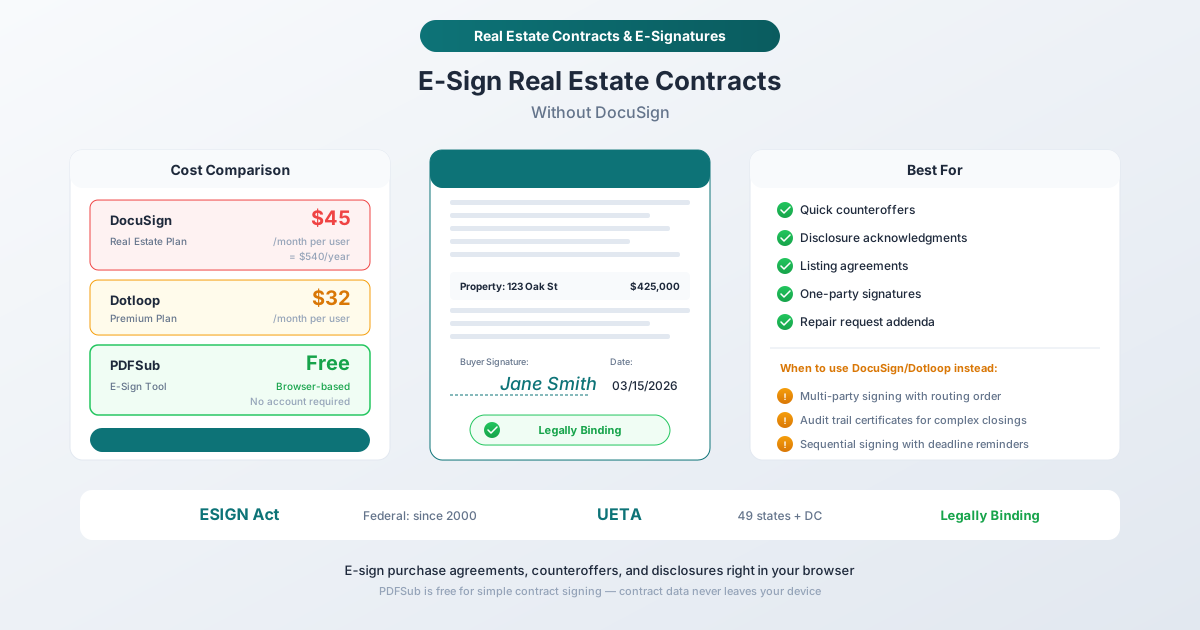
You open DocuSign. It costs $45 per month for the real estate plan. That is $540 per year to do something you need to do right now: put a signature on a PDF and send it back.
For a brokerage with a team of 5 agents, that is $2,700 per year just for e-signatures. A team of 10 is spending $5,400. And every one of those agents is using DocuSign for the same basic task: adding a signature to a document that is already a PDF.
There is a category of real estate signing that does not need DocuSign's full infrastructure - no routing workflows, no signing order management, no envelope tracking. Just a signature on a document. For those situations, a free browser-based e-sign tool does the job without the monthly bill.
This guide covers what real estate documents can be e-signed, the legal framework that makes electronic signatures valid, where PDFSub works well, and where you genuinely need a platform like DocuSign or Dotloop instead.
The Legal Framework: Are E-Signatures Valid for Real Estate?
Before signing anything electronically, you need to know whether the signature will hold up. The short answer for most real estate transactions: yes. The longer answer involves two federal laws and their state-level adoptions.
ESIGN Act (Federal, 2000)
The Electronic Signatures in Global and National Commerce Act establishes that electronic signatures cannot be denied legal effect solely because they are electronic. A contract "may not be denied legal effect, validity, or enforceability solely because an electronic signature or electronic record was used in its formation."
This applies to interstate and foreign commerce, which covers most real estate transactions.
UETA (State-Level)
The Uniform Electronic Transactions Act has been adopted by 49 states plus Washington D.C. and the U.S. Virgin Islands. New York has not adopted UETA but has its own equivalent - the Electronic Signatures and Records Act (ESRA) - which provides similar protections.
UETA confirms that electronic records and electronic signatures satisfy legal requirements for writings and signatures at the state level. Since real estate law is primarily state law, UETA adoption is the more relevant statute for most transactions.
What Real Estate Documents Can Be E-Signed?
The vast majority of documents in a real estate transaction are eligible for electronic signature:
| Document Type | E-Signature Valid? | Notes |
|---|---|---|
| Purchase agreements | Yes | The core contract of every transaction |
| Counteroffers | Yes | Time-sensitive; e-signature speeds turnaround |
| Listing agreements | Yes | Between seller and listing agent/brokerage |
| Buyer agency agreements | Yes | Between buyer and buyer's agent |
| Seller disclosures | Yes | Property condition, lead paint, natural hazards |
| Inspection contingency waivers | Yes | Often need quick turnaround |
| Repair request addenda | Yes | Amendments to the purchase agreement |
| Lease agreements | Yes | Rental and lease documents |
| HOA documents | Yes | Acknowledgments and approvals |
| Closing instructions | Yes | Typically signed by both parties |
Exceptions to Be Aware Of
A few categories of real estate documents may still require wet-ink signatures or notarization in some states:
- Deeds - Most states now accept electronically signed and recorded deeds, but requirements vary. Some counties still require ink signatures for recording.
- Notarized documents - Remote online notarization (RON) is legal in most states, but not all. Check your state's RON laws for documents requiring notarization (e.g., certain affidavits, powers of attorney).
- Court-ordered documents - Some judicial proceedings related to real estate may require physical signatures.
For the vast majority of the transaction - from initial offer through inspection negotiations, amendments, and closing instructions - e-signatures are valid and widely accepted.
What Makes an E-Signature Legally Valid?
Four conditions must be met:
- Intent to sign - The signer demonstrably intended to sign the document (not an accidental click)
- Consent to do business electronically - Both parties agreed to use electronic signatures
- Association of signature with record - The signature is connected to the specific document
- Record retention - Both parties can retain a copy of the signed document
These conditions are met by any competent e-sign tool, including PDFSub's browser-based option.
The Cost Reality: DocuSign and Alternatives
DocuSign Pricing for Real Estate
DocuSign offers a Real Estate-specific plan at $45 per month (billed month-to-month). The standard business plans range from $25 to $65 per user per month depending on features.
For a solo agent, that is $540 per year. For a team:
| Team Size | Annual Cost (DocuSign Real Estate) |
|---|---|
| 1 agent | $540 |
| 3 agents | $1,620 |
| 5 agents | $2,700 |
| 10 agents | $5,400 |
DocuSign earns these fees with enterprise features: multi-party signing with routing order, automated reminders, detailed audit trail certificates, template libraries, API integrations with transaction management platforms, and compliance documentation.
Dotloop Pricing
Dotloop, which is specifically built for real estate, charges $31.99 per month for its Premium plan. It includes transaction management features beyond just signing - document storage, compliance tracking, and MLS integration.
Where the Money Goes
The key question is: how much of DocuSign's feature set do you actually use for a given signing task?
If you are routing a purchase agreement through 4 parties (buyer, seller, buyer's agent, seller's agent) with a specific signing order, deadline reminders, and a certified audit trail for a complex closing - DocuSign or Dotloop earns its fee.
If you are putting your buyer's signature on a counteroffer addendum and emailing it back to the listing agent - you are paying $45/month for a task that takes 30 seconds with a free tool.
When PDFSub Is the Right Choice
PDFSub's E-Sign PDF tool is designed for straightforward, one-party-at-a-time signing. Here is where it fits naturally into real estate workflows:
Quick Counteroffers
A counteroffer often involves a single page: the counteroffer addendum to the purchase agreement. One party signs, the document is sent to the other party, and they sign separately. There is no complex routing. There is no multi-party signing ceremony. It is one signature on one document.
Workflow:
- Open the counteroffer PDF in PDFSub's E-Sign tool
- Create or upload your signature (typed, drawn, or image)
- Place the signature in the signature field
- Add the date
- Download and email to the other party
Total time: under 60 seconds.
Disclosure Acknowledgments
Seller disclosures, lead paint disclosures, natural hazard disclosures, and HOA disclosures typically require the buyer's signature acknowledging receipt. These are unilateral - one party signs to confirm they received and reviewed the document.
Listing Agreements
The agreement between a seller and their listing agent is signed by two parties (seller and agent), but they usually sign at the same time during the listing appointment. Open the PDF, both parties sign, done.
Buyer Agency Agreements
Same pattern as listing agreements. The buyer and their agent typically sign together, in person or during a video call.
Repair Request Addenda
After an inspection, the buyer submits a repair request as an addendum to the purchase agreement. One signature, one document, emailed to the listing agent. Straightforward and time-sensitive.
Lease Agreements
For landlords and property managers handling individual lease signings, PDFSub covers the signature step. The tenant signs, the landlord countersigns, and the executed lease is saved.
Internal Documents
Brokerage-internal documents - compliance acknowledgments, training certifications, commission split agreements between agents and their brokerage - rarely need enterprise signing features. These are one-signature or two-signature documents.
When You Genuinely Need DocuSign or Dotloop
Let's be honest about what PDFSub does not do. There are real estate signing scenarios where a dedicated platform like DocuSign or Dotloop is the better tool.
Multi-Party Sequential Signing
A purchase agreement that needs to be signed by the buyer, then routed to the seller for countersignature, with both agents witnessing - in a specific order, with automated notifications at each step - requires signing workflow management. PDFSub handles one signer at a time. You would need to manually send the document between parties.
Deadline-Driven Signing with Reminders
When you need the seller to sign by 5 PM Friday or the offer expires, DocuSign's automated reminder system and deadline enforcement is valuable. PDFSub signs the document but does not send reminders or enforce deadlines - that is up to you and email.
Certified Audit Trails
For complex closings where the parties want a signed certificate of completion showing exactly when each party signed, from what IP address, with tamper-evident sealing - DocuSign and Dotloop provide this documentation. PDFSub does not generate signing certificates or audit trail records.
High-Volume Transaction Management
If your brokerage processes 500+ transactions per year and needs signing integrated with your transaction management platform, CRM, and MLS - the integration capabilities of DocuSign or Dotloop justify the cost. That is platform-level infrastructure, not a signing tool.
Title Company and Lender Requirements
Some title companies and lenders require signatures through specific platforms to meet their compliance requirements. If a title company says "sign through DocuSign," you need to use DocuSign for that document. Check with the title company and lender before assuming any signing method will be accepted.
Step-by-Step: E-Signing a Purchase Agreement with PDFSub
Here is the complete workflow for the most common real estate signing scenario: adding your (or your client's) signature to a purchase agreement or addendum.
Step 1: Open the Document
Navigate to PDFSub's E-Sign PDF tool and upload the PDF. The document is processed entirely in your browser - the contract never leaves your device.
Step 2: Create Your Signature
You have three options:
- Draw - Use your mouse, trackpad, or touchscreen to draw your signature
- Type - Type your name and select a signature style
- Upload - Upload an image of your handwritten signature
For real estate professionals who sign dozens of documents weekly, uploading a high-quality image of your signature saves time and produces the most consistent result.
Step 3: Place the Signature
Click the signature field area on the document and place your signature. Resize and position it to fit the signature line. For documents with multiple signature fields (initials on each page, signature on the last page), add each one.
Step 4: Add the Date
Most real estate contracts require a date next to the signature. Use the text tool to add the current date in the appropriate field.
Step 5: Add Initials (If Required)
Many purchase agreements require initials on each page to confirm the signer reviewed every page. Add your initials to each page's initial line.
Step 6: Download and Send
Download the signed PDF and email it to the other party or their agent. Keep a copy for your records.
Total time for a standard counteroffer: Under 2 minutes including upload, signature, date, and download.
Combining E-Sign with Other PDF Tools
Real estate transactions involve more than just signing. Here is how other PDFSub tools fit into the workflow:
Fill Forms Before Signing
Some real estate documents have fillable fields (buyer name, property address, purchase price, dates). Use PDFSub's PDF Form Filler to complete these fields before adding the signature. Fill, then sign - in one workflow.
Merge Multiple Documents
A purchase agreement package often includes the agreement itself plus addenda, disclosures, and exhibits. Use PDFSub's Merge PDFs to combine them into a single document before signing, or merge signed documents into a complete transaction file after execution.
Compress for Email
A purchase agreement with multiple addenda and disclosures can easily exceed 15 to 20 MB. If you need to email the signed package, use PDFSub's Compress PDF to reduce the file size while maintaining signature legibility.
Password Protect Sensitive Contracts
Purchase agreements contain sensitive financial information - purchase price, loan amounts, earnest money deposits, sometimes Social Security numbers on certain forms. Use PDFSub's Password Protect to encrypt the document before emailing it.
Tips for Real Estate E-Signatures
Include a Consent Clause
Add a sentence to the document stating that both parties consent to electronic signature. Something like: "The parties agree that this document may be executed by electronic signature, which shall have the same legal effect as an original ink signature." This strengthens enforceability and eliminates ambiguity.
Keep Copies of Everything
After signing, save the signed PDF with a clear filename: 123_Oak_St_Counteroffer_Signed_2026-03-15.pdf. Real estate agents are typically required to retain transaction records for a period specified by their state's real estate commission - commonly 3 to 7 years.
Sign in the Correct Location
This sounds obvious, but misplaced signatures on real estate documents can create ambiguity about what the signer agreed to. Make sure your signature is on the correct line (buyer vs. seller, initials vs. full signature) and adjacent to the correct date field.
Use a Consistent Signature
Whether you draw, type, or upload your signature, use the same one consistently across all documents in a transaction. Inconsistent signatures can raise questions during closing or in any subsequent dispute.
Confirm Acceptance with the Other Party
After e-signing and sending, confirm receipt with the other party's agent. Unlike DocuSign, which sends delivery confirmations automatically, a manual e-sign workflow relies on email delivery. A quick text or call - "I just emailed the signed counteroffer" - closes the loop.
Frequently Asked Questions
Are electronic signatures on real estate contracts legally binding?
Yes. The federal ESIGN Act (2000) and UETA (adopted by 49 states plus DC) confirm that electronic signatures carry the same legal weight as handwritten signatures for real estate contracts, including purchase agreements, counteroffers, listing agreements, disclosures, and lease agreements. The exceptions are narrow: some states still require wet signatures for certain deeds, and documents requiring notarization may need remote online notarization (RON) rather than a simple e-signature.
Will title companies and lenders accept documents signed with PDFSub?
Most title companies and lenders accept documents signed electronically by any method, as long as the signature is valid under ESIGN/UETA. However, some may require signatures through a specific platform (usually DocuSign) for their own compliance or audit purposes. Check with the title company and lender early in the transaction to confirm their requirements.
How is PDFSub different from DocuSign for real estate?
PDFSub's E-Sign tool is a browser-based signing tool: you open a PDF, add your signature, and download the signed document. It handles one signer at a time and is free to use. DocuSign is a signing platform: it manages multi-party signing workflows with routing order, automated reminders, deadline enforcement, and certified audit trail certificates. PDFSub is ideal for quick, one-party signings (counteroffers, disclosure acknowledgments, listing agreements). DocuSign is better for complex multi-party closings with sequential signing requirements.
Can both the buyer and seller sign using PDFSub?
Yes, but sequentially rather than simultaneously. The first party signs and downloads the signed PDF. That signed PDF is emailed to the second party, who opens it in PDFSub, adds their signature, and downloads the fully executed document. This is how most real estate signings work in practice - the buyer signs, the document goes to the seller, the seller countersigns. PDFSub handles each step; you handle the routing via email.
Does PDFSub provide an audit trail or signing certificate?
No. PDFSub's E-Sign tool adds your signature to the document but does not generate a separate audit trail certificate, signing log, or tamper-evident seal. For transactions where a certified audit trail is required (complex closings, lender requirements, or title company specifications), use DocuSign or Dotloop. For straightforward signings where the signed PDF itself is sufficient documentation, PDFSub works well.
Is it safe to sign real estate contracts in a browser-based tool?
PDFSub processes documents entirely in your browser. The PDF never leaves your device - there is no server upload, no cloud storage, and no data retention. Contract terms, purchase prices, personal information, and signatures stay on your computer. This actually provides stronger privacy than cloud-based signing platforms, where your documents are uploaded to and stored on external servers.
Wrapping Up
Not every signature needs a $45/month platform. For the quick counteroffer that needs to go back by end of day, the disclosure acknowledgment that just needs a buyer's initials, or the listing agreement signed during a kitchen-table meeting - PDFSub's E-Sign PDF tool handles the job in under two minutes, right in the browser, with a 7-day free trial.
For complex multi-party closings with sequential signing, deadline enforcement, and certified audit trails, DocuSign and Dotloop earn their fees. The smart approach is using the right tool for the right task - and not paying enterprise prices for a task that takes 30 seconds.
For the full real estate PDF toolkit - including document merging, compression, form filling, and more - see the PDF Tools for Real Estate guide.