How Accountants Can Save 15 Hours a Week on Data Entry
Manual data entry costs accounting firms $28,500 per employee per year and has a 1–4% error rate. Here's a realistic breakdown of where 15 hours go every week - and how to get them back.
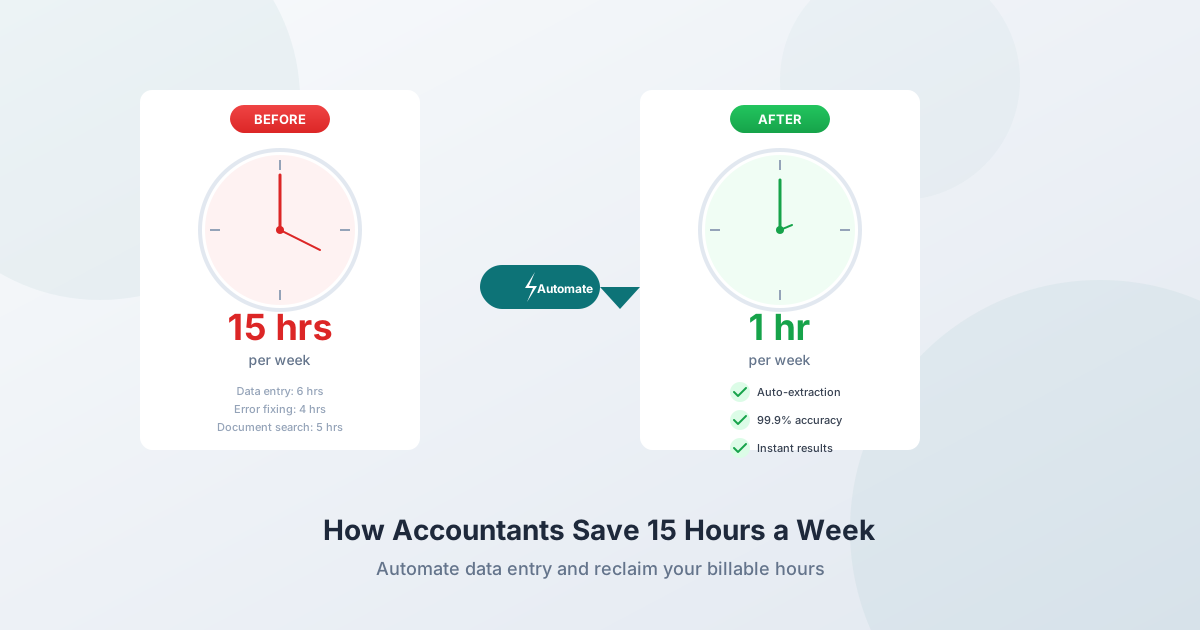
The average employee spends more than 9 hours per week on manual data entry - over a full workday every week copying data between systems. For accountants handling bank statements, invoices, receipts, and tax forms, that number climbs to 15+ hours when you include the downstream work: error correction, document searching, and reconciliation.
At $28,500 per employee per year in lost productivity, manual data entry is one of the most expensive invisible costs in any accounting practice. And with 300,000+ professionals leaving the field since 2020 and 83% of senior leaders reporting talent shortages, those hours can't be replaced by hiring.
This guide breaks down exactly where those 15 hours go and how to reclaim them - with specific tools, time estimates, and ROI calculations.
The Data Entry Problem in Accounting
How Much Time Is Actually Lost?
| Metric | Value | Source |
|---|---|---|
| Weekly hours on manual data entry (average employee) | 9+ hours | Nodewave/Parseur 2025 |
| Time spent searching for documents daily | 2 hours | IDC/Coral Tree Tech |
| Billable hours lost to non-billable tasks | 17–20% | AICPA/Memtime |
| Percentage of workday on low-value repetitive tasks | 51% | McKinsey |
| Annual cost of manual data entry per employee | $28,500 | Parseur/QuestionPro 2025 |
| Accountants wanting to automate repetitive processes | 45% | Sage 2024 |
The 51% figure is striking: more than half the workday goes to tasks that could be automated or eliminated. For accounting specifically, the problem is worse because the data is locked inside PDFs - bank statements, invoices, receipts, tax forms - and extracting it requires manual keying.
The Error Tax
Manual data entry doesn't just waste time. It introduces errors that compound downstream.
- 1–4% error rate for manual data entry (100–400 mistakes per 10,000 entries)
- 88% of manual AP documents include data-entry errors
- 22% error rate on manual expense reports
- Each error costs $50–$150 to find and fix
The 1-10-100 rule quantifies the cascade: $1 to prevent a data quality issue at the source, $10 to correct it after it occurs, $100 when it goes unaddressed. In accounting, uncaught errors affect reconciliation, tax filings, financial statements, and audit outcomes.
Automated data entry achieves 99.96–99.99% accuracy - effectively eliminating the error correction burden.
Where 15 Hours Go Every Week
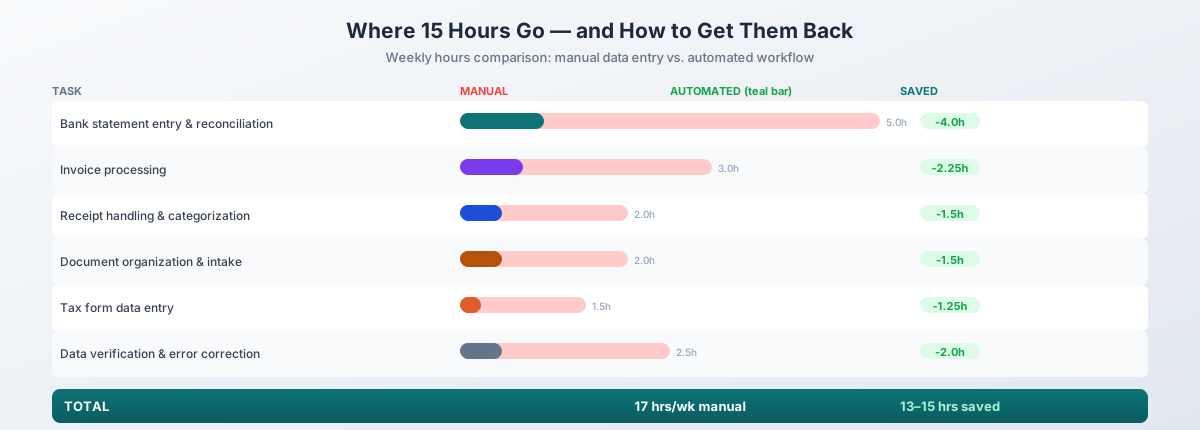
Here's a realistic weekly time budget for a staff accountant or bookkeeper managing 15–25 clients:
| Task | Manual Hours/Week | Automated Hours/Week | Time Saved |
|---|---|---|---|
| Bank statement entry and reconciliation | 5.0 | 1.0 | 4.0 hrs |
| Invoice processing | 3.0 | 0.75 | 2.25 hrs |
| Receipt handling and categorization | 2.0 | 0.5 | 1.5 hrs |
| Document organization and client intake | 2.0 | 0.5 | 1.5 hrs |
| Tax form data entry (seasonal average) | 1.5 | 0.25 | 1.25 hrs |
| Journal entry preparation | 1.0 | 0.25 | 0.75 hrs |
| Data verification and error correction | 2.5 | 0.5 | 2.0 hrs |
| Total | 17.0 | 3.75 | 13.25 hrs |
The conservative total: 13–15 hours saved per week, depending on client volume and complexity. Here's what drives each line.
1. Bank Statement Entry and Reconciliation (5 hrs → 1 hr)
The Manual Process
For each client, every month:
- Download PDF bank statement from online banking
- Open the PDF and the accounting software side by side
- Manually key each transaction: date, description, amount
- Categorize each transaction
- Reconcile against the general ledger
- Fix mismatches
A single bank statement takes 10–30 minutes to process manually, depending on transaction count. For 15–25 clients, each with 1–3 accounts, that's 4–8+ hours per month.
One bookkeeper reported that manually reconciling a client's statement with over 400 transactions took two full days. With automated conversion, it took less than an hour.
The Automated Process
- Download PDF bank statement
- Upload to PDFSub's Bank Statement Converter (processes in your browser - file never leaves your device)
- Export as QBO (QuickBooks), OFX (Xero/Sage), or CSV
- Import directly into accounting software
- Review auto-matched transactions, handle exceptions only
Time per statement: under 30 seconds for conversion + a few minutes for review.
Supporting data: 78% of businesses automating bank statement conversion report saving over 5 hours per week. Automated bank reconciliation reduces errors by 95% and saves 20+ hours monthly.
Output Format Guide
| Accounting Software | Best Import Format |
|---|---|
| QuickBooks Online | QBO or CSV |
| QuickBooks Desktop | QBO or QFX |
| Xero | OFX or CSV |
| Sage | CSV or OFX |
| FreshBooks | CSV |
PDFSub exports to all of these: Excel, CSV, TSV, JSON, QBO, OFX, QFX, and QIF.
2. Invoice Processing (3 hrs → 0.75 hr)
The Manual Process
Accounts payable requires entering each vendor invoice:
- Open the invoice PDF
- Find the vendor name, invoice number, date
- Key in each line item with description and amount
- Enter tax amounts
- Record the total
- File the invoice
Manual processing averages 12–15 minutes per invoice - about 5 invoices per hour. For a practice handling 15–20 invoices per week, that's 3+ hours.
The Automated Process
- Upload invoice PDF to PDFSub's Invoice Extractor
- AI extracts vendor, invoice number, date, line items, tax, and total
- Review extracted data (typically 95%+ accuracy)
- Export to your accounting system
Time per invoice: 1–2 minutes (extraction + review).
After AP automation, firms process 30 invoices per hour versus 5 manually - a 6x improvement. One firm reduced invoice processing from 15–20 minutes to under 3 minutes per invoice.
3. Receipt Handling and Categorization (2 hrs → 0.5 hr)
The Manual Process
Bookkeepers spend a disproportionate amount of time on receipts:
- Collect receipt PDFs/images from clients
- Open each receipt
- Type the merchant name, date, amount, and tax
- Assign an expense category
- Check for duplicates
- File the receipt
This cycle accounts for 40–50% of a bookkeeper's time when managing expense-heavy clients. Manual expense reports have a 22% error rate.
The Automated Process
- Upload receipt PDFs to PDFSub's Receipt Scanner
- AI extracts merchant, date, amounts, tax, and categories
- Review and adjust categories as needed
- Export structured data
Advanced receipt scanning reduces manual processing time by 75% and achieves over 95% accuracy versus the 22% manual error rate.
4. Document Organization and Client Intake (2 hrs → 0.5 hr)
The Manual Process
Employees spend an average of 2 hours daily searching for documents - a productivity loss of 21.3%. For accountants, this includes:
- Tracking down client documents across emails, portals, and physical mail
- Renaming and organizing files into folder structures
- Dealing with scanned documents that aren't searchable
- Merging multiple client submissions into organized sets
- Removing passwords from bank statements (most banks password-protect emailed PDFs)
Less than 25% of clients actually complete the full client organizer. Documents arrive piecemeal, disorganized, and often in the wrong format.
The Automated Process
- Unlock PDF - Remove bank-applied passwords instantly
- OCR - Make scanned documents searchable and extractable
- Merge PDFs - Combine multiple submissions into one organized file per client
- Consistent naming:
ClientName_Year_DocType_Source.pdf
Going paperless improves staff productivity by nearly 30%. The key is reducing document search time through consistent organization and searchable PDFs.
5. Tax Form Data Entry (1.5 hrs → 0.25 hr, Seasonal Average)
The Manual Process
During tax season (January–April), data entry burden spikes dramatically. A PwC study found that 60% of tax compliance time goes to data extraction, cleansing, and analysis.
Forms that require manual keying:
- W-2s (wages, withholding, employer info)
- 1099-NEC and 1099-MISC (contractor and miscellaneous income)
- 1099-K (payment card transactions)
- K-1s from partnerships and S-corps
- Brokerage statements (dividends, capital gains)
The seasonal average of 1.5 hours/week masks the reality: during January–April, this number is 5–8 hours/week. During May–December, it's near zero.
The Automated Process
AI-powered extraction tools pull structured data from tax forms:
- Upload the tax document PDF
- AI identifies the form type and extracts all fields
- Review extracted data against the source
- Import into tax preparation software
One firm processed 1,392 1099-NEC forms through bulk automation in a single filing season. The manual alternative would have consumed hundreds of hours.
6. Journal Entry Preparation (1 hr → 0.25 hr)
The Manual Process
Preparing journal entries requires:
- Reviewing source documents
- Determining correct accounts
- Manually entering each debit and credit
- Adding descriptions and references
- Reviewing for balance
The Automated Process
Organizations achieve a 60–75% reduction in journal processing time with automation. When bank statement conversion and invoice extraction feed directly into your accounting software, many journal entries are created automatically during import.
The remaining manual entries are typically adjusting entries, accruals, and non-standard transactions - the work that actually requires accounting judgment.
7. Data Verification and Error Correction (2.5 hrs → 0.5 hr)
The Manual Process
This is the hidden cost of manual data entry. Every keystroke error creates downstream work:
- Reconciliation discrepancies that require investigation
- Transaction mismatches between bank and ledger
- Incorrectly categorized expenses
- Duplicate entries
- Transposed numbers (entering $1,350 instead of $1,530)
With a 1–4% manual error rate across thousands of entries per week, error correction alone consumes 2–3 hours weekly.
The Automated Process
When automated extraction achieves 99.96–99.99% accuracy, the verification process shrinks to exception handling:
- Review flagged items (low-confidence extractions)
- Verify totals match source documents
- Spot-check a sample of transactions
Instead of checking everything, you check only what the system flags as uncertain. This is the difference between reading every line and reviewing a short exception report.
The ROI Calculation
For a Single Staff Accountant
| Metric | Value |
|---|---|
| Hours saved per week | 13–15 |
| Staff accountant hourly wage | $32.21 |
| Annual labor savings | $21,800–$25,100 |
| Staff accountant billing rate | $150–$200/hr |
| Annual recovered billable capacity | $101,400–$156,000 |
For a 5-Person Firm
| Metric | Annual Value |
|---|---|
| Labor cost savings (5 × $23,400 avg.) | $117,000 |
| Recovered billable capacity (5 × $128,700 avg.) | $643,500 |
| Error reduction savings | $26,000+ |
| Total annual impact | $786,500 |
For a 10-Person Firm
At billing rates, 15 hours × 10 accountants × $175/hr × 52 weeks = $1,365,000 in annual recoverable billable capacity.
Even at a conservative 50% utilization of recovered hours, that's $682,500 in potential revenue.
The Advisory Revenue Multiplier
The real ROI isn't just in savings - it's in what you do with the recovered time.
- Compliance client: ~$1,200/year average revenue
- Advisory client: $5,000+/year
- Revenue premium: 300–400%
Over 60% of CPA firms are now prioritizing advisory and consulting services as their core growth driver. 80% of firms report increasing client demand for financial planning, business strategy, and technology consulting.
Every hour shifted from data entry to advisory work generates 3–4x more revenue.
Real-World Results
Bank Reconciliation: 2 Days → 1 Hour
A bookkeeper manually reconciling a client's statement with 400+ transactions spent two full days. After automating bank statement conversion, the same task took less than one hour - including review time.
Invoice Processing: 80% Faster
One firm reduced invoice processing from 15–20 minutes per invoice to under 3 minutes - an 80%+ time reduction across their entire AP workflow.
Non-Billable Tasks: Cut in Half
Firm owners reported spending 50% less time on manual, non-billable tasks after implementing workflow automation. That time went directly to client-facing work.
Finance Manager Data Work: 85% Reduction
A financial services firm reduced manual copying and data transcribing by 85%, freeing senior staff for analysis and decision-making rather than data entry.
Bank Reconciliation: 3 Hours → 30 Minutes
A bookkeeper charging clients for 3 hours weekly of bank reconciliation work cut it to 30 minutes with automated conversion and reconciliation.
The Tax Season Multiplier
During January–April, everything intensifies:
| Metric | Normal | Tax Season |
|---|---|---|
| Weekly hours (most common) | 40–50 | 51–60 |
| Accountants working 60+ hrs/week | ~10% | 31% |
| Accountants reporting burnout | High | 99% |
| Document volume vs. normal | 1x | 3–5x |
| Cyberattacks on accounting firms/week | 300 | 900+ |
The staffing crisis compounds the problem:
- 300,000+ accountants have left the field since 2020
- 75% of current CPAs are nearing retirement age
- New accounting graduates hit a 20-year low in 2023–24 (55,152 - roughly 24,000 below the mid-2010s peak)
- Firms average 4–5 weeks to fill open accounting roles
Automation isn't optional during tax season - it's the primary way firms handle growing workloads with fewer people. Every hour of data entry automated is an hour that doesn't require hiring someone who may not be available.
Implementation: A 12-Week Rollout
Phase 1: Audit Current State (Weeks 1–2)
Track every data entry task for two weeks:
- Time per task category (bank statements, invoices, receipts, tax forms, journal entries, document management)
- Volume per category
- Error frequency and correction time
- Which clients consume the most data entry time
Phase 2: Identify Highest-Impact Areas (Week 3)
Rank tasks by total time spent, error frequency, and ease of automation. For most firms, the ranking is:
- Bank statement conversion (highest volume, most time, easiest to automate)
- Invoice processing (second highest volume)
- Receipt categorization
- Document organization
- Tax form entry (seasonal)
Phase 3: Pilot (Weeks 4–6)
Start with bank statement conversion - it has the highest time savings and lowest risk:
- Pick 2–3 clients with typical statement complexity
- Convert their statements using PDFSub's Bank Statement Converter
- Compare accuracy and time against your manual process
- Validate that output formats import correctly into your accounting software
Phase 4: Expand (Weeks 7–12)
- Roll out bank statement automation to all clients
- Add invoice extraction for AP-heavy clients
- Implement receipt scanning for expense management
- Set up document organization standards (naming, merging, OCR for scanned docs)
- Train team on exception handling rather than data entry
Phase 5: Optimize (Ongoing)
- Monitor time savings weekly
- Track error rates before and after
- Redirect recovered hours to advisory services
- Review automation accuracy quarterly
What's Coming Next
The AI in accounting market is growing at 41.27% CAGR (2025–2030). What's on the horizon:
Near-zero manual data entry. Machine learning OCR processes invoices by analyzing numbers, amounts, and dates, then categorizes transactions using historical patterns. AI automatically records transactions in the ledger.
Real-time bank feeds with AI categorization. Bank feeds reconciled automatically with AI creating, extracting, and classifying transactions. Accountants focus only on exception cases.
Predictive cash flow analysis. AI analyzes historical financial data to predict future cash flow, flag budget variances, and identify potential issues before they escalate.
Workforce transformation. Roles are shifting from data entry to data analysis, AI tool management, and consulting. The firms that automate data entry now will be positioned for advisory growth as the profession evolves.
Start Saving Time Today
The math is straightforward: 15 hours per week × 52 weeks × your billing rate = the annual revenue you're leaving on the table.
Bank statement conversion is the single highest-impact starting point. One statement, under 30 seconds, and you'll see exactly how much time you've been losing.
Try PDFSub Free - convert bank statements to Excel, CSV, QBO, or OFX entirely in your browser. Your files never leave your device. Cancel anytime.