How to Extract Data from PDF Invoices Automatically
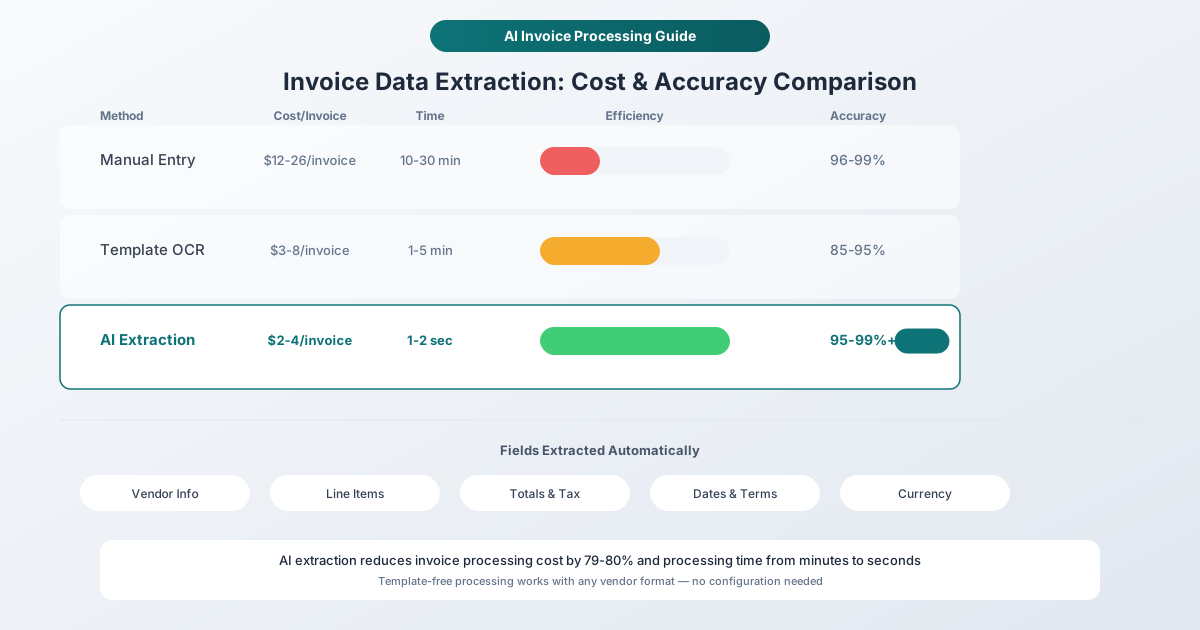
Manual invoice entry costs $12-26 per invoice and eats 10-30 minutes each. Here's how AI extraction cuts that to seconds - and what to watch for.
You just got 47 invoices in your inbox. Different vendors, different layouts, different currencies. Each one needs the same thing: someone has to pull out the vendor name, invoice number, date, line items, tax, and total - then type it all into your accounting software.
At 15 minutes per invoice, that's almost 12 hours of data entry. For the month. Every month.
This is the accounts payable bottleneck that automation was built to solve. But not all extraction tools are equal. Some need a template for every vendor. Some require you to upload sensitive financial documents to servers you don't control. And some just don't handle the invoice your Italian supplier sent last week.
Let's look at what actually works.
The Real Cost of Manual Invoice Processing
Before talking about tools, let's quantify the problem.
According to Ardent Partners and APQC research, processing a single invoice manually costs between $12.88 and $26.00 - and that's not just the data entry person's time. It includes error correction, approval routing, exception handling, and the occasional duplicate payment that slips through.
Here's what the numbers look like at scale:
| Invoice Volume | Manual Cost/Month | Manual Hours/Month | With Automation |
|---|---|---|---|
| 50/month | $644 - $1,300 | 12 - 25 hrs | $104 - $200 |
| 200/month | $2,576 - $5,200 | 50 - 100 hrs | $416 - $800 |
| 500/month | $6,440 - $13,000 | 125 - 250 hrs | $1,040 - $2,000 |
| 1,000/month | $12,880 - $26,000 | 250 - 500 hrs | $2,080 - $4,000 |
That's a 79-80% cost reduction with automation, not counting the time your AP team gets back for vendor negotiations, early-payment discounts, and not staring at spreadsheets.
Nearly 25% of AP staff time goes to fixing errors from manual entry. And those errors aren't just annoying - 79% of companies reported attempted or actual payment fraud in 2024, with duplicate payments running between 1% and 2.5% of total disbursements.
What Data Gets Extracted from an Invoice?
Modern AI extraction pulls two categories of information from invoices:
Header-level fields - the "who, when, and how much" at the top of every invoice:
- Vendor/supplier name, address, phone, email, and tax ID
- Invoice number and date
- Due date and payment terms
- Purchase order (PO) reference
- Customer billing and shipping addresses
- Currency
Line-item details - the actual goods and services:
- Item descriptions and SKU/part numbers
- Quantities and units of measure
- Unit prices and line totals
- Subtotals, tax amounts, and tax rates
- Shipping charges and discounts
- Grand total / amount due
The best tools also cross-reference extracted data against existing records, flagging mismatched totals, duplicate invoice numbers, or vendors that don't match your approved list.
Template-Based vs. AI-Based Extraction
This is the most important distinction in the invoice extraction world, and it affects everything from accuracy to ongoing maintenance costs.
Template-Based Extraction
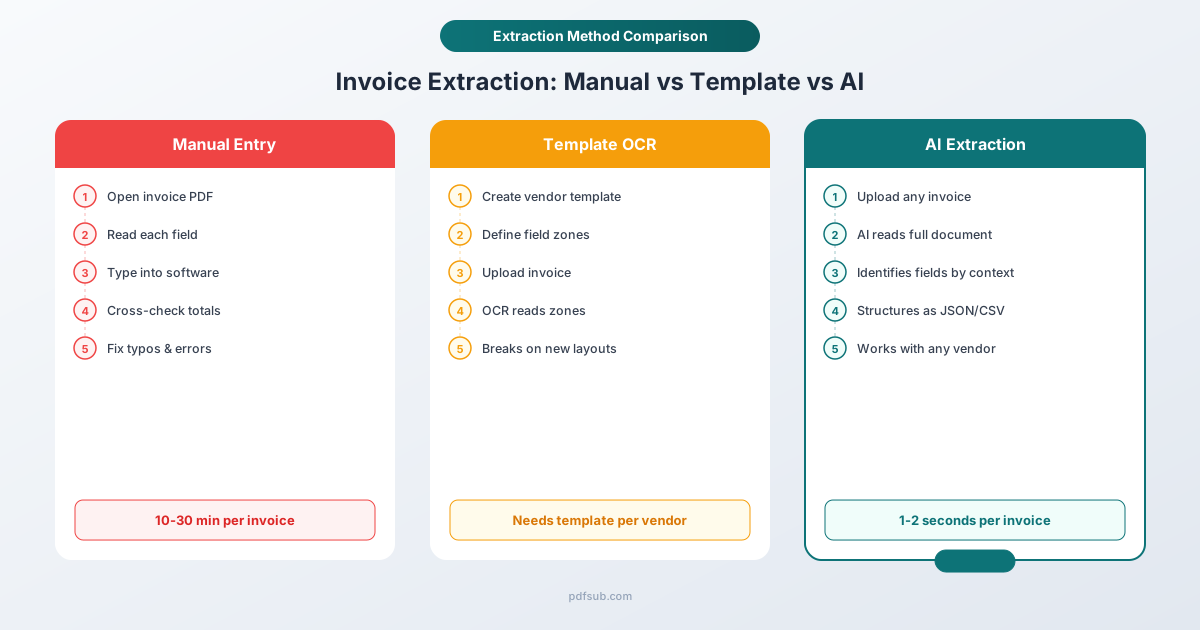
Traditional tools use fixed zones - "the invoice number is always at pixel coordinates (420, 180), the total is always in the bottom-right corner." You create a template for each vendor's invoice layout, and the tool reads data from those exact positions.
The problem: Every new vendor needs a new template. Every time a vendor redesigns their invoice, the template breaks. If you work with 50+ vendors, template maintenance becomes its own job.
Template-based tools typically achieve 85-95% accuracy on invoices that match their templates perfectly. On invoices that don't match - zero.
AI-Based (Template-Free) Extraction
AI extraction doesn't care where the data sits on the page. It reads the entire document, understands the semantic meaning of each element, and identifies fields based on context: "this number next to the word 'Total' is probably the total amount."
This approach handles:
- New vendors without configuration
- Layout changes without breaking
- Multi-language invoices
- Handwritten annotations
- Complex multi-page line item tables
AI-based tools consistently hit 95-99%+ accuracy across varied invoice formats and improve over time as they process more documents.
The industry has shifted decisively toward AI-based extraction. By 2026, all leading platforms - Rossum, ABBYY, Nanonets, Docsumo - are AI-first. Template-based is legacy.
How AI Invoice Extraction Actually Works
The typical workflow has four steps:
Step 1: Upload. You provide the invoice as a PDF - either a digital PDF (generated by invoicing software) or a scanned paper invoice.
Step 2: Text extraction. For digital PDFs, the tool reads the embedded text directly. For scanned invoices, OCR converts the image to text first. The quality of this step determines everything downstream.
Step 3: AI analysis. The AI model processes the text (or the entire document image for scanned PDFs), identifies field types based on context, and structures the data into a clean JSON or spreadsheet format.
Step 4: Export. You get the structured data as CSV, Excel, JSON, or directly imported into your accounting software.
The critical difference between tools is what happens between steps 2 and 3. Some tools always upload your document to cloud servers for processing. Others - like PDFSub's Invoice Extractor - try to extract text client-side first, only escalating to server-side AI when the PDF is scanned or the text quality is poor.
This matters for two reasons: privacy (your invoice data doesn't leave your browser unless necessary) and cost (text-based extraction uses fewer AI resources than vision-based processing).
Accuracy: What to Actually Expect
Let's be honest about accuracy numbers, because the marketing claims don't always match reality.
Digital PDFs (Generated by Software)
If your vendors send invoices created in QuickBooks, Xero, FreshBooks, or any invoicing tool, you're dealing with digital PDFs. These contain embedded text with exact character positioning.
For these invoices, AI extraction accuracy is genuinely excellent:
- Header fields (vendor name, invoice number, date, total): 97-99%+
- Line items (descriptions, quantities, prices): 93-97%
- Currency and tax detection: 95-99%
The remaining errors are almost always edge cases: unusual date formats, amounts in both the header and a "previous balance" section, or line item descriptions that wrap across three lines.
Scanned Paper Invoices
This is where accuracy drops. Even the best OCR introduces errors:
- Faded ink or low-resolution scans degrade character recognition
- Coffee stains, staple holes, and creases create gaps
- Handwritten notes overlay printed text
- "0" vs "O" and "1" vs "l" are classic OCR confusion points
Expect 88-95% accuracy on scanned invoices, depending on scan quality. For critical invoices, always verify totals manually.
Multi-Language Invoices
International invoices add another layer of complexity:
- Date formats vary: 01/03/2026 is January 3rd in the US, March 1st in Europe
- Number formats differ: 1.234,56 (European) vs 1,234.56 (US)
- Currency symbols overlap: ¥ means both Japanese yen and Chinese yuan
- Tax terminology changes: VAT, GST, MwSt., IVA, TVA
This is where most extraction tools fall short. PDFSub's Invoice Extractor handles 130+ languages with automatic format detection - dates, numbers, and currencies are parsed correctly regardless of the invoice's country of origin.
Comparing Invoice Extraction Tools
The market ranges from enterprise platforms processing millions of invoices to lightweight tools handling a few dozen per month. Here's how the main options stack up:
Enterprise Platforms ($500+/month)
Rossum (~$1,500/month) is the market leader for high-volume invoice processing. Their Aurora Engine handles complex layouts, and integrations with Coupa and major ERPs make it a natural fit for large organizations. But the price tag puts it out of reach for small businesses and solo accountants.
ABBYY FlexiCapture offers enterprise-grade OCR with claims of 99.5% field-level accuracy. Multi-language support is strong, and both cloud and on-premises deployment options exist. Pricing is custom and typically enterprise-level.
Kofax ReadSoft has 25+ years in invoice processing. Deep ERP integration and multi-channel capture (paper, email, upload) are strengths. But the platform feels dated compared to AI-native alternatives, and accuracy ranges from 80-95% depending on the document type.
Mid-Market Platforms ($25-500/month)
Nanonets offers pay-as-you-go pricing with pre-trained invoice models. You can train custom models for proprietary formats. The platform is versatile but primarily designed for document processing workflows, not general PDF tools.
Docsumo combines AI extraction with human cross-verification for higher accuracy. Good for businesses that need verified data but can accept slightly longer processing times.
Lightweight and Multi-Purpose Tools
PDFSub takes a different approach. Instead of being exclusively an invoice processing platform, it's a comprehensive PDF tool suite with 90+ tools - and the Invoice Extractor is one of its AI-powered financial tools.
What makes it worth considering:
- Template-free AI extraction - works with any vendor's invoice format
- Privacy-first processing - extracts text in your browser first, only uses server-side AI for scanned documents
- 130+ languages - handles international invoices with automatic date, number, and currency format detection
- Multiple export formats - JSON for APIs and integrations, CSV for spreadsheets
- Part of a larger toolkit - bank statement conversion, receipt scanning, PDF comparison, translation, and 98+ total tools included in one subscription
- 7-day free trial - full access to all tools on any paid plan
The tradeoff: PDFSub isn't built for processing 10,000 invoices per day with ERP integration. It's built for accountants, bookkeepers, and small businesses who need accurate extraction from a few hundred invoices per month alongside their other PDF workflows.
Cloud Platform APIs
Microsoft Azure Document Intelligence, Amazon Textract, and Google Document AI all offer invoice extraction APIs. These are powerful but require development resources to integrate. Pricing is typically per-page ($1-15 per 1,000 pages), making them cost-effective at scale but complex to set up.
Best for: teams with developers who can build custom integrations.
The Fields PDFSub Extracts
When you upload an invoice to PDFSub's Invoice Extractor, the AI analyzes the document and returns structured data including:
- Invoice number and invoice date
- Due date and payment terms
- Vendor/supplier information - name, address, phone, email, tax ID
- Customer/bill-to information - name and address
- Line items - description, quantity, unit price, and amount for each item
- Subtotal, tax (rate and amount), discounts
- Total amount due
- Currency
The output comes as structured JSON that you can download directly or convert to CSV for import into Excel, Google Sheets, or your accounting software.
For digital PDFs, extraction typically completes in seconds. Scanned invoices take slightly longer because the AI needs to process the document image.
Step-by-Step: Extracting Invoice Data with PDFSub
Here's the actual workflow:
- Go to the Invoice Extractor at pdfsub.com/tools/invoice-extractor or open it in the Studio dashboard
- Upload your invoice PDF - drag and drop or click to browse. Supports files up to 20MB.
- Click "Extract Invoice Data" - the AI processes the document automatically
- Review the extracted data - check the structured output for accuracy
- Download your results - save as CSV for spreadsheets or JSON for system integrations
For batch processing, you can upload multiple invoices in one session. Each invoice is processed independently and generates its own output file.
Pro tip: If your invoice is a scan (photographed or scanned paper), the tool automatically switches to vision-based AI extraction. For best results, use digital PDFs downloaded directly from your vendor's invoicing system whenever possible.
Best Practices for Accurate Invoice Extraction
Even with AI, a few habits significantly improve your results:
Use Digital PDFs When Possible
Contact vendors who still send paper invoices and ask for electronic versions. Most invoicing platforms (QuickBooks, Xero, FreshBooks, Wave) generate PDF invoices with embedded text that extract perfectly.
Verify Totals on First Use
The first time you process invoices from a new vendor, spot-check the extracted totals against the original PDF. AI extraction is highly accurate, but layout quirks can trip up any tool. Once you've confirmed a vendor's format works, you can process their future invoices with confidence.
Standardize Your Export Format
Choose one output format and stick with it. CSV works for most spreadsheet imports. JSON is better if you're feeding data into an API or database. Switching formats mid-workflow creates unnecessary conversion headaches.
Handle Multi-Page Invoices Carefully
Invoices that span multiple pages - especially those with continuation line items - are the hardest documents for any extraction tool. Check that all line items from all pages made it into the output. The total should match the invoice's grand total.
Keep a Verification Checklist
For high-value invoices, use this quick checklist:
- Does the total match the PDF?
- Are all line items present?
- Is the tax amount correct?
- Is the vendor name and invoice number right?
- Is the currency correct for international invoices?
This takes 30 seconds per invoice and catches the 1-3% of cases where AI extraction needs a human correction.
When to Use Different Tools
Not every invoice workflow needs the same tool:
| Scenario | Best Approach |
|---|---|
| 50-500 invoices/month from diverse vendors | PDFSub Invoice Extractor - template-free, multiple export formats |
| 1,000+ invoices/month with ERP integration | Rossum or ABBYY - enterprise workflows and deep integrations |
| International invoices in multiple languages | PDFSub - 130+ language support with auto-format detection |
| Custom document types beyond invoices | Nanonets or Docsumo - trainable AI models |
| Developer building a custom integration | Azure Document Intelligence or Amazon Textract - APIs |
| One-off invoice with quick turnaround | PDFSub - start a 7-day free trial for full extraction |
Beyond Invoices: The Complete Financial Workflow
Invoice extraction rarely exists in isolation. If you're processing invoices, you're probably also dealing with:
- Bank statements that need reconciling - PDFSub's Bank Statement Converter exports to Excel, CSV, QBO, OFX, and 4 other formats
- Receipts that need digitizing for expense reports - the AI Receipt Scanner handles paper and digital receipts
- Financial reports that need analysis - the Financial Report Analyzer extracts key metrics from annual reports and P&L statements
Having all these tools in one platform means one subscription, one login, and a consistent extraction quality across all your financial documents. No switching between three different vendors for three different document types.
FAQ
What invoice formats does AI extraction support?
AI-based extraction works with any invoice layout - there's no need to create templates. Whether your vendor uses QuickBooks, Xero, FreshBooks, SAP, or a custom layout, the AI identifies fields based on context rather than fixed positions. Both digital PDFs and scanned paper invoices are supported.
How accurate is AI invoice extraction?
For digital PDFs (generated by invoicing software), expect 97-99%+ accuracy on header fields like vendor name, invoice number, and total. Line item accuracy is typically 93-97%. Scanned invoices are lower, around 88-95%, depending on scan quality. Always verify totals on high-value invoices.
Is it safe to upload invoices to an online extraction tool?
This varies dramatically by tool. Some services store your documents on their servers indefinitely. PDFSub processes text client-side in your browser first - your invoice data doesn't leave your device unless the PDF requires server-side AI processing (scanned documents). Server-processed files are processed in isolation and auto-deleted.
Can I extract data from invoices in languages other than English?
Most extraction tools are English-only or support a handful of languages. PDFSub supports 130+ languages with automatic detection of international date formats (DD/MM/YYYY vs MM/DD/YYYY), number formats (1.234,56 vs 1,234.56), and currency symbols. This handles invoices from any country without manual configuration.
What's the difference between invoice extraction and OCR?
OCR (optical character recognition) converts images of text into machine-readable characters - it answers "what letters are on this page?" Invoice extraction goes further: it understands the document structure and identifies which text is a vendor name, which is a total, and which is a line item description. Modern AI extraction includes OCR as a step but adds semantic understanding on top.
How do I handle multi-page invoices?
Upload the complete multi-page PDF - don't split it into individual pages. AI extraction processes all pages together and connects continuation line items across page breaks. After extraction, verify that the line item count and grand total match the original invoice.
Getting Started
If you're still typing invoice data by hand, the math is straightforward: even at 50 invoices per month, you're spending 12+ hours and $644+ on work that AI handles in minutes.
Try PDFSub's Invoice Extractor - start a 7-day free trial with full access. Upload an invoice, see the extracted data, and decide if the accuracy meets your needs before committing to a paid plan.
For teams processing higher volumes, PDFSub's paid plans include additional AI credits, batch processing, and access to the full suite of 90+ PDF tools alongside the financial extraction tools.