Convert Turkish Bank Statements to Excel (Garanti BBVA, İş Bankası, Akbank, and More)
Turkish bank statements use comma decimals, DD.MM.YYYY dates, and EFT/FAST/Havale transaction codes that break in English-locale converters. Here's how to convert them cleanly.
Your Turkish hesap ekstresi looks perfectly structured on screen -- until you try to pull the numbers into a spreadsheet. The comma decimals turn into text. The DD.MM.YYYY dates silently flip months and days. The EFT and FAST transaction codes get mangled into one long string. And the amounts -- inflated to six or seven digits by years of high inflation -- overflow columns or lose their decimal precision entirely.
Turkey's banking system serves roughly 85 million people, with over 70% of the adult population holding at least one bank account. The country runs one of the most sophisticated instant payment networks in the world (FAST), maintains widespread multi-currency accounts as inflation hedges, and supports a parallel Islamic banking sector with its own terminology. All of this makes Turkish bank statements among the most complex to convert accurately.
Whether you're an SMMM (Serbest Muhasebeci Mali Musavir) processing dozens of client statements each month, an international accountant consolidating a Turkish subsidiary's data, or a business owner trying to reconcile your Garanti BBVA or Akbank accounts in QuickBooks -- the challenges are real and specific.
This guide covers exactly what makes Turkish statements difficult, the major banks you'll encounter, and the fastest way to get clean, structured data into Excel, CSV, or accounting software.
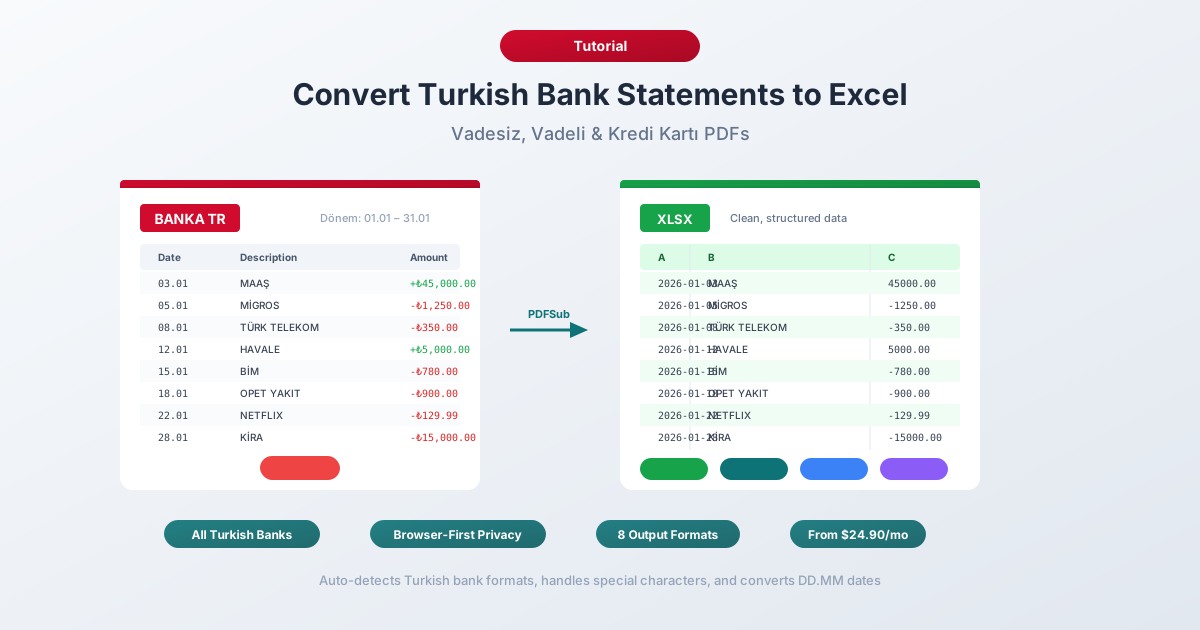
Why Turkish Bank Statements Break in Excel
Turkish bank statements combine number formatting, date conventions, character encoding, and financial terminology that are each individually tricky -- and collectively a nightmare for English-locale tools. Here are the six core problems.
1. Comma Decimals and Period Thousands
Like most of continental Europe, Turkey uses the opposite number convention from the English-speaking world:
| Turkish Format | English Equivalent | What Excel Sees |
|---|---|---|
| 1.234,56 TL | 1,234.56 TL | Text (unrecognized) |
| 125.000,00 TL | 125,000.00 TL | Text or 125.0 |
| -4.567,89 TL | -4,567.89 TL | Text |
| 1.250.000,00 TL | 1,250,000.00 TL | Text |
English-locale Excel can't parse "1.234,56" -- it sees periods and commas in the wrong positions and treats the entire value as a text string. Simple find-and-replace fails because swapping commas for periods without first removing the thousands separators produces "1.234.56" -- still broken.
This problem is amplified in Turkey because high inflation produces large numbers. While a German statement might show four- or five-digit amounts in euros, Turkish statements routinely show six- and seven-digit figures in lira. A monthly salary might read "45.750,00 TL" and a rent payment "22.500,00 TL." More thousands separators mean more opportunities for parsing errors.
2. DD.MM.YYYY Date Format with Period Separators
Turkish dates use day-month-year order with periods: 15.03.2026 means March 15, 2026.
English-locale Excel interprets this as either:
- March 15, 2026 (if the day happens to be 13 or higher, forcing correct interpretation)
- January 15, 2026 (if the day is 12 or lower, and Excel guesses MM.DD.YYYY)
The result is a column where some dates parse correctly and others are silently wrong -- off by months. Sorting that column produces nonsensical transaction ordering, and you may not notice until reconciliation fails weeks later.
Turkish statements also feature dual dates per transaction:
- Islem Tarihi -- the transaction date (when the payment occurred)
- Valor Tarihi -- the value date (when the amount affects interest calculations)
These are frequently different. A Friday POS purchase might show an Islem Tarihi of Friday but a Valor Tarihi of Monday. Your converter needs to map both columns correctly and preserve the distinction.
3. The I/i Problem -- Turkish Character Encoding
Turkish uses four characters that don't exist in standard ASCII and that cause unique encoding problems:
| Character | Name | Problem |
|---|---|---|
| i (dotless I) | Lowercase dotless i | Unique to Turkish -- no English equivalent |
| I (dotted I) | Uppercase dotted I | The capital of "i" in Turkish, NOT "I" |
| g | Soft g | Often dropped or replaced with "g" |
| s | Cedilla s | Replaced with "s" in ASCII contexts |
The most notorious issue is the I/i inversion. In English, "i" uppercases to "I." In Turkish, "i" (dotted) uppercases to "I" (dotted), while "i" (dotless) uppercases to "I" (dotless). This means case-insensitive searches and text matching break unless the software understands Turkish locale rules. Bank statements frequently contain ALL CAPS text -- "EFT GONDERIM", "IS BANKASI", "GARANTI BBVA" -- where the dotted/dotless distinction matters for correct rendering.
Additional Turkish characters (c, o, u) appear throughout payee names, branch names, and descriptions. Encoding mismatches turn "Islem" into "Ä°ÅŸlem" or "?slem" -- making descriptions unreadable.
4. Large Inflation-Driven Amounts
Turkey's sustained high inflation (peaking above 85% in 2022 and remaining elevated) means that everyday transaction amounts are large by international standards. A restaurant meal might be 2.500,00 TL. A monthly utility bill might be 3.750,00 TL. Business transactions routinely reach millions.
This creates practical issues: Excel's default column width can't display seven-digit numbers (showing "####" instead), amounts accidentally parsed as floating-point lose precision on large numbers, and many Turks hold parallel USD, EUR, and gold accounts as inflation hedges -- so a single customer's statements may contain transactions in multiple currencies with wildly different magnitudes.
5. Multi-Currency Statements
Foreign-currency accounts are not a niche product in Turkey -- they're mainstream. Banks like Garanti BBVA, Is Bankasi, and Akbank offer USD, EUR, GBP, and even altin (gold) accounts where balances are denominated in grams of gold.
A single customer may hold a TRY current account, a USD deposit account as an inflation hedge, a EUR account for international trade, and an altin hesabi (gold account) as a savings vehicle. Each currency generates its own statement, often with different formatting conventions for the same bank. A converter needs to handle TRY, USD, EUR, GBP, and XAU amounts correctly, preserving the currency code and applying the right decimal formatting for each.
The government's 2021 KKM (Kur Korumali Mevduat -- FX-protected deposit) scheme added another layer: statements may show KKM entries where lira deposits are linked to exchange rate guarantees, producing descriptions that reference both TRY amounts and USD/EUR conversion rates.
6. EFT/FAST/Havale Transaction Codes
Turkish statements contain transfer-type codes that generic parsers don't recognize:
| Code | Full Name | Meaning |
|---|---|---|
| EFT | Elektronik Fon Transferi | Inter-bank transfer via CBRT (business hours only) |
| FAST | Fonlarin Anlik ve Surekli Transferi | Instant 24/7 transfer (Turkey's real-time payment system) |
| Havale | Havale | Intra-bank transfer (typically free) |
| POS | POS Islemi | Point-of-sale card transaction |
| ATM | ATM Islemi | ATM withdrawal or deposit |
These codes appear embedded in description fields alongside dekont (receipt) numbers, IBAN fragments, and payee details -- all in Turkish. A converter that doesn't understand this structure will either split one transaction across multiple rows or collapse multiple fields into a single unstructured text blob.
The Major Banks and Their Statement Formats
Turkey's banking sector divides into four distinct categories, each with different statement conventions and export capabilities.
State Banks
Ziraat Bankasi -- Turkey's largest bank by assets, founded in 1863. Originally an agricultural bank, now a full-service institution with the country's widest branch network. Statements are primarily PDF-based. Digital exports from online banking are limited compared to private banks. Very common for government employees, retirees, and rural customers.
Halkbank -- The second major state bank, focused on small business lending. PDF statements are the primary format with basic export options from online banking.
VakifBank -- The third state pillar, originally established as a foundation bank. Similar to Halkbank in digital capabilities with PDF-heavy statement delivery.
State bank statements tend to be more conservative in layout -- simpler formatting but fewer export options. If your client banks with a state bank, you're almost certainly working with PDFs that need conversion.
Private Banks
Is Bankasi -- Turkey's largest private bank, founded in 1924 during the early Republic. Provides both PDF and Excel export from online banking (Isbank Internet Subesi). The most commonly encountered private bank statement in accounting workflows. Multi-currency statements are standard for business clients.
Garanti BBVA -- Owned by Spain's BBVA group. Strong digital banking platform with PDF and Excel export options. Garanti's online banking interface offers reasonably clean transaction downloads, though the CSV format uses semicolons as delimiters and Turkish number formatting.
Akbank -- Part of the Sabanci Group. Offers PDF and limited Excel export. Widely used by corporate clients with high transaction volumes.
Yapi Kredi -- Joint venture between Koc Group and UniCredit. PDF is the default format for official ekstreler, with digital access through online banking.
Digital and Foreign-Owned Banks
Enpara.com -- QNB Finansbank's digital banking brand, known for zero-fee accounts. Offers the best export capabilities among Turkish banks -- clean CSV and Excel downloads with well-structured columns. If your client uses Enpara, start with their native export before converting PDFs.
QNB Finansbank -- Owned by Qatar National Bank. Standard PDF and limited CSV export.
DenizBank -- Owned by Emirates NBD. Standard digital banking exports.
Papara -- Turkey's largest fintech with over 20 million users. Transaction history exports are available but formatted differently from traditional bank statements.
Participation (Islamic) Banks
Kuveyt Turk, Albaraka Turk, and Turkiye Finans operate under Islamic banking principles. Their statements use fundamentally different terminology:
| Conventional Term | Participation Bank Term | Meaning |
|---|---|---|
| Faiz (Interest) | Kar Payi (Profit Share) | Return on deposits |
| Kredi (Credit/Loan) | Finansman (Financing) | Lending products |
| Faiz Orani (Interest Rate) | Kar Payi Orani (Profit Share Rate) | Rate of return |
| Mevduat (Deposit) | Katilim Hesabi (Participation Account) | Savings account |
A converter that expects "faiz" in interest entries will miss "kar payi" on participation bank statements entirely. This distinction matters for categorizing transactions correctly in accounting software.
Method 1: Use a Bank Statement Converter (Recommended)
PDFSub handles Turkish bank statements natively, including all the formatting challenges described above.
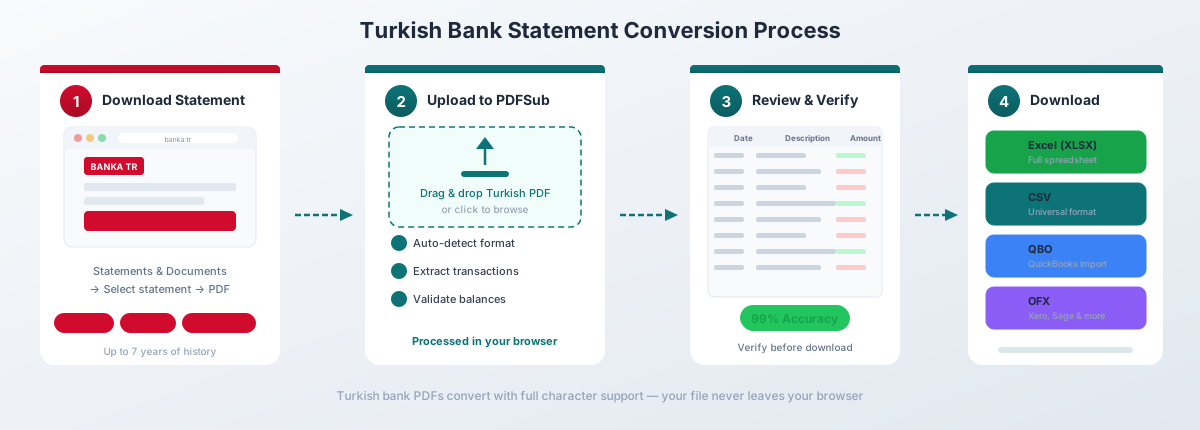
How It Works
-
Upload your hesap ekstresi -- Drag and drop the PDF from any Turkish bank. PDFSub auto-detects the bank format and Turkish locale from the document structure, currency codes, and text patterns.
-
Automatic format handling -- The converter automatically:
- Converts DD.MM.YYYY dates to your preferred format
- Transforms comma decimals (1.234,56) to standard numbers (1234.56)
- Preserves Turkish characters (c, g, i, I, o, s, u) with correct UTF-8 encoding
- Parses EFT, FAST, and Havale transaction types into structured fields
- Maps Islem Tarihi and Valor Tarihi to separate date columns
- Handles TRY, USD, EUR, and other currency amounts correctly
-
Review and verify -- Check the extracted transactions in the preview. Opening and closing bakiye (balance) values are validated against the statement totals.
-
Download -- Export as Excel (.xlsx), CSV, QBO (QuickBooks), OFX (Xero, Wave), QFX (Quicken), QIF, or JSON.
Why It Works for Turkish Statements
130+ languages including Turkish. The extraction engine understands Turkish banking terminology -- hesap ekstresi, bakiye, borc, alacak, tutar, aciklama -- and maps them to structured fields correctly.
All major Turkish banks supported. Ziraat, Halkbank, VakifBank, Is Bankasi, Garanti BBVA, Akbank, Yapi Kredi, QNB Finansbank, DenizBank, Enpara, and participation banks are all recognized and parsed correctly across 20,000+ global bank formats.
Browser-first privacy. For digital PDFs from online banking -- which is most Turkish bank statements -- text extraction happens entirely in your browser. The file never leaves your device. Server-side processing is only triggered for scanned documents or image-heavy PDFs.
Correct Turkish number handling. The converter understands Turkish number formatting rules, including the large inflation-driven amounts that are common on Turkish statements. Six- and seven-digit numbers with period thousands separators and comma decimals are parsed without precision loss.
Multi-currency awareness. TRY, USD, EUR, GBP, and gold account statements are each handled with the correct decimal precision and currency code preservation.
Pricing
Bank statement conversion is included in the All-In-One plan at $20/user/mo (annual; 500 pages per user). All paid plans include a 7-day free trial with full functionality. See current pricing for details.
Method 2: Bank-Provided Downloads
Some Turkish banks offer CSV or Excel exports from their online banking platforms. Here's what to expect:
How to Get It
- Is Bankasi: Isbank Internet Subesi -- Hesap Hareketleri -- Excel Indir
- Garanti BBVA: Garanti Internet -- Hesap Islemleri -- Excel/CSV
- Akbank: Akbank Direkt -- Hesap Ozeti -- Indir (Excel)
- Enpara: Enpara.com -- Hesap Hareketleri -- CSV Indir (cleanest exports)
- Ziraat Bankasi: Ziraat Internet -- limited export options, PDF primary
Limitations
Semicolon-delimited CSV. Like other countries that use comma decimals, Turkish CSV exports use semicolons as delimiters. Opening these in English-locale Excel dumps everything into column A.
Fix: Open Excel -- Data -- From Text/CSV -- Select the file -- Choose "Semicolon" as delimiter -- Set UTF-8 encoding to preserve Turkish characters.
Turkish number formatting preserved. The exported file retains comma decimals and period thousands separators. You'll still need to convert these to English number format for calculations.
State banks lag behind. Ziraat, Halkbank, and VakifBank -- which collectively serve a massive share of Turkey's population -- offer minimal or no Excel/CSV export. If your client banks with a state bank, you're working with PDFs.
Limited history. Most banks restrict export to 3-12 months of transactions. For annual statement processing or audit preparation, you'll need to work with the PDF ekstreler.
Not an official document. A CSV download is not a hesap ekstresi. It lacks opening and closing balances, the bank's official formatting, and the document standing required by Turkish tax authorities (Gelir Idaresi Baskanligi).
Method 3: Copy-Paste (Not Recommended)
You can try selecting transaction data from the PDF and pasting into Excel. The problems are severe:
- Turkish characters (c, g, i, o, s, u) may be corrupted or dropped
- Comma decimals paste as text, not numbers
- Multi-line descriptions create extra rows, breaking the table structure
- EFT/FAST codes and dekont numbers merge with descriptions
- Dual date columns (Islem Tarihi / Valor Tarihi) collapse into a single field
- No validation against opening and closing balances
- Large inflation-driven numbers may paste with incorrect precision
For anything beyond a handful of transactions, copy-paste creates more cleanup work than it saves.
Transfer Types on Turkish Statements
Understanding the transfer codes on Turkish statements is essential for correct categorization. Here's what each type means and how it appears:
EFT (Elektronik Fon Transferi)
Inter-bank electronic transfer processed through the Central Bank of the Republic of Turkey (TCMB). Available only during CBRT business hours (weekdays 08:30-17:30). Statement descriptions typically read:
EFT GONDERIM-- outgoing EFTEFT GELEN-- incoming EFTEFT/MEHMET YILMAZ/TR330006100519786457841234-- with recipient name and IBAN
FAST (Fonlarin Anlik ve Surekli Transferi)
Turkey's instant payment system, operational 24/7/365 with transfer limits up to 100.000 TL per transaction. Launched in 2021 and rapidly adopted -- similar to India's UPI or Brazil's PIX. Statement appearances include:
FAST GONDERIM-- outgoing instant transferFAST GELEN-- incoming instant transferFAST/AYSE DEMIR/TR760001001234567890123456-- with details
Havale
Intra-bank transfer between accounts at the same institution. Typically free of charge and processed instantly. Common descriptions:
HAVALE GONDERIM-- outgoing havaleHAVALE GELEN-- incoming havaleHAVALE/SUBE 1234/HESAP 567890-- with branch and account details
Other common entries include POS ISLEMI (card payment), OTOMATIK ODEME (automatic bill payment), MAAS ODEMESI (salary), KREDI KARTI ODEMESI (credit card payment), ATM CEKIM (ATM withdrawal), VIRMAN (internal transfer between own accounts), and DEKONT NO: 123456 (receipt/voucher number reference).
Tax and Fee Entries
Turkish bank statements contain several tax-related deductions that need to be categorized correctly for accounting purposes. Here's what you'll encounter:
| Tax / Fee | Turkish Name | Rate / Notes |
|---|---|---|
| KDV | Katma Deger Vergisi (VAT) | 20% on commission charges and bank service fees |
| BSMV | Banka ve Sigorta Muameleleri Vergisi | 10% on core banking transactions (replaces KDV for financial services) |
| Stopaj | Stopaj Kesintisi (Withholding Tax) | Deducted at source on interest/profit share income; appears after faiz or kar payi entries |
| KKDF | Kaynak Kullanimi Destekleme Fonu | Levy on FX borrowing and import financing; common on business accounts |
| Damga Vergisi | Stamp Tax | Applied to loan drawdowns, guarantees, and financial contracts |
Each of these entries needs to map to the correct tax category in your chart of accounts. A converter that correctly parses Turkish description fields makes this categorization significantly faster than scanning PDF pages manually.
Multi-Currency and Gold Accounts
Turkey's inflationary environment has made multi-currency banking a standard practice rather than a luxury. Understanding how these accounts appear on statements is critical for accurate conversion.
It's common for Turkish individuals and businesses to hold accounts in three or more currencies simultaneously. A typical small business might maintain a TRY hesap for domestic transactions and payroll, a USD hesap for imports and as a store of value, a EUR hesap for European suppliers, and an altin hesabi (gold account) denominated in grams as a savings vehicle.
Each currency account generates a separate hesap ekstresi with its own opening balance, closing balance, and transaction history. When converting for reconciliation, process each statement independently and preserve the currency denomination.
Gold accounts are denominated in grams rather than currency units. Balances appear as "152,347 gr" or "0,500 gr ALTIN." Converting gold account statements requires handling gram-denominated amounts that don't follow standard currency conventions.
KKM (Kur Korumali Mevduat) -- the government's exchange-rate-protected deposit scheme introduced in December 2021 -- adds a unique entry type. KKM deposits are denominated in TRY but pegged to the USD/TRY or EUR/TRY exchange rate, so statement entries may reference multiple currencies in a single transaction description.
Participation Banking Statements
Turkey's participation banks (katilim bankalari) -- Kuveyt Turk, Albaraka Turk, Turkiye Finans, Vakif Katilim, and Ziraat Katilim -- operate under Islamic banking principles. Their statements use different terminology that requires specific handling.
The most important distinction is that participation banks do not use the word "faiz" (interest). Interest income becomes kar payi (profit share), loans become finansman (financing), and deposit accounts become katilim hesabi (participation account). A converter that scans for "faiz" to identify interest entries will miss every participation bank equivalent.
For SMMMs, this means stopaj (withholding tax) entries reference "kar payi" rather than "faiz," expense classifications use "kar payi gideri" instead of "faiz gideri," and automated matching rules that reference "faiz" or "kredi" won't catch participation bank equivalents. Ensure your converter handles both terminology sets.
Importing into Accounting Software
Once your Turkish bank statement is converted, you need to get the data into your accounting system. Here's how the main platforms handle Turkish financial data.
QuickBooks
Format: QBO (Web Connect) or CSV
QuickBooks Online does not natively support Turkish number or date formatting. Convert your statement to QBO format -- which uses standardized date (YYYYMMDD) and number (no thousands separator, period decimal) conventions -- for the cleanest import. PDFSub's QBO export handles this conversion automatically.
For QuickBooks Desktop, use the QBO or QIF import path through File -- Utilities -- Import -- Web Connect.
Xero
Format: OFX or CSV
Xero's bank feed import accepts OFX files, which -- like QBO -- use standardized formatting that bypasses Turkish locale issues. For CSV import, Xero requires specific column headers (Date, Amount, Payee, Description) and expects English number formatting. Convert via PDFSub to OFX for the smoothest experience.
Turkish Accounting Software
LUCA and Parasut -- Turkey's most popular cloud accounting platforms. Both accept CSV and Excel imports with Turkish formatting, so you may want to preserve the original Turkish date and number formats rather than converting to English conventions.
DATEV -- For Turkish subsidiaries of German companies, DATEV-compatible export is sometimes required. PDFSub's CSV output provides the structured data needed for DATEV's import assistant.
General Import Tips
- Always match the currency -- don't import a USD hesap ekstresi into a TRY-denominated bank account
- Map dual dates correctly -- use Islem Tarihi (transaction date) as the primary date; Valor Tarihi is relevant only for interest calculations
- Preserve descriptions -- EFT/FAST codes and dekont numbers are valuable for audit trails
- Handle tax entries separately -- BSMV, KDV, and Stopaj amounts should map to dedicated tax expense or withholding accounts
Frequently Asked Questions
Can I convert Ziraat Bankasi statements to Excel?
Yes. PDFSub supports Ziraat Bankasi statements in all formats. Since Ziraat's online banking offers limited CSV/Excel export compared to private banks, PDF conversion is typically the only practical path for accessing structured data from Turkey's largest bank.
How do I handle the comma decimal format in Turkish statements?
PDFSub converts Turkish comma decimals (1.234,56) to standard format (1234.56) automatically during extraction. If you're working with raw CSV files from a Turkish bank, you'll need to either change Excel's locale settings (File -- Options -- Advanced -- uncheck "Use system separators" and set Decimal separator to comma, Thousands separator to period) or use Find & Replace to swap separators manually.
What's the difference between EFT, FAST, and Havale?
EFT (Elektronik Fon Transferi) is an inter-bank transfer that processes only during CBRT business hours. FAST (Fonlarin Anlik ve Surekli Transferi) is Turkey's instant payment system that works 24/7 with a 100.000 TL limit. Havale is an intra-bank transfer between accounts at the same institution, typically free and instant. All three appear as distinct transaction types on Turkish statements.
Do Turkish digital bank statements have OCR issues?
Generally no. Statements downloaded from Turkish online banking portals (internet subesi) are native digital PDFs with selectable text. OCR is only needed for older paper statements or scanned documents. PDFSub handles both -- browser-based extraction for digital PDFs and server-side AI for scanned documents.
How do I handle multi-currency Turkish statements?
Each currency account generates a separate hesap ekstresi. Process each statement individually, preserving the currency code (TRY, USD, EUR, GBP, or XAU for gold). When importing into accounting software, ensure each statement maps to the correct currency-denominated bank account in your chart of accounts.
Can I convert participation bank (katilim bankasi) statements?
Yes. PDFSub recognizes both conventional and participation banking terminology. Entries using "kar payi" (profit share) instead of "faiz" (interest) and "finansman" instead of "kredi" are correctly parsed and mapped to structured fields.
What Turkish characters might cause encoding issues?
The Turkish-specific characters c, g, i (dotless i), I (dotted I), o, s, and u require UTF-8 encoding to display correctly. The most problematic is the I/i pair, which has a different uppercase/lowercase mapping than English. PDFSub preserves all Turkish characters with correct UTF-8 encoding throughout the conversion process.
How many Turkish banks does PDFSub support?
PDFSub supports 20,000+ bank formats globally, including all major Turkish banks: Ziraat Bankasi, Halkbank, VakifBank, Is Bankasi, Garanti BBVA, Akbank, Yapi Kredi, QNB Finansbank, DenizBank, Enpara.com, Papara, and all participation banks (Kuveyt Turk, Albaraka Turk, Turkiye Finans, Vakif Katilim, Ziraat Katilim).
Is my data secure when converting Turkish bank statements?
For digital PDFs, PDFSub's Tier 1 extraction runs entirely in your browser - the file never leaves your device. When server-side processing is needed for scanned documents, the PDFSub Engine handles it - an isolated service with no internet access. Files are processed in an isolated environment and auto-deleted. This is a strong privacy model for handling sensitive Turkish financial data.
Can I process multiple Turkish statements at once?
Yes. Upload multiple hesap ekstreleri and PDFSub processes them sequentially. Each statement is auto-detected and converted independently, even if they're from different banks or different currencies.