Convert Spanish Bank Statements to Excel (CaixaBank, Santander, BBVA, and More)
Spanish bank statements use period-separated thousands, comma decimals, and DD/MM/YYYY dates that break in English Excel. Here's how to convert them correctly.
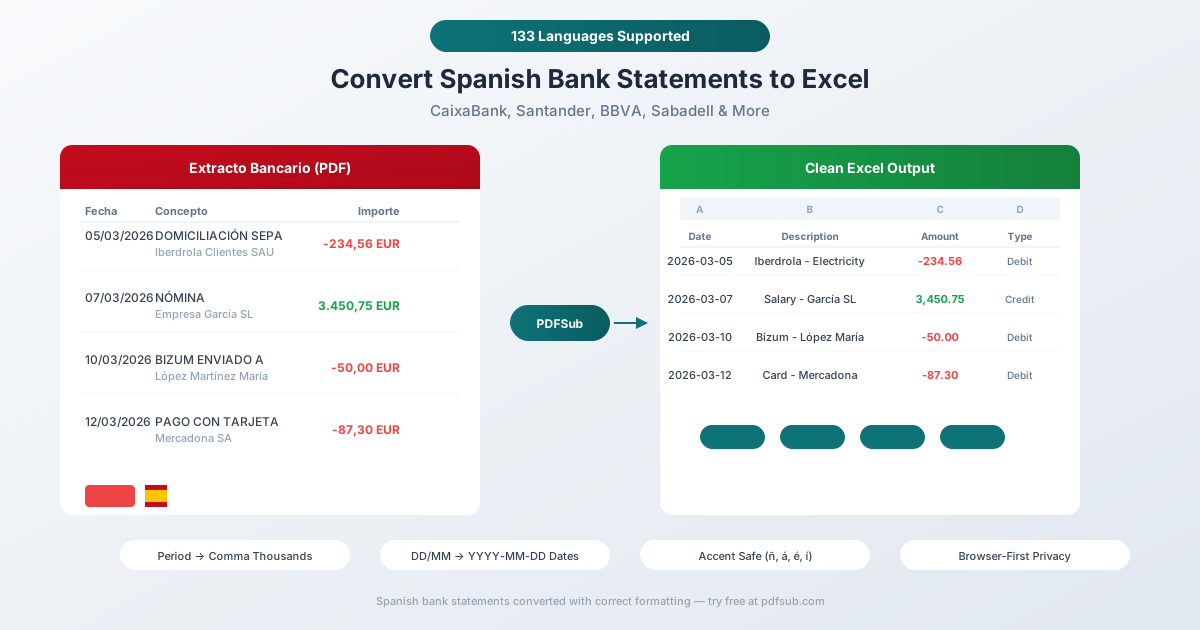
Your extracto bancario from CaixaBank looks perfectly organized - clean columns, every transaction neatly labeled with its concepto. But paste it into English Excel and the formatting breaks immediately: "1.234,56" gets treated as a date or text because the periods and commas are reversed from what English Excel expects. "15/03/2026" silently becomes March 15 or gets misread as May 3 depending on your locale. And multi-line SEPA domiciliación entries split into three separate rows.
Here's the context that makes this worse: Spain's banking sector underwent massive consolidation after the 2012 crisis, shrinking from 59 institutions to just 18. The five major banks - CaixaBank, Santander, BBVA, Sabadell, and Bankinter - now dominate the market. Most offer PDF statements as the primary export format, with Spain's proprietary Norma 43 electronic format reserved mainly for business accounts. For millions of personal account holders, PDF conversion is the only path to spreadsheet data.
Whether you're a British retiree on the Costa del Sol reconciling CaixaBank statements for UK tax purposes, an asesor fiscal importing client data into Sage Despachos, an American expat filing FBAR with Spanish bank data, or a multinational consolidating Spanish subsidiary accounts - the core problem is identical: extracting structured, spreadsheet-ready data from Spanish bank statement PDFs.
This guide covers the specific formatting challenges of Spanish statements, the major banks you'll encounter, and how to convert them accurately.
Why Spanish Bank Statements Break in Excel
Spanish financial formatting uses the European Continental convention, which reverses the meaning of periods and commas compared to English. This, combined with Spanish-language descriptions and multi-line SEPA entries, creates several parsing challenges.
1. Reversed Decimal and Thousands Separators
This is the fundamental formatting conflict. Spanish numbers use:
- Period (.) as thousands separator: 1.234.567
- Comma (,) as decimal separator: 1.234,56 EUR
| Spanish Format | English Equivalent | What English Excel Does |
|---|---|---|
| 1.234,56 | 1,234.56 | Treats as text or date (1.234 looks like a version number) |
| 15.000,00 | 15,000.00 | Treats "15.000" as a date (Jan 15, 2000) or text |
| 125.347,89 | 125,347.89 | Treats as text (multiple periods = unrecognizable) |
The problem is particularly insidious with round numbers. "15.000" - meaning 15,000 euros - gets interpreted by English Excel as January 15, 2000. Once Excel converts it to a date serial number, the original value is permanently lost. You can't undo it because Excel has already overwritten the cell data.
For amounts with a single thousands separator (e.g., "1.250,00"), English Excel may interpret "1.250" as the number 1.25, silently losing three orders of magnitude. A €1,250 payment becomes €1.25 in your spreadsheet - with no error message.
2. DD/MM/YYYY Dates
Spanish dates use day-month-year with slashes: 15/03/2026 means March 15, 2026.
Like French dates, Spanish dates use the same slash separator as American dates. When the day is 12 or below, English Excel silently interprets the day as the month. "05/03/2026" (March 5) becomes May 3. No warning, no error - just wrong data in roughly 40% of your date column.
Spanish statements may also show a Fecha valor (value date) alongside the Fecha operación (transaction date). These two dates can differ by 1-2 business days, and your converter needs to identify and export both correctly.
3. Multi-Line SEPA and Domiciliación Descriptions
Spanish SEPA direct debits (domiciliaciones) produce verbose entries:
15/03  ADEUDO POR DOMICILIACION
       IBERDROLA CLIENTES SAU
       Ref: ES12345678901234
       Mandato: MAND-2024-789012
       Factura electricidad marzo
That's one transaction across five lines. A naive PDF parser creates five rows. The meaningful description - "Factura electricidad marzo" - is buried on line 5.
This is amplified by Norma 43's limitation: the standard only allows 28 characters in the primary description field, forcing banks to use up to 5 complementary records (76 characters each) for the full transaction details. When these are rendered in PDF format, they become multi-line entries.
4. Bizum Transactions
Spain's dominant P2P payment system - Bizum - has over 30 million active users in a country of 49 million. Bizum transactions appear on statements as entries like:
BIZUM ENVIADO A GARCIA LOPEZ MARIA
BIZUM RECIBIDO DE MARTINEZ FERNANDEZ PEDRO
PAGO BIZUM TIENDA ONLINE
These need to be correctly identified as P2P transfers, not miscategorized as other transaction types. The format varies slightly between banks.
5. Spanish Characters (ñ, á, é, í, ó, ú)
Spanish text includes accented characters and the distinctive ñ. These appear constantly in:
- Transaction types: "Domiciliación", "Nómina", "Comisión"
- Payee names: "Señor García López", "Compañía Telefónica"
- Description fields: "Número de recibo", "Información adicional"
Encoding mismatches between ISO-8859-1 (Latin-1, used in many Spanish banking systems) and UTF-8 turn "Domiciliación" into garbled characters. The ñ is particularly problematic - it's a single character (U+00F1) that gets corrupted into two bytes when the encoding is wrong.
6. Norma 43 Artifacts
If your accountant or software imports Norma 43 files, the artifacts are specific:
- Fixed 80-character line width - inherited from IBM punch cards
- 2-digit year in dates (DDMMAA) - "150326" means March 15, 2026
- ISO-8859-1 encoding - not UTF-8
- 28-character description limit - requiring complementary records for full details
- Bank-specific code variations - transaction type codes differ between CaixaBank, Santander, and BBVA
Major Spanish Banks and Their Statements
CaixaBank (~18.87 Million Customers)
Spain's largest bank by domestic presence with approximately 25% market share. Has 5,397 branches - the most extensive branch network in Spain. Formed through the 2021 merger with Bankia (which inherited the former Caja Madrid customer base). Offers Norma 43 downloads through Línea Abierta online banking. PDF statements available. Historical Norma 43 files cost approximately €3 per download for periods up to 10 years.
Banco Santander
The largest Spanish bank globally with 180 million customers worldwide. Total domestic assets of approximately €535 billion. Spanish operations represent 17.4% of global revenue. PDF statements through online banking. Norma 43 available primarily for business accounts.
BBVA (~77.2 Million Global Customers)
Second-largest Spanish bank with approximately €468 billion in domestic assets (18.66% market share). Norma 43 is available but may require activation through a local branch. PDF statements available through online banking. BBVA's mobile app is considered one of the best in European banking.
Banco Sabadell (~12 Million Customers)
Spain's fifth-largest bank with approximately €184 billion in total assets. Successfully resisted BBVA's hostile takeover bid in 2025. Strong presence in the UK through TSB Bank (subsidiary). PDF and electronic statement downloads available.
Bankinter
Focused on higher-income, digitally-savvy customers. Record profit of €1.09 billion in 2025. Strong private banking division (€49 billion AUM). Known for digital-first approach with comprehensive online banking tools.
Unicaja (~3 Million Customers)
Formed from the 2021 merger of Unicaja and Liberbank (both former cajas de ahorro). Approximately €93 billion in total assets. Strongest presence in Andalusia and Asturias.
ING Spain (~4.4 Million Customers)
Popular with expats due to English-language support and no-fee accounts. Recently expanded ATM network with 740+ new terminals. PDF and transaction downloads available through online banking.
Method 1: Use PDFSub (Recommended)
PDFSub handles Spanish bank statements natively - including all the formatting challenges above.
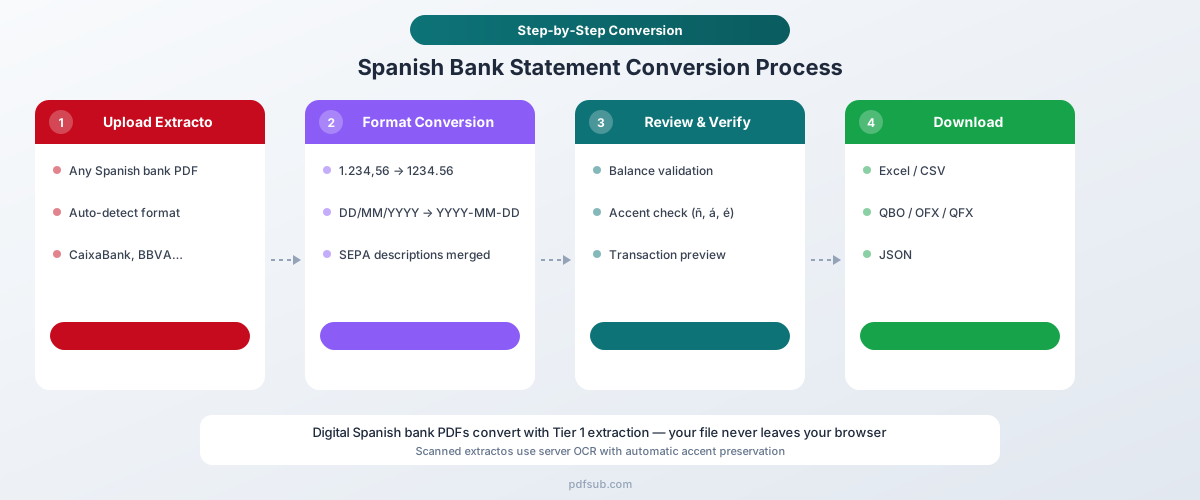
How It Works
-
Upload your extracto bancario - Drag and drop the PDF from any Spanish bank. PDFSub auto-detects the bank format from the 20,000+ supported templates.
-
Automatic format handling - The converter automatically:
- Converts period thousands (1.234) and comma decimals (,56) to standard format (1234.56)
- Parses DD/MM/YYYY dates correctly (not as MM/DD/YYYY)
- Merges multi-line SEPA and domiciliación descriptions into single entries
- Identifies Bizum transactions correctly
- Preserves Spanish characters (ñ, á, é, í, ó, ú) with correct UTF-8 encoding
- Maps Fecha operación and Fecha valor to separate columns
-
Review and verify - Check the extracted transactions in the preview. Balances are validated against the statement's Saldo anterior and Saldo final.
-
Download - Export as Excel (.xlsx), CSV, QBO (QuickBooks), OFX (Xero, Wave), QFX (Quicken), or JSON.
Why PDFSub Works for Spanish Statements
130+ languages including Spanish. The extraction engine understands Spanish banking terminology - Transferencia, Domiciliación, Nómina, Recibo, Comisión, Bizum - and maps them to structured fields.
Every major Spanish bank supported. From CaixaBank's 18.87 million customers to Santander, BBVA, Sabadell, Bankinter, Unicaja, and ING Spain. The AI-assisted extraction adapts to each bank's specific PDF layout.
Browser-first privacy. For digital PDFs from online banking, text extraction happens entirely in your browser. The file never leaves your device. Server-side processing is only used for scanned documents - important for businesses handling sensitive financial data under Spain's data protection law (LOPDGDD).
Correct number handling. The converter correctly interprets Spanish number formatting - "1.234,56" becomes 1234.56, not 1.234 (which Excel would interpret as 1.234 or a date). This prevents the silent data corruption that manual approaches create.
SEPA-aware parsing. Multi-line domiciliación entries with mandate references, IBAN details, and concepto descriptions are merged into clean, single-line entries. The actual payment purpose is extracted and separated from machine-readable SEPA metadata.
Method 2: Norma 43 (Cuaderno 43)
Norma 43 is Spain's proprietary electronic bank statement format, developed by the Asociación Española de la Banca (AEB). It's the standard format used by Spanish accounting software for bank reconciliation.
What It Is
A fixed-width text file where every line is exactly 80 characters. Transaction records include date, value date, amount (with sign), and a 28-character description. Complementary records can extend the description up to 380 additional characters.
Limitations
Business accounts only. Most banks offer Norma 43 downloads only for corporate or professional accounts. Personal account holders typically can't access it.
ISO-8859-1 encoding. Not UTF-8. Spanish characters can be corrupted if the file is opened with the wrong encoding.
28-character descriptions. The primary description field is extremely limited. While complementary records extend it, the parsing is complex.
Bank-specific variations. Despite being a "standard," different banks implement Norma 43 slightly differently. Transaction type codes vary between CaixaBank, Santander, and BBVA.
2-digit years. Dates use DDMMAA format with 2-digit years, creating potential parsing ambiguity.
Becoming obsolete. PSD2/PSD3 open banking APIs are gradually replacing Norma 43 with real-time data access. However, it remains widely used by accounting software including Sage Despachos, A3 (Wolters Kluwer), and Contasol.
Method 3: Manual Copy-Paste (Not Recommended)
The problems are severe with Spanish statements:
- Period-thousands numbers paste as dates or version numbers, permanently corrupting the data
- Comma-decimal amounts paste as text that can't be calculated
- Dates silently get misinterpreted (day vs. month swap)
- Multi-line domiciliación entries create 3-5 extra rows per transaction
- Spanish characters (ñ, á) may be corrupted by encoding mismatches
- Bizum entries and SEPA references lose their structure
- No validation against Saldo anterior / Saldo final balances
For anything beyond a few transactions, this approach introduces more errors than it saves time.
Spanish Financial Systems You Should Know
Modelo 303 (VAT Return)
Spain's periodic IVA (VAT) self-assessment form, filed quarterly by most businesses (April 20, July 20, October 20, January 30). Reports VAT collected on sales vs. VAT paid on purchases. Spain has three IVA rates:
- 21% - Standard rate (electronics, clothing, professional services)
- 10% - Reduced rate (food, water, transport, hotels)
- 4% - Super-reduced rate (bread, milk, eggs, books, medicines)
Note: The Canary Islands, Ceuta, and Melilla have separate tax systems (IGIC in the Canaries).
Modelo 347 (Third-Party Operations)
Annual declaration required when transactions with a single client or supplier exceed €3,005.06 (including VAT) in a fiscal year. Used by Hacienda (Spain's tax authority) for cross-checking. Filed in February.
SII (Suministro Inmediato de Información)
Real-time VAT reporting system requiring electronic submission of invoice data within 4 calendar days. Mandatory for businesses with annual turnover above €6,010,121.04. Covers approximately 30,000-40,000 companies that account for the majority of domestic business turnover.
Verifactu (2026 E-Invoicing Mandate)
Spain's new e-invoicing mandate: effective January 1, 2026, for corporate taxpayers and July 1, 2026, for autónomos (self-employed). Requires all invoicing software to guarantee integrity and traceability of every invoice record. Penalty for non-compliance: up to €50,000 per fiscal year. Part of the broader "Crea y Crece" law establishing mandatory B2B e-invoicing.
Spanish Accounting Software
Spanish accountants use specialized tools:
- Sage Despachos - Most widely adopted for asesores fiscales
- A3 (Wolters Kluwer) - Long-established, serves both SMEs and accounting firms
- Contasol (Teamsystem) - Widely adopted, particularly for smaller firms
- Holded - Fast-growing cloud platform (accounting, invoicing, CRM)
- Quipu - Popular with freelancers; automates IVA and IRPF filings
All major platforms support Norma 43 import for bank reconciliation. PDFSub's CSV and Excel exports can also be imported directly.
Who Needs Spanish Bank Statement Conversion?
Asesores fiscales and gestorías. Spain has over 60,000 gestorías, asesorías, and professional offices providing tax advisory services. They process client bank statements for bookkeeping, Modelo 303 preparation, and Modelo 347 cross-checking. Many clients only provide PDF statements.
British expats. Over 290,000 British citizens are registered residents in Spain, concentrated on the Costa del Sol (Málaga) and Costa Blanca (Alicante). 40% are retirees. Many need to reconcile Spanish bank statements with UK tax obligations and report foreign accounts.
American expats. US citizens in Spain must report worldwide income and file FBAR for Spanish bank accounts exceeding $10,000. Spanish bank statements need to be converted to formats American accountants can process.
International businesses. Spain is the EU's fourth-largest economy. Companies with Spanish subsidiaries or operations need to consolidate Spanish banking data with global accounting systems that expect English number formatting.
Modelo 720 filers. All Spanish tax residents holding foreign assets over €50,000 per category must file Modelo 720. This requires detailed documentation of all foreign and domestic bank account balances, making accurate statement conversion essential.
Freelancers and autónomos. Spain's self-employed workers need bank statement data for quarterly IVA filings (Modelo 303) and annual income tax. Converting PDF statements to Excel is the starting point for categorizing business expenses and calculating IVA credits.
Tips for Working with Spanish Financial Data in Excel
Check for silent number corruption. After conversion, verify that large round numbers weren't converted to dates. If you see "Jan 15, 2000" where you expected "15.000" (€15,000), the conversion failed. This is the most dangerous error with Spanish numbers because Excel permanently overwrites the original data.
Verify date interpretation. Sort by date and check that dates are chronological. Any date that appears out of sequence suggests a DD/MM vs. MM/DD parsing error.
Understand Fecha operación vs. Fecha valor. The Fecha operación is when the transaction occurred. The Fecha valor is when it affects your balance for interest calculations. For reconciliation purposes, most accountants use Fecha operación.
Watch for Bizum formatting. Bizum transactions may appear with different prefixes across banks: "BIZUM ENVIADO A," "BIZUM RECIBIDO DE," or "PAGO BIZUM." Ensure these are consistently categorized in your spreadsheet.
Keep the original extracto. Spanish tax law requires retention of financial records for 4 years (general) and up to 10 years for certain documents. The original PDF extracto bancario serves as your legal document. Always keep it alongside the converted Excel file.
Mind the IVA. When categorizing expenses from bank statements, remember that amounts on the statement include IVA. For Modelo 303 preparation, you'll need to separate the base amount and IVA component - information that usually comes from the invoice, not the bank statement.
Frequently Asked Questions
Can I convert CaixaBank statements to Excel?
Yes. CaixaBank is Spain's largest bank by domestic presence with 18.87 million customers. PDFSub handles CaixaBank PDF statements natively, converting the Spanish formatting - period-separated thousands, comma decimals, and multi-line domiciliación entries - to clean spreadsheet data.
How do I handle the reversed number formatting?
PDFSub automatically converts Spanish number formatting: "1.234,56" becomes 1234.56. If you're working manually, the critical step is converting in the right order: first remove the period-thousands separators, then replace the comma decimal with a period. Doing it in reverse order corrupts the data.
What is Norma 43 and do I need it?
Norma 43 (Cuaderno 43) is Spain's proprietary electronic bank statement format - a fixed-width text file used primarily by Spanish accounting software. Most personal bank accounts only offer PDF statements. If your accountant uses Sage Despachos, A3, or Contasol, they may import Norma 43 files directly. PDFSub converts PDFs to clean Excel/CSV that can be imported into these tools as an alternative.
Do Spanish digital bank statements have OCR issues?
Generally no. Statements downloaded from Spanish online banking portals are native digital PDFs with selectable text, meaning extraction is fast and accurate. OCR is only needed for older paper statements or physical bank documents. PDFSub handles both - browser-based extraction for digital PDFs and server-side OCR for scans.
Can I export Spanish bank data for use with Holded or Sage?
PDFSub exports to Excel, CSV, QBO, OFX, QFX, and JSON. For Spanish accounting software (Sage Despachos, A3, Holded, Contasol), export to CSV and import using the software's bank transaction import feature. The properly formatted data from PDFSub avoids the encoding and number formatting issues that manual CSV imports create.
Is PDFSub compliant with Spanish data protection (LOPDGDD)?
For digital PDFs, PDFSub's Tier 1 extraction runs entirely in your browser - the file never leaves your device. When server-side processing is needed for scanned documents, the PDFSub Engine handles it - an isolated service with no internet access. Files are processed in an isolated environment and auto-deleted. PDFSub is GDPR and CCPA compliant, and SOC 2 Ready.
How many Spanish banks does PDFSub support?
PDFSub supports 20,000+ bank formats globally, including all major Spanish banks: CaixaBank, Santander, BBVA, Sabadell, Bankinter, Unicaja, Kutxabank, ING Spain, and dozens of regional institutions.
Can I convert multiple Spanish statements at once?
Yes. Upload multiple extractos bancarios and PDFSub processes them sequentially. Each statement is auto-detected and converted independently, even if they're from different banks with different PDF layouts.
Try PDFSub Free - full access to the Bank Statement Converter and 98+ other PDF tools on the All-In-One plan ($20/user/mo annual). Cancel anytime.