Convert Korean Bank Statements to Excel (KB Kookmin, Shinhan, Kakao Bank, and More)
Korean bank statements use Hangul text, integer-only Won amounts, and YYYY.MM.DD dates that trip up English-locale converters. Here's how to convert them cleanly.
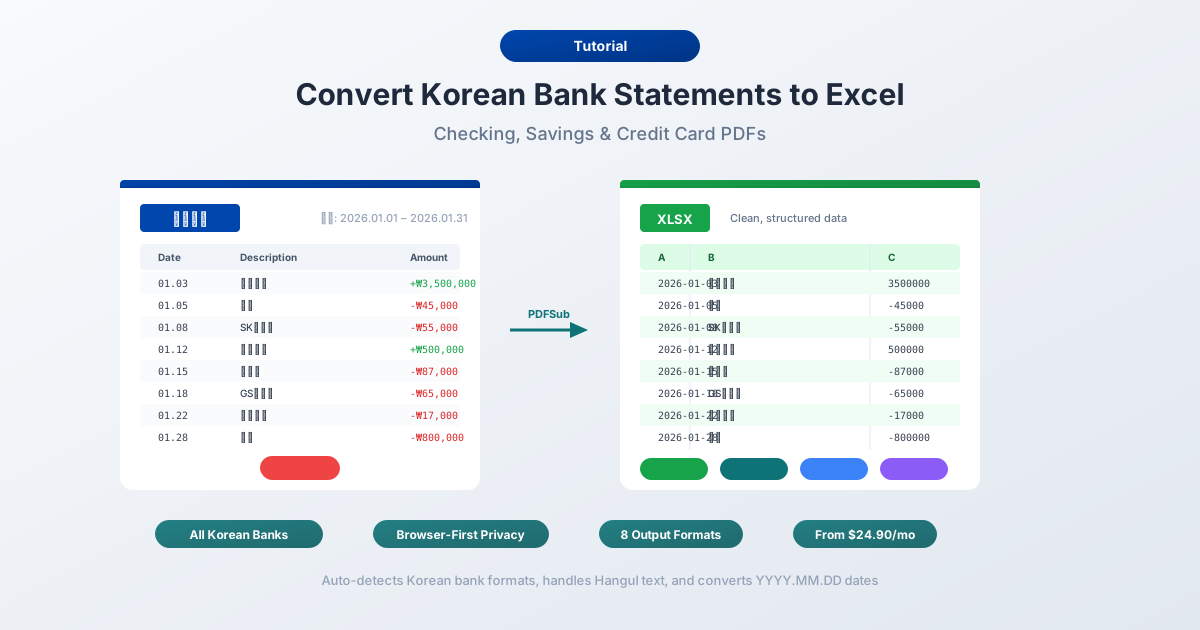
Your 거래내역서 (transaction statement) from KB Kookmin looks perfectly structured in the PDF. Clean columns, neatly labeled transaction types, every amount aligned. But open it in Excel outside South Korea and the problems begin: Hangul characters collapse into garbled text because the encoding is wrong, the amount 1,234,567원 is read as text because Excel doesn't recognize the Won symbol as a currency suffix, the date 2026.03.02 is misinterpreted or ignored entirely because period-separated dates aren't standard in most locales, and column headers like 거래일, 적요, and 잔액 are opaque to anyone who doesn't read Korean.
Here's the scale of the challenge: South Korea has a population of 51.7 million with 97.4% internet penetration - one of the highest rates on Earth. It is one of the world's most cashless societies. Kakao Bank alone has 25.8 million customers, Toss Bank has crossed 10 million, and mobile payment platforms like Kakao Pay (23 million+ users), Naver Pay, and Samsung Pay dominate daily transactions. The result is that South Korean bank statements are dense with digital payment descriptors, transfer references, and platform-intermediated transactions - all in Hangul.
Whether you're an expat in Seoul processing KB Kookmin statements for home-country tax filing, an international accountant consolidating data from a Korean subsidiary, a bookkeeper managing clients with Korean bank accounts, or a Korean freelancer exporting data into QuickBooks or Xero - the core problem is identical: extracting structured, spreadsheet-ready data from Korean bank statement PDFs.
This guide covers the specific formatting challenges of Korean statements, the major banks you'll encounter, and the methods available for accurate conversion.
Why Korean Bank Statements Break in Excel
Korean bank statements create a distinct set of conversion challenges that go beyond simple language translation. The problems span character encoding, currency formatting, date conventions, and statement layout.
1. Hangul Encoding Issues
Korean is written in Hangul (한글), a script where 24 base characters - 14 consonants and 10 vowels - combine into syllable blocks. Each block represents a single syllable: 은 (eun), 행 (haeng), together forming 은행 (bank). There are 11,172 possible syllable block combinations in Unicode, and Korean bank statements use thousands of them.
The encoding problem arises because older Korean systems and some bank exports use EUC-KR or CP949 encoding - character sets designed specifically for Korean that predate UTF-8. When you open an EUC-KR file on a system expecting UTF-8, Hangul characters become garbled.
| What You Should See | What UTF-8 May Display |
|---|---|
| 국민은행 거래내역 | ±¹¹ÎÀºÇà °Å·¡³»¿ª |
| 입금 급여 | ÀÔ±Ý ±Þ¿© |
| 자동이체 통신비 | ÀÚµ¿ÀÌü Åë½Åºñ |
The additional complication: Korean bank statements mix Hangul with Latin characters and Arabic numerals. Account numbers are in Latin digits, amounts use Latin numerals with commas, and some transaction descriptions include English merchant names alongside Korean text. The converter must handle this mixed-script content without corrupting either character set.
2. Integer-Only Won Amounts
The Korean Won (KRW, ₩) has no decimal subunit - there are no cents. All amounts on Korean bank statements are whole numbers: 1,234,567원 means exactly 1,234,567 Won.
This simplifies decimal handling but introduces other problems:
- Large numbers are routine. A typical monthly salary ranges from ₩3,000,000 to ₩5,000,000. Rent in Seoul might be ₩800,000 to ₩2,000,000 per month. Seven-digit numbers are the norm, not the exception.
- The Won symbol (₩) is a currency suffix or prefix. Statements may show amounts as 1,234,567원, ₩1,234,567, or just 1,234,567 with the currency implied. The 원 suffix and ₩ prefix are both text characters that Excel treats as non-numeric, preventing calculations.
- 만 (man) = 10,000 thinking. Koreans mentally group numbers in units of 10,000 (만) and 100,000,000 (억, eok). A salary of ₩50,000,000 is thought of as "5천만원" (50 million Won). Bank statements show the full number, but descriptions or notes may reference the abbreviated form.
- Commas every 3 digits on statements - even though the Korean and East Asian number system groups by 4 digits (만, 억). Financial documents follow the international convention.
3. YYYY.MM.DD Date Format
Korean bank statements use a big-endian date format with period separators: 2026.03.02. This is year-month-day order - logically ISO 8601 compliant - but the period separators trip up many parsers.
| Korean Date | Expected Interpretation |
|---|---|
| 2026.03.02 | March 2, 2026 |
| 2026.01.15 | January 15, 2026 |
| 2025.12.31 | December 31, 2025 |
English-locale Excel may interpret "2026.03.02" as a decimal number (2026.0302), a text string, or simply fail to parse it as a date. The period separator is the specific problem - Excel expects slashes (/) or hyphens (-) for dates, not periods.
Some statements also include timestamps: "2026.03.02 14:23" or use the Korean date characters: "2026년 03월 02일." The 년/월/일 characters (year/month/day) need to be stripped for Excel to recognize the date.
4. Separate Deposit and Withdrawal Columns
Like Japanese statements, Korean bank statements typically use two separate amount columns rather than a single signed-amount column:
- 입금액 (ipgeumack) - Deposit amount
- 출금액 (chulgeumack) - Withdrawal amount
For each transaction, one column contains the amount and the other is blank. Some statements use the formal honorific forms: 맡기신금액 (amount deposited, honorific) and 찾으신금액 (amount withdrawn, honorific). A converter must recognize both the standard and honorific versions and correctly map them to deposits and withdrawals.
5. Dense Transaction Descriptions in Hangul
Korean transaction descriptions are compact and use specialized banking vocabulary:
| Korean Term | Romanization | Meaning |
|---|---|---|
| 입금 | ipgeum | Deposit |
| 출금 | chulgeum | Withdrawal |
| 이체 | iche | Transfer |
| 자동이체 | jadong-iche | Auto-transfer (direct debit) |
| 급여 | geupyeo | Salary |
| 이자 | ija | Interest |
| 수수료 | susuryo | Fee/commission |
| 카드결제 | kadeu-gyeolje | Card payment |
These descriptions are critical for categorizing transactions in accounting software, but they're unreadable to anyone who doesn't speak Korean. A converter needs to either preserve them faithfully for Korean-speaking users or provide English mappings.
The Major Banks and Their Statement Formats
South Korea's banking landscape is dominated by four commercial banking groups, supplemented by government-affiliated banks and a rapidly growing digital banking sector.
KB Kookmin Bank (KB국민은행)
South Korea's largest bank by assets - approximately $409 billion - and the country's most widely used retail bank. Part of KB Financial Group. Online banking and the KB Star Banking app provide PDF statement downloads. KB Kookmin allows 10-year statement queries, one of the longest retention periods among Korean banks. Statements use standard Korean formatting with separate deposit/withdrawal columns.
Shinhan Bank (신한은행)
The second of the Big 4 commercial banks, part of Shinhan Financial Group. Shinhan was the first bank in Korea to offer internet banking and has one of the most advanced digital platforms. PDF and CSV exports available through Shinhan SOL (personal banking app). Statements follow standard Korean layout conventions.
Hana Bank (하나은행)
The third major commercial bank, part of Hana Financial Group. Formed from the 2015 merger of Hana Bank and Korea Exchange Bank. Online banking through Hana 1Q provides PDF statement access.
Woori Bank (우리은행)
The fourth of the Big 4, and the oldest - tracing its lineage to the first modern bank in Korea (1899). Part of Woori Financial Group. Woori WON Banking app provides statement downloads.
NH NongHyup Bank (NH농협은행)
Government-affiliated agricultural cooperative bank with 1,106 branches - the largest branch network in South Korea. NongHyup reaches virtually every rural community in the country. Popular with agricultural businesses, civil servants, and rural populations. Statement formats are standard Korean but the sheer volume of NongHyup customers makes it a frequently encountered format.
IBK Industrial Bank of Korea (IBK기업은행)
Government-affiliated bank focused on small and medium enterprises (SMEs). Widely used by Korean businesses for commercial banking. Statements may include additional corporate fields like business registration numbers and tax identifiers.
Kakao Bank (카카오뱅크)
South Korea's largest digital bank with 25.8 million customers - roughly half the country's population. Founded in 2017, integrated with the Kakao messaging ecosystem. Kakao Bank's statement layout is cleaner than traditional banks - fewer legacy formatting artifacts, more consistent column structure. Statements are digitally native with no scanning or OCR concerns.
Toss Bank (토스뱅크)
Digital bank operated by Viva Republica, the company behind the Toss super-app (30 million+ members). Launched in 2021 with 10 million+ customers as of 2025. Toss Bank statements are modern and well-structured, though the integration with the Toss payment platform means many transactions reference Toss-internal descriptors.
K bank (케이뱅크)
South Korea's first internet-only bank, launched in 2017, with 10 million+ customers. Backed by KT Corporation. Clean digital statement formats similar to Kakao Bank and Toss Bank.
Method 1: Use a Bank Statement Converter (Recommended)
PDFSub handles Korean bank statements natively - including all the encoding, currency, and formatting challenges described above.
How It Works
-
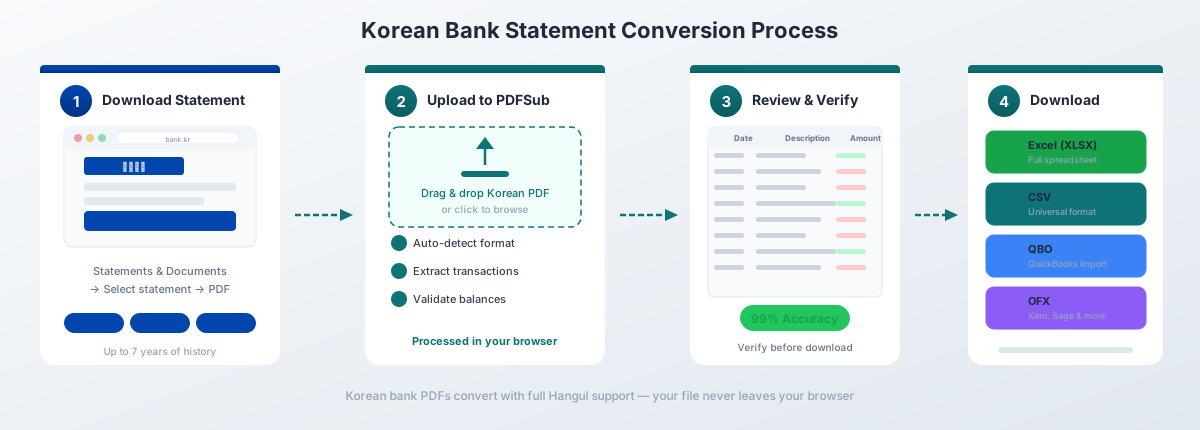
Upload your 거래내역서 - Drag and drop the PDF from any Korean bank. PDFSub auto-detects the bank format from over 20,000 supported templates.
-
Automatic format handling - The converter automatically:
- Detects and converts EUC-KR / CP949 encoding to UTF-8
- Strips Won symbols (₩ and 원) and converts amounts to numeric values
- Parses YYYY.MM.DD dates to standard date format (2026-03-02)
- Strips 년/월/일 characters from Korean-format dates
- Recognizes both standard (입금액/출금액) and honorific (맡기신금액/찾으신금액) column headers
- Maps Korean banking terminology (이체, 자동이체, 급여, 수수료, etc.) to structured fields
- Merges deposit/withdrawal columns or preserves them as separate columns
-
Review and verify - Check the extracted transactions in the preview. Balances are validated against the statement's opening and closing 잔액 (balance).
-
Download - Export as Excel (.xlsx), CSV (UTF-8), QBO (QuickBooks), OFX (Xero, Wave), QFX (Quicken), or JSON.
Why It Works for Korean Statements
130+ languages including Korean. The extraction engine understands Korean banking terminology - 입금, 출금, 이체, 자동이체, 급여, 수수료, 이자, 카드결제 - and maps them to structured fields.
Encoding handled automatically. No need to manually detect or convert between EUC-KR and UTF-8. PDFSub identifies the encoding and normalizes everything to UTF-8 with proper handling of Hangul syllable blocks and mixed Korean-Latin text.
Every major Korean bank supported. From the Big 4 (KB Kookmin, Shinhan, Hana, Woori) to NongHyup's 1,106 branches, IBK for SME clients, and the digital banks - Kakao Bank, Toss Bank, and K bank.
Browser-first privacy. For digital PDFs from online banking, text extraction happens entirely in your browser. The file never leaves your device. Server-side processing is only used for scanned documents or image-heavy PDFs.
Integer currency handling. Won amounts are correctly parsed as whole numbers with no spurious decimal places. The ₩ prefix and 원 suffix are stripped during extraction, leaving clean numeric values ready for calculation.
Pricing
PDFSub's All-In-One plan is $20/user/mo (annual) or $25/user/mo (monthly) - 98+ tools, 500 AI credits, and 500 bank statement pages per user. Stackable add-on packs available - 500 BSC pages at $20/month or 500 AI credits at $7/month (annual rates). All paid plans include a 7-day free trial with full functionality.
See current pricing for details.
Method 2: Bank-Provided Downloads
Most Korean banks offer some form of transaction download through online banking, but the experience is more restrictive than in Western banking markets.
What You'll Get
- Format: PDF is universally available. Excel/CSV export is offered by most major banks but varies in quality.
- Encoding: Typically EUC-KR for CSV files, not UTF-8.
- Date format: YYYY.MM.DD with period separators.
- Columns: 거래일 (Date), 적요 (Description), 입금액 (Deposit), 출금액 (Withdrawal), 잔액 (Balance).
Limitations
Certificate authentication barrier. Korean online banking has historically required a 공동인증서 (joint certificate) - a digital certificate stored on the user's device or USB drive. While the system has modernized significantly since 2020, many banking functions - including statement downloads - still require certificate-based authentication. This creates friction for international users who may not have the Korean-issued certificate infrastructure set up.
Limited export options. OFX and QBO are uncommon in the Korean banking ecosystem. Most banks provide PDF and Excel/CSV, but not the accounting-software-ready formats that Western banks offer. You'll need an intermediary tool to convert to QBO or OFX.
History limits vary. KB Kookmin's 10-year query window is generous, but other banks may limit export to 3-12 months. Longer history often requires downloading statements period by period.
ActiveX and browser restrictions. While improving, some Korean banking websites still have dependencies on specific browsers or plugins - legacy of the ActiveX era that dominated Korean web banking for over a decade. International users on macOS or Linux may encounter compatibility issues with certain bank portals.
Method 3: Copy-Paste (Not Recommended)
Copying transaction data from a Korean bank statement PDF and pasting into Excel produces predictably poor results:
- Hangul characters may paste as garbled text if the system clipboard doesn't handle Korean encoding correctly
- Won amounts paste as text strings (with ₩ or 원 attached) that Excel can't calculate
- YYYY.MM.DD dates paste as text strings or are misinterpreted as decimal numbers
- Separate deposit/withdrawal columns lose their alignment - amounts shift into wrong columns
- Transaction descriptions containing mixed Korean and Latin text may split unpredictably across cells
- No validation against opening/closing balances
- No way to verify extraction accuracy for large numbers of transactions
For anything beyond a handful of transactions, copy-paste is impractical.
Understanding the Korean Statement Layout
Korean bank statements follow a relatively consistent structure across banks, though terminology varies slightly.
Standard Column Headers
| Korean Header | Romanization | English Meaning |
|---|---|---|
| 거래일 (거래일자) | georae-il (georae-ilja) | Transaction date |
| 적요 | jeoyo | Description/summary |
| 입금액 | ipgeumack | Deposit amount |
| 출금액 | chulgeumack | Withdrawal amount |
| 잔액 | jan-ack | Balance |
| 거래점 | georae-jeom | Branch |
| 메모 | memo | Memo/note |
Honorific Variants
Some Korean banks - particularly traditional banks serving older demographics - use honorific forms for column headers. This is a uniquely Korean convention rooted in the language's complex honorific system:
| Standard | Honorific | Meaning |
|---|---|---|
| 입금액 | 맡기신금액 | Amount deposited (respectful) |
| 출금액 | 찾으신금액 | Amount withdrawn (respectful) |
The honorific forms use the suffix -신 (-shin), which elevates the verb to show respect toward the account holder. A converter must recognize both forms as equivalent.
Common Transaction Types
| Korean | Romanization | English | Context |
|---|---|---|---|
| 입금 | ipgeum | Deposit | General incoming funds |
| 출금 | chulgeum | Withdrawal | General outgoing funds |
| 이체 | iche | Transfer | Bank-to-bank transfer |
| 자동이체 | jadong-iche | Auto-transfer | Recurring direct debit |
| 급여 | geupyeo | Salary | Payroll deposit |
| 이자 | ija | Interest | Interest earned/charged |
| 수수료 | susuryo | Fee | Bank service charge |
| 카드결제 | kadeu-gyeolje | Card payment | Debit/credit card purchase |
| 현금인출 | hyeongeum-inchul | Cash withdrawal | ATM withdrawal |
| 타행이체 | tahaeng-iche | Inter-bank transfer | Transfer to another bank |
| 당행이체 | danghaeng-iche | Intra-bank transfer | Transfer within same bank |
Mobile Payment Descriptions on Statements
South Korea's mobile payment penetration is among the highest globally. When a payment goes through a mobile platform using a linked bank account, the bank statement shows the payment platform's name rather than the actual merchant.
| Platform | Statement Descriptor | Notes |
|---|---|---|
| Kakao Pay (카카오페이) | 카카오페이, 카카오페이 결제, 카카오페이 송금 | 23M+ users; actual merchant not shown |
| Naver Pay (네이버페이) | 네이버페이, 네이버파이낸셜, N페이 | May show Naver Financial entity name |
| Toss (토스) | 토스, 토스페이, 비바리퍼블리카 | Viva Republica is Toss's corporate entity |
| Samsung Pay (삼성페이) | 삼성페이, 삼성전자 | Samsung Electronics as corporate name |
The key issue for accounting: the actual merchant - whether a convenience store, restaurant, or online retailer - is not shown on the bank statement. You see a generic platform name instead. For merchant-level detail, you need to cross-reference with each payment app's own transaction history.
Digital vs. Traditional Bank Statements
The distinction between Korea's digital banks and traditional banks matters for conversion quality.
| Feature | Digital Banks (Kakao, Toss, K bank) | Traditional Banks (KB, Shinhan, Hana, Woori) |
|---|---|---|
| PDF type | Born-digital, selectable text | Digital, but may include scanned legacy statements |
| Layout consistency | Highly consistent across periods | Variable between account types and branches |
| Encoding | Typically UTF-8 | May use legacy EUC-KR |
| Decorative elements | Minimal | Borders, logos, watermarks, regulatory disclaimers |
| Column stability | Fixed positions | May shift between statement periods |
Digital bank statements are generally easier to convert due to their clean structure. Traditional bank statements - especially from NongHyup's 1,106 branches or older archived periods - may require server-side fallback processing for reliable extraction.
Importing into Accounting Software
Once you've converted a Korean bank statement to Excel or CSV, the next step is typically importing it into accounting software for reconciliation and categorization.
QuickBooks Online
QuickBooks accepts QBO (QuickBooks Web Connect) files for direct bank feed import. PDFSub exports to QBO natively, so the workflow is:
- Convert Korean bank PDF to QBO using PDFSub
- In QuickBooks, go to Banking → Upload Transactions
- Select the QBO file and map the bank account
- Review and categorize transactions
QuickBooks will handle the integer Won amounts correctly since QBO files specify the currency. Korean transaction descriptions (in Hangul) will appear in the description field - you'll categorize them manually or set up rules for recurring descriptions like 자동이체 (auto-transfer) and 급여 (salary).
Xero
Xero accepts OFX files and CSV files with mapped columns. For Korean statements:
- Convert to OFX or CSV using PDFSub
- In Xero, go to Accounting → Bank Accounts → Import a Statement
- Upload the file and verify the date and amount mapping
- Reconcile transactions against invoices and bills
Xero handles multi-currency accounts well, so Korean Won amounts import cleanly as long as the account is set to KRW.
Korean Accounting Software
South Korea has its own ecosystem of accounting platforms:
| Software | Focus | Import Method |
|---|---|---|
| Douzone (더존) | SME/Enterprise ERP | Excel/CSV import, direct bank integration |
| Wehago (위하고) | Cloud accounting for SMEs | CSV import, API integration |
| SERP (세무사랑) | Tax accountant software | Excel import for bank transactions |
| Hometax (홈택스) | National Tax Service portal | Direct bank data via MyData |
For Korean accounting software, Excel or CSV exports from PDFSub can be imported directly. These platforms expect Korean-language transaction descriptions and YYYY.MM.DD dates, so maintaining the original Korean formatting (rather than translating to English) is typically preferred.
MyData (마이데이터) Integration
South Korea launched its MyData system in January 2022, allowing consumers to aggregate financial data from multiple institutions through a single platform. Under MyData, users can authorize third-party services to pull their bank transaction data directly - bypassing the need for PDF statement conversion entirely.
However, MyData has limitations: coverage is not universal across all financial products, some users prefer not to grant broad data access permissions, and international users or businesses may not have MyData access. PDF-based conversion remains the most reliable method for comprehensive statement processing.
Frequently Asked Questions
Can I convert KB Kookmin (국민은행) statements to Excel?
Yes. KB Kookmin is South Korea's largest bank with approximately $409 billion in assets. PDFSub handles KB Kookmin PDF statements natively - including Hangul text encoding, integer Won amounts, YYYY.MM.DD dates, and separate deposit/withdrawal columns. KB Kookmin allows 10-year statement queries, so even historical statements can be converted.
How do I fix garbled Korean text (encoding issues)?
Garbled Hangul text occurs when an EUC-KR or CP949 encoded file is opened as UTF-8. PDFSub avoids this by detecting the encoding automatically and exporting in UTF-8. If you're working with raw CSV files from a Korean bank, specify "Korean (EUC-KR)" encoding when importing into Excel: Data → Get Data → From Text/CSV → select the encoding from the dropdown.
Do Korean bank PDFs have OCR issues?
Statements downloaded from online banking - especially from digital banks like Kakao Bank, Toss Bank, and K bank - are native digital PDFs with selectable text. No OCR is needed and extraction is fast and accurate. OCR is only required for scanned paper statements or photographed bank books, which are rare in Korea's heavily digital banking environment.
What is the 공동인증서 (certificate) and do I need it?
The 공동인증서 (joint certificate, formerly 공인인증서) is a digital certificate used for Korean online banking authentication. You need it to log into Korean banking portals and download statements. International users may find this challenging to set up. If you already have the PDF statement file, you don't need the certificate for the conversion step - only for obtaining the statement from your bank in the first place.
Can I convert Kakao Bank (카카오뱅크) statements?
Yes. Kakao Bank is Korea's largest digital bank with 25.8 million customers. Its statements are digitally native with clean, consistent formatting - making them among the easiest Korean bank statements to convert. PDFSub handles Kakao Bank statements without requiring server-side processing in most cases.
How does PDFSub handle the Won (₩) currency?
The Korean Won is an integer-only currency - no decimal places. PDFSub strips the ₩ prefix and 원 suffix, removes thousands separators, and converts the resulting integer to a numeric value. The output contains clean numbers ready for calculation in Excel, with no spurious decimal places or text-as-number issues.
Can I export Korean bank data to QuickBooks or Xero?
Yes. PDFSub exports to QBO (QuickBooks), OFX (Xero, Wave), QFX (Quicken), CSV, and Excel. Korean Won amounts are handled as integers with proper currency coding. Transaction descriptions in Hangul are preserved faithfully in the export for categorization in your accounting software.
What about statements from NongHyup (농협)?
NongHyup has the largest branch network in South Korea with 1,106 branches, making it one of the most commonly encountered statement formats. PDFSub supports NongHyup statement layouts. Note that NongHyup statements may vary slightly between branches, but the template-agnostic extraction approach handles these variations automatically.
How far back can I convert Korean bank statements?
That depends on how far back your bank provides PDF statements. KB Kookmin allows 10-year queries - one of the most generous windows. Other banks typically provide 3-12 months through online banking, with older statements available upon request from your branch. Once you have the PDF, PDFSub can convert statements from any time period regardless of age.
Can I convert multiple Korean bank statements at once?
Yes. Upload multiple 거래내역서 (transaction statements) from different banks and PDFSub processes them sequentially. Each statement is auto-detected independently, so you can mix KB Kookmin, Shinhan, Kakao Bank, and other formats in a single batch.