Best Soda PDF Alternative for PDF Editing & Conversion (2026)
Soda PDF offers editing and conversion, but subscription issues, limited AI, and cloud concerns drive users to seek better alternatives.
PDFSub is best for:
- Soda PDF users frustrated by license activation failures who want hassle-free browser-based access
- Users who need more than Soda PDF's 50 AI questions/mo - PDFSub includes AI credits in every plan
- Professionals who need reliable OCR and financial document extraction that Soda PDF struggles with
- Teams wanting transparent pricing with no hidden tiers or post-acquisition subscription confusion
PDFSub is NOT best for:
- Users who need Soda PDF's desktop app for offline editing and local batch processing
- Anyone who needs advanced PDF form creation with JavaScript actions and calculations
- Users satisfied with Soda PDF who haven't experienced activation or subscription issues
Soda PDF has been a mid-market PDF editor for over a decade. Owned by Avanquest (a subsidiary of Claranova), it offers a blend of online and desktop PDF editing with features like text editing, form filling, e-signatures, OCR, and file conversion. For users who don't want to pay Adobe Acrobat prices, Soda PDF has historically been a reasonable middle ground.
But the product has accumulated baggage. Subscription activation issues have frustrated long-time users, especially after corporate restructurings. The AI features feel bolted on rather than integrated. OCR quality lags behind modern alternatives. And the pricing, while lower than Adobe, doesn't always deliver proportional value when you factor in what's actually included at each tier.
If you've dealt with license activation failures, struggled with Soda PDF's OCR on financial documents, or found the AI assistant too limited for real document work, this guide covers where Soda PDF falls short and which alternatives actually solve those problems.
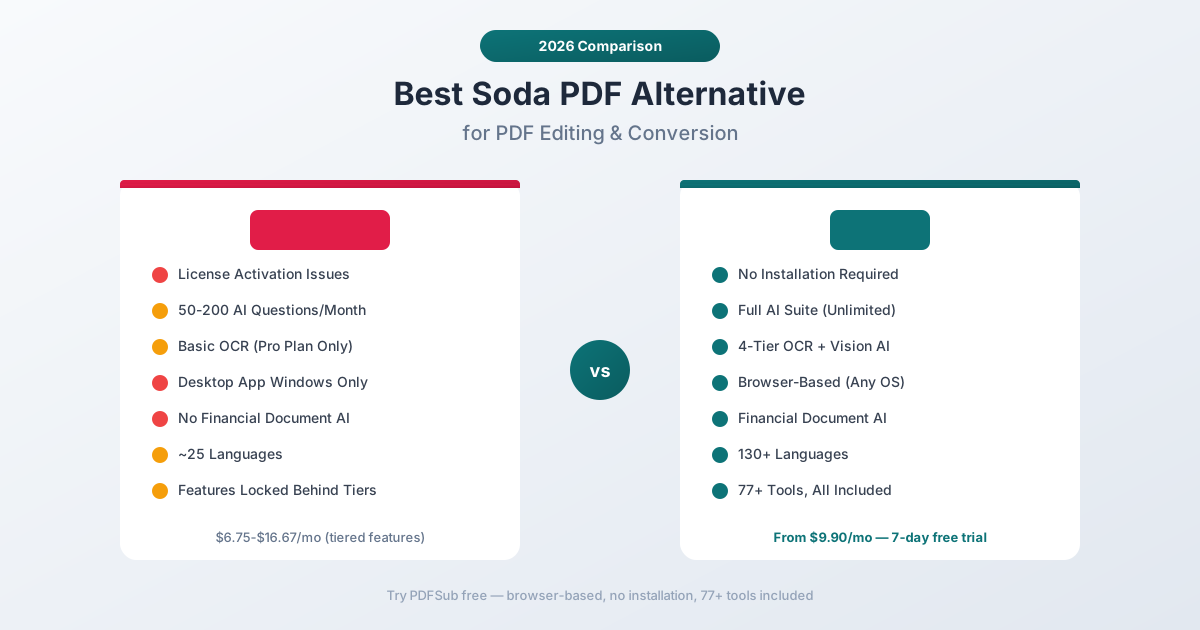
Why People Switch from Soda PDF
Soda PDF reviews on Capterra and G2 show a split audience. Some users find it a practical, affordable editor. Others report frustrating experiences that compound over time. Here's what drives the searches for alternatives:
Subscription and License Activation Problems
This is the most persistent complaint in Soda PDF reviews. Users report:
- Subscription not recognized - the software sees you're logged in but doesn't connect to your paid plan, locking you out of features you're paying for
- Re-installation requirements - instead of simple license refresh, users are told to uninstall and reinstall the desktop software to fix activation
- Post-acquisition confusion - after Avanquest's involvement, some long-time users found their subscriptions disrupted with limited support options
- Support availability - phone support hours are limited (some users report availability only between 3 AM and 9 AM in their timezone)
These aren't product feature issues - they're operational issues that erode trust. When you're paying monthly for a tool and can't use it because the license won't activate, the features become irrelevant.
Limited AI Capabilities
Soda PDF Pro includes an AI assistant with 50 questions per month. The Business plan increases this to 200 questions per month. Compare that to dedicated AI document platforms that offer hundreds or thousands of AI interactions per month.
The AI features feel like additions rather than core capabilities:
- Summarization works for straightforward text documents but struggles with complex layouts
- No specialized financial document AI - bank statements, invoices, and receipts get the same generic treatment as any other PDF
- Translation is available but limited compared to purpose-built document translation tools
- No vision AI for severely degraded scans or image-based documents
For users specifically looking for AI-powered document intelligence, Soda PDF's AI is a checkbox feature, not a competitive advantage.
OCR Quality Limitations
Soda PDF Pro includes OCR, but the quality doesn't match modern standards:
- Clean scans work reasonably well - standard printed text with good resolution
- Financial documents with dense tables, small fonts, and tight column spacing produce inconsistent results
- Degraded scans - faded documents, thermal paper receipts, low-resolution images - often produce unusable text
- Multi-language OCR is limited compared to tools built specifically for international document processing
For users who primarily work with digital-native PDFs, Soda PDF's OCR is adequate. For anyone dealing with real-world scanned documents, especially financial ones, it's a frequent source of frustration.
Desktop + Web Split Creates Friction
Soda PDF offers both desktop (Windows only) and web versions, but the experience between them isn't seamless:
- The desktop app has features the web version doesn't, and vice versa
- File syncing between desktop and web can be unreliable
- The desktop app is Windows-only - Mac users are limited to the web version
- Some users report performance issues with the desktop application, especially on older hardware
This dual-platform approach means you're never quite sure which version to use, and switching between them mid-workflow creates friction.
No Financial Document Specialization
Soda PDF treats every document the same. A bank statement gets the same processing as a novel. An invoice gets the same extraction as a research paper.
For users working with financial documents - accountants, bookkeepers, financial analysts, small business owners - this means:
- No structured transaction extraction from bank statements
- No automatic field identification on invoices (vendor, amounts, dates, line items)
- No receipt data extraction (merchant, items, totals, tax)
- No understanding of financial document formats or conventions
- No support for specialized output formats like QBO, OFX, or CSV with proper column mapping
If financial document processing is part of your workflow, Soda PDF requires manual work that specialized tools automate.
Pricing Complexity
Soda PDF's pricing structure can be confusing:
- Standard: ~$6.75/month - basic editing, conversion, page management
- Pro: ~$8.25/month - adds OCR, AI (50 questions), translation, e-signatures, batch processing
- Business: ~$16.67/month - adds higher AI limits (200 questions), 10 GB cloud storage, phone support
The Standard plan is affordable but limited. Most useful features - OCR, AI, e-signatures - require Pro or above. And users report that the billing process and cancellation aren't always straightforward, with some encountering unexpected charges.
What to Look for in a Soda PDF Alternative
When evaluating replacements, focus on the gaps Soda PDF leaves:
Reliable subscriptions. This should go without saying, but license activation should just work. No re-installations, no support tickets to use features you're paying for.
Integrated AI. AI features should be core to the platform, not a limited add-on. Look for tools where AI is designed into the document processing pipeline rather than bolted on top.
Quality OCR. Multi-tier extraction that handles everything from clean digital text to severely degraded scans. Financial documents in particular need OCR that preserves table structure and column relationships.
Financial document intelligence. If you process bank statements, invoices, or receipts, the tool should understand these document types natively - not treat them as generic PDFs.
Cross-platform consistency. The experience should be the same regardless of your device or browser. Web-first tools eliminate the desktop vs. web confusion entirely.
Transparent pricing. Clear plans with clear features. No surprise limitations, no confusing tier differences, no activation issues.
PDFSub: The Best Soda PDF Alternative
PDFSub is a browser-based document platform with 98+ PDF tools, AI-powered extraction, 130+ language support, and financial document specialization - all accessible from any device without desktop software installation.
Browser-First Architecture
Soda PDF splits between a desktop app (Windows only) and a web interface with inconsistent feature parity. PDFSub is entirely browser-based:
- Works on any operating system - Windows, Mac, Linux, ChromeOS
- Same features on every device - no "desktop has X but web doesn't" confusion
- No software to install, update, or troubleshoot
- No license activation issues - log in and your subscription is active
This isn't just convenience - it eliminates an entire category of problems that Soda PDF users regularly encounter.
Privacy-First Processing
When Soda PDF processes your documents, they go to Soda PDF's servers (or stay on your Windows desktop). PDFSub takes a different approach:
- Browser processing first - If the operation can be done client-side (merging, splitting, compressing, text extraction from digital PDFs), it happens in your browser. Your files never leave your device.
- Server processing when needed - OCR, AI features, and complex operations use server processing, but only when browser processing can't handle the task.
For financial documents with account numbers, transaction histories, and other sensitive data, browser-first processing provides meaningfully better privacy.
4-Tier Document Extraction
Soda PDF's OCR is a single layer - it either works or it doesn't. PDFSub uses four extraction tiers:
- Browser text extraction - Instant, private, no upload needed for digital PDFs
- Server text extraction - Handles complex layouts, multi-column documents, and difficult formatting
- Server OCR - Converts scanned documents to searchable, extractable text
- Vision AI - For the worst cases (faded receipts, poor photos, damaged documents), AI reads directly from image content
Each document automatically gets the best extraction method. A clean digital PDF processes instantly in your browser. A water-damaged 20-year-old bank statement still gets accurate extraction through vision AI.
Financial Document Specialization
This is where PDFSub and Soda PDF diverge most dramatically. Soda PDF treats every document as a generic PDF. PDFSub includes dedicated extractors:
- Bank statements - Parses transactions across 20,000+ bank formats with accurate date, description, debit, credit, and balance extraction
- Invoices - Identifies vendor, line items, totals, tax, and payment terms automatically
- Receipts - Extracts merchant, items, totals, tax, and payment method from any format
- Financial reports - Understands balance sheets, income statements, and cash flow statements
These aren't generic AI features - they're purpose-built extraction pipelines trained on financial document structures. The difference shows in accuracy: PDFSub correctly identifies a column of numbers as "credits" because it understands bank statement layouts, while Soda PDF's generic OCR just sees text.
130+ Languages
Soda PDF's translation feature and OCR work primarily with major European languages. PDFSub supports 130+ languages natively:
- Right-to-left scripts: Arabic, Hebrew, Urdu, Farsi
- CJK: Chinese (Simplified and Traditional), Japanese, Korean
- Complex scripts: Hindi, Thai, Bengali, Tamil, Telugu
- European: All major and minor European languages
- African and Southeast Asian languages
This isn't just OCR language support - the AI features, chat, extraction, and translation all work natively in these languages.
98+ Tools vs. Tiered Feature Lockout
Soda PDF locks useful features behind higher tiers. OCR requires Pro. AI requires Pro. E-signatures require Pro. Batch processing requires Pro.
PDFSub includes all 98+ tools in every subscription:
- All PDF editing operations (merge, split, compress, rotate, reorder)
- All conversion tools (PDF to Excel, Word, PowerPoint, images, and vice versa)
- All extraction tools (tables, data, metadata, text)
- All AI tools (chat, summarize, translate, extract)
- All financial tools (bank statement converter, invoice extractor, receipt scanner)
- All security tools (watermark, redact, password protect)
No feature gating, no "upgrade to unlock" - every tool is available from your first day.
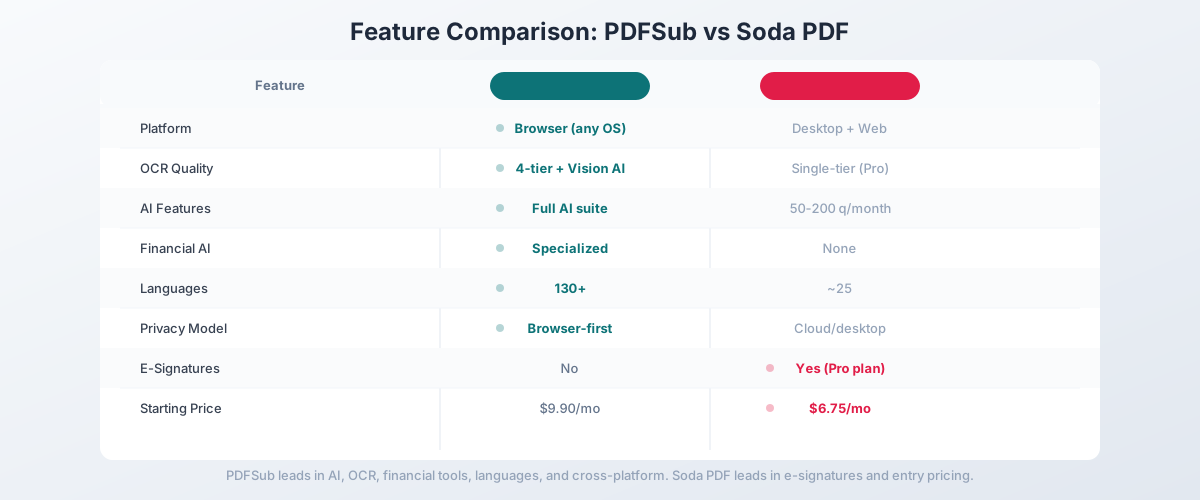
Head-to-Head: PDFSub vs Soda PDF
| Feature | PDFSub | Soda PDF |
|---|---|---|
| Platform | Browser (any OS) | Desktop (Windows) + Web |
| OCR quality | 4-tier with Vision AI | Single-tier (Pro plan) |
| AI features | Unlimited within plan | 50-200 questions/month |
| Languages | 130+ | ~25 |
| Financial document AI | Specialized extractors | None |
| Bank statement parsing | 20,000+ bank formats | No |
| Privacy model | Browser-first | Cloud/desktop |
| E-signatures | Yes (no per-envelope fees) | Yes (Pro plan) |
| Desktop app | No (browser-only) | Yes (Windows only) |
| Free trial | 7-day full access | Free tier available |
| Starting price | $20/user/mo (annual) | $6.75/mo (Standard) |
Where PDFSub wins: OCR quality, AI capabilities, financial document processing, language support, cross-platform consistency, privacy architecture, and e-sign with no per-envelope fees. If you work with scanned documents, financial files, or multilingual content, PDFSub handles these natively where Soda PDF struggles.
Where Soda PDF wins: Lower entry price for basic editing, desktop application for offline work, and a free tier for light use. If you primarily need basic PDF editing and want a native Windows desktop app, Soda PDF covers that use case at a lower starting price.
The value calculation: Soda PDF Pro at $8.25/month includes basic OCR and 50 AI questions per month. PDFSub at $20/user/mo (All-In-One, annual; $25/user/mo monthly) includes 98+ tools, 500 AI credits, 500 bank statement pages, 130+ languages, and specialized financial extraction. The per-user premium over Soda PDF Pro gets you dramatically more platform breadth.
Other Soda PDF Alternatives Worth Considering
Adobe Acrobat - $22.99/month
The industry standard for PDF editing:
- Strengths: Most complete feature set, excellent cross-device sync, strong enterprise support, AI Assistant
- Weaknesses: Expensive, heavy application, AI features still maturing, no financial specialization
- Best for: Enterprise users who need the most comprehensive PDF editing suite and don't mind the price
Foxit PDF Editor - $14.99/month
A direct Soda PDF competitor focused on editing:
- Strengths: Fast performance, good annotation tools, collaboration features, cross-platform desktop apps
- Weaknesses: Limited AI features, no financial document specialization, desktop-focused
- Best for: Users who want a lighter, faster desktop PDF editor with solid annotation and collaboration
Smallpdf - $12/month
Web-based PDF platform with broad tool coverage:
- Strengths: Clean web interface, 20+ tools, e-signatures, affordable, easy to use
- Weaknesses: Limited OCR quality, basic AI features, no financial specialization
- Best for: Users who want simple web-based PDF editing and conversion without desktop software
iLovePDF - $7/month
Budget-friendly web PDF tool suite:
- Strengths: Very affordable, covers basic PDF operations, web-based, simple interface
- Weaknesses: Limited AI, basic OCR, no financial features, feature limits on lower plans
- Best for: Budget-conscious users who need basic PDF operations without advanced features
Nitro PDF - $14/month
Enterprise-focused PDF editor:
- Strengths: Strong collaboration tools, analytics dashboard, enterprise administration, eSign built-in
- Weaknesses: Desktop-heavy, expensive, no financial specialization, limited AI
- Best for: Enterprise teams that need PDF editing with collaboration tracking and admin controls
Quick Comparison Matrix
| Tool | Price/mo | OCR | AI | Languages | Financial AI | E-Signatures |
|---|---|---|---|---|---|---|
| PDFSub | $20/user/mo annual | 3-tier | Unlimited | 130+ | Specialized | Yes (no per-envelope fees) |
| Soda PDF | $6.75-$16.67 | Pro only | 50-200 q/mo | ~25 | No | Yes |
| Adobe Acrobat | $22.99 | Yes | AI Assistant | ~25 | No | Yes |
| Foxit | $14.99 | Yes | Basic | ~20 | No | Yes |
| Smallpdf | $12 | Basic | Basic | ~30 | No | Yes |
| iLovePDF | $7 | Basic | No | ~15 | No | No |
| Nitro | $14 | Yes | No | ~20 | No | Yes |
When Soda PDF Is Still the Right Choice
To be fair, Soda PDF works well for specific use cases:
- Basic PDF editing on Windows - If you need a desktop PDF editor for text editing, form filling, and annotation on a Windows machine
- Native desktop app - Soda PDF's installed Windows app handles fully offline workflows that browser-based platforms can't
- Light, occasional use - The free tier handles basic viewing and limited editing for casual users
- Budget-constrained editing - At $6.75/month, Soda PDF Standard is one of the cheapest PDF editors with conversion capabilities
If your workflow is edit-sign-send on text-based English PDFs and you specifically need a Windows desktop install, Soda PDF Pro at $8.25/month is functional.
When You Need Something Better
Switch from Soda PDF when:
- License activation is failing. If you're spending time troubleshooting subscriptions instead of working on documents, the tool is costing you more than its price.
- You need real AI features. 50 AI questions per month with generic processing doesn't cut it for professional document work. Purpose-built AI with financial specialization makes a material difference.
- Your documents are scanned or degraded. Single-tier OCR misses too many documents. Multi-tier extraction with vision AI handles the full range of document quality.
- You work with financial documents. Bank statements, invoices, and receipts need structured extraction, not generic PDF editing tools.
- You work on Mac or Linux. Soda PDF's desktop app is Windows-only. A browser-based platform works everywhere.
- You need multilingual support. If your documents span multiple languages and scripts, 130+ language support matters.
How to Switch from Soda PDF to PDFSub
- Start a free trial at pdfsub.com/signup - 7 days with full access to all 98+ tools
- Try your typical workflow - upload the kinds of documents you normally process in Soda PDF
- Test the AI features - chat with a PDF, summarize a document, or translate a file
- Try financial document tools - upload a bank statement to the bank statement converter, an invoice to the invoice extractor
- Check cross-platform consistency - try PDFSub on your phone, tablet, or secondary computer and verify the same features are available everywhere
No data migration is needed. Export any documents from Soda PDF's cloud storage, and they'll work directly in PDFSub.
Frequently Asked Questions
Is Soda PDF free?
Soda PDF has a free tier with basic viewing and limited editing features. Most useful features - OCR, AI, e-signatures, batch processing - require the Pro plan ($8.25/month) or Business plan ($16.67/month).
Is Soda PDF owned by Avanquest?
Yes. Soda PDF is published by Avanquest, which is a subsidiary of the French technology group Claranova (now renamed from Avanquest Group). The corporate restructuring has caused some disruption for existing subscribers.
Does Soda PDF work on Mac?
Soda PDF's desktop application is Windows-only. Mac users can access the web version through their browser, but it has a different feature set than the desktop application. For consistent cross-platform access, consider a browser-first tool like PDFSub.
Can Soda PDF convert bank statements to Excel?
Soda PDF can convert PDF files to Excel format, but it doesn't perform structured extraction of bank statement data. The conversion produces a generic spreadsheet that may not correctly identify transaction dates, descriptions, amounts, and balances. For accurate bank statement conversion with 20,000+ bank format support, use a specialized converter.
How does Soda PDF's AI compare to dedicated AI tools?
Soda PDF Pro includes 50 AI questions per month for summarization and basic analysis. This is significantly more limited than dedicated AI document platforms that offer thousands of interactions. The AI doesn't include financial document specialization, multi-tier OCR, or vision AI for degraded documents.
Is Soda PDF safe for financial documents?
Soda PDF processes documents on their servers (web version) or locally (desktop version). The desktop version keeps files on your machine, but the web version requires uploading. For sensitive financial documents, consider a tool with browser-first processing that minimizes server uploads.
Why does Soda PDF have subscription activation problems?
Multiple user reviews report issues where the software recognizes the user's login but doesn't connect to their subscription, locking features. This appears to be related to license management infrastructure, and some users have needed to contact support or reinstall the software to resolve it.
What's the cheapest Soda PDF alternative?
iLovePDF starts at $7/month for basic PDF operations. PDFSub starts at $20/month (annual) / $25/month (monthly) with 98+ tools. For a free option, there are open-source PDF editors, though they lack AI and financial features.