Best Smallpdf Alternative for PDF Processing (2026)
Looking for a Smallpdf alternative? Compare features, pricing, and privacy. See why teams switch to PDFSub.
PDFSub is best for:
- Smallpdf users concerned about cloud-only processing who want browser-based privacy for sensitive docs
- Users who need 98+ tools vs Smallpdf's ~21, including AI extraction and bank statement conversion
- Professionals paying Smallpdf's $12/mo who want dramatically more features at PDFSub's $20/user/mo (annual)
- Financial professionals who need structured data extraction that Smallpdf completely lacks
PDFSub is NOT best for:
- Users who require a native desktop app for occasional offline work (Smallpdf has one; PDFSub is browser-based)
- Teams that prefer an established brand with 1 billion+ users and ISO 27001 certification
- Users who require HIPAA compliance for medical or healthcare workflows
Smallpdf has built an impressive business. With over 36 million monthly visitors, it's one of the most recognizable names in online PDF tools. The interface is clean, the tools work for basic tasks, and the brand has earned genuine trust since launching in 2013.
But popularity doesn't mean it's the right fit for every workflow.
If you've ever hesitated before uploading a confidential contract because you know it's going to a Swiss server, or tried to extract data from a bank statement only to realize Smallpdf has no extraction tools, or hit the daily operation limit on the free tier mid-project - you already know the gaps.
This guide covers the specific limitations that drive people away from Smallpdf, what to look for in an alternative, and how the top options compare on the features that matter for professional document work.
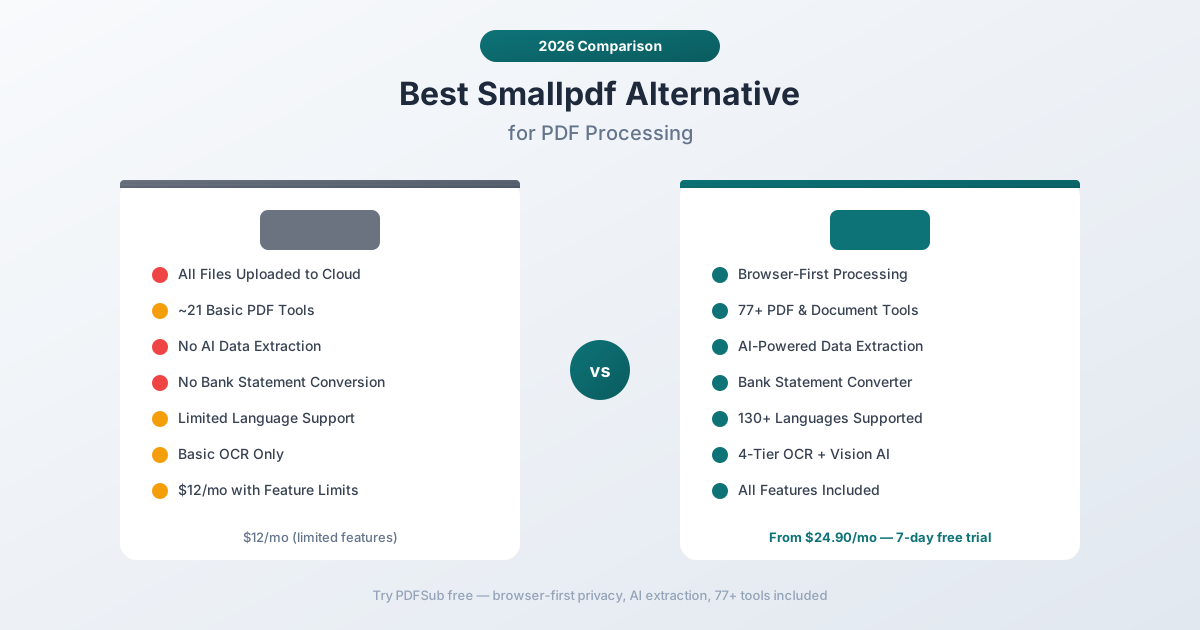
Why People Look for Smallpdf Alternatives
Smallpdf consistently gets positive reviews for its ease of use. The frustrations tend to surface once users move beyond casual PDF editing into more demanding workflows. Here are the most common pain points:
Every File Goes to the Cloud
This is the fundamental architectural limitation. Smallpdf processes every file on their servers. There's no option for local or browser-based processing. When you merge two PDFs, compress a document, or convert a file - it gets uploaded to Smallpdf's infrastructure first.
For personal documents, this might be acceptable. For financial statements, legal contracts, medical records, or any document containing sensitive data, it's a real concern. Smallpdf states they delete files after processing, but the upload still happens. Your data travels to and through their servers regardless.
In regulated industries - finance, healthcare, legal - cloud-only processing can create compliance headaches. GDPR, HIPAA, and SOC 2 frameworks all have opinions about where sensitive data goes.
Limited Tool Set for a Paid Product
Smallpdf offers approximately 21 PDF tools. That covers the basics well: merge, split, compress, convert to/from Word and Excel, e-sign, and a few others. For someone who only needs to merge PDFs occasionally, that's plenty.
But the gaps become apparent quickly:
- No AI-powered extraction. You can't chat with a PDF, extract structured data from invoices, or analyze financial documents.
- No bank statement conversion. There's no way to convert a bank statement PDF to Excel, CSV, or accounting formats like QBO and OFX.
- No dedicated financial tools. No invoice extractor, no receipt scanner, no financial report analyzer.
- Limited OCR. Smallpdf's OCR is basic compared to multi-tier approaches that combine browser extraction, server OCR, and vision AI.
If your work involves financial documents, Smallpdf has a significant feature gap.
Free Tier Is Heavily Restricted
Smallpdf's free tier allows two operations per day. That's it. Need to merge a PDF and then compress it? You've used your daily allowance.
The Pro plan at $12/month removes this limit and adds batch processing, but you're still limited to the same ~21 tools. There's no AI, no extraction, no financial document support - just unlimited access to basic PDF operations.
Language Support Is Limited
Smallpdf's OCR and conversion features work best with English-language documents. If you regularly work with documents in Arabic, Chinese, Japanese, Korean, or other non-Latin scripts, accuracy drops. For a global workforce, this matters.
No Financial Document Specialization
This is the gap that surprises most users. Smallpdf was built for general PDF manipulation - merge, split, compress, convert. It was never designed to understand document content.
Ask Smallpdf to extract transaction data from a bank statement, pull line items from an invoice, or analyze a financial report, and you'll get nothing. These aren't features Smallpdf offers or plans to offer. It's a fundamentally different product category.
What to Look for in a Smallpdf Alternative
Before comparing specific tools, here are the criteria that separate a basic PDF tool from a comprehensive document platform:
Privacy architecture. Does the tool process files in your browser first, only sending to servers when necessary? Or does every file get uploaded regardless? For sensitive documents, browser-first processing is the gold standard.
Tool breadth. Count the tools, but also check the categories. Basic PDF manipulation (merge, split, compress) is table stakes. Look for AI-powered features, financial document tools, and specialized extractors.
AI capabilities. Can you chat with a document? Extract structured data? Analyze financial statements? AI features separate modern document platforms from legacy PDF tools.
Language support. If you work with international documents, you need native support for non-English languages - not just OCR, but AI that understands content in its original language.
OCR quality. Basic OCR handles clean, well-scanned documents. Multi-tier OCR with vision AI handles everything from thermal receipts to faded faxes.
Pricing transparency. Does the price include all features, or are AI, OCR, and advanced tools extra? Hidden costs add up.
PDFSub: The Best Smallpdf Alternative
PDFSub is a document AI platform that addresses every limitation listed above - privacy-first architecture, 98+ tools, AI-powered extraction, and specialized financial document support.
Browser-First Privacy
This is the core architectural difference. PDFSub runs editing tools like merge, compress, and split entirely in your browser. Conversions and advanced processing are powered by the PDFSub Engine - an isolated service with no internet access. Files are processed in an isolated environment and auto-deleted after processing.
For financial documents containing account numbers, transaction histories, and sensitive personal data, this architecture eliminates the privacy concern entirely for most operations.
98+ Tools vs ~21
PDFSub includes over 84 PDF and document tools in every subscription. Beyond the basics that Smallpdf covers, PDFSub adds:
- AI Chat - Ask questions about any PDF document
- AI Data Extraction - Pull structured data from unstructured documents
- Bank Statement Converter - Export bank statements to Excel, CSV, QBO, OFX, QIF, and more across 20,000+ bank formats
- Invoice Extractor - Automatically extract vendor details, line items, and totals
- Receipt Scanner - Pull merchant, items, tax, and totals from any receipt format
- Financial Report Analyzer - Analyze balance sheets, income statements, and cash flow
- PDF Translation - Translate documents across 130+ languages
- Advanced OCR - 4-tier extraction with vision AI fallback
- Batch Convert - Convert multiple files simultaneously
- 40+ format conversions - PDF to/from Word, Excel, PowerPoint, EPUB, ODT, SVG, and more
One subscription replaces multiple tool subscriptions.
AI-Powered Document Intelligence
Smallpdf treats PDFs as containers - it can rearrange pages and convert formats, but it doesn't understand what's inside.
PDFSub's AI features understand document content:
- Chat with PDF - Ask "What were the total expenses in Q3?" and get an answer pulled from the actual data, not a generic text search
- Extract Tables - Detect and extract table structures with column relationships preserved
- Summarize - Generate structured summaries of any document
- Translate - Translate while preserving document formatting across 130+ languages
Financial Document Specialization
This is where the gap between a general PDF tool and a document platform becomes a canyon:
- 20,000+ bank statement formats recognized and converted automatically
- Dedicated invoice extraction that understands vendor fields, line items, tax calculations, and payment terms
- Receipt scanning that handles everything from point-of-sale receipts to handwritten notes
- Financial report analysis for balance sheets, income statements, and ratio calculations
If you work in accounting, bookkeeping, or financial services, these aren't nice-to-have features - they're the reason to switch.
130+ Languages
PDFSub supports 130+ languages natively, including right-to-left scripts (Arabic, Hebrew), CJK characters (Chinese, Japanese, Korean), and complex scripts (Hindi, Thai, Bengali). This isn't limited to OCR - the AI features understand and respond in the document's original language.
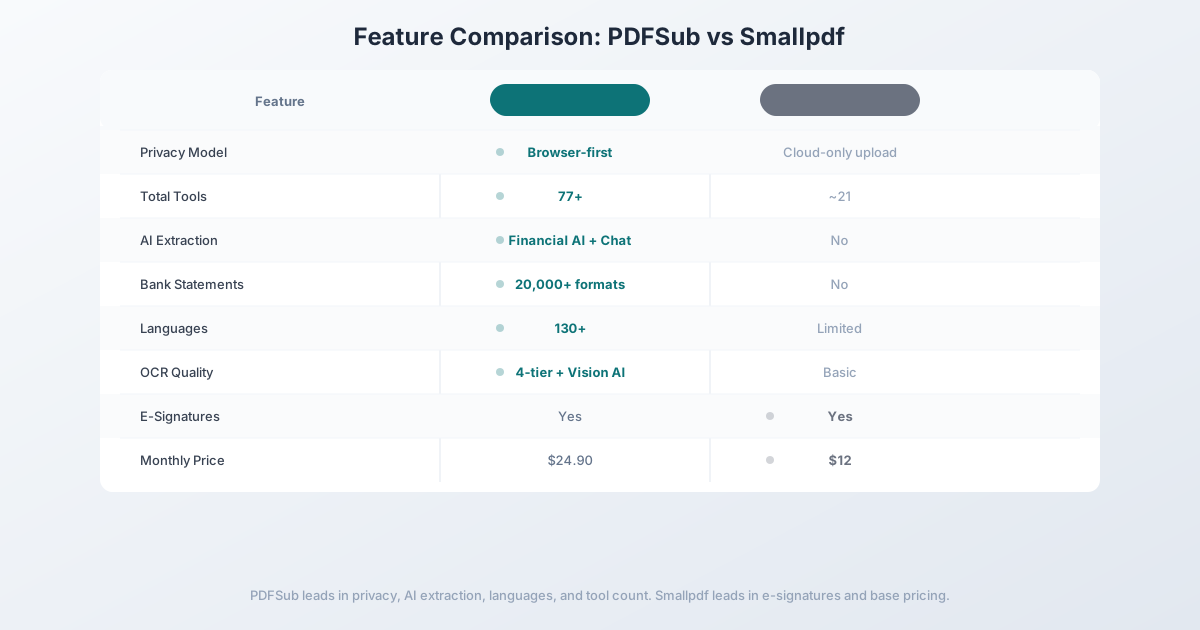
Head-to-Head: PDFSub vs Smallpdf
| Feature | PDFSub | Smallpdf |
|---|---|---|
| Privacy model | Browser-first processing | Cloud-only upload |
| Total tools | 98+ | ~21 |
| AI extraction | Financial AI + Chat | No |
| Bank statement conversion | 20,000+ formats | No |
| Invoice/receipt extraction | Dedicated tools | No |
| OCR quality | 4-tier + Vision AI | Basic |
| Languages | 130+ | Limited |
| E-signatures | Yes | Yes |
| PDF editing | Essential editing + annotations | Basic editing |
| Free trial | 7-day full access | 2 operations/day |
| Price | $25/user/mo (annual) | $12/user/mo Pro |
Where PDFSub wins: Privacy, AI capabilities, financial document tools, language support, and tool breadth. If you need more than basic PDF manipulation, PDFSub offers significantly more value.
Where Smallpdf wins: Base price and simplicity. At $12/month, Smallpdf is cheaper if all you need is merge, split, compress, and basic conversion. The interface is also streamlined for those specific tasks.
The value calculation: PDFSub at $20/user/mo annual is roughly $8/user/mo more than Smallpdf Pro at $12/user/mo - but includes 63+ additional tools, AI extraction (chat, summarize, translate, invoice/receipt/financial extraction), bank statement conversion across 20,000+ banks, e-sign with no per-envelope fees on top of the seat, and browser-first privacy. If you'd otherwise need even one additional tool or service for financial documents or e-sign, PDFSub is the better deal.
Other Alternatives Worth Considering
iLovePDF - $7/month
iLovePDF is the budget option in the PDF tools space:
- Strengths: Lower price point, free tier with more operations than Smallpdf, clean interface
- Weaknesses: Ad-heavy free experience, cloud-only processing, no AI features, no financial document support
- Best for: Budget-conscious users who need basic PDF manipulation and can tolerate ads on the free tier
Adobe Acrobat - $19.99/month (Pro)
The industry standard for PDF editing:
- Strengths: Most comprehensive PDF editing capabilities, deep enterprise integrations, strong OCR
- Weaknesses: Expensive, heavy desktop application, complex UI, no bank statement tools, limited financial AI
- Best for: Users who need advanced PDF editing capabilities (redlining, form creation, digital signatures with certificate authority)
PDF24 - Free
A free alternative with a solid tool set:
- Strengths: Completely free, 30+ tools, no registration required for basic use
- Weaknesses: Cloud processing, no AI features, no financial document support, less polished interface
- Best for: Users who want a free alternative and don't need AI or financial features
Frequently Asked Questions
Is Smallpdf safe for sensitive documents?
Smallpdf processes all files on their servers in Switzerland and states they delete files after processing. However, every document is uploaded to the cloud regardless of the operation type. If you work with sensitive financial data, legal documents, or medical records, consider a tool with browser-first processing that avoids the upload entirely.
Can Smallpdf convert bank statements to Excel?
Smallpdf can convert a PDF to Excel using generic conversion, but it doesn't understand bank statement structure. The result will be a rough layout conversion, not a structured extraction of transactions, dates, amounts, and descriptions. For actual bank statement conversion, you need a dedicated tool that understands financial document formats.
Is Smallpdf free?
Smallpdf offers a free tier limited to 2 operations per day. This includes any tool use - merging, compressing, converting, etc. The Pro plan at $12/month removes this limit. Teams pricing starts at $9/user/month (annual billing).
Why is PDFSub more expensive than Smallpdf?
PDFSub's All-In-One plan is $20/month annual compared to Smallpdf's $12/month Pro. PDFSub provides 98+ tools plus AI extraction (500 credits/month included), bank statement conversion (500 pages/month included), financial document AI, 130+ languages, and browser-first privacy. The broader feature set replaces multiple separate subscriptions.
Does Smallpdf have AI features?
Smallpdf added a basic AI-powered PDF assistant in 2024 that can answer questions about document content. However, it doesn't include structured data extraction, financial document analysis, bank statement conversion, or the specialized AI features found in dedicated document AI platforms.
Switching from Smallpdf - What to Expect
There's nothing to migrate - Smallpdf stores nothing about you. The transition is purely habit replacement. Here's the typical 4-step path:
Step 1 - Day 1: Sign up for PDFSub. Start the 7-day trial. For the first day, use PDFSub for the simple operations you'd normally do on Smallpdf - merge, split, compress, convert, sign. The basic workflows feel almost identical.
Step 2 - Days 1-2: Test what PDFSub adds. Run a long PDF through summarization, translate something to a target language, try Chat with PDF. Smallpdf's AI Assistant is basic compared to PDFSub's full AI suite.
Step 3 - Days 2-5: Try the financial extractors. Upload a bank statement to the bank statement converter and try the invoice or receipt extractors. Smallpdf has none of these.
Step 4 - Days 5-7: Decide. If your day-to-day was simple PDF operations and Smallpdf's $12/mo covered it, the upgrade only makes sense if AI and financial extraction earn their keep. If they do, lock in PDFSub's $20/mo annual. If your team needs Smallpdf's mobile/desktop apps for offline work or specifically requires Swiss data jurisdiction, keep Smallpdf and add PDFSub for the AI and financial work.
The Bottom Line
Smallpdf is a well-built tool for basic PDF operations. If all you need is to merge, split, compress, and convert PDFs occasionally, it does the job at a reasonable price.
But if your workflow involves financial documents, sensitive data, international languages, or any kind of intelligent document processing, Smallpdf's limitations become constraints. No browser-first privacy, no AI extraction, no financial document support, limited language coverage - these aren't minor gaps for professional use.
Try PDFSub Free - full access to all 98+ tools, AI extraction, bank statement conversion, and browser-first privacy. Cancel anytime.
Still evaluating, not yet switching? This page is written for teams ready to leave Smallpdf. For a neutral feature-by-feature breakdown and pricing side-by-side, see the PDFSub vs Smallpdf comparison.