Best Sejda Alternative for PDF Editing & Extraction (2026)
Sejda's free limits are restrictive. Compare features and see why PDFSub is the better choice.
PDFSub is best for:
- Sejda users hitting the 3-tasks-per-hour limit who want unlimited operations at $20/user/mo (annual)
- Users frustrated by Sejda's 200-page and 50 MB file caps who need to process larger documents
- Professionals who need AI summarization, translation, and data extraction that Sejda does not offer
- Accountants who need bank statement conversion and invoice extraction alongside PDF editing
PDFSub is NOT best for:
- Users who primarily need Sejda's inline PDF text editing - PDFSub focuses on processing, not reflow editing
- Light users who only need 1-3 tasks per day and can live within Sejda's free tier
- Users who want a desktop app for offline PDF editing (Sejda offers this; PDFSub is browser-only)
Sejda has carved out a solid niche as a browser-based PDF editor that actually lets you edit text directly in PDFs - something many online tools claim but few deliver well. With over 30 online tools and a desktop application, Sejda handles the basics competently: merge, split, compress, convert, and its signature feature, direct PDF text editing in the browser.
For quick, one-off PDF tasks, Sejda's free tier can be genuinely useful. Upload a file, make your edit, download the result. Simple.
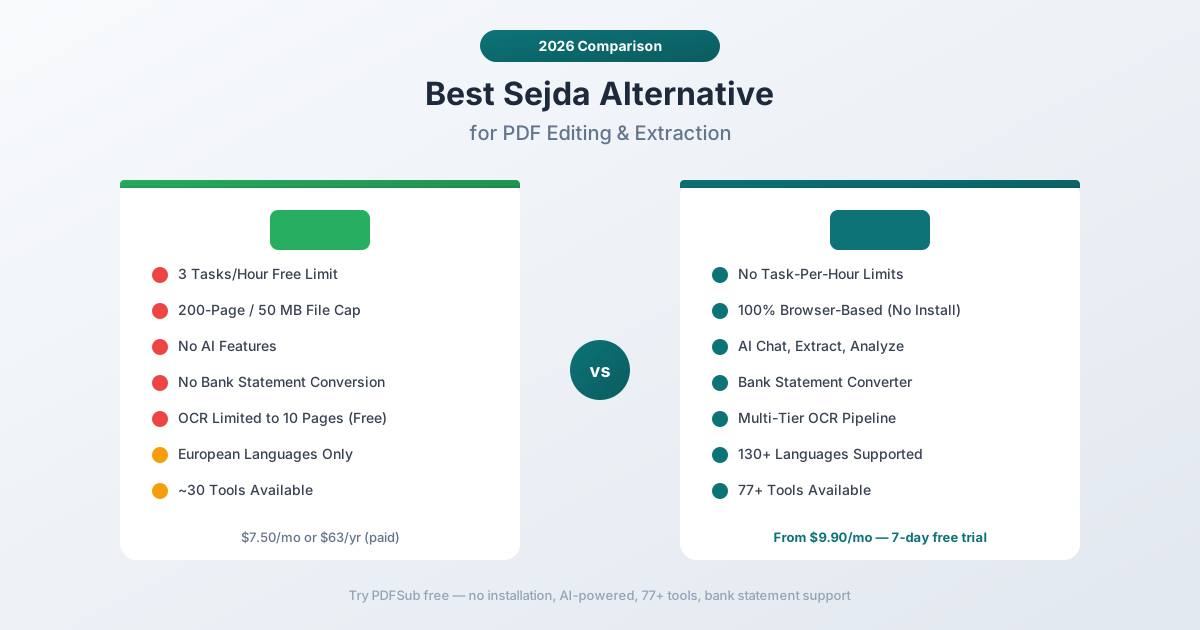
But "quick" and "one-off" are the operative words. Sejda's free tier limits you to 3 tasks per hour, files under 200 pages, and 50 MB maximum file size. OCR is capped at 10 pages. Hit any of these limits - which happens faster than you'd expect during a productive work session - and you're either waiting for the timer to reset or reaching for your credit card.
If you've been bumping into Sejda's ceilings and wondering whether the paid tier ($7.50/month) is the right move, or whether there's a better option entirely, this comparison will help you decide.
Why People Look for Sejda Alternatives
Sejda's approach works for light use. The frustrations emerge as usage grows:
The 3-Task-Per-Hour Limit
Sejda's free tier restricts you to 3 tasks per hour. That sounds reasonable until you realize how fast you burn through them:
- Merge two PDFs together - that's task one.
- Compress the merged file for email - task two.
- Add a watermark to the compressed file - task three.
You've used your hourly allocation in under five minutes. Need to split a different document? Wait an hour. This effectively makes Sejda's free tier a demo, not a tool you can rely on for actual work.
The paid plans remove this limit, but at $7.50/month (or $63/year for the annual plan), you're paying for basic PDF operations that other platforms include in more comprehensive packages.
200-Page and 50 MB File Limits
The free tier caps files at 200 pages or 50 MB. While this covers many documents, it's surprisingly easy to hit:
- Annual financial reports often exceed 200 pages
- Scanned document PDFs can easily exceed 50 MB
- Combined statement packages from banks or institutions regularly breach both limits
- Large presentation decks converted to PDF frequently exceed 50 MB
When you hit these limits, there's no graceful fallback. The tool simply refuses to process the file.
OCR Limited to 10 Pages
Sejda's free OCR is capped at 10 pages. For a scanned document that needs text recognition, this means:
- A 20-page scanned contract? Only half gets OCR.
- A 50-page scanned report? You'd need to process it in 5 batches and reassemble.
- A scanned bank statement package? Almost always exceeds the limit.
Even the paid plans have OCR quality that users report as inconsistent, especially with complex layouts, tables, or non-English text.
No AI Document Intelligence
Sejda is a mechanical PDF tool. It can manipulate files - editing text, rearranging pages, converting formats - but it has no understanding of document content:
- No ability to ask questions about a document
- No intelligent data extraction from tables or forms
- No financial document analysis
- No smart summarization
- No AI-powered translation with formatting preservation
Every operation in Sejda is manual. You tell it exactly what to do with specific parts of a file. There's no layer of intelligence that can understand what a document contains and extract structured data automatically.
No Financial Document Tools
Sejda cannot:
- Convert bank statements to structured Excel data
- Extract invoice line items, vendors, and totals
- Parse receipt information (merchant, items, totals)
- Analyze financial reports with ratio calculations
- Export to accounting formats (QBO, OFX, QIF)
For anyone who works with financial documents, Sejda's generic PDF-to-Excel conversion produces unusable results - merged cells, misaligned columns, and no understanding of transaction structure.
Limited Language Support
Sejda's OCR and conversion capabilities are primarily optimized for English and major European languages. Support for right-to-left scripts, CJK languages, and South Asian languages is limited or absent. There's no translation capability at all.
What to Look for in a Sejda Alternative
If Sejda has been your go-to PDF tool, the upgrade path should address its specific limitations:
No task-per-hour limits. Process as many documents as you need without watching a timer. Professional work doesn't fit into 3-task windows.
Generous file size handling. Support for large documents, long scanned files, and combined packages without arbitrary page or megabyte caps.
AI document understanding. Beyond mechanical editing, the ability to comprehend document content, extract structured data, and answer questions about what's in your files.
Financial document specialization. Dedicated extraction tools for bank statements, invoices, receipts, and financial reports.
Comprehensive language support. Real multi-language capabilities for translation, OCR, and document processing across 100+ languages.
Browser-first with privacy. The convenience of browser-based tools with the privacy of local processing where possible.
PDFSub: The Best Sejda Alternative
PDFSub provides everything Sejda does - browser-based PDF editing and manipulation - without the restrictive free-tier limits, and adds AI intelligence, financial document tools, and multi-language support that Sejda has never offered.
No Arbitrary Task Limits
PDFSub doesn't count your tasks per hour. During your subscription, you can process as many documents as your workflow demands. Merge ten files, compress them all, add watermarks, and split the results - all in the same session without hitting a timer wall.
For professionals who process documents throughout the day, the difference between "3 tasks per hour" and "unlimited tasks" is the difference between a demo and a tool you can rely on.
98+ Tools, All Browser-Based
PDFSub offers 98+ PDF tools compared to Sejda's 30+. Every tool runs entirely in the browser with no installation required. The tool set includes everything Sejda offers plus entire categories Sejda lacks:
- All standard operations: Merge, split, compress, convert, rotate, crop, watermark, page numbers, protect
- PDF editing: Annotations, text additions, shapes, stamps, redaction, signatures
- AI tools: Chat with PDF, extract data, summarize, translate, analyze financial reports
- Financial tools: Bank statement converter, invoice extractor, receipt scanner, financial report analyzer
- Conversion: PDF to/from Word, Excel, PowerPoint, images, HTML - and reverse
AI That Understands Your Documents
This is the transformative gap between PDFSub and Sejda. PDFSub's AI features include:
- Chat with PDF - Ask questions about any document in natural language. "What are the total debits in Q3?" or "Summarize the key findings." The AI understands tables, hierarchies, and relationships within the document.
- Extract Data - Pull structured data from any document. Tables maintain column relationships, forms preserve field structure. The output is clean, organized data ready for further processing.
- Summarize - Generate intelligent summaries that capture key information from documents of any length.
- Translate - Translate documents across 130+ languages while maintaining formatting and layout.
- Financial Report Analyzer - Analyze balance sheets, income statements, and cash flow documents with automated ratio calculations and trend identification.
Where Sejda requires you to manually locate and copy information from a PDF, PDFSub's AI can extract it automatically and present it in structured format.
Bank Statement Conversion
PDFSub's bank statement converter transforms bank statement PDFs into structured, usable data. It recognizes 20,000+ bank formats worldwide and exports to:
- Excel (.xlsx) - Clean columns for date, description, debit, credit, balance
- CSV and TSV - For import into any spreadsheet or database
- QBO - Direct import to QuickBooks Online
- OFX - Open Financial Exchange format for accounting software
- QIF - Legacy QuickBooks interchange format
- JSON - For developers and automated pipelines
The converter handles multi-page statements, transactions that span page breaks, bank-specific formatting, and correct debit/credit separation. Sejda's generic PDF-to-Excel export produces a visual layout copy - not structured transaction data.
Invoice and Receipt Extraction
Dedicated extractors for the financial documents that drive business:
- Invoice Extractor - Pulls vendor name, invoice number, line items with quantities and prices, subtotals, tax amounts, totals, and payment terms into structured data
- Receipt Scanner - Extracts merchant name, date, individual items, tax breakdown, payment method, and totals
- Financial Report Analyzer - Parses balance sheets, income statements, and cash flow documents with automated ratio calculations
These tools understand financial document semantics. An invoice produces structured data, not a visual representation of the PDF layout.
130+ Languages
PDFSub supports over 130 languages for translation, OCR, and document processing:
- Right-to-left languages (Arabic, Hebrew, Persian, Urdu)
- CJK languages (Chinese, Japanese, Korean)
- South Asian languages (Hindi, Tamil, Bengali, Telugu)
- Southeast Asian languages (Thai, Vietnamese, Indonesian)
- All European languages
Sejda's OCR is primarily effective for English and major European languages. PDFSub's multi-language support means a single platform handles documents regardless of the language they're written in.
Privacy-First Architecture
PDFSub processes files in the browser whenever possible. For operations like merging, splitting, compressing, and basic editing, the file never leaves your device. Server processing is reserved for AI analysis and OCR.
Both Sejda and PDFSub are browser-based, but PDFSub's architecture keeps more processing local. For sensitive financial documents, this provides stronger privacy protection.
Head-to-Head: PDFSub vs Sejda
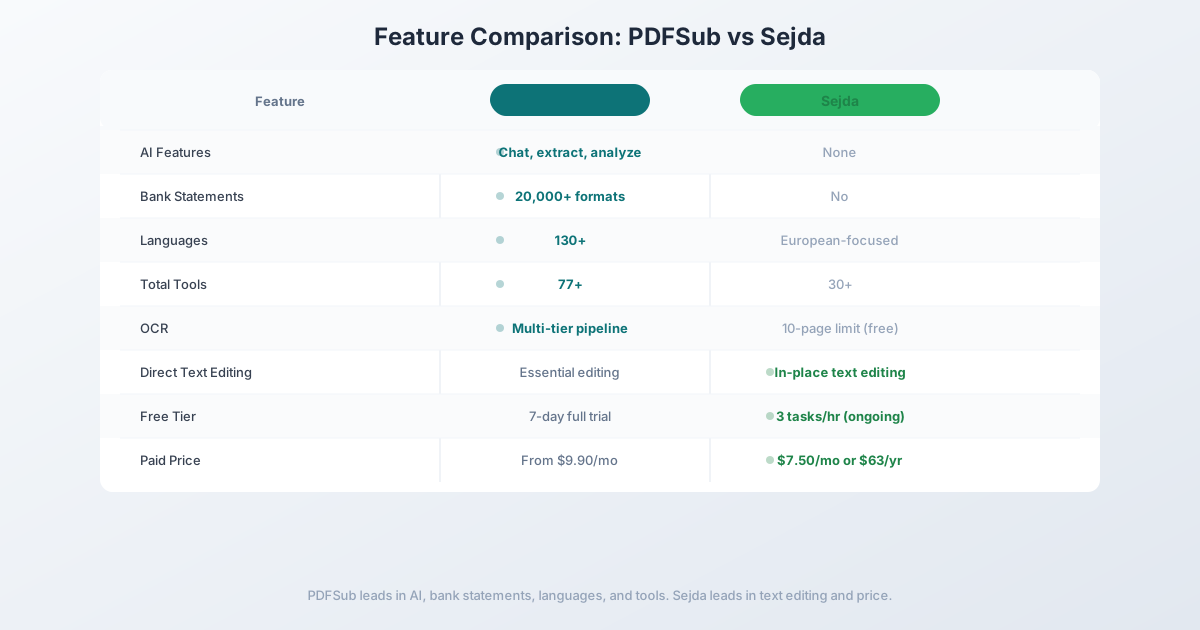
| Feature | PDFSub | Sejda |
|---|---|---|
| Free tier limits | 7-day free trial (full access) | 3 tasks/hour, 200 pages, 50 MB |
| OCR | Multi-tier (browser + server + AI) | 10-page limit (free) |
| AI features | Chat, extract, analyze, translate | None |
| Bank statement conversion | 20,000+ formats | No |
| Invoice/receipt extraction | Dedicated tools | No |
| Languages | 130+ | European-focused |
| Total tools | 98+ | 30+ |
| Direct PDF text editing | Essential editing | Yes (core feature) |
| Desktop app | Browser-only (no install needed) | Available (Windows/Mac/Linux) |
| Privacy model | Browser-first processing | Server-based processing |
| Paid pricing | $20/mo (annual; $25/mo monthly) | $7.50/mo or $63/yr |
| Platform | Any browser, any device | Browser + desktop apps |
Where PDFSub wins: AI document intelligence, financial document tools, bank statement conversion, multi-language support (130+), no task-per-hour limits, larger tool set (98+ vs 30+), and privacy-first browser processing. For anyone who needs more than basic PDF manipulation, PDFSub provides capabilities Sejda simply doesn't have.
Where Sejda wins: Direct PDF text editing in the browser. Sejda's ability to edit existing text within a PDF - changing font, size, and content of the original text - is its standout feature. For users whose primary need is modifying text in existing PDFs, Sejda's editing experience is more focused. Sejda also offers a free tier (with limits) and a desktop application for offline use, and its paid plan is cheaper at $7.50/month.
The value calculation: Sejda's paid plan at $7.50/month removes the task limits and provides solid basic PDF tools. PDFSub starts at $20/month (annual) / $25/month (monthly) but includes AI extraction, financial document tools, bank statement conversion, and 130+ language support. The $2.40/month difference buys capabilities that would cost hundreds of dollars per month from specialized financial extraction services. If you only need basic PDF editing, Sejda's price is hard to beat. If you need intelligence in your document processing, PDFSub's premium is a fraction of the value it delivers.
Other Alternatives Worth Considering
Smallpdf - $12/month (billed annually)
A polished browser-based PDF suite:
- Strengths: Very clean interface, good basic tool selection, e-signatures included, no desktop installation needed
- Weaknesses: No AI extraction, no financial document tools, no bank statement conversion, free tier limited to 2 tasks/day
- Best for: Users who want a step up from Sejda with a more polished interface but don't need AI or financial features
ILovePDF - Free / $7/month Pro
A popular free alternative:
- Strengths: Generous free tier, clean web interface, mobile apps, batch processing on paid plans
- Weaknesses: No AI features, no financial tools, limited OCR, server-based processing
- Best for: Users who primarily need basic PDF manipulation and want a free or low-cost option
PDF Candy - Free / $6/month Pro
Another browser-based option:
- Strengths: Simple interface, free tier available, covers basic operations, no installation
- Weaknesses: Limited tool depth, no AI, no financial features, less refined than Sejda for text editing
- Best for: Very light PDF use where simplicity is the top priority
Frequently Asked Questions
Is Sejda free to use?
Sejda offers a free tier with significant restrictions: 3 tasks per hour, files limited to 200 pages or 50 MB, OCR limited to 10 pages, and one file at a time. For occasional, small-file use, the free tier works. For regular professional use, you'll hit the limits quickly and need the paid plan ($7.50/month or $63/year).
Can Sejda edit text in PDFs?
Yes. Direct PDF text editing is Sejda's strongest feature. You can click on existing text in a PDF and modify it - change wording, font, size, and color. This is a genuine editing capability, not just adding text on top. However, results can be inconsistent with scanned documents or complex layouts.
Can Sejda convert bank statements?
No. Sejda can convert a PDF to Excel using generic conversion, but it has no bank statement-specific features. The output mirrors the visual PDF layout rather than producing structured transaction data with proper date, description, debit, credit, and balance columns.
Is PDFSub more expensive than Sejda?
PDFSub starts at $20/month (annual) / $25/month (monthly) compared to Sejda's $7.50/month. However, PDFSub includes AI extraction, financial document tools, bank statement conversion (20,000+ formats), and 130+ language support - capabilities that would require multiple additional subscriptions to replicate alongside Sejda.
Does PDFSub have a free trial?
Yes. PDFSub offers a 7-day free trial with full access to all 98+ tools, AI features, bank statement conversion, and the complete platform. Cancel anytime. Unlike Sejda's limited free tier, the trial provides unrestricted access to evaluate every capability.
Switching from Sejda - What to Expect
There's nothing to migrate - Sejda stores nothing about you. The transition is purely habit replacement. Here's the typical 4-step path:
Step 1 - Day 1: Sign up for PDFSub. Start the 7-day trial. For the first day, use PDFSub for anything you'd normally do on Sejda - merge, split, compress, sign, annotate. If you specifically used Sejda for inline text editing of PDFs, test PDFSub's edit tools to see if the workflow fits.
Step 2 - Days 1-2: Test what PDFSub adds. Run a long PDF through summarization, translate something to a target language, try Chat with PDF. This is where the price difference stops feeling like a price increase and starts feeling like new capability.
Step 3 - Days 2-5: Try the financial extractors. Upload a bank statement to the bank statement converter and try the invoice or receipt extractors. If you're an accountant, bookkeeper, or small business owner, this often justifies the switch alone.
Step 4 - Days 5-7: Decide replace vs supplement. If your day-to-day was simple PDF editing and Sejda's $7.50/mo covered it, PDFSub may be overkill - stick with Sejda. If the AI and financial extraction tools earned their keep, lock in PDFSub's $20/mo annual. If you specifically need Sejda's deep inline text editing AND PDFSub's AI, run both.
The Bottom Line
Sejda built a solid reputation as a browser-based PDF editor with real text editing capabilities. For users whose primary need is making quick edits to PDF text, Sejda remains a functional choice - especially at its $7.50/month price point.
But document processing in 2026 demands more than mechanical file manipulation. The ability to understand document content, extract structured data from financial documents, convert bank statements into usable formats, and work across 130+ languages has moved from "nice to have" to "essential."
If you've been hitting Sejda's 3-task-per-hour limit, struggling with the 200-page cap, or wishing your PDF tools could actually understand your financial documents, PDFSub provides the upgrade. All the browser-based convenience you're used to, plus the AI intelligence and financial specialization that makes document processing genuinely productive.
Try PDFSub Free - full access to all 98+ tools, AI extraction, bank statement conversion, and browser-first privacy. No installation required. Cancel anytime.
Still evaluating, not yet switching? This page is written for teams ready to leave Sejda. For a neutral feature-by-feature breakdown and pricing side-by-side, see the PDFSub vs Sejda comparison.