Best ScanWriter Alternative for Financial Data Extraction (2026)
Looking for a ScanWriter alternative? Compare features, pricing, and capabilities with PDFSub.
PDFSub is best for:
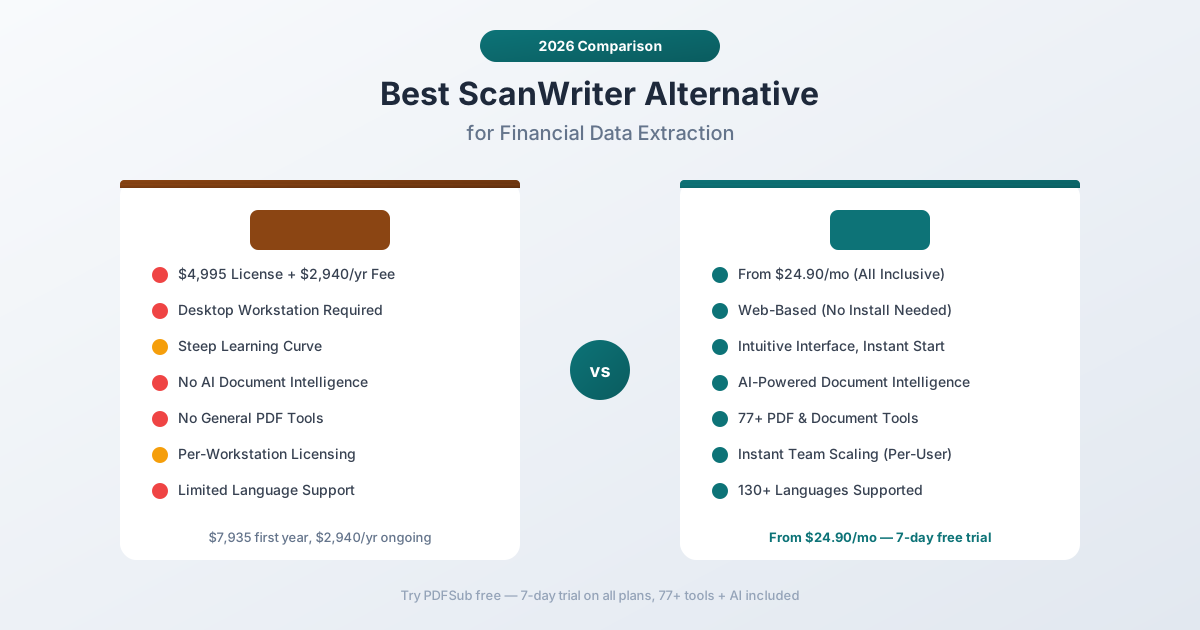
- Firms switching from ScanWriter's $4,995 license + $2,940/yr maintenance to $15-45/mo pricing
- Distributed teams needing browser-based access vs ScanWriter's per-workstation desktop install
- Accountants who need 130+ languages and 20,000+ banks vs ScanWriter's narrower coverage
- Professionals who want a fast learning curve vs ScanWriter's steep onboarding process
PDFSub is NOT best for:
- Forensic accounting firms that need ScanWriter's specialized litigation-support and modeling features
- Teams requiring direct on-premise integration with proprietary accounting systems
- Large practices processing 10,000+ statements/month that justify ScanWriter's enterprise investment
ScanWriter by Personable Inc. has been a fixture in the forensic accounting and financial investigation world for years. If you work at an accounting firm that handles litigation support, fraud investigations, or high-volume bank statement processing, you've likely encountered ScanWriter - or at least seen its $4,995 price tag.
For firms that process thousands of financial documents per year and need rock-solid data extraction with accounting software integration, ScanWriter has earned its reputation. The patented scanning technology and direct QuickBooks/Xero integration appeal to firms that can justify the investment.
But that investment is steep. With an initial license fee of $4,995 plus a $2,940 annual maintenance fee, ScanWriter represents a significant commitment - one that a growing number of accounting professionals are questioning as more affordable, AI-powered alternatives emerge. This guide examines where ScanWriter falls short and what modern alternatives bring to the table.
Why People Look for ScanWriter Alternatives
ScanWriter's core technology is solid. The pain points tend to be around cost, flexibility, and the evolving capabilities that newer platforms offer.
Prohibitive Pricing
Let's address the elephant in the room: ScanWriter's pricing is enterprise-grade, even for small and mid-size firms.
- Initial license: $4,995 per workstation (includes one user and ten customized readers)
- Annual maintenance: $2,940 per year (non-prorated)
- First-year total cost: $7,935
- Ongoing annual cost: $2,940+
For a mid-size accounting firm with five workstations, that's nearly $40,000 in the first year and close to $15,000 annually after that. For solo practitioners or small firms, this pricing is simply out of reach.
Even firms that can afford it are increasingly asking whether the ROI justifies the cost when web-based alternatives offer comparable extraction at a fraction of the price.
Desktop-Only Deployment
ScanWriter is installed on individual workstations. While it has historically offered both on-premise and some cloud-based options, the core product is a desktop application. This creates real challenges for modern firms:
- Remote work limitations - Staff working from home need VPN access to office machines or separate licenses for home workstations
- IT overhead - Installation, updates, and troubleshooting across multiple machines
- Device restrictions - No tablet, Chromebook, or mobile access
- Collaboration friction - No shared workspace for team review of extracted data
In 2026, with accounting firms increasingly distributed, tying critical software to physical workstations creates workflow bottlenecks.
Steep Learning Curve
ScanWriter's interface reflects its heritage as specialized forensic software. New users consistently report a significant onboarding period before becoming productive. The software includes sophisticated analytical tools and modeling features that are powerful but add complexity.
For firms with turnover in junior staff positions - which is most accounting firms - retraining costs add up beyond the license fees.
Limited Document Scope
ScanWriter excels at extracting financial data from bank statements, credit card statements, and invoices. But it stops there. The tool doesn't offer:
- General PDF tools - No merge, split, compress, or resize capabilities
- AI document chat - No ability to ask questions about document content
- Document translation - No translation capabilities
- General-purpose OCR - Focused on financial documents specifically
- Non-financial extraction - Not designed for contracts, reports, or other document types
Firms typically need additional software subscriptions to handle the document tasks ScanWriter doesn't cover.
No AI Intelligence Layer
ScanWriter's extraction technology, while effective, predates the AI revolution in document processing. Modern AI-powered platforms can:
- Understand context and adapt to unfamiliar layouts
- Chat with documents in natural language
- Summarize complex financial reports
- Detect patterns across multiple statements
- Handle severely degraded scans through AI vision
ScanWriter's traditional scanning approach is reliable for clean documents but doesn't offer these capabilities.
What to Look for in a ScanWriter Alternative
Before comparing specific tools, here's what matters when evaluating alternatives:
Extraction accuracy. Any replacement needs to handle bank statements, credit card statements, and invoices with high accuracy. Look for multi-tier extraction that combines traditional parsing with AI.
Bank coverage. How many bank formats are pre-built? A large template library means less manual configuration.
Pricing sanity. Can you get comparable extraction capability without spending $5,000+ per workstation?
Web-based access. Can your team use it from any device, any location, without installation?
Document breadth. Does the tool handle more than financial documents? AI features, PDF tools, and translation reduce total software costs.
Accounting integration. Can you export directly to QuickBooks, Xero, or Sage-compatible formats?
PDFSub: The Best ScanWriter Alternative
PDFSub is a web-based document platform with 98+ tools that covers bank statement conversion, invoice extraction, receipt scanning, AI-powered document intelligence, and comprehensive PDF operations - at a fraction of ScanWriter's cost.
20,000+ Bank Templates vs Manual Configuration
PDFSub includes pre-built extraction templates for over 20,000 financial institutions globally. When you upload a bank statement, the system automatically identifies the bank and applies the correct parsing rules.
ScanWriter includes customized readers (ten per license), but its template library doesn't match the breadth of 20,000+ pre-built formats. For firms handling clients across dozens of banks - especially international ones - PDFSub's template coverage eliminates setup time.
4-Tier Extraction That Handles Everything
PDFSub's cascading extraction approach surpasses ScanWriter's scanning technology:
- Browser-based extraction - Clean digital PDFs are parsed instantly in your browser. Maximum privacy, zero upload.
- Server-side text extraction - Complex multi-column layouts get server-level processing.
- Server OCR - Scanned documents receive optical character recognition.
- AI vision - Severely degraded scans, photographed statements, and unusual formats get AI-powered reading that understands context.
This matters because accounting firms frequently receive statements in varying quality - from pristine digital exports to faded thermal printouts from 15 years ago. ScanWriter handles clean documents well; PDFSub handles everything.
Fraction of the Cost
The pricing comparison speaks for itself:
| ScanWriter | PDFSub | |
|---|---|---|
| First year | $7,935 | $348 ($29/mo) |
| Ongoing annual | $2,940 | $348 ($29/mo) |
| 5 users, first year | ~$39,675 | $1,494 ($29/mo x 5) |
| 5 users, ongoing | ~$14,700/yr | $1,494/yr |
PDFSub costs roughly 4% of ScanWriter's first-year price for a single user, and includes 98+ tools that ScanWriter doesn't offer. For a five-person firm, the savings are over $38,000 in the first year alone.
Complete Financial Document Platform
Where ScanWriter focuses on bank and credit card statement extraction, PDFSub covers the entire financial document workflow:
- Bank statement converter - 20,000+ bank templates, every output format
- Invoice extractor - Automated extraction of vendor details, line items, totals, payment terms
- Receipt scanner - Merchant, items, totals, tax, and payment method extraction
- Financial report analyzer - AI analysis of balance sheets, income statements, cash flow statements
- Chat with PDF - Ask questions about any financial document in natural language
- Extract tables - Pull structured table data from financial reports
- Document comparison - Compare versions of contracts and financial documents
One subscription replaces ScanWriter plus the other tools your firm needs.
Web-Based, Team-Ready
Every team member accesses PDFSub from their browser. No installation, no license management, no VPN required for remote access. A new staff member is productive in minutes, not hours.
For accounting firms with seasonal staff, this is transformative. During tax season, you can add users without purchasing additional workstation licenses. When the season ends, you scale back. ScanWriter's per-workstation model doesn't offer this flexibility.
130+ Languages for International Clients
For firms handling international clients, PDFSub supports over 130 languages across all tools - bank statement conversion, AI features, translation, and extraction. This includes Arabic, Chinese, Japanese, Korean, Hindi, and every major European language.
ScanWriter's language support is limited in comparison, making it less suitable for firms with global client bases.
Head-to-Head: PDFSub vs ScanWriter
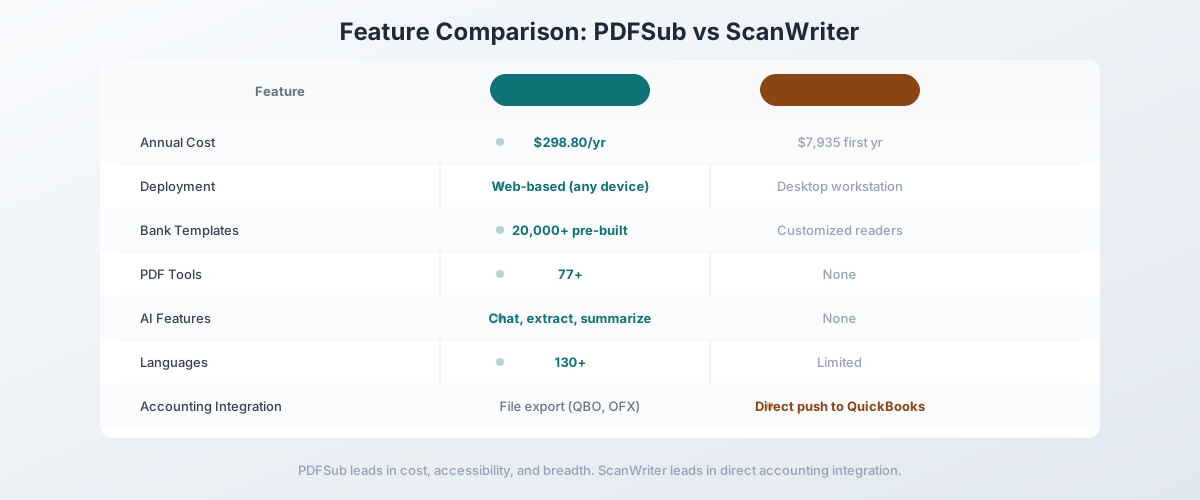
| Feature | PDFSub | ScanWriter |
|---|---|---|
| Deployment | Web-based (any device) | Desktop workstation |
| First-year cost | $348 | $7,935 |
| Annual cost | $348 | $2,940 |
| Bank templates | 20,000+ pre-built | Customized readers included |
| Scanned statements | AI vision + OCR | Traditional scanning |
| PDF tools | 98+ | None |
| AI features | Chat, extract, summarize | None |
| Invoice extraction | Automated | Supported |
| Receipt scanning | Automated | Supported |
| Languages | 130+ | Limited |
| Accounting formats | CSV, Excel, QBO, OFX, QIF, MT940 | CSV, Excel, QIF, OFX |
| QuickBooks integration | Via QBO export | Direct integration |
| Free trial | 7-day full access | Available |
| Team scalability | Instant per-user | Per-workstation license |
Where PDFSub wins: Cost (over 95% cheaper), bank template coverage, AI-powered extraction, web-based deployment, document breadth (98+ tools), team scalability, and language support. For the vast majority of accounting firms, PDFSub delivers comparable or better extraction at a tiny fraction of the cost.
Where ScanWriter wins: ScanWriter has direct QuickBooks and Xero integration that goes beyond file export - it can push data directly into accounting software. For high-volume forensic accounting firms that have already invested in ScanWriter training, the existing workflow integration and familiarity may justify continuing the investment. ScanWriter's analytical tools for following money trails in fraud investigations are also specialized features that general document platforms don't replicate.
The value calculation: A single ScanWriter license ($7,935 first year) would fund roughly 33 years of PDFSub All-In-One access for one user ($20/user/mo annual). Even a five-person team on PDFSub ($1,200/yr) saves over $6,700 in year one versus a single ScanWriter license, while picking up 98+ tools, AI features, and 130+ language support along the way.
Other Alternatives Worth Considering
PDFSub isn't the only alternative. Here's how the broader market compares:
DocuClipper - From $49.95/month
Cloud-based bank statement and financial document converter:
- Strengths: Good bank template coverage, batch processing, transaction categorization, accounting integrations
- Weaknesses: More expensive than PDFSub, focused on bank statements, no general PDF tools, no AI chat or summarization
- Best for: Accounting firms that want a cloud-based ScanWriter replacement focused specifically on bank statement conversion
Hubdoc (by Xero) - Included with Xero subscription
Document capture and data extraction built into Xero:
- Strengths: Free with Xero subscription, direct integration, automatic data extraction from bills and receipts, supplier auto-matching
- Weaknesses: Xero-only (doesn't work with QuickBooks or other accounting software), limited to supported document types, no bank statement conversion, no general PDF tools
- Best for: Firms exclusively using Xero that need basic document capture without additional software costs
Botkeeper - Custom pricing
AI-powered bookkeeping platform:
- Strengths: Automated bookkeeping, bank reconciliation, dedicated bookkeeping support, integrates with QuickBooks and Xero
- Weaknesses: Expensive (custom enterprise pricing), more than just document extraction (full bookkeeping service), complex implementation, overkill for document conversion needs
- Best for: Firms that want to outsource the entire bookkeeping workflow, not just document extraction
Valid8 Financial - Custom pricing ($5,000+/month)
Forensic financial intelligence platform:
- Strengths: Specialized forensic analysis, fund flow visualization, evidence verification, fraud investigation tools
- Weaknesses: Even more expensive than ScanWriter, enterprise-only, focused on investigation rather than routine processing
- Best for: Law firms and forensic specialists handling fraud investigations and litigation support (see our Valid8 comparison for details)
Quick Comparison Matrix
| Tool | Annual Cost | Deployment | Bank Templates | AI Features | PDF Tools | Best For |
|---|---|---|---|---|---|---|
| PDFSub | $240/yr | Web | 20,000+ | Yes | 98+ | Most accounting firms |
| ScanWriter | $7,935+ first yr | Desktop | Limited | No | None | Legacy forensic workflows |
| DocuClipper | $599.40+/yr | Web | Good | Limited | None | High-volume bank conversion |
| Hubdoc | Free w/ Xero | Web | N/A | Limited | None | Xero-exclusive firms |
| Valid8 | $60,000+/yr | Web | N/A | Limited | None | Forensic investigations |
When ScanWriter Is Still the Right Choice
To be fair, ScanWriter may still make sense for specific firms:
- Established forensic practices that have invested years in ScanWriter training, workflows, and customized readers, where the switching cost (retraining, workflow redesign) is genuinely high
- Firms with direct accounting integration requirements where ScanWriter's push-to-QuickBooks/Xero capability is deeply embedded in their workflow and file-based import is not acceptable
- High-volume litigation support where ScanWriter's analytical tools for following money trails, data visualization, and forensic modeling provide specialized value that general document platforms don't replicate
- Firms where the budget is already allocated and the per-workstation model is accepted as a cost of doing business in the forensic accounting space
If your firm processes thousands of financial documents per month for fraud investigations and the $7,935+ annual cost is a rounding error in your litigation budget, ScanWriter's specialized forensic features may justify the premium.
When You Need Something Better
Switch to a ScanWriter alternative when:
- Cost is a factor. If $7,935 for the first year (and $2,940 annually after) is a significant budget line item, PDFSub's All-In-One plan at $20/user/mo (annual, with 500 bank statement pages included) delivers comparable extraction at over 95% less cost, even on a five-seat team.
- Your team is distributed. Desktop workstation licensing doesn't work for remote teams, seasonal staff, or multi-office firms.
- You need broader document capabilities. PDF tools, AI chat, document translation, and general-purpose extraction save money on additional subscriptions.
- You handle international clients. 130+ language support and 20,000+ global bank templates cover what ScanWriter's limited templates cannot.
- You process scanned or degraded documents. AI-powered extraction handles poor-quality scans that traditional scanning technology struggles with.
- You want team scalability. Adding users should be as simple as sharing a login, not purchasing a $4,995 workstation license.
How to Switch from ScanWriter to PDFSub
- Start a free trial at pdfsub.com/signup - 7 days with full access to all 98+ tools
- Process a batch of bank statements you've recently handled in ScanWriter - compare accuracy and output quality using the bank statement converter
- Try a scanned statement that required extra effort in ScanWriter - see how AI extraction handles it
- Export to your accounting format - QBO for QuickBooks, OFX for Xero, CSV for general import
- Test invoice and receipt extraction using the invoice extractor and receipt scanner - capabilities ScanWriter offers but at a much higher cost
- Calculate your savings - Compare your current ScanWriter annual cost against PDFSub pricing for the same number of users
Most firms find that PDFSub matches or exceeds ScanWriter's extraction quality for routine bank statement processing, while the 98+ additional tools and massive cost savings make the switch straightforward.
Frequently Asked Questions
Is ScanWriter worth $4,995?
For large forensic accounting firms that process thousands of financial documents per month for fraud investigations, ScanWriter's specialized analytical tools may justify the cost. For the majority of accounting firms that primarily need bank statement conversion and financial document extraction, comparable results are available at a fraction of the price through web-based platforms like PDFSub.
Can PDFSub match ScanWriter's extraction accuracy?
For standard bank statements, credit card statements, and invoices, PDFSub's 4-tier extraction with AI fallback produces comparable or better results, especially on scanned and degraded documents where AI vision outperforms traditional scanning. ScanWriter's edge is in its forensic analytical tools (money trail tracking, data visualization) rather than raw extraction accuracy.
Does ScanWriter work with QuickBooks Online?
ScanWriter integrates with QuickBooks and Xero through direct data push. PDFSub exports to QBO format, which can be imported into QuickBooks. The ScanWriter integration is more direct; PDFSub's approach requires an import step but supports more accounting platforms through its range of export formats.
What is ScanWriter's annual maintenance cost?
ScanWriter charges $2,940 per year for annual maintenance (non-prorated), on top of the initial $4,995 license fee. This means the total first-year cost is $7,935, with $2,940 annually thereafter per workstation.
Can PDFSub handle forensic accounting workflows?
PDFSub handles the document extraction portion of forensic work - converting bank statements, invoices, and receipts into structured data. However, it doesn't include ScanWriter's specialized forensic analysis tools like money trail visualization and cross-document pattern detection. For pure extraction, PDFSub is a strong replacement. For forensic analysis, your workflow may need to combine PDFSub's extraction with separate analytical tools.
Is there a free trial for PDFSub?
Yes, PDFSub offers a 7-day free trial with full access to all 98+ tools, including bank statement conversion with 20,000+ bank templates, AI features, and every output format.