Best Receipt Scanner Apps for Business (2026)
Paper receipts fade, get lost, and waste time at tax season. Here are the best receipt scanner apps - from free phone cameras to AI-powered extraction.
PDFSub is best for:
- Users who need receipt scanning plus bank statement conversion and invoice extraction in one tool
- Professionals who want AI receipt extraction alongside 98+ PDF tools at $20/user/mo (annual)
- Tax preparers who also need to process multi-page financial documents and PDF reports
- Browser-based receipt processing for privacy-sensitive financial data
PDFSub is NOT best for:
- Users who just need a free phone camera receipt scanner (Expensify free or Wave work fine)
- Companies needing receipt scanning tied to expense report approval and reimbursement workflows
- Teams requiring mobile-first receipt capture with offline scanning capability
Paper receipts are a losing battle. Thermal paper fades within months. Receipts crumple at the bottom of bags and pockets. Come tax season, you are squinting at a faded slip trying to figure out if that $47.82 was office supplies or a client lunch.
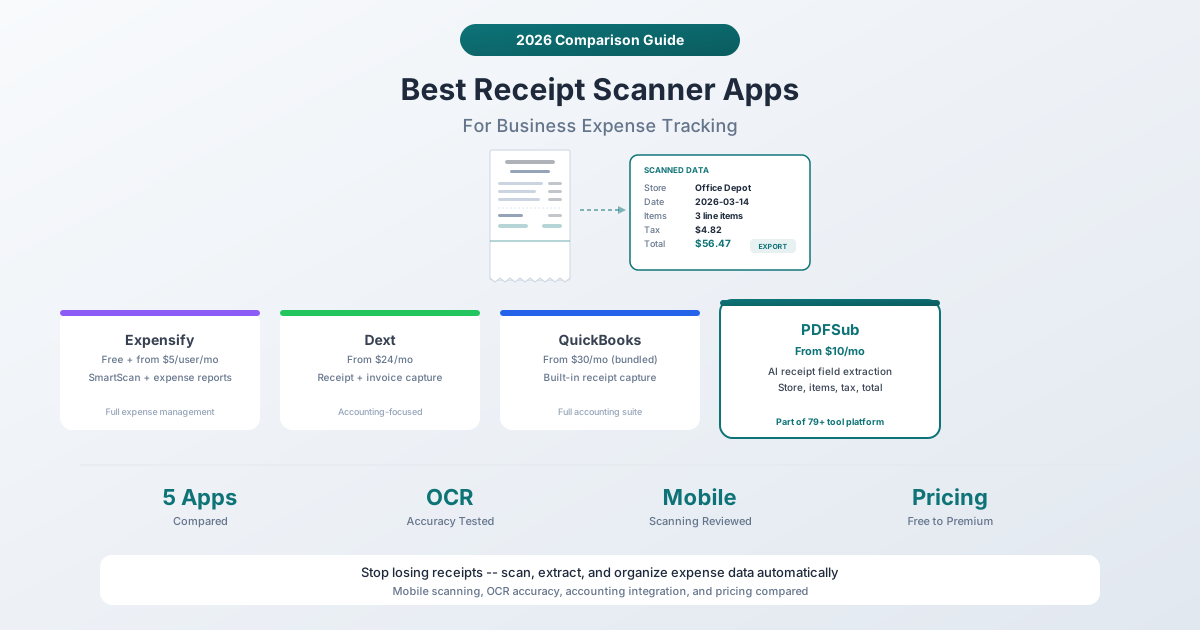
Receipt scanner apps solve this by digitizing receipts the moment you get them. Snap a photo, and the app extracts the merchant name, date, items, tax, and total into structured data. The receipt image is stored digitally, and the data flows into your accounting or expense system.
But receipt scanning apps range from free phone camera tools to $50+/user enterprise expense platforms. Here is how to find the right fit for your business.
What Makes a Good Receipt Scanner?
Not all receipt scanning is equal. Here is what separates a useful app from a frustrating one:
-
OCR accuracy. Can the app correctly read faded thermal paper, crumpled receipts, and non-standard layouts? This is the baseline requirement.
-
Speed. Does it extract data in seconds, or do you wait minutes? A slow scanner breaks the habit of scanning receipts immediately.
-
Data completeness. Does it extract just the total, or does it capture merchant name, date, individual items, tax breakdown, and payment method?
-
Accounting integration. Can the data flow into QuickBooks, Xero, Sage, or your accounting system without re-typing?
-
Storage and search. Can you find a specific receipt from 8 months ago in seconds?
1. Expensify
Best for: Companies with employees who need to submit expense reports with receipt documentation.
Expensify is the heavyweight of business receipt scanning. Its SmartScan feature reads receipts using a combination of OCR, AI, and human reviewers (for edge cases). But Expensify is more than a receipt scanner -- it is a complete expense management platform with corporate cards, approval workflows, and reimbursement processing.
Pricing: The free plan handles basic receipt scanning for individuals. Paid plans start around $5/user/month (Collect plan) for teams needing approval workflows, and the Control plan runs about $9/user/month for larger organizations with advanced policy controls.
How it works: Photograph a receipt with the Expensify app. SmartScan extracts the merchant, date, amount, and category. The receipt is attached to an expense report that can be submitted for approval. Managers approve, finance reimburses, and the data flows to your accounting software.
Strengths:
- SmartScan combines AI with human verification for high accuracy
- Complete expense management workflow (not just scanning)
- Corporate card integration and automatic receipt matching
- Mileage tracking and per-diem calculations
- Broad integrations: QuickBooks, Xero, NetSuite, Sage, Oracle
- Team policies and approval workflows
Limitations:
- Per-user pricing adds up quickly (a 20-person team is $100-180/month)
- Overkill if you just need receipt scanning without expense management
- The app can feel bloated with features you do not use
- SmartScan human review adds processing delay
- Free plan is limited and pushes toward paid upgrades
2. Dext (formerly Receipt Bank)
Best for: Bookkeepers and accountants who need receipt data flowing directly into accounting software.
Dext is built for the accounting workflow. Snap a receipt, and Dext extracts the data, codes it to your chart of accounts, and publishes it to Xero, QuickBooks, Sage, or FreeAgent. It learns your coding preferences over time -- if you always code receipts from Staples to "Office Supplies," Dext remembers.
Pricing: Plans start around $24/month for small businesses. Accountant and bookkeeper plans are available for managing multiple clients. Annual contracts reduce the per-month cost.
How it works: Photograph receipts with the Dext mobile app, forward them via email, or use the browser extension. Dext extracts merchant, date, amount, tax, and category. You review (or auto-approve based on rules), and data is published to your accounting software.
Strengths:
- Deep accounting integrations (Xero, QuickBooks, Sage, FreeAgent)
- Supplier rules automate categorization over time
- Multi-currency support with conversion
- Handles both receipts and invoices
- Client management for accountants with multiple businesses
- Data extraction accuracy is among the best in the industry
Limitations:
- More expensive than most alternatives ($24/month starting)
- The interface has a learning curve for non-accountants
- Designed for accounting professionals -- may be over-featured for casual users
- No free tier (trial only)
- Receipt-only focus -- no broader PDF capabilities
3. QuickBooks Receipt Capture
Best for: Existing QuickBooks users who want receipt scanning built into their accounting workflow.
If you already use QuickBooks Online, receipt capture is built in. Snap a photo in the QuickBooks mobile app, and the system extracts data and matches it to transactions in your bank feed. No separate tool, no separate subscription.
Pricing: Included with QuickBooks Online plans (starting around $30/month for Simple Start). No additional cost for receipt scanning.
How it works: Open the QuickBooks mobile app, photograph a receipt. QuickBooks extracts the vendor, date, and amount. The receipt attaches to the matched transaction in your bank feed. During reconciliation, the receipt is right there as documentation.
Strengths:
- Free with QuickBooks -- no additional cost
- Seamless integration with your accounting workflow
- Automatic matching to bank transactions
- Receipt images stored as transaction documentation
- Tax-time readiness -- receipts are already attached to categorized transactions
Limitations:
- Only useful if you use QuickBooks Online
- Extraction accuracy is decent but not best-in-class
- Limited to receipt scanning -- no invoice processing or expense reports
- The QuickBooks mobile app can be slow
- No multi-client management (unlike Dext)
- You are paying $30+/month for QuickBooks, not specifically for receipt scanning
4. Wave Receipts
Best for: Freelancers and small businesses that want free accounting with free receipt scanning.
Wave offers free accounting software with free receipt scanning built in. For budget-conscious freelancers and solopreneurs, this is an attractive combination -- no monthly fees for the core accounting and receipt features.
Pricing: Free for invoicing and accounting. Wave makes money through payment processing fees and payroll services. Receipt scanning is included at no cost.
How it works: Photograph receipts in the Wave mobile app. The system extracts data and creates expense entries in your Wave accounting. Receipts are stored and attached to transactions.
Strengths:
- Completely free for receipt scanning and accounting
- Simple interface designed for non-accountants
- Unlimited receipt scanning
- Combined with free invoicing
- Cancel anytime
Limitations:
- Extraction accuracy is lower than premium alternatives
- Limited integrations (Wave is a standalone ecosystem)
- No line-item extraction -- just merchant, date, and total
- The mobile app can be buggy
- Free model means less investment in feature development
- No expense approval workflows or team features
5. PDFSub Receipt Scanner
Best for: Teams that need AI-powered receipt data extraction as part of a broader document workflow.
PDFSub's Receipt Scanner uses AI to extract structured data from receipt PDFs (or photos converted to PDF). It captures the merchant name, date, individual line items, tax breakdown, and total. The AI handles different receipt formats -- long grocery receipts, restaurant checks, gas station receipts -- without requiring template setup.
Pricing: Included in PDFSub's All-In-One plan ($20/user/mo annual; $25/user/mo monthly) with 98+ tools. No per-receipt fees. A 7-day free trial is available.
How it works: Upload a receipt image or PDF. The AI vision model analyzes the receipt layout and extracts all fields. Results are returned as structured data that you can export to Excel, CSV, or JSON for import into your accounting system.
Strengths:
- AI vision handles any receipt format without template training
- Extracts individual line items, not just header fields
- Part of a complete document platform (98+ tools)
- Also includes invoice extraction, bank statement conversion, and financial report analysis
- Fixed monthly price -- no per-receipt charges
- Browser-based -- works on any device
- Supports receipts in 130+ languages
Limitations:
- No direct accounting software integration (export and import workflow)
- No mobile app for camera scanning (upload PDFs or images through browser)
- No expense management features (approval workflows, expense reports)
- Requires uploading receipts -- no email forwarding for automatic capture
- Best as a data extraction tool, not a complete expense management system
Comparison Table
| Feature | Expensify | Dext | QuickBooks | Wave | PDFSub |
|---|---|---|---|---|---|
| Starting Price | Free/$5/user/mo | ~$24/mo | Included ($30/mo+) | Free | $15/mo |
| Mobile Scanning | Yes (app) | Yes (app) | Yes (app) | Yes (app) | Browser upload |
| Line Item Extraction | Basic | Yes | No | No | Yes |
| Accounting Integration | QB, Xero, Sage, NetSuite | QB, Xero, Sage, FreeAgent | QuickBooks only | Wave only | Export (CSV/Excel) |
| Expense Reports | Yes | No | No | No | No |
| Invoice Processing | Yes | Yes | No | No | Yes (separate tool) |
| Team Management | Yes | Yes (for accountants) | Limited | No | Yes |
| Other PDF Tools | No | No | No | No | 98+ |
How to Choose
You need full expense management with approval workflows: Expensify. Receipt scanning is part of a broader expense management platform with corporate cards, mileage tracking, and approval workflows.
You are a bookkeeper managing multiple client businesses: Dext. The client management features, supplier rules, and deep accounting integrations are purpose-built for this workflow.
You already use QuickBooks and want simple receipt scanning: QuickBooks Receipt Capture. It is free with your existing subscription and integrates seamlessly with your bank feed.
You are a freelancer on a tight budget: Wave. Free accounting with free receipt scanning is hard to beat on price.
You need receipt data extraction alongside other document tools: PDFSub. At $20/user/mo (annual) for receipt scanning plus invoice extraction, bank statement conversion, AI chat, translation, and 98+ other tools, it's the broadest per-user value.
A Note on Tax Compliance
Most tax authorities accept digital copies of receipts for documentation purposes. The IRS in the United States, HMRC in the UK, and CRA in Canada all accept electronic receipt images as valid records. However, you should keep the digital copies for the required retention period (typically 3-7 years depending on your jurisdiction) and ensure the images are legible and unaltered.
All tools on this list store receipt images alongside the extracted data, giving you both the documentation and the structured data for tax purposes.
Frequently Asked Questions
How accurate are receipt scanners on faded thermal paper?
Accuracy varies significantly. Premium tools like Dext and Expensify (with human verification) achieve the best results on faded receipts. AI-powered tools like PDFSub's Receipt Scanner handle faded text reasonably well because AI vision models are trained on degraded image quality. Free tools (Wave, QuickBooks) may struggle with badly faded receipts. For best results, scan receipts as soon as possible before they fade.
Can I use a receipt scanner app for personal expenses too?
Yes. Expensify and Wave both offer free tiers for personal use. Google Lens and Apple Live Text (not covered in depth here) can extract text from receipts for free. PDFSub can extract receipt data for personal use as part of its subscription. The question is whether you need structured data extraction (merchant, amount, category) or just a photo archive.
What is the difference between receipt scanning and expense management?
Receipt scanning extracts data from a receipt image. Expense management is a broader workflow that includes receipt scanning, categorization, approval routing, policy enforcement, reimbursement, and accounting integration. Expensify is an expense management platform that includes receipt scanning. PDFSub and Wave are receipt scanning tools that do not include full expense management. Dext sits in between -- it handles receipt and invoice processing with accounting integration but does not include employee reimbursement workflows.
Are receipt scanner apps secure enough for business use?
All tools on this list use encrypted connections and store data on secure servers. Expensify and Dext are SOC 2 certified. PDFSub is SOC 2 Ready. For most businesses, the security of any tool on this list is adequate. If you are in a regulated industry with specific compliance requirements, check each tool's security certifications against your requirements.
Can these tools scan receipts in languages other than English?
Most tools handle receipts in major languages. Expensify and Dext support receipts in English, French, German, Spanish, and other major languages. PDFSub supports 130+ languages with automatic language detection, making it the broadest option for international receipts. If your business regularly receives receipts in multiple languages (international travel, global suppliers), language support should be a key selection criterion.
The Bottom Line
The best receipt scanner depends on your workflow complexity. Full expense management platforms (Expensify) are worth the per-user cost for companies with employees submitting expense reports. Accounting-focused tools (Dext) are ideal for bookkeepers. Built-in options (QuickBooks, Wave) work for simple, low-volume needs.
For teams that need receipt scanning as one part of a broader document workflow, PDFSub's Receipt Scanner offers AI-powered extraction alongside 98+ other PDF tools at $20/user/mo (annual) -- a strong value when you also need invoice extraction, bank statement conversion, and standard PDF operations.