Best ProperSoft Alternative for Bank Statement Conversion (2026)
Looking for a ProperSoft alternative? Compare features, pricing, and capabilities with PDFSub.
PDFSub is best for:
- Teams who want 20,000+ pre-built bank templates instead of manually configuring ProperSoft templates
- Distributed firms needing browser-based access vs ProperSoft's desktop-only install
- Professionals who need AI-powered extraction, document chat, and 98+ PDF tools beyond statement conversion
- International bookkeepers processing statements in 130+ languages vs ProperSoft's limited coverage
PDFSub is NOT best for:
- Users who prefer offline-only processing on a local desktop with no cloud involvement
- ProperSoft power users who rely on its 100+ YouTube tutorials and custom template workflows
- Organizations needing a dedicated account manager for enterprise support
ProperSoft has carved out a respectable niche in the bank statement conversion market. If you've ever needed to turn a PDF bank statement into a QBO file for QuickBooks, ProperSoft's suite of desktop converters (ProperConvert, Bank2QBO, Bank2CSV, and others) probably showed up in your search results. For straightforward, single-file conversion on a desktop machine, ProperSoft gets the job done.
But the document conversion landscape has shifted significantly. Web-based platforms with AI-powered extraction, multi-format output, and broad bank template libraries have raised the bar well beyond what a desktop utility can offer. If you've been relying on ProperSoft and finding yourself hitting its limits - template coverage, batch processing, format breadth, or the need for additional document tools - this guide walks through the best alternatives and why teams are switching.
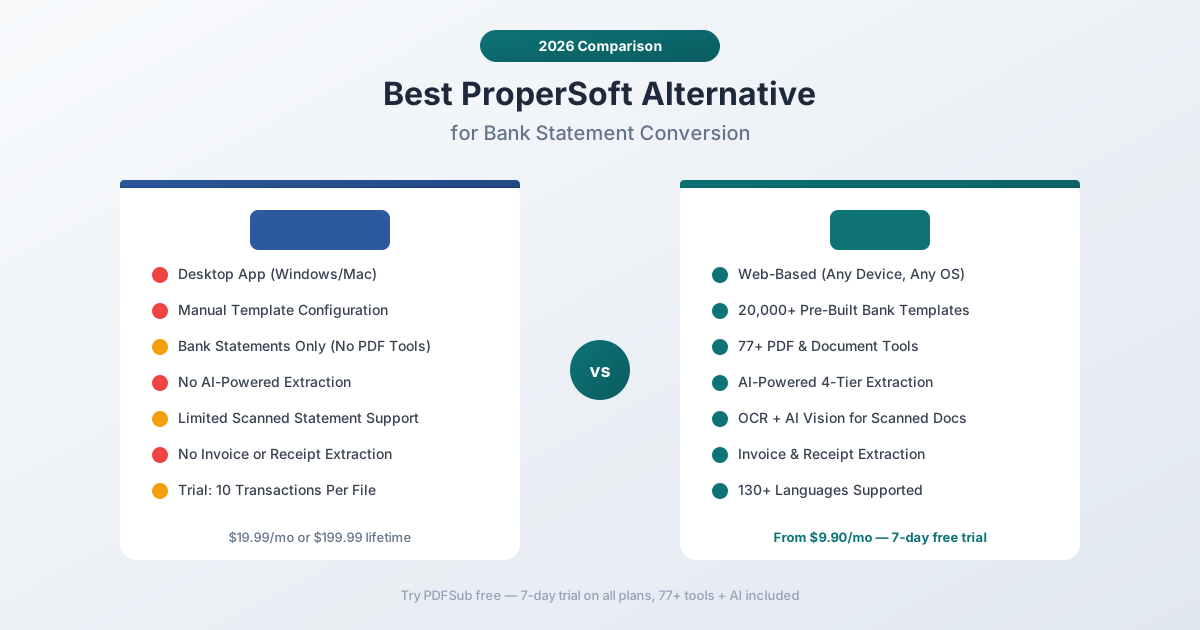
Why People Look for ProperSoft Alternatives
ProperSoft works well for its core use case. The frustrations tend to come from what it doesn't do, and the limitations that become apparent as your needs grow.
Limited Bank Template Coverage
ProperSoft relies on user-configured templates to parse bank statement layouts. This means that for every new bank format you encounter, there's a setup process - you may need to manually define column positions, date formats, and transaction patterns. For bookkeepers and accountants handling clients across multiple banks, this template configuration adds up quickly.
There's no published template library with thousands of pre-built formats. If your bank's PDF layout is unusual, you're essentially teaching the software how to read it yourself.
Desktop-Only Architecture
ProperSoft runs on Windows and Mac as a desktop application. In 2026, when teams work remotely and across devices, requiring a local install creates friction:
- No Chromebook or tablet support - Mobile workers and lightweight device users are excluded
- IT management overhead - Each workstation needs installation and updates
- No collaboration - There's no shared workspace or team features
- License management - Tracking who has which license across an organization
For solo practitioners, desktop-only is manageable. For teams, it's a bottleneck.
Single-Purpose Tool
ProperSoft focuses on one thing: converting bank statements from PDF/CSV/Excel into accounting formats (QBO, QFX, OFX, QIF, CSV). That's the entire product.
What it doesn't do:
- Invoice extraction - No automated field extraction from invoices
- Receipt scanning - No receipt-to-data conversion
- PDF editing - No merge, split, compress, or resize capabilities
- AI features - No document chat, summarization, or smart extraction
- Document translation - No translation capabilities
- Financial report analysis - No balance sheet or income statement analysis
If your workflow involves any document tasks beyond bank statement conversion, you need additional software subscriptions on top of ProperSoft.
Pricing Structure
ProperSoft offers three pricing tiers: $19.99/month, $119.99/year, or $199.99 lifetime. While the lifetime option sounds attractive, the individual converter products (Bank2QBO, Bank2CSV, etc.) were previously sold separately. The ProperConvert bundle covers all formats, but the per-converter licensing model can catch users off guard.
The free trial is limited to 10 transactions per file, which may not be enough to evaluate accuracy on complex statements.
No AI-Powered Extraction
ProperSoft uses traditional parsing - pattern matching and template-based extraction. For clean, well-formatted digital PDFs, this works fine. For scanned statements, image-based PDFs, or unusual layouts, traditional parsing struggles.
Modern AI-powered extraction can read statements the way a human would - understanding context, handling variations, and recovering data from poor-quality scans. ProperSoft doesn't have this capability.
What to Look for in a ProperSoft Alternative
Before comparing specific tools, here's what matters most when evaluating alternatives:
Bank template coverage. How many bank formats are pre-built? A library of 20,000+ templates means most statements work out of the box without manual configuration.
Multi-format output. Can you export to CSV, Excel, QBO, OFX, QIF, MT940, and other accounting formats? Different accounting software requires different formats.
AI extraction fallback. When traditional parsing fails on a scanned or unusual statement, does the tool have AI vision to recover the data?
Beyond bank statements. Does the platform handle invoices, receipts, financial reports, and other document types? Consolidating tools saves money and reduces context-switching.
Web-based access. Can your entire team use it from any browser without installation?
Privacy. Does the tool process documents in the browser when possible, or does everything get uploaded to servers?
PDFSub: The Best ProperSoft Alternative
PDFSub is a web-based document platform with 98+ tools that covers bank statement conversion, invoice extraction, receipt scanning, AI-powered document intelligence, and the complete spectrum of PDF operations - all accessible from any browser.
20,000+ Bank Templates Pre-Built
This is the most significant difference. PDFSub's bank statement converter includes pre-built templates for over 20,000 financial institutions worldwide. When you upload a bank statement, the system automatically identifies the bank and applies the correct extraction template.
No manual template configuration. No teaching the software how to read a new format. Upload, extract, download - for statements from virtually any bank in any country.
For bookkeepers and accountants who handle clients across dozens of banks, this eliminates hours of template setup that ProperSoft requires.
4-Tier Extraction Architecture
PDFSub doesn't rely on a single extraction method. It uses a cascading approach:
- Browser-based extraction - Clean digital PDFs are parsed instantly in your browser. The file never leaves your device.
- Server-side text extraction - Complex layouts with multi-column content get server processing for better accuracy.
- Server OCR - Scanned statements receive optical character recognition.
- AI vision - For severely degraded scans, photographed statements, or unusual formats, AI vision reads the document the way a human would.
Each statement automatically gets the best extraction method. ProperSoft's traditional parsing handles clean digital PDFs well, but falls apart on scanned documents. PDFSub's cascading approach handles everything.
Every Output Format
PDFSub supports 8 output formats:
- CSV - Universal format for any spreadsheet or accounting software
- Excel (XLSX) - Formatted spreadsheets with proper column headers
- TSV - Tab-separated values for data pipelines
- JSON - Structured data for developers and automation
- QBO - QuickBooks Online/Desktop format
- OFX - Open Financial Exchange for broad accounting compatibility
- QFX - Quicken Financial Exchange
- QIF - Quicken Interchange Format
One tool, every major accounting format. No need to purchase separate converters for each output type.
98+ Additional Tools
Where ProperSoft gives you bank statement conversion and nothing else, PDFSub gives you a complete document platform:
- Invoice extractor - Pull vendor details, line items, totals, and payment terms
- Receipt scanner - Extract merchant, items, totals, tax, and payment method
- Financial report analyzer - AI analysis of balance sheets, income statements, and cash flow
- Chat with PDF - Ask questions about any document in natural language
- Translate PDF - Translate documents across 130+ languages
- Merge, split, compress, rotate, resize - All standard PDF operations
- Convert - PDF to Word, Excel, PowerPoint, images, and back
- Extract tables - Pull structured table data from any document
- Summarize - Get concise summaries of long documents
One subscription replaces ProperSoft plus the 3-5 other tools you'd need for a complete accounting workflow.
Browser-First Privacy
PDFSub processes documents in your browser whenever possible. Clean digital bank statements are parsed entirely on your device - the PDF never touches PDFSub's servers. Server processing only kicks in when the document requires OCR or AI vision.
ProperSoft also processes locally (it's a desktop app), but PDFSub's browser-first approach gives you both privacy and web-based convenience.
130+ Languages
PDFSub supports bank statements and documents in over 130 languages, including right-to-left scripts (Arabic, Hebrew), CJK characters (Chinese, Japanese, Korean), and complex scripts (Hindi, Thai, Bengali). This matters for international accounting firms handling statements from global banks.
Predictable Pricing
PDFSub's All-In-One plan is $20/month annual ($240/year, saves $60 vs monthly; $25/month billed monthly) - includes all 98+ PDF tools, 500 AI credits, 500 bank statement pages, e-sign with no per-envelope fees, 50 GB storage; add unlimited team seats at the same per-user rate. A 7-day free trial gives you full access to evaluate everything.
Compare that to ProperSoft's $19.99/month or $199.99 lifetime - but remember, ProperSoft only covers bank statement conversion. PDFSub's pricing includes 98+ tools, AI features, 130+ languages, and 20,000+ bank templates.
Head-to-Head: PDFSub vs ProperSoft
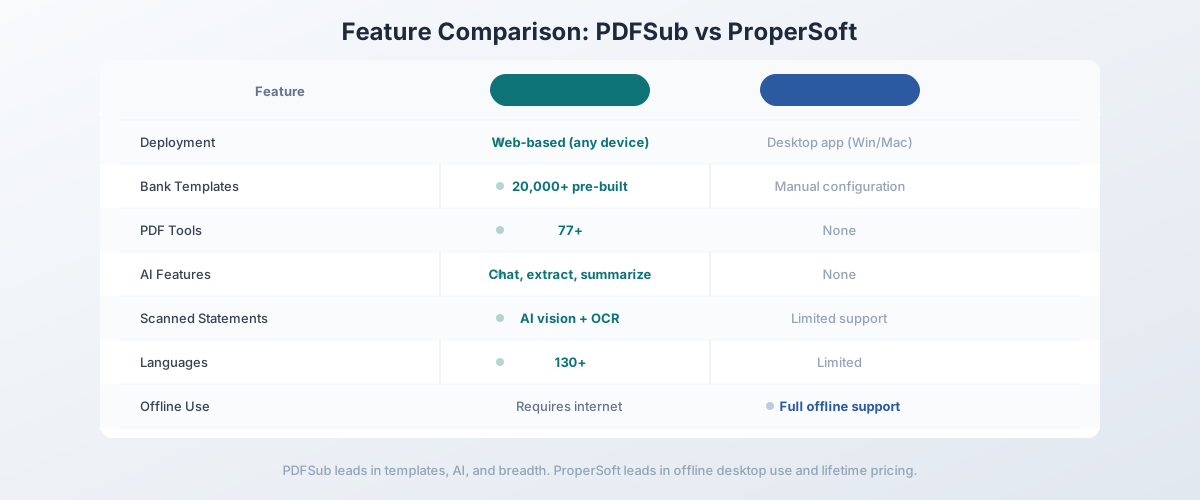
| Feature | PDFSub | ProperSoft |
|---|---|---|
| Deployment | Web-based (any device) | Desktop app (Windows/Mac) |
| Bank templates | 20,000+ pre-built | User-configured templates |
| Output formats | CSV, Excel, TSV, JSON, QBO, OFX, QFX, QIF | CSV, Excel, QBO, OFX, QIF, QFX, IIF |
| Scanned statements | AI vision + OCR fallback | Limited (traditional parsing) |
| PDF tools | 98+ | None |
| AI features | Chat, extract, summarize, analyze | None |
| Invoice extraction | Automated | None |
| Receipt scanning | Automated | None |
| Languages | 130+ | Limited |
| Privacy | Browser-first processing | Local desktop processing |
| Pricing | $20/mo (annual) (tools) / $29/mo (BSC) | $19.99/mo or $199.99 lifetime |
| Free trial | 7-day full access | 10 transactions per file |
| Team deployment | Instant (browser) | Per-device install |
Where PDFSub wins: Bank template coverage (20,000+ vs manual configuration), scanned statement handling, document breadth (98+ tools vs one), AI features, web-based access, and team deployment. For anyone who needs more than basic conversion of clean digital PDFs, PDFSub is the more capable platform.
Where ProperSoft wins: ProperSoft's lifetime license ($199.99 one-time) is attractive for solo users with very limited needs. If you only convert a handful of clean digital bank statements per month from the same few banks, and you never need invoices, receipts, AI features, or other PDF tools, ProperSoft's low long-term cost is hard to beat. The desktop architecture also means zero dependency on internet connectivity.
The value calculation: ProperSoft's lifetime license ($199.99) equals roughly 10 months of PDFSub's All-In-One plan ($20/user/mo annual, which includes 500 BSC pages, 500 AI credits, and 98+ tools). After that, every month of PDFSub costs more in cash than ProperSoft - but you also get AI features, 20,000+ bank templates, 130+ language support, and e-sign with no per-envelope fees. For most professionals working beyond a single bank's clean PDFs, the broader capability justifies the subscription model.
Other Alternatives Worth Considering
PDFSub isn't the only alternative. Here's how the broader market compares:
DocuClipper - From $49.95/month
Cloud-based bank statement converter focused on accounting professionals:
- Strengths: Good bank template coverage, batch processing, accounting software integrations, transaction categorization
- Weaknesses: Significantly more expensive than ProperSoft, focused solely on bank statements, no general PDF tools, no AI document intelligence
- Best for: Accounting firms that process high volumes of bank statements and need dedicated batch conversion
MoneyThumb - From $19.95/month
Desktop and cloud bank statement converter:
- Strengths: Multiple output formats, reasonable pricing, established market presence, supports scanned statements via OCR
- Weaknesses: Desktop-focused, limited bank template library compared to larger platforms, no AI features, no general document tools
- Best for: Solo bookkeepers who need a step up from ProperSoft's template approach but don't need a full document platform
Bank Statement Converter Pro - From $39.99/month
Dedicated online bank statement conversion:
- Strengths: Web-based, supports multiple banks, batch processing, good format coverage
- Weaknesses: Single-purpose (bank statements only), no AI features, no general PDF tools, higher price point
- Best for: Users who want web-based bank statement conversion without the full document platform
Dext (formerly Receipt Bank) - From $24/month
Expense management and document capture:
- Strengths: Strong receipt capture, accounting integrations (Xero, QuickBooks, Sage), mobile app, automated data extraction
- Weaknesses: Focused on receipts and invoices rather than bank statements, no general PDF tools, no AI chat or summarization
- Best for: Small businesses that primarily need receipt and invoice capture with direct accounting software integration
Quick Comparison Matrix
| Tool | Price | Deployment | Bank Templates | AI Features | PDF Tools | Output Formats |
|---|---|---|---|---|---|---|
| PDFSub | $20/mo (annual) | Web | 20,000+ | Yes | 98+ | CSV, Excel, TSV, JSON, QBO, OFX, QFX, QIF |
| ProperSoft | $19.99/mo or $199.99 | Desktop | Manual config | No | None | CSV, Excel, QBO, OFX, QIF, QFX, IIF |
| DocuClipper | From $49.95/mo | Web | Good coverage | Limited | None | CSV, Excel, QBO |
| MoneyThumb | From $19.95/mo | Desktop + Web | Moderate | No | None | CSV, QBO, OFX, QIF |
| Dext | From $24/mo | Web + Mobile | N/A | Limited | None | Accounting exports |
When ProperSoft Is Still the Right Choice
To be fair, ProperSoft remains a reasonable option in specific situations:
- Solo users with simple needs who only convert a handful of clean digital bank statements per month from the same few banks, and the lifetime license makes long-term sense
- Offline-only environments where documents must never touch the internet and all processing must happen on a local machine
- Budget-constrained individuals who need the absolute cheapest option for basic PDF bank statement conversion and don't need AI, templates, or additional tools
- QuickBooks-specific workflows where you only need QBO output from clean digital PDFs and the simplicity of a single-purpose tool appeals to you
If your workflow is "take a digital PDF bank statement from Bank X, convert it to QBO, import into QuickBooks" and that's the entire scope, ProperSoft handles that adequately.
When You Need Something Better
Switch to a ProperSoft alternative when:
- You encounter new bank formats regularly. ProperSoft's manual template configuration means every new bank layout requires setup time. PDFSub's 20,000+ pre-built templates handle most banks automatically.
- You process scanned or image-based statements. ProperSoft's traditional parsing struggles with scanned documents. AI-powered extraction handles these reliably.
- You need more than bank statements. Invoice extraction, receipt scanning, financial report analysis, PDF tools - if your workflow extends beyond bank statements, you need a broader platform.
- Your team is distributed. Desktop software with per-device licensing doesn't scale for remote and hybrid teams.
- You want AI capabilities. Document chat, smart extraction, summarization - these features are standard in 2026 and ProperSoft doesn't offer them.
- You work with international banks. 130+ language support and 20,000+ global bank templates matter for international accounting.
How to Switch from ProperSoft to PDFSub
The switch is straightforward:
- Start a free trial at pdfsub.com/signup - 7 days with full access to all 98+ tools
- Upload a bank statement you've been converting with ProperSoft and test the bank statement converter - compare accuracy and output quality
- Try a scanned statement that ProperSoft struggles with - see how AI-powered extraction handles it
- Export in your format - QBO, CSV, Excel, OFX, or whatever your accounting software needs
- Explore the other 98+ tools - invoice extraction, receipt scanning, PDF merge/split/compress, AI chat, and more
You can run PDFSub alongside ProperSoft during the trial. Most users find PDFSub handles their bank statements more accurately with less manual configuration, and the additional 98+ tools make the switch obvious.
Frequently Asked Questions
Is ProperSoft worth the lifetime license?
For users with very limited needs - a few clean digital statements per month from the same banks - the $199.99 lifetime license offers good long-term value. However, the manual template configuration and lack of AI extraction mean you're trading convenience for cost savings. If you ever handle scanned statements, unusual formats, or statements from unfamiliar banks, the time spent on manual configuration often exceeds what you'd pay for a platform with pre-built templates.
Can PDFSub match ProperSoft's conversion accuracy?
For clean digital PDFs from well-known banks, both tools produce comparable results. PDFSub's advantage emerges with scanned statements, unusual layouts, and international bank formats where its AI-powered extraction and 20,000+ template library significantly outperform ProperSoft's template-based approach.
Does ProperSoft work on Mac?
Yes, ProperSoft offers both Windows and Mac versions. PDFSub works on any platform with a browser - including Chromebooks, tablets, and Linux - since it's entirely web-based.
Can ProperSoft handle scanned bank statements?
ProperSoft has limited support for scanned/image-based PDFs, but its traditional parsing approach is less effective than AI-powered extraction. For scanned statements, you'll generally get better results with a platform that includes OCR and AI vision capabilities.
What accounting formats does PDFSub support?
PDFSub supports CSV, Excel (XLSX), TSV, JSON, QBO (QuickBooks), OFX (Open Financial Exchange), QFX (Quicken Financial Exchange), and QIF (Quicken). This covers virtually every major accounting software platform.
Is there a free trial for PDFSub?
Yes, PDFSub offers a 7-day free trial with full access to all 98+ tools, including the bank statement converter with 20,000+ bank templates, AI features, and every output format. Cancel anytime.
Can PDFSub process documents offline?
PDFSub requires an internet connection for login and server-side features (OCR, AI). Basic PDF operations and digital bank statement extraction that use browser-side processing work with minimal connectivity. If you need fully offline processing in an air-gapped environment, ProperSoft's desktop architecture is better suited for that specific requirement.
Still evaluating, not yet switching? This page is written for teams ready to leave ProperSoft. For a neutral feature-by-feature breakdown and pricing side-by-side, see the PDFSub vs ProperSoft comparison.