Best pdfFiller Alternative for PDF Forms & Document Processing (2026)
pdfFiller handles forms and e-signatures, but its high cost, limited AI, and cloud-only model push users toward better alternatives.
PDFSub is best for:
- Users frustrated by pdfFiller's $20-40/mo monthly billing for basic form fill and e-sign
- Professionals who need AI document intelligence (chat, summarize, extract) that pdfFiller lacks
- Users wanting e-sign plus financial extraction (invoices, receipts, bank statements) in one platform
- Teams needing 98+ PDF tools at $25/user/mo (All-In-One annual) instead of pdfFiller's limited scope at similar pricing
PDFSub is NOT best for:
- Users who primarily fill IRS tax forms and government paperwork (pdfFiller has a large form library)
- Teams needing advanced form field creation with conditional logic and calculations
- Organizations requiring e-signature templates with bulk send to multiple recipients
pdfFiller, owned by airSlate, has built a strong reputation for PDF form filling and e-signatures. Upload a document, fill in fields, add a signature, and send it along. For users who primarily deal with forms - tax documents, contracts, applications, HR paperwork - pdfFiller streamlines what used to be a print-sign-scan workflow.
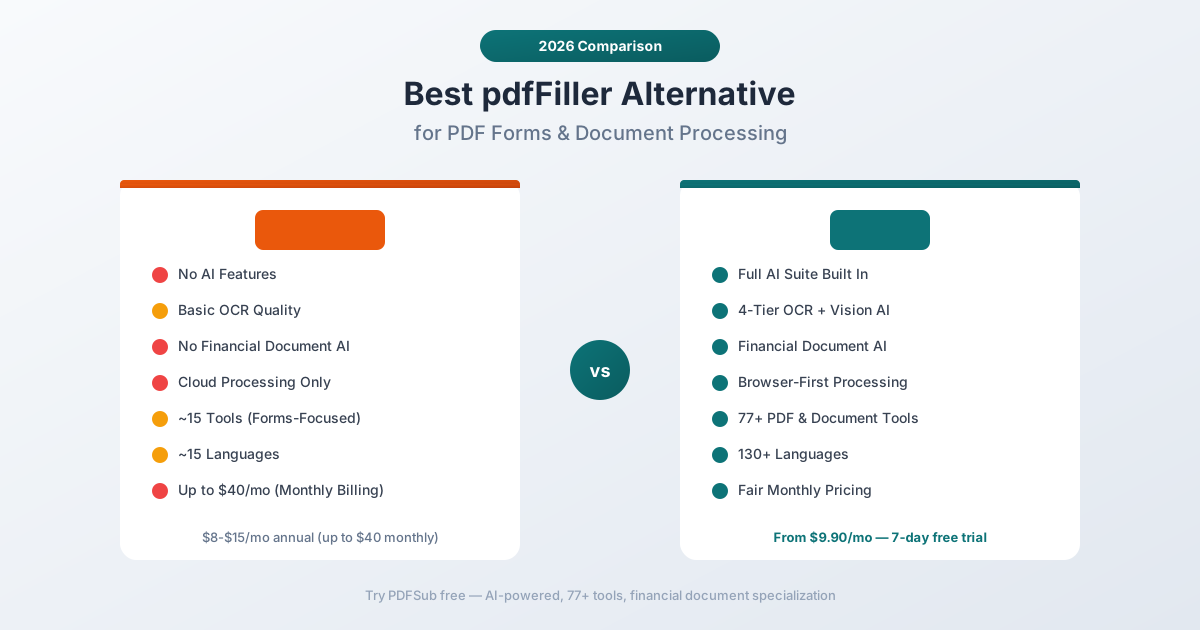
But pdfFiller's strengths are also its boundaries. The platform was designed around forms and signatures, and it shows when you try to use it for anything else. AI features are minimal. Financial document extraction doesn't exist. OCR is basic. And the pricing - up to $40/month on monthly billing - puts it in premium territory without delivering premium breadth.
If you've been frustrated by pdfFiller's cost relative to what it offers, the lack of AI document intelligence, or the inability to handle financial documents beyond simple form filling, this guide examines where pdfFiller falls short and which alternatives cover the gaps.
Why People Switch from pdfFiller
pdfFiller has solid G2 and Capterra ratings, and for its core use case - filling out PDF forms and collecting signatures - it works well. The problems emerge when users need more.
Expensive for What You Get
pdfFiller's pricing is one of the most common complaints:
- Basic: $8/month (annual) or ~$20/month (monthly billing)
- Plus: $12/month (annual) or ~$30/month (monthly billing)
- Premium: $15/month (annual) or ~$40/month (monthly billing)
The monthly billing premium is steep - up to 2.5x the annual price. And even at the annual rate, $15/month for the Premium plan gets you PDF editing, e-signatures, and document storage. No AI chat, no financial extraction, no multi-language support beyond basic OCR.
For comparison, that $15/month buys form filling and e-signatures. It doesn't buy document intelligence, structured data extraction, or the breadth of tools that modern document platforms offer.
No AI Document Intelligence
pdfFiller has no meaningful AI features:
- No AI chat with documents
- No AI-powered summarization
- No intelligent data extraction
- No financial document AI
- No document comparison or analysis
In 2026, when competitors are using AI to extract data, summarize content, answer questions, and automate document workflows, pdfFiller's feature set feels stuck in 2020. You fill forms. You sign documents. That's the extent of the intelligence.
For users who need to understand document content - not just edit it - pdfFiller offers no help.
Limited OCR Quality
pdfFiller includes OCR, but users report mixed results:
- Clean forms with standard printed text convert well
- Financial documents with dense tables and small fonts produce errors in column alignment and number recognition
- Degraded scans - faded documents, old thermal receipts, low-quality photos - often produce unusable output
- OCR accuracy drops significantly for poor-quality scanned documents, per user reviews on G2 and Capterra
For users primarily working with digital-native forms, pdfFiller's OCR is adequate. For real-world document diversity, it's a limitation.
Cloud-Only Processing
Every document uploaded to pdfFiller goes to airSlate's servers. There's no browser-based processing, no local file handling, and no option to keep files on your device.
pdfFiller does store documents in their cloud system, which is convenient for access across devices but means your sensitive data - financial records, personal information, contracts - lives on third-party servers.
For businesses handling client financial documents, healthcare records, or legally sensitive files, cloud-only processing raises compliance and privacy questions.
Document Handling Constraints
Users report practical limitations in daily work:
- Combining more than five pages at once requires batch processing - you can't merge a large set of documents in a single operation
- Large document lag - performance degrades noticeably on longer PDFs
- Limited text formatting - font options, spacing, and layout control are more restricted than dedicated editors
- Multi-step saving process - some users report difficulty saving documents without navigating through multiple screens
- No offline capability - requires internet connectivity for all operations
These aren't dealbreakers for occasional form filling, but they create friction for professional daily use.
Steep Learning Curve for Advanced Features
pdfFiller offers API access and scripting for automation, but users consistently report that:
- Advanced features have a steep learning curve
- Template customization is limited compared to more flexible PDF editors
- The interface prioritizes simplicity for basic tasks at the expense of power user efficiency
- Handling many tasks at once feels "inefficient and cumbersome" per user reviews
The platform is optimized for the simple use case - open form, fill fields, sign, send. Anything beyond that requires more effort than it should.
No Financial Document Processing
pdfFiller has no understanding of financial document structure:
- No bank statement conversion or transaction extraction
- No invoice data extraction (vendor, line items, totals)
- No receipt scanning with structured output
- No financial report analysis
- No support for financial output formats (QBO, OFX, CSV with mapped columns)
For the accountant who needs to extract transactions from bank statement PDFs, or the business owner who wants to pull invoice data into a spreadsheet, pdfFiller simply doesn't offer these capabilities.
What to Look for in a pdfFiller Alternative
When evaluating replacements, here's what to prioritize:
AI document intelligence. In 2026, your PDF tool should understand document content, not just edit it. AI chat, summarization, extraction, and translation transform how you work with documents.
Financial document specialization. If you work with bank statements, invoices, receipts, or financial reports, the tool should understand these formats natively and extract structured data automatically.
Broad tool coverage. Form filling is one workflow. Merging, splitting, converting, extracting, translating, compressing, and analyzing are others. A single platform that covers all of them eliminates subscription sprawl.
Privacy architecture. Browser-first processing keeps routine operations on your device. Cloud processing should be the exception, not the default.
Transparent, fair pricing. No 2.5x premium for monthly billing. Clear features at each tier. Predictable costs for budgeting.
Multi-language support. If any of your documents are non-English, the tool needs native support - not just basic OCR for Latin characters.
Cross-platform access. The tool should work identically on any device and operating system without desktop software to install or update.
PDFSub: The Best pdfFiller Alternative
PDFSub is a browser-based document platform with 98+ PDF and document tools, AI-powered chat and extraction, 130+ language support, financial document specialization, and browser-first privacy - all in a single subscription.
AI-Powered Document Intelligence
This is the most fundamental difference. pdfFiller has no AI features. PDFSub includes:
- AI Chat - Ask questions about any document and get accurate, cited answers
- AI Summarization - Generate concise summaries of long documents
- AI Translation - Translate documents across 130+ languages while preserving formatting
- AI Data Extraction - Pull structured data from unstructured documents automatically
- AI Table Extraction - Identify and extract tables with accurate column relationships
- AI Financial Analysis - Specialized analysis of financial documents with ratio calculations
These aren't future features or limited previews. They're core capabilities available to every subscriber.
Financial Document Specialization
Where pdfFiller treats a bank statement like any other PDF, PDFSub includes dedicated, purpose-built extractors:
- Bank statements - Converts transaction tables from 20,000+ bank formats into structured Excel, CSV, or QBO output with accurate date, description, debit, credit, and balance columns
- Invoices - Extracts vendor details, line items, totals, tax amounts, and payment terms automatically
- Receipts - Pulls merchant name, item list, subtotal, tax, total, and payment method from any receipt format
- Financial reports - Parses balance sheets, income statements, and cash flow statements with calculated ratios
For financial professionals, this is the feature that makes the biggest practical difference. Instead of manually retyping data from PDF bank statements into spreadsheets, PDFSub extracts it automatically - accurately, across thousands of bank formats.
4-Tier Document Processing
pdfFiller's OCR is a single layer. PDFSub uses four cascading tiers:
- Browser text extraction - Digital PDFs process instantly in your browser. No upload, no server, complete privacy.
- Server text extraction - Complex layouts get server-side processing for accurate multi-column and table extraction.
- Server OCR - Scanned documents get optical character recognition across a wide range of scan qualities.
- Vision AI - Severely degraded documents (faded receipts, poor photos, damaged scans) get AI vision processing that reads directly from image content.
This matters because real-world documents come in all qualities. A new digital PDF processes in milliseconds. A 30-year-old faxed bank statement still gets accurate extraction.
Browser-First Privacy
pdfFiller processes everything in the cloud. Every document goes to airSlate's servers.
PDFSub processes documents in your browser first. When text extraction, merging, splitting, or compression can be done client-side, your files never leave your device. Server processing activates only when needed for OCR, AI features, or operations that require server compute.
For financial documents with account numbers, SSNs, transaction histories, and other sensitive data, this architecture difference is meaningful.
130+ Languages
pdfFiller's language support is primarily English and major European languages. PDFSub supports 130+ languages natively:
- Right-to-left: Arabic, Hebrew, Urdu, Farsi
- CJK: Chinese, Japanese, Korean
- Complex scripts: Hindi, Thai, Bengali, Tamil
- European: All major and minor European languages
- And over 100 more
This extends across OCR, AI chat, extraction, and translation - not just basic text recognition.
98+ Tools vs. Forms-Focused Feature Set
pdfFiller offers form filling, e-signatures, basic editing, and document storage. PDFSub includes 98+ tools:
- Edit: Merge, split, rotate, reorder, delete pages, compress
- Convert: PDF to/from Excel, Word, PowerPoint, images, and 15+ other formats
- Extract: Tables, data, metadata, text from any document
- AI: Chat, summarize, translate, analyze, compare documents
- Financial: Bank statement converter (20,000+ banks), invoice extractor, receipt scanner, financial report analyzer
- Security: Watermark, redact, password protect
- OCR: Convert scanned documents to searchable, editable text
One subscription covers the entire document workflow - not just forms and signatures.
Head-to-Head: PDFSub vs pdfFiller
| Feature | PDFSub | pdfFiller |
|---|---|---|
| AI features | Chat, summarize, translate, extract | None |
| OCR quality | 4-tier with Vision AI | Basic single-tier |
| Languages | 130+ | ~15 |
| Financial document AI | Specialized extractors | None |
| Bank statement parsing | 20,000+ bank formats | No |
| E-signatures | Yes (no per-envelope fees) | Yes (all plans) |
| Form filling | Yes (included) | Advanced (core feature, deeper workflows) |
| Privacy model | Browser-first | Cloud-only |
| PDF tools included | 98+ | ~15 |
| Free trial | 7-day full access (subscription required after) | 30-day trial |
| Starting price | $20/user/mo (annual, 7-day free trial) | $8/mo (annual) |
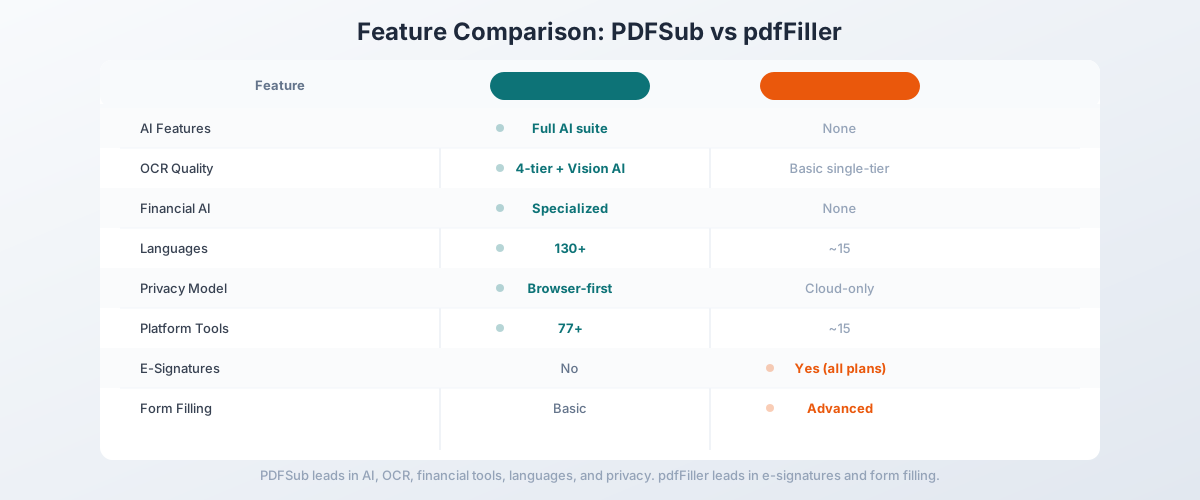
Where PDFSub wins: AI features, OCR quality, financial document processing, language support, tool breadth, privacy architecture, and e-sign with no per-envelope fees. If you need document intelligence beyond filling forms - AI chat, data extraction, bank statement conversion, multilingual support - PDFSub delivers capabilities pdfFiller doesn't offer at any price tier.
Where pdfFiller wins: Advanced form workflows and signature automation. pdfFiller's core competency is forms-as-a-product, with features like routing workflows, audit trails, signing automation, and template management at scale. If your primary workflow is fill-sign-send at high volume with bulk send and approval chains, pdfFiller is purpose-built for that.
The value calculation: pdfFiller Premium at $15/month (annual) gives you forms, signatures, and basic editing. PDFSub's All-In-One at $20/user/mo (annual) gives you 98+ tools, 500 AI credits, 500 bank statement pages, e-sign with no per-envelope fees, and 50 GB storage per user. Unlimited team seats can be added at the same $20/user/mo rate. 7-day free trial. If your needs extend even slightly beyond forms and signatures, PDFSub offers dramatically more per dollar.
Other pdfFiller Alternatives Worth Considering
Adobe Acrobat - $22.99/month
The most comprehensive PDF editor available:
- Strengths: Complete editing suite, excellent form tools, e-signatures, AI Assistant, enterprise support
- Weaknesses: Expensive, heavy application, no financial specialization
- Best for: Enterprise users who need the most complete PDF editing and signing suite
DocuSign - $10-$25/month
The industry standard for e-signatures:
- Strengths: Best-in-class e-signature workflows, deep integrations (Salesforce, Microsoft, Google), trusted brand
- Weaknesses: Primarily signatures - limited PDF editing, no AI features, no financial tools
- Best for: Users whose primary need is e-signatures with enterprise-grade compliance
Smallpdf - $12/month
Web-based PDF platform with e-signatures:
- Strengths: Clean interface, 20+ tools, e-signatures, affordable, easy to use
- Weaknesses: Basic AI, limited OCR, no financial specialization
- Best for: Users who want simple PDF editing plus e-signatures in a web-based tool
Foxit PDF Editor - $14.99/month
Desktop PDF editor with form and signature features:
- Strengths: Fast performance, good form tools, annotation, cross-platform desktop apps
- Weaknesses: Desktop-focused, limited AI, no financial document specialization
- Best for: Users who want a desktop PDF editor with solid form filling and annotation
Sejda - $7.50/month
Lightweight web-based PDF editor:
- Strengths: Affordable, simple interface, covers basic PDF operations, web and desktop versions
- Weaknesses: No AI features, limited OCR, no financial tools, file size limits
- Best for: Budget-conscious users who need basic PDF editing and form filling
Quick Comparison Matrix
| Tool | Price/mo | AI | OCR | E-Signatures | Financial AI | Languages |
|---|---|---|---|---|---|---|
| PDFSub | $20/user/mo annual (7-day trial) | Full suite | 4-tier | Yes (no per-envelope fees) | Specialized | 130+ |
| pdfFiller | $8-$15 (annual) | None | Basic | Yes | No | ~15 |
| Adobe Acrobat | $22.99 | AI Assistant | Yes | Yes | No | ~25 |
| DocuSign | $10-$25 | No | No | Best-in-class | No | ~40 |
| Smallpdf | $12 | Basic | Basic | Yes | No | ~30 |
| Foxit | $14.99 | Basic | Yes | Yes | No | ~20 |
| Sejda | $7.50 | No | Basic | No | No | ~10 |
When pdfFiller Is Still the Right Choice
pdfFiller genuinely excels for specific workflows:
- High-volume form filling - If your daily work revolves around filling out PDF forms (tax documents, applications, contracts), pdfFiller's form detection and field management are purpose-built
- E-signature workflows - For send-sign-track workflows with audit trails and signing automation, pdfFiller handles this well
- Template management - If you reuse the same forms repeatedly and need template libraries with pre-filled fields
- airSlate ecosystem - If you already use other airSlate products (SignNow, USLegal), pdfFiller integrates with the ecosystem
- 30-day trial evaluation - pdfFiller offers a 30-day free trial, which is more generous than many competitors
If your work is predominantly filling forms and collecting signatures on standard English documents, pdfFiller at $8-15/month (annual) handles that workflow effectively.
When You Need Something Better
Switch from pdfFiller when:
- You need AI document intelligence. pdfFiller has zero AI features. If you want to chat with documents, extract data automatically, summarize content, or translate files, you need a platform with AI built in.
- You work with financial documents. Bank statements, invoices, and receipts need structured extraction - not just form filling. A dedicated bank statement converter saves hours of manual data entry.
- Monthly billing costs are too high. pdfFiller charges up to 2.5x more for monthly billing ($40/month for Premium). If you don't want annual commitments, look for platforms with fair monthly pricing.
- Your documents are scanned or degraded. Single-tier OCR produces errors on real-world scanned documents. Multi-tier extraction with vision AI handles the full range of document quality.
- Privacy matters. Cloud-only processing means every document goes to airSlate's servers. Browser-first architecture keeps routine processing on your device.
- You need multilingual support. 130+ languages vs. ~15 - if your documents span languages and scripts, the gap matters.
- You need more than forms and signatures. If your workflow includes conversion, extraction, merging, translation, AI analysis, or any operation beyond fill-and-sign, pdfFiller requires supplementing with other tools.
How to Switch from pdfFiller to PDFSub
- Start your 7-day free trial at pdfsub.com/signup - 7 days with full access to all 98+ tools. PDFSub is subscription-only ($20/mo annual; $25/mo monthly) after the trial ends.
- Try your current workflow - if you fill forms, test PDF editing and field tools in PDFSub
- Test AI features - upload a document to Chat with PDF and see what AI document intelligence adds to your workflow
- Try financial document tools - upload a bank statement to the bank statement converter, or an invoice to the invoice extractor
- Explore the full platform - conversion, extraction, merging, splitting, compressing, translating, and more
Export any documents stored in pdfFiller's cloud before switching. PDFSub works with any PDF file regardless of where it originated.
Frequently Asked Questions
Is pdfFiller free?
pdfFiller offers a 30-day free trial. After that, plans start at $8/month (annual billing). Monthly billing is significantly more expensive - up to $40/month for the Premium plan. There's no permanent free tier.
Who owns pdfFiller?
pdfFiller is owned by airSlate, a global technology company headquartered in Boston, MA. airSlate also owns SignNow and other document workflow products.
Does pdfFiller have AI features?
No. As of 2026, pdfFiller does not include AI chat, AI summarization, AI extraction, or any AI-powered document intelligence features. It focuses on form filling, e-signatures, and basic PDF editing.
Can pdfFiller convert bank statements to Excel?
pdfFiller can convert PDFs to other formats, but it doesn't perform structured extraction of bank statement data. The conversion produces a generic file that may not correctly identify transaction dates, descriptions, amounts, and balances. For accurate bank statement conversion, use a tool with dedicated financial document extraction.
Is pdfFiller safe for sensitive documents?
pdfFiller processes all documents on airSlate's cloud servers. The company maintains security certifications, but all your files - including financial documents, contracts, and personal information - are stored and processed on their infrastructure. For sensitive documents, consider a tool with browser-first processing.
How does pdfFiller compare to DocuSign?
pdfFiller combines form filling with e-signatures in one platform. DocuSign is primarily an e-signature tool with superior workflow automation, enterprise integrations, and compliance features. For pure e-signature needs, DocuSign is stronger. For form filling plus basic PDF editing, pdfFiller covers more ground.
Why is pdfFiller so expensive on monthly billing?
pdfFiller uses aggressive annual billing discounts, making monthly billing up to 2.5x more expensive. This is an intentional pricing strategy to lock users into annual commitments. Premium plan costs $15/month annually vs. approximately $40/month billed monthly.
What's the best free pdfFiller alternative?
For basic PDF form filling, browser-based PDF viewers can handle simple forms. For a 7-day free trial of a full-featured platform, PDFSub gives you complete access to all 98+ tools (credit card required to start) - though PDFSub is subscription-only ($20/user/mo annual or $25/user/mo monthly) after the trial ends. For dedicated e-signatures, some tools offer limited free tiers.