Best PDF24 Alternative for PDF Processing & Data Extraction (2026)
PDF24 is free but ad-supported and limited. Compare features and see why PDFSub wins.
PDFSub is best for:
- PDF24 users who want an ad-free, professional experience for client-facing or screen-share work
- Users who need AI features (summarize, translate, chat, extract data) that PDF24 completely lacks
- Mac and Linux users stuck with PDF24's ad-filled web tools because its desktop app is Windows-only
- Anyone who needs bank statement conversion or financial document processing beyond basic PDF ops
PDFSub is NOT best for:
- Users with zero budget who are happy with PDF24's unlimited free tools despite advertisements
- Casual users who only need basic merge, split, or compress and don't mind ads
- Windows users who value PDF24 Creator's offline desktop experience at no cost
PDF24 has become one of the most popular free PDF tool suites in the world. Founded by Jonas Knieps in Germany, PDF24 offers a surprisingly comprehensive set of PDF utilities - merge, split, compress, convert, protect - all without charging a cent. For millions of users, especially in Europe, PDF24 is the default answer to "how do I edit a PDF for free?"
And honestly? For basic, occasional PDF tasks, PDF24 is hard to beat on price. Free is free.
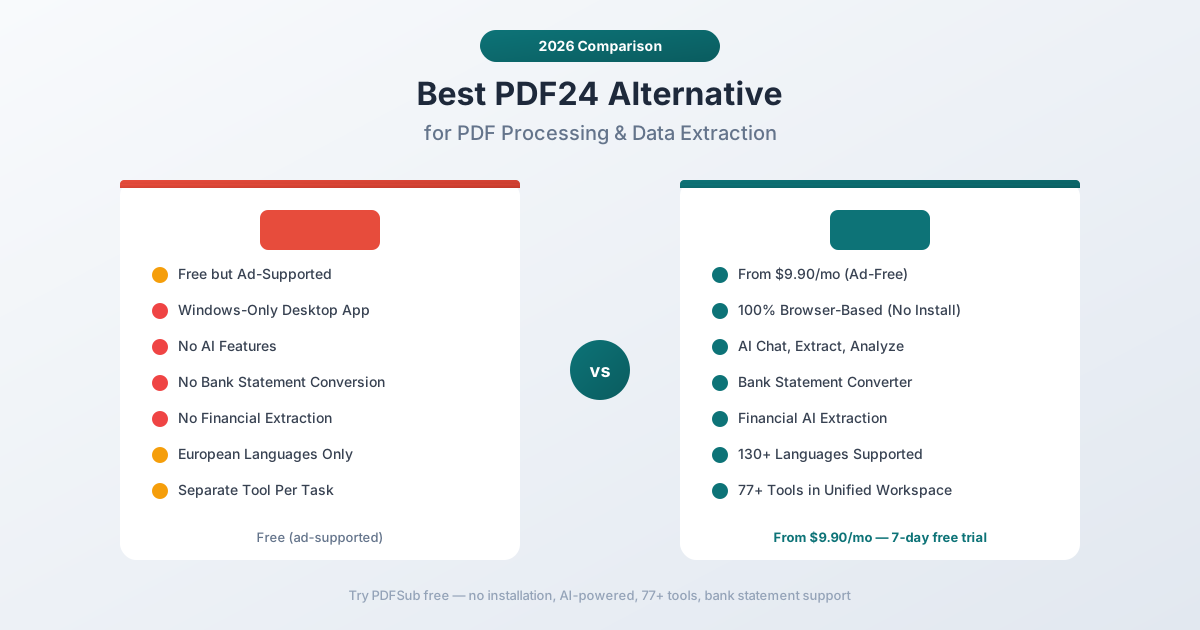
But "free" comes with trade-offs that become painful once you move beyond occasional use. The ad-supported model means intrusive advertisements on the web tools. The desktop creator is Windows-only. There's no AI intelligence - PDF24 processes files mechanically without understanding their content. And for anyone working with financial documents, bank statements, or multi-language files, PDF24 simply has no answer.
If you've been using PDF24 and hitting its ceiling, this guide breaks down exactly where it falls short and what to use instead.
Why People Look for PDF24 Alternatives
PDF24's popularity is earned. It genuinely delivers a lot of value for zero cost. But the complaints follow predictable patterns:
Ad-Supported Experience
PDF24 is free because it's funded by advertising. The web interface includes display ads that can be distracting, especially during professional work. When you're processing client documents or working on a deadline, banner ads and interstitials break concentration and look unprofessional if someone's looking over your shoulder or watching a screen share.
There's no paid tier to remove ads. The trade-off is binary: free with ads, or use something else. For personal use, this is fine. For business use, it creates friction.
Windows-Only Desktop App
PDF24 Creator - the installable desktop application - only runs on Windows. macOS and Linux users are limited to the web tools, which means dealing with the ads and requiring an internet connection for every task.
In a world where teams use a mix of operating systems and many organizations issue macOS laptops, a Windows-only desktop application is a significant limitation. The web tools work across platforms, but without the offline capability and ad-free experience of the desktop version.
No AI or Document Intelligence
PDF24 is a collection of mechanical PDF operations. It can merge two files, compress a PDF, or convert a document to a different format. What it cannot do is understand what's in your documents.
There's no AI chat to ask questions about a PDF's content. No intelligent extraction that recognizes table structures. No financial document analysis. No smart summarization or translation with formatting preservation. Every task is a simple input-output operation with no comprehension layer.
For an era when AI can read, understand, and extract structured data from complex documents, PDF24's approach feels like using a calculator when you need a spreadsheet.
No Financial Document Tools
PDF24 cannot:
- Convert bank statements to Excel with structured transaction data
- Extract invoice line items, vendor details, and totals
- Scan receipts and pull merchant names, dates, and amounts
- Analyze financial reports and calculate ratios
- Export to accounting formats (QBO, OFX, QIF)
If you work with financial documents - and most professionals do - PDF24 provides no specialized tools for the most common financial PDF workflows.
Each Task Requires a Separate Workflow
PDF24's architecture means each operation is isolated. If you need to merge a PDF, then compress it, then add a watermark, that's three separate tool loads, three separate file uploads, and three separate downloads. There's no unified workspace where you can chain operations on a single document.
For one-off tasks, this is manageable. For batch workflows or multi-step document processing, it gets tedious fast.
Limited Language Support
PDF24's conversion and OCR capabilities are primarily optimized for European languages. If you regularly work with documents in Arabic, Chinese, Japanese, Korean, Hindi, Thai, or other non-Latin scripts, PDF24's conversion quality drops significantly. There's no AI-powered translation capability at all.
What to Look for in a PDF24 Alternative
If PDF24 has served you well for basic tasks, the next step up should preserve what works while adding what's missing:
Ad-free, professional interface. A clean workspace that doesn't interrupt your flow with advertisements. Something you can use in client meetings without embarrassment.
Cross-platform from the start. Not a Windows desktop app with a web fallback, but a genuine browser-first platform that works identically on every operating system and device.
AI document understanding. Beyond mechanical operations, the ability to chat with documents, extract structured data, and analyze content intelligently.
Financial document specialization. Dedicated tools for bank statements, invoices, receipts, and financial reports - not just generic PDF-to-Excel conversion.
Multi-language support. Real support for 100+ languages, including translation capabilities, not just basic Latin-script OCR.
Unified workspace. A single environment where you can perform multiple operations without bouncing between isolated tools.
PDFSub: The Best PDF24 Alternative
PDFSub takes everything PDF24 does well - comprehensive tool coverage, browser accessibility - and adds the intelligence layer, financial specialization, and professional experience that PDF24 cannot provide.
Ad-Free Professional Experience
PDFSub has no advertisements. The interface is clean, focused, and designed for professional use. You can share your screen during a client call, work through documents in a meeting, or process files at your desk without distracting banners or pop-ups.
This isn't just an aesthetic preference. An ad-free environment means faster page loads, fewer accidental clicks, and a more reliable experience. Ads can slow down page rendering and occasionally interfere with tool functionality on slower connections.
98+ Tools, All Browser-Based
PDFSub offers 98+ PDF tools that run entirely in your browser. No Windows-only desktop app, no platform limitations. Every tool works on Windows, macOS, Linux, ChromeOS, tablets, and phones.
The tool set covers everything PDF24 offers - merge, split, compress, convert, protect, rotate, watermark, page numbering - plus categories PDF24 doesn't touch: AI extraction, financial document processing, and multi-language tools.
AI That Understands Your Documents
This is the fundamental gap between PDFSub and PDF24. PDFSub's AI features include:
- Chat with PDF - Ask questions about any document and get answers based on the actual content. The AI understands tables, hierarchies, and relationships within the document.
- Extract Data - Pull structured data from any document type. Tables maintain their column relationships, forms preserve their field structure.
- Summarize - Generate intelligent summaries of documents of any length. Not just the first paragraph - genuine understanding of the full document.
- Translate - Translate documents across 130+ languages while maintaining formatting and structure.
- Financial Report Analyzer - Analyze balance sheets, income statements, and cash flow documents with automated ratio calculations.
PDF24 processes files. PDFSub understands them.
Bank Statement Conversion
PDFSub's bank statement converter is purpose-built for the most common financial PDF task: turning bank statement PDFs into usable data. It recognizes 20,000+ bank formats worldwide and exports to:
- Excel (.xlsx) - Clean columns for date, description, debit, credit, balance
- CSV and TSV - For import into any spreadsheet or database
- QBO - Direct import to QuickBooks Online
- OFX - Open Financial Exchange format for accounting software
- QIF - Legacy QuickBooks interchange format
- JSON - For developers and automated pipelines
The converter handles multi-page statements, transactions that span page breaks, bank-specific date formats, and the separation of debits from credits - tasks that generic PDF-to-Excel conversion (which PDF24 offers) mangles completely.
Invoice and Receipt Extraction
Beyond bank statements, PDFSub provides dedicated extraction tools for:
- Invoices - Vendor name, invoice number, line items, subtotals, tax, totals, payment terms
- Receipts - Merchant name, date, individual items, tax breakdown, payment method, total
- Financial reports - Balance sheet items, income statement lines, cash flow components, with automated ratio calculations
These aren't generic "convert to spreadsheet" tools. They understand the structure and semantics of financial documents.
130+ Languages
PDFSub supports over 130 languages for translation, OCR, and document processing. This includes comprehensive support for:
- Right-to-left languages (Arabic, Hebrew, Persian)
- CJK languages (Chinese, Japanese, Korean)
- South Asian languages (Hindi, Tamil, Bengali, Urdu)
- Southeast Asian languages (Thai, Vietnamese)
- All major European languages
PDF24's language support is primarily focused on European languages with limited effectiveness for non-Latin scripts.
Privacy-First Architecture
PDFSub processes files in your browser whenever possible. For operations like merging, splitting, compressing, and basic editing, the file never leaves your device. Server processing is reserved for operations that genuinely require it (OCR, AI analysis).
PDF24's web tools upload files to their servers for processing. While they state files are deleted after processing, the upload itself is a privacy consideration - especially for financial documents containing account numbers and transaction histories.
Head-to-Head: PDFSub vs PDF24
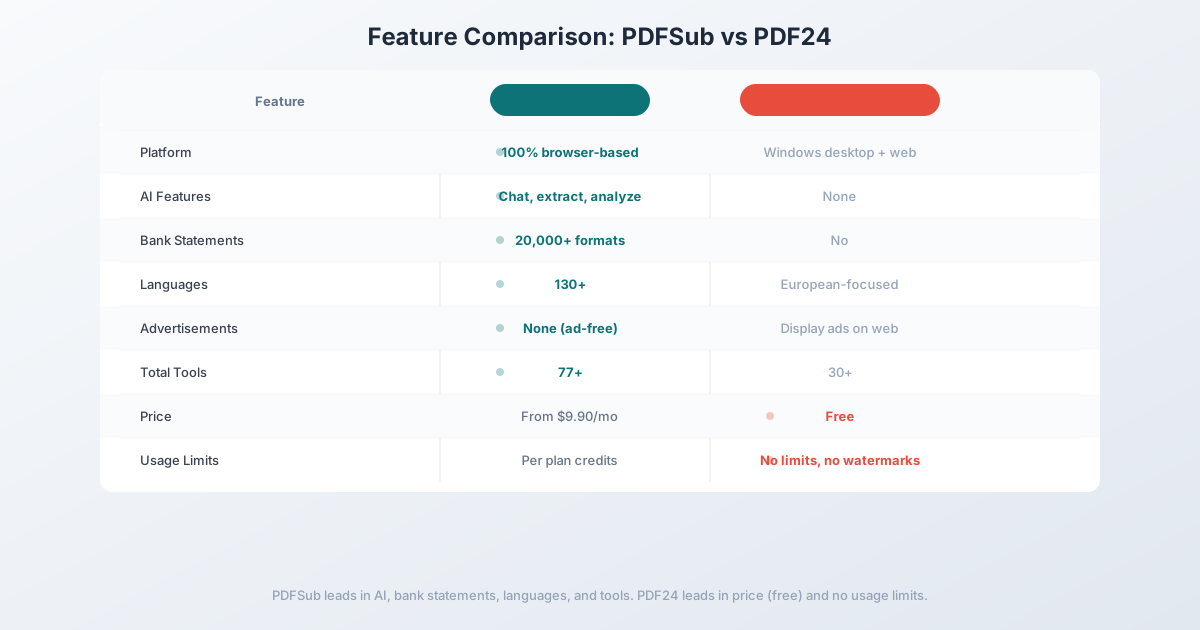
| Feature | PDFSub | PDF24 |
|---|---|---|
| Price | $20/mo (annual) (7-day free trial) | Free (ad-supported) |
| Ads | None | Display ads on web tools |
| Platform | 100% browser-based | Windows desktop + web |
| AI features | Chat, extract, analyze, translate | None |
| Bank statement conversion | 20,000+ formats | No |
| Invoice/receipt extraction | Dedicated tools | No |
| Languages | 130+ | European-focused |
| Privacy model | Browser-first processing | Server upload required |
| Total tools | 98+ | 30+ |
| Offline use | Browser (no install) | Windows desktop only |
| Unified workspace | Yes | Separate tool per task |
| File size limits | Per plan | No limits (free) |
Where PDFSub wins: AI document understanding, financial document tools, bank statement conversion, multi-language support, ad-free professional experience, cross-platform consistency, and privacy-first architecture. For anyone who processes documents professionally, PDFSub provides capabilities PDF24 simply doesn't have.
Where PDF24 wins: Price. PDF24 is completely free with no usage limits and no watermarks. If your needs are limited to basic PDF operations (merge, split, compress, convert) and you don't mind ads, PDF24 delivers genuine value at zero cost. The Windows desktop app also provides offline capability that doesn't require any subscription.
The value calculation: PDF24 is unbeatable for free, basic PDF operations. But the moment you need AI extraction, financial document processing, bank statement conversion, or a professional ad-free experience, PDFSub's $20/user/mo (annual) All-In-One plan delivers capabilities that no amount of free tools can match. The question isn't "is free better than paid?" - it's "do you need intelligence in your document processing?"
Other Alternatives Worth Considering
Smallpdf - $12/month (billed annually)
Smallpdf is another browser-based PDF tool suite:
- Strengths: Clean interface, good tool selection, no installation required, cross-platform
- Weaknesses: No AI extraction, no financial document tools, no bank statement conversion, limited free tier (2 tasks/day), no offline mode
- Best for: Users who want a step up from PDF24 with a cleaner interface but don't need AI or financial features
ILovePDF - Free / $7/month Pro
ILovePDF is a popular free alternative:
- Strengths: Free tier with basic tools, clean web interface, mobile apps available, batch processing on paid plans
- Weaknesses: No AI features, no financial tools, limited free usage, server-based processing
- Best for: Users looking for another free option with slightly different tool coverage than PDF24
LibreOffice Draw - Free (open-source)
For desktop users who want free without ads:
- Strengths: Completely free, open-source, no ads, basic PDF editing, runs on Windows/Mac/Linux
- Weaknesses: Desktop-only, clunky interface, limited PDF features, no AI, no financial tools, steep learning curve
- Best for: Technical users who want free, ad-free desktop PDF editing and are comfortable with open-source software
Frequently Asked Questions
Is PDF24 really completely free?
Yes. PDF24 offers all its tools for free with no usage limits, no watermarks, and no hidden fees. The service is funded through advertising on the web interface. The Windows desktop application (PDF24 Creator) is also free and ad-free, but only available on Windows.
Is PDF24 safe to use?
PDF24 is a legitimate German company with a long track record. Files processed through the web tools are uploaded to their servers and deleted after processing. The service complies with GDPR. However, for sensitive financial documents, a browser-first platform that processes files locally provides stronger privacy protection.
Can PDF24 convert bank statements?
PDF24 can convert a PDF to Excel using generic conversion, but it has no bank statement-specific capability. The resulting Excel file will roughly mirror the PDF's visual layout, with merged cells, misaligned columns, and no structured transaction data. For usable bank statement data, you need a dedicated converter.
Why switch from a free tool to a paid one?
The same reason you'd switch from a free calculator app to a spreadsheet: capability. If you only need basic operations, free tools are fine. But once you need AI understanding, financial data extraction, bank statement conversion, or multi-language processing, the gap between a free mechanical tool and an intelligent platform becomes the difference between hours of manual work and automated results.
Does PDFSub have a free trial?
Yes. PDFSub offers a 7-day free trial with full access to all 98+ tools, AI features, bank statement conversion, and the complete platform. Cancel anytime.
Switching from PDF24 - What to Expect
There's nothing to migrate - PDF24 stores nothing about you. The transition is purely habit replacement. Here's the typical 4-step path:
Step 1 - Day 1: Bookmark PDFSub and start the trial. Start the 7-day trial. For the first day, force yourself to use PDFSub for anything you'd normally do on PDF24 - merge, split, compress, convert. Building the habit matters more than feature parity.
Step 2 - Days 1-2: Test the AI tools you couldn't access on PDF24. Run a long PDF through summarization, translate something to a target language, try Chat with PDF. This is where the subscription stops feeling like a price increase and starts feeling like new capability.
Step 3 - Days 2-5: Try the financial extractors. Upload a bank statement to the bank statement converter and try the invoice or receipt extractors. If you're an accountant, bookkeeper, or small business owner, this alone usually justifies the switch.
Step 4 - Days 5-7: Commit or walk away. If your day-to-day fits within PDF24's free utility and you don't value AI or financial extraction, walk away - there's no point paying $20/mo for tools you don't need. If the AI and extraction tools earned their keep, lock in the $20/mo annual price.
This is one of the few "switches" that's a pure tool-replacement rather than a migration.
The Bottom Line
PDF24 earned its place as the world's most popular free PDF tool suite. For basic, occasional PDF tasks - merging a few files, compressing a document for email, converting a PDF to Word - it delivers real value at no cost.
But PDF24 was built for a pre-AI world where "processing a PDF" meant performing mechanical operations on files. In 2026, document processing means understanding content, extracting structured data, converting financial documents into usable formats, and working across languages.
If you've outgrown PDF24's capabilities - or if the ads, Windows-only desktop app, and lack of AI features are holding you back - PDFSub provides the professional upgrade. Everything PDF24 does, without ads, plus AI intelligence, financial document tools, and 130+ language support.
Try PDFSub Free - full access to all 98+ tools, AI extraction, bank statement conversion, and browser-first privacy. No installation required. Cancel anytime.
Still evaluating, not yet switching? This page is written for teams ready to leave PDF24. For a neutral feature-by-feature breakdown and pricing side-by-side, see the PDFSub vs PDF24 comparison.