Best Expensify Alternative for Document Processing (2026)
Looking for an Expensify alternative? Compare features, pricing, and capabilities. See why teams switch to PDFSub.
PDFSub is best for:
- Users who found Expensify while searching for receipt scanning but don't need expense management
- Small firms needing invoice and receipt extraction plus bank statement conversion at $20/user/mo (annual)
- Teams wanting flat-rate pricing instead of Expensify's per-user model that scales with headcount
- Users who also need PDF tools (merge, split, translate, summarize) - not just receipt capture
PDFSub is NOT best for:
- Companies needing employee expense report submission and approval workflows
- Organizations that require corporate card reconciliation and reimbursement processing
- Teams needing travel booking, per diem tracking, and expense policy enforcement
Expensify built its reputation as the go-to expense management tool for businesses. Snap a photo of a receipt, submit an expense report, get reimbursed. For corporate teams managing employee spending and corporate card programs, it streamlined a genuinely painful workflow.
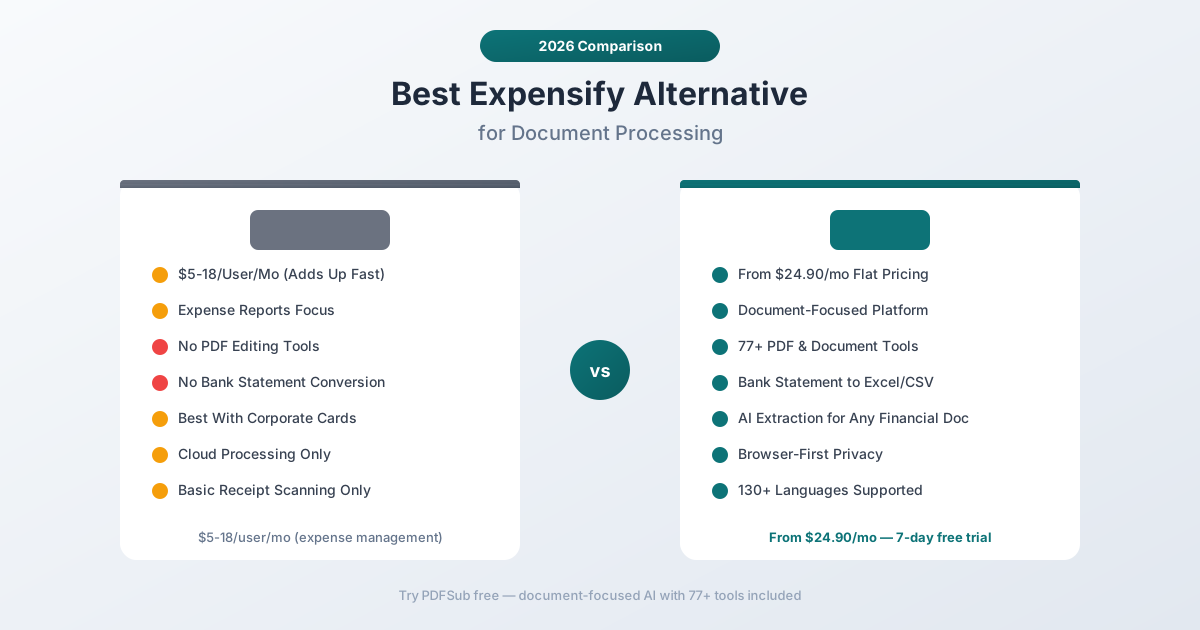
But Expensify is fundamentally an expense management platform, not a document processing tool. If you found Expensify while searching for receipt scanning or financial document extraction, you've probably realized that it's designed for corporate expense workflows - not for accountants processing client documents, small businesses extracting data from bank statements, or anyone who needs general PDF tools alongside their receipt scanning.
The per-user pricing adds up fast for larger teams, the tool does nothing with PDFs beyond receipt capture, and if you need bank statement conversion or document extraction beyond basic receipts, Expensify has nothing to offer. This guide examines these limitations, identifies what to look for in an alternative, and compares the tools that deliver more document processing value.
Why People Look for Expensify Alternatives
Expensify maintains a 4.5 rating on G2 and has millions of users. The product works well for its intended use case. The reasons people leave are about scope and fit, not quality.
Per-User Pricing Adds Up for Teams
Expensify offers two main plans:
- Collect: $5/user/month - basic expense tracking, receipt scanning, corporate card support
- Control: $9/user/month - adds approval workflows, custom policies, advanced analytics
There's also the new Expensify plan at $9/user/month (or $18/user/month for the top tier) with their redesigned platform.
The per-user model means costs scale linearly with headcount:
| Team Size | Collect ($5/user) | Control ($9/user) |
|---|---|---|
| 5 users | $25/mo | $45/mo |
| 20 users | $100/mo | $180/mo |
| 50 users | $250/mo | $450/mo |
| 100 users | $500/mo | $900/mo |
For a 50-person company using the Control plan, that's $5,400/year - for an expense reporting tool. Many teams discover that Expensify's receipt scanning (the feature they actually wanted) is buried inside a broader expense management platform they don't fully use.
Expense Management, Not Document Processing
This is the core mismatch. Expensify is an expense management platform that happens to include receipt scanning. It's designed for a specific workflow:
- Employee incurs an expense
- Employee photographs the receipt
- Expensify extracts the data
- Employee submits an expense report
- Manager approves the report
- Finance processes reimbursement
If you're looking for document extraction - pulling data from invoices, bank statements, financial reports, or any PDF - Expensify doesn't help. It scans receipts to populate expense reports. That's a subset of what most professionals need.
For accountants, bookkeepers, and small business owners, the workflow is different: you have a stack of financial documents that need data extracted, not a stream of employee receipts that need expense reports. Expensify's whole paradigm is wrong for this use case.
No PDF Tools
Expensify has zero PDF processing capabilities. It can't merge, split, compress, convert, watermark, encrypt, or manipulate PDF files in any way. If you need to combine three invoices into one PDF, compress a large file for email, or convert a Word document to PDF, you need a completely separate tool.
For anyone who works with documents regularly - which is virtually everyone searching for a "receipt scanning" or "document extraction" tool - the absence of basic PDF operations is a significant gap.
No Bank Statement Conversion
Bank statements are the most common financial document that accountants and bookkeepers need to convert. Turning a PDF bank statement into Excel, CSV, QBO, or OFX for accounting software import is a daily task in most practices.
Expensify doesn't do this. Not even close. Its receipt scanner is limited to single-page receipts and simple invoices. Multi-page bank statements with transaction tables, running balances, and multiple accounts are completely outside its scope.
Corporate Card Focus Limits Flexibility
Expensify has invested heavily in its corporate card program (Expensify Card). The platform works best when paired with their card - automatic receipt matching, real-time transaction logging, and integrated expense policies.
But if you don't use the Expensify Card, or you're not managing corporate expenses at all, a significant portion of the platform is irrelevant. You're paying for corporate card management, approval workflows, and reimbursement tracking when all you needed was document extraction.
Cloud-Only Processing
Every receipt and document you upload to Expensify is processed on their cloud servers. For basic expense receipts, this is rarely a concern. But for sensitive financial documents - client bank statements, tax documents, confidential business records - cloud-only processing means your data passes through a third-party server with no option for local processing.
What to Look for in an Expensify Alternative
The right alternative depends on what you actually need. If you're looking to replace Expensify's expense management capabilities, that's a different search than replacing its receipt scanning. This guide focuses on the document processing angle - if you need better receipt scanning, invoice extraction, bank statement conversion, and PDF tools.
Document-first design. The tool should be built for processing documents, not managing expense reports. Document upload, data extraction, and file download should be the core workflow - not expense submission and approval chains.
Multi-document extraction. Receipts are one document type. The ideal tool also handles invoices, bank statements, financial reports, and general PDFs. One tool for all your document extraction needs.
PDF tools included. If you work with documents, you need to merge, split, compress, convert, and edit PDFs. These should be bundled, not billed separately.
Flat or predictable pricing. Per-user pricing makes sense for employee expense management. For document processing, flat monthly pricing is more predictable and more cost-effective.
Language support. International documents require multi-language extraction. If your documents come in languages other than English, your tool needs to handle them natively.
Privacy model. Browser-first processing keeps documents on your device whenever possible. Cloud processing should be the fallback, not the default.
PDFSub: The Best Expensify Alternative for Document Processing
PDFSub is a document-focused platform that replaces Expensify's receipt scanning with comprehensive financial document extraction - receipts, invoices, bank statements, and financial reports - plus 98+ PDF tools under flat monthly pricing.
Document Processing vs. Expense Management
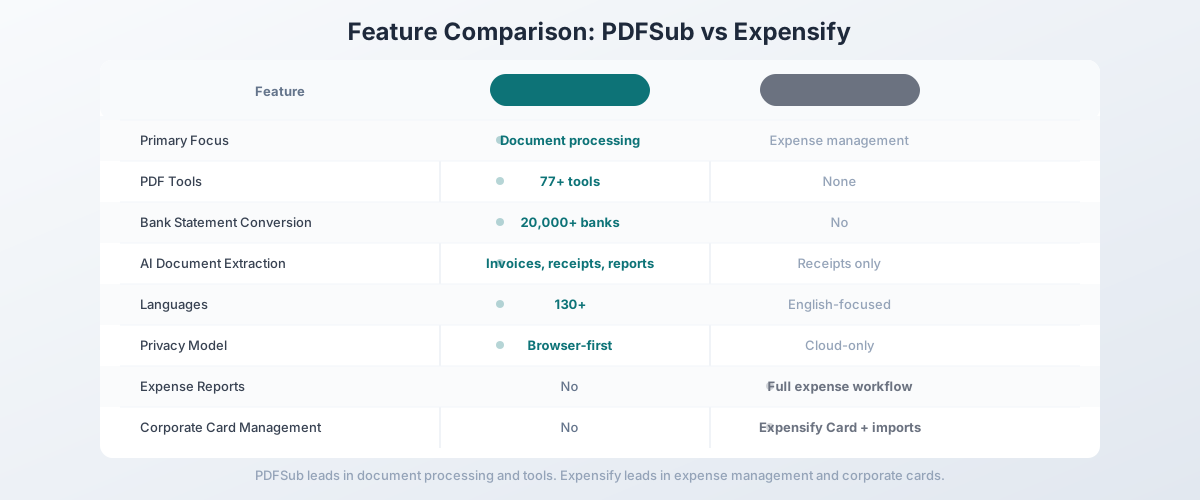
The fundamental difference: PDFSub processes documents. Expensify manages expenses. These are different problems.
PDFSub's workflow: Upload a financial document (receipt, invoice, bank statement, report). The platform extracts structured data. Download the data in your preferred format (Excel, CSV, QBO, OFX). Done.
Expensify's workflow: Employee photographs a receipt. The platform creates an expense entry. Employee submits an expense report. Manager approves. Finance reimburses.
If you need the second workflow - corporate expense reporting with approval chains and reimbursement - PDFSub doesn't do that. If you need the first workflow - extracting data from financial documents for accounting, analysis, or import - PDFSub is purpose-built for it.
Receipt Scanning That Goes Beyond Expense Reports
Expensify scans receipts to populate expense line items. PDFSub's AI receipt scanner extracts comprehensive data from receipts:
- Merchant name and address
- Transaction date and time
- Individual line items with quantities and prices
- Subtotal, tax breakdown, tip, and total
- Payment method
The extracted data downloads as structured Excel or CSV - ready for accounting software import, client reporting, or analysis. No expense report, no approval chain, no corporate card integration required.
Invoice Extraction Expensify Can't Match
Expensify's receipt scanning works on simple receipts. Complex invoices - multi-page documents with line item tables, purchase order references, tax breakdowns, and payment terms - exceed its capabilities.
PDFSub's AI invoice extractor handles invoices of any complexity:
- Vendor and buyer information
- Invoice number, dates, and terms
- Detailed line items with descriptions, quantities, and prices
- Tax calculations and totals
- Payment instructions
It works on invoices from any vendor, any country, in any of 130+ supported languages. No training, no templates, no manual configuration.
Bank Statement Conversion - The Feature Expensify Doesn't Have
This is the biggest gap. Expensify has no bank statement processing capability. PDFSub's bank statement converter is one of the platform's most powerful tools:
- Recognizes statements from 20,000+ banks worldwide
- Extracts every transaction: date, description, debit, credit, balance
- Auto-detects date formats, number formats, and currencies
- Exports to 8 formats: Excel, CSV, TSV, JSON, QBO, OFX, QFX, QIF
- Handles multi-account statements and continuation rows
- Browser-first processing - most statements never leave your device
For accountants and bookkeepers, bank statement conversion is the daily workflow that Expensify completely ignores. One bank statement converter subscription replaces hours of manual data entry every week.
98+ PDF Tools
Beyond financial document extraction, PDFSub includes a comprehensive PDF toolkit:
- Merge multiple PDFs into a single document
- Split PDFs by page range or bookmark
- Compress files for email (up to 90% size reduction)
- Convert between PDF, Word, Excel, PowerPoint, and images
- Rotate and reorder pages
- Watermark documents with text or image stamps
- Encrypt and password-protect sensitive files
- Translate entire documents across 130+ languages
- Summarize long documents with AI
- Compare two documents side by side
- Chat with documents - ask questions and get answers
Expensify offers none of these. If you currently use Expensify plus a separate PDF tool (or multiple PDF tools), PDFSub consolidates everything into one subscription.
Flat Pricing vs. Per-User Pricing
PDFSub starts at $20/month - per-user rate, not per user. Compare the annual cost:
| Scenario | Expensify (Control) | PDFSub |
|---|---|---|
| Solo accountant | $108/yr ($9/mo) | $120/yr ($15/mo) |
| 5-person team | $540/yr ($45/mo) | $120-$168/yr ($10-$14/mo) |
| 20-person team | $2,160/yr ($180/mo) | $120-$168/yr |
| 50-person team | $5,400/yr ($450/mo) | $120-$168/yr |
For solo users, Expensify's Collect plan ($5/month) is cheaper than PDFSub - but only if you exclusively need receipt scanning for expense reports. The moment you need bank statements, PDF tools, or broader document extraction, PDFSub's value per dollar spent is significantly higher.
For teams of 5 or more, PDFSub is cheaper even at its base plan, while delivering dramatically more document processing capability.
130+ Languages
PDFSub supports 130+ languages with automatic detection. Upload a receipt from Tokyo, an invoice from Berlin, or a bank statement from Dubai - the platform identifies the language and extracts data correctly without configuration.
Expensify's receipt scanning works primarily in English. It can handle receipts in other major languages, but accuracy drops significantly for non-Latin scripts and less common languages. There's no formal multi-language support promise.
Browser-First Privacy
PDFSub's Tier 1 extraction runs entirely in your browser. Digital PDFs - including most bank statements, invoices, and financial reports - are processed on your device without being uploaded to any server.
Expensify uploads every receipt and document to their cloud. For corporate expense receipts (restaurant tabs, Uber rides), this is rarely sensitive. For client bank statements and financial records, the privacy difference matters.
Side-by-Side Feature Comparison
| Feature | PDFSub | Expensify |
|---|---|---|
| Primary focus | Document processing | Expense management |
| Starting price | $15/mo (flat) | $5/user/mo |
| Receipt scanning | AI extraction to Excel/CSV | Expense report population |
| Invoice extraction | Full line-item extraction | Basic (limited) |
| Bank statement conversion | 20,000+ banks, 8 formats | No |
| PDF tools | 98+ (merge, split, compress, etc.) | None |
| Languages | 130+ (auto-detected) | English-focused |
| Privacy model | Browser-first | Cloud-only |
| Expense reports | No | Full workflow |
| Corporate cards | No | Expensify Card + imports |
| Approval workflows | No | Manager approval chains |
| Reimbursement | No | Built-in |
| Mobile app | Browser-based | Dedicated iOS/Android |
| Free trial | 7-day full access (subscription required after) | Free plan (limited) |
When Expensify Is Still the Right Choice
Being honest about where Expensify excels, because some readers genuinely need expense management rather than document processing:
You need corporate expense management. If your primary requirement is tracking employee spending, managing expense reports, enforcing spending policies, and processing reimbursements, Expensify is purpose-built for this. PDFSub doesn't do expense management at all.
You need corporate card integration. The Expensify Card program - with automatic receipt matching, real-time transaction alerts, and integrated spending limits - is a strong product. If corporate card management is a priority, Expensify's card ecosystem is hard to replicate.
You need approval workflows. Expense report submission, manager approval, multi-level authorization chains - Expensify has refined these workflows over years. PDFSub is a tool, not a workflow platform.
Your team uses SmartScan for expenses. Expensify's SmartScan receipt scanning is optimized for the expense reporting workflow: scan receipt, match to transaction, categorize, submit. If your receipts exist to become expense report line items, Expensify's workflow is tightly integrated. PDFSub extracts data; what you do with it is up to you.
You need per-diem and mileage tracking. Expensify handles per-diem rates, mileage calculation, and other expense-specific features that document processing tools don't address. If travel expense management is part of your workflow, Expensify covers it natively.
Other Alternatives Worth Considering
Different alternatives serve different needs. Here's where other tools fit:
Dext Prepare - Receipt and invoice capture specifically for accountants, with direct sync to Xero, QuickBooks, and Sage. Better than Expensify for accounting practice use. Per-client pricing ($25-55/mo per client) makes it expensive at scale. No bank statements, no PDF tools, limited languages.
SAP Concur - Enterprise expense management competitor to Expensify. Better for large organizations with complex travel and expense policies. Significantly more expensive and complex to implement. If you're replacing Expensify for enterprise expense management (not document processing), Concur is the main competitor.
Brex - Corporate card and expense management platform focused on startups and tech companies. Modern interface, strong card controls, and integrated expense tracking. If you're leaving Expensify because of corporate card limitations, Brex is worth evaluating. No document processing beyond receipt capture.
Zoho Expense - More affordable expense management ($3-$6/user/month) with Zoho ecosystem integration. Good option if you're in the Zoho ecosystem (Zoho Books, Zoho CRM). Similar limitations to Expensify for document processing - it's an expense tool, not a document tool.
PDFSub + Expensify. If you need both expense management and document processing, you might keep Expensify for corporate expenses and add PDFSub for bank statements, invoice extraction, PDF tools, and broader document work. The two tools serve different needs and can coexist.
Switching from Expensify - What to Expect
The migration depends on what you're actually using Expensify for. If you came to Expensify hoping for document processing and discovered it's an expense workflow tool, this is more of a tool-replacement than a true migration. Here's the typical 4-step path:
Step 1 - Day 1: Be honest about which Expensify features you use. List them. If the answer is "I scan a few receipts and wish it could handle bank statements and invoices too," PDFSub will replace it cleanly. If the answer involves approval chains, reimbursement runs, or corporate cards, you need to keep Expensify and add PDFSub alongside it.
Step 2 - Days 1-3: Run the trial against your real workflow. Start the 7-day PDFSub trial. Upload the documents Expensify struggled with - bank statements, vendor invoices, financial reports. Test the extraction quality and export the data to whatever accounting software you use.
Step 3 - Days 3-5: Export your historical receipts from Expensify (if relevant). Expensify lets you download past expense reports as PDF or Excel. Pull anything you need for compliance or audit before you cancel. PDFSub doesn't import historical expense data - it processes documents on demand.
Step 4 - Days 5-7: Decide replace vs supplement. If you're a solo bookkeeper or accountant whose Expensify use was always about document extraction, cancel Expensify and use PDFSub. If you support a team submitting expenses, downgrade Expensify to its lowest tier (or keep current plan) and add PDFSub for the document work it never did well.
Most users who came to Expensify "for receipt scanning" find PDFSub replaces it entirely. Teams with active expense-policy workflows usually run both.
Frequently Asked Questions
Is PDFSub a replacement for Expensify's expense management?
No. PDFSub is a document processing platform, not an expense management tool. It doesn't handle expense reports, approval workflows, reimbursements, or corporate card management. If you need those features, keep Expensify (or switch to Dext, Concur, or Brex). PDFSub replaces the document extraction and PDF processing capabilities that Expensify lacks.
Can PDFSub scan receipts like Expensify?
Yes, PDFSub's AI receipt scanner extracts data from receipt PDFs and images - merchant, date, items, tax, and total. The difference is output: Expensify creates expense report entries; PDFSub produces structured Excel/CSV files. Both scan receipts accurately, but for different purposes.
Does PDFSub handle bank statements?
Yes - this is one of PDFSub's strongest features and something Expensify can't do at all. The bank statement converter processes statements from 20,000+ banks worldwide and exports to 8 formats (Excel, CSV, QBO, OFX, and more). For accountants and bookkeepers, this alone can justify the subscription.
Can I use PDFSub for my whole team without per-user fees?
Yes. PDFSub's pricing is per-account, not per-user. A team of 1 pays the same as a team of 50. There are no seat licenses, no per-user surcharges. Usage is governed by plan limits (AI credits, page counts) rather than headcount.
Does PDFSub have a mobile app?
PDFSub works in any mobile browser - no dedicated app needed. However, it doesn't have Expensify's camera integration for snapping receipt photos on the go. If mobile receipt photography is essential, you could use your phone's camera to create PDFs and upload them to PDFSub, or keep Expensify's app for that specific workflow.
What about Expensify's free plan?
Expensify offers a limited free plan for individuals. PDFSub is subscription-only ($20/month annual; $25/month monthly) but every plan includes a 7-day free trial with full functionality. The free trial gives you complete access to all 98+ tools, AI extraction, and bank statement conversion - enough to thoroughly evaluate the platform with your actual documents.
Can PDFSub extract data from financial reports?
Yes. PDFSub includes an AI financial report analyzer that extracts key metrics, ratios, and data points from financial reports, annual statements, and other financial documents. Expensify has no comparable feature.
The Bottom Line
Expensify and PDFSub solve different problems. Expensify manages corporate expenses - receipt scanning, expense reports, approvals, and reimbursements. PDFSub processes documents - extracting data from receipts, invoices, bank statements, and financial reports, plus 98+ PDF tools for everything else.
If you came to Expensify looking for document processing and found an expense management platform instead, PDFSub is what you actually need. If you need both expense management and document processing, the two tools complement each other.
PDFSub starts at $20/user/mo (annual) with simple per-user pricing, 130+ languages, browser-first privacy, and no per-user fees. Every plan includes a 7-day free trial with full feature access - cancel anytime in one click. Start your 7-day free trial - test your bank statements, invoices, and receipts against Expensify's output, and see which tool better fits your actual workflow.
Still evaluating, not yet switching? This page is written for teams ready to leave Expensify. For a neutral feature-by-feature breakdown and pricing side-by-side, see the PDFSub vs Expensify comparison.