Best DocuSign Alternatives for Small Business (2026)
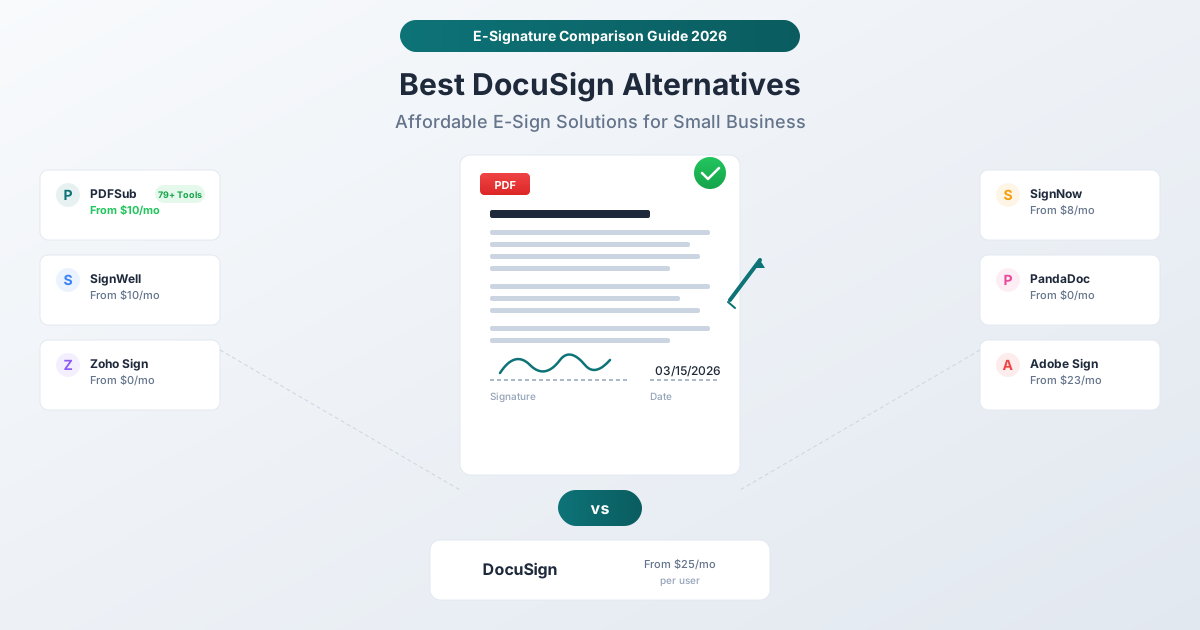
DocuSign starts at $25/month per user - overkill if you just need to sign PDFs. Here are the best alternatives for small businesses, from free options to full-featured platforms.
PDFSub is best for:
- Freelancers and solopreneurs who sign documents occasionally
- Small teams wanting e-sign + 98+ PDF tools at one per-user rate
- Privacy-first users - signatures processed in your browser
- Budget-conscious - $20/user/mo (annual) with no per-envelope fees on e-sign
PDFSub is NOT best for:
- Teams needing multi-party signing workflows with routing
- Enterprises requiring template libraries and bulk send
- Organizations needing signing API integrations
DocuSign dominates the e-signature market. It's the first name people think of when they need a document signed electronically, and for good reason - it's a powerful, enterprise-grade platform with deep integrations, advanced workflows, and a brand name that practically defines the category.
But here's the problem: DocuSign's cheapest plan starts at $25 per month per user. Their Standard plan runs $45/month per user. Business Pro hits $65/month per user. For a five-person team, you're looking at $125 to $325 per month just for e-signatures.
If you're sending hundreds of contracts through complex signing workflows with multiple parties, conditional routing, and CRM integrations, DocuSign earns its price tag. But if you're a freelancer who needs to sign a few contracts per month, a small business owner who occasionally sends NDAs, or an accountant who needs clients to sign engagement letters? You're paying enterprise prices for a fraction of the features.
This guide compares the best DocuSign alternatives for small businesses in 2026, with honest assessments of what each platform does well and where it falls short.
Why Small Businesses Look for DocuSign Alternatives
The reasons come up again and again in user reviews and community discussions:
1. Pricing That Doesn't Scale Down
DocuSign's pricing is designed for teams that process high volumes of agreements. The Personal plan ($25/month) limits you to 5 envelopes per month. Five. That's $5 per signature. At that rate, printing and scanning would be cheaper.
Moving to the Standard plan ($45/month per user) gets you more envelopes and team features, but now you're paying $540/year for a single user. Add a second team member and it's over $1,000 annually.
For most small businesses, e-signatures are a necessary but infrequent task. Paying $25-65/month for something you use a few times a week feels disproportionate.
2. Feature Complexity
DocuSign has evolved into an "Intelligent Agreement Management" platform. That means a dashboard packed with features most small businesses never touch: payment collection, identity verification, contract lifecycle management, advanced analytics, and dozens of integration options.
This isn't a criticism of DocuSign - these features matter for enterprise customers. But for a small business owner who wants to sign a lease or send an NDA, the interface can feel overwhelming. Several reviewer complaints mention difficulty navigating the platform and finding basic features buried under enterprise functionality.
3. Envelope-Based Pricing
DocuSign measures usage in "envelopes" - essentially documents sent for signature. The Personal plan includes 5 envelopes per month; the Standard plan includes 100 per year. Running out means either upgrading or waiting.
This per-envelope model creates friction that simpler pricing (unlimited documents, flat monthly fee) avoids entirely.
4. Customer Support Frustrations
Multiple review sites show a pattern of DocuSign users frustrated with customer service response times and quality, particularly for lower-tier plans. Enterprise customers get dedicated support; small business customers often get help articles and chatbots.
What to Look for in an E-Signature Alternative
Before comparing specific tools, here's what actually matters for small business e-signatures:
Legal Validity
Electronic signatures are legally binding in the United States under the ESIGN Act (Electronic Signatures in Global and National Commerce Act, 2000) and the UETA (Uniform Electronic Transactions Act, adopted by 49 states). In the European Union, the eIDAS regulation (2016) establishes the legal framework for electronic signatures across all member states.
The key legal requirement is intent - the signer must demonstrably intend to sign the document. Whether they draw their signature with a mouse, type their name, or upload an image of their handwritten signature, the electronic signature carries the same legal weight as a wet-ink signature for most business transactions.
Exceptions exist for specific document types (wills, certain real estate deeds, court orders), but for contracts, NDAs, engagement letters, invoices, and the vast majority of business documents, any reputable e-signature tool produces legally valid signatures.
Bottom line: Don't pay extra for "legal compliance" in an e-signature tool. The law is the law - it doesn't change based on which software you use.
Ease of Use
If it takes longer to figure out the signing interface than it would to print and scan, the tool has failed. Look for:
- Simple document upload
- Intuitive signature placement
- Mobile-friendly signing experience for recipients
- Minimal account requirements for signers (ideally none)
Pricing Transparency
Beware envelope limits, per-seat pricing that assumes large teams, and annual contracts disguised as monthly pricing. The best alternatives are straightforward: here's what you pay, here's what you get.
Security and Audit Trails
For business documents, you want at minimum:
- Encrypted document storage
- Audit trail showing who signed and when
- Tamper-evident seals on completed documents
- HTTPS/TLS encryption in transit
The 7 Best DocuSign Alternatives for Small Business
1. PDFSub - Best for Budget-Conscious Teams Who Need More Than E-Signatures
Pricing: $20/month annual ($240/year, saves $60) or $25/month billed monthly | 7-day free trial
PDFSub takes a different approach to e-signatures than dedicated signing platforms. Rather than building a standalone e-sign product, PDFSub includes E-Sign PDF as one of 98+ PDF and document tools - alongside Merge PDFs, Split PDF, Compress PDF, convert, AI-powered Extract Data, OCR, Translate PDF, and dozens more.
E-sign capabilities: PDFSub offers straightforward electronic signatures with no per-envelope fees. You can draw your signature with a mouse or trackpad, type your name to generate a signature, or upload an image of your handwritten signature. Place the signature on any page of the PDF, add the date, and download the signed document. Many of these operations are processed entirely in your browser, meaning your files don't leave your device.
What PDFSub does well:
- Value per dollar. For $20/month annual, you get e-sign plus 98+ other PDF tools and AI features. That's less than DocuSign's Personal plan, but you can also merge PDFs, Extract Tables to Excel, compress files for email, convert between formats, Redact PDF, and more.
- Browser-based processing. Most PDF operations happen in your browser. Files aren't uploaded to servers for basic tasks, which is a meaningful privacy advantage for sensitive documents like contracts and financial records.
- AI document tools. All-In-One includes 500 AI credits monthly for AI-powered features: Summarize PDF, translate PDFs, Chat with PDF, and extract structured data. Useful if you handle multilingual contracts or need to quickly review long agreements before signing.
- No per-envelope limits. There's no envelope-based pricing. Sign as many documents as you need.
Where PDFSub falls short for e-signatures:
- No multi-party signing workflows. You can sign documents yourself, but you can't send a document to three people and have them sign sequentially. There's no routing, no signing order, no automated reminders to signers.
- No signature templates. You can't save a template with pre-placed signature fields and reuse it across documents.
- No bulk send. Can't send the same document to 50 people for individual signatures.
- No e-sign API. PDFSub ships a Developer API with 10 SDKs for HTML rendering, but doesn't expose e-signature endpoints for programmatic signing workflows.
- No legal completion certificates. DocuSign generates a detailed Certificate of Completion with timestamps, IP addresses, and a chain of custody. PDFSub doesn't provide this.
- SOC 2 Ready, not certified. PDFSub has implemented SOC 2 controls and is SOC 2 Ready, but has not yet completed the formal SOC 2 Type II audit. For most small businesses, this is irrelevant - SOC 2 certification is typically a requirement from enterprise procurement departments, not a small-business need. But if your clients or industry require formal SOC 2 certification, this is a limitation to consider.
Best for: Freelancers, solopreneurs, and small teams who occasionally sign documents and want a comprehensive PDF toolkit for one low monthly price. If e-signatures are 10% of your document workflow and PDF operations are the other 90%, PDFSub is the most cost-effective choice.
2. SignWell - Best Simple and Affordable Dedicated E-Sign
Pricing: Free (3 docs/month, 1 sender) | $10/month Light | $30/month Business
SignWell is what DocuSign would look like if you stripped out everything except the core signing experience and priced it for humans, not enterprise procurement departments.
What SignWell does well:
- Generous free tier. 3 documents per month, 1 template, reminders and notifications included. Enough for very light use.
- Clean, simple interface. Upload a document, place signature fields, send it out. The learning curve is measured in minutes, not hours.
- Unlimited documents on paid plans. The $10/month Light plan removes the document limit entirely.
- Custom branding. Even the $10/month plan lets you brand the signing experience with your logo.
- Completion certificates and audit trails. Legal compliance features from the start.
Where SignWell falls short:
- Limited free tier. 3 documents per month and 1 template is tight. Most users outgrow it quickly.
- Per-sender pricing on upgrades. Additional senders cost $10-$15/month each. A 3-person team on the Light plan pays $30-$40/month.
- No PDF tools beyond signing. SignWell does one thing. If you also need to merge, compress, or convert PDFs, you'll need a separate tool.
- No AI features. No document summarization, translation, or data extraction.
Best for: Small businesses that need a dedicated, simple e-signature tool with proper audit trails and don't mind paying per sender.
3. SignNow - Best Affordable Dedicated E-Sign for Teams
Pricing: From ~$8/user/month (billed annually) | Free trial available
SignNow (part of the airSlate Business Cloud) strikes a balance between affordability and professional e-signature features. It's noticeably cheaper than DocuSign while covering most of the same ground.
What SignNow does well:
- Competitive pricing. Business plans start around $8/user/month billed annually - roughly a third of DocuSign's Standard plan.
- Full signing workflows. Sequential and parallel signing, role-based access, signing order enforcement.
- Templates and bulk send. Create reusable templates and send documents to multiple signers at once.
- Mobile apps. Solid iOS and Android apps for signing on the go.
- API access. Developer-friendly API for automating signature workflows in your applications.
- Integrations. Connects with Salesforce, NetSuite, Google Workspace, and other business tools.
Where SignNow falls short:
- Interface complexity. More feature-rich than SignWell, but also more cluttered. The dashboard can feel busy for users who just need basic signing.
- Pricing tiers can be confusing. Multiple plans with varying feature sets - requires careful comparison to find the right fit.
- Support quality varies. Like DocuSign, some users report slow support on lower-tier plans.
- No broader PDF toolkit. Dedicated to e-signatures - no merge, compress, convert, or AI tools.
Best for: Small-to-mid-size teams that need professional signing workflows (sequential signing, templates, bulk send) at a fraction of DocuSign's price.
4. PandaDoc - Best for Proposals + E-Signatures Combined
Pricing: Free e-sign (unlimited) | Essentials $35/user/month | Business $65/user/month
PandaDoc combines document creation, proposals, quotes, and e-signatures in one platform. If you spend time building proposals and contracts before getting them signed, PandaDoc eliminates the gap between "create" and "sign."
What PandaDoc does well:
- Free e-signatures. PandaDoc offers unlimited free e-signatures - no envelope limits, no document caps. This alone makes it worth considering.
- Document creation + signing. Build proposals with drag-and-drop templates, add pricing tables, insert images, and send for signature - all in one workflow.
- CRM integrations. Deep integrations with HubSpot, Salesforce, Pipedrive, and others. Pull contact data directly into documents.
- Content library. Save reusable content blocks, clauses, and templates.
- Analytics. Track when recipients open documents, how long they spend on each page, and when they sign.
Where PandaDoc falls short:
- Paid plans are expensive. The free tier covers basic e-sign, but Essentials ($35/user/month) and Business ($65/user/month) are in DocuSign territory. You're paying for the document creation features.
- Overkill for simple signing. If you just need to sign PDFs that already exist, PandaDoc's proposal and document creation features are unnecessary complexity.
- Steep learning curve. The template builder and document editor are powerful but take time to learn.
- No PDF tools. PandaDoc doesn't merge, compress, split, or convert PDFs. It's a document workflow platform, not a PDF toolkit.
Best for: Sales teams and agencies that create proposals, quotes, and contracts and want document creation and e-signatures in one platform. The free e-sign tier is excellent for anyone who just needs basic signing.
5. Zoho Sign - Best for Businesses Already in the Zoho Ecosystem
Pricing: Free (5 docs/month, 1 user) | Standard $15/user/month | Professional $25/user/month | Enterprise $45/user/month
Zoho Sign is a solid mid-range e-signature tool that becomes particularly compelling if you already use other Zoho products (Zoho CRM, Zoho Books, Zoho People, etc.).
What Zoho Sign does well:
- Free tier with useful features. 5 envelopes/month, audit trail, reminders, cloud storage integration. More generous than DocuSign's envelope limits at any price.
- Deep Zoho integration. If you use Zoho CRM or Zoho Books, Sign plugs in seamlessly. Auto-populate fields from CRM records, trigger signing workflows from sales pipelines.
- Reasonable pricing. The Standard plan ($15/user/month) includes 25 envelopes/user/month with approval workflows, SMS delivery, and recipient authentication. That's roughly a third of DocuSign's Standard plan.
- Compliance features. The Enterprise plan supports regulatory controls including 21 CFR Part 11 (FDA) and EU GMP compliance, plus qualified electronic signatures (QES) for EU requirements.
- Multi-language support. Available in multiple languages on the Professional plan and above.
Where Zoho Sign falls short:
- Envelope limits on lower tiers. The Free plan caps at 5/month; Standard caps at 25/user/month. Only Professional and above offer unlimited envelopes.
- Best value inside Zoho. If you don't use other Zoho products, the integration advantage disappears, and Zoho Sign becomes just another mid-range e-sign tool.
- Interface is functional, not elegant. Zoho's design language prioritizes density over simplicity. It works, but it's not as polished as SignWell or PandaDoc.
- No PDF tools. E-signatures only - no merge, compress, convert, or AI features.
Best for: Businesses already using Zoho products who want e-signatures that integrate with their existing stack. Also a strong budget option for any small business at the Standard tier.
6. Adobe Acrobat Sign - Best for Teams Already Paying for Adobe
Pricing: Included with Acrobat Standard ($23/month) and Acrobat Pro ($30/month) | Standalone business plans available
Adobe Acrobat Sign (formerly Adobe Sign, formerly EchoSign) has the advantage of being bundled with Adobe Acrobat, which many businesses already pay for.
What Adobe Sign does well:
- Bundled with Acrobat. If you already pay for Adobe Acrobat Standard or Pro, you get e-signature capabilities included. No additional subscription needed.
- Full signing workflows. Sequential and parallel signing, signing groups, delegation, authentication.
- Microsoft 365 integration. Deep integration with Word, Outlook, Teams, and SharePoint.
- Enterprise-grade compliance. SOC 2 Type II certified, ISO 27001, HIPAA-ready, FedRAMP authorized.
- PDF editing + signing. Because it's Acrobat, you can edit PDFs and sign them in the same application.
Where Adobe Sign falls short:
- Expensive as standalone. If you don't already use Acrobat, starting at $23/month per user is steep for e-signatures alone.
- Complex interface. Adobe's interface reflects decades of feature accumulation. Finding e-sign features within Acrobat can be non-intuitive.
- Adobe ecosystem dependency. Works best within the Adobe ecosystem. If you use Google Workspace instead of Microsoft 365, the integration story is weaker.
- Subscription fatigue. Many users resent Adobe's shift to subscription-only pricing for what were once perpetual-license products.
Best for: Teams that already pay for Adobe Acrobat and want to add e-signatures without a separate subscription. Not recommended as a standalone purchase for e-signatures alone.
7. Dropbox Sign (formerly HelloSign) - Best Mid-Tier Balance of Features and Price
Pricing: From ~$15/month (Essentials) | ~$25/month (Standard) | Business plans available
Dropbox Sign (rebranded from HelloSign after Dropbox acquired it in 2019) occupies the middle ground between bare-bones signing tools and enterprise platforms.
What Dropbox Sign does well:
- Clean signing experience. HelloSign was known for its simple, user-friendly interface, and Dropbox has largely preserved that.
- Unlimited signature requests on paid plans. No envelope counting.
- Templates and team features. Create reusable templates, manage team access, set signing order.
- API-first approach. Excellent API for developers who want to embed signing into their applications.
- Dropbox integration. Seamless if you use Dropbox for file storage.
- SOC 2 Type II certified. Strong security posture for businesses that need compliance documentation.
Where Dropbox Sign falls short:
- Limited free tier (if still available). Dropbox has progressively reduced the free tier since the acquisition.
- Dropbox ecosystem preference. Integration is strongest with Dropbox and Google Workspace; less robust with Microsoft 365.
- Pricing has crept up. HelloSign was once the clear budget alternative to DocuSign; post-acquisition pricing has narrowed the gap.
- No PDF tools beyond signing. Like most dedicated e-sign platforms, it doesn't merge, split, compress, or convert PDFs.
Best for: Small-to-mid-size businesses that want a clean, reliable signing experience with good API access. Particularly strong if you already use Dropbox for file storage.
Feature Comparison
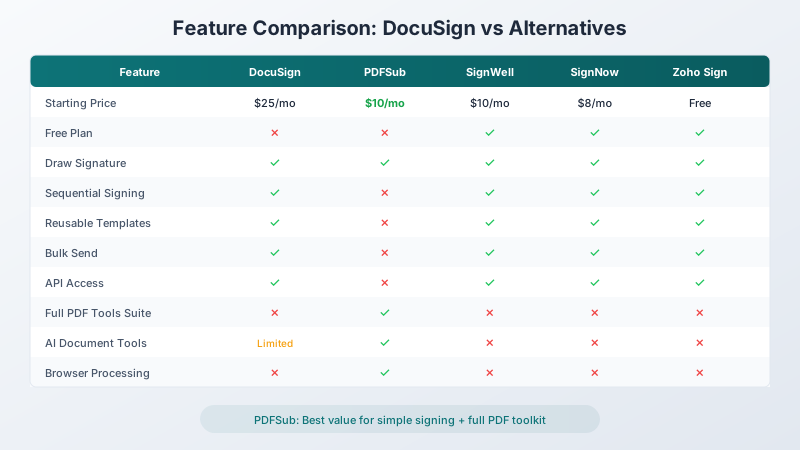
| Feature | DocuSign | PDFSub | SignWell | SignNow | PandaDoc | Zoho Sign | Adobe Sign | Dropbox Sign |
|---|---|---|---|---|---|---|---|---|
| Starting price | $25/mo | $20/user/mo (annual) | Free | ~$8/mo | Free | Free | ~$23/mo | ~$15/mo |
| Draw signature | Yes | Yes | Yes | Yes | Yes | Yes | Yes | Yes |
| Type signature | Yes | Yes | Yes | Yes | Yes | Yes | Yes | Yes |
| Upload signature | Yes | Yes | Yes | Yes | Yes | Yes | Yes | Yes |
| Sequential signing | Yes | No | Yes | Yes | Yes | Yes | Yes | Yes |
| Templates | Yes | No (e-sign templates) | Yes | Yes | Yes | Yes | Yes | Yes |
| Bulk send | Yes | No | Limited | Yes | Yes | Yes | Yes | Yes |
| API access | Yes (e-sign API) | HTML rendering API (no e-sign API) | Yes | Yes | Yes | Yes | Yes | Yes |
| Audit trail | Full | Basic | Full | Full | Full | Full | Full | Full |
| Mobile apps | Yes | Web | Yes | Yes | Yes | Yes | Yes | Yes |
| PDF tools suite | No | 98+ tools | No | No | No | No | Acrobat | No |
| AI document tools | Limited | Yes | No | No | No | No | Yes | No |
| Browser processing | No | Yes | No | No | No | No | No | No |
Pricing Comparison
| Platform | Free Tier | Cheapest Paid | Mid-Tier | Top Tier |
|---|---|---|---|---|
| DocuSign | No free plan | $25/mo (Personal) | $45/mo/user (Standard) | $65/mo/user (Business Pro) |
| PDFSub | 7-day trial | $20/mo annual (All-In-One) | $25/mo monthly (All-In-One) | Single plan - all features included |
| SignWell | 3 docs/month | $10/mo (Light) | $30/mo (Business) | Custom (Enterprise) |
| SignNow | Free trial | ~$8/mo/user | ~$15/mo/user | ~$30/mo/user |
| PandaDoc | Unlimited e-sign | $35/mo/user (Essentials) | $65/mo/user (Business) | Custom (Enterprise) |
| Zoho Sign | 5 docs/month | $15/mo/user (Standard) | $25/mo/user (Professional) | $45/mo/user (Enterprise) |
| Adobe Sign | No free plan | ~$23/mo (Acrobat Std) | ~$30/mo (Acrobat Pro) | Custom (Business) |
| Dropbox Sign | Limited | ~$15/mo (Essentials) | ~$25/mo (Standard) | Custom (Business) |
Annual billing note: Most platforms offer 15-25% discounts for annual billing. The prices above reflect monthly-equivalent rates for annual plans where applicable.
When DocuSign IS the Right Choice
Fairness requires acknowledging when DocuSign is genuinely the best option. Consider sticking with (or choosing) DocuSign if:
You need complex signing workflows. Sequential signing with conditional routing - "send to legal first, then to the CFO, but only if the contract value exceeds $50,000" - is where DocuSign excels. Most alternatives support basic sequential signing, but DocuSign's workflow engine handles edge cases that simpler tools can't.
You process high volumes. If you're sending hundreds or thousands of envelopes per month, DocuSign's enterprise infrastructure, reliability, and per-envelope economics at scale become competitive.
You need deep CRM integration. DocuSign's Salesforce integration is among the deepest available. If your sales team lives in Salesforce and needs signing embedded in their workflow, the integration quality justifies the price.
Your clients expect DocuSign. Brand recognition matters. Some enterprise clients have procurement policies that specifically name DocuSign as an approved vendor. If your clients require DocuSign, that requirement overrides any cost comparison.
You need certified compliance. DocuSign holds SOC 2 Type II, ISO 27001, HIPAA BAA, and FedRAMP certifications. If your industry requires specific compliance certifications from your e-signature vendor, DocuSign's compliance portfolio is among the most comprehensive.
You need the API at scale. DocuSign's API is battle-tested at enterprise scale. If you're building an application that processes thousands of signatures daily, DocuSign's API reliability and documentation are hard to beat.
Which Alternative Should You Choose?
The decision depends on what e-signatures mean to your business:
"I just need to sign the occasional PDF." PDFSub ($20/month annual; $25/month monthly) gives you simple e-signatures with no per-envelope fees, plus 98+ other PDF tools and AI features. You're not paying for signing features you'll never use, and you get a comprehensive document toolkit.
"I need to send documents for others to sign." SignWell ($10/month) or SignNow (~$8/month) are the most affordable options with proper sending workflows, templates, and audit trails.
"I create proposals and need them signed." PandaDoc's free e-sign tier for basic signing, or their paid plans if you want the full proposal + signing workflow.
"I'm already in the Zoho/Adobe/Dropbox ecosystem." Choose the signing tool that integrates with your existing stack. The productivity gains from integration outweigh modest pricing differences.
"I need enterprise features at a lower price." SignNow offers the closest feature parity with DocuSign at roughly a third of the price. It's the strongest alternative for teams that need professional signing workflows.
Switching from DocuSign - What to Expect
Migrating away from DocuSign is mostly about workflow mapping, not data export. DocuSign stores completed envelopes and audit trails, which you can download as PDFs at any time. Here's the typical 4-step path:
Step 1 - Before you cancel: Download your completed envelopes. Inside DocuSign, export your completed signed PDFs with their certificates of completion. You'll want a copy of every legally significant signed document - those certificates are your audit trail and they stay with the PDF after you cancel.
Step 2 - Days 1-3: Audit which DocuSign features you actually use. Most teams use a small subset of DocuSign's capability. List the specific workflows you run weekly: simple self-signing, sending to one external party, sequential routing, templates, bulk send. Match each to the alternative that handles it cheapest. For self-signing-only workflows, PDFSub's 7-day trial covers you in minutes.
Step 3 - Days 3-7: Run a parallel pilot. Process a week of incoming and outgoing signing requests through your candidate alternative while keeping DocuSign active. This catches edge cases - clients who specifically expect DocuSign branding, integrations that depend on the DocuSign API, automated reminders.
Step 4 - End of trial: Stagger the cancel. If you've validated the new tool, downgrade or cancel DocuSign at the next renewal. If parts of your business genuinely need DocuSign (regulated workflows, enterprise CRM-triggered envelopes), keep a smaller DocuSign seat and use PDFSub for the everything-else.
Most freelancers and small teams complete the switch within the trial week. Larger organizations with complex signing workflows often land on a hybrid model.
Frequently Asked Questions
Are electronic signatures legally binding?
Yes. In the United States, electronic signatures are legally binding under the ESIGN Act (2000) and the UETA (adopted by 49 states plus the District of Columbia). In the European Union, the eIDAS regulation (2016) provides the legal framework. Most major economies worldwide have similar legislation. Electronic signatures carry the same legal weight as handwritten signatures for the vast majority of business transactions.
What types of documents can't be e-signed?
Most jurisdictions exclude certain document types from electronic signature laws: wills and testamentary trusts, adoption and divorce papers, court orders, notices of eviction or foreclosure, and certain real estate documents (varies by state). For standard business documents - contracts, NDAs, invoices, engagement letters, HR forms - electronic signatures are fully valid.
Do signers need an account to sign?
This varies by platform. Most modern e-signature tools (SignWell, PandaDoc, SignNow, DocuSign) allow recipients to sign without creating an account. PDFSub's e-sign is self-service - you sign documents yourself without needing others to create accounts. Check each platform's current policy, as this can change.
Is a typed name legally as valid as a drawn signature?
Yes. Under the ESIGN Act and eIDAS, the method of creating the electronic signature (drawing, typing, uploading an image, clicking a button) does not affect its legal validity. What matters is the signer's intent to sign and the association of that signature with the document. A typed name is as legally valid as a hand-drawn digital signature.
Can I use a free e-signature tool for business documents?
Yes. The legality of an e-signature is independent of whether you paid for the software that created it. Free tools from PandaDoc, SignWell, Zoho Sign, and others produce signatures that are just as legally valid as DocuSign's. The difference between free and paid tools is in workflow features (templates, sequential signing, bulk send, integrations), not legal validity.
What's the difference between an electronic signature and a digital signature?
An electronic signature is any electronic indication of intent to sign - drawing, typing, clicking "I agree." A digital signature is a specific type of electronic signature that uses cryptographic certificates to verify the signer's identity and detect document tampering. Digital signatures offer stronger security guarantees but require certificate infrastructure. For most small business use cases, standard electronic signatures are sufficient. If you need digital signatures (common in government and regulated industries), look for platforms supporting PKI-based signing.
The Bottom Line
DocuSign built the e-signature market, and it remains the right choice for enterprise teams with complex agreement workflows. But for most small businesses, it's like buying a commercial truck to pick up groceries.
If you need simple, affordable e-signatures as part of a broader document toolkit, PDFSub delivers 98+ PDF tools including e-sign at $20/month annual ($25/month billed monthly) with no per-envelope fees - cheaper than DocuSign's Personal plan, but with far more capability.
If you need dedicated signing workflows with templates, sequential signing, and audit trails, SignNow and SignWell offer professional capabilities at a fraction of DocuSign's price.
And if you just need to sign a few documents for free, PandaDoc's unlimited free e-sign tier is hard to beat.
Still evaluating, not yet switching? This page is written for teams ready to leave DocuSign. For a neutral feature-by-feature breakdown and pricing side-by-side, see the PDFSub vs DocuSign comparison.
The best DocuSign alternative is the one that matches the complexity of what you actually need - not the complexity of what DocuSign wants to sell you.