Best DocuClipper Alternative for Bank Statement Conversion (2026)
Looking for a DocuClipper alternative? Compare features, pricing, and language support to find the right bank statement converter for your workflow.
PDFSub is best for:
- Accountants with international clients needing 130+ language support
- Small firms wanting bank statement conversion + 98+ PDF tools in one subscription
- Privacy-conscious professionals who want browser-based processing
- Budget-conscious teams - $20/user/mo (annual) with the broader tool coverage justifying the per-user price versus DocuClipper's $29/mo entry tier
PDFSub is NOT best for:
- Enterprise teams requiring SOC 2 Type II certification
- Firms processing 10,000+ statements/month at scale
- Organizations needing a dedicated account manager
DocuClipper is one of the most popular bank statement converters on the market. It's fast, handles batch processing well, and integrates directly with QuickBooks and Xero.
But it's not the right fit for everyone.
Maybe you've hit the English-only limitation while processing a client's international statements. Maybe the page-based pricing doesn't match your usage pattern - you need to convert 20 statements one month and zero the next. Or maybe you've seen one too many Reddit threads about billing issues after cancellation.
Whatever brought you here, this guide compares DocuClipper against the best alternatives so you can make an informed switch.
Why People Look for DocuClipper Alternatives
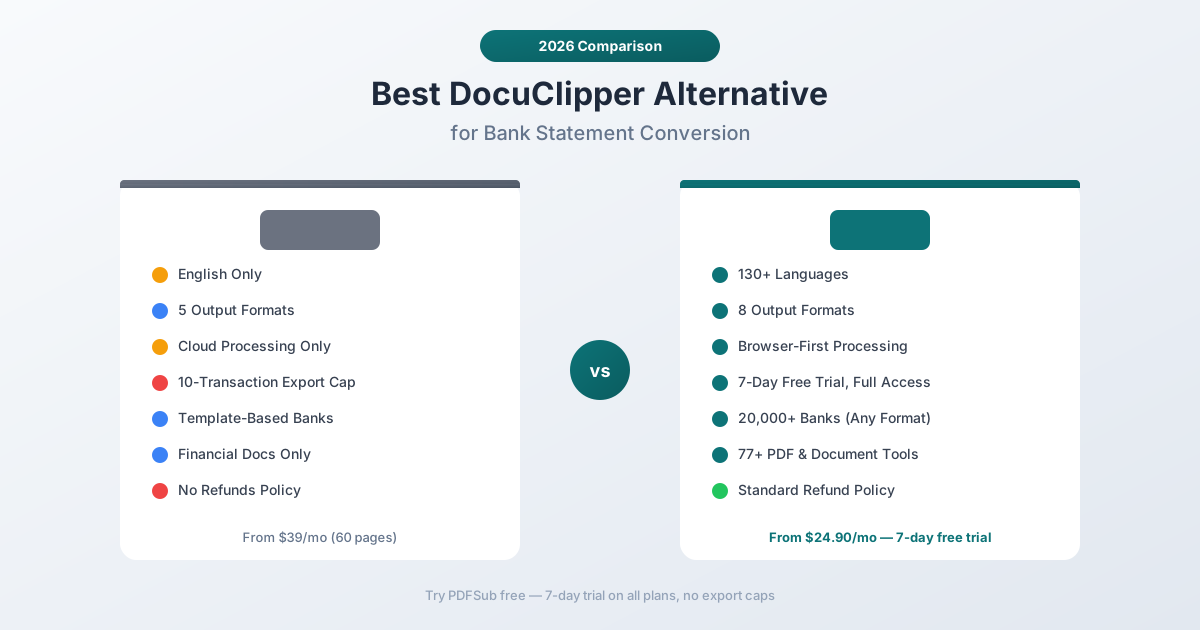
Before recommending alternatives, it helps to understand the specific pain points that drive people away from DocuClipper. Based on user reviews across G2, Trustpilot, and accounting forums, these are the most common reasons:
English-Only Language Support
This is DocuClipper's biggest limitation. It only processes documents in English. If your client has bank statements from Deutsche Bank (German), BNP Paribas (French), ICBC (Chinese), or Banco Santander (Spanish), DocuClipper can't handle them.
For accountants working with international clients - or anyone outside the English-speaking world - this is a dealbreaker. You'd need a separate tool for non-English statements, which means two subscriptions, two workflows, and twice the headaches.
Page-Based Pricing Gets Expensive
DocuClipper charges per page, not per statement. A typical 12-page bank statement costs $0.96 to $7.80 depending on your plan. Process 50 statements a month and you're looking at $48 to $390 - just for conversion.
Worse, unused pages don't roll over on monthly plans. If you buy 500 pages and only use 200, those 300 pages vanish at the end of the month.
The pricing structure punishes irregular usage. Tax season might require thousands of pages; summer months might need a handful. You either overpay during slow months or run out during busy ones.
Restrictive Free Trial
DocuClipper's 14-day trial gives you 120 pages - sounds generous. But here's the catch: you can only export the first 10 transactions per document. The tool extracts everything and shows you the results, but the download is capped.
That means you can't actually complete real work during the trial. You can verify that extraction works, but you can't deliver results to a client. It's a preview, not a trial.
Billing and Cancellation Complaints
Multiple reviewers on Trustpilot and G2 report being charged after cancelling their subscription. Others describe difficulty getting cancellations processed. DocuClipper's refund policy explicitly states: "We do not offer refunds for any reason, including dissatisfaction with the service, lack of use, or technical issues."
That's unusually strict for a SaaS product. Most competitors offer at least a pro-rated refund or money-back guarantee.
Advertised Features That Don't Work
Several G2 reviewers report that DocuClipper advertises integrations and connectors that aren't actually functional. One reviewer called the experience "false advertising" after being told by support that "those features are not working at this time."
What to Look for in a DocuClipper Alternative
Not all bank statement converters are created equal. Here's what matters most when evaluating alternatives:
Language support. If you work with international clients (or plan to), multi-language support isn't optional. Look for converters that handle non-Latin scripts (Chinese, Arabic, Hindi) and international date/number formats (DD.MM.YYYY, comma-as-decimal).
Output formats. At minimum, you need Excel and CSV. For accounting workflows, QBO (QuickBooks), OFX (Xero, Wave), and QFX (Quicken) are essential. The more formats available, the fewer manual reformatting steps.
Pricing model. Per-page pricing works for high-volume, consistent usage. For variable workloads, look for plans with rollover pages, pay-as-you-go options, or generous free tiers.
Accuracy on your specific banks. Every converter has banks it handles well and banks it struggles with. Test with your actual client statements before committing to an annual plan.
Privacy model. Some converters process everything in the cloud. Others offer browser-based processing where files never leave your device. For sensitive financial data, this matters.
PDFSub: The Best DocuClipper Alternative
PDFSub is a bank statement converter built specifically to address the gaps that DocuClipper leaves open - particularly language support, pricing flexibility, and privacy.
130+ Languages vs. English-Only
This is the most significant difference. PDFSub supports 130+ languages - including Chinese, Japanese, Korean, Arabic, Hindi, German, French, Spanish, Portuguese, and every other major language your international clients might use.
It auto-detects date formats (MM/DD/YYYY, DD.MM.YYYY, YYYY年MM月DD日), number formats (US, European, Indian), and currency symbols. You don't need to manually configure anything for non-English statements.
DocuClipper? English only. Non-English documents require workarounds - typically submitting a support request and waiting for a custom template, which can take days.
8 Output Formats vs. DocuClipper's 4-5
PDFSub exports to eight formats:
| Format | Use Case |
|---|---|
| Excel (XLSX) | Analysis, reporting, manual review |
| CSV | Universal import, custom workflows |
| TSV | Avoids comma-parsing issues in descriptions |
| JSON | Developer integrations, automated pipelines |
| OFX | Xero, Wave, generic accounting software |
| QBO | QuickBooks Online and Desktop |
| QFX | Quicken |
| QIF | Legacy Quicken, some Xero imports |
Plus a "Download All" option that generates a ZIP containing all eight formats in one click. Convert once, use anywhere.
DocuClipper supports Excel, CSV, QBO, IIF, and QIF - a narrower set that misses OFX (important for Xero users) and JSON (important for developers).
Browser-First Privacy
PDFSub uses a 4-tier extraction waterfall:
- Tier 1 - Client-side extraction runs entirely in your browser. Your PDF never leaves your device. No upload, no server processing, no privacy risk.
- Tier 2 - Server-side coordinate extraction for more complex layouts.
- Tier 3 - OCR + AI for scanned or image-based PDFs.
- Tier 4 - AI vision for the most challenging documents.
Most digital bank statements are handled by Tier 1 - meaning your data stays on your machine. DocuClipper uploads every file to their cloud servers for processing.
For accountants handling sensitive client financial data, the ability to process statements without uploading them is a meaningful privacy advantage.
More Generous Free Trial
PDFSub offers a 7-day free trial with full functionality on all paid plans. You can convert bank statements and download complete results immediately - no export caps, no transaction limits.
DocuClipper's 14-day trial gives you 120 pages, but caps exports at 10 transactions per document. You can see that extraction works, but you can't use the results for actual client work.
Part of a Larger Platform
PDFSub isn't just a bank statement converter. It's an 98+ tool document platform that includes PDF merging, splitting, compression, conversion, AI summarization, translation, and more. One subscription covers bank statements and every other PDF task your practice needs.
DocuClipper focuses exclusively on financial document extraction. That's a strength (deep specialization) and a limitation (you need separate tools for everything else).
Side-by-Side Feature Comparison
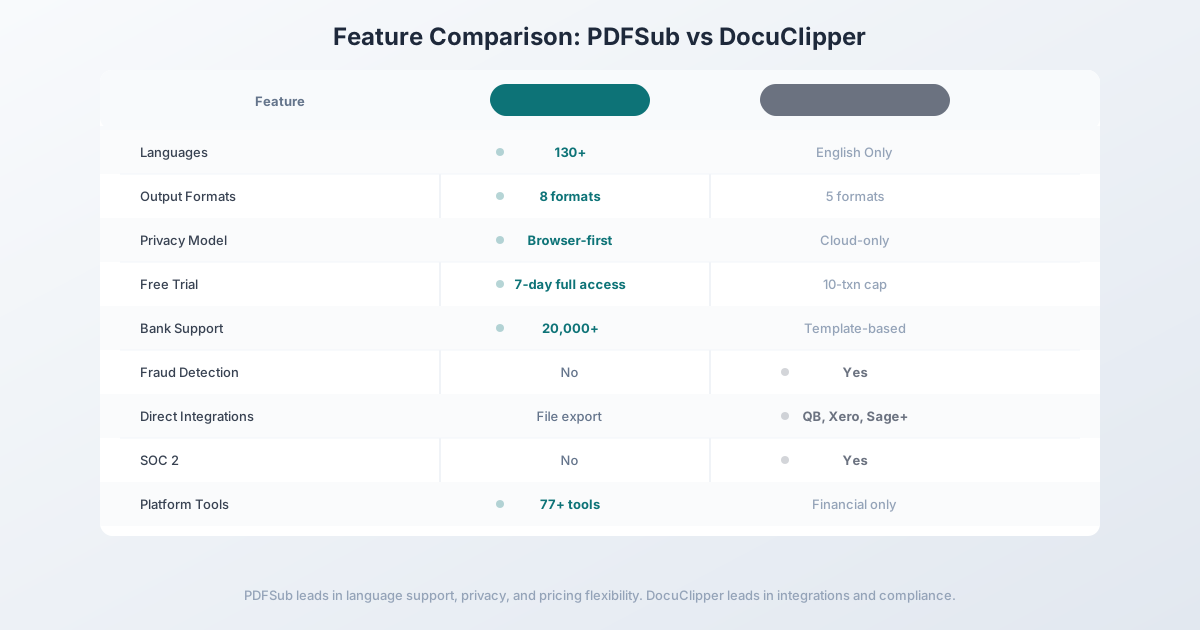
Here's how PDFSub and DocuClipper compare across the features that matter most:
| Feature | PDFSub | DocuClipper |
|---|---|---|
| Languages | 130+ (auto-detected) | English only |
| Output formats | 8 (XLSX, CSV, TSV, JSON, OFX, QBO, QFX, QIF) | 5 (XLSX, CSV, QBO, IIF, QIF) |
| Banks supported | 20,000+ (template-agnostic) | Varies (template-based) |
| Privacy model | Browser-first (Tier 1 never uploads) | Cloud-only (all files uploaded) |
| Free trial | 7-day free trial, full functionality | 14-day trial, 10-transaction export cap |
| Date format detection | Auto (MM/DD, DD/MM, YYYY/MM/DD, CJK) | Manual selection |
| Number format detection | Auto (US, European, Indian) | US format |
| Batch processing | Yes (paid plans) | Yes (up to 500 documents) |
| Fraud detection | No | Yes (added January 2025) |
| Reconciliation | Balance verification | Full reconciliation |
| Direct integrations | Export files for any software | QuickBooks, Xero, Sage, NetSuite |
| API access | HTML rendering API + 10 SDKs (bank statement extraction endpoints in follow-up phase) | Business/Enterprise plans |
| SOC 2 certification | No | Yes |
| Platform tools | 98+ PDF/document tools | Financial documents only |
| Refund policy | Standard | No refunds for any reason |
Pricing Comparison
DocuClipper Pricing
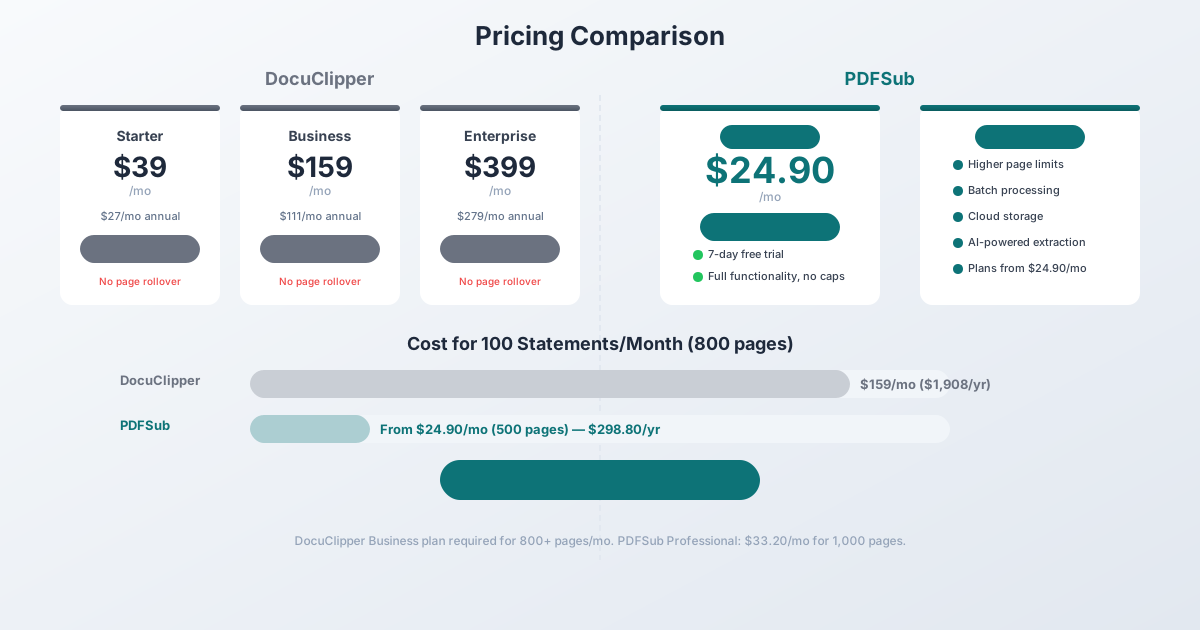
DocuClipper uses page-based pricing across three tiers:
| Plan | Monthly | Annual (per month) | Pages/Month |
|---|---|---|---|
| Starter | $39 | ~$27 | 60–300 |
| Business | $159 | ~$111 | 500–1,500 |
| Enterprise | $399 | ~$279 | 2,000–5,000 |
Per-page cost ranges from $0.08 to $0.65 depending on plan and volume. Annual plans save 30%, but unused pages on monthly plans don't roll over.
PDFSub Pricing
PDFSub offers bank statement conversion as part of its All-In-One subscription:
- All-In-One plan: $20/month (annual; $240/year, saves $60) or $25/month billed monthly - 500 bank statement pages + 500 AI credits + all 98+ tools + e-sign + 50 GB storage + unlimited team seats (each billed at the same per-user rate)
- Stackable add-on packs: 500 BSC Pages, 500 AI Credits, 40 GB Storage, Priority Support
All plans include a 7-day free trial with full functionality - no export caps, no transaction limits.
The Cost Difference in Practice
Consider a typical accounting firm processing 100 bank statements per month, averaging 8 pages each (800 pages total):
With DocuClipper, you'd need at least the Business plan at $159/month (1,000 pages). That's $1,908/year on an annual plan.
With PDFSub's All-In-One plan at $20/month annual (500 pages included), you'd pay $240/year - saving over $1,600/year compared to DocuClipper's Business plan.
When DocuClipper Is Still the Right Choice
Being honest: DocuClipper does some things better than PDFSub. If these features matter to your workflow, DocuClipper might still be the right tool:
You need direct accounting integrations. DocuClipper connects directly to QuickBooks, Xero, Sage, NetSuite, and Dynamics 365. PDFSub exports files in the right formats (QBO, OFX, etc.), but you upload them manually. If you process hundreds of statements and need one-click push to your accounting software, DocuClipper's direct integrations save time.
You need fraud detection. DocuClipper added document tampering detection in January 2025. It flags suspicious alterations, missing pages, and duplicate transactions. PDFSub doesn't offer this. For forensic accounting or compliance-heavy workflows, DocuClipper's fraud detection is a genuine advantage.
You need SOC 2 compliance. If your firm requires SOC 2 certified vendors, DocuClipper has that certification. PDFSub does not (yet). For enterprise clients with strict vendor security requirements, this matters.
You need an API today. DocuClipper offers API access on Business and Enterprise plans. If you're building automated document processing pipelines, DocuClipper's API is available now.
All your clients are English-speaking. If you exclusively work with US, UK, Canadian, or Australian banks and never encounter non-English documents, DocuClipper's English-only limitation isn't relevant to you.
How to Switch from DocuClipper to PDFSub
Switching is straightforward - there's no data migration or import process needed.
Step 1: Try PDFSub for Free
Go to PDFSub's Bank Statement Converter and start a free trial. All plans include a 7-day free trial with full functionality - no export caps.
Compare the extraction quality against DocuClipper's output. Pay attention to:
- Transaction dates (correct format?)
- Description accuracy (truncated or complete?)
- Amount signs (deposits positive, withdrawals negative?)
- Running balance (if present)
Step 2: Test Your Problem Cases
Try the statements that gave DocuClipper trouble:
- Non-English statements (if applicable)
- Scanned or image-based PDFs
- Statements from smaller or international banks
- Multi-account statements
Step 3: Download in Your Preferred Format
Export as QBO, OFX, CSV, or whichever format your accounting software expects. Verify the import works in QuickBooks, Xero, or your target platform.
Step 4: Cancel DocuClipper
Once you're confident PDFSub handles your workflow, cancel your DocuClipper subscription. Important: Document your cancellation (screenshot the confirmation) - multiple users report billing issues after cancellation.
Other DocuClipper Alternatives Worth Considering
PDFSub is our recommendation, but other tools may fit specific use cases:
MoneyThumb - Desktop-based converter with strong QBO output. Good accuracy but requires Windows/Mac installation. No browser-based option. Limited language support.
ProperSoft - Affordable desktop tool for converting bank statements to QBO and OFX. Good for QuickBooks-focused workflows but lacks AI extraction for complex layouts.
Nanonets - AI-powered document extraction platform. Strong API and automation capabilities. Better for enterprise document processing pipelines than individual accountant workflows. More expensive than both PDFSub and DocuClipper.
BankStatementConverter.com - Simple web-based converter. Handles basic statements well but struggles with complex layouts. Limited output format options.
Frequently Asked Questions
Is PDFSub more accurate than DocuClipper?
Accuracy depends heavily on the specific bank statement format. DocuClipper claims 99.5–99.6% accuracy (self-reported). PDFSub uses a 4-tier extraction waterfall that escalates from coordinate-based extraction to AI vision for complex documents. The best approach is to test both tools with your actual client statements - PDFSub's 7-day free trial gives you full access to evaluate extraction quality.
Can PDFSub handle scanned bank statements?
Yes. PDFSub's Tier 3 and Tier 4 extraction handle scanned and image-based PDFs using OCR and AI vision. Digital (text-based) PDFs are processed by Tier 1 in your browser without uploading. Scanned documents require server-side processing.
Does PDFSub integrate directly with QuickBooks?
PDFSub exports QBO files that import directly into QuickBooks Online and Desktop. The workflow is: convert in PDFSub → download QBO file → upload in QuickBooks via Banking → Upload from file. It's one extra step compared to DocuClipper's direct integration, but the QBO files include proper FITIDs for automatic duplicate detection.
Can I process statements in bulk with PDFSub?
Yes. All paid plans include batch processing capabilities. You can test batch processing during the 7-day free trial.
What happens to my data when I use PDFSub?
For most digital bank statements, PDFSub's Tier 1 extraction runs entirely in your browser - your PDF never leaves your device. For scanned documents that require server processing, files are processed in an isolated environment and automatically deleted after processing.
Does PDFSub support credit card statements too?
Yes. PDFSub's bank statement converter handles both bank statements and credit card statements. The extraction engine auto-detects the document type and applies appropriate parsing logic.
Still evaluating, not yet switching? This page is written for teams ready to leave DocuClipper. For a neutral feature-by-feature breakdown and pricing side-by-side, see the PDFSub vs DocuClipper comparison.