Best Dext Alternative for Document Processing (2026)
Looking for a Dext alternative? Compare features, pricing, and capabilities. See why teams switch to PDFSub.
PDFSub is best for:
- Accountants hit by Dext's per-client pricing who want flat-rate extraction at $20/user/mo (annual)
- Firms needing bank statement conversion (20,000+ banks) - something Dext doesn't offer
- Users who want AI translation, summarization, and 98+ PDF tools alongside receipt extraction
- Practices managing many clients where per-client billing makes Dext cost-prohibitive
PDFSub is NOT best for:
- Firms that rely on Dext's direct push to Xero/QuickBooks/Sage with auto-categorization
- Teams needing automated expense approval workflows and supplier rule matching
- Practices where the receipt-to-ledger pipeline is the primary pain point (Dext is purpose-built for this)
Dext Prepare (formerly Receipt Bank) is one of the most popular receipt and invoice capture tools for accountants. It scans receipts, extracts key data, and pushes it directly into accounting software like Xero, QuickBooks, and Sage. For bookkeepers running a tightly integrated accounting practice, it's been a reliable workhorse for years.
But Dext was built for a narrow workflow: photograph a receipt, extract the vendor and amount, code it to an account, push it to your ledger. Step outside that corridor - you need to convert a bank statement, process a document in Mandarin, handle financial reports, or do anything with a PDF beyond receipt capture - and Dext has nothing to offer.
If you've been frustrated by Dext's per-client pricing eating into your margins, its inability to handle bank statements, or the feeling that you're paying for one tool when you need five, this guide compares the alternatives and identifies which one gives you the most value for your money.
Why People Look for Dext Alternatives
Dext has solid reviews - 4.3 stars on G2 - and genuinely excels at its core use case. The complaints aren't about quality. They're about scope, pricing, and limitations that become more visible as your practice grows.
Per-Client Pricing Scales Painfully
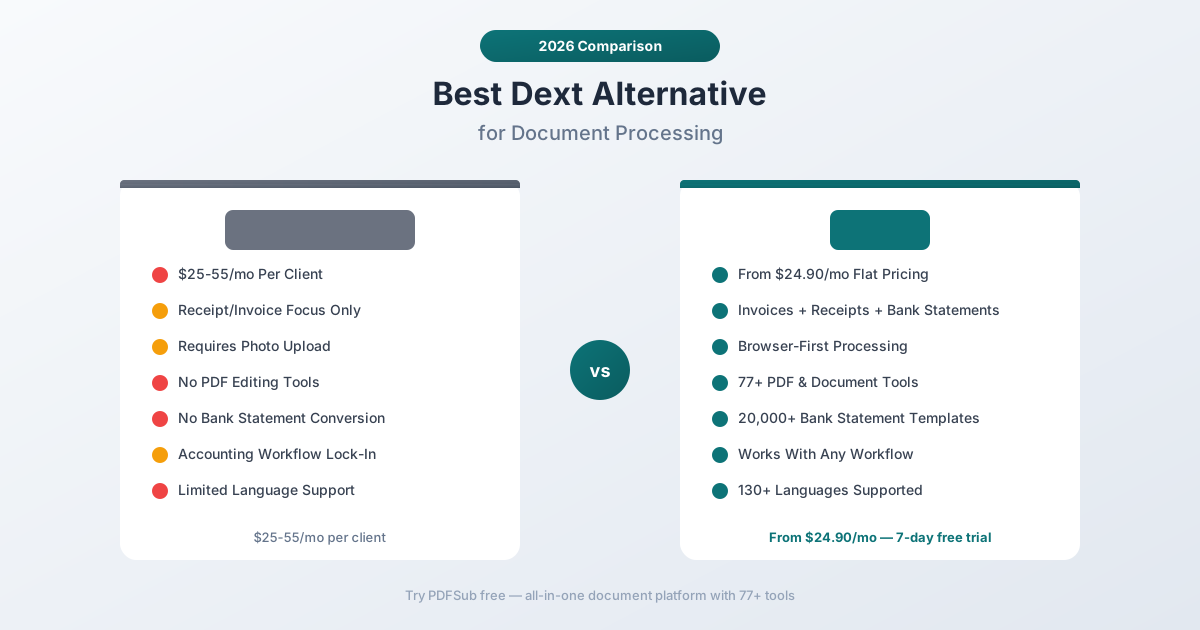
Dext Prepare uses a per-client pricing model. The exact cost varies by plan tier and region, but accountants typically report paying $25 to $55 per client per month depending on the feature level.
That sounds manageable with 5 clients. At 20 clients, you're spending $500-$1,100/month on receipt capture alone. At 50 clients, it's $1,250-$2,750/month. The economics get worse as your practice grows, which is the exact opposite of how pricing should scale.
Some accountants report spending more on Dext than on their actual accounting software. When a receipt scanning tool costs more than Xero or QuickBooks, something's off.
PDFSub uses simple per-user pricing at $20/user/mo (annual) - the per-user rate stays the same regardless of whether you have 5 clients or 500. No per-client multiplier, no per-document charges, no surprises on your monthly bill.
Receipt and Invoice Only - Nothing Else
Dext captures receipts and invoices. That's it. It doesn't:
- Convert bank statements to Excel, CSV, QBO, or OFX
- Merge, split, or compress PDFs
- Extract data from financial reports or annual statements
- Translate documents between languages
- Summarize or analyze documents with AI
- Handle any general PDF operations
For most accounting practices, receipt capture is one task among many. You also need to convert bank statements for reconciliation, process financial reports from clients, manage PDF documents, and handle documents in multiple formats. Dext covers one piece of that puzzle.
No Bank Statement Conversion
This is the gap that matters most for bookkeepers and accountants. Bank statement conversion - turning PDF bank statements into Excel, CSV, QBO, or OFX files for accounting software import - is a core task in virtually every accounting workflow.
Dext doesn't do it. Not at all. If a client sends you a PDF bank statement, Dext has no way to extract the transactions and produce an importable file. You need a separate bank statement converter, which means a separate subscription, a separate login, and a separate workflow.
PDFSub includes a bank statement converter that handles statements from 20,000+ banks worldwide with exports to 8 formats (Excel, CSV, TSV, JSON, QBO, OFX, QFX, QIF). It's included in every subscription - no extra charge.
Limited Language Support
Dext supports approximately 30 languages for receipt and invoice extraction. That covers major European languages and a handful of Asian languages, but it's far from comprehensive.
If your practice handles international clients with documents in Arabic, Hindi, Thai, Vietnamese, or dozens of other languages, Dext's coverage is spotty. And unlike tools with automatic language detection, Dext sometimes requires manual configuration for non-English documents.
PDFSub supports 130+ languages with automatic detection - including all non-Latin scripts (Chinese, Japanese, Korean, Arabic, Hindi, Thai, etc.) and international date and number formats.
Requires Photo Upload or Email Forward
Dext's primary workflow is mobile-first: take a photo of a receipt with the Dext app, or forward a receipt email to your Dext inbox. This works beautifully for capturing receipts on the go.
But for processing PDF documents that already exist on your computer - bank statements, financial reports, multi-page invoices - the photo-centric workflow feels clunky. You're uploading a digital file to a tool designed for photographing paper. The interface reflects this: it's optimized for single-page captures, not multi-page document processing.
Accounting Software Lock-In
Dext's value proposition is tight integration with accounting software. It syncs directly with Xero, QuickBooks Online, Sage, FreeAgent, and others. This is genuinely useful - but it also means Dext is most valuable within that specific ecosystem.
If you use accounting software that Dext doesn't integrate with, the tool loses its primary advantage. If you need to export data in formats other than what your accounting software accepts, Dext's export options are limited. The tool is designed to sit inside the accounting workflow, not alongside it.
PDFSub exports to standard file formats (Excel, CSV, QBO, OFX, etc.) that work with any accounting software. The tradeoff is an extra import step, but the flexibility means you're never locked into a specific software ecosystem.
What to Look for in a Dext Alternative
Before comparing specific tools, here are the criteria that matter most when evaluating Dext alternatives:
Predictable pricing. Per-client pricing punishes growth. Look for flat monthly plans where your cost stays the same regardless of client count. Your tool should get cheaper per client as you grow, not more expensive.
Broader document coverage. Receipt capture is one task. The ideal tool handles receipts, invoices, bank statements, financial reports, and general PDF operations. One subscription, one workflow, one login.
Bank statement conversion. If you're an accountant, bank statement conversion is non-negotiable. The tool should handle PDF-to-Excel and PDF-to-QBO conversion for statements from banks worldwide.
Language support. International clients mean international documents. Your tool should handle non-English text and non-Latin scripts without manual configuration.
Privacy options. Financial documents are sensitive. Tools that process documents in the browser (without uploading to a server) offer meaningful privacy advantages for accountants handling client data.
Output format flexibility. You need Excel, CSV, QBO, OFX, and other standard formats - not just a push to one specific accounting platform.
PDFSub: The Best Dext Alternative
PDFSub replaces Dext's narrow receipt capture with a comprehensive document platform - AI extraction for receipts, invoices, and bank statements, plus 98+ PDF tools, all under flat monthly pricing.
Flat Pricing vs. Per-Client Pricing
This is the most immediate difference. PDFSub charges $20/user/mo (annual) - the per-user price stays the same whether you process documents for 1 client or 100.
Compare the cost at different client counts:
| Clients | Dext (est. $35/client) | PDFSub |
|---|---|---|
| 5 | $175/mo | $20/mo (annual; $25/mo monthly) |
| 10 | $350/mo | $20/mo (annual; $25/mo monthly) |
| 20 | $700/mo | $20/mo (annual; $25/mo monthly) |
| 50 | $1,750/mo | $20/mo (annual; $25/mo monthly) |
Even at higher volume tiers, PDFSub's pricing is dramatically lower. The savings compound every month - over a year, the difference can easily be $5,000-$15,000 depending on your client count.
Receipts + Invoices + Bank Statements
While Dext handles receipts and invoices, PDFSub handles all three major financial document types:
Receipt scanning. Upload a receipt PDF or image, and PDFSub's AI receipt scanner extracts merchant name, date, items, subtotal, tax, tip, and total. Works with receipts from any country in 130+ languages.
Invoice extraction. The AI invoice extractor pulls vendor name, invoice number, dates, line items, amounts, tax details, and payment terms from any invoice layout.
Bank statement conversion. The bank statement converter handles statements from 20,000+ banks worldwide. It extracts every transaction with date, description, and amount, auto-detects the bank format, and exports to 8 formats: Excel, CSV, TSV, JSON, QBO, OFX, QFX, and QIF.
Dext handles the first two (receipts and invoices). The third - bank statements - requires a completely separate tool. With PDFSub, all three are covered in one platform.
98+ PDF Tools Included
Beyond financial document extraction, PDFSub includes a full suite of PDF tools:
- Merge and split PDFs for client document packages
- Compress large files for email or storage
- Convert between PDF, Word, Excel, PowerPoint, and image formats
- Watermark and stamp documents for draft or confidential marking
- Encrypt and decrypt PDFs for security
- Translate documents across 130+ languages with AI
- Summarize long documents for quick review
- Compare two documents side by side
For accountants, these aren't luxuries - they're daily operations. Combining client documents, compressing files for email, converting between formats, and protecting sensitive files are tasks you do constantly. Having them in the same platform as your extraction tools eliminates tool-switching and extra subscriptions.
130+ Languages vs. ~30
PDFSub supports 130+ languages with automatic detection, compared to Dext's approximately 30. This matters for any practice with international clients:
- Non-Latin scripts (Chinese, Japanese, Korean, Arabic, Hindi, Thai, Cyrillic) are fully supported
- International date formats (DD.MM.YYYY, YYYY-MM-DD, CJK dates) are auto-detected
- Number formats (European comma-decimal, Indian lakh system) are handled automatically
- Currency symbols from 100+ countries are recognized
If you work exclusively with English-speaking clients, this difference doesn't matter. If you have even one client with international operations, PDFSub's language coverage saves you from manual data entry.
Browser-First Privacy
PDFSub's Tier 1 extraction runs entirely in your browser - your document never leaves your device. For most digital bank statements, invoices, and receipts, all processing happens client-side. Only scanned or image-based documents that need OCR are sent to the server.
Dext uploads every document to their cloud servers for processing. All photos, all emails, all PDFs - everything goes to Dext's servers before extraction happens.
For accountants handling sensitive client financial data, browser-first processing is a meaningful privacy advantage. You can assure clients that their bank statements and financial documents are processed on your machine, not in the cloud.
Side-by-Side Feature Comparison
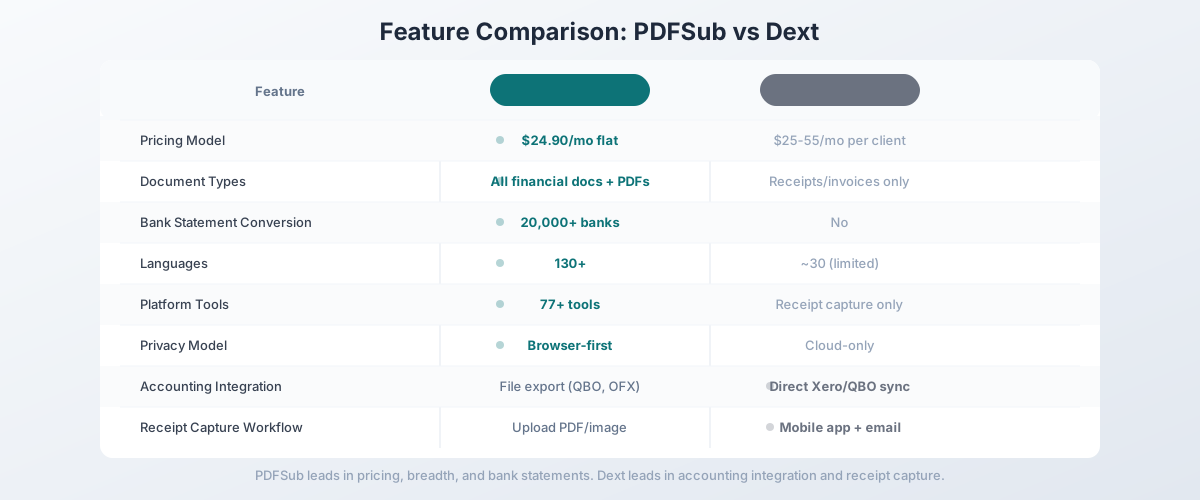
| Feature | PDFSub | Dext Prepare |
|---|---|---|
| Pricing model | Flat ($20/mo (annual; $25/mo monthly)) | Per client ($25-55/mo) |
| Document types | Receipts, invoices, bank statements, reports | Receipts and invoices |
| Bank statement conversion | 20,000+ banks, 8 formats | No |
| PDF tools | 98+ (merge, split, compress, convert, etc.) | None |
| Languages | 130+ (auto-detected) | ~30 |
| Privacy model | Browser-first (Tier 1 never uploads) | Cloud-only |
| Output formats | Excel, CSV, TSV, JSON, QBO, OFX, QFX, QIF | Xero/QBO push, CSV |
| Mobile app | Browser-based (works on mobile) | Dedicated iOS/Android app |
| Email receipt capture | No (upload/drag-drop) | Yes (dedicated email inbox) |
| Accounting sync | File export (manual import) | Direct Xero/QBO/Sage sync |
| Free trial | 7-day full access | 14-day trial |
| Training required | None | None for receipts/invoices |
When Dext Is Still the Right Choice
Being honest: Dext does some things better than PDFSub. If these features are critical to your workflow, Dext might still be the right tool:
You need direct accounting software sync. Dext pushes extracted data directly into Xero, QuickBooks, Sage, FreeAgent, and other platforms. PDFSub exports files in the right formats, but you import them manually. If you process hundreds of receipts per week and the one-click sync saves you meaningful time, Dext's integration is a genuine advantage.
You need a mobile receipt capture app. Dext's mobile app is polished and purpose-built for photographing receipts on the go. PDFSub works in a mobile browser but doesn't have a dedicated app with camera integration. If your workflow heavily depends on capturing paper receipts via phone, Dext's app is better.
You need email receipt forwarding. Dext provides a dedicated email address - forward receipts from vendors, and they're automatically captured and extracted. This is a genuinely useful feature for automating receipt collection. PDFSub requires manual upload.
Your practice is purely receipt/invoice focused. If bank statements, financial reports, and PDF tools are genuinely irrelevant to your practice, and you only need receipt and invoice capture with accounting software sync, Dext's focused approach may be preferable to PDFSub's broader platform.
You have a small client count. At 3-5 clients, Dext's per-client pricing might total $75-$175/month - still more than PDFSub, but the direct accounting sync may be worth the premium if you don't need bank statements or PDF tools.
Other Alternatives Worth Considering
PDFSub is our recommendation for the broadest value, but other tools may fit specific needs:
Hubdoc - Now part of Xero, Hubdoc captures bills and receipts and syncs directly with Xero. Free for Xero subscribers on certain plans. If you're all-in on Xero and only need receipt/invoice capture, Hubdoc is effectively free. But it only works with Xero, doesn't handle bank statements, and has limited language support.
AutoEntry - Receipt and invoice capture similar to Dext, with QuickBooks, Xero, and Sage integration. Slightly cheaper than Dext at some volume levels. Per-client pricing still applies. Good alternative if you want the same Dext workflow at a lower price, but it has the same limitations: no bank statements, no PDF tools.
Expensify - Expense management platform with receipt scanning. Better for corporate expense tracking than accounting practice use. Per-user pricing ($5-18/user/month). No bank statement conversion, no PDF tools, no document extraction beyond receipts.
DocuClipper - Bank statement converter specifically. Good option if bank statements are your primary need. English-only, page-based pricing ($39-$399/month), no receipt/invoice extraction, no PDF tools. Complements Dext rather than replacing it.
How to Switch from Dext to PDFSub
Switching is straightforward - there's no data migration needed since PDFSub is a document processing tool, not an accounting data store.
Step 1: Start a Free Trial
Go to PDFSub's pricing page and start a 7-day free trial. All plans include full functionality - no feature restrictions during the trial.
Step 2: Test Your Core Workflows
Process the document types you handle most frequently:
- Receipts: Upload a receipt PDF and verify the extracted data matches the original
- Invoices: Test with invoices from your most common vendors
- Bank statements: Convert a client bank statement to Excel and verify transaction accuracy
- Non-English documents: If you have international clients, test with their documents
Step 3: Compare Output Quality
For receipts and invoices, compare PDFSub's extracted fields against what Dext produces. For bank statements, verify the exported QBO or OFX file imports cleanly into your accounting software.
Step 4: Factor in Total Cost
Calculate your current Dext spend (number of clients x per-client rate) and compare it to PDFSub's per-user rate. Factor in any additional tools you currently pay for separately (bank statement converter, PDF tools, etc.) that PDFSub would replace.
Step 5: Cancel Dext
Once you've verified PDFSub handles your workflow, cancel your Dext subscription. Note that Dext doesn't offer refunds for partial months, so time the switch to coincide with your billing cycle.
Frequently Asked Questions
Is PDFSub as accurate as Dext for receipt extraction?
Both tools deliver strong extraction accuracy for standard receipts and invoices. Dext has years of training data for receipt formats specifically, which gives it an edge on unusual receipt layouts. PDFSub's AI extraction handles the vast majority of receipt and invoice formats accurately. The best approach is to test both with your actual client documents during PDFSub's 7-day free trial.
Can PDFSub push data directly into QuickBooks or Xero?
PDFSub exports QBO files (for QuickBooks), OFX files (for Xero and other platforms), and standard Excel/CSV files. You import these files into your accounting software - it's one extra step compared to Dext's direct sync. The QBO files include FITIDs for automatic duplicate detection in QuickBooks.
Does PDFSub have a mobile app?
PDFSub works in any mobile browser - no app installation needed. However, it doesn't have a dedicated camera-based receipt capture app like Dext. If mobile receipt photography is a core part of your workflow, you may want to keep Dext's mobile app or use your phone's camera to create PDFs first.
Can I use PDFSub for multiple clients without per-client fees?
Yes. PDFSub's pricing is per-account, not per-client. Whether you process documents for 1 client or 100, the subscription cost is the same. There's no per-client surcharge, no client seat limits, and no usage tiers based on client count.
Does PDFSub handle receipt email forwarding?
No. PDFSub requires you to upload documents (drag-and-drop or file picker). It doesn't have an email inbox feature like Dext. If email receipt forwarding is essential to your workflow, you'd need to download receipt attachments first and then upload them to PDFSub.
What about Dext Commerce for e-commerce?
PDFSub doesn't offer e-commerce integrations (Shopify, Amazon, eBay, etc.) like Dext Commerce. If you need automated e-commerce transaction capture, Dext Commerce is purpose-built for that. PDFSub focuses on document processing rather than e-commerce data feeds.
The Bottom Line
Dext Prepare is a solid receipt and invoice capture tool - but it's a single-purpose tool with per-client pricing that punishes practice growth. For accountants and bookkeepers who also need bank statement conversion, PDF tools, multi-language support, and predictable pricing, Dext is only covering a fraction of the workflow.
PDFSub replaces Dext's receipt and invoice capture, adds bank statement conversion for 20,000+ banks, includes 98+ PDF tools, supports 130+ languages, and starts at $25/month - no per-client fees, no scope limitations, no need for additional tool subscriptions.
Try PDFSub free with a 7-day trial and compare the output against Dext. Test receipts, invoices, and especially bank statements. When you add up the cost savings and the tools you no longer need to pay for separately, the math tends to be compelling.
Still evaluating, not yet switching? This page is written for teams ready to leave Dext. For a neutral feature-by-feature breakdown and pricing side-by-side, see the PDFSub vs Dext comparison.