Best BankStatementConverter Alternative for Bank Statement Conversion (2026)
Looking for a BankStatementConverter alternative? Compare features, pricing, and capabilities. See why teams switch to PDFSub.
PDFSub is best for:
- Users who need 8 export formats (QBO, OFX, QFX, QIF, etc.) vs BankStatementConverter's Excel/CSV only
- Firms processing international statements in 130+ languages vs BankStatementConverter's 5-language UI
- High-volume bookkeepers who want flat monthly pricing instead of per-statement charges
- Professionals who need bank statement conversion plus 98+ PDF tools in one subscription
PDFSub is NOT best for:
- Occasional users who prefer a permanent free tier (BankStatementConverter offers 5 free pages/day)
- Developers who need API access for automated processing pipelines right now
- Users who only need basic Excel/CSV output and nothing else
BankStatementConverter.com has one of the most valuable domain names in its niche. When someone searches "bank statement converter," there it is - exact match. And for basic English-language bank statement conversion, it gets the job done.
But owning the perfect domain name doesn't make a product the best option. If you've used BankStatementConverter.com, you've probably noticed the gaps: per-statement pricing that gets expensive fast, limited output format options, English-only processing that shuts out international banks, and extraction that fails on statements with non-standard layouts.
For bookkeepers handling 50 statements a month, accountants working with international clients, or anyone who needs more than basic CSV output, these limitations add up quickly. This guide breaks down where BankStatementConverter falls short and what alternatives deliver more - for less.
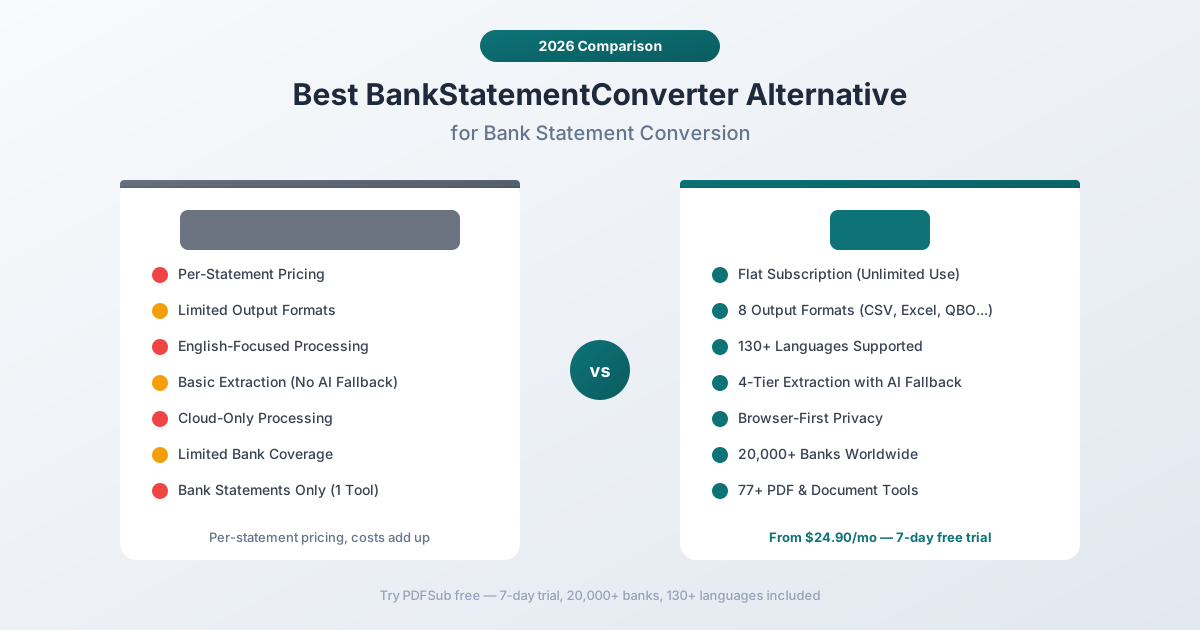
Why People Look for BankStatementConverter Alternatives
BankStatementConverter.com is a straightforward tool, and that simplicity is both its strength and its limitation. Here's what consistently drives users to look elsewhere:
Per-Statement Pricing Gets Expensive
BankStatementConverter.com charges per statement converted. For someone processing one or two statements a month, this feels reasonable. But the cost model breaks down quickly at scale.
A bookkeeper with 15 clients who each provide 2-3 bank statements monthly is looking at 30-45 conversions per month. At per-statement rates, this can easily exceed $100/month - and that's for a single tool that only converts bank statements.
There's no "unlimited" tier for high-volume users. Every additional statement is an additional charge. For accounting firms during busy seasons, the costs become unpredictable and can spike dramatically.
Limited Output Formats
BankStatementConverter.com outputs to CSV and Excel - the two most basic formats. That's fine for users who just need raw transaction data in a spreadsheet.
But professional accounting workflows often need:
- QBO (QuickBooks Online format) - Direct import into QuickBooks without CSV mapping headaches
- OFX (Open Financial Exchange) - Standard format for financial software interoperability
- QIF (Quicken Interchange Format) - For Quicken and older accounting systems
- MT940 - International banking standard used by enterprise treasury systems
- JSON - For developers building custom processing pipelines
If you need any of these, BankStatementConverter.com can't help. You'd need a separate conversion step after getting the CSV, which introduces errors and extra work.
English-Focused Processing
BankStatementConverter.com is designed primarily for English-language bank statements from US, UK, Canadian, and Australian banks. This works fine if that's all you process.
But the world has more than English-speaking banks. If you work with:
- German bank statements from Deutsche Bank or Commerzbank
- French statements from BNP Paribas or Credit Agricole
- Chinese statements from ICBC, Bank of China, or China Merchants Bank
- Arabic statements from Emirates NBD or Al Rajhi Bank
- Japanese statements from MUFG or Sumitomo Mitsui
- Indian statements from SBI, HDFC, or ICICI
Then you need a converter that understands non-English characters, right-to-left text, different date formats, and varied number formatting conventions. BankStatementConverter.com's English focus means these statements either fail outright or produce garbled, unusable output.
Basic Extraction Without AI Fallback
Every bank statement converter encounters documents it can't parse perfectly. Statement layouts change, banks update their PDF templates, scanned documents have quality issues, and some statements use non-standard formatting.
What happens when BankStatementConverter.com's extraction engine can't parse a statement? You get incomplete results, missing transactions, or a failure message. There's no fallback layer to catch what the primary extraction missed.
Modern converters address this with multi-tier extraction - if the first method doesn't work, a second kicks in, then a third, then AI-powered extraction as a final safety net. BankStatementConverter.com relies on a single extraction approach.
Cloud-Only Processing
Every bank statement you upload to BankStatementConverter.com goes to their servers for processing. For documents containing account numbers, transaction histories, running balances, and personal financial data, this is a legitimate privacy concern.
There's no option to process statements locally or in-browser. Every document, every time, goes through their cloud infrastructure.
No Other Document Tools
BankStatementConverter.com converts bank statements. That's the entire product.
If you also need to:
- Extract data from invoices or receipts
- Merge, split, or compress PDFs
- Translate documents
- Chat with PDFs using AI
- Convert between file formats
- Extract tables from non-financial documents
You need separate subscriptions to separate tools. For professionals who work with multiple document types daily, managing multiple tools, logins, and subscriptions is a real productivity drain.
What to Look for in a BankStatementConverter Alternative
Before comparing specific tools, here's what separates adequate bank statement converters from great ones:
Bank coverage. How many bank formats does the tool support? A converter that works with 500 banks is fine until your client hands you a statement from bank 501. The best tools support thousands of formats and handle unknown formats through AI.
Output format variety. CSV and Excel are table stakes. Look for QBO, OFX, QIF, MT940, and JSON. The more formats available, the fewer manual conversion steps in your workflow.
Language support. If you work with any international clients or non-English banks, you need a converter that handles multiple languages and character sets natively.
Multi-tier extraction. What happens when the first extraction attempt doesn't work? Tools with fallback layers - server OCR, AI vision, prompt-based extraction - catch the documents that single-method tools miss.
Privacy model. Does the tool process in your browser when possible, or does every document go to a cloud server? For sensitive financial data, browser-first processing matters.
Platform breadth. Does the tool do more than bank statements? If you also process invoices, receipts, and other documents, a broader platform eliminates the need for multiple subscriptions.
Pricing predictability. Per-statement pricing creates unpredictable costs. Flat monthly subscriptions let you budget accurately regardless of volume.
PDFSub: The Best BankStatementConverter Alternative
PDFSub is a document platform with a bank statement converter that supports 20,000+ bank formats, 8 output formats, 130+ languages, and 4-tier extraction - plus 76 other PDF and document tools.
20,000+ Bank Formats
This is PDFSub's headline advantage for bank statement conversion. The converter recognizes statement formats from over 20,000 banks worldwide - from major international institutions to regional credit unions and community banks.
This matters because bank statement formats vary enormously:
- Column layouts differ (some banks put dates on the left, others on the right)
- Transaction descriptions use different conventions (some include check numbers, others don't)
- Balance columns may show running balances, or only opening and closing
- Date formats vary by country and bank (MM/DD/YYYY, DD/MM/YYYY, YYYY-MM-DD)
- Multi-page continuations handle differently across banks
PDFSub's converter understands these variations natively. When it encounters a format it hasn't seen before, the AI fallback layer analyzes the document structure and extracts transactions intelligently.
8 Output Formats
PDFSub exports to every major format professional accountants actually need:
- CSV - Universal spreadsheet format
- Excel (.xlsx) - Formatted spreadsheet with proper column types
- TSV - Tab-separated values for data pipelines
- JSON - Structured data for developers and custom pipelines
- QBO - Direct QuickBooks Online import
- OFX - Open Financial Exchange standard
- QFX - Quicken Financial Exchange
- QIF - Quicken Interchange Format
No post-conversion format translation needed. Export directly into whatever your accounting software or workflow requires.
130+ Languages
PDFSub processes bank statements in over 130 languages. This includes:
- Right-to-left scripts - Arabic, Hebrew, Urdu, Farsi
- CJK characters - Chinese (Simplified and Traditional), Japanese, Korean
- Complex scripts - Hindi, Thai, Bengali, Tamil, Devanagari
- European languages - German, French, Spanish, Portuguese, Italian, Dutch, Polish, and dozens more
- Cyrillic - Russian, Ukrainian, Bulgarian, Serbian
The extraction engine doesn't just recognize these characters - it understands the language context. German number formatting (1.234,56 instead of 1,234.56) is handled automatically. Date formats in each language are parsed correctly. Transaction descriptions in any language are preserved accurately.
For accountants working with international clients, this eliminates the need for separate tools per language or manual pre-translation of statements before conversion.
4-Tier Extraction with AI Fallback
PDFSub's bank statement converter uses a cascading extraction approach that handles virtually any document:
- Browser extraction (Tier 1) - Text-based PDFs are parsed directly in your browser using coordinate-based column detection. Fast, private, and accurate for clean digital statements.
- Server text extraction (Tier 2a) - For documents where browser parsing hits limitations, server-side engines handle complex layouts, overlapping elements, and multi-column detection.
- Server OCR (Tier 2b) - Scanned bank statements get optical character recognition with financial document-specific optimization.
- AI extraction (Tiers 3/4) - For statements that resist all conventional extraction - unusual layouts, damaged scans, mixed-format documents - AI analyzes the document structure and extracts transactions using visual understanding.
This cascading approach means that the converter succeeds on documents where single-method tools fail. A digital PDF from Chase processes in seconds in your browser. A photocopied statement from a rural Indian bank still gets accurate extraction through the AI tier.
Browser-First Privacy
When your bank statement has selectable text (which most digital statements do), PDFSub processes it entirely in your browser. The file never leaves your device. Account numbers, transaction histories, and balances stay local.
Server processing is only triggered when browser extraction can't handle the document - typically scanned statements or documents requiring OCR. Even then, files are processed and immediately discarded, never stored.
For financial data containing account numbers, routing numbers, and transaction histories, this architecture provides meaningfully better privacy than cloud-only alternatives.
98+ Tools Beyond Bank Statements
Unlike BankStatementConverter.com, PDFSub isn't a single-purpose tool. Your subscription includes:
- Invoice extractor - Automated extraction of vendor details, line items, totals, tax amounts
- Receipt scanner - Merchant, items, totals, tax, and payment method extraction
- Financial report analyzer - AI analysis of balance sheets, income statements, cash flow
- Chat with PDF - Ask questions about any document
- Merge, split, compress, rotate - All standard PDF operations
- Translate PDF - Translate documents across 130+ languages
- Convert - PDF to Word, Excel, PowerPoint, images, and reverse
- Extract tables - Pull structured table data from any document
- OCR - Make scanned documents searchable
- Watermark, sign, redact, encrypt - Security and annotation tools
For bookkeepers and accountants who process bank statements but also handle invoices, receipts, and other financial documents, this eliminates the need for multiple separate tool subscriptions.
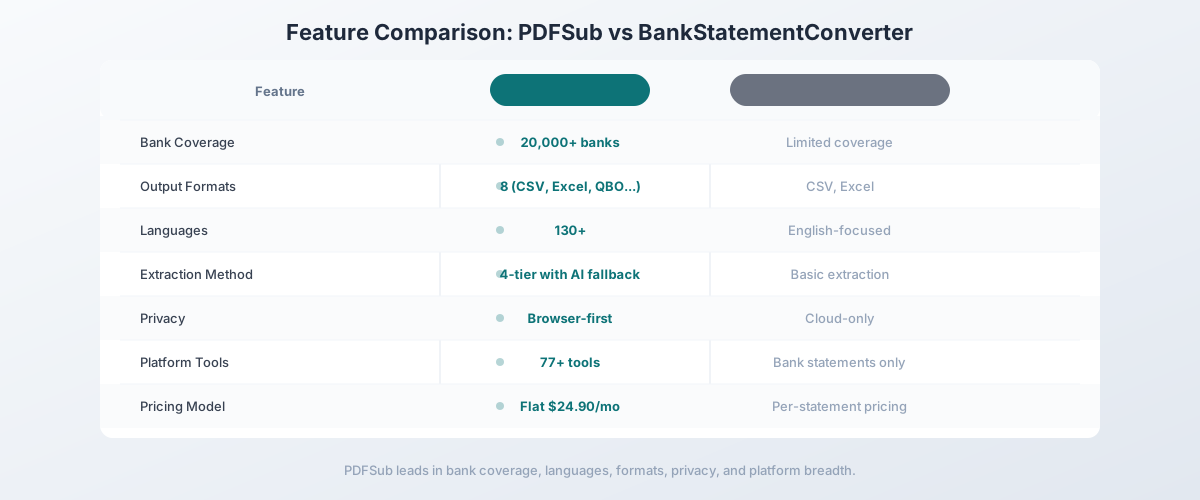
Head-to-Head: PDFSub vs BankStatementConverter
| Feature | PDFSub | BankStatementConverter |
|---|---|---|
| Bank coverage | 20,000+ formats | Limited coverage |
| Output formats | 8 (CSV, Excel, TSV, JSON, QBO, OFX, QFX, QIF) | CSV, Excel |
| Languages | 130+ | English-focused |
| Extraction method | 4-tier with AI fallback | Basic extraction |
| Scanned statements | OCR + Vision AI | Limited OCR |
| Privacy model | Browser-first | Cloud-only |
| Other PDF tools | 98+ | None |
| Invoice extraction | Yes | No |
| Receipt scanning | Yes | No |
| AI features | Chat, summarize, analyze | No |
| Pricing | $20/mo (annual) (tools) / $29/mo (BSC) | Per-statement |
| Free trial | 7-day full access | Limited free tier |
Where PDFSub wins: Bank coverage, output formats, language support, extraction reliability, privacy, platform breadth, and pricing predictability. For anyone processing more than a handful of statements monthly, PDFSub is the clear winner.
Where BankStatementConverter wins: Simplicity. If you occasionally need to convert a single English-language bank statement to CSV and nothing else, BankStatementConverter.com's focused interface is straightforward. Per-statement pricing also means you only pay when you use it, which works for very low-volume users.
The value calculation: For a bookkeeper processing 20+ statements monthly, BankStatementConverter.com's per-statement pricing quickly exceeds PDFSub's $20/user/month - and PDFSub includes 98+ tools beyond bank statement conversion. Even at 10 statements per month, PDFSub's per-user rate provides better value and predictability.
Other Alternatives Worth Considering
The bank statement converter market has several players. Here's how others compare:
DocuClipper - $27.99/month
DocuClipper is one of the most popular bank statement converters for accounting firms:
- Strengths: QuickBooks and Xero integration, batch processing, good accuracy on English statements, established product
- Weaknesses: English-only, page-based pricing tiers, no AI fallback, no other document tools, pricing complaints on review sites
- Best for: English-only accounting firms already in the QuickBooks/Xero ecosystem who want direct integration
MoneyThumb - $24.95/month
MoneyThumb offers both desktop and cloud bank statement conversion:
- Strengths: Desktop option available, multiple output formats, established in the market for years
- Weaknesses: Desktop version feels dated, limited language support, no AI features, no broader document tools, accuracy inconsistencies on complex statements
- Best for: Users who prefer desktop software and primarily work with English-language US bank statements
Tabula - Free (Open Source)
Tabula is a free, open-source tool for extracting tables from PDFs:
- Strengths: Completely free, works locally, open source, no data leaves your computer
- Weaknesses: General-purpose table extraction (not bank statement-specific), requires manual column selection, no account/balance detection, no AI, no output to accounting formats, steep learning curve for non-technical users
- Best for: Technical users who want a free solution and are comfortable with manual extraction and post-processing
PDF2QBO - $19.95/month
PDF2QBO focuses specifically on QBO format output:
- Strengths: Good at generating clean QBO files, focused on QuickBooks compatibility
- Weaknesses: Limited to QBO output (single format), English-focused, no AI, no other tools, accuracy depends on statement layout
- Best for: QuickBooks users who need reliable QBO output and don't need other formats or languages
Sensible.so - Custom pricing
Sensible is a developer-focused document extraction platform:
- Strengths: Powerful API, custom extraction configurations, handles complex layouts, developer-friendly
- Weaknesses: Requires development work, not end-user friendly, custom pricing (expensive for small teams), complex setup
- Best for: Development teams building custom bank statement processing into their applications who have engineering resources
Quick Comparison Matrix
| Tool | Price/mo | Banks | Output Formats | Languages | AI Fallback | Other Tools |
|---|---|---|---|---|---|---|
| PDFSub | $25 | 20,000+ | 8 | 130+ | Yes (3-tier) | 98+ |
| BankStatementConverter | Per-statement | Limited | CSV, Excel | English | No | None |
| DocuClipper | $27.99+ | English banks | 5+ | English | No | None |
| MoneyThumb | $24.95 | US-focused | 4+ | English | No | None |
| Tabula | Free | Any (manual) | CSV | Any (manual) | No | None |
| PDF2QBO | $19.95 | US-focused | QBO only | English | No | None |
| Sensible.so | Custom | Any (configured) | Custom | Custom | Via config | API only |
When BankStatementConverter Is Still the Right Choice
BankStatementConverter.com works fine for:
- Very low volume - If you convert 1-3 English bank statements per month, per-statement pricing keeps costs minimal
- Simple CSV needs - If all you need is raw transaction data in a spreadsheet and no other format
- US/UK banks only - If 100% of your statements come from English-language banks
- One-off conversions - If you have a single batch to process and don't need an ongoing subscription
If your entire workflow is "convert an occasional English bank statement to CSV," BankStatementConverter.com does that without requiring a monthly subscription.
When You Need Something Better
Switch to a BankStatementConverter alternative when:
- Volume increases. Once you're processing more than 10 statements monthly, per-statement pricing becomes more expensive than a flat subscription.
- You work internationally. Any non-English bank statements require a converter with multi-language support.
- You need accounting formats. QBO, OFX, QIF, and MT940 are essential for professional accounting workflows, and CSV-only tools create extra manual steps.
- Extraction fails. When the basic extraction engine can't handle a statement, you need a tool with fallback tiers that can still process the document.
- You process other documents too. If you also handle invoices, receipts, and financial reports, a single platform subscription replaces multiple tools.
- Privacy matters. Browser-first processing keeps sensitive financial data on your device when possible.
How to Switch from BankStatementConverter to PDFSub
There's no migration needed - bank statement converters are stateless tools:
- Start a free trial at pdfsub.com/signup - 7 days with full access, no statement caps
- Upload a bank statement to the bank statement converter - try a statement that BankStatementConverter.com handled well to compare results
- Try a difficult statement - upload one that failed or produced poor results on BankStatementConverter.com
- Export in multiple formats - test QBO import into QuickBooks, OFX into your financial software, CSV for spreadsheet analysis
- Try the other tools - process an invoice with the invoice extractor, a receipt with the receipt scanner, or ask a document a question with Chat with PDF
Most users see the difference on the first statement - especially when testing non-English documents or statements from banks that BankStatementConverter.com doesn't support.
Frequently Asked Questions
Is BankStatementConverter.com free?
BankStatementConverter.com offers limited free conversions, but professional use requires payment. The per-statement pricing model means costs scale directly with your volume, which can become expensive for users processing multiple statements regularly.
Can BankStatementConverter handle scanned bank statements?
BankStatementConverter.com has limited OCR capabilities for scanned statements, but accuracy is inconsistent. For scanned or photographed bank statements, tools with dedicated OCR and AI vision fallback (like PDFSub's 4-tier system) produce significantly better results.
What's the best bank statement converter for QuickBooks?
If you import into QuickBooks, you need QBO format output. PDFSub, DocuClipper, and PDF2QBO all support QBO export. PDFSub is the best all-around choice because it also offers the widest bank coverage and 7 other output formats.
Can I convert bank statements from non-English banks?
BankStatementConverter.com is English-focused and will struggle with non-English statements. PDFSub supports 130+ languages and is specifically built to handle international bank formats, including right-to-left scripts, CJK characters, and non-standard date/number formatting.
How accurate are bank statement converters?
Accuracy depends on the statement quality and the converter's extraction method. Simple digital PDFs from major banks convert at near 100% accuracy across most tools. Scanned statements, unusual layouts, and non-English documents are where tools diverge significantly. PDFSub's 4-tier extraction catches documents that single-method converters miss.
Is it safe to upload bank statements to these tools?
All cloud-based converters receive your files on their servers. The key difference is architecture: PDFSub processes text-based statements in your browser without uploading them, only sending files to servers when OCR or AI is needed. BankStatementConverter.com is cloud-only, meaning every statement is uploaded regardless of type.
Can bank statement converters handle credit card statements?
Most bank statement converters, including PDFSub, can process credit card statements. The transaction table structure is similar to bank statements, though credit card-specific fields (like minimum payment and APR) may require specialized handling that not all tools support.
How many bank statements can I convert per month?
BankStatementConverter.com charges per statement with no stated limit (costs scale linearly). PDFSub includes statement conversion in its flat monthly subscription - the practical limit depends on your plan's AI credits for statements that require server-side processing.
Still evaluating, not yet switching? This page is written for teams ready to leave BankStatementConverter.com. If you want a neutral feature-by-feature breakdown and pricing side-by-side, see the PDFSub vs BankStatementConverter comparison.