Best AskYourPDF Alternative for AI Document Chat (2026)
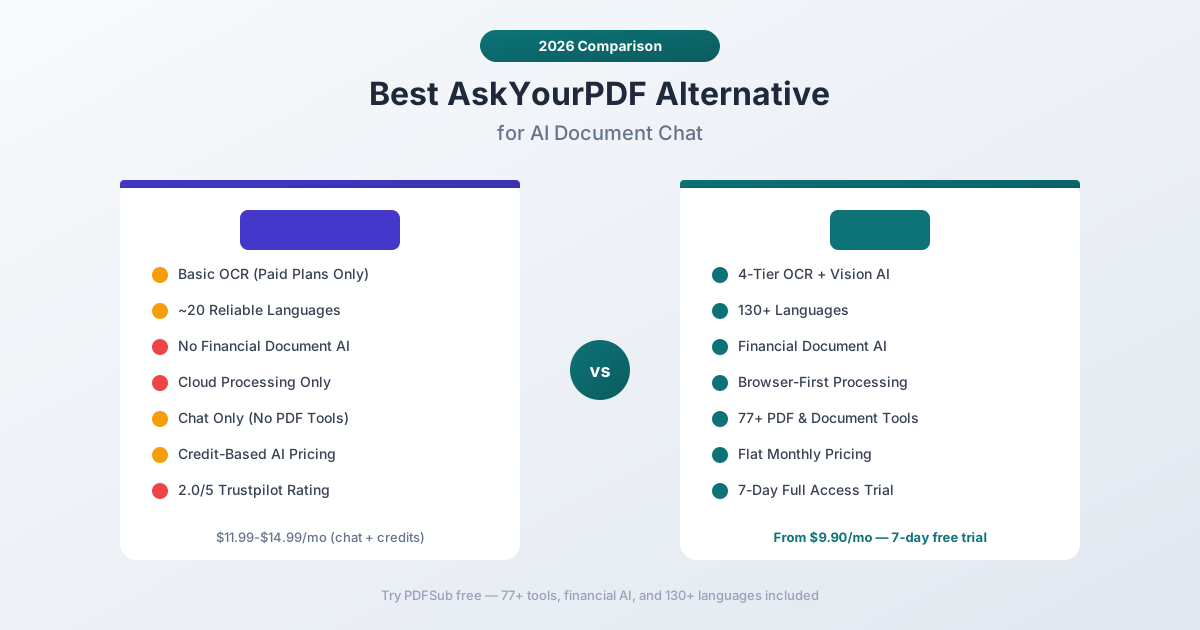
AskYourPDF is popular for AI PDF chat, but its limits on OCR, financial docs, and privacy push users to seek better alternatives.
PDFSub is best for:
- Users who need accurate AI chat on financial documents - bank statements, invoices, and reports
- Professionals who want PDF chat plus structured data extraction, not just Q&A answers
- Privacy-focused users who prefer browser-based processing over third-party cloud uploads
- Teams needing one subscription ($20/mo annual) for chat, summarize, translate, extract, and 98+ PDF tools
PDFSub is NOT best for:
- Researchers building multi-document knowledge bases with Zotero or citation management
- Students who primarily need a free ChatGPT plugin for academic papers
- Users who need a dedicated mobile app for on-the-go document Q&A
AskYourPDF carved a niche as one of the first ChatGPT plugins for PDF documents. Upload a file, ask questions, and get AI-generated answers from the content. With a Chrome extension, mobile app, and Zotero integration, it built a solid ecosystem for researchers and knowledge workers.
But as users push AskYourPDF beyond simple question-and-answer sessions with well-structured text documents, the cracks become visible. Scanned PDFs return empty results. Financial tables produce hallucinated numbers. Sensitive documents get uploaded to third-party servers with no browser-based alternative. And the credit system means heavy users hit walls mid-workflow.
If you've been frustrated by AskYourPDF's OCR gaps, inaccurate financial data extraction, or the restrictions of its credit-based model, this guide walks through where it falls short, what to prioritize in an alternative, and which tools actually deliver.
Why People Switch from AskYourPDF
AskYourPDF has solid reviews on Product Hunt and a loyal user base among students and researchers. The issues aren't about the chat quality for simple documents - they're about what happens when your needs go beyond basic text Q&A.
Limited OCR Capabilities
AskYourPDF's Premium plan advertises OCR support, but user reports paint a mixed picture. The OCR works for clean scans with standard fonts, but struggles with degraded documents, handwritten notes, low-resolution scans, and complex multi-column layouts.
For anyone working with real-world documents - scanned bank statements from the 1990s, photographed receipts, faxed contracts - "OCR support" on a pricing page doesn't mean much if it can't handle the messy documents that actually land on your desk.
The free plan has no OCR at all, which means every scanned document is a dead end until you upgrade.
Financial Document Accuracy Issues
AskYourPDF uses general-purpose language models to answer questions about document content. This works well for narrative text - research papers, reports, articles. It works poorly for structured financial data.
Ask AskYourPDF about a bank statement, and common problems include:
- Column confusion - the model misreads which numbers belong to debits vs. credits
- Hallucinated totals - generating plausible-looking sums that don't match the actual document
- Missing multi-page data - answering from page 1 when transaction tables span 15 pages
- Table structure collapse - treating tabular data as paragraph text, losing row-column relationships
These aren't bugs - they're fundamental limitations of applying generic chat AI to structured financial documents without specialized extraction logic.
Credit-Based Pricing Creates Friction
AskYourPDF's pricing model uses credits for premium AI models. The Premium plan includes 10 credits, the Pro plan includes 30. Once credits run out, you're limited to the base model or need to purchase more.
This creates an unpredictable cost structure. A simple document might cost one credit, but a long financial report requiring multiple follow-up questions could burn through credits quickly. Users report being surprised by how fast credits deplete, especially when working with longer documents or using the more capable AI models.
For professionals processing documents daily, credit-based pricing adds mental overhead - you're constantly calculating whether a question is "worth" a credit.
Cloud-Only Processing
Every document uploaded to AskYourPDF goes to their servers. There's no browser-based processing option, no local file handling, and no way to use the tool without your document touching third-party infrastructure.
For researchers working with published papers, this is fine. For accountants handling bank statements with account numbers, businesses processing invoices with vendor details, or anyone working with personally identifiable information, cloud-only processing is a privacy concern.
AskYourPDF's privacy policy states documents are used to provide the service, but the fundamental architecture means your files always leave your device.
Trustpilot Concerns
AskYourPDF has a 2.0 out of 5 rating on Trustpilot as of early 2026. Common complaints include:
- Users being charged after trial periods without clear cancellation flows
- Reports of accessing document content not uploaded by the user (a serious privacy concern)
- Difficulty getting refunds on annual subscriptions
- Non-refundable subscription policy across all plans
These reviews don't represent every user's experience, but they point to customer service and billing issues that compound the product limitations.
Narrow Tool Focus
AskYourPDF is fundamentally a chat tool. It does AI conversation with documents, and it does it reasonably well for text-heavy content. But that's all it does.
Need to extract a table from a PDF? Convert a document to Excel? Merge multiple PDFs? Compress a large file? Split a document into sections? You'll need a separate tool - and a separate subscription.
For users whose PDF needs extend beyond asking questions, AskYourPDF becomes one tool in a growing stack of subscriptions.
What to Look for in an AskYourPDF Alternative
Before comparing specific tools, here are the criteria that separate adequate PDF chat tools from genuinely useful ones:
Robust OCR. Not just "supports OCR" - but multi-tier extraction that handles clean digital text, standard scans, degraded documents, and image-based files. The best tools cascade through extraction methods automatically so you never have to think about document quality.
Financial document intelligence. Generic chat models treat bank statements like essays. Purpose-built financial AI understands transaction tables, column relationships, running balances, and multi-page continuations. This isn't a nice-to-have for financial work - it's the difference between useful and unusable.
Predictable pricing. Credit-based models create anxiety. Per-month subscriptions with clear limits let you budget accurately and use the tool without second-guessing every query.
Privacy architecture. Browser-first processing means your documents stay on your device for routine operations. Server processing should be the fallback, not the default.
Platform breadth. Chat is one workflow. Extraction, conversion, translation, merging, splitting, compression, and financial document processing are others. A single platform that handles all of them eliminates subscription sprawl.
Language support. If even a fraction of your documents are non-English, the tool needs native multi-language support - not machine translation tacked onto an English-only engine.
PDFSub: The Best AskYourPDF Alternative
PDFSub is a document AI platform with 98+ PDF and document tools, including AI chat, financial document extraction, OCR, translation, and conversion - all in one subscription with browser-first privacy.
4-Tier Document Processing
Where AskYourPDF relies on basic OCR that struggles with degraded documents, PDFSub uses a cascading extraction approach:
- Browser text extraction - Clean digital PDFs are parsed instantly in your browser. No upload, no server, no privacy concern.
- Server-side text extraction - Complex layouts with multi-column content get server-side processing for accurate text recovery.
- Server OCR - Scanned documents get optical character recognition that handles a wide range of scan qualities.
- Vision AI - For the worst cases - faded thermal receipts, low-resolution photos, damaged scans - vision AI reads directly from the image content.
Each document automatically gets the best extraction method. You don't choose; the system cascades through tiers until it gets accurate text.
Financial Document Specialization
This is where PDFSub and AskYourPDF diverge most sharply. PDFSub includes dedicated, purpose-built extractors for:
- Bank statements - Parses transaction tables across 20,000+ bank formats, understanding dates, descriptions, debits, credits, and running balances
- Invoices - Extracts vendor details, line items, totals, tax, and payment terms with structured output
- Receipts - Pulls merchant names, item lists, totals, tax, and payment methods from any receipt format
- Financial reports - Handles balance sheets, income statements, and cash flow statements with ratio analysis
When you chat with a financial document on PDFSub, the system understands its structure. Ask "What were the total deposits in March?" and it queries the actual transaction table - not a paragraph of text that mentions the word "deposits."
130+ Languages
AskYourPDF's language support depends on the underlying AI model. For English and major European languages, it works. For Thai, Vietnamese, Arabic, Hindi, Korean, or less common languages, accuracy drops significantly.
PDFSub supports 130+ languages natively, including right-to-left scripts (Arabic, Hebrew, Urdu), CJK characters (Chinese, Japanese, Korean), and complex scripts (Hindi, Thai, Bengali, Tamil). The multi-language support extends through OCR, chat, extraction, and translation - not just the chat interface.
Browser-First Privacy
AskYourPDF processes everything in the cloud. Every document touches their servers.
PDFSub processes documents in your browser first. When text extraction works client-side, your file never leaves your device. Server processing activates only when needed - scans, complex layouts, or AI features that require server compute.
For documents containing account numbers, transaction histories, SSNs, or other sensitive data, this architecture provides meaningfully better privacy without sacrificing functionality.
Predictable Pricing Without Credits
PDFSub uses a single straightforward subscription: the All-In-One plan at $20/month (annual; $240/year, saves $60) or $25/month billed monthly. It includes 500 AI credits/month, 500 bank statement pages/month, 98+ tools, e-sign with no per-envelope fees, 50 GB storage; add unlimited team seats at the same per-user rate. Every plan includes a 7-day free trial with full feature access. Cancel anytime in one click. No credits to ration on a per-query basis, no surprise overages.
Compare this to AskYourPDF's credit model where the Premium plan ($11.99/month) includes just 10 credits for advanced AI models. Heavy users can burn through credits in a single session, then face degraded service or additional costs.
98+ Tools in One Platform
AskYourPDF does chat with documents. PDFSub does chat plus 76 other things:
- Merge, split, compress, and organize PDFs
- Convert between PDF and 20+ formats (Excel, Word, PowerPoint, images)
- Extract tables, data, and metadata
- Bank statement converter with 20,000+ bank formats
- Invoice and receipt extraction
- OCR for scanned documents
- PDF translation across 130+ languages
- Watermarking, redaction, and security tools
- Page manipulation (rotate, reorder, remove)
One subscription replaces multiple tools. One interface for your entire document workflow.
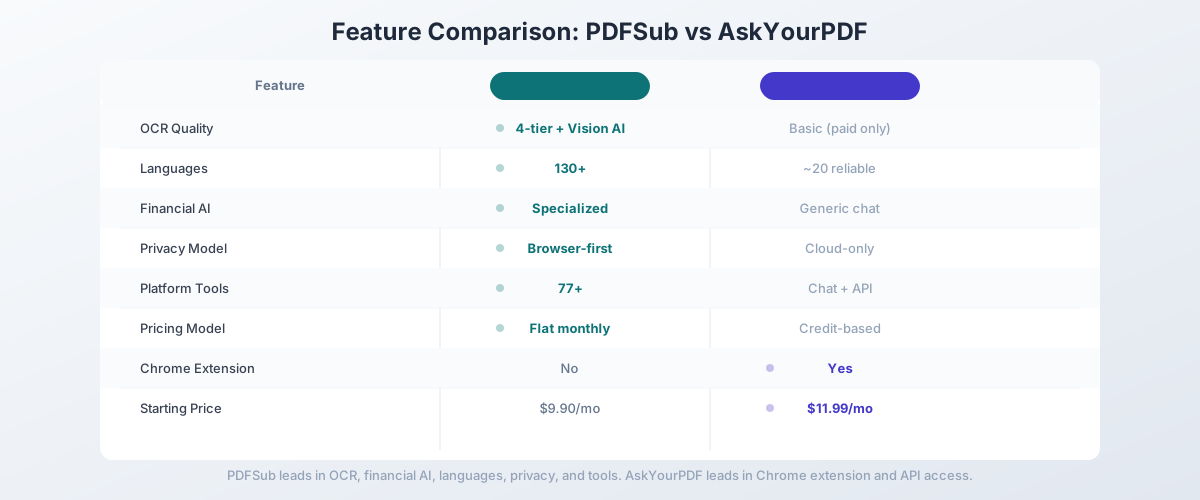
Head-to-Head: PDFSub vs AskYourPDF
| Feature | PDFSub | AskYourPDF |
|---|---|---|
| OCR quality | 4-tier (browser + server + OCR + Vision AI) | Basic (Premium plan only) |
| Languages | 130+ | Model-dependent (~20 reliable) |
| Financial document AI | Specialized extractors for banks, invoices, receipts | Generic chat only |
| Bank statement parsing | 20,000+ bank formats | No structured extraction |
| Privacy model | Browser-first | Cloud-only |
| Pricing model | Flat monthly subscription | Credit-based (10-30 credits/plan) |
| PDF tools included | 98+ | Chat only |
| Chrome extension | Coming soon | Yes |
| API access | HTML rendering API + 10 SDKs (PDF chat endpoints in follow-up phase) | Yes (Pro plan) |
| Free trial | 7-day full access (subscription required after) | Limited free tier |
| Starting price | $20/mo annual (7-day free trial) | $11.99/mo (Premium) |
Where PDFSub wins: OCR quality, financial document accuracy, language coverage, privacy architecture, predictable pricing, and platform breadth. If you work with bank statements, scanned documents, or non-English content, PDFSub handles them where AskYourPDF struggles.
Where AskYourPDF wins: Chrome extension integration, ChatGPT plugin ecosystem, programmatic PDF-chat endpoints, and multi-document knowledge base chat. PDFSub ships a Developer API for HTML rendering with 10 SDKs, but doesn't yet expose PDF-chat endpoints - extraction APIs land in a follow-up phase. If you need to query across multiple documents simultaneously or integrate PDF chat into your own application, AskYourPDF has features PDFSub doesn't offer.
The value calculation: AskYourPDF Pro costs $14.99/month but only does chat (with credit limits). PDFSub's All-In-One plan is $20/month (annual; $240/year) or $25/month billed monthly, including 98+ tools, 500 AI credits, 500 bank statement pages, e-sign; add unlimited team seats at the same per-user rate - with specialized financial AI. Every plan includes a 7-day free trial. If you'd otherwise need even one additional tool subscription alongside AskYourPDF, PDFSub is more cost-effective.
Other AskYourPDF Alternatives Worth Considering
ChatPDF - $19.99/month
ChatPDF is the original PDF chat tool with a streamlined, focused interface:
- Strengths: Clean UI, simple to use, no credit system, works well for text-heavy documents
- Weaknesses: No OCR for scanned documents, no financial specialization, cloud-only processing
- Best for: Users who want straightforward PDF chat without complexity
PDF.ai - $15/month
PDF.ai offers a similar chat experience with a polished interface:
- Strengths: Good conversation memory, clean design, reasonable pricing
- Weaknesses: No OCR, no structured extraction, limited language support
- Best for: Users who prioritize design and UX for basic document Q&A
Adobe Acrobat AI Assistant - $22.99/month
Adobe's AI features are integrated into the Acrobat ecosystem:
- Strengths: Deep Acrobat integration, citation links to source content, handles long documents well
- Weaknesses: Requires Acrobat subscription, expensive, limited financial AI
- Best for: Teams already in the Adobe ecosystem who want AI without another tool
Smallpdf - $12/month
Smallpdf is a PDF editing platform with AI chat added as a feature:
- Strengths: 20+ PDF tools plus AI chat, affordable, well-designed
- Weaknesses: AI chat quality is secondary to editing features, no financial specialization
- Best for: Users who need basic PDF editing plus occasional AI chat
Humata - $9.99/month
Humata targets academic and research use cases:
- Strengths: Handles large document volumes (up to 10,000 pages), citation support, research-focused
- Weaknesses: No OCR, limited financial understanding, narrow feature set
- Best for: Academic researchers processing large volumes of papers
Quick Comparison Matrix
| Tool | Price/mo | OCR | Languages | Financial AI | PDF Tools | Privacy |
|---|---|---|---|---|---|---|
| PDFSub | $25 annual (7-day trial) | Yes (4-tier) | 130+ | Specialized | 98+ | Browser-first |
| AskYourPDF | $11.99-$14.99 | Basic (paid) | ~20 | No | Chat + API | Cloud |
| ChatPDF | $19.99 | No | ~20 | No | Chat only | Cloud |
| PDF.ai | $15 | No | ~15 | No | Chat only | Cloud |
| Smallpdf | $12 | No (in chat) | ~30 | No | 20+ | Cloud |
| Adobe Acrobat | $22.99 | Basic | ~25 | No | Full suite | Cloud |
| Humata | $9.99 | No | ~15 | No | Chat only | Cloud |
When AskYourPDF Is Still the Right Choice
AskYourPDF genuinely excels in specific scenarios:
- Developers who need API access to integrate PDF chat into their own applications
- Multi-document research where you need to query across a knowledge base of many PDFs simultaneously
- ChatGPT plugin users who want PDF chat integrated directly into their ChatGPT workflow
- Chrome extension users who want to chat with web-based PDFs without downloading them first
- Budget-conscious students who can work within the free tier's limits (1 document/day, 50 questions)
If your documents are English, text-based, and your primary need is conversational research across document collections, AskYourPDF at $11.99/month does that job well.
When You Need Something Better
Switch from AskYourPDF when:
- Your documents are scanned or low-quality. AskYourPDF's OCR is limited to clean scans on paid plans. Real-world documents need multi-tier extraction with vision AI fallback.
- You work with financial documents. Bank statements, invoices, and receipts need structured extraction that understands columns, rows, and financial data relationships - not generic text chat.
- Credits are limiting your workflow. If you're rationing questions or avoiding premium models to conserve credits, you need predictable flat-rate pricing.
- Privacy matters for your documents. Cloud-only processing means every file touches third-party servers. Browser-first architecture keeps routine processing on your device.
- You need more than chat. If your workflow includes conversion, extraction, merging, translation, or any other PDF operation, a comprehensive platform eliminates subscription stacking.
- You work in multiple languages. If your documents span languages beyond English and major European languages, you need native multi-language support.
How to Switch from AskYourPDF to PDFSub
Migration is simple since AskYourPDF doesn't store your documents permanently:
- Start your 7-day free trial at pdfsub.com/signup - 7 days with full access to all 98+ tools. PDFSub is subscription-only ($20/mo annual; $25/mo monthly) after the trial ends.
- Upload any PDF to the Chat with PDF tool - scanned, text-based, any language
- Test with a financial document - upload a bank statement to the bank statement converter and see the difference between generic chat and structured extraction
- Try the specialized tools - invoice extractor, receipt scanner, table extraction
- Explore the full platform - merging, splitting, compressing, converting, translating, and more
No data migration is needed. Your source documents work across both platforms, and you'll immediately notice the difference on scanned files and financial documents.
Frequently Asked Questions
Is AskYourPDF free?
AskYourPDF has a free tier: 1 document per day, 50 questions per day, 3 conversations per day, 100-page limit, no OCR. It's usable for very light research but impractical for professional work. The Premium plan starts at $11.99/month (billed annually).
Does AskYourPDF have OCR?
OCR is available on the Premium ($11.99/month) and Pro ($14.99/month) plans only. The free tier has no OCR support. Even on paid plans, OCR quality is limited for degraded scans, complex layouts, and non-standard fonts.
Is AskYourPDF safe for sensitive documents?
AskYourPDF processes all documents on their servers. There's no browser-based processing option. Trustpilot reviews have raised concerns about document privacy, including reports of users accessing content not uploaded by them. For sensitive financial documents, consider a tool with browser-first processing.
Can AskYourPDF extract data from bank statements?
AskYourPDF can answer questions about bank statement content through chat, but it cannot perform structured extraction - converting transaction tables into Excel, CSV, or QBO format with accurate date, description, and amount columns. For actual data extraction, you need a specialized bank statement converter.
What's the best free AskYourPDF alternative?
For free PDF chat, ChatPDF offers 2 PDFs per day with 50 questions. For a 7-day free trial of a full-featured platform, PDFSub gives you complete access to all 98+ tools including AI chat, OCR, and financial document extraction (credit card required to start the trial). PDFSub is subscription-only ($20/month annual; $25/month billed monthly) after the trial ends - there's no permanent free tier.
Does AskYourPDF work with ChatGPT?
Yes, AskYourPDF has a ChatGPT plugin that lets you upload and chat with PDFs directly within ChatGPT. This requires a ChatGPT Plus subscription ($20/month) in addition to any AskYourPDF subscription. The plugin is limited to text-based PDFs.
Can I chat with multiple documents in AskYourPDF?
Yes, AskYourPDF's knowledge base feature lets you upload multiple documents and query across them simultaneously. This is one of AskYourPDF's genuine strengths - cross-document research in a unified knowledge base. PDFSub focuses on deep single-document analysis with specialized extraction.
How does AskYourPDF's credit system work?
Premium plans include 10 credits and Pro plans include 30 credits for advanced AI models (GPT-5.2, Claude). Once credits are exhausted, you're limited to the base model (GPT-5 Mini) or can purchase additional credits. Credits reset monthly.