Best All-in-One PDF Platforms (2026)
Tired of juggling 3-4 different PDF tools? Here are the best all-in-one platforms that handle editing, conversion, signing, and more - in one subscription.
PDFSub is best for:
- Users who want 98+ tools including AI, e-sign, and bank statements in one subscription
- Professionals who need financial document extraction that standalone PDF platforms lack
- Privacy-focused teams who prefer browser-based processing over cloud uploads
- Budget-conscious users who want all-in-one coverage at $20/user/mo (annual)
PDFSub is NOT best for:
- Users who need offline desktop editing without internet access
- Enterprises that require Creative Cloud or Microsoft 365 deep integrations
- Teams needing advanced preflight or print-production PDF features
Here's a familiar scenario: you use Smallpdf to compress a file, iLovePDF to merge two documents, DocuSign to get something signed, and then Adobe's free tool to convert a Word doc to PDF. Four different tools, four different accounts, four different privacy policies governing your documents.
There's a better way. All-in-one PDF platforms bundle every PDF operation you're likely to need into a single subscription. The tradeoff is that you pay a monthly fee instead of using limited free tools - but if you work with PDFs regularly, the time savings and simplicity usually justify the cost.
This guide compares the best all-in-one PDF platforms in 2026, with honest pricing, tool counts, and an assessment of who each one is actually built for.
What Makes a Platform "All-in-One"?
An all-in-one PDF platform should handle at minimum:
- Basic operations: Merge, split, rotate, delete pages, reorder pages
- Compression: Reduce file size without destroying quality
- Conversion: PDF to Word, Excel, PowerPoint, image formats, and back
- Editing: Add text, annotations, shapes
- Security: Password protection, redaction, metadata removal
- Signing: E-signatures (at least basic)
- OCR: Extract text from scanned documents
Beyond these basics, platforms differentiate on AI features, financial document tools, translation, batch processing, and specialized capabilities.
The Best All-in-One PDF Platforms
1. PDFSub - Most Tools, Best Value
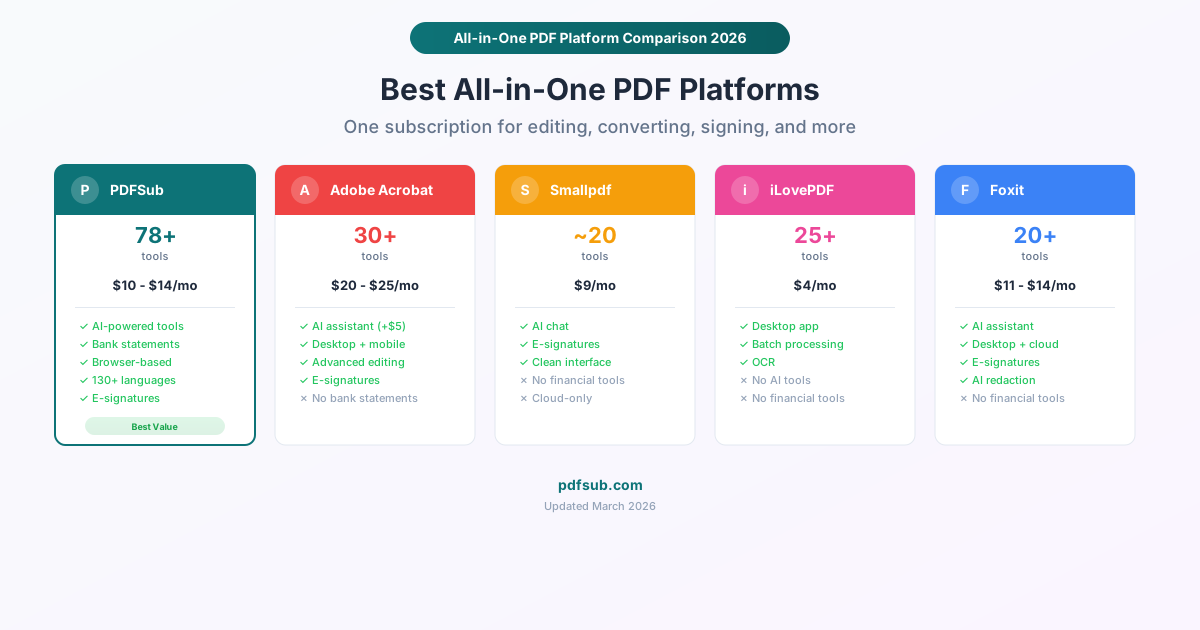
Price: $20/user/mo (annual) / $25/user/mo (monthly) - single All-In-One plan Tool count: 98+ AI features: Yes (summarize, translate, chat with PDF, extract data) Financial tools: Yes (bank statements, invoices, receipts) Processing: Browser-based (most tools) + server-side (AI and conversions) Free tier: 7-day trial with access to all tools
PDFSub has the highest tool count of any platform on this list, and it's not close. At 98+ tools, it covers standard PDF operations, format conversions, AI-powered document analysis, and a complete set of financial document tools that no other general PDF platform offers.
What's included:
- All standard PDF operations (Merge PDFs, Split PDF, Compress PDF, Rotate PDF, reorder, delete pages, Extract Pages)
- Format conversions (PDF to Word, Excel to PDF, PDF to PowerPoint, HTML to PDF, EPUB, Image to PDF, SVG to PDF, RTF, and OpenDocument formats)
- AI tools: Summarize PDF, Translate PDF (130+ languages), Chat with PDF, Extract Data
- Financial tools: Bank Statement Converter (20,000+ banks, exports to Excel, CSV, QBO, OFX, QIF), Invoice Extractor, Receipt Scanner, Financial Report Analyzer
- Security: Redact PDF, Password Protect/removal, metadata editing and removal, Add Watermark
- E-Sign PDF, PDF Form Filler, Stamp PDF
- OCR, Extract Images, Repair PDF, PDF/A Conversion
- Specialized: Compare PDFs, Batch Convert, pages per sheet, auto-crop, Headers & Footers, Page Numbers
What's good:
- 98+ tools in one subscription - replaces 3-4 separate tools for most people
- Browser-based processing for most tools means sensitive documents stay on your device
- AI features are included in the subscription (not an add-on)
- Financial document tools are unique - no other general PDF platform offers bank statement conversion
- $20/user/mo annual pricing is competitive for the breadth of features
What's limited:
- No desktop app - browser only
- E-signatures are for signing your own documents, not multi-party signing workflows
- AI features use credits that vary by plan
- Newer platform with a smaller brand name than Adobe or Foxit
Best for: Anyone who regularly works with PDFs and wants one tool that does everything. Particularly strong for accountants, bookkeepers, and financial professionals who need bank statement and invoice tools alongside standard PDF operations.
2. Adobe Acrobat Pro - Industry Standard
Price: $19.99/month (annual) / $29.99/month (monthly) Tool count: ~30 AI features: Yes (AI Assistant, +$4.99/month) Financial tools: No Processing: Desktop + cloud Free tier: Limited free online tools
Adobe Acrobat defined the PDF format and remains the default choice for enterprise environments. Acrobat Pro is a mature, deeply capable desktop application with decades of development behind it.
What's included:
- Full PDF editing (modify text, images, and formatting in existing PDFs)
- Conversions to/from Word, Excel, PowerPoint
- Advanced redaction with search-and-redact capability
- E-signatures with send-for-signature workflows
- Digital signatures with certificate validation
- OCR with accessibility compliance
- Document comparison
- Form creation and filling
- AI Assistant (additional $4.99/month)
What's good:
- The most mature and polished PDF editing experience available
- True in-place text editing (change existing text in a PDF, not just add annotations)
- Best redaction tools in the industry, including pattern-based search
- Desktop application means no internet required for core features
- Universal brand recognition and enterprise compliance
What's limited:
- $19.99/month is expensive (plus $4.99/month for AI Assistant)
- Fewer tools overall than PDFSub (no bank statements, invoices, batch conversion, or many format conversions)
- Annual commitment required for the $19.99 price; monthly is $29.99
- The interface is complex - powerful but overwhelming for casual users
- No browser-based processing option for sensitive documents (cloud features go through Adobe servers)
Best for: Enterprise users, legal professionals, and anyone who needs in-place PDF text editing or advanced redaction. Worth the premium if PDF editing is a core part of your daily work.
3. Smallpdf - Simplest Interface
Price: $9/month per user (annual) Tool count: ~20 AI features: Yes (AI chat with PDFs) Financial tools: No Processing: Cloud-based Free tier: 2 tasks per day
Smallpdf's value proposition is simplicity. Every tool is clean, intuitive, and fast. If you've ever been frustrated by Adobe's complexity or confused by a competitor's interface, Smallpdf is the antidote.
What's included:
- Core PDF operations (merge, split, compress, rotate)
- Conversions to/from Word, Excel, PowerPoint, JPG
- E-signatures
- OCR
- AI chat for document Q&A
- PDF editing (annotations, text, shapes)
What's good:
- Best user interface of any PDF platform - no learning curve
- AI chat feature for asking questions about document content
- Desktop and mobile apps available
- $9/month is reasonable for what's included
What's limited:
- Only ~20 tools - significantly fewer than PDFSub (98+) or Adobe (~30)
- No financial document tools
- No redaction, no metadata removal, no watermarking
- Cloud-based only - documents upload to Smallpdf servers for processing
- Free tier is very restrictive (2 tasks per day across all tools)
- No advanced conversion formats (no EPUB, SVG, RTF, OpenDocument)
Best for: People who value simplicity above all else and only need core PDF operations. If you find yourself saying "I just need to merge/compress/convert files," Smallpdf handles that beautifully.
4. iLovePDF - Best Budget Option
Price: $4/month per user (annual) Tool count: 25+ AI features: Limited Financial tools: No Processing: Cloud-based Free tier: Yes, with limits
iLovePDF is the value champion. At $4/month, it offers 25+ PDF tools with batch processing, OCR, and no watermarks. It's the cheapest serious PDF platform available.
What's included:
- Core PDF operations (merge, split, compress, rotate, watermark)
- Conversions to/from Word, Excel, PowerPoint, JPG
- E-signatures
- OCR
- Batch processing (multiple files at once)
- PDF editing (annotations)
- Page numbers, headers/footers
What's good:
- $4/month - the cheapest premium PDF platform by a significant margin
- Batch processing included (compress 10 files at once)
- Desktop and mobile apps available
- OCR included at the base price
- No watermarks or branding on processed files
What's limited:
- Limited AI capabilities (no document summarization, translation, or chat)
- No financial document tools
- Cloud-based processing (documents upload to servers)
- The interface is functional but not as polished as Smallpdf
- No redaction tools
- Integration options are basic
Best for: Budget-conscious users who need solid PDF tools and don't care about AI features or financial document processing. At $4/month, it's hard to argue with the value.
5. Foxit PDF Editor - Best Desktop Alternative to Adobe
Price: $10.99/month (PDF Editor) / $13.99/month (PDF Editor+) Tool count: 20+ AI features: Yes (AI Assistant, Smart Redact on Editor+) Financial tools: No Processing: Desktop + cloud Free tier: Free online tools with limits
Foxit is the most direct competitor to Adobe Acrobat Pro. It offers similar desktop PDF editing capabilities at a lower price, with the bonus of AI-powered features like Smart Redact (automatic PII detection).
What's included:
- Full PDF editing (modify text, images, formatting)
- Conversions to/from major formats
- AI-powered Smart Redact (automatically find and redact PII)
- E-signatures (150 envelopes/year on PDF Editor+)
- OCR
- Digital signatures
- Document comparison
- Form creation
What's good:
- $10.99/month is significantly cheaper than Adobe Acrobat Pro ($19.99/month)
- AI-powered redaction automatically detects names, addresses, SSNs, and other PII
- Desktop application with local processing
- Perpetual license option (~$210 one-time) available
- 20 free AI credits per month
What's limited:
- No financial document tools
- AI credits (20/month free) may not be enough for heavy AI usage
- Fewer format conversion options than PDFSub
- Brand recognition is lower than Adobe, which matters in some enterprise contexts
- The interface, while functional, isn't as refined as Adobe's
Best for: Users who want Adobe-like desktop PDF editing at a lower price, especially those who value AI-powered redaction.
Platform Comparison Table
| Feature | PDFSub | Adobe Acrobat | Smallpdf | iLovePDF | Foxit |
|---|---|---|---|---|---|
| Monthly price (annual) | $20 | $19.99 | $9 | $4 | $10.99 |
| Tool count | 98+ | ~30 | ~20 | 25+ | 20+ |
| AI summarize/translate | Yes | +$4.99/mo | Chat only | No | Limited |
| Bank statement tools | Yes | No | No | No | No |
| Invoice/receipt tools | Yes | No | No | No | No |
| In-place text editing | Annotations | Yes | Annotations | Annotations | Yes |
| True redaction | Yes | Yes | No | No | Yes (AI) |
| E-signatures | Send + sign | Send + sign | Yes | Yes | Yes (150/yr) |
| Browser-based processing | Yes | No | No | No | No |
| Desktop app | No | Yes | Yes | Yes | Yes |
| Batch processing | Yes | Yes | Pro only | Yes | Yes |
| OCR | Yes | Yes | Yes | Yes | Yes |
| Free tier | 7-day trial | Limited | 2/day | Yes | Limited |
Which Platform Should You Choose?
You want the most tools for the money: PDFSub - 98+ tools at $20/user/mo (annual) is unmatched value at the per-user price
You need professional PDF editing (change existing text): Adobe Acrobat Pro - the industry standard for in-place editing
You want the simplest possible experience: Smallpdf - clean, fast, no learning curve
Budget is your top priority: iLovePDF - $4/month for 25+ solid tools
You want a desktop Adobe alternative: Foxit - similar capabilities at $10.99/month with AI redaction
You work with financial documents: PDFSub - the only platform with bank statement conversion, invoice extraction, and receipt scanning
You need enterprise compliance: Adobe Acrobat Pro - the name alone satisfies many compliance checklists
The Real Question: Do You Need "All-in-One"?
Be honest with yourself about how you actually use PDF tools:
- If you compress one file per month and merge another, free tools are fine. Don't pay for an all-in-one platform.
- If you use 3-4 different PDF operations weekly, an all-in-one platform saves time and simplifies your workflow.
- If PDF work is a core part of your job (legal, accounting, administrative), an all-in-one platform is almost certainly worth the investment.
The break-even point is usually around 10-15 PDF operations per month. Below that, free tools work. Above that, you're wasting more time switching between tools than you'd spend on a subscription.
Frequently Asked Questions
Can I use multiple tools in one workflow?
Yes, all platforms listed here let you chain operations. For example, you might merge three PDFs, compress the result, add page numbers, and e-sign the final document - all within the same platform. The advantage of an all-in-one solution is that you don't download, re-upload, and switch between different tools for each step.
Do all-in-one platforms compromise on quality for individual tools?
Sometimes. Adobe Acrobat Pro's PDF editing is better than any all-in-one platform's editing. iLovePDF's compression is as good as standalone compressors. The trade-off varies by platform and feature. PDFSub compensates with tool count (98+ tools) - breadth over depth. Adobe compensates with polish - fewer tools, but each one is extremely refined.
Is browser-based processing as fast as desktop software?
For most operations (merge, split, compress, rotate), browser-based processing is comparable to desktop software. For very large files (100+ MB) or computationally intensive operations (heavy OCR on scanned documents), desktop software has an advantage because it can access more system resources. The gap has narrowed significantly as browser capabilities have improved.
What happens to my files when I use cloud-based tools?
Cloud-based tools (Smallpdf, iLovePDF, Adobe's online tools) upload your documents to their servers for processing. Reputable tools delete files after processing (usually within 1-2 hours). However, your document does traverse the internet and temporarily exist on a third-party server. For sensitive documents, browser-based processing (PDFSub) or desktop software (Adobe, Foxit, Nitro) keeps files on your device.
Can I switch platforms easily?
Yes. PDF platforms don't lock you in - PDFs are a universal format. Your documents work identically regardless of which tool processed them. The only potential friction is recreating templates (for e-signature platforms) or adjusting to a different interface. There are no data portability concerns with PDF tools.