Best Adobe Acrobat Alternative for PDF Processing (2026)
Looking for an Adobe Acrobat alternative? Compare features, pricing, and privacy. See why teams switch to PDFSub.
PDFSub is best for:
- Professionals who use 98+ tools and don't want to pay $23/mo for Adobe
- Users who need AI features (summarize, translate, chat) built in
- Privacy-conscious - many tools process in your browser, not Adobe's cloud
- Accountants who also need bank statement conversion alongside PDF tools
PDFSub is NOT best for:
- Users who need advanced desktop editing (CAD, 3D PDF, preflight)
- Enterprises deeply integrated with Adobe Creative Cloud
- Teams needing Adobe Sign's advanced routing workflows
Adobe Acrobat invented the PDF format in 1993 and has dominated the space ever since. For decades, "working with PDFs" meant working with Acrobat. It's the gold standard for PDF editing, form creation, and digital signatures in enterprise environments.
But the world has changed faster than Acrobat has.
Today, most PDF work happens in browsers - on laptops without admin rights to install software, on shared workstations, on personal devices. The documents that need processing aren't just contracts and reports anymore - they're bank statements that need data extraction, invoices that need automated parsing, and financial documents in dozens of languages.
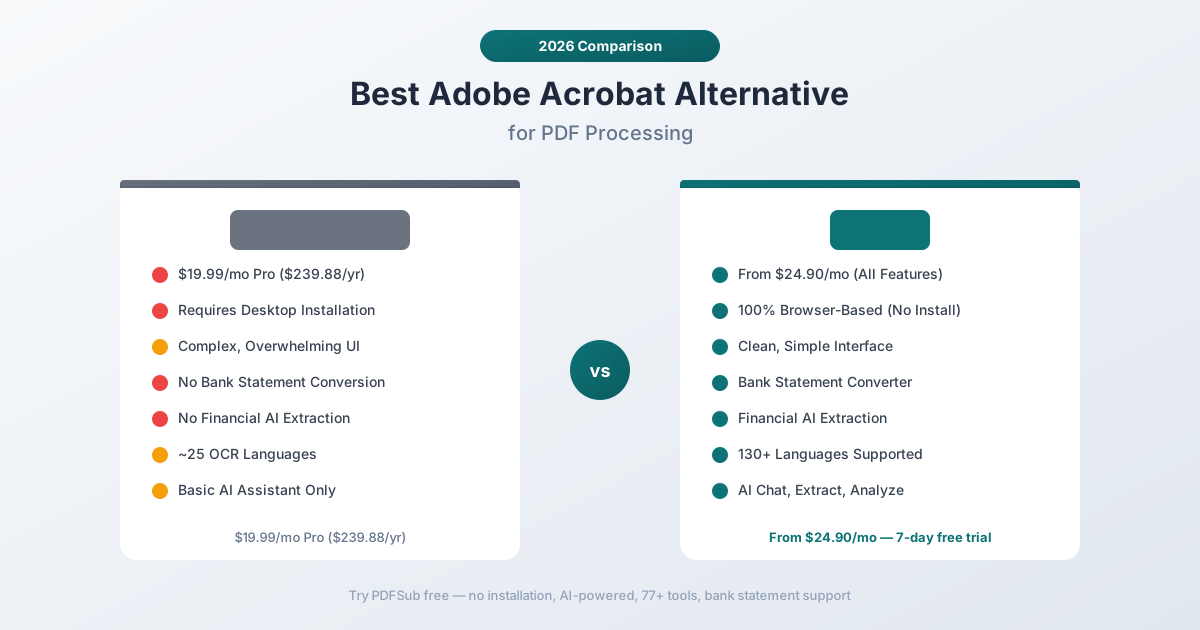
Acrobat was built for a different era. It's a powerful desktop application with a price tag to match ($19.99/month for Pro, $239.88/year) and a feature set optimized for the document workflows of 2010, not 2026. If you've found yourself paying for Acrobat but only using 10% of its features, struggling with the complex UI, or wishing it could actually understand your financial documents rather than just display them - this guide is for you.
Why People Look for Adobe Acrobat Alternatives
Acrobat's reputation is earned. It does certain things better than any competitor. But the complaints are consistent and growing:
The Price Keeps Climbing
Acrobat Pro costs $19.99/month ($239.88/year). Acrobat Standard is $12.99/month. Adobe's Creative Cloud bundle adds even more costs if you need other Adobe products.
For enterprises with hundreds of seats, the per-user cost adds up to significant annual expenditure - often for software that most employees use to merge a PDF once a month. The pricing model is built around power users who need advanced PDF editing daily, but it gets applied to everyone.
Making matters worse, Adobe's annual commitment contracts mean canceling mid-year incurs an early termination fee equal to 50% of the remaining contract value. Users who signed up thinking they'd need it regularly find themselves locked into a subscription they barely use.
Desktop Installation Is a Barrier
Acrobat Pro is primarily a desktop application. That means:
- IT approval required. In corporate environments, installing Acrobat requires IT department approval and deployment.
- Device-locked. Your license is tied to a specific number of devices. Switch to a new laptop and you need to deactivate the old one first.
- No Chromebook support. Acrobat doesn't run on ChromeOS, which is increasingly common in education and budget-conscious organizations.
- Update friction. Desktop applications need regular updates, and Acrobat's updates occasionally break workflows or change the interface.
Adobe does offer Acrobat Web, but it's significantly limited compared to the desktop application. Many features simply aren't available in the browser version.
The UI Is Overwhelming
Acrobat has accumulated 30+ years of features, and the interface reflects that history. New users face a learning curve that can take weeks to climb. The toolbar has dozens of icons, the right panel has multiple collapsible sections, and finding a specific feature often requires knowing which menu it lives under.
For someone who needs to merge PDFs, compress a file, or extract some data, Acrobat's interface is like using a commercial jet cockpit to drive to the grocery store.
No Bank Statement or Financial Extraction
Despite being the most expensive PDF tool on the market, Acrobat cannot:
- Convert bank statements to Excel with structured transaction data
- Extract invoice line items, vendor information, and totals automatically
- Scan receipts and pull merchant, item, and total information
- Analyze financial reports and calculate ratios
Acrobat's "Export PDF" feature does a generic conversion to Excel, but it has no understanding of financial document structure. A bank statement exported through Acrobat produces a spreadsheet that roughly mirrors the visual layout - merged cells, misaligned columns, and no separation between transaction fields.
AI Features Are Limited
Adobe added "AI Assistant" to Acrobat in 2024, allowing users to ask questions about document content. It's a step forward, but the implementation is limited:
- It works as a sidebar chat, not a deep analysis engine
- It doesn't understand financial table structure
- It can't extract structured data into spreadsheets
- It has no specialized modes for invoices, bank statements, or receipts
- The AI features require an additional subscription ($4.99/month) on top of the Acrobat Pro subscription
For $24.98/month (Acrobat Pro + AI), you get a generic chat tool bolted onto a desktop PDF editor. No financial specialization, no structured extraction, no bank statement conversion.
What to Look for in an Adobe Acrobat Alternative
Replacing Acrobat means finding something that covers the capabilities you actually use while adding the capabilities Acrobat lacks:
Browser-based access. No installation, no IT approval, works on any device with a modern browser. This eliminates the deployment and device-licensing friction entirely.
AI that understands documents. Not just a chat overlay, but genuine document understanding - table structure recognition, financial data extraction, and multi-language comprehension.
Financial document tools. Dedicated extractors for bank statements, invoices, receipts, and financial reports. Generic PDF-to-Excel conversion isn't enough for structured financial data.
Simpler interface. If you don't need Acrobat's advanced editing capabilities (and most users don't), a simpler interface that surfaces the right tools faster will save time daily.
Privacy model. Browser-first processing keeps files on your device. Acrobat's cloud features upload files to Adobe's servers.
Transparent pricing. One price, all features. No add-on subscriptions for AI, no per-feature upsells, no annual commitment traps.
PDFSub: The Best Adobe Acrobat Alternative
PDFSub replaces Acrobat for the workflows that matter most in 2026 - document processing, AI extraction, financial document conversion, and multi-language support - all from a browser with no installation required.
100% Browser-Based
PDFSub runs in your browser. There's nothing to install, no IT approval needed, no device licenses to manage. Open a browser tab, upload your document, and start working. It runs on Windows, Mac, Linux, ChromeOS, tablets, and phones.
This isn't a watered-down web version of a desktop app. PDFSub was built browser-first from the ground up, so every tool is optimized for the web environment.
AI That Understands Financial Documents
PDFSub's AI features go far beyond a sidebar chat:
- Chat with PDF - Ask questions about any document and get answers grounded in the actual content, not hallucinations. The AI understands table relationships, column headers, and data hierarchies.
- Extract Data - Pull structured data from any document. Tables, forms, and embedded information get extracted with relationships preserved.
- Financial Report Analyzer - Analyze balance sheets, income statements, and cash flow statements with automated ratio calculations.
- Summarize - Generate structured summaries of any document length.
- Translate - Translate documents across 130+ languages while maintaining formatting.
The extraction pipeline uses 4 tiers: browser text extraction, server text extraction, server OCR, and vision AI. Every document gets the best method automatically, from clean digital PDFs to faded thermal receipts.
Bank Statement Conversion
This is the capability Acrobat has never offered and likely never will. PDFSub's bank statement converter recognizes 20,000+ bank formats worldwide and exports structured data to:
- Excel (.xlsx) - Clean columns for date, description, debit, credit, balance
- CSV and TSV - For import into any spreadsheet or database
- QBO - Direct import to QuickBooks Online
- OFX - Open Financial Exchange format for accounting software
- QIF - Legacy QuickBooks interchange format
- JSON - For developers and automated pipelines
The converter understands bank-specific layouts, handles multi-page statements, continues transactions across page breaks, and separates debits from credits correctly - things that generic PDF-to-Excel conversion cannot do.
Simpler Interface, Same Power
PDFSub's interface is built around getting things done, not showcasing features. You see your tools organized by category, select the one you need, upload your file, and get results. There's no learning curve to navigate.
For the operations most users actually perform - merge, split, compress, convert, extract, sign - PDFSub is faster to learn and faster to use than Acrobat.
Privacy-First Architecture
Acrobat's cloud features upload files to Adobe's servers. PDFSub processes files in your browser whenever possible. For operations like merging, splitting, compressing, and basic editing, the file never leaves your device. Server processing is reserved for operations that genuinely require it (OCR, AI analysis).
For financial documents with account numbers, transaction histories, and personal data, this architectural difference matters.
Head-to-Head: PDFSub vs Adobe Acrobat
| Feature | PDFSub | Adobe Acrobat Pro |
|---|---|---|
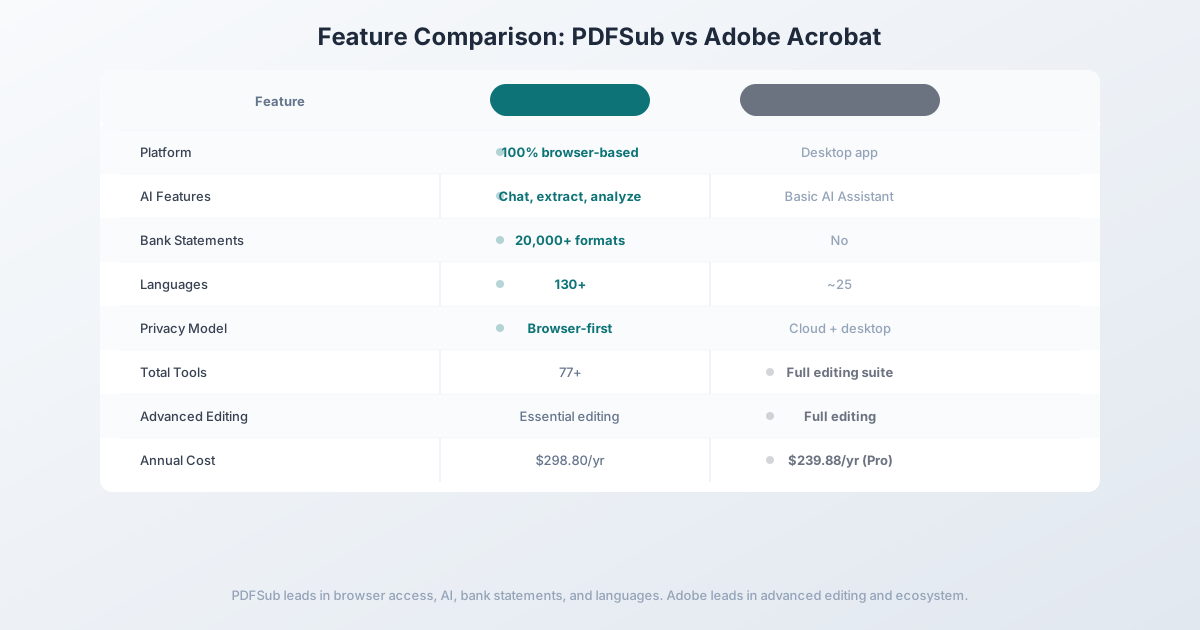
| Platform | 100% browser-based | Desktop app + limited web |
| AI features | Chat, extract, analyze, translate | Basic AI Assistant ($4.99 extra) |
| Bank statement conversion | 20,000+ formats | No |
| Invoice/receipt extraction | Dedicated tools | No structured extraction |
| OCR quality | 4-tier + Vision AI | Strong desktop OCR |
| Languages | 130+ | ~25 for OCR |
| Privacy model | Browser-first | Cloud + desktop |
| Installation required | No | Yes (desktop version) |
| PDF editing | Essential editing + annotations | Full advanced editing |
| Form creation | Form fill + basic creation | Advanced form creation |
| Total tools | 98+ | Full editing suite |
| Free trial | 7-day full access | 7-day trial |
| Price | $20/mo (annual; $240/yr) or $25/mo (monthly) | $19.99/mo Pro + $4.99/mo AI |
Where PDFSub wins: Browser-based access, AI document understanding, financial document tools, bank statement conversion, language coverage, and simpler pricing. For document processing and data extraction, PDFSub is the stronger choice.
Where Acrobat wins: Advanced PDF editing. If you need to edit text directly in PDFs, create complex forms from scratch, set up automated workflows with Action Wizard, or integrate with enterprise document management systems, Acrobat's editing capabilities are unmatched.
The value calculation: Acrobat Pro with AI Assistant costs $24.98/month total ($19.99 + $4.99). PDFSub's All-In-One plan is $20/month (annual; $240/year) or $25/month (billed monthly) with 500 AI credits, 500 bank statement pages, e-sign with no per-envelope fees, and 98+ tools included. PDFSub costs less than Acrobat Pro + AI and delivers AI extraction, bank statement conversion, and financial tools that Acrobat doesn't offer.
Other Alternatives Worth Considering
Foxit PDF Editor - $149/year
Foxit is the traditional Acrobat alternative for desktop PDF editing:
- Strengths: Lighter and faster than Acrobat, strong editing capabilities, good OCR, lower annual cost
- Weaknesses: Still a desktop application, complex licensing tiers, no AI extraction, no financial document tools, limited web capabilities
- Best for: Users who specifically need desktop PDF editing at a lower price than Acrobat
Nitro PDF Pro - $179.99 (one-time)
Nitro offers a one-time purchase model:
- Strengths: No subscription (one-time purchase), solid editing and form capabilities, good integration with Microsoft 365
- Weaknesses: Windows-only, no AI features, no financial tools, one-time purchase means no ongoing updates after a version cycle
- Best for: Windows users who want to avoid subscriptions and need traditional PDF editing
PDF Expert (Readdle) - $79.99/year
PDF Expert is popular among Mac users:
- Strengths: Native macOS and iOS design, fast and responsive, good annotation tools, clean interface
- Weaknesses: Apple ecosystem only, no AI features, no financial tools, limited compared to Acrobat for advanced editing
- Best for: Mac users who want a native PDF editor with a clean interface
Switching from Adobe Acrobat - What to Expect
Migrating from Acrobat is mostly habit-breaking, not data migration. Acrobat stores PDFs on disk; PDFSub processes them on demand. Here's the typical 4-step path:
Step 1 - Day 1: Sign up while still inside your Acrobat term. Start the 7-day PDFSub trial. You don't need to cancel Acrobat first - overlap is fine, and you'll want both available for side-by-side comparison.
Step 2 - Days 1-3: Move your common workflows. Pick the three Acrobat tasks you actually do weekly - most users land on merge/split, compress, convert to Word/Excel, and sign. Run those through PDFSub. If you use Acrobat's AI Assistant, compare it head-to-head with PDFSub's chat-with-PDF on a real document.
Step 3 - Days 3-5: Try the capabilities Acrobat doesn't have. This is where the switch tends to feel decisive: run a bank statement through the bank statement converter, translate a foreign-language PDF, or extract structured data from an invoice. Each of these would require additional software on top of Acrobat.
Step 4 - Days 5-7: Plan the cancel. Acrobat charges a 50% early termination fee on annual plans, so the cleanest path is to let your current term end and not renew. Set a calendar reminder for your renewal date. If you need Acrobat for one specific workflow (legal-grade redaction, complex form authoring), keep it on monthly and use PDFSub for everything else.
Most users find they stop opening Acrobat within the first week of the trial - except for the occasional advanced edit.
Frequently Asked Questions
Is Adobe Acrobat worth $20/month?
For users who need advanced PDF editing capabilities - editing text within PDFs, creating complex interactive forms, running automated Action Wizard workflows, or integrating with enterprise document management - Acrobat justifies its price. For the majority of users who primarily need to merge, split, convert, and extract data from PDFs, a browser-based alternative provides more value at a similar or lower cost.
Can I cancel Adobe Acrobat anytime?
If you're on an annual plan (which is the default), canceling before the year ends incurs an early termination fee of 50% of the remaining contract value. Monthly plans can be canceled without penalty but cost more per month ($29.99/mo vs $19.99/mo for annual). Read the cancellation terms carefully before subscribing.
Does Adobe Acrobat have bank statement tools?
No. Acrobat can export a PDF to Excel using generic conversion, but it has no bank statement-specific features. The export doesn't understand transaction tables, date formats, or debit/credit columns. For bank statement conversion, you need a dedicated tool.
Can PDFSub replace Acrobat for PDF editing?
PDFSub handles the most common PDF editing tasks: annotations, text additions, shapes, stamps, watermarks, redaction, e-signatures, and form filling. It doesn't match Acrobat for advanced capabilities like in-place text editing within the original PDF content, complex form creation, or Action Wizard automation. If advanced editing is your primary need, Acrobat or Foxit is the better choice.
Is PDFSub cheaper than Adobe Acrobat?
PDFSub's All-In-One plan is $20/month (annual; $240/year, saves $60) or $25/month billed monthly - with 500 AI credits, 500 bank statement pages, and 98+ tools included. Acrobat Pro costs $19.99/month, plus $4.99/month for AI Assistant ($24.98 total). PDFSub is cheaper than Acrobat Pro + AI Assistant and specializes in AI extraction and financial documents. Acrobat specializes in advanced PDF editing.
The Bottom Line
Adobe Acrobat earned its reputation over three decades of PDF innovation. For advanced PDF editing, form creation, and enterprise workflows that depend on the Acrobat ecosystem, it remains the standard.
But the document processing landscape has shifted. Most PDF work today is about extracting information, not editing pages. It's about converting bank statements into usable data, not tweaking text in a contract. It's about working in a browser across devices, not installing desktop software.
If your primary needs are document processing, AI extraction, financial document conversion, and browser-based access, PDFSub delivers more relevant features at essentially the same price point as Acrobat Pro with AI.
Try PDFSub Free - full access to all 98+ tools, AI extraction, bank statement conversion, and browser-first privacy. No installation required. Cancel anytime.
Still evaluating, not yet switching? This page is written for teams ready to leave Acrobat. For a neutral feature-by-feature breakdown and pricing side-by-side, see the PDFSub vs Adobe Acrobat comparison.