Best Accounting Document Tools (2026)
Accountants spend 6+ hours per week on PDF data entry. Here are the best tools for bank statement conversion, invoice extraction, and financial document processing.
PDFSub is best for:
- Accountants who need bank statement conversion, invoice extraction, and receipt scanning in one platform
- Small firms wanting all three financial document workflows at $20/user/mo (annual) instead of separate subscriptions
- Users who also need 98+ PDF tools (merge, split, compress, translate) alongside financial extraction
- Browser-based processing for privacy-sensitive client financial documents
PDFSub is NOT best for:
- Firms needing direct live sync with accounting software (PDFSub exports files for manual import)
- Practices requiring automated chart-of-accounts coding and supplier rule matching
- Enterprise accounting departments needing multi-user approval workflows and audit trails
The irony of modern accounting: the profession that's supposed to be all about numbers spends a staggering amount of time doing things that have nothing to do with numbers. Downloading bank statement PDFs. Manually entering transaction data into spreadsheets. Copying invoice amounts from PDF to accounting software. Sorting through shoe boxes of receipt photos.
A 2024 survey by Sage found that accountants spend an average of 6.3 hours per week on manual data entry from financial documents. That's over 300 hours per year - nearly two full months of working time - spent typing numbers from one format into another.
The tools in this guide exist to eliminate most of that work. They convert financial PDFs into structured data that flows directly into your accounting software. This guide covers the best options for bank statement conversion, invoice extraction, and receipt scanning in 2026, with honest assessments of pricing, accuracy, and practical limitations.
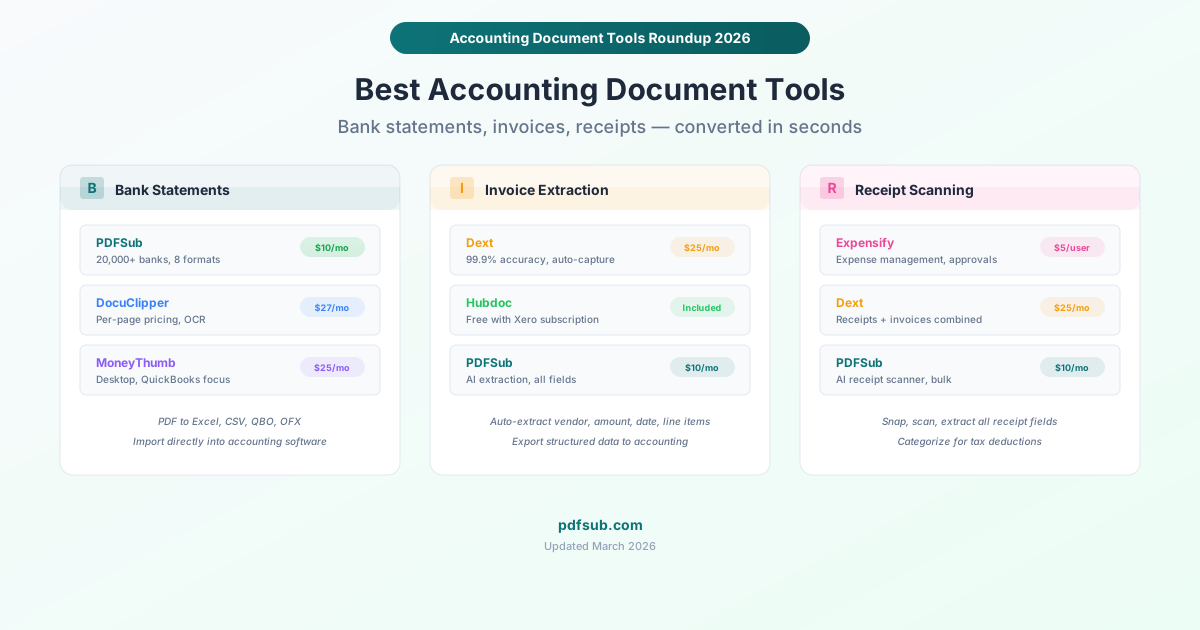
The Three Categories of Accounting Document Tools
Financial document processing breaks down into three distinct workflows, and most tools specialize in one:
1. Bank Statement Conversion
Converting PDF bank statements into Excel, CSV, QBO, OFX, or QIF formats for import into accounting software. This is the highest-volume task for most accountants - a single client might generate 12-50+ statement pages per year across multiple accounts.
2. Invoice Extraction
Pulling vendor name, invoice number, date, line items, tax amounts, and totals from PDF invoices. Accounting firms processing AP (accounts payable) for clients may handle hundreds of invoices monthly.
3. Receipt Scanning
Capturing merchant, date, amount, tax, and category from receipt images or PDFs. Critical for expense management and tax preparation.
Bank Statement Conversion Tools
PDFSub - Best All-in-One with Bank Statement Support
Price: $20/user/mo (annual) - includes 98+ PDF tools Banks supported: 20,000+ Output formats: Excel, CSV, TSV, JSON, OFX, QBO, QFX, QIF Processing: Browser-based first, then server-side AI fallback
PDFSub's Bank Statement Converter supports over 20,000 banks globally and outputs to eight different formats. What makes it unique is the tiered extraction approach: it first tries to extract data entirely in your browser (no file upload), which is both faster and more private. If the PDF is complex or scanned, it falls back to server-side processing with AI.
What's good:
- 20,000+ bank formats across dozens of countries
- Eight output formats including QBO and OFX for direct accounting software import
- Browser-based processing means statements stay on your device when possible
- Part of a 98+ tool platform - you also get Invoice Extractor, Receipt Scanner, PDF Merge PDFs/Split PDF/Compress PDF, and everything else
- $20/user/mo (annual) covers everything (no per-page pricing)
- Supports statements in 130+ languages including Arabic, Chinese, Japanese, Korean
What's limited:
- Not a dedicated bank statement tool - it's one of 98+ tools, so the interface is less specialized than purpose-built tools
- Per-plan credit limits for AI-powered extraction
- Newer platform, smaller user base than established competitors
- Browser-based extraction works best with digitally-generated statements; scanned statements benefit from server-side processing
Best for: Accountants who need bank statement conversion plus general PDF tools in one subscription. The multi-format output (especially QBO/OFX) and multi-language support make it strong for firms with diverse client bases.
DocuClipper - Best Dedicated Bank Statement Tool
Price: From $27/month (annual) / $39/month (monthly) for 200 pages Banks supported: Thousands (major banks globally) Output formats: Excel, CSV, QuickBooks Processing: Cloud-based with OCR Free trial: 14 days (200 pages, 10 transactions export limit)
DocuClipper is purpose-built for bank statement conversion. It focuses on accuracy and accounting software integration, with templates that learn from corrections over time.
What's good:
- Purpose-built for bank statements - the interface is optimized for this specific workflow
- OCR handles scanned and image-based statements
- Templates improve with usage (machine learning from corrections)
- Transaction categorization features
- QuickBooks integration for direct import
- Reliable accuracy on major bank formats
What's limited:
- Per-page pricing: 200 pages for $27/month (annual) or $39/month (monthly)
- If you process many statements, costs escalate quickly ($99/month annual for 2,000 pages)
- Only bank statements - no invoice extraction, receipt scanning, or general PDF tools
- Cloud-based processing (statements are uploaded to DocuClipper servers)
- 14-day trial limits exports to 10 transactions - barely enough to evaluate accuracy
Best for: Firms that process high volumes of bank statements and want a specialized, dedicated tool. The per-page pricing model works if you can predict your monthly volume.
MoneyThumb - Best for QuickBooks Users
Price: From $24.95/month (5 conversions) or desktop licenses from $549 Banks supported: Major U.S. and international banks Output formats: QBO, QFX, OFX, CSV, QIF Processing: Desktop or cloud Free trial: Limited
MoneyThumb has been in the bank statement conversion space for over a decade, with a strong focus on QuickBooks compatibility. Their desktop converters are popular with accountants who prefer offline processing.
What's good:
- Deep QuickBooks integration - converts directly to QBO format for Bank Feeds
- Desktop software option means no internet required and statements stay local
- Long track record (established company with years of development)
- Multiple converter products for different accounting software targets
What's limited:
- Pricing is confusing - multiple products with different price points ($24.95/month for 5 online conversions vs. $549+ for desktop)
- Desktop licenses are expensive upfront ($549 for basic, $599 with OCR)
- Per-conversion pricing for online tool ($0.20/page)
- Interface feels dated compared to modern web tools
- Limited output format flexibility compared to PDFSub's eight formats
- No general PDF tools - bank statements only
Best for: Accountants deeply embedded in QuickBooks who want dedicated desktop software for bank statement conversion.
Invoice Extraction Tools
Dext (formerly Receipt Bank) - Best for Accounting Firms
Price: From $25/month (business) or $207/month (practice, 10 clients) Accuracy: 99.9% claimed Processing: Cloud-based with AI Integrations: Xero, QuickBooks, Sage, MYOB
Dext is the market leader for accountants who process invoices and receipts for multiple clients. It combines receipt capture, invoice extraction, and bank statement processing (via credits) in one platform designed for accounting firm workflows.
What's good:
- 99.9% claimed extraction accuracy
- Built for multi-client accounting firm workflows
- Deep integrations with Xero, QuickBooks, Sage, and MYOB
- Mobile capture app for receipts
- Automatic supplier detection and categorization
- Line item extraction available (via credits)
- 14-day free trial with full features
What's limited:
- Expensive for firms - $207/month for 10 clients on the practice plan
- Credits system for advanced features (bank statements, line items) adds complexity
- Primarily designed for invoices and receipts - bank statement support is secondary
- Learning curve for setting up multi-client workflows
- Overkill for individual users or small businesses processing their own documents
Best for: Accounting firms managing AP workflows for multiple clients who need deep accounting software integration.
Hubdoc - Best Free Option (with Xero)
Price: Included free with Xero subscriptions Accuracy: Good for standard invoices Processing: Cloud-based Integrations: Xero, QuickBooks (limited)
If you're already using Xero, Hubdoc is included at no additional cost. It captures invoices, bills, and receipts, extracts the data, and publishes directly into Xero. Xero acquired Hubdoc in 2018, and the integration shows.
What's good:
- Free with any Xero subscription - no additional cost
- Seamless Xero integration (automatic publishing to the right account)
- Email forwarding: send invoices to a Hubdoc email address for automatic processing
- Fetch feature automatically downloads statements from financial institutions
What's limited:
- Practically requires Xero - QuickBooks integration exists but is limited
- Extraction accuracy is good but not best-in-class
- No line item extraction
- Limited to invoices and bills - no bank statement conversion to Excel/CSV
- Not available as a standalone product
Best for: Xero users who want invoice capture without paying for a separate tool.
PDFSub Invoice Extractor - Best Budget Invoice Tool
Price: Included in PDFSub's All-In-One plan ($20/user/mo annual) Processing: AI-powered extraction Output: Structured data (vendor, date, amounts, line items)
PDFSub's Invoice Extractor uses AI to pull structured data from PDF invoices. It's not as specialized as Dext, but it handles standard invoices well and costs a fraction of the price.
What's good:
- Included in the All-In-One subscription ($20/user/mo annual; no additional cost)
- AI extracts vendor, invoice number, date, amounts, tax, and line items
- Part of a complete PDF toolkit - you also get bank statements, receipts, and 98+ other tools
- Works on invoices in multiple languages
What's limited:
- No automatic accounting software integration (you export data manually)
- Less specialized than Dext for high-volume invoice processing
- AI accuracy depends on invoice format quality
- No multi-client workflow features for accounting firms
Best for: Individual users and small businesses who process invoices occasionally and want it bundled with other PDF tools.
Receipt Scanning Tools
Expensify - Best for Expense Management
Price: From $5/user/month Processing: AI-powered SmartScan Integrations: QuickBooks, Xero, Sage, NetSuite
Expensify is the leading receipt scanning tool, but it's really an expense management platform. Receipt scanning feeds into expense reports, approval workflows, and reimbursement processing.
What's good:
- SmartScan AI reads receipts with high accuracy
- Complete expense management workflow (scan, categorize, approve, reimburse)
- Mileage tracking, per diem automation, corporate card integration
- Strong integrations with accounting software
- Mobile app for instant receipt capture
What's limited:
- $5/user/month adds up for larger teams
- Overkill if you just need receipt data extraction without expense management
- Receipt scanning accuracy varies on crumpled, faded, or non-standard receipts
- The platform has grown complex over the years
Best for: Companies that need expense management, not just receipt scanning. If you need approval workflows and reimbursement tracking, Expensify is the standard.
PDFSub Receipt Scanner - Best Budget Receipt Tool
Price: Included in PDFSub's All-In-One plan ($20/user/mo annual) Processing: AI-powered extraction Output: Merchant, date, total, tax, items, payment method
PDFSub's Receipt Scanner extracts all standard receipt fields using AI. It handles both digital receipt PDFs and photos of paper receipts.
What's good:
- Included in the All-In-One subscription ($20/user/mo annual)
- Extracts merchant, date, items, subtotal, tax, total, and payment method
- Works on receipt photos (not just PDFs)
- Part of a complete toolkit - process receipts alongside bank statements and invoices
What's limited:
- No expense management features (approval workflows, reimbursement)
- No automatic accounting software sync
- Best for individual receipt processing, not bulk corporate expense management
Best for: Freelancers, small businesses, and individuals who need to digitize receipts for tax preparation without paying for a full expense management platform.
Mapping Tools to Accounting Workflows
Here's how these tools fit into common accounting workflows:
Monthly Bookkeeping
- Bank statements: PDFSub or DocuClipper to convert PDF statements to QBO/CSV
- Invoices: Dext or PDFSub to extract AP data
- Receipts: PDFSub or Expensify for expense categorization
- General PDF tasks: PDFSub for merging, compressing, and organizing client documents
Tax Preparation
- Bank statements: PDFSub (multi-year statement processing for all accounts)
- Receipts: PDFSub receipt scanner or Expensify for deduction tracking
- Document organization: PDFSub merge/split for organizing client tax packages
Audit Preparation
- Bank statements: DocuClipper or PDFSub for high-volume extraction
- Document security: PDFSub for redaction and password protection
- Document comparison: PDFSub Compare PDFs tool for verifying statement versions
Cost Comparison for a Typical Accounting Firm
For a small firm processing 10 clients' monthly statements, invoices, and receipts:
| Approach | Monthly Cost | What You Get |
|---|---|---|
| PDFSub only | $20/user/mo annual | Bank statements + invoices + receipts + 98+ PDF tools |
| DocuClipper + Dext | $27 + $207 = $234 | Dedicated BSC + dedicated invoice/receipt processing |
| MoneyThumb + Expensify | $25 + $50 (10 users) = $75 | Desktop BSC + expense management |
| PDFSub + Dext | $20 + $207 = $227/mo | Best of both: BSC + professional invoice workflow |
PDFSub's All-In-One plan at $20/user/mo (annual) covers all three categories in one subscription. It won't match Dext's multi-client workflow features or DocuClipper's specialized interface, but for small firms and solo practitioners, it's a compelling all-in-one value.
Accuracy: What to Realistically Expect
No tool achieves 100% accuracy on all documents. Here's what realistic accuracy looks like:
Digitally-generated bank statements (PDF from bank website): 95-99% accuracy across all tools. These are the easiest - clean text, consistent formatting.
Scanned bank statements (paper scanned to PDF): 85-95% accuracy. OCR quality and scan resolution are the limiting factors. Tilted, crumpled, or low-resolution scans drop accuracy.
Standard invoices (common formats): 90-98% accuracy. Vendor name, amounts, and dates are usually correct. Line items are less reliable.
Handwritten or unusual invoices: 70-85% accuracy. AI struggles with non-standard layouts, handwriting, and uncommon currencies.
Receipts (photos): 80-95% accuracy. Wrinkled, faded, or partially obscured receipts are challenging for all tools.
Always verify extracted data before importing into accounting software. Even the best tools make occasional errors, and a single wrong decimal point in a financial import can cause significant reconciliation headaches.
Frequently Asked Questions
Can I convert bank statements from any bank?
Coverage varies by tool. PDFSub supports 20,000+ banks globally, including statements in 130+ languages. DocuClipper covers thousands of major banks. MoneyThumb focuses on major U.S. and international banks. For obscure or small regional banks, you may need to try multiple tools. Most tools handle the big banks (Chase, Bank of America, Wells Fargo, Citi, HSBC, etc.) reliably.
How do these tools handle multi-page statements?
All tools listed here handle multi-page statements correctly - transactions that span page breaks are detected and joined. PDFSub and DocuClipper both handle continuation rows (where a single transaction's description spans multiple lines). However, complex statements with subtotals, multiple accounts, or unusual layouts may require manual review.
Are these tools GDPR compliant for handling client data?
Browser-based tools like PDFSub (which processes most operations locally) offer a natural compliance advantage - client data never leaves the device for most operations. Cloud-based tools (DocuClipper, Dext, Expensify) process data on their servers and must comply with GDPR data processing requirements. All major tools listed here have privacy policies and data processing agreements available, but you should review them for your specific compliance needs.
Can I batch process multiple clients' statements?
Yes, with limitations. PDFSub supports batch conversion within its plan limits. DocuClipper's batch processing scales with your page allocation (200-2,000 pages per month). Dext supports multi-client workflows natively with its practice plans. For high-volume batch processing (thousands of pages monthly), DocuClipper's higher plans or Dext's practice plans are designed for this workflow.
Should I use a bank statement tool or ask my bank for CSV/OFX exports?
Many banks offer CSV or OFX downloads directly through online banking, which eliminates the need for PDF conversion entirely. Always check your bank's export options first. However, bank statement conversion tools remain necessary when: (1) you only have PDF statements (historical records, client-provided documents), (2) the bank doesn't offer machine-readable exports, (3) you need QBO/OFX format and the bank only provides CSV, or (4) you're processing statements from multiple banks and want a consistent format.