How to Replace a Social Security Card (2026 Step-by-Step Guide)
Lost your Social Security card? Replacement is free and takes 10-14 days. Here's exactly how to replace it - online, in person, or by mail - plus how to fill out Form SS-5.
You reach for your wallet to fill out a form and realize your Social Security card isn't there. Maybe it fell out somewhere. Maybe it was in a bag that got stolen. Maybe you just moved and it's buried in a box you haven't unpacked. Whatever happened, the sinking feeling is real - your Social Security number is one of the most important numbers you'll ever have.
Take a breath. Replacing a Social Security card is straightforward, completely free, and something millions of Americans do every year. The Social Security Administration (SSA) issues roughly 10 million replacement cards annually. You are not the first person to lose one, and you won't be the last.
This guide walks you through every step of the replacement process - all three methods, every document you might need, how to fill out the application form, special situations like name changes and children's cards, and how to protect yourself from scams along the way.
Quick Answer: How to Replace Your Social Security Card
If you're in a hurry, here's the short version:
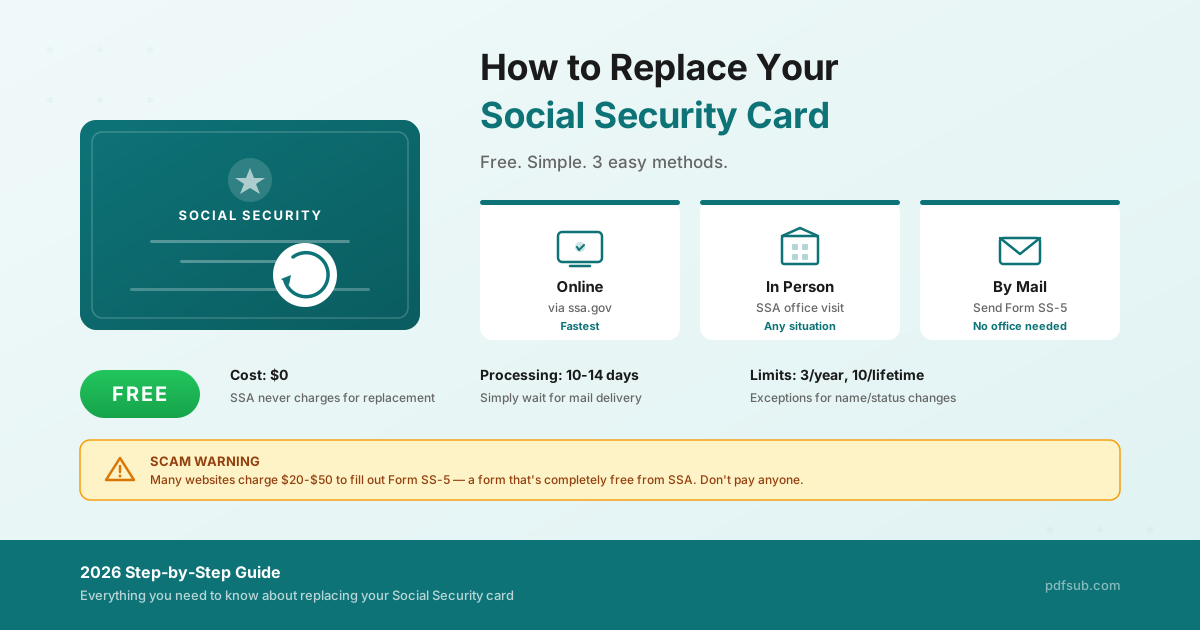
- Cost: Completely free. SSA never charges for a replacement card.
- Methods: Online (fastest), in person at an SSA office, or by mail.
- Processing time: 5-14 business days depending on the method.
- What you need: Proof of identity (driver's license, state ID, or passport) and a completed Form SS-5 (for in-person or mail applications).
- Limits: 3 replacement cards per year, 10 per lifetime (with exceptions).
- Online eligibility: U.S. citizen, age 18+, U.S. mailing address, driver's license or state ID from a participating state, no name or other record changes needed.
Read on for the full details on each method, the exact documents required for your specific situation, and a field-by-field walkthrough of Form SS-5.
Scam Warning: Never Pay for a Social Security Card Replacement
Before we get into the process, this warning needs to come first because it could save you money.
The SSA provides replacement Social Security cards for free. Always. No exceptions.
On March 10, 2026, the SSA's Office of the Inspector General (OIG) issued a fresh scam alert reminding Americans that they never have to pay for Social Security card services. This alert exists because the problem is widespread.
Search for "replace Social Security card" online and you'll find dozens of websites that charge $20 to $50+ to "help" you fill out Form SS-5 - the exact same form you can download and complete yourself for free. These sites often:
- Look official. They use government-style fonts, eagle logos, and red-white-and-blue color schemes designed to make you think they're affiliated with the SSA. They are not.
- Charge for a free form. Form SS-5 is a free, two-page government form. Paying someone to fill it out for you provides no advantage - you still need to provide the same information and submit the same documents directly to the SSA.
- Collect your sensitive data. Some sites harvest your Social Security number, date of birth, and other personal information - exactly the data an identity thief needs.
- Violate federal law. Section 1140 of the Social Security Act specifically prohibits misleading SSA-related communications and restricts charging for services SSA provides for free. Violators face financial penalties.
How to stay safe:
- Only use the official SSA website: ssa.gov
- Never pay anyone for a replacement Social Security card
- Never enter your SSN on a non-government website claiming to process your application
- If you encounter a scam site, report it at ssa.gov/scam
If someone contacts you by phone, text, email, or social media claiming to be from the SSA and requesting payment or personal information, it is a scam. The SSA will never threaten you with arrest, demand immediate payment, or ask for gift cards.
Method 1: Replace Your Social Security Card Online (Fastest)
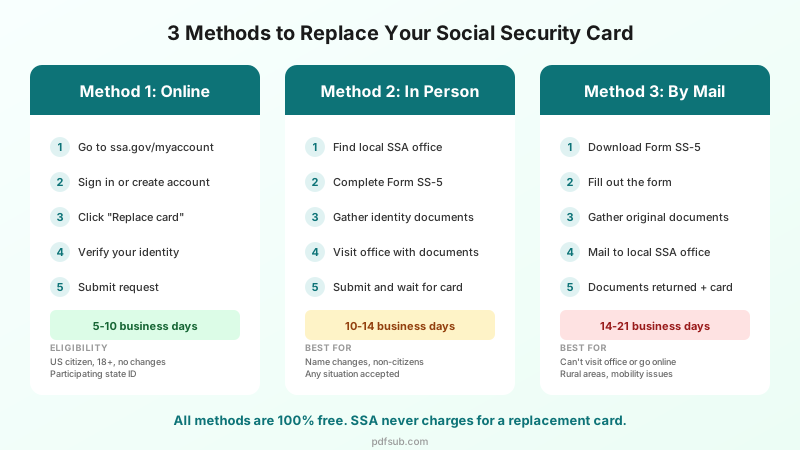
The fastest way to get a replacement card is through the SSA's online system. No form to fill out by hand, no office visit, no mailing original documents. You can complete the entire process from your phone or computer in under 10 minutes.
Eligibility Requirements for Online Replacement
You can replace your card online if all of the following are true:
- You are a U.S. citizen
- You are age 18 or older
- You have a U.S. mailing address (including APO, FPO, and DPO military addresses)
- You have a driver's license or state-issued ID from a participating state or the District of Columbia
- You are not requesting a name change, date of birth correction, gender update, or any other changes to your Social Security record
- You have (or can create) a free my Social Security account at ssa.gov
If you don't meet all of these criteria - for example, you need a name change, you're a non-citizen, or your state doesn't participate - skip to Method 2 (In Person) or Method 3 (By Mail).
Participating States
As of early 2026, most U.S. states participate in the online replacement program. Connecticut, Ohio, and Utah were among the most recent additions (April 2025). For the current complete list, visit ssa.gov/number-card. If your state isn't listed, you'll need to apply in person or by mail.
Step-by-Step: Online Replacement
Step 1: Go to the SSA's replacement card page. Visit ssa.gov/number-card/replace-card. The site will ask you a few questions to determine whether you're eligible for online replacement.
Step 2: Sign in to your my Social Security account. If you already have a my Social Security account, sign in. If not, you'll need to create one - the process takes about 5 minutes and requires identity verification through ID.me or Login.gov. You'll need your SSN, an email address, and your driver's license or state ID handy.
Step 3: Select "Replace Social Security card." Once signed in, you'll see this option on your dashboard. Click it to begin.
Step 4: Verify your information. The system will confirm your identity using the information on file. You may be asked to verify your driver's license or state ID details.
Step 5: Submit your request. Review and confirm. That's it. No documents to upload, no forms to print.
Step 6: Wait for your card. Your replacement card will arrive by mail in 5 to 10 business days. You'll receive a confirmation on screen and can check the status through your my Social Security account.
Important Note
You do not need your physical Social Security card for most purposes. Your Social Security number is what matters. Employers can accept other documents from the I-9 acceptable documents list. Many banks, government agencies, and other institutions can verify your number electronically.
Method 2: Replace Your Social Security Card In Person
If you don't qualify for online replacement - or if you need to make changes to your record (name, citizenship status, etc.) - visiting your local Social Security office is the most direct route. This is also the only option for many non-citizens and for replacing a child's card.
What to Do Before You Go
Step 1: Find your local Social Security office. Use the SSA's office locator at ssa.gov/locator. Enter your ZIP code to find the nearest office, along with hours and contact information.
Step 2: Schedule an appointment (recommended). While some offices accept walk-ins, scheduling an appointment significantly reduces wait times. As of February 2026, the SSA has improved its online appointment scheduling - you can begin your application online and then self-schedule an appointment to complete it at your local office. Visit ssa.gov/number-card/replace-card/get-started to start.
Step 3: Complete Form SS-5. Download Form SS-5 from ssa.gov/forms/ss-5.pdf and fill it out before your visit. (You can also get a blank copy at the office, but completing it ahead of time saves significant time.) See our detailed Form SS-5 walkthrough below.
Step 4: Gather your documents. Bring original documents or certified copies issued by the agency that created them. The SSA cannot accept photocopies or notarized copies. The specific documents you need depend on your situation - see our complete documents table below.
What to Expect at the Office
- Bring your completed Form SS-5 and original identity documents
- A staff member will review your form and documents
- Your original documents will be returned to you - either immediately or by mail
- You'll receive a receipt confirming your application
- Your replacement card will arrive by mail in 10 to 14 business days
Tips for a Smooth Visit
- Go early. Offices are typically busiest on Mondays, the day after holidays, and during the first week of the month.
- Bring more documents than you think you need. If there's any issue with one document, having backups prevents a second trip.
- Don't bring original documents you can't afford to lose if there's any risk of loss. The SSA sometimes mails documents back rather than returning them on the spot (though they typically return them).
Method 3: Replace Your Social Security Card By Mail
If you can't visit an office and don't qualify for online replacement, you can apply by mail. This method takes the longest but works for nearly any situation.
When to Use This Method
- You live in a rural area far from an SSA office
- You have mobility limitations that make an office visit difficult
- Your state doesn't participate in online replacement and you prefer not to visit an office
- You simply prefer mail correspondence
Step-by-Step: Mail Replacement
Step 1: Download and complete Form SS-5. Get the form from ssa.gov/forms/ss-5.pdf. Fill it out completely using black or blue ink. See our field-by-field walkthrough below.
Step 2: Gather your original documents. You'll need to mail your original identity documents (or certified copies) with your application. Yes, this means temporarily parting with your driver's license or passport. The SSA will mail them back to you.
Step 3: Find your local SSA office mailing address. Do not mail your application to SSA headquarters in Baltimore. Use the SSA office locator at ssa.gov/locator to find the mailing address for your local office.
Step 4: Mail your application. Send your completed Form SS-5 and original documents to your local SSA office. Consider using USPS Certified Mail with Return Receipt so you have proof of delivery and can track the package. This is especially important since you're mailing original identity documents.
Step 5: Wait for your documents and card. The SSA will process your application, mail your original documents back to you, and then send your replacement card separately. Expect to receive your documents back within 1-2 weeks and your new card within 2-3 weeks total.
Important Warning About Mailing Documents
Mailing original identity documents always carries some risk. To reduce that risk:
- Use Certified Mail with Return Receipt Requested or another trackable service
- Make copies of every document before mailing (for your own records)
- If you're uncomfortable mailing your only form of ID, consider the in-person method instead
- If you use PDFSub's Photo to Document tool, you can quickly scan your documents with your phone camera to create clean PDF copies for your records before mailing the originals
- Use Merge PDFs to combine your completed Form SS-5 with scanned copies of supporting documents into a single organized file for your records
Documents You'll Need
The documents required depend on your specific situation. Here's a comprehensive breakdown.
For All Situations: Proof of Identity
You must provide at least one document that proves your identity. The document must be current (not expired) and show your name plus identifying information (date of birth or age). A recent photograph on the document is preferred.
Primary identity documents (strongest - one of these is usually sufficient):
| Document | Notes |
|---|---|
| U.S. driver's license | Most commonly used |
| U.S. state-issued ID card | Non-driver ID from your state's DMV |
| U.S. passport or passport card | Current, unexpired |
Secondary identity documents (accepted if you don't have a primary document):
| Document | Notes |
|---|---|
| U.S. military ID | Current, active duty or dependent |
| Certificate of Naturalization | Form N-550 or N-570 |
| Employee ID card | Must include photo |
| School ID card | Must include photo |
| Health insurance card | Must show name and identifying info |
| Medicaid card | Must show name |
| Certified medical record | From clinic, doctor, or hospital |
Important rules:
- All documents must be originals or certified copies issued by the original agency
- Photocopies are not accepted, even if notarized
- Expired documents are not accepted
- Birth certificates are not accepted as proof of identity (they prove age and citizenship, not identity)
By Situation
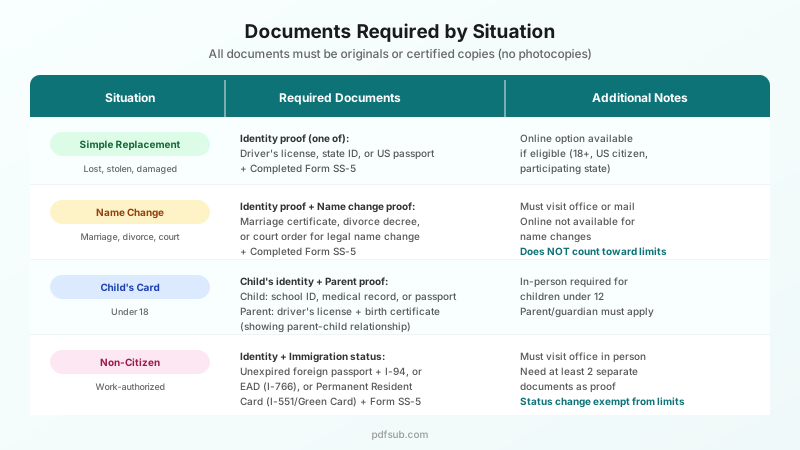
Simple Replacement (Lost, Stolen, or Damaged - No Changes)
- Completed Form SS-5
- One identity document from the list above
That's it. This is the simplest scenario.
Name Change (Marriage, Divorce, Court Order)
- Completed Form SS-5 (with both old and new names)
- One identity document
- Plus proof of legal name change:
- Marriage: Certified marriage certificate
- Divorce: Divorce decree showing your restored/new name
- Court order: Certified court order approving the name change
- Naturalization: Certificate of Naturalization showing new name
Good news: Replacements issued for legal name changes do not count toward your 3-per-year or 10-per-lifetime limits.
Child's Card (Under 18)
- Completed Form SS-5 (filled out by parent/guardian)
- Child's identity document (school ID with photo, medical record, or passport - birth certificate alone is NOT accepted as identity)
- Parent's identity document (driver's license, state ID, or passport)
- Proof of parent-child relationship (typically the child's birth certificate)
Note: Children under 12 generally require an in-person visit. A parent or legal guardian must sign the application.
Non-Citizen (Work-Authorized)
- Completed Form SS-5
- One identity document
- Plus immigration status documentation:
- Unexpired foreign passport plus I-94 Arrival/Departure Record, or
- I-551 Permanent Resident Card (Green Card), or
- I-766 Employment Authorization Document (EAD/Work Permit)
Note: You must provide at least two separate documents (for example, an EAD can serve as proof of both immigration status and work authorization, but you still need a separate identity document). Non-citizens must apply in person - the online method is not available.
Good news: Replacements issued due to immigration status changes do not count toward your limits.
How to Fill Out Form SS-5: Field-by-Field Guide
Form SS-5 is officially titled "Application for a Social Security Card." It's a two-page form with 18 fields. While it's not complicated, filling it out correctly the first time prevents delays.
You can download Form SS-5 from the SSA website. It's a standard PDF form.
If you prefer to type rather than handwrite, you can use a PDF form filler to complete the form digitally - just download the PDF, open it in the tool, type your responses, and print the completed form. This produces a cleaner, more legible application that's easier for SSA staff to process.
Here's what each field asks for:
Field 1: Name
Enter the full legal name you want shown on your Social Security card. This means first name, middle name (if any), and last name. If you're applying because of a name change, enter your new legal name here.
Field 2: Social Security Number
Enter your existing nine-digit Social Security number. If you're applying for an original card (first time), leave this blank.
Field 3: Place of Birth
Enter the city and state where you were born (for U.S. births) or the city and country (for foreign births). Do not abbreviate. Write out the full state or country name.
Field 4: Date of Birth
Enter your date of birth exactly as it appears on your birth certificate or other official document. Use MM/DD/YYYY format.
Field 5: Citizenship
Check one box:
- U.S. Citizen - Born in the U.S. or naturalized
- Legal Alien Allowed to Work - You have work authorization (EAD, Green Card, certain visa types)
- Legal Alien Not Allowed to Work - You need an SSN for a non-work purpose (some government benefits, banking)
- Other - Rare; requires a separate explanation
Field 6: Ethnicity (Voluntary)
This asks whether you are of Hispanic or Latino origin. This field is optional - you can skip it without affecting your application.
Field 7: Race (Voluntary)
Select from the listed race categories. This field is also optional and can be skipped.
Field 8: Sex
Select Male or Female.
Field 9: Mother's/Parent's Information
Enter your mother's (or first parent's) full name at birth and Social Security number if known. If you don't know the SSN, write "Unknown."
Field 10: Father's/Parent's Information
Enter your father's (or second parent's) full name and Social Security number if known. Same rules as Field 9.
Field 11: Previous Application History
Check "Yes" or "No" to indicate whether you have ever applied for or received a Social Security card before. For a replacement, this should almost always be Yes.
Field 12: Name on Previous Card
If you answered Yes to Field 11, enter the name that appears on your most recent Social Security card. This is especially important if you're changing your name.
Field 13: Date of Birth Discrepancy
If the date of birth currently on your Social Security record differs from what you entered in Field 4, enter the date the SSA has on file here. Leave blank if there's no discrepancy.
Field 14: Today's Date
Enter today's date in MM/DD/YYYY format.
Field 15: Daytime Phone Number
Enter a phone number where the SSA can reach you if they have questions, including area code. This field is optional but recommended.
Field 16: Mailing Address
Enter the complete address where you want your replacement card mailed. This must be a U.S. mailing address. Include apartment or unit numbers. Do not abbreviate country names.
Field 17: Signature
Sign the form using black or blue ink only. If you're applying for yourself, you must sign here. If you're unable to sign, you may mark an "X" with two witnesses who also sign. For a child's application, the parent or legal guardian signs here.
Field 18: Your Relationship to the Person on Line 1
Check the appropriate box:
- Self - You're applying for your own card
- Natural or Adoptive Parent - You're a parent applying for a child
- Legal Guardian - You're a court-appointed guardian
- Other - Specify your relationship
Tips for a Clean Application
- Use black or blue ink only when filling out by hand
- Print clearly - illegible handwriting is the most common cause of processing delays
- Don't use white-out or correction tape - if you make an error, cross it out neatly and initial it, or start with a fresh form
- Double-check that names match - the name on your Form SS-5 must exactly match your supporting documents
- Make sure you've signed and dated the form before submitting
Special Situations
Replacing a Card After Marriage or Divorce
Getting married or divorced? You'll need to update your Social Security record with your new legal name before (or at the same time as) getting a replacement card. Here's what to do:
- Get your certified name-change document first. For marriage, this is your marriage certificate. For divorce, it's the divorce decree showing your restored or changed name. You need the certified copy from the issuing county or court - not a photocopy.
- Complete Form SS-5 with your new legal name in Field 1 and your previous name in Field 12.
- Visit your local SSA office with your Form SS-5, identity document, and name-change proof. (Name changes cannot be processed online.)
- Update your other documents. After receiving your new Social Security card, update your driver's license, passport, bank accounts, employer records, and any other documents that show your name.
Timing tip: Update your Social Security card first, before changing your driver's license. Many states require your updated Social Security record before they'll issue a new driver's license with your new name.
Replacing a Child's Social Security Card
Children can't apply for their own replacement cards - a parent or legal guardian must do it on their behalf.
- Complete Form SS-5, checking the appropriate box in Field 18 (Natural or Adoptive Parent, or Legal Guardian).
- Gather the child's identity document. Note that a birth certificate is not accepted as identity proof for children - you'll need something else like a school ID with photo, doctor's office record, or the child's passport.
- Bring your own identity document (parent's driver's license, state ID, or passport).
- Bring the child's birth certificate to prove the parent-child relationship.
- Visit your local SSA office. In-person visits are generally required for children under 12.
Non-Citizens: Replacement Cards and Work Authorization
If you're a non-citizen, the process involves additional documentation:
- Permanent residents (Green Card holders): Bring your I-551 (Permanent Resident Card) plus another identity document. Your Green Card serves as proof of both immigration status and work authorization.
- Work visa holders: Bring your unexpired foreign passport, I-94 Arrival/Departure Record, and work authorization document (EAD/I-766 or visa stamp).
- Status changes: If your immigration status has changed, you may need an updated card with a different work restriction legend. These changes do not count toward your replacement limits.
Non-citizens must apply in person at a Social Security office. The online replacement option is not available.
Lost vs. Stolen: Does It Matter?
Functionally, the replacement process is the same whether your card was lost or stolen. However, if your card was stolen, you should take additional steps to protect yourself from identity theft:
- File a police report - This creates an official record and may be needed for dispute resolution.
- Place a fraud alert with the three major credit bureaus (Equifax, Experian, TransUnion). This makes it harder for someone to open new accounts in your name. You only need to contact one bureau - they're required to notify the other two.
- Consider a credit freeze. This is stronger than a fraud alert and prevents anyone (including you) from opening new credit accounts until you lift the freeze. It's free.
- File an identity theft report at IdentityTheft.gov - the FTC's dedicated identity theft resource.
- Monitor your credit reports. You're entitled to a free report from each bureau annually at AnnualCreditReport.com.
See our Protecting Your Social Security Number section below for long-term protection strategies.
How Long Does It Take?
Processing times vary by method:
| Method | Processing Time | Notes |
|---|---|---|
| Online (my Social Security) | 5-10 business days | Fastest option |
| In person (SSA office) | 10-14 business days | Card arrives by mail after visit |
| By mail | 14-21 business days | Includes mail transit time both ways |
What to Do While You Wait
You do not need your physical Social Security card for most day-to-day activities. Here's what to know:
- For employment (I-9 form): You can use other documents from the I-9 acceptable documents list, such as a passport, driver's license plus birth certificate, or a passport card.
- For taxes: You just need your Social Security number, not the card itself.
- For banking: Most banks can verify your SSN electronically.
- For government benefits: Your SSN is on file - you don't typically need the physical card.
If you're asked for your Social Security card and don't have it yet, explain that a replacement is in process and ask if an alternative document is acceptable. Most institutions are familiar with this situation.
Can You Track Your Application?
If you applied online through your my Social Security account, you can check the status of your application by logging back in. For in-person and mail applications, there's no online tracking system. If you haven't received your card after the expected timeframe, contact your local SSA office or call the SSA at 1-800-772-1213 (TTY: 1-800-325-0778).
Replacement Limits: 3 Per Year, 10 Per Lifetime
The Intelligence Reform and Terrorism Prevention Act of 2004 limits the number of replacement Social Security cards you can receive:
- 3 replacement cards per calendar year
- 10 replacement cards per lifetime
These limits apply to cards issued on or after December 17, 2005.
Exceptions That Don't Count Toward Limits
The following replacements are exempt from the yearly and lifetime limits:
- Legal name changes - Cards issued after a verified name change (marriage, divorce, court order) do not count
- Immigration status changes - Cards issued to reflect a change in work authorization or restrictive legend do not count
- Hardship exceptions - On a case-by-case basis, the SSA may grant an exception if you can demonstrate significant hardship
What Happens If You Hit the Limit?
If you've reached the 3-per-year or 10-per-lifetime limit, the SSA generally will not issue another routine replacement. However:
- They can issue a written verification letter confirming your SSN - this is accepted by most employers and institutions
- Hardship exceptions may apply if you can demonstrate a genuine need
- Name changes and status changes are always processed regardless of your count
How Many Have I Used?
Unfortunately, there's no easy way to check how many replacement cards you've received. The SSA tracks this internally, but there's no self-service lookup. If you're concerned about approaching the limit, you can call the SSA at 1-800-772-1213 to ask.
Protecting Your Social Security Number
Losing your Social Security card is stressful partly because of the identity theft risk. Here are practical steps to protect yourself going forward.
Immediate Steps (If Your Card Was Stolen)
- Place a fraud alert or credit freeze - Contact any one of the three major credit bureaus:
- Equifax: 1-800-525-6285
- Experian: 1-888-397-3742
- TransUnion: 1-800-680-7289
- Report to the FTC at IdentityTheft.gov
- File a police report if you believe theft was involved
- Review your credit reports at AnnualCreditReport.com for any unauthorized activity
Long-Term Protection
- Don't carry your Social Security card in your wallet. This is the most common way cards are lost or stolen. Memorize your number and keep the card in a secure location at home.
- Store your card in a fireproof safe or lockbox. If you keep it at home, protect it from fire and water damage.
- Keep digital copies secure. If you scan your card for your records, store the file encrypted. PDFSub's Password Protect tool can encrypt PDFs containing sensitive documents with a strong password, ensuring they can't be opened without authorization.
- Redact your SSN before sharing documents. Whenever you need to share a document that contains your Social Security number - tax forms, old applications, pay stubs - redact the SSN first. PDFSub's Redact tool permanently removes sensitive text from PDFs (unlike black marker or text boxes, which can sometimes be removed).
- Shred old documents that contain your SSN before disposing of them.
- Be skeptical of anyone asking for your full SSN. Many organizations only need the last four digits. Ask why they need the full number and whether an alternative is acceptable.
- Monitor your Social Security statement. Create a my Social Security account at ssa.gov and review your earnings record annually. Unauthorized employment under your SSN will show up here.
Frequently Asked Questions
How much does it cost to replace a Social Security card?
Nothing. Replacing a Social Security card is 100% free. The SSA never charges a fee for new or replacement cards. If any website or service asks you to pay for a replacement card or to fill out Form SS-5, it is either a scam or an unnecessary third-party service. Go directly to ssa.gov.
Can I replace my Social Security card online?
Yes, if you meet all eligibility requirements: you must be a U.S. citizen, age 18 or older, have a U.S. mailing address, possess a driver's license or state-issued ID from a participating state, and not need any changes to your record (name, date of birth, etc.). Apply through your free my Social Security account.
How long does it take to get a replacement Social Security card?
For online applications, expect 5 to 10 business days. For in-person applications at an SSA office, expect 10 to 14 business days. Mail applications take the longest at roughly 14 to 21 business days including mail transit time.
What documents do I need to replace my Social Security card?
At minimum, you need one proof of identity - a current U.S. driver's license, state ID, or U.S. passport. For name changes, you also need proof of the legal name change (marriage certificate, divorce decree, or court order). Non-citizens need additional immigration documents. All documents must be originals or certified copies.
Can I get a replacement Social Security card the same day?
No. The SSA does not issue cards on the spot. All replacement cards are produced at a central facility and mailed to your address. Even if you apply in person, you'll wait 10-14 business days for the card to arrive by mail.
What if I need my Social Security number but my card hasn't arrived yet?
You don't need the physical card for most purposes. Your Social Security number is what employers, banks, and government agencies actually need, and you can provide it verbally, on forms, or through electronic verification. For employment, use alternative I-9 documents like a passport or the combination of a driver's license and birth certificate.
Do I need to replace a damaged Social Security card?
Technically, no - a damaged card is still valid as long as the information on it is legible. However, if the card is significantly damaged, torn, or worn to the point where your name or number is hard to read, replacing it is a good idea.
Can someone else apply for my replacement card?
Generally, no - adults must apply for their own cards. However, a parent or legal guardian can apply for a child's card (under 18), and a legal guardian appointed by a court can apply on behalf of an adult who cannot apply themselves due to disability or incapacity.
What if I'm a non-citizen? Can I replace my Social Security card?
Yes, but you must apply in person at an SSA office. You'll need your identity document plus immigration status documents (Green Card, EAD, or foreign passport with I-94). The online method is not available for non-citizens.
My Social Security card was stolen. Should I get a new Social Security number?
The SSA only assigns new Social Security numbers in very rare, extreme cases - for example, if you're a victim of ongoing identity theft that cannot be resolved, or if your safety is at risk. In almost all cases of a stolen card, you'll receive a replacement card with your same SSN and should take identity theft protection steps (fraud alert, credit freeze, monitoring) rather than seeking a new number.
Summary
Replacing your Social Security card is simpler than most people expect. It costs nothing, takes about 10-14 days, and can often be done entirely online without leaving your home.
Here's a quick recap of your three options:
- Online - Fastest (5-10 days). Use your free my Social Security account at ssa.gov. Available to eligible U.S. citizens age 18+ with a participating state ID and no record changes needed.
- In person - Most versatile (10-14 days). Works for any situation including name changes, children's cards, and non-citizens. Visit your local SSA office with Form SS-5 and original documents.
- By mail - Most convenient for some (14-21 days). Mail your completed Form SS-5 and original documents to your local SSA office.
Whichever method you choose, remember: it's free, it's straightforward, and the SSA processes millions of these requests every year.
If you need to fill out Form SS-5 digitally, PDFSub's PDF Form Filler lets you type directly into the form instead of handwriting your responses. And if you're scanning supporting documents for your own records before mailing originals, Photo to Document turns phone camera shots into clean PDFs. Both tools process your documents in the browser - nothing is uploaded to a server - which matters when you're dealing with documents that contain your Social Security number.
Stay safe, don't pay anyone for a free government service, and keep that replacement card somewhere secure when it arrives.