PDF Tools for Sales Teams: Proposals, Contracts, and E-Signatures
Sales reps spend too much time on document prep instead of selling. Here's how to create professional proposals, get contracts signed, and manage sales documents - without the enterprise price tag.
Your best sales rep closed three deals last quarter. She could have closed five.
The difference wasn't her pitch, her product knowledge, or her pipeline. It was the 70% of her week she spent not selling. Data entry, internal meetings, email admin, scheduling, and - the quiet killer nobody tracks - document preparation.
Sales reps spend only about 28% of their time actually selling. The rest disappears into CRM updates, meeting prep, research, and an endless loop of formatting proposals, assembling contract packages, chasing signatures, and converting files between formats nobody asked for. Administrative tasks alone consume 41% of a rep's day.
That's not a productivity problem. That's a structural problem. And for most sales teams, the document workflow is the biggest piece of it that's still stuck in 2015.
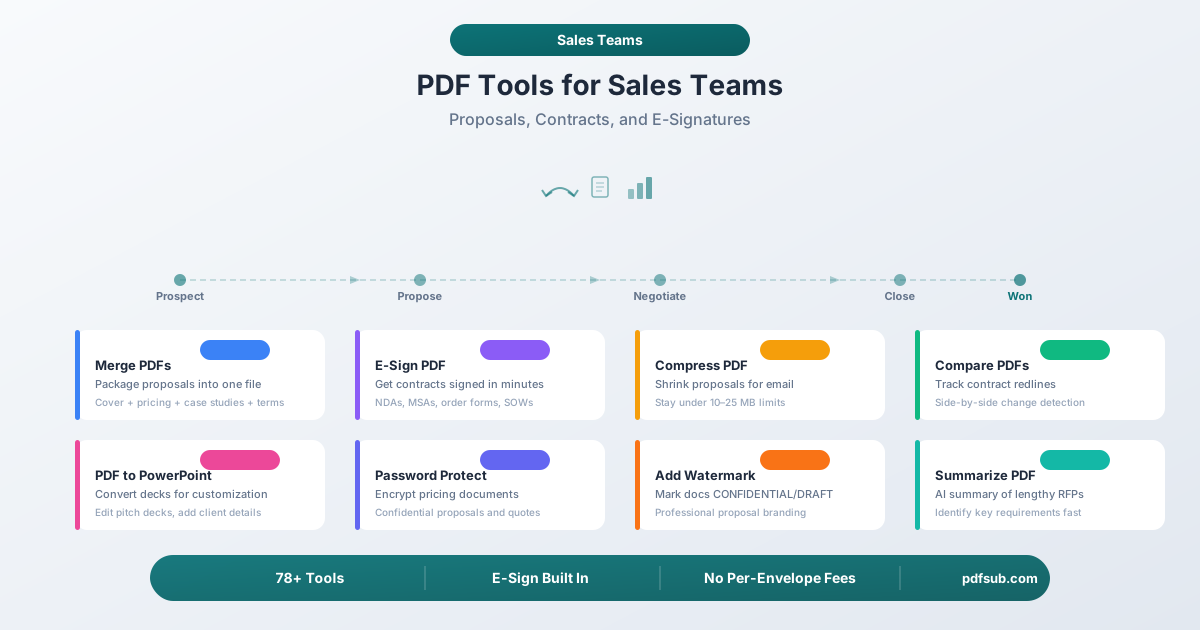
This guide breaks down every document workflow a sales team encounters - from initial prospecting through signed contracts - and maps each one to the PDF tools that eliminate the bottleneck. No enterprise procurement cycles. No per-seat minimums that punish you for growing. Just the tools that get proposals out the door and contracts signed faster.
Why Sales Teams Need Better PDF Tools
Before we get into specific workflows, here's the business case in three numbers:
Speed wins deals. Contract creation, negotiation, and approval contribute up to 18% of the enterprise sales cycle. Even a one-day delay in document turnaround can cost a company $80,000 in lost revenue on average. When your competitor sends back a revised proposal in 20 minutes and yours takes until tomorrow morning, the deal doesn't wait.
Document volume is staggering. Organizations respond to an average of 153 RFPs per year, with enterprise companies handling 266 or more. Each RFP response takes an average of 25 hours to assemble. Add proposals, contracts, SOWs, order forms, NDAs, case studies, pricing sheets, and product brochures, and a sales team is producing thousands of documents per quarter.
Administrative overhead kills quota attainment. 68% of sales professionals report that note taking and data input are their most time-consuming tasks, with 43% saying administrative work occupies 10 to 20 hours every week. Top-performing reps protect their selling time ruthlessly - spending 35 to 40% of their time on revenue-generating activities versus the 28% average.
The sales teams that close more don't necessarily have better closers. They have faster document workflows.
The Documents Sales Teams Actually Handle
Here's a quick inventory of the PDF documents that cross a sales rep's desk in a typical quarter:
| Category | Documents |
|---|---|
| Prospecting & Outreach | Product brochures, capability decks, one-pagers, case studies, ROI calculators |
| Proposals & Quotes | Cover letters, executive summaries, pricing sheets, scope of work, technical specifications, implementation timelines |
| Contracts & Legal | NDAs, MSAs, SOWs, order forms, license agreements, terms and conditions, amendments |
| Presentations | Pitch decks, demo follow-up decks, QBR presentations, board-ready summaries |
| RFP Responses | Compliance matrices, technical responses, past performance references, team bios, certifications |
| Deal Desk | Custom pricing approvals, discount authorization forms, deal registration documents |
That's 25+ distinct document types, many of which need to be combined, converted, signed, branded, compressed, or compared during a single deal cycle. The right tools turn this from a multi-hour production into a few clicks.
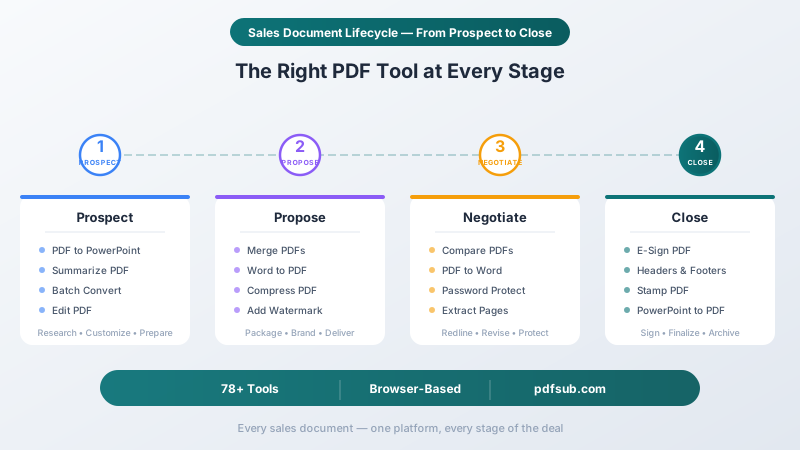
PDF Tools by Sales Workflow
1. Proposal Creation and Packaging
A proposal isn't one document. It's a package - and the way you assemble it says as much about your professionalism as the content itself.
A typical B2B proposal package includes a cover letter, executive summary, proposed solution, pricing breakdown, implementation timeline, relevant case studies, team bios, and terms and conditions. Some of these start as Word documents. Others are existing PDFs. The case studies might be pulled from a library of 50. The pricing sheet was just finalized in Excel.
Getting all of this into a single, polished PDF package is where most sales teams lose time.
The tools:
-
Merge PDFs - Combine your cover letter, pricing sheet, case studies, and terms into a single professional proposal package. Drag and drop files in the right order, rearrange as needed, and output one clean PDF. No more emailing six separate attachments and hoping the prospect opens them in the right order.
-
Word to PDF - Convert your proposal narrative and SOW from Word to PDF before merging. Preserves formatting, fonts, and layout so the document looks exactly the same on every device and operating system.
-
Compress PDF - A proposal package with high-resolution case study images can easily hit 30 to 50 MB. Email providers cap attachments between 10 and 25 MB. Compress reduces file size while maintaining visual quality so your proposal actually reaches the prospect's inbox instead of bouncing.
-
Add Watermark - Mark draft proposals as DRAFT before they're finalized, or stamp final versions as CONFIDENTIAL. Client-specific watermarks (adding the prospect's company name) add a professional touch that signals this isn't a cookie-cutter proposal.
-
Headers & Footers - Add your company logo, proposal title, date, and page numbers to every page of the package. This is especially important for merged documents where individual sections may not have consistent branding.
Real workflow example: Your AE finishes a proposal in Word, pulls three relevant case studies from the shared drive, grabs the standard terms PDF from legal, and exports the custom pricing from a spreadsheet. She converts the Word doc and spreadsheet to PDF, merges all six documents in order, adds a "CONFIDENTIAL" watermark, compresses the result from 42 MB to 8 MB, and emails it - all in under five minutes.
2. Contract Management and E-Signatures
Contract turnaround is where deals go to die. The average company loses 9% of its annual revenue to slow, inefficient contracting processes. Contracts typically go through 5 to 10 iterations before both parties agree, and each round-trip adds days to the sales cycle.
Then comes the signature. If you're still printing, signing, scanning, and emailing contracts, you're adding 3 to 5 business days to every deal. If you're paying $25 to $40 per user per month for an enterprise e-signature platform, you're spending thousands per year on a feature most sales teams use for straightforward sign-here workflows.
The tools:
-
E-Sign PDF - Add legally valid electronic signatures to contracts, NDAs, order forms, and any document that needs a signature. Draw, type, or upload your signature, place it on the document, and send. No per-envelope fees, no monthly caps on how many documents you can sign.
-
Compare PDFs - When the prospect's legal team sends back a redlined contract, Compare shows you exactly what changed between your version and theirs. Side-by-side comparison catches every edit - including the subtle ones buried on page 14 that could cost you margin.
-
PDF to Word - Convert received contracts to Word for editing. When a prospect sends their paper (their MSA, their terms), you need to be able to mark it up in a format your legal team can work with.
-
Password Protect - Encrypt contracts and pricing documents with password protection before sending. Essential for confidential agreements, custom pricing tiers, and any document containing competitive information.
-
Extract Pages - Pull specific sections from a master agreement for review. When legal only needs to see the indemnification clause and the limitation of liability section, send them just those pages instead of a 40-page MSA.
Real workflow example: A prospect's legal team returns a redlined MSA. Your AE uses Compare PDFs to identify all 12 changes, converts the PDF to Word so your legal counsel can respond to each redline, then converts the final version back to PDF and sends it for E-Sign. The entire redline-to-signature cycle that used to take a week now takes a day.
3. Presentations and Pitch Decks
Sales presentations live in a constant state of flux. The corporate deck gets customized for every prospect. The quarterly business review needs updated numbers. A partner sends their deck as a PDF and you need to incorporate three slides into your own presentation.
The format shuffle between PowerPoint and PDF is a daily reality for sales teams, and getting it wrong - sending an editable PowerPoint when you meant to send a locked PDF, or receiving a PDF when you need editable slides - wastes time at best and leaks confidential content at worst.
The tools:
-
PDF to PowerPoint - Convert PDF pitch decks back to editable PowerPoint. When a partner, vendor, or colleague sends a deck as a PDF and you need to customize it - add your client's logo, insert your pricing slide, or rearrange the narrative - this gets you back to an editable format without rebuilding from scratch.
-
PowerPoint to PDF - Convert finalized presentations to PDF for delivery. PDFs look identical on every device, can't be accidentally edited by the recipient, and don't require PowerPoint to open. This is how you send final presentations to prospects who shouldn't see your speaker notes or hidden slides.
-
Edit PDF - Make quick edits to presentations without converting back to PowerPoint. Add a text annotation, highlight a key metric, or annotate a slide with a note for the prospect. Ideal for post-meeting follow-ups where you want to mark up specific slides.
-
Stamp PDF - Add approval stamps, your company logo, or date stamps to finalized decks. Useful for internal approvals (marking a deck as "APPROVED BY MARKETING") or adding a professional date stamp to quarterly business review presentations.
4. RFP Response Assembly
RFP responses are the most document-intensive workflow in sales. The average enterprise team spends 25 hours assembling a single RFP response, and companies handle 150 to 266 RFPs per year depending on size. That's potentially thousands of hours per year spent on document assembly.
The challenge is that RFP responses pull content from everywhere: past proposals, technical documentation, compliance certifications, team bios, case studies, financial statements, and custom narrative sections written specifically for the opportunity. Getting all of this into a coherent, professionally formatted response package is a project in itself.
The tools:
-
Summarize PDF - When a 60-page RFP lands in your inbox, you need to quickly identify the key requirements, evaluation criteria, mandatory qualifications, and submission deadlines. AI-powered summarization extracts the critical information so you can assess fit and allocate resources before investing 25 hours in a response.
-
Merge PDFs - Assemble the final response package from individual sections. Technical response, management approach, past performance, pricing volume, compliance matrix - merge them into a single submission document with the right page order.
-
Extract Pages - Pull relevant sections from previous RFP responses, past performance documentation, or capability briefings. When 80% of an RFP response uses content you've already written, Extract Pages lets you pull the right pages from the right sources.
-
Batch Convert - Convert multiple supporting documents at once. Team bios in Word, org charts in PowerPoint, certifications as images - batch convert handles all of them in a single operation so you're not converting files one at a time.
-
Add Watermark - Mark draft responses for internal review before final submission, or add PROPRIETARY watermarks to the final submission to establish intellectual property protections.
5. Sales Collateral Management
Sales collateral is the supporting material that moves deals forward between meetings - case studies, product brochures, competitive comparisons, ROI calculators, white papers, and customer testimonials. Most sales teams have dozens of collateral assets, and keeping them organized, up-to-date, and ready to send is an ongoing challenge.
The problem isn't usually creating the content - marketing handles that. The problem is that collateral arrives in inconsistent formats, at unwieldy file sizes, without consistent branding, and in packages that don't match what the specific prospect actually needs to see.
The tools:
-
Extract Pages - Pull specific case studies from a master case study deck. When a prospect is in healthcare and your case study library has 30 studies across 10 industries, extract just the three healthcare case studies instead of sending the entire 60-page deck.
-
Compress PDF - Collateral PDFs with high-resolution images, embedded charts, and full-bleed designs can be massive. Compress them for email delivery without destroying the visual quality that marketing spent weeks perfecting.
-
Headers & Footers - Standardize branding across collateral pieces that came from different sources or different time periods. Add consistent headers with your current logo and footers with your website and contact information.
-
Edit PDF - Add quick annotations to collateral before sending. Circle a metric that's relevant to the prospect, add a note pointing to the section that addresses their specific concern, or highlight the ROI figure that matches their use case.
6. Deal Desk and Pricing Documents
Deal desk documents are the most sensitive documents in sales. Custom pricing proposals, discount authorization forms, competitive pricing analyses, and deal registration documents contain information that could damage your business if they reach the wrong hands.
These documents also tend to be the most time-sensitive. A pricing approval that takes two days to circulate internally can lose a deal that your competitor priced in two hours.
The tools:
-
Password Protect - Encrypt pricing documents before sending them to prospects. If a custom pricing proposal with aggressive discount tiers gets forwarded to a competitor, you've just handed them your pricing strategy. Password protection adds a layer of security that prevents casual forwarding.
-
Add Watermark - Add the prospect's company name as a watermark to custom pricing documents. This both personalizes the document and makes it traceable - if a pricing sheet leaks, the watermark identifies which prospect's document it was.
-
E-Sign PDF - Get pricing approvals signed internally before sending to the prospect. When a deal requires VP-level discount approval, E-Sign eliminates the print-sign-scan cycle and gets the authorization back in minutes instead of days.
-
Compare PDFs - Compare pricing iterations side by side. When you're negotiating a multi-year enterprise deal with custom pricing tiers, usage-based discounts, and volume commitments, Compare ensures you know exactly what changed between v3 and v4 of the pricing proposal.
E-Sign Without the Enterprise Price Tag
Let's talk about the elephant in the sales stack: e-signature pricing.
DocuSign's Standard plan costs $25 per user per month ($300/year) and caps you at roughly 100 envelopes per user annually. The Business Pro plan is $40 per user per month ($480/year). For a 10-person sales team, that's $3,000 to $4,800 per year - just for signatures.
And that's just the sticker price. Enterprise e-signature platforms often lock essential features behind higher tiers: custom branding on the Standard plan, advanced fields on Business Pro, and API access on Enterprise. The total cost of ownership climbs fast.
PDFSub takes a different approach. E-Sign is included as one of 98+ PDF tools in a single subscription, starting at $15 per month. There are no per-envelope fees and no monthly caps on how many documents you can sign.
Honest Comparison: Where PDFSub Fits
PDFSub is not trying to replace DocuSign for every use case. Here's an honest assessment:
| Feature | PDFSub E-Sign | DocuSign Standard |
|---|---|---|
| Add signature to PDFs | Yes | Yes |
| Draw, type, or upload signature | Yes | Yes |
| Per-envelope fees | None | ~100/user/year |
| Sequential multi-party routing | No | Yes |
| Automated reminders and workflows | No | Yes |
| Audit trail with tamper seal | No | Yes |
| CRM integration (Salesforce, HubSpot) | No | Yes |
| Template library for recurring docs | No | Yes |
| Additional PDF tools included | 98+ tools | Signatures only |
| Starting price | $15/mo | $25/user/mo |
PDFSub E-Sign is ideal for: Sales teams that need to sign contracts, NDAs, order forms, and internal approvals quickly - and don't need automated multi-party routing, CRM-integrated workflows, or compliance audit trails. If your signing workflow is "I sign it, then the prospect signs it, and we both keep a copy," PDFSub handles that at a fraction of the cost.
DocuSign is better for: Large organizations that need sequential signing workflows with automated reminders, detailed audit trails for compliance, deep CRM integration, and template libraries for high-volume recurring agreements.
The real value of PDFSub for sales teams isn't just cheaper e-signatures - it's that E-Sign comes bundled with every other PDF tool you need. Instead of paying $25/user/month for signatures, $20/month for a PDF editor, and $15/month for a compression tool, you get everything in one subscription.
The Hidden Cost of Slow Document Turnaround
Sales leaders obsess over pipeline metrics - conversion rates, average deal size, win rates - but rarely measure document velocity. That's a mistake.
Here's what the research shows:
-
Contract turnaround contributes up to 18% of the enterprise sales cycle. For a company with a 90-day sales cycle, that's 16 days consumed by document workflows. Cut it in half and you free up 8 days per deal.
-
Companies lose an average of 9% of annual revenue to slow, inefficient manual contracting processes. For a company doing $10M in revenue, that's $900,000 left on the table because contracts take too long.
-
82% of e-signed agreements are completed in less than a day, and 50% in less than 15 minutes. Compare that to 5 to 7 business days for traditional paper contracts. That's not incremental improvement - it's an order of magnitude faster.
-
Sales teams using e-signatures report a 23% improvement in monthly deal velocity. Not annual. Monthly. Compounded over a year, that's a transformative impact on revenue.
When you measure the time your team spends formatting proposals, assembling document packages, converting file formats, chasing signatures, and comparing contract redlines, you'll almost certainly find that document workflows are your single largest non-selling time drain after CRM data entry.
The solution isn't a $50,000 contract lifecycle management platform. For most sales teams, it's having the right PDF tools available when they need them - without waiting for IT approval, signing enterprise contracts, or learning complex software.
Mapping Tools to Your Sales Cycle
Here's a quick reference for which PDFSub tools to use at each stage of the sales cycle:
Prospecting and Discovery
| Task | Tool | Time Saved |
|---|---|---|
| Summarize a 60-page RFP to assess fit | Summarize PDF | 1-2 hours |
| Convert a partner's PDF deck for customization | PDF to PowerPoint | 30-45 min |
| Convert multiple collateral pieces for a prospect | Batch Convert | 15-30 min |
Proposal and Pricing
| Task | Tool | Time Saved |
|---|---|---|
| Assemble proposal package from 5+ documents | Merge PDFs | 20-30 min |
| Compress proposal for email delivery | Compress PDF | 5-10 min |
| Convert Word proposal to polished PDF | Word to PDF | 5-10 min |
| Add CONFIDENTIAL watermark to pricing | Add Watermark | 2-5 min |
| Add branding and page numbers | Headers & Footers | 5-10 min |
Negotiation and Redlining
| Task | Tool | Time Saved |
|---|---|---|
| Compare redlined contract to original | Compare PDFs | 30-60 min |
| Convert received contract for legal markup | PDF to Word | 10-15 min |
| Extract specific clauses for review | Extract Pages | 5-10 min |
| Encrypt sensitive pricing documents | Password Protect | 2-5 min |
Closing and Execution
| Task | Tool | Time Saved |
|---|---|---|
| Get NDA/contract signed electronically | E-Sign PDF | 3-5 days |
| Finalize presentation for delivery | PowerPoint to PDF | 5-10 min |
| Add approval stamp to signed documents | Stamp PDF | 2-5 min |
| Quick edits to final documents | Edit PDF | 10-20 min |
Security for Sales Documents
Sales documents contain some of the most sensitive information in your organization - pricing strategies, competitive intelligence, customer terms, and proprietary methodologies. The tools you use to handle these documents need to reflect that sensitivity.
PDFSub's editing tools (Merge, Compress, Watermark, Extract Pages, and others) process your files directly in the browser. Your documents are never uploaded to a server for these operations. For AI-powered tools like Summarize PDF, documents are processed through the PDFSub Engine with secure, isolated processing and are not retained after the operation completes.
This matters for sales teams handling:
- Custom pricing proposals with aggressive discount tiers
- Competitive analyses comparing your product to alternatives
- Contract drafts containing negotiated terms
- RFP responses with proprietary technical approaches
- Deal desk documents with internal margin targets
When your proposal contains your best pricing for a Fortune 500 prospect, "processed in the browser" isn't just a feature - it's a requirement.
Frequently Asked Questions
How many PDF tools does PDFSub include?
PDFSub includes 98+ tools covering document editing, conversion, e-signatures, AI analysis, compression, security, and more. All tools are included in every subscription - there's no feature gating or per-tool pricing.
Can PDFSub replace DocuSign for my sales team?
For straightforward signing workflows - one or two signers, no automated routing - yes. PDFSub's E-Sign tool handles the same basic signing use case at a fraction of the cost. If you need sequential multi-party routing, automated reminders, CRM integration, or compliance audit trails, DocuSign or a similar enterprise platform is the better fit.
Are signed documents legally valid?
Electronic signatures are legally valid in the United States under the ESIGN Act and in the European Union under the eIDAS Regulation. PDFSub's E-Sign tool creates electronic signatures that meet these legal standards for standard business contracts.
How does browser-based processing work for proposals with confidential pricing?
When you use PDFSub's editing tools (Merge, Compress, Watermark, Extract Pages, Edit, and others), your files are processed entirely in your web browser. The document data never leaves your device. This means your confidential pricing proposals, competitive analyses, and contract drafts are never uploaded to any server.
Can I use PDFSub on my phone or tablet during client meetings?
Yes. PDFSub works in any modern web browser on any device - desktop, laptop, tablet, or phone. You can merge documents, sign contracts, or compress files from your phone during a client dinner or from your tablet during a presentation.
What file formats does PDFSub support for conversion?
PDFSub converts between PDF and Word (DOC/DOCX), PowerPoint (PPT/PPTX), Excel (XLS/XLSX), HTML, images (JPG, PNG, WEBP, TIFF, HEIC), EPUB, RTF, ODT, ODS, ODP, SVG, and plain text. The Batch Convert tool handles multiple files at once.
How does Summarize PDF help with RFP responses?
When you receive a lengthy RFP (often 40 to 100+ pages), Summarize PDF uses AI to extract the key requirements, evaluation criteria, mandatory qualifications, submission deadlines, and scoring methodology. This lets you assess fit and allocate team resources in minutes instead of spending two hours reading the full document.
Is there a limit on how many documents I can sign or process?
There are no per-envelope fees for E-Sign and no per-document fees for any tool. Your subscription includes unlimited use of all 98+ tools.
Stop Wrestling with Documents. Start Closing Deals.
Every minute a sales rep spends formatting a proposal, converting a file, or chasing a signature is a minute they're not spending with a prospect. The math is simple: faster document workflows mean more selling time, and more selling time means more revenue.
PDFSub gives sales teams every PDF tool they need - from proposal assembly to contract signatures - in one subscription, at a price that doesn't require a procurement review.
Try PDFSub free and see how much time your sales team gets back.