PDF Tools for Nonprofits and NGOs: Grants, Compliance, and Impact Reporting
Nonprofits juggle grant proposals, donor communications, compliance filings, and program reports - all on tight budgets. Here's how to streamline every document workflow without breaking the bank.
A nonprofit receives a $5,000 discretionary grant. Good news, right? Then the paperwork arrives: 37 separate documents required to process the contract, several needing notarization. The organization spends dozens of staff hours - worth more than the grant itself - just on administrative compliance.
This is not a hypothetical. The Center for an Urban Future documented exactly this scenario at BEAM (Bridge to Enter Advanced Mathematics), a New York City education nonprofit. And it is far from unusual. Across the country, nonprofits divert hundreds of thousands of staff hours annually to document preparation, formatting, signing, filing, and reporting - hours that could have gone toward the communities they serve.
The math is brutal: every dollar your organization spends wrestling with PDFs, printing forms for wet signatures, or manually compiling grant packages is a dollar that does not reach your mission. With approximately 1.8 million registered nonprofits in the United States - 92% operating on budgets under $1 million - the administrative tax on the sector is staggering.
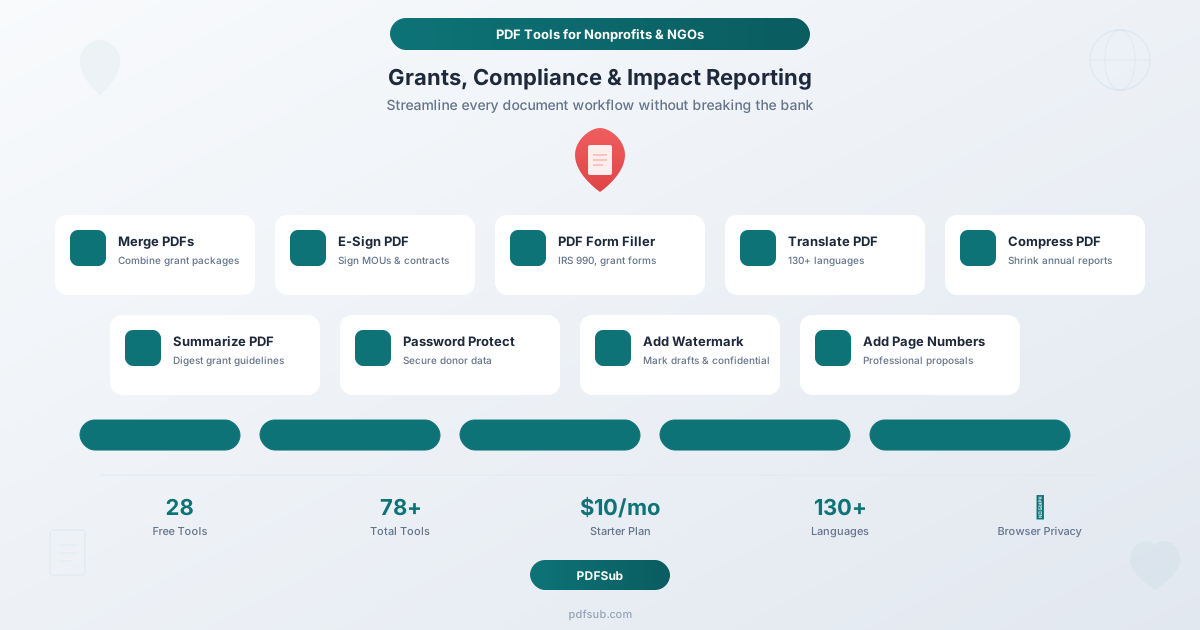
This guide maps the specific PDF tools that nonprofits and NGOs need across every document workflow: grant writing, donor management, board governance, compliance filings, program reporting, and international operations. More importantly, it shows how to handle all of it affordably, with full-platform access at $20/user/mo (annual) with a 7-day free trial.
Why Nonprofits Need Affordable PDF Tools
Before diving into workflows, it helps to understand why nonprofits face a uniquely difficult document management challenge compared to for-profit organizations.
The Budget Reality
Nonprofits allocate just 3.9% of revenue to technology on average, yet nearly half of nonprofit executives acknowledge insufficient digital expertise within their organizations. Small nonprofits - those with annual budgets under $500,000 - spend just $7,595 on IT annually, yet that figure represents 13.2% of their total budget. Compare that to very large nonprofits spending $235,445, which is only 1.5% of their budget. The smaller the organization, the more painful every technology dollar.
This creates a dilemma. Enterprise document management platforms like Adobe Acrobat Pro cost $23-$25/user/month. For a five-person nonprofit, that is $1,500/year just for PDF editing - a meaningful chunk of a small organization's technology budget. Multiply that by the CRM, accounting software, email marketing platform, and other tools a modern nonprofit requires, and the licensing costs quickly become unsustainable.
The Document Volume Problem
Meanwhile, the paperwork never stops. A typical mid-size nonprofit might handle:
- 5-20 grant applications per year, each requiring narrative proposals, budgets, organizational charts, letters of support, and board resolutions - often merged into a single PDF package
- Annual IRS Form 990 filing (with potential schedules A through R), due by the 15th day of the 5th month after fiscal year-end, with automatic revocation of tax-exempt status after three consecutive years of non-filing
- State registration renewals in every state where the organization solicits donations (up to 41 states require registration)
- Donor acknowledgment letters for every contribution of $250 or more, required by the IRS for donors to claim tax deductions
- Board meeting packets quarterly or monthly, with agendas, financial statements, committee reports, and resolutions
- Program reports to funders on a quarterly, semi-annual, or annual basis
- Annual reports for public distribution
- MOUs and partnership agreements with contractors, partner organizations, and government agencies
Each of these documents needs to be created, formatted, signed, protected, compressed, and distributed - often under tight deadlines and with limited staff.
The Compliance Pressure
Federal grant compliance alone involves 12 key requirements under the Uniform Guidance (2 CFR 200), covering allowable costs, procurement, reporting, and subrecipient monitoring. All documentation must be retained for at least three years after grant closeout. State-level requirements add another layer of complexity, with charity registration, annual filings, and solicitation disclosures varying by jurisdiction.
For nonprofits handling donor data, there are additional privacy considerations. Donor lists, giving histories, and personal information must be secured. Board deliberations and financial projections should be kept confidential. Draft grant proposals shared for review should be clearly marked. All of this requires document-level security controls - password protection, watermarking, and redaction - that most free PDF viewers simply do not offer.
PDF Tools by Nonprofit Workflow
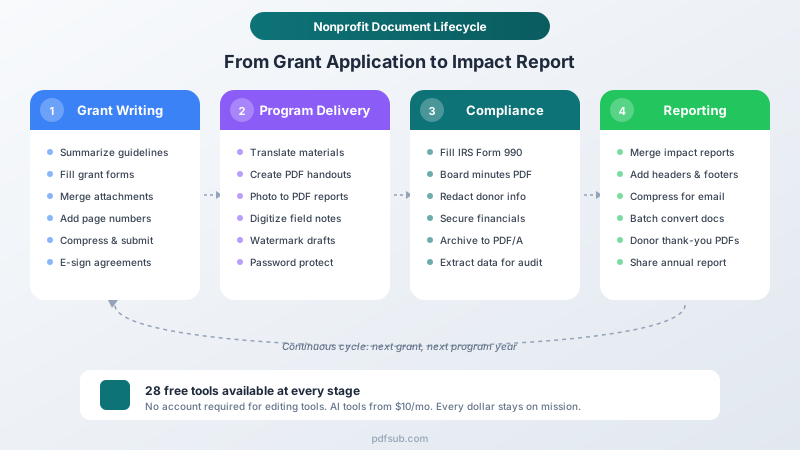
Let us walk through the six major document workflows that every nonprofit and NGO encounters, and the specific tools that streamline each one.
1. Grant Writing and Proposal Submission
Grant writing is where nonprofits live or die. A strong proposal that is poorly formatted, exceeds the page limit, or arrives as a bloated email attachment can be rejected outright. Here is how to get the documents right.
Summarize PDF - Before writing a single word of your proposal, you need to digest the funder's guidelines. Federal RFPs from Grants.gov can run 50-100 pages. Foundation guidelines might include specific formatting requirements, required attachments, and evaluation criteria buried in dense text. Use AI-powered summarization to extract the key requirements, deadlines, page limits, and evaluation criteria into a concise brief. This alone can save hours of staff time per application and reduce the risk of missing a requirement that disqualifies your proposal.
PDF Form Filler - Many funders provide fillable PDF application forms. Federal grants, state agencies, and larger foundations increasingly use standardized PDF forms for cover sheets, budget summaries, and organizational information. Rather than printing, filling by hand, and scanning (which degrades quality and increases file size), fill forms digitally. The result is clean, professional, and searchable.
Create PDF - When a funder does not provide a template, you need to create proposal documents from scratch. Build professional-looking narratives, logic models, and program descriptions as polished PDFs without purchasing desktop publishing software.
Page Numbers - Grant reviewers read dozens of proposals. Page numbers make your application navigable and professional. Some funders explicitly require sequential page numbering across the entire application package. PDFSub lets you add page numbers in any position with custom formatting.
Headers & Footers - Add your organization name, the grant program name, or your EIN to every page. This is especially important for applications submitted as part of a larger package, where pages from multiple organizations may be interleaved.
Merge PDFs - The final grant package typically includes the narrative proposal, budget and budget justification, organizational chart, board list, 501(c)(3) determination letter, audited financial statements, letters of support from partners, and any supplementary materials. Rather than submitting these as seven separate attachments (and hoping the reviewer assembles them in the right order), merge everything into a single, professionally ordered PDF. All PDFSub tools are available with a 7-day free trial.
Compress PDF - Many grant portals have file size limits (10-25 MB is common). A grant package with scanned letters of support and financial statements can easily exceed this. Compress the final PDF to ensure it uploads without issues while maintaining readable quality.
E-Sign PDF - Grant applications often require authorized signatures from the executive director, board chair, or fiscal officer. Letters of support from partner organizations need signatures. MOUs attached to collaborative proposals need multiple signatories. Instead of printing, signing, scanning, and reattaching (a process that adds 2-3 days for multi-party documents), sign electronically. This avoids the $15-$50/month cost of dedicated e-signature platforms.
2. Donor Management and Stewardship
Donor communications are both legally required and strategically critical. The IRS requires written acknowledgment for charitable contributions of $250 or more, and donors need these documents to claim tax deductions. Beyond compliance, donor stewardship - thanking donors, reporting on how their gifts were used, and maintaining the relationship - is what drives repeat giving.
Create PDF - Generate polished donor acknowledgment letters that include all IRS-required elements: your organization's name, the donation amount, the date received, and a statement about whether goods or services were provided in return. Create these as professional PDFs that donors can easily file with their tax records.
Batch Convert - At year-end, many nonprofits send hundreds or thousands of acknowledgment letters. If your donor management system exports letters as Word documents or HTML, batch convert them to PDF in one step. This ensures consistent formatting and makes the documents easy to email as attachments.
PDF to Word - Sometimes you receive documents from donors - pledge agreements, matching gift forms, or correspondence - in PDF format that you need to edit. Convert them to editable Word documents, make your updates, and convert back.
Password Protect - Donor records often contain personal financial information: giving amounts, credit card details, employer names, and home addresses. When sharing donor reports with board members or auditors, password-protect the PDFs. This is especially important for major donor prospect lists and giving history reports.
Add Watermark - Mark draft donor reports, campaign analyses, and prospect research documents as "CONFIDENTIAL" or "DRAFT" to prevent premature distribution. This is particularly important for capital campaign feasibility studies and board briefing materials that contain sensitive strategic information.
Extract Data - When donors send correspondence, pledges, or matching gift documentation as PDFs, extract the structured data - names, amounts, dates, matching gift company - rather than manually re-entering it into your CRM. AI-powered extraction handles varying document formats without needing custom templates for each donor's paperwork.
3. Board Governance and Compliance
Nonprofits are accountable to the public, and that accountability is enforced through a web of federal, state, and organizational governance requirements. The board of directors sits at the center of this, and the documents they produce and review are among the most important an organization handles.
PDF Form Filler - IRS Form 990 is the cornerstone of nonprofit compliance. The full Form 990 runs 12 pages, and organizations may need to attach several of the 16 available schedules (Schedule A for public charity status, Schedule B for contributors, Schedule D for supplemental financial statements, and so on). While many organizations use a CPA or tax software to prepare the 990, smaller nonprofits sometimes fill forms directly. PDFSub's form filler detects and populates fillable fields without requiring a paid tax preparation subscription.
Merge PDFs - Board meeting packets are assembled from multiple sources: the agenda (created by staff), financial statements (from the accountant), committee reports (from committee chairs), executive director report, and any resolutions requiring board action. Merge these into a single, organized packet with a consistent table of contents.
Add Page Numbers - Board packets can run 30-100 pages. Sequential page numbering makes it possible for board members to reference specific sections during meetings. "Please turn to page 47 for the finance committee report" is much more efficient than "It is the third attachment after the blue page."
Compress PDF - Board members are often volunteers with personal email accounts that have attachment size limits. Compress the final board packet so it can be emailed reliably. For organizations distributing via a board portal, compression also speeds downloads on mobile connections - important for board members reviewing materials on the go.
E-Sign PDF - Board resolutions, conflict-of-interest disclosures, minutes approvals, and officer elections all require signatures. Circulating paper documents to 9-15 board members (the average nonprofit board size) and collecting wet signatures can take weeks. E-signing lets you get signatures from all board members in days, with a clear audit trail showing who signed and when.
Password Protect - Board materials often contain confidential information: executive compensation discussions, litigation updates, personnel matters, and strategic plans. Password-protect board packets before distribution. For particularly sensitive materials (executive sessions, legal opinions), use separate password-protected documents with restricted distribution.
Add Watermark - Mark draft financials, proposed budgets, and preliminary audit findings as "DRAFT" to prevent them from being treated as final. This is a governance best practice that protects board members and staff alike.
Redact PDF - When making board materials available for public inspection (as required in some states or for transparency), redact personally identifiable information, Social Security numbers, bank account details, and other sensitive data. Unlike drawing a black box over text in a regular editor, proper PDF redaction permanently removes the underlying data.
4. Program Reporting and Impact Documentation
Funders want to know their money made a difference. Program reports are the primary vehicle for demonstrating impact, and they come in many forms: narrative reports, data tables, photo documentation, participant testimonials, and financial accountings. The quality of these reports directly affects future funding.
Image to PDF - Field staff capture program activities through photos: community meetings, training sessions, infrastructure projects, health screenings. Convert these photos into professional PDF reports with captions and context. This is far more compelling than attaching a zip file of JPGs to an email.
Handwritten Conversion - Program staff working in the field - community health workers, agricultural extension agents, social workers - often record data and observations by hand. Digitize handwritten field notes, surveys, and intake forms into searchable, editable text. This bridges the gap between on-the-ground program delivery and office-based reporting requirements.
Merge PDFs - Program reports often combine narrative sections (written in Word), data tables (from Excel), photo documentation (converted from images), and financial summaries. Merge all components into a single, cohesive report that tells the complete story.
Headers & Footers - Add your organization's logo, the grant number or program name, and the reporting period to every page. This branding and identification is especially important when funders receive reports from dozens of grantees.
Add Page Numbers - For multi-section reports, page numbers help readers navigate between the narrative, data appendix, and financial section. Some funders specify required page numbering formats.
Compress PDF - Impact reports with photos and charts can easily reach 50-100 MB. Many funder portals cap uploads at 10-25 MB. Compress without losing the visual quality that makes impact photos effective.
Summarize PDF - When your organization receives program evaluation reports or research findings from external evaluators, AI summarization helps staff quickly identify key findings, recommendations, and data points to incorporate into future proposals and board reports.
Extract Data - Pull structured data from program reports, evaluation documents, and partner communications. Extract outcome metrics, participant counts, financial data, and other key indicators without manual data entry.
5. International Programs and Multi-Language Needs
For NGOs operating across borders, every document workflow gets more complicated. Legal agreements must be understood in multiple languages. Program materials must reach participants who speak dozens of languages. Compliance requirements vary by country. And all of this must happen with the same constrained budget.
Translate PDF - This is the highest-impact tool for international NGOs. Translate program materials, consent forms, training manuals, and policy handbooks across 130+ languages. When NGO documents run 20-30 pages of policies, safety rules, and codes of conduct, the challenge is not just translation - it is clarity and consistency. PDFSub preserves the document layout while translating content, so you do not need to reformat after translation.
Consider the real-world applications: A health NGO distributing patient education materials in East Africa needs Swahili, Amharic, French, and English versions. A refugee resettlement organization needs intake forms in Arabic, Dari, Ukrainian, and Spanish. An environmental organization publishing research needs versions for stakeholders across Latin America, Southeast Asia, and Europe. Manual translation of a 30-page handbook into four languages would cost $3,000-$6,000 through a professional translation agency and take 2-4 weeks. AI translation provides a working draft in minutes that can then be reviewed by in-country staff for cultural accuracy.
PDF to Word - When receiving documents from international partners, governments, or donors in PDF format, convert them to editable Word documents for translation, annotation, or adaptation to local contexts. Partnership agreements from a foreign government may arrive as a PDF in the local language - convert it, translate it, and review it before signing.
E-Sign PDF - Cross-border agreements (MOUs, partnership agreements, subgrant agreements) need signatures from parties in different countries. Rather than mailing paper documents internationally - which can take weeks and risks loss in transit - e-sign documents and maintain a digital audit trail that satisfies compliance requirements in both jurisdictions.
Password Protect - International operations involve sensitive data subject to data protection laws in multiple jurisdictions (GDPR in Europe, national privacy laws elsewhere). Password-protect documents containing beneficiary information, local staff details, and financial data as they move between country offices and headquarters.
Compress PDF - Internet bandwidth varies dramatically across the countries where NGOs operate. A 50 MB report that downloads instantly in Washington, DC takes minutes on a 3G connection in rural Uganda. Compress documents to make them accessible across varied infrastructure conditions.
Create PDF - Generate locally-adapted program materials, training guides, and informational documents for different country programs. Create professional PDFs from text content without requiring design software licenses in every field office.
6. Fundraising and Events
Beyond grants, nonprofits raise funds through individual giving campaigns, special events, annual appeals, and major donor cultivation. Each of these activities generates its own document requirements.
Create PDF - Design event programs, sponsorship packages, case-for-support documents, and campaign brochures. Create professional fundraising materials without graphic design software subscriptions.
Merge PDFs - Sponsorship proposals often include a cover letter, sponsorship levels and benefits, event details, organizational history, and financial information. Merge these into a polished, single-document package that corporate sponsors can easily review and share internally.
Compress PDF - Email marketing platforms typically limit attachment sizes. Compress event invitations, annual reports, and campaign materials so they can be attached to donor emails without bouncing.
Add Watermark - Mark draft event materials, preliminary budgets, and unapproved sponsorship proposals to prevent premature circulation.
Image to PDF - Convert event photos into post-event reports and donor impact updates. A photo compilation showing event highlights, attendees, and beneficiary stories makes a compelling stewardship piece.
Batch Convert - After an event, you may have a mix of Word documents (thank-you letters), Excel files (financial reconciliation), and images (event photos). Batch convert everything to PDF for consistent archival and distribution.
The Budget-Friendly Approach
Here is where PDFSub's value proposition aligns with nonprofit realities.
Try Every Tool with a 7-Day Free Trial
PDFSub offers a 7-day free trial with full access to all 98+ tools. The trial covers essential operations that nonprofits use daily:
| Tool | Nonprofit Use Case |
|---|---|
| Merge PDFs | Combine grant packages, board packets |
| Compress PDF | Shrink reports for email and portals |
| Rotate PDF | Fix scanned documents |
| Split PDF | Separate multi-section reports |
| Delete Pages | Remove outdated sections |
| Reorder Pages | Arrange packet sections |
| Add Page Numbers | Professional document formatting |
| PDF to Image | Create graphics from report pages |
| Image to PDF | Build photo-based impact reports |
| Extract Pages | Pull specific sections for sharing |
Many of these tools process files directly in your browser - nothing is uploaded to a server. After the trial, the All-In-One plan is $20/user/mo (annual) or $25/user/mo (monthly), with cancellation available in one click.
Full Platform: $15/Month Starter
For organizations that need AI-powered features (summarization, translation, data extraction, form filling) and advanced tools (e-sign, password protection, batch conversion), the PDFSub All-In-One plan is $20/user/mo (annual). Compare this to the alternatives:
| Tool | Monthly Cost | What You Get |
|---|---|---|
| Adobe Acrobat Pro | $23-25/user | PDF editing, e-sign, forms |
| DocuSign Standard | $25/user | E-signatures only |
| Smallpdf Pro | $12/user | PDF tools, no AI features |
| PDFSub All-In-One | $25/user (annual) | 98+ tools, 500 AI credits, 500 BSC pages, 130+ languages |
For a five-person nonprofit, Adobe Acrobat Pro would cost $1,380-1,500/year. PDFSub costs $180/year for the entire organization to share. That is a savings of $1,200+ annually - enough to fund a small program grant, cover a month of office rent for a small organization, or pay for half a year of another essential software subscription.
What This Means for Grant Budgets
When writing grant budgets, technology costs are a line item that reviewers scrutinize. A $180/year PDF platform is easy to justify. A $1,500/year per-seat PDF suite raises questions about fiscal responsibility - exactly the wrong impression to make in a grant proposal.
For nonprofits that include indirect cost calculations in federal grants, keeping technology costs low directly improves your indirect cost rate, making your proposals more competitive. Under the Uniform Guidance, technology costs contribute to your modified total direct costs, and lower overhead rates make your organization a more attractive grantee.
Frequently Asked Questions
Can multiple staff members use one PDFSub account?
Yes. PDFSub accounts are not per-seat. Your entire team can use the same account, which is a significant advantage for nonprofits where 3-5 staff members may all need to work with PDFs but cannot justify per-user licensing fees.
Is our donor data safe?
PDFSub's editing tools (merge, compress, rotate, page numbers, and others) process files entirely in your browser. Your documents are never uploaded to a server. For AI-powered tools that require server processing (summarize, translate, extract data), files are processed in isolated environments via the PDFSub Engine and are not stored after processing completes. This means donor information, financial data, and confidential board materials remain secure.
Can we fill IRS Form 990 with PDFSub?
Yes. PDFSub's PDF Form Filler detects and populates all fillable fields in IRS Form 990 and its schedules. You can fill the form digitally, save your progress, and download the completed form for filing. For organizations that use a CPA for final preparation, you can fill in the sections you know (organizational information, officer details, program descriptions) and send the partially completed form to your accountant.
How does the translation quality compare to professional translation?
PDFSub's AI translation across 130+ languages produces working drafts suitable for internal review and operational use. For legal documents (contracts, compliance filings in foreign jurisdictions), we recommend having in-country staff or a professional translator review the AI output. For program materials, training handouts, and internal communications, the AI translation is typically sufficient for immediate use. The key advantage is speed and cost: a 30-page handbook translated into four languages in minutes versus weeks and thousands of dollars through a translation agency.
Do you offer nonprofit pricing or discounts?
At $20/user/mo annual for the All-In-One plan, PDFSub is competitively priced for nonprofits versus comparable platforms that charge per-tool or per-envelope. A 7-day free trial lets you evaluate every feature before subscribing. For large nonprofits or NGOs needing higher volume processing, contact our team to discuss organizational needs.
Can we use PDFSub for grant compliance documentation?
Absolutely. Several tools directly support compliance workflows: PDF/A Conversion creates archival-quality documents that meet federal record retention requirements, Password Protect secures sensitive financial and donor data, Merge PDFs compiles all required documentation into organized packages, and Extract Data helps pull structured information from grant reports for audit purposes. Federal grants require document retention for three or more years after closeout - PDF/A format ensures these documents remain readable and compliant long-term.
What about accessibility?
Many funders and government agencies require documents to meet accessibility standards (Section 508 for federal, WCAG for general web accessibility). PDFSub's text-based tools preserve the underlying text layer that screen readers depend on, and Add Page Numbers and Headers & Footers create consistent navigation structures that improve document accessibility.
Making Every Document Dollar Count
The nonprofit sector contributes an estimated $1.5 trillion to the U.S. economy and employs 12.8 million people. These organizations provide essential services in health, education, social services, the arts, and environmental protection. The administrative overhead that diverts their resources from mission delivery is not just an organizational problem - it is a societal one.
Every hour a program director spends reformatting a PDF grant application is an hour not spent on program design. Every $25/month spent on a per-seat document tool is $25 not available for direct services. Every week wasted collecting wet signatures on a board resolution is a week of delayed organizational action.
The tools exist to eliminate this friction. A 7-day free trial gives you full access to all 98+ tools right now, in your browser. After that, the All-In-One plan is $20/user/mo (annual) - competitive with a single lunch meeting.
Your mission is too important for bad PDF workflows. Start a 7-day free trial and see how much time you get back for the work that matters.