PDF Tools for Government Agencies: FOIA, Archiving, and Public Records
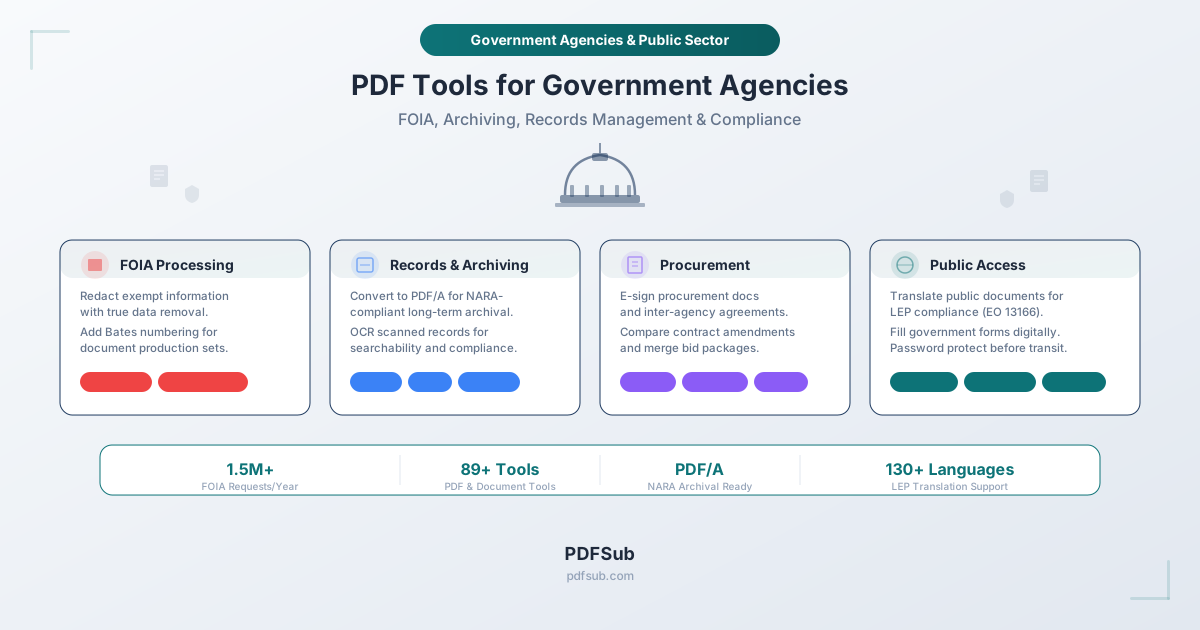
Government agencies process millions of documents - FOIA requests, procurement contracts, policy documents, grants. Here's the complete toolkit for records management, redaction, archiving, and compliance.
In fiscal year 2024, federal agencies received a record 1.5 million Freedom of Information Act requests. Each one demands document review, redaction of exempt information, page numbering, and release - often within a statutory 20-business-day window. And FOIA is just one workflow. Government agencies at every level - federal, state, county, and municipal - also manage procurement contracts, grant applications, policy documents, permits, licenses, compliance forms, meeting minutes, inter-agency agreements, and public communications.
The volume is staggering. The federal government alone imposes an estimated 9.78 billion burden hours of paperwork annually, and the Office of Management and Budget's M-23-07 directive now requires all permanent federal records to be managed, transferred, and archived electronically. Paper is no longer acceptable. As of July 2024, the National Archives and Records Administration (NARA) will not accept permanent records in analog formats - everything must be digital, searchable, and properly formatted.
Government workers face this reality with tools that were often designed for general consumers, not for agencies that need true redaction (not visual cover-ups), PDF/A archival conversion (not just "save as PDF"), Bates-style page numbering for document productions, and processing that keeps sensitive constituent data off third-party servers.
This guide maps the essential PDF workflows in government - FOIA processing, records management, procurement, grants, policy development, and public communications - to the specific tools that handle each task, with attention to the security, accessibility, and compliance requirements that define public sector document management.
Why Government Agencies Need Specialized PDF Tools
The Scale of Government Paperwork
Government agencies operate at a scale that dwarfs most private-sector organizations. Consider the numbers:
- 1.5 million FOIA requests received by federal agencies in FY 2024 alone - a 25% increase over the prior year
- Five agencies (DHS, DOJ, VA, DOD, and HHS) collectively handle 84% of all federal FOIA requests
- 9.78 billion burden hours of federally mandated paperwork imposed on agencies, businesses, and individuals annually
- Thousands of state and local agencies each managing their own records retention schedules, public records laws, and document workflows
Every one of these interactions generates PDFs - requests, responses, contracts, applications, permits, reports, meeting minutes, and compliance filings. And each PDF may need to be redacted, numbered, merged, converted, signed, translated, compressed, archived, or some combination of all of these.
Compliance Requirements That Shape Every Workflow
Unlike private businesses, government agencies operate under a web of overlapping mandates that dictate exactly how documents must be created, processed, released, and stored:
| Requirement | What It Mandates | Impact on PDF Workflows |
|---|---|---|
| FOIA / State Public Records Laws | Respond to records requests within statutory deadlines; redact only exempt information | Redaction, page numbering, merge, metadata removal |
| NARA / M-23-07 | All permanent records must be electronic; transfers to NARA must be in digital format with metadata | PDF/A conversion, OCR, batch conversion |
| Section 508 | All electronic content must be accessible to individuals with disabilities | OCR (searchable text layers), accessible PDF structure |
| Executive Order 13166 (LEP) | Agencies must provide meaningful access to services for people with limited English proficiency | Document translation |
| Records Retention Schedules | Documents must be retained for specified periods - some permanently | PDF/A archiving, compression for storage |
| Procurement Regulations (FAR) | Federal Acquisition Regulation governs contract documentation | E-signatures, document comparison, merge |
| Privacy Act / PII Protection | Personally identifiable information must be protected from unauthorized disclosure | Redaction, metadata removal, encryption |
Generic PDF viewers and editors are not built with these requirements in mind. A government FOIA officer does not need a tool that highlights text in black and calls it "redaction." They need a tool that permanently, irrecoverably removes exempt content from the document's data structure - because the difference between a visual cover-up and true redaction is the difference between compliance and a data breach that makes the front page.
PDF Tools by Government Workflow

1. FOIA and Public Records Processing
FOIA processing is the highest-stakes PDF workflow in government. Every federal agency has a FOIA office, and most states have equivalent public records laws (California Public Records Act, New York FOIL, Texas Public Information Act, etc.) that impose similar obligations on state and local agencies. The workflow follows a consistent pattern: receive a request, search for responsive records, review for exempt information, redact, number, assemble, and release.
Each step maps to a specific PDF tool.
Redaction: The Most Legally Consequential Step
FOIA has nine exemptions that allow agencies to withhold information - national security (Exemption 1), personal privacy (Exemptions 6 and 7(C)), trade secrets (Exemption 4), law enforcement records (Exemption 7), and others. When responsive records contain both releasable and exempt information, agencies must redact the exempt portions and release the rest. The statute requires agencies to "take reasonable steps to segregate and release nonexempt information."
This makes redaction the single most legally consequential PDF operation in government. If the redaction tool merely draws a black rectangle over text without removing the underlying data, the "redacted" information remains in the PDF file and can be recovered by anyone who knows how to select text, copy-paste, or inspect the document structure. This is not a theoretical risk - redaction failures have exposed classified information, law enforcement records, and personal data in high-profile cases.
PDFSub's Redact tool performs true redaction. When you redact content, the underlying text data, metadata, and any references to the redacted content are permanently removed from the PDF. The data is not hidden or masked - it is destroyed. The redacted areas are replaced with solid fills that contain no recoverable information beneath them.
FOIA redaction marking requirements: The Department of Justice's Office of Information Policy requires that redacted documents clearly indicate the amount of information withheld, its location within the document, and the FOIA exemption being asserted for each redaction. This typically means the redacted area shows a notation like "(b)(6)" or "(b)(7)(C)" to identify the applicable exemption. True redaction tools that permanently remove data while leaving visible exemption markers fulfill both the segregation requirement (releasing nonexempt information) and the marking requirement (showing what was withheld and why).
Bates-Style Page Numbering for Document Productions
FOIA responses frequently span hundreds or thousands of pages. Each page needs a unique identifier so that requesters, agencies, and courts can reference specific pages in correspondence, appeals, and litigation. Bates-style numbering - sequential identifiers like "FOIA-001," "FOIA-002" - provides this tracking.
PDFSub's Add Page Numbers tool applies sequential numbering to every page in a document or merged document set. For FOIA productions, this means a requester can reference "page FOIA-347" in an appeal, and the agency can locate exactly which document and page is at issue.
Merging Multi-Part Responses
Many FOIA responses involve records from multiple offices, divisions, or systems. A single request about a government program might produce responsive records from the legal office, the program office, the communications office, and the inspector general. These must be assembled into a single, organized response package.
PDFSub's Merge tool combines multiple PDFs into one document with drag-and-drop ordering. After merging, apply page numbers to create a unified, numbered production set ready for release.
Metadata Removal Before Public Release
PDFs contain hidden metadata that can inadvertently disclose information the agency intended to withhold - author names, revision history, internal comments, creation timestamps, and software version information. Before releasing documents publicly, agencies should strip this metadata to prevent unintentional disclosures.
PDFSub's Remove Metadata tool strips hidden data from PDF files before release. This is a critical but often overlooked step in the FOIA workflow.
Extracting Pages from Lengthy Records
When a FOIA request targets specific information within a larger file - say, pages 45 through 72 of a 500-page report - agencies need to extract just the responsive pages rather than releasing (and redacting) the entire document.
PDFSub's Extract Pages tool pulls specific page ranges from larger documents. This is also useful when different pages are responsive to different requests, or when different exemptions apply to different sections and must be processed separately.
2. Records Management and Archiving
The federal government's transition to electronic records management is no longer optional. OMB Memorandum M-23-07, issued in December 2022, updated the original M-19-21 mandate and established a firm deadline: as of June 30, 2024, NARA will only accept permanent records in electronic format with appropriate metadata. Agencies that still have paper records must digitize them before transfer.
This mandate affects every federal agency and has ripple effects at the state and local level, where many jurisdictions are adopting similar electronic records requirements.
PDF/A Conversion for Long-Term Archival
PDF/A is the ISO-standardized format for long-term document preservation. Unlike standard PDFs, PDF/A files are self-contained - all fonts are embedded, no external dependencies exist, JavaScript and encryption are prohibited, and the file is designed to be renderable decades from now without relying on any specific software version.
NARA recommends PDF/A for permanent records transfer, and many state archives have adopted similar requirements. The format ensures that a document created today will be readable in 50 or 100 years without depending on specific rendering software.
PDFSub's PDF/A Conversion tool converts standard PDFs to PDF/A format. For agencies preparing records for NARA transfer or state archives, this is a critical step in the records management workflow. Batch processing is especially important when dealing with the volume of records that government agencies generate - converting hundreds of documents individually is not practical.
OCR: Making Scanned Records Searchable and Compliant
Government agencies hold vast archives of scanned documents - paper records that were photocopied or scanned to PDF over decades of digitization efforts. These image-only PDFs appear to contain text but are actually just pictures of text. They cannot be searched, the text cannot be selected or copied, and they fail Section 508 accessibility requirements because screen readers cannot interpret them.
The M-23-07 digitization mandate means agencies must not only scan paper records but also make them searchable. An unsearchable scan is barely better than the paper original from a records management perspective - you still cannot find what you need without manually reviewing every page.
PDFSub's OCR tool converts scanned PDFs into fully searchable documents. The visual appearance remains identical, but an invisible text layer is added that enables full-text search, text selection, and screen reader access. PDFSub supports OCR in over 130 languages, which matters for agencies with records in foreign languages - immigration records, international correspondence, treaty documents, and records from multilingual communities.
Compression for Digital Storage
Government records repositories can grow to enormous sizes. A single agency might manage millions of documents, many of them high-resolution scans that are tens of megabytes each. Storage costs add up, and records management systems often have file size limits that reject oversized uploads.
PDFSub's Compress tool reduces PDF file sizes without sacrificing readability. For agencies transferring large volumes of records to digital repositories, compression can significantly reduce storage requirements and transfer times.
Batch Conversion for Legacy Documents
Many government offices still have documents in Word, Excel, PowerPoint, and other formats that need to be converted to PDF for records management. Some legacy systems output documents in formats that modern records management systems cannot ingest.
PDFSub's Batch Convert tools convert documents from multiple formats to PDF, enabling agencies to standardize their records in a single archival format. Combined with PDF/A conversion, this creates a complete pipeline from legacy formats to archival-ready records.
3. Procurement and Contract Management
Government procurement is one of the most document-intensive workflows in the public sector. The Federal Acquisition Regulation (FAR) alone runs thousands of pages, and every procurement action - from requests for proposals (RFPs) to contract awards to modifications - generates its own document trail. State and local procurement follows similar patterns, with agencies managing solicitations, bid evaluations, award notifications, and contract files.
E-Signatures for Procurement Documents
Government contracting involves signatures at virtually every stage: memoranda of understanding, inter-agency agreements, contract awards, modifications, delivery orders, and contractor performance evaluations. Traditionally, these required wet-ink signatures that added days or weeks to already lengthy procurement timelines.
The ESIGN Act and the Government Paperwork Elimination Act (GPEA) provide the legal framework for electronic signatures in government. Many agencies have adopted e-signature policies that allow digital signing of procurement documents, with some exceptions for classified or certain high-value actions.
PDFSub's E-Sign tool allows government employees to add signatures directly to procurement PDFs - sign inter-agency agreements, approve purchase orders, or execute contract modifications without printing, wet-signing, scanning, and re-uploading. The signed document is a standard PDF that integrates with existing document management systems.
For procurement specifically, the key advantage is speed. A contract modification that sits on a contracting officer's desk waiting for a wet signature delays the entire procurement action. E-signatures eliminate this bottleneck.
Comparing Contract Amendments and Modifications
Government contracts are frequently modified - scope changes, period of performance extensions, funding adjustments, and clause updates. When a modification changes contract terms, the contracting officer needs to verify exactly what changed between the original and modified versions. Missing a changed clause in a multi-million-dollar contract can result in unauthorized obligations, audit findings, or protest actions.
PDFSub's Compare tool provides visual side-by-side comparison that highlights every difference between two PDF documents. This is particularly valuable when reviewing contract modifications to verify that only the intended changes were made, or when comparing successive RFP amendments to track how solicitation requirements evolved.
Merging Bid Packages and Contract Files
Procurement files typically include multiple documents: the solicitation, all amendments, the winning proposal, the evaluation report, the price negotiation memorandum, the contract award, and supporting documentation. These must be assembled into a complete contract file for audit and retention purposes.
PDFSub's Merge tool combines these documents into a single organized contract file. After merging, add page numbers for easy reference during audits and reviews.
Password Protection for Pre-Decisional Documents
Before contract award, procurement documents are source-selection sensitive. Evaluation reports, competitive range determinations, and pricing analyses must be protected from unauthorized access. Unauthorized disclosure of source-selection information can lead to protests, re-competitions, and even criminal liability under the Procurement Integrity Act.
PDFSub's Password Protect tool encrypts PDFs with password protection before transmission or storage. This adds a layer of protection for sensitive procurement documents shared between evaluation team members or forwarded to approval authorities.
4. Grant Administration
Federal agencies award hundreds of billions of dollars in grants annually, and every grant - from application to close-out - generates a substantial document trail. The same is true at the state and local level, where agencies both issue and receive grants. The paperwork includes applications (SF-424 and related forms), budget justifications, progress reports, financial reports (SF-425), audit reports, and close-out documentation.
Filling Government Forms Digitally
Government grant forms - SF-424 (Application for Federal Assistance), SF-424A (Budget Information), SF-425 (Federal Financial Report) - are distributed as PDF forms. Grant applicants and recipients need to fill these forms digitally without printing, handwriting, and scanning.
PDFSub's PDF Form Filler allows users to fill government PDF forms directly in the browser. Type into form fields, select checkboxes, and save the completed form as a standard PDF ready for submission. This is particularly useful for smaller organizations - nonprofits, community groups, and local governments - that receive federal grants but may not have specialized grant management software.
AI Data Extraction from Applications
Grant program officers review hundreds or thousands of applications per funding cycle. Each application contains key data points - organization name, requested amount, project description, budget breakdown, performance metrics - that must be extracted and entered into grant management systems.
PDFSub's Extract Data tool uses AI to extract structured data from PDF applications and compliance forms. Instead of manually re-typing information from each application, program officers can extract the key fields into structured formats for analysis and system entry.
Converting Reports for Editing
Grant recipients submit progress and financial reports as PDFs. Program officers often need to edit, annotate, or incorporate sections of these reports into their own summary documents. Converting the PDF to an editable format is faster than retyping.
PDFSub's PDF to Word tool converts PDF reports to editable Word documents, preserving formatting and layout. This allows program officers to pull relevant sections from grantee reports into review summaries, briefing documents, and Congressional reports.
5. Policy Development and Compliance
Government agencies continuously develop, revise, and publish policies - regulations, directives, standard operating procedures, guidance documents, and compliance manuals. The policy lifecycle involves multiple drafts, inter-agency review, legal review, public comment periods, and final publication. Each stage generates document versions that must be tracked, compared, and managed.
Comparing Policy Drafts
Policy documents go through numerous revisions as they move through the development process. A proposed regulation may be reviewed by the program office, the legal office, the budget office, and the Office of Management and Budget before publication. Each reviewer may make changes, and the policy owner needs to track every modification across versions.
PDFSub's Compare tool highlights differences between policy draft versions at the visual level - not just text changes, but formatting, layout, and structural modifications. This is critical when a legal reviewer moves a clause from one section to another, or when a budget reviewer changes a dollar figure buried in a table.
Extracting Data from Compliance Forms
Regulatory agencies collect compliance data through standardized forms - environmental monitoring reports, financial disclosures, safety inspection reports, and licensing applications. This data needs to be extracted and analyzed to identify compliance trends, flag violations, and generate enforcement statistics.
PDFSub's Extract Data tool pulls structured information from compliance PDFs, reducing the manual data entry that consumes hours of staff time. For agencies processing thousands of compliance filings per year, this automation is significant.
Batch Converting Legacy Policy Documents
Many agencies maintain policy libraries that span decades. Older policies may exist as scanned images, Word documents, WordPerfect files, or other legacy formats. Standardizing these into searchable, archival-ready PDFs makes the policy library accessible and compliant with electronic records requirements.
Use OCR for scanned documents, Batch Convert for documents in other formats, and PDF/A Conversion for archival-ready output.
6. Public Communications and Accessibility
Government agencies have a unique obligation that private businesses do not: they must make their documents accessible to every member of the public, regardless of disability or language proficiency. Two federal mandates shape this requirement - Section 508 of the Rehabilitation Act and Executive Order 13166 on Limited English Proficiency.
Section 508: Accessibility for Individuals with Disabilities
Section 508 requires all federal electronic content - including PDFs - to be accessible to individuals with disabilities. This means PDFs must conform to WCAG 2.0 Level AA success criteria. In practical terms, this requires:
- Searchable text - not scanned images of text. Screen readers cannot interpret image-only PDFs.
- Proper document structure - headings, lists, and tables must be tagged so assistive technology can navigate them.
- Alternative text for images - visual content must have text descriptions.
- Reading order - the logical reading order must be correct for screen readers.
The most common Section 508 failure for PDFs is also the simplest to fix: scanned documents that lack a text layer. When a government office scans a paper document and posts the resulting image-only PDF on its website, that document is inaccessible to anyone using a screen reader - and the agency is out of compliance.
PDFSub's OCR tool adds a searchable text layer to scanned PDFs, addressing the most fundamental accessibility requirement. While full Section 508 compliance involves additional tagging and structure work, OCR is the essential first step that transforms an inaccessible image into a document that assistive technology can begin to interpret.
Executive Order 13166: Limited English Proficiency
Executive Order 13166, signed in 2000, requires federal agencies to provide meaningful access to services for people with limited English proficiency (LEP). This extends to recipients of federal financial assistance - which means state agencies, local governments, nonprofits, and other organizations that receive federal grants must also comply.
In practice, this means vital documents must be translated into the languages spoken by the LEP populations each agency serves. A county health department serving a large Spanish-speaking population must provide vital health notices in Spanish. A state transportation agency with significant Korean-speaking communities must translate key public safety documents into Korean.
The Department of Justice outlines a four-factor analysis for determining translation obligations: the number of LEP individuals in the service area, the frequency of contact, the importance of the service, and the resources available. But the obligation is clear - agencies cannot simply publish everything in English and call it a day.
PDFSub's Translate PDF tool translates PDF documents while preserving formatting and layout. With support for over 130 languages, it covers the vast majority of LEP populations that government agencies serve. For agencies that need to translate public notices, application instructions, safety information, and benefit eligibility documents, this tool addresses the EO 13166 obligation directly.
A practical note on translation quality: AI-powered translation has advanced considerably but is not yet a substitute for certified human translation of legally binding documents. PDFSub's translation tool is ideal for internal drafts, initial translations that will be reviewed by bilingual staff, and informational documents where conveying the essential meaning is the priority. For documents with legal force - consent decrees, regulatory notices with compliance deadlines, rights notifications - agencies should use the translated draft as a starting point and have it reviewed by a qualified translator.
Security Considerations for Government
Government agencies handle some of the most sensitive information in existence - law enforcement records, personally identifiable information, health records protected by HIPAA, classified materials, pre-decisional policy documents, source-selection sensitive procurement data, and confidential constituent communications. The tools used to process these documents must meet security expectations that go beyond what consumer-grade PDF tools provide.
Browser-Based Processing: The Security Advantage
The most effective way to protect sensitive government data is to avoid transmitting it in the first place. Tools that process PDFs entirely in the browser - without uploading files to external servers - eliminate an entire category of risk.
When a FOIA analyst uses a browser-based redaction tool, the document never leaves the agency's network. There is no data in transit to intercept, no file stored on a third-party server to be breached, and no cloud infrastructure that might be shared with foreign entities or commercial competitors.
PDFSub processes many of its tools - including redaction, merge, extract pages, page numbers, compress, compare, form fill, e-sign, password protect, and remove metadata - entirely in the browser. The document stays on the user's device from start to finish. For these browser-based operations, the security model is simple: if the document never leaves your machine, the only security perimeter that matters is the one your agency already controls.
For operations that require server-side processing - OCR, AI-powered data extraction, PDF/A conversion, translation, and format conversions - PDFSub uses isolated, secure server-side processing through the PDFSub Engine. Files are processed in isolation with no internet access and deleted after processing. But the browser-first approach means the majority of everyday government document tasks never require server interaction at all.
FedRAMP: An Honest Assessment
The Federal Risk and Authorization Management Program (FedRAMP) provides a standardized security assessment framework for cloud services used by federal agencies. FedRAMP authorization requires extensive documentation, third-party security assessment, and continuous monitoring - a process that typically costs $500,000 to $2 million and takes 12 to 18 months.
PDFSub is not FedRAMP authorized. This is an important limitation for federal agencies that require FedRAMP-authorized tools for cloud services that process, store, or transmit federal data.
However, context matters. FedRAMP applies to cloud services - tools where federal data is uploaded to and processed on external servers. For PDFSub's browser-based tools, no federal data is transmitted to PDFSub's servers. The processing happens entirely within the browser on the user's own device. This distinction is relevant (though not necessarily dispositive) in the FedRAMP analysis:
| Processing Type | Data Leaves Agency Network? | FedRAMP Relevance |
|---|---|---|
| Browser-based tools (redact, merge, compare, etc.) | No | Lower - no cloud data processing |
| Server-side tools (OCR, translate, PDF/A, etc.) | Yes - processed in isolation, deleted after processing | Higher - cloud processing involved |
For agencies that require FedRAMP authorization for all tools, PDFSub's server-side features would not meet that requirement in their current form. For agencies that distinguish between tools that process data locally versus those that transmit data to external servers, PDFSub's browser-based tools may be appropriate - but agencies should consult their own IT security and procurement offices to make that determination.
State and local agencies generally do not have FedRAMP requirements, though many have their own security assessment frameworks (StateRAMP, TX-RAMP, etc.). PDFSub's browser-based processing model is often well-suited to these environments.
Data Handling Practices
For operations that do involve server-side processing, PDFSub follows these practices:
- Encryption in transit - all file uploads use TLS encryption
- No persistent storage - files are deleted after processing
- Isolated processing - documents are processed in isolation through the PDFSub Engine, not in shared environments
- No training on user data - uploaded documents are not used to train AI models
Frequently Asked Questions
Is PDFSub FedRAMP authorized?
No. PDFSub does not currently hold FedRAMP authorization. For federal agencies that require FedRAMP-authorized tools, PDFSub's server-side features (OCR, translation, PDF/A conversion, AI data extraction) would not meet that requirement. However, PDFSub's browser-based tools process documents entirely on your device without transmitting data to external servers, which changes the security calculus. Consult your agency's IT security office to determine whether browser-based tools fall within your authorization requirements.
Does PDFSub's redaction tool perform true redaction or just visual cover-up?
True redaction. PDFSub permanently removes the underlying text, metadata, and all references to the redacted content from the PDF file structure. The data is irrecoverably destroyed - it cannot be recovered by selecting text, inspecting the document, or using forensic tools. This is the standard required for FOIA productions, law enforcement records, and any document containing exempt or sensitive information.
Can PDFSub convert documents to PDF/A for NARA compliance?
Yes. PDFSub's PDF/A Conversion tool converts standard PDFs to PDF/A format, which is the ISO standard for long-term document preservation and is recommended by NARA for permanent records transfer. PDF/A files are self-contained - all fonts embedded, no external dependencies, no JavaScript, no encryption - ensuring the document remains readable for decades.
How does browser-based processing work?
For browser-based tools, the PDF file is processed entirely within your web browser using local computing resources. The file is never uploaded to PDFSub's servers or any external server. Processing happens on your device, and the output file is generated locally. This means sensitive government documents - FOIA responses, procurement files, constituent data - never leave your network.
Can PDFSub handle the volume of documents government agencies process?
PDFSub's tools are designed for individual and batch document processing. For operations like merging FOIA response packages, batch converting legacy documents, or compressing large record sets, the tools handle multi-document workflows. For enterprise-scale automation involving thousands of documents per day with API integration, agencies should evaluate whether PDFSub's current feature set meets their volume requirements.
Does PDFSub support Bates numbering?
PDFSub's Add Page Numbers tool applies sequential numbering to documents, which serves the Bates numbering function required for FOIA productions and legal document management. You can apply numbering after merging documents to create a unified, sequentially numbered production set.
Can PDFSub translate government documents for LEP compliance?
Yes. PDFSub's Translate PDF tool supports over 130 languages and preserves document formatting during translation. This directly supports Executive Order 13166 obligations. For vital documents with legal force, we recommend using the AI translation as a starting draft and having it reviewed by qualified human translators before publication.
What about accessibility - does PDFSub help with Section 508 compliance?
PDFSub's OCR tool addresses the most fundamental Section 508 requirement for PDFs: making scanned documents searchable by adding a text layer that screen readers can interpret. Full Section 508 compliance involves additional document structure and tagging work, but OCR is the essential first step for any scanned document.
Getting Started
Government document workflows are complex, but the tools do not need to be. Whether you are a FOIA analyst processing public records requests, a contracting officer managing procurement files, a records manager preparing archives for NARA transfer, or a communications officer translating public notices for LEP communities, the tasks map to straightforward PDF operations: redact, merge, number, convert, sign, compress, translate, compare, extract.
The browser-based tools process documents on your device without uploading them to external servers - which aligns with the security posture that government agencies require for sensitive documents. The server-side tools handle operations that need more processing power - OCR, translation, format conversion - with isolated processing and no persistent storage.
Explore the full set of PDF tools at PDFSub and see which ones map to your agency's document workflows.