How to Convert PDF to PDF/A for Long-Term Archiving
PDF/A is the ISO standard for long-term document preservation. Here's how to convert your PDFs to PDF/A - required for government, legal, and compliance archiving.
You've been told to submit your documents in PDF/A format. Maybe it's a government filing, a legal court submission, a healthcare record, or a corporate compliance requirement. You look at your regular PDF and wonder: what's wrong with it? Why does it need to be "PDF/A"? And how do you convert it?
PDF/A is an ISO standard (ISO 19005) designed for one purpose: ensuring that a PDF document can be reproduced exactly the same way, on any system, decades from now. A regular PDF can reference external fonts, link to websites, run JavaScript, and depend on system resources that may not exist in 20 years. A PDF/A file is entirely self-contained - everything needed to render the document is embedded within the file itself.
This matters more than you might think. Government archives need to open documents 50 years from now. Courts need to ensure evidence hasn't changed. Healthcare systems need patient records that render identically on any platform. PDF/A guarantees this.
This guide explains what PDF/A is, which variant you need, who requires it, and how to convert your existing PDFs.
What Makes PDF/A Different from Regular PDF
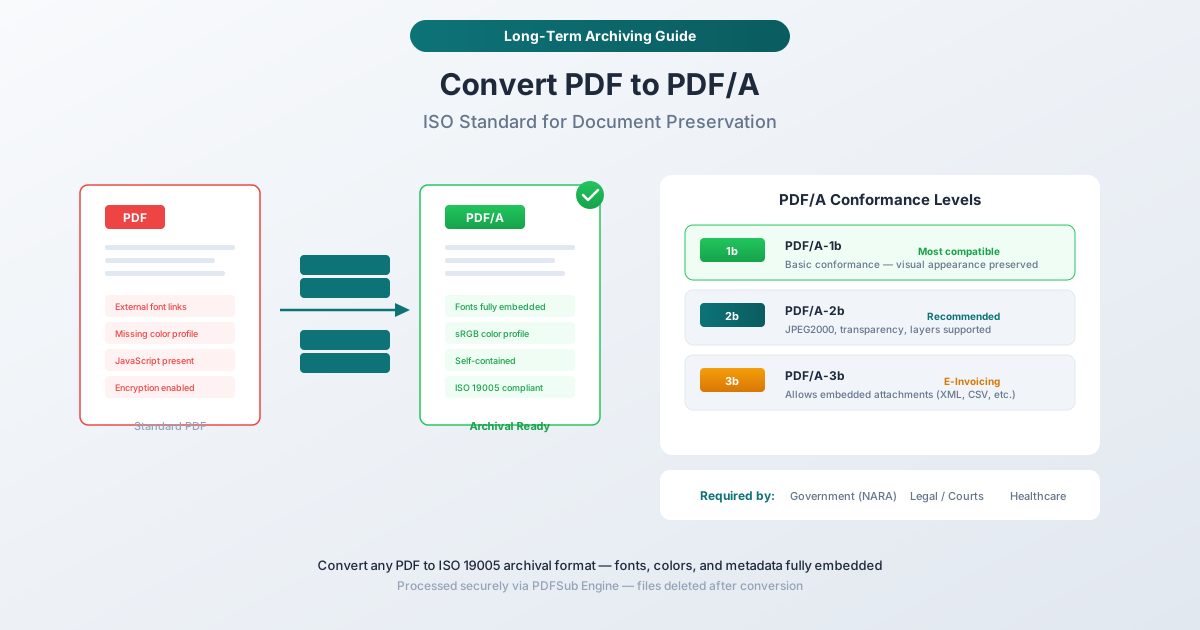
A standard PDF is remarkably flexible. It can embed fonts or reference system fonts. It can include JavaScript for interactive forms. It can link to external content. It can use encryption. This flexibility makes PDF great for everyday use - but it creates problems for long-term preservation.
Consider what happens when you try to open a 20-year-old PDF that references a font that doesn't exist on your system. The viewer substitutes a different font, and suddenly the document looks different - text reflows, columns shift, tables break. For a regular business document, this is annoying. For a legal contract or government record, it's unacceptable.
PDF/A eliminates these risks by enforcing strict rules:
Everything Must Be Embedded
Fonts: Every font used in the document must be fully embedded - not just referenced. This means the entire font file (or at minimum, the subset of glyphs used) is stored inside the PDF. Even if the font disappears from every operating system on earth, the document will render correctly.
Color profiles: The document must include ICC color profiles that define exactly how colors should be displayed. A regular PDF might say "use red" and leave the interpretation to the viewer. A PDF/A file specifies exactly which shade of red, using a standardized color profile.
Images: All images must be embedded, not linked. No external URLs, no references to files on a network drive.
Some Features Are Prohibited
JavaScript: No executable code allowed. Interactive forms that rely on JavaScript calculations won't work in PDF/A. The form fields can remain, but any scripting is stripped.
Encryption: PDF/A files cannot be encrypted or password-protected. The rationale is that encryption depends on specific algorithms and key lengths that may become obsolete - and an archive that can't be opened is useless.
External references: No links to external content, no multimedia that streams from the internet, no dependencies on anything outside the file.
Transparency (in PDF/A-1): The earliest PDF/A standard doesn't support transparency in graphics. Later versions (PDF/A-2 and PDF/A-3) added transparency support.
PDF/A Conformance Levels Explained
PDF/A isn't a single standard - it comes in several variants, each building on the previous one. Here's what you need to know.
PDF/A-1b (ISO 19005-1, Level B)
The original PDF/A standard from 2005. Level B ("basic") ensures the visual appearance of the document is preserved - the document will look the same on any system. It doesn't guarantee that text can be searched or extracted (that's Level A).
Best for: Simple documents where visual preservation is the only requirement. The most widely supported variant - if you're not sure what to use, PDF/A-1b is the safest choice.
PDF/A-1a (ISO 19005-1, Level A)
Level A ("accessible") adds requirements for document structure: tagged content, proper reading order, Unicode text mapping, and alternative text for images. This makes the document fully accessible to screen readers and ensures text can be reliably searched and extracted.
Best for: Documents that need to be accessible under ADA, Section 508, or WCAG compliance requirements.
PDF/A-2b (ISO 19005-2, Level B)
Published in 2011, PDF/A-2 is based on the newer PDF 1.7 specification. It adds support for JPEG2000 image compression, transparency in graphics, and PDF layers (optional content groups). It also allows embedding other PDF/A files as attachments.
Best for: Modern documents with transparency effects, layered content, or embedded PDF attachments. The recommended choice for most new conversions.
PDF/A-3b (ISO 19005-3, Level B)
The key innovation in PDF/A-3: it allows embedding any file type as an attachment - not just other PDF/A files. This means you can attach the original Word document, an XML data file, a CSV spreadsheet, or any other source file alongside the archived PDF.
Best for: E-invoicing (the ZUGFeRD and Factur-X standards require PDF/A-3), hybrid archival where source data needs to travel with the visual document, and workflows that require both human-readable and machine-readable formats in a single file.
Which Variant Should You Choose?
| Requirement | Recommended Variant |
|---|---|
| General archiving | PDF/A-2b |
| Maximum compatibility | PDF/A-1b |
| Accessibility compliance | PDF/A-2a |
| E-invoicing (ZUGFeRD / Factur-X) | PDF/A-3b |
| Archiving with source file attachments | PDF/A-3b |
| Government submission (check requirements) | Usually PDF/A-1b or PDF/A-2b |
When in doubt, ask the receiving organization which variant they accept. If they just say "PDF/A" without specifying, PDF/A-2b is the safest modern choice.
Who Requires PDF/A?
PDF/A isn't just a nice-to-have - many organizations and regulations require it.
Government Archives
The U.S. National Archives and Records Administration (NARA) requires PDF/A for permanent electronic records. The European Commission mandates PDF/A for official documents. Many national archives worldwide have similar requirements.
Courts and Legal Systems
An increasing number of court systems require PDF/A for electronic filings. The logic is straightforward: legal documents must be preserved exactly as submitted, potentially for decades. PDF/A's self-contained nature ensures a contract filed today looks identical when reviewed in 2060.
Healthcare
Medical records and clinical documentation must be preserved in standardized formats. PDF/A is widely adopted in healthcare information systems (HIS) and electronic health record (EHR) platforms for this purpose.
Financial Services
Banking regulators, audit trails, and financial reporting increasingly require PDF/A for long-term record retention. The Basel Accords and various national banking regulations specify retention periods of 5-10+ years for certain documents.
E-Invoicing
The European e-invoicing standards ZUGFeRD (Germany/Austria) and Factur-X (France) specifically require PDF/A-3b format. The PDF/A document contains the human-readable invoice, while an embedded XML attachment carries the machine-readable structured data.
Corporate Compliance
Many large organizations have adopted PDF/A as their standard archival format. If you work with enterprise clients, government contractors, or regulated industries, you'll encounter PDF/A requirements sooner or later.
How to Convert PDF to PDF/A with PDFSub
PDFSub's PDF to PDF/A tool processes the conversion server-side using the PDFSub Engine, which handles the complex work of embedding fonts, converting color profiles, removing prohibited features, and validating the output.
Step-by-Step Instructions
Step 1: Open the tool. Navigate to pdfsub.com/tools/pdf-to-pdfa.
Step 2: Upload your PDF. Drag and drop the file or click to browse. The file uploads to PDFSub's secure processing servers.
Step 3: Select the conformance level. Choose your PDF/A variant - PDF/A-1b, PDF/A-2b, or PDF/A-3b. If you're unsure, PDF/A-2b is the recommended default.
Step 4: Convert. Click the convert button. The PDFSub Engine processes the document: embedding fonts, adding color profiles, stripping JavaScript and encryption, and performing other required transformations.
Step 5: Download. The converted PDF/A file downloads with the conformance level included in the metadata. You can verify the conversion using any PDF/A validator.
What the Conversion Process Does
The conversion engine performs several transformations automatically:
- Embeds all fonts - any referenced-but-not-embedded fonts are located and embedded
- Adds ICC color profile - typically sRGB for screen display, ensuring consistent color rendering
- Strips JavaScript - any scripting is removed (form fields remain but lose interactivity)
- Removes encryption - password protection is stripped (the document must be accessible)
- Converts transparency - for PDF/A-1, transparent elements are flattened into opaque equivalents
- Adds PDF/A metadata - the XMP metadata block is updated to declare conformance
Troubleshooting Conversion Issues
"Font Cannot Be Embedded"
Some fonts have licensing restrictions that prevent embedding. If the conversion fails because of a restricted font, you have two options: substitute the font with an embeddable alternative (the conversion tool can do this automatically with a visually similar font), or go back to the source document and change the font before re-exporting as PDF.
Document Looks Slightly Different After Conversion
This usually happens when transparency is flattened (for PDF/A-1 conversion) or when fonts are substituted. If visual fidelity is critical, try converting to PDF/A-2b instead of PDF/A-1b - the newer standard supports transparency natively, which eliminates most visual differences.
File Size Increased After Conversion
This is expected. PDF/A files embed everything - fonts, color profiles, full metadata. A regular PDF that references system fonts might be 200 KB, but the PDF/A version with those fonts fully embedded could be 2 MB. The increase is the cost of self-containment.
Form Fields Lost Interactivity
PDF/A prohibits JavaScript, so form calculations, validation scripts, and dynamic behaviors are stripped. The form fields themselves remain - they can still be filled in - but any automated behavior is gone. If you need interactive forms, PDF/A isn't the right format for the working copy. Use PDF/A only for the final, archived version.
Frequently Asked Questions
Can I still edit a PDF/A document?
PDF/A is an archival format, not a locked-down format. You can open and edit a PDF/A file in any PDF editor. However, editing may break the PDF/A conformance - the editor might add features or remove metadata that violates the standard. After editing, you'd need to re-convert to PDF/A to restore conformance. For this reason, it's best to keep your editable source file separate and only convert to PDF/A when the document is finalized.
Is PDF/A the same as a "read-only" PDF?
No. A read-only PDF is one with owner-level password protection that prevents editing. PDF/A actually prohibits encryption - it can't be password-protected at all. PDF/A is about preservation, not access control. Anyone can open, copy, and (technically) edit a PDF/A file.
How do I verify that my PDF is valid PDF/A?
Several tools can validate PDF/A conformance. Adobe Acrobat Pro has built-in PDF/A validation. The free veraPDF tool is an open-source validator used by many archives and libraries. PDFSub's conversion process includes validation - if the output passes, you'll see a conformance indicator.
Will converting to PDF/A change how my document looks?
In most cases, no. The whole point of PDF/A is visual preservation. However, some edge cases can cause minor changes: transparency flattening in PDF/A-1, font substitution for non-embeddable fonts, and removal of multimedia elements. Converting to PDF/A-2b or PDF/A-3b minimizes these issues since the newer standards support more features.
What's the difference between PDF/A and PDF/X?
PDF/A is for archiving - long-term preservation with guaranteed reproducibility. PDF/X is for print production - ensuring a document prints correctly across different printing systems. They're different standards for different purposes, though a document can technically conform to both.
Summary
PDF/A is the ISO standard for long-term document preservation. It ensures your documents can be opened and displayed identically on any system, at any point in the future, by embedding everything needed for rendering within the file itself.
For most conversions, PDF/A-2b is the recommended choice - it's modern, widely supported, and handles features like transparency and JPEG2000 that the original PDF/A-1b standard doesn't. Use PDF/A-1b when maximum backward compatibility is required, and PDF/A-3b when you need to embed non-PDF attachments (particularly for e-invoicing).
The conversion process is automatic - the tool handles font embedding, color profiles, JavaScript removal, and validation. Your job is simply to upload the PDF and choose the conformance level.
Ready to convert? Try PDFSub's PDF to PDF/A tool - upload your document, select a conformance level, and get an archival-ready file in seconds.