How to Convert Handwritten Notes to Digital Text
Your handwritten notes are unsearchable, unshareable, and at risk of being lost. Here's how to convert handwriting to digital text using AI - from messy meeting notes to grandmother's recipe collection.
You had a brilliant idea during a meeting. You scribbled it across three pages of a notebook. Now you need to find it, share it with your team, or turn it into something actionable. But the notebook is on your desk, the idea is buried between grocery lists and phone numbers, and searching through handwritten pages is exactly as efficient as it sounds.
Handwritten notes have a fundamental problem: they are trapped in physical form. You cannot search them. You cannot copy and paste from them. You cannot back them up to the cloud, share them in a group chat, or run them through a spell checker. If the notebook gets lost, water-damaged, or left in a taxi, everything in it is gone.
This is not a small problem. Researchers estimate that the average professional takes hundreds of pages of handwritten notes per year. Students fill entire shelves with lecture notebooks. Families have shoeboxes of recipes, letters, and journals written by people who are no longer around to re-dictate them.
The solution is converting handwritten text to digital text. And until recently, that meant typing it all out by hand.
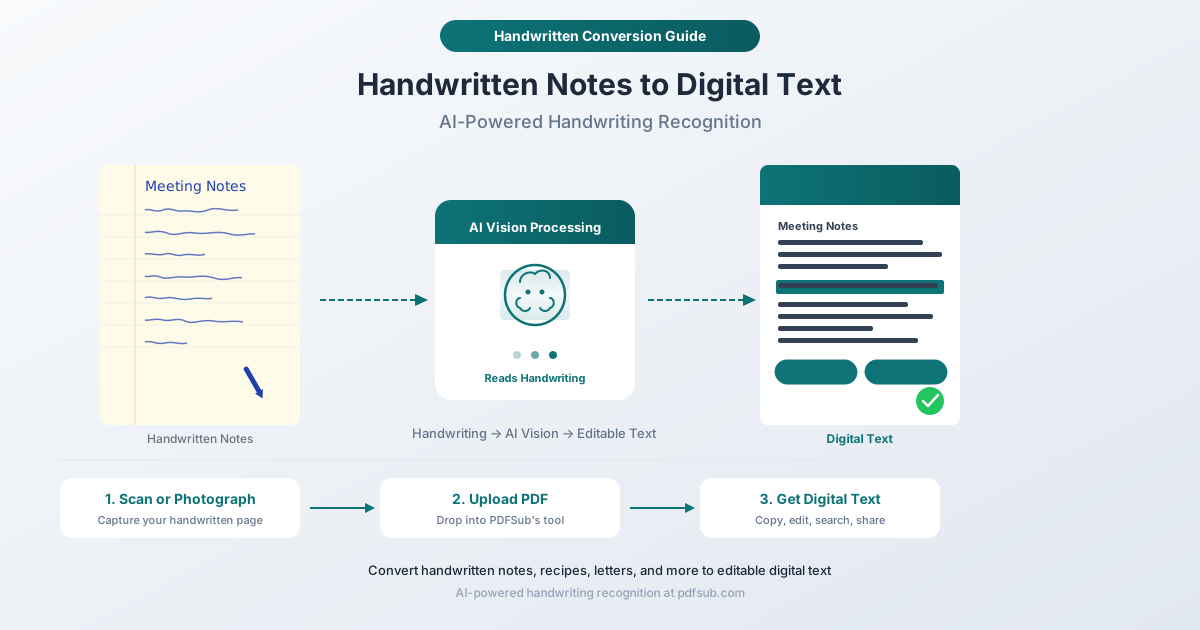
What Handwritten Conversion Actually Does
Traditional OCR (Optical Character Recognition) was designed for printed text - clean, uniform fonts on white paper. It works well for scanned documents from a laser printer. But handwriting is a different challenge entirely. Every person writes differently. The same person writes differently depending on whether they are sitting at a desk or balancing a notebook on their knee. Letters connect, overlap, vary in size, and sometimes abandon the baseline altogether.
Handwritten conversion uses AI vision models instead of traditional OCR. Rather than matching individual character shapes against a database of known fonts, AI vision analyzes the full context of the page - the way letters flow together, the structure of words within sentences, and the meaning of the text itself. If a character is ambiguous on its own, the surrounding words help the AI resolve it, much like how you can read a friend's messy handwriting because you understand what they are probably saying.
The result is structured digital text you can copy, paste, edit, search, and share.
What Kinds of Handwritten Content Can It Handle?
AI-powered handwriting recognition works across a wide range of content types:
- Meeting notes and brainstorms - Action items, decisions, whiteboard summaries
- Lecture notes - Class notes, study guides, formulas, diagrams with annotations
- Recipes - Handwritten recipe cards, cookbook margin notes, family recipes passed down through generations
- Business plans and outlines - Early-stage ideas, project sketches, to-do lists
- Calculations and figures - Arithmetic, budgets, measurements (though complex mathematical notation has limits)
- Poems and creative writing - Drafts, journaling, song lyrics
- Field notes - Research observations, site visit records, travel journals
- Medical and clinical notes - Patient intake forms, clinical observations (always verify accuracy for medical data)
- Letters and journals - Personal correspondence, diary entries, historical documents
The AI handles both print-style handwriting and cursive. Neat handwriting produces better results, but legible messy handwriting works too - the AI is more forgiving than you might expect.
How PDFSub's Handwritten Conversion Works
PDFSub's Handwritten Conversion tool uses AI vision to read your handwritten pages and output structured digital text. Here is what happens under the hood:
- Image analysis - The AI examines the full page as a visual image, identifying text regions, reading order, and page structure
- Contextual recognition - Instead of character-by-character matching, the AI reads words and phrases in context, using language understanding to resolve ambiguous letterforms
- Text structuring - The output is organized into coherent paragraphs, preserving the logical structure of your notes rather than producing a raw stream of characters
- Output delivery - You receive clean, editable text that you can copy into any application
This is fundamentally different from traditional OCR. The AI doesn't just see shapes - it reads.
Step-by-Step Guide
Step 1: Capture Your Handwritten Pages
You need a PDF of your handwritten content. There are two ways to get one:
- Scan the pages using a flatbed scanner or a multifunction printer's scan feature. Set the resolution to 300 DPI and use color or grayscale mode.
- Photograph the pages using your phone camera. Most phones now have a "document scan" mode (in the camera app, Notes app, or Files app) that automatically crops, straightens, and adjusts contrast. This works well.
If your phone produces JPEG images instead of a PDF, you can use PDFSub's Image to PDF tool to combine your photos into a single PDF before uploading.
Step 2: Upload to PDFSub
Navigate to pdfsub.com/tools/handwritten-conversion. Drag and drop your PDF into the upload area, or click to browse for the file. Multi-page PDFs are handled automatically - the AI processes each page.
Step 3: AI Processes Your Handwriting
The AI vision model analyzes your pages. Processing time depends on the number of pages and the density of the handwriting, but most documents complete within seconds. This step uses AI credits (more on pricing below).
Step 4: Review and Use Your Digital Text
The tool outputs editable text. You can:
- Copy and paste into Google Docs, Word, Notion, email, or any text editor
- Search the text for specific words or phrases
- Edit to fix any recognition errors
- Share with colleagues, classmates, or family members
Tips for Best Results
Good input produces good output. These tips help the AI deliver its best accuracy:
Lighting matters. When photographing notes, use even, diffused lighting. Avoid harsh shadows from overhead lights or your own hand. Natural daylight near a window is ideal. Flash can create glare and washed-out areas.
Photograph flat. Lay the page on a flat surface and hold your phone directly above it, parallel to the page. Angled shots introduce perspective distortion that makes letters harder to read - for both humans and AI.
Dark ink on light paper. Blue or black ink on white or light-colored paper gives the highest contrast. Pencil on gray paper or light ink on colored paper reduces accuracy.
Clear handwriting helps, but messy is workable. You do not need calligraphy. If a human can read your handwriting with reasonable effort, the AI can usually read it too. Extremely rushed or cramped writing will reduce accuracy, but legibly messy is fine.
One page at a time for photos. If photographing, capture one page per photo rather than trying to fit two pages in one shot. The AI works best with a full, clear view of each page.
Check your scan quality. Before uploading, zoom into your PDF and make sure the text is sharp and readable at the pixel level. Blurry scans produce blurry results.
Use Cases
Students Digitizing Lecture Notes
A semester's worth of handwritten lecture notes becomes searchable in minutes. Instead of flipping through five notebooks looking for where the professor discussed a specific concept, you search the digital text. Especially valuable before exams, when time spent searching is time not spent studying.
Professionals Archiving Meeting Notes
Meeting notes lose value fast. The action items from last Tuesday's meeting are useful today but nearly impossible to find in a pile of notebooks three months from now. Converting them to digital text means they can be filed, tagged, and searched alongside your other documents.
Researchers Preserving Field Observations
Field researchers - biologists, archaeologists, geologists, sociologists - often take notes in conditions where laptops are impractical. Those handwritten observations are primary data. Digitizing them creates searchable, shareable records that integrate with research databases and publications.
Cooks Digitizing Recipe Collections
Grandmother's recipe for pie crust, written on a stained index card in fading ink, is irreplaceable. Converting it to digital text preserves the content permanently. You can share it with family, add it to a recipe app, or print clean copies - while keeping the original card safe in a drawer.
Preserving Family Letters and Journals
Old letters, diaries, and journals are historical records. Handwritten conversion makes them readable, searchable, and shareable across family members. A great-grandparent's journal from 1942 becomes something the whole family can read on their phones instead of passing around a fragile original.
Accuracy Expectations: Being Honest
AI-powered handwriting recognition is impressive, but it is not perfect. Setting realistic expectations saves frustration.
Neat print handwriting: 85-95% character accuracy. Most words are correct. Occasional errors on ambiguous letters (a/o, u/v, l/1).
Legible cursive: 75-90% accuracy. The AI handles flowing script well but may stumble on unusual letter connections or highly stylized writing.
Messy or rushed handwriting: 60-80% accuracy. If you struggle to read your own handwriting, the AI will struggle too. Results are often good enough to jog your memory about what you wrote, even if not every word is perfect.
Non-Latin scripts: Accuracy varies by language and script. The AI handles many languages, but handwriting recognition is strongest for Latin-alphabet languages.
The bottom line: Always review the output. For casual notes, the raw AI output is usually good enough. For anything critical - medical data, financial figures, legal content - verify every detail against the original.
AI Credits and Pricing
Handwritten conversion is an AI-powered feature that uses AI credits. Unlike basic PDF tools (merge, split, compress) that run in your browser at no per-use cost, handwriting recognition requires server-side AI vision processing.
Here is how it works with PDFSub's plans:
- All-In-One ({{ plan.business.price_annual_monthly }}/user/mo annual; {{ plan.business.price_monthly }}/user/mo monthly): Includes {{ plan.business.ai_credits }} AI credits and {{ plan.business.bank_pages }} bank statement pages per user. Handwritten conversion, along with other AI features like translation, summarization, and data extraction, draws from the same {{ plan.business.ai_credits }}-credit pool.
- Stackable add-ons: 500 AI Credits, 500 Bank Statement Conversion Pages, 40 GB Storage, Priority Support. Add as many as you need for higher volumes.
Each page of handwritten conversion uses AI credits based on the complexity and length of the content. A typical single-page conversion uses a modest number of credits - you can process dozens of pages within a monthly allocation.
PDFSub offers a 7-day free trial that includes AI credits, so you can test handwritten conversion on your own documents before committing.
Frequently Asked Questions
Can the AI read cursive handwriting?
Yes. The AI vision model handles both print and cursive handwriting. Cursive accuracy is somewhat lower than neat print - expect 75-90% for legible cursive. Very ornate or stylized cursive (think elaborate calligraphy or 19th-century copperplate) will be more challenging.
What file format do I need to upload?
PDFSub's Handwritten Conversion tool accepts PDF files. If your handwritten pages are photographs (JPEG or PNG), you can first convert them to PDF using PDFSub's Image to PDF tool, then upload the resulting PDF.
Does it work with handwriting in languages other than English?
The AI can recognize handwriting in many languages. Accuracy is highest for Latin-alphabet languages (English, Spanish, French, German, etc.) and may vary for other scripts. If your handwriting is in a non-Latin script, try a test page first to gauge accuracy for your specific language and handwriting style.
How many pages can I convert at once?
You can upload multi-page PDFs and the AI will process each page. The main constraint is your AI credit balance - each page uses credits. For large notebooks, you may want to process them in batches across your monthly credit allocation.
Will it preserve the layout of my notes exactly?
The tool focuses on extracting the text content in a readable, structured format - not replicating the exact spatial layout of your handwriting. Paragraphs and logical groupings are preserved, but the output is clean digital text rather than a visual replica of your notebook page. If you need the visual appearance, a simple scan preserves that.
What if the AI misreads something?
Review the output and correct any errors manually. The AI provides a strong first draft that eliminates the bulk of manual transcription work. For most handwritten content, you will spend a few minutes proofreading rather than an hour typing - that is the real value. Think of it as a 90% shortcut, not a 100% replacement for human review.
Start Converting Your Handwritten Notes
If you have notebooks, recipe cards, letters, or journals waiting to be digitized, the process is straightforward:
- Scan or photograph your handwritten pages
- Upload the PDF to pdfsub.com/tools/handwritten-conversion
- Review the output and make any corrections
- Save, share, and search your newly digital text
PDFSub offers a 7-day free trial with AI credits included. Try it on a page of your own handwriting and see how it reads.