GDPR Compliance for PDF Tools: What to Look For
PDFs carry personal data - names, addresses, financials, health records. If your PDF tool uploads files to a server, GDPR applies. Here's what compliance actually requires and how to evaluate any tool.
Every time you merge a contract, redact an invoice, or convert a bank statement to Excel using an online PDF tool, there is a question most people never think to ask: where did that file just go?
PDFs are not harmless formatting containers. They carry names, addresses, bank account numbers, salaries, medical diagnoses, and legal agreements. The EU's General Data Protection Regulation (GDPR) does not care whether you intended to "process personal data" - it cares whether you did. And if your PDF tool uploaded that file to a server, the answer is yes.
This guide breaks down how GDPR applies to PDF tools, what compliance requires from tool providers, and how to evaluate any tool before trusting it with sensitive documents.
Why GDPR Matters for PDF Tools
The average business handles thousands of PDFs every month. Internal HR documents, client contracts, bank statements, invoices, tax forms, medical records, legal correspondence - virtually all of them contain personal data as defined by the GDPR.
Article 4(1) of the GDPR defines personal data broadly: "any information relating to an identified or identifiable natural person." That includes:
- Names and contact details found on invoices, contracts, and correspondence
- Financial data including account numbers, transaction histories, salaries, and tax information on bank statements and payslips
- Health information in medical records, insurance documents, and disability assessments
- Government identifiers such as national ID numbers, tax IDs, and social security numbers
- Legal information in contracts, court documents, and compliance reports
When you open a PDF containing any of this data and process it through an online tool - merging, splitting, converting, compressing, or editing - you are processing personal data. That processing is subject to GDPR regardless of whether extracting personal data was your intent.
The consequences are not theoretical. According to the DLA Piper GDPR Fines and Data Breach Survey (January 2026), aggregate fines since GDPR took effect reached EUR 7.1 billion, with EUR 1.2 billion issued in 2025 alone. Non-compliance with general data processing principles - the category most relevant to how PDF tools handle your files - accounts for five of the ten largest fines ever issued.
GDPR Basics for Non-Lawyers
Before evaluating PDF tools through a compliance lens, you need to understand four core concepts. This section skips the legal jargon and focuses on what each concept means in practice.
Personal Data
Any information that can identify a person, directly or indirectly. A name on a contract is personal data. A bank account number on a statement is personal data. An email address in a PDF form is personal data. Even data that only identifies someone when combined with other information counts - a postcode plus a date of birth, for instance.
If the PDF you are processing contains information about any identifiable person, you are handling personal data.
Data Controller vs. Data Processor
The data controller decides why and how personal data is processed. If you are a business choosing to use a PDF tool to convert your client bank statements, you are the controller.
The data processor processes data on behalf of the controller. The PDF tool provider is the processor - they handle the data according to your instructions (convert this file, merge these documents, extract this table).
This distinction matters because GDPR imposes obligations on both roles. Controllers must choose processors that offer "sufficient guarantees" of compliance (Article 28). Processors must follow controller instructions and implement appropriate security measures. If your PDF tool provider fails to protect personal data, both of you may be liable.
Lawful Basis for Processing
Article 6 requires a lawful basis for processing personal data. For most business use of PDF tools, the relevant bases are legitimate interests (a genuine business reason, such as converting bank statements for accounting), contract performance (processing needed to fulfill a contractual obligation), or consent (less common in B2B workflows). The lawful basis must exist before processing begins.
Data Subject Rights
Individuals whose data appears in those PDFs have rights under GDPR. The most relevant for PDF tool usage are the right of access (Article 15 - request a copy of personal data), the right to erasure (Article 17 - request deletion when data is no longer necessary or consent is withdrawn), and the right to data portability (Article 20 - request data in a machine-readable format).
Controllers must respond within one month. If your PDF tool provider has retained copies of documents containing that person's data, you must be able to ensure those copies are deleted too.
When Using a PDF Tool Triggers GDPR
Not every use of a PDF tool creates GDPR obligations. The distinction is simple but critically important.
Scenario 1: Browser-Based Processing (No Transfer)
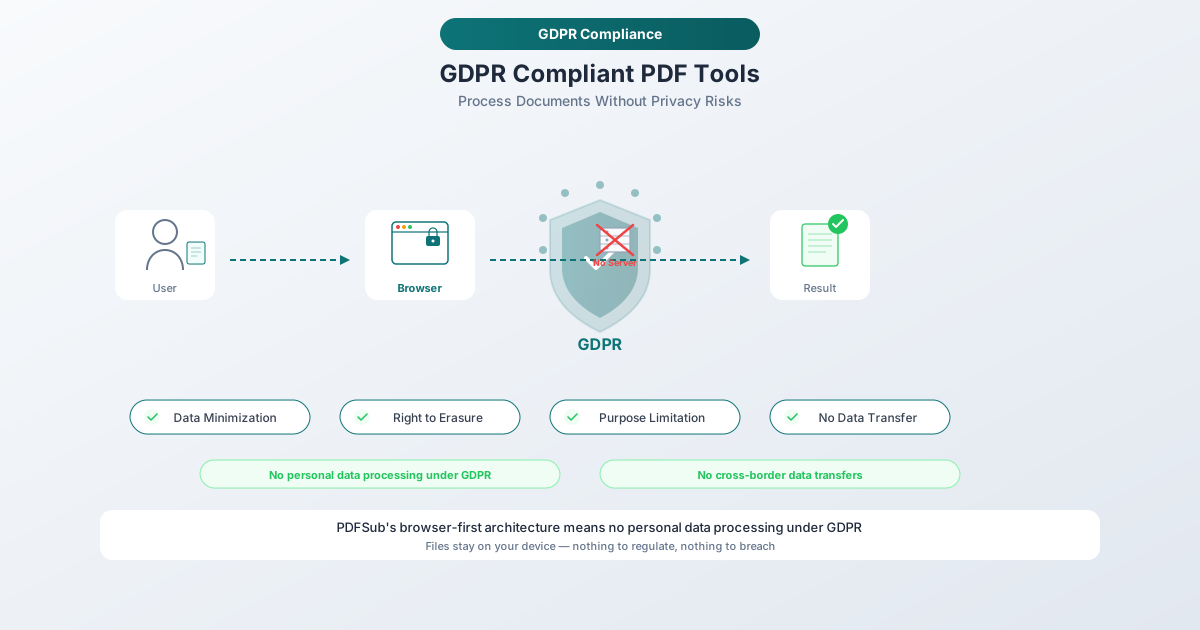
You open a PDF tool in your browser, select a file, and it processes entirely using client-side code. The file never leaves your device.
In this scenario, the PDF tool provider is not a data processor under GDPR. No personal data was transferred. No DPA is needed. This is the cleanest possible approach from a compliance perspective.
Scenario 2: Cloud-Based Processing (Transfer to Processor)
You upload a PDF to an online tool's server. The server processes the file - converting, merging, extracting, or whatever operation you selected - and returns the result. During this time, the file existed on the provider's infrastructure.
In this scenario, the PDF tool provider is a data processor under GDPR. You, as the controller, have transferred personal data to a processor. This triggers a cascade of legal requirements:
- A Data Processing Agreement (DPA) must be in place before the transfer
- The processor must implement appropriate technical and organizational measures to protect the data
- If the processor is outside the EU/EEA, the transfer is an international data transfer subject to additional safeguards
Scenario 3: AI-Powered Processing (Additional Considerations)
Some PDF tools use AI or machine learning to process documents - for OCR, data extraction, summarization, or translation. If this involves sending your file to a third-party AI service (Google's Gemini, OpenAI's GPT, etc.), the AI provider is a sub-processor. The chain of obligations extends further:
- The PDF tool provider needs your authorization to use sub-processors
- The sub-processor must be bound by equivalent data protection obligations
- You should know which AI services are being used and where they process data
- There must be clear commitments that your files are not used for AI model training
Key GDPR Requirements for PDF Tool Providers
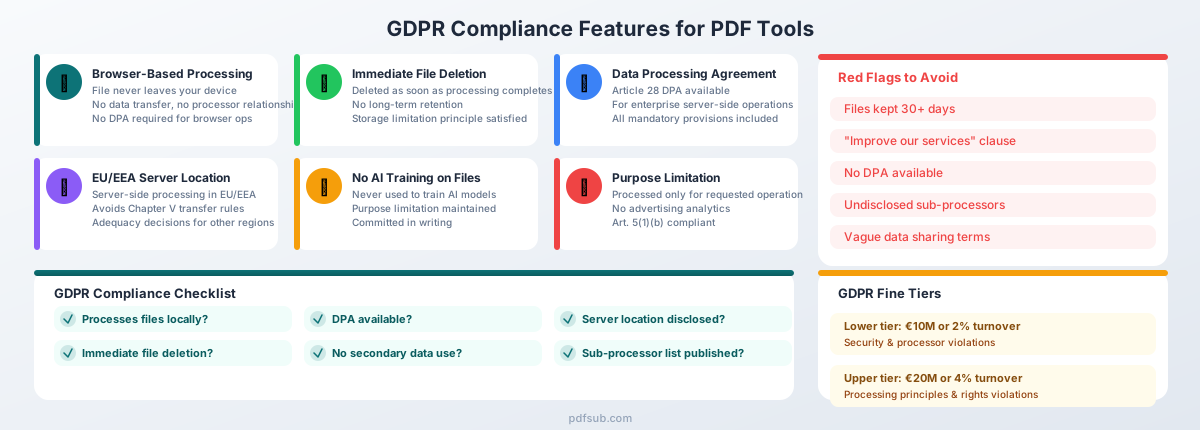
If a PDF tool does process files on its servers - making it a data processor - the GDPR imposes specific requirements. Here is what to look for.
Data Processing Agreement (DPA)
Article 28 of the GDPR makes this non-negotiable. Any data processor must have a written DPA with each controller. The DPA must specify the nature and purpose of processing, types of personal data, categories of data subjects, processor obligations on security and confidentiality, sub-processor rules, data deletion requirements upon termination, and controller audit rights.
A PDF tool provider that does not offer a DPA is a compliance risk. Any legitimate cloud-based processor should have a standard DPA available.
Purpose Limitation
Article 5(1)(b) of the GDPR states that personal data must be "collected for specified, explicit and legitimate purposes and not further processed in a manner that is incompatible with those purposes."
For a PDF tool, the purpose is clear: you uploaded a file to be converted, merged, split, or otherwise transformed. The provider may only process your file for that stated purpose. They cannot analyze your documents for advertising insights. They cannot use your file contents to train AI models. They cannot share your data with partners for marketing purposes.
If a tool's privacy policy includes language about using uploaded files "to improve our services" or "for research purposes," that is a purpose limitation violation waiting to happen.
Data Minimization
Article 5(1)(c) requires that personal data be "adequate, relevant and limited to what is necessary in relation to the purposes for which they are processed."
In practice, this means a PDF tool should only access the parts of your file needed for the requested operation. It should not extract metadata, log document contents, or retain information beyond what is necessary to complete the task.
The strongest form of data minimization is not collecting the data at all - which is exactly what browser-based processing achieves.
Security Measures
Article 32 requires "appropriate technical and organisational measures" proportionate to the risk. For a PDF tool, this means encryption in transit (TLS/HTTPS), encryption at rest, proper access controls, secure hosting environments, and regular security testing. A provider that cannot articulate their security architecture should not be handling your files.
File Retention and Deletion
This is where many PDF tools fail. The GDPR principle of storage limitation (Article 5(1)(e)) requires that personal data be "kept in a form which permits identification of data subjects for no longer than is necessary."
For a PDF tool, the necessary duration is the time it takes to complete the processing operation and deliver the result. Once you have downloaded your converted file, the provider should have no reason to retain the original or the output.
Some tools retain files for 24 hours, 7 days, or even 30 days. Ask yourself: why? Convenience for the user is not a lawful basis for retaining personal data. Extended retention creates risk without corresponding benefit.
The best practice is immediate deletion after processing completes.
International Data Transfers
If the PDF tool provider or its sub-processors are outside the EU/EEA, Chapter V of the GDPR requires additional safeguards: an adequacy decision (the Commission has determined the destination country provides adequate protection - as of early 2026, this includes the UK, Japan, South Korea, Canada, and the US under the EU-US Data Privacy Framework), Standard Contractual Clauses (SCCs), or Binding Corporate Rules (BCRs).
The EU-US Data Privacy Framework survived a legal challenge in September 2025, but commentators note that 2026 may bring fresh scrutiny. Organizations relying on this framework should monitor developments.
Breach Notification
Article 33 requires controllers to notify the supervisory authority within 72 hours of becoming aware of a breach. For PDF tool providers, this means they must notify you (the controller) without undue delay so you can meet your own obligations. The DPA should include clear breach notification commitments and timelines.
Red Flags in PDF Tool Privacy Policies
Privacy policies are often long and deliberately vague. Here are specific phrases and practices that should trigger concern.
"We may share data with third parties for business purposes"
Vague sharing terms violate the transparency principle. You need to know exactly which third parties receive data, for what purpose, and under what legal basis. "Business purposes" is not a lawful basis - it is an evasion.
"Files are stored for up to 30 days"
Excessive retention without justification. If the tool's purpose is to convert a PDF, why does it need your bank statement for a month? Long retention periods increase breach risk and are difficult to reconcile with the storage limitation principle.
"We use uploaded files to improve our services"
This is the biggest red flag. If a tool provider uses your documents - containing your clients' personal data - to train AI models or improve their algorithms, they are processing personal data for a purpose you did not authorize. This violates purpose limitation, likely lacks a lawful basis, and may constitute a secondary processing activity requiring separate consent.
No DPA available
If a cloud-based PDF tool cannot provide a Data Processing Agreement, it is not GDPR-compliant. Full stop. Article 28 is unambiguous on this point. No DPA means no lawful basis for them to process personal data on your behalf.
Server location not disclosed
If the provider will not tell you where your files are processed, you cannot assess whether the transfer requires additional safeguards under Chapter V. Transparency about infrastructure is a baseline requirement.
No sub-processor list
GDPR requires processors to inform controllers about sub-processors. If the tool uses third-party services to process your files (cloud hosting, AI APIs, CDNs) and does not disclose them, you cannot perform adequate due diligence.
Green Flags: What Compliant PDF Tools Look Like
The inverse of each red flag above is a green flag. But a few deserve emphasis:
- Browser-based processing is the single strongest privacy feature a PDF tool can offer. When a file never leaves your device, the provider never becomes a data processor. No transfer of personal data, no DPA needed for that operation, no server-side retention risk. This is not a theoretical distinction - client-side processing genuinely eliminates an entire category of compliance risk.
- Immediate file deletion after processing completes. Any retention beyond that needs justification.
- DPA publicly available or obtainable without an enterprise sales call.
- EU-based servers or clearly documented transfer mechanisms (adequacy decision, SCCs, BCRs) for servers outside the EU/EEA.
- No secondary use of file contents - committed in writing, in both the privacy policy and DPA.
- Transparent sub-processor list with a notification mechanism when sub-processors change (Article 28(2)).
How PDFSub Handles GDPR Compliance
PDFSub was built with a privacy-first architecture that addresses GDPR requirements by design, not as an afterthought. PDFSub is GDPR and CCPA compliant, and SOC 2 Ready.
Browser-Based Processing by Default
For editing operations - merging, splitting, compressing, rotating - PDFSub processes files in your browser. Conversions and advanced processing are powered by the PDFSub Engine - an isolated service with no internet access. Files are processed in an isolated environment and auto-deleted after processing.
This is not a marketing claim - it is an architectural decision. Client-side processing eliminates the data processor relationship entirely for these operations. No DPA needed. No international transfer risk. No server-side retention.
When Server Processing Is Required
Some operations require server-side processing: OCR for scanned documents, AI-powered extraction for complex financial documents, and certain advanced conversions. When this happens, PDFSub follows strict protocols:
- Encryption in transit - all file transfers use TLS encryption
- Isolated processing - files are processed in an isolated environment with no internet access
- Immediate deletion - files are deleted as soon as processing completes
- No training on user files - uploaded documents are never used to train AI models or improve algorithms
- Purpose limitation - files are processed exclusively for the requested operation
DPA Available for Enterprise Customers
PDFSub provides a Data Processing Agreement for enterprise customers who require formal documentation of the processor relationship. This covers the server-side processing scenarios and includes all Article 28 mandatory provisions.
Transparent About What Happens
PDFSub's privacy approach is straightforward: process locally whenever possible, and when server processing is necessary, minimize data exposure through encryption and immediate deletion. There are no vague "business purposes" clauses. There is no secondary use of your data.
You can browse PDFSub's 98+ tools and try a 7-day free trial to verify the browser-based processing model yourself before committing.
GDPR Compliance Checklist for Choosing a PDF Tool
Use this checklist when evaluating any PDF tool for GDPR compliance. Browser-based tools sidestep several categories entirely, but for any cloud-based tool, every item matters.
| # | Question | What to Look For |
|---|---|---|
| 1 | Does it process files locally? | Browser-based processing = no data transfer = no processor relationship. Verify by checking network traffic in browser dev tools. |
| 2 | Is a DPA available? | Should be obtainable without an enterprise sales call. Must include all Article 28 mandatory provisions. |
| 3 | Where are servers located? | EU/EEA processing avoids transfer complications. If outside EU, check for adequacy decision, SCCs, or BCRs. |
| 4 | What is the file retention policy? | Immediate deletion is best practice. Any retention beyond processing completion needs justification. |
| 5 | Is data used for any secondary purpose? | Privacy policy should explicitly exclude AI training, analytics, and advertising use of file contents. |
| 6 | How are data subject requests handled? | Must be able to confirm deletion of retained copies when a data subject exercises the right to erasure. |
| 7 | What sub-processors are involved? | Published list with descriptions, locations, and a notification mechanism when sub-processors change. |
| 8 | What security measures are in place? | Encryption in transit and at rest, access controls, relevant certifications (ISO 27001, SOC 2). |
| 9 | What are the breach notification commitments? | Notification within 72 hours (or sooner), with a dedicated point of contact for security incidents. |
| 10 | Can you audit compliance? | DPA should include audit rights. Provider should share compliance documentation and designate a DPO. |
The Cost of Getting It Wrong: GDPR Fines in Context
GDPR fines are designed to be dissuasive. The lower tier (Article 83(4)) allows fines up to EUR 10 million or 2% of annual global turnover for processor and security violations. The upper tier (Article 83(5)) allows fines up to EUR 20 million or 4% of annual global turnover for violations of data processing principles and data subject rights.
The enforcement trend is unmistakable. In 2025, insufficient legal basis for data processing accounted for 90% of total fine value (approximately EUR 1.03 billion). TikTok received a EUR 530 million fine in May 2025 for illegally transferring EU user data to China without adequate safeguards. Smaller organizations are not immune - supervisory authorities have fined SMEs for inadequate DPAs, insufficient security, and excessive retention.
The reputational cost can exceed the financial penalty. A data breach involving client bank statements or medical records damages trust in ways no fine payment can repair.
Common GDPR Violations with PDF Tools
Based on enforcement actions and regulatory guidance, these are the most frequent compliance failures related to document processing tools.
Excessive File Retention
Many online PDF tools retain uploaded files for days or weeks. The justification - "so you can download your file later" - does not hold up under GDPR scrutiny. Once the conversion is complete and the result delivered, the original file should be deleted.
Undisclosed Third-Party Sharing
A PDF tool that routes files through multiple cloud services - CDN for upload, separate processing server, AI API for OCR - without disclosing these sub-processors violates transparency requirements. You cannot fulfill controller obligations if you do not know who is processing your data.
Using Files for AI Training
Some document processing tools feed uploaded files into machine learning pipelines. If not clearly disclosed and separately consented to, this violates purpose limitation. The user uploaded a file for conversion, not for contributing to an AI training dataset.
Missing or Inadequate DPAs
Operating as a data processor without a DPA is a GDPR violation for both the processor and the controller. Controllers have an affirmative duty to ensure DPAs are in place before processing begins.
Insufficient Security for Temporary Storage
Even briefly retained files must be protected. Storing uploaded PDFs in unencrypted temporary directories, accessible via predictable URLs, or without proper access controls is a security measure failure under Article 32.
No Mechanism for Erasure Requests
If a data subject exercises their right to erasure, you must ensure all processors delete relevant data. A PDF tool provider with no documented process for handling such requests creates a compliance gap.
Practical Steps for Compliance Teams
If you are responsible for tool procurement or data protection in your organization, here is a streamlined approach to PDF tool selection.
- Audit current tools. Identify every PDF tool in use, including shadow IT. Individual employees often use whatever free online tool they find first.
- Classify by processing type. For each tool, determine whether it processes files locally or uploads them to a server.
- Request DPAs. For any cloud-based tool, request a Data Processing Agreement. No DPA available? Plan a migration.
- Review privacy policies for red flags. Vague sharing terms, excessive retention, secondary data use, undisclosed sub-processors.
- Standardize on browser-based tools where possible. This eliminates entire categories of compliance risk.
- Document your assessment. GDPR's accountability principle (Article 5(2)) requires demonstrable compliance. Record your evaluation and reasoning.
- Review annually. Privacy policies, sub-processors, and adequacy decisions change. Schedule periodic reassessment.
Conclusion
GDPR compliance for PDF tools is not about checking boxes. It is about a fundamental truth: PDFs carry personal data, and every tool that processes those PDFs is part of your data processing chain.
The simplest path to compliance is also the most effective: choose tools that process files in your browser wherever possible. When server processing is unavoidable, insist on encryption, immediate deletion, clear DPAs, and transparent practices.
PDFSub was designed for exactly this reality - browser-based processing as the default, with strict server-side protocols when additional processing power is needed. Browse all 98+ tools and start a 7-day free trial to see how privacy-first PDF processing works in practice.
Your clients trust you with their most sensitive documents. Make sure your tools deserve that trust too.