Extract Key Metrics from Annual Reports Automatically
Annual reports bury critical financial data inside 100-300 page PDFs. Here's how to extract revenue, net income, EPS, cash flow, and other key metrics without manually copying numbers from tables into spreadsheets.
You just downloaded a 247-page annual report. Somewhere inside it are the twelve numbers you actually need: revenue, net income, earnings per share, total assets, total liabilities, operating cash flow, EBITDA, and a handful of margins. The rest is boilerplate, legal disclosures, and stock photography of smiling employees.
Finding those numbers isn't the hard part. They're in the financial statements section, usually starting around page 80. The hard part is getting them out of the PDF and into your model in a format you can actually work with. And then doing it again for the next twenty companies in your coverage universe. And then doing it again for the last five years of each company to build a time series.
This is the annual report extraction problem, and it costs equity research teams, credit analysts, and portfolio managers thousands of hours every year. The global data extraction software market is projected to reach $3.64 billion by 2029, growing at 15.9% annually, driven largely by financial professionals who are tired of copying numbers from PDF tables into Excel.
This guide covers what makes annual report extraction uniquely difficult, which metrics to target, and how to automate the process so you can spend your time on analysis instead of data entry.
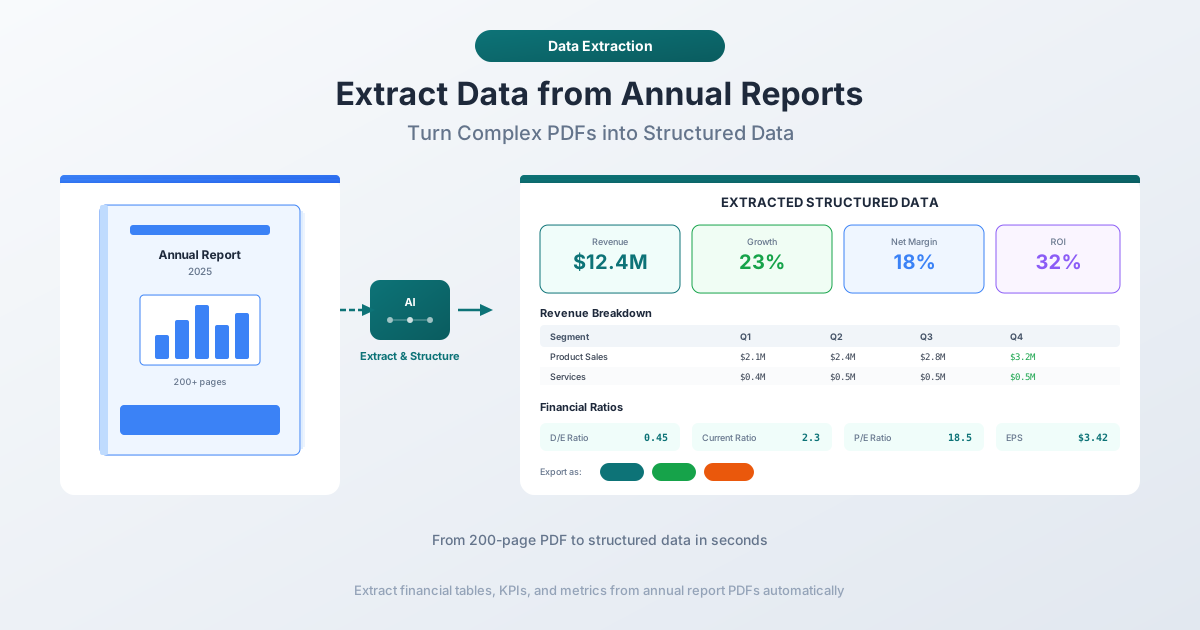
The Annual Report Extraction Challenge
Annual reports are not like other PDF documents. A bank statement has a predictable structure: date, description, amount, balance, repeated for every transaction. An invoice has a header, line items, and a total. These documents follow patterns that extraction tools can learn quickly.
Annual reports are different. They are long, complex, and structurally inconsistent documents that combine:
- Flowing narrative text in the CEO letter, Management Discussion and Analysis (MD&A), and risk factor sections
- Dense financial tables in the income statement, balance sheet, and cash flow statement
- Footnotes and annotations that qualify, adjust, or restate the numbers in those tables
- Charts and graphs that visualize trends but contain no machine-readable data
- Segment reporting tables with breakdowns by geography, business unit, or product line
- Multi-year comparatives that present two or three years of data side by side
A typical 10-K filing runs 100 to 300 pages. The financial statements themselves might occupy 30 to 40 pages, but the notes to the financial statements - where the real detail lives - can stretch to another 50 or 60. The rest is legal language, risk factors, executive compensation tables, and governance disclosures.
Why Standard Copy-Paste Fails
If you've ever tried to select a table in a PDF annual report and paste it into Excel, you know the result: columns merge, numbers wrap into the wrong rows, and footnote markers embed themselves into your data.
PDFs do not contain tables. They contain individual characters positioned at precise x,y coordinates on a canvas. What looks like a clean table is actually hundreds of separate text positioning commands with no row delimiters, column boundaries, or cell references. Copy-paste ignores these spatial relationships entirely.
Annual reports make this worse because multi-line row headers like "Net income attributable to common shareholders" need to be a single row. Parenthetical negatives like $(1,234) are three separate positioned elements that split into separate cells. Footnote superscripts corrupt numbers. And comparative columns frequently merge.
The Manual Extraction Nightmare
The traditional approach is brute force. An analyst opens the annual report, navigates to the income statement, and manually types each number into a spreadsheet. Then the balance sheet. Then the cash flow statement. Then the segment data. Then the footnotes.
For a single company, this takes 30 to 60 minutes. But financial analysis rarely involves one company. Equity research analysts typically cover 10 to 25 companies. Credit analysts might need data from 50 or more borrowers. Twenty companies at 45 minutes each is 15 hours of data entry per reporting period - 60 hours a year just copying numbers from PDFs.
The error rate makes it worse. Manual data entry has a documented error rate of 1 to 4 percent. A $4,521 million revenue figure typed as $4,512 million throws off your growth rate, margin calculations, EV/Revenue multiple, and every downstream forecast that depends on it.
What Analysts Actually Extract
Not every number in an annual report matters equally. Financial professionals typically target a specific set of metrics depending on their use case. Here is what most extraction workflows focus on.
Income Statement Metrics
| Metric | Why It Matters | Where to Find It |
|---|---|---|
| Revenue / Net Sales | Top-line growth, the starting point for most valuation models | Income statement, first line |
| Cost of Goods Sold (COGS) | Gross margin calculation, supply chain efficiency | Income statement, below revenue |
| Gross Profit | Revenue minus COGS, measures production profitability | Income statement, calculated |
| Operating Income (EBIT) | Core business profitability before interest and taxes | Income statement, mid-section |
| EBITDA | Cash-oriented profitability, used in EV/EBITDA multiples | Often in MD&A or calculated from income statement + D&A from cash flow |
| Net Income | Bottom-line profit after all expenses, taxes, and interest | Income statement, near bottom |
| Earnings Per Share (Basic & Diluted) | Per-share profitability, drives P/E ratios | Income statement, last lines |
Balance Sheet Metrics
| Metric | Why It Matters | Where to Find It |
|---|---|---|
| Total Assets | Company size, leverage calculations | Balance sheet, assets section total |
| Total Liabilities | Debt burden, solvency assessment | Balance sheet, liabilities section total |
| Total Equity / Stockholders' Equity | Net worth, book value calculations | Balance sheet, equity section total |
| Total Debt (Short-term + Long-term) | Leverage ratios, interest coverage | Balance sheet + footnotes |
| Cash and Cash Equivalents | Liquidity, net debt calculations | Balance sheet, first current asset |
| Current Assets / Current Liabilities | Working capital, current ratio | Balance sheet section totals |
Cash Flow Statement Metrics
| Metric | Why It Matters | Where to Find It |
|---|---|---|
| Operating Cash Flow | Cash generated by core business | Cash flow statement, first section |
| Capital Expenditures | Investment in growth, free cash flow calculation | Cash flow from investing activities |
| Free Cash Flow | Cash available after maintaining operations | Operating cash flow minus capex |
| Dividends Paid | Shareholder returns, payout ratio | Cash flow from financing activities |
Derived Ratios and Margins
Once raw metrics are extracted, analysts calculate:
- Gross Margin: Gross Profit / Revenue
- Operating Margin: Operating Income / Revenue
- Net Margin: Net Income / Revenue
- Return on Equity (ROE): Net Income / Stockholders' Equity
- Return on Assets (ROA): Net Income / Total Assets
- Debt-to-Equity: Total Debt / Total Equity
- Current Ratio: Current Assets / Current Liabilities
- Interest Coverage: EBIT / Interest Expense
These ratios require clean, accurate extraction of the underlying components. One wrong number corrupts the entire ratio.
Structured Data Buried in Unstructured Documents
The core technical challenge is that structured data - numbers with precise meanings and relationships - is embedded in unstructured documents. A financial statement is a table, but it sits inside a PDF that also contains narrative paragraphs, legal disclaimers, images, and page headers.
This creates several extraction problems beyond simple table recognition:
- Context-dependent numbers. The number "12,345" means different things depending on where it appears. In the revenue line, it means $12,345 million (or thousands, depending on the reporting unit stated at the top of the financial statements). In executive compensation, it might mean $12,345 in actual dollars. Effective extraction requires understanding which section a number belongs to and what the column headers and unit denomination say.
- Nested and spanning tables. Annual report tables use merged cells for section headers, indented sub-items under parent categories, subtotals interspersed with line items, multi-year comparative columns, and blank separator rows. A naive extraction tool treats every visual element as a data point, producing misaligned spreadsheets full of phantom rows and merged values.
- Footnote references. Revenue of "12,345^(1)" becomes "12345 1" when extracted without semantic understanding. The superscript is a separate positioned character in the PDF. Extraction tools either strip it (losing the reference) or include it (corrupting the number).
How AI Extraction Handles Annual Reports
AI-powered extraction takes a fundamentally different approach. Instead of relying purely on spatial analysis - detecting rows and columns based on character positions - it combines spatial awareness with semantic understanding.
Layout-aware table detection goes beyond looking for grid lines (many financial tables have no visible borders). The system analyzes character spacing patterns, decimal point alignment, formatting repetition, and header rows to detect table boundaries. It can distinguish a narrative paragraph that happens to contain numbers from a table of financial data with aligned columns.
Semantic field recognition identifies what each column and row represents. It recognizes that "Revenue," "Net sales," "Total revenue," and "Net revenues" all refer to the same concept. It understands that "(1,234)" in a financial context means negative 1,234, not a footnote reference. This matters because naming conventions vary widely between companies - one reports "Stockholders' equity" while another uses "Shareholders' equity" or "Total equity."
Multi-page table continuations are handled by recognizing repeated header patterns and consistent column alignment across page breaks. The income statement might start on page 84 and continue on page 85, and AI extraction stitches the data into a single coherent table.
Key Sections to Target in Annual Reports
Not every section of an annual report contains extractable financial data. Knowing where to focus saves time and improves accuracy.
Financial Statements are the primary extraction target: the Consolidated Statements of Income, Balance Sheets, Cash Flows, and Stockholders' Equity. These four statements contain the raw numbers that drive financial models.
Management Discussion and Analysis (MD&A) is where management explains the numbers. It often contains non-GAAP metrics like adjusted EBITDA and free cash flow, segment-level breakdowns, and forward-looking guidance - all embedded in narrative paragraphs rather than tables. AI extraction can identify and pull these figures, but they require more contextual understanding than table data.
Segment Reporting breaks down results by business unit, geography, or product line. This data is essential for sum-of-the-parts valuation. Segment tables often have non-standard structures with segment names as column headers and intersegment eliminations that add negative rows.
Notes to Financial Statements contain the most detailed data: debt schedules with maturity dates, revenue disaggregation by product or geography, lease obligations, pension details, tax rate reconciliations, and goodwill breakdowns by segment. These are the hardest to extract because they mix narrative text with small embedded tables.
Risk Factors are mostly qualitative, but sometimes contain quantitative disclosures: concentration risk percentages, litigation reserves, or regulatory capital requirements buried in paragraphs of legal language.
Extracting Annual Report Data with PDFSub
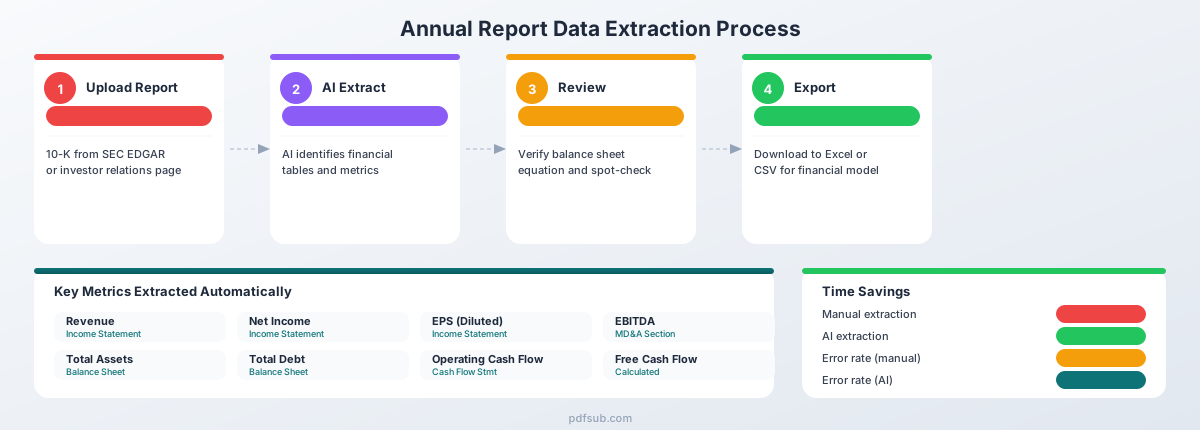
PDFSub provides two tools specifically suited for annual report extraction: the Extract Tables tool and the Financial Report Analyzer.
Extract Tables: Pull Financial Statements into Spreadsheets
The Extract Tables tool detects and extracts tabular data from PDF documents. For annual reports, this means:
- Upload the annual report PDF - Drag and drop the file. For digital PDFs downloaded from SEC EDGAR or company investor relations pages, initial processing happens in your browser. The file does not leave your device unless server-side AI processing is needed.
- Automatic table detection - The tool identifies all table regions in the document, including multi-page tables that span page breaks.
- Review extracted tables - Each detected table is displayed with its extracted data. You can verify that columns are aligned correctly and values are accurate.
- Export to Excel or CSV - Download the extracted tables in formats ready for financial modeling.
This approach works well for the core financial statements (income statement, balance sheet, cash flow) where the data is presented in clear tabular format.
Financial Report Analyzer: AI-Powered Metric Extraction
The Financial Report Analyzer goes beyond table extraction. It uses AI to read the entire document, understand its structure, and extract specific financial metrics - including those embedded in narrative text or footnotes.
For annual reports, the analyzer can:
- Identify and extract key financial metrics across all sections of the document
- Pull non-GAAP metrics from the MD&A section
- Extract segment-level data from reporting tables
- Recognize and handle different naming conventions for the same metric
- Provide context for extracted numbers, including the reporting period and unit of measurement
Combining Both Tools
The most effective workflow for annual reports combines both approaches:
- Use Extract Tables to pull the structured financial statements (income statement, balance sheet, cash flow) into Excel with full tabular fidelity
- Use Financial Report Analyzer to extract specific metrics from narrative sections, footnotes, and non-standard tables
- Cross-reference the results to verify accuracy
Both tools are available with PDFSub's 7-day free trial, so you can test them against your actual annual reports before committing.
Export to Excel and CSV for Financial Modeling
Extraction is only useful if the output fits your workflow. Extracted tables export as .xlsx files with properly typed numeric cells, preserved column alignment, separate sheets for each table, and clean headers. For analysts who prefer CSV (common for databases and scripting tools), you get comma-delimited output with UTF-8 encoding and one file per extracted table.
A typical post-extraction workflow: extract the income statement, balance sheet, and cash flow statement; import the three tables into your model template; map field names to your standardized row labels; verify totals match; calculate derived ratios; and build time series by repeating for prior-year reports. This replaces manual typing and reduces end-to-end time from 45 minutes to under 5 minutes per company.
Use Cases: Who Extracts Annual Report Data
Equity research. Analysts build financial models with 5 to 10 years of historical data and 3 to 5 years of projections. A coverage universe of 15 companies means extracting data from 15 annual reports and 60 quarterly reports per year. Automated extraction transforms this from a multi-day data entry exercise into a same-day task.
Credit analysis. Credit analysts evaluate borrower creditworthiness using Debt/EBITDA (leverage), EBITDA/Interest Expense (coverage), Current Ratio (liquidity), and Debt/Total Capitalization (capital structure). A commercial bank's loan portfolio might contain hundreds of borrowers, each submitting annual financial statements that need these metrics extracted.
Benchmarking and competitive analysis. Comparing a company against its peers requires extracting the same metrics from 5 to 15 annual reports, normalizing for different fiscal year ends, reporting units, and accounting standards (US GAAP vs. IFRS).
Portfolio monitoring. Investment managers tracking 30 to 100 holdings extract a standard set of monitoring metrics quarterly: revenue growth, EBITDA margin trend, net debt/EBITDA, free cash flow yield, and return on invested capital. Automated extraction makes this feasible at scale.
Multi-Year Extraction: Building Time Series Data
Financial analysis is fundamentally about trends: Is revenue accelerating? Are margins expanding? Is the company deleveraging? Answering these questions requires time series data spanning at least three to five years.
Approach 1: Extract From Each Annual Report
Annual reports typically present two years of income statement data (current year and prior year) and two years of balance sheet data. Some include three-year comparative income statements.
To build a five-year time series, you need to extract from three annual reports:
- 2025 annual report: Contains 2025 and 2024 data
- 2023 annual report: Contains 2023 and 2022 data
- 2021 annual report: Contains 2021 and 2020 data
This gives you overlapping years (2024 appears in both the 2025 and 2024 reports) that serve as a cross-check.
Approach 2: Use the 10-K Selected Financial Data
Some companies include a "Selected Financial Data" table that presents five to ten years of key metrics in a single table. When available, this is the fastest path to a multi-year time series. However, the SEC eliminated the requirement for this table in 2021, and many companies have since dropped it.
Approach 3: Extract From SEC EDGAR XBRL Data
For US public companies, SEC filings include XBRL-tagged data that is machine-readable without PDF extraction. The SEC's EDGAR system provides RESTful APIs delivering JSON-formatted data for standardized line items. However, XBRL has limitations: custom line items may not be tagged consistently, non-GAAP metrics are rarely available, segment data may be missing, and presentation ordering may not match the original filing. PDF extraction remains the most reliable source for complete, presentation-consistent financial data.
Building the Time Series Spreadsheet
Once you have multiple years of extracted data, create a master spreadsheet with years as columns and metrics as rows. Import each year's data, verify that overlapping years match across reports, add calculated rows for growth rates and ratios, and flag any restatements that break comparability.
Quality Checks: Verifying Extracted Data
Automated extraction is fast, but you should always verify the output. Annual reports contain built-in cross-checks that make verification straightforward.
The Balance Sheet Equation
The most fundamental check: Total Assets = Total Liabilities + Total Stockholders' Equity.
If this equation doesn't hold in your extracted data, something went wrong. Either a number was misread, a row was skipped, or columns were misaligned. This single check catches a large percentage of extraction errors.
Income Statement Flow
Revenue minus all expenses should equal net income. Verify the arithmetic:
Revenue
- Cost of Goods Sold
= Gross Profit
- Operating Expenses
= Operating Income
- Interest Expense
+ Interest Income
- Tax Provision
= Net Income
If the subtotals don't add up, examine which line items were missed or misextracted.
Cash Flow Reconciliation
The cash flow statement begins with net income and ends with the change in cash. That ending change should reconcile to the difference between beginning and ending cash on the balance sheet.
Beginning Cash Balance (from balance sheet)
+ Net Change in Cash (from cash flow statement)
= Ending Cash Balance (from balance sheet)
Reasonableness and Spot Checks
Scan extracted data for implausible values: revenue changing more than 50% year over year, negative total assets, EPS that doesn't correspond to net income divided by shares outstanding, or margins outside industry norms (a 90% net margin in manufacturing suggests a decimal error). Then pick three to five numbers at random, go back to the original PDF, and verify they match. This takes 30 seconds and catches systematic errors like extracting data from the wrong column.
Tips for Better Extraction Results
Use digital annual reports, not scanned copies. Digital PDFs extract far more accurately than scanned documents. For US public companies, always download from SEC EDGAR (filings are digital by definition) or company investor relations pages. Avoid printed reports scanned back into PDF and image-heavy "glossy" annual reports designed for marketing.
Use the 10-K, not the Annual Report to Shareholders. Public companies often produce both a 10-K filing (standardized financial statements) and an Annual Report to Shareholders (marketing document with glossy photos). The 10-K has standardized GAAP presentation, consistent table formatting, full footnotes, and is always available as a digital PDF from EDGAR.
Identify the reporting unit before extracting. At the top of every financial statement is a note like "in millions, except per share amounts" or "in thousands." If you miss this, a revenue figure of "45,231" could be $45.2 billion or $45.2 million. Always check and apply the correct multiplier.
Handle fiscal year differences. Not all companies use a calendar fiscal year. Apple ends in September, Walmart in January, Microsoft in June. The fiscal year end date is stated at the top of each financial statement.
Watch for restatements. When a company restates prior-year financials, the restated numbers appear in the current year's annual report. The 2024 data in the 2025 report might differ from the 2024 data in the 2024 report. Always use the most recently restated figures when building time series.
Getting Started
Annual report extraction does not need to be a manual, error-prone process. The practical workflow: download the 10-K from SEC EDGAR, upload it to PDFSub's Extract Tables tool or Financial Report Analyzer, review the output, export to Excel or CSV, run the quality checks described above, and import the verified data into your financial model.
PDFSub offers a 7-day free trial so you can test the extraction tools against your actual annual reports. Try it with a 10-K you've previously extracted manually and compare the results - both the accuracy and the time savings.
For financial professionals who process annual reports regularly, automated extraction is a competitive advantage. The analyst who spends 5 minutes extracting data and 55 minutes analyzing it will consistently outperform the analyst who spends 55 minutes extracting and 5 minutes analyzing.