How to Digitize Receipts for Tax Deductions
Paper receipts fade, get lost, and fail audits. Here's how to digitize them properly - from IRS documentation rules to AI-powered extraction - so every deduction survives tax season.
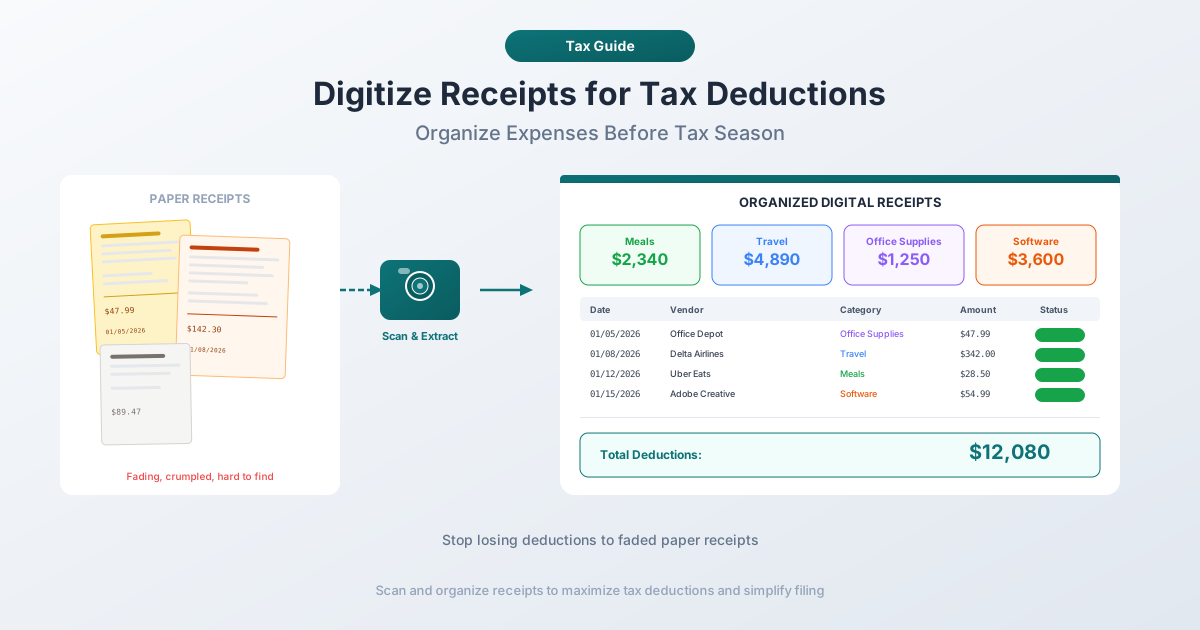
There is a receipt in your wallet right now that will be unreadable in eight months. It is printed on thermal paper - no ink, just a heat-sensitive chemical coating that degrades from sunlight, friction, and body heat. By tax season, the vendor name will be a gray smudge and the amount will be a guess.
If you are self-employed, freelancing, or running a small business, receipts are the raw evidence of your tax deductions. Lose the proof, lose the deduction. And if the IRS audits you, "I know I bought it but I can't find the receipt" is not a defense.
The good news: the IRS has accepted digital records as valid documentation since 1998. You do not need the original paper - you need an accurate, accessible digital copy with the right data fields captured. This guide covers the IRS requirements, why paper receipts fail, and how to build a digitization system that protects every deduction through audit season and beyond.
What the IRS Actually Requires for Receipt Documentation
Before setting up any system, you need to understand what the IRS considers adequate proof of a business expense. The rules are more specific than most people realize.
The Five Elements of Proof
Under IRS Publication 463 and the broader recordkeeping requirements in Publication 583, every deductible business expense must be documented with five elements:
- Amount - The exact cost incurred, including tax and tip where applicable.
- Date - When the expense occurred. Not when you filed it, not when your credit card was charged - the date of the transaction.
- Place - The vendor name and location where the expense was paid.
- Business purpose - Why the expense was necessary for your business. "Office supplies" is sufficient for a ream of paper. "Client dinner to discuss Q3 deliverables" is what the IRS expects for a meal.
- Business relationship - For meals, entertainment, and gifts, you need to document who was there and their business relationship to you.
This is not optional. The IRS can disallow any deduction where these five elements are not adequately documented.
The $75 Receipt Rule
The IRS does not require a physical receipt for individual business expenses under $75, with two important exceptions: lodging expenses require receipts regardless of amount, and business gifts must always be documented with receipts.
For expenses under $75, alternative documentation is acceptable - credit card statements, bank records, or a written log that includes the date, amount, vendor, and business purpose. But "acceptable" and "ideal" are different things. In an audit, a receipt showing itemized line items is always stronger evidence than a single-line credit card charge.
The practical takeaway: digitize everything, even expenses under $75. The effort is minimal, and having the receipt available eliminates ambiguity during an audit.
How Long to Keep Records
The IRS record retention rules depend on your situation:
| Retention Period | When It Applies |
|---|---|
| 3 years | Standard - from the date you filed the return or the due date, whichever is later |
| 6 years | If you underreported income by more than 25% of gross income |
| 7 years | If you claimed a loss from worthless securities or bad debt deduction |
| Indefinitely | If you filed a fraudulent return or did not file at all |
For most small business owners and freelancers, the safe default is seven years. Storage is cheap, and you never want to discover during an audit that you deleted records one year too early.
Employment tax records require at least four years of retention. Records for property (purchases, improvements, depreciation) must be kept until the limitations period expires for the year you dispose of the property - meaning equipment depreciated over five years needs documentation for at least eight years total.
The Shoebox Problem: Why Paper Receipts Fail
If you have ever dumped a pile of receipts on your accountant's desk during tax season, you already know the problem. But the failure modes of paper receipts are worse than most people realize.
Thermal Paper Fades - Fast
Approximately 70% of point-of-sale receipts are printed on thermal paper - a chemical coating that darkens when heated by the printer head, with no actual ink deposited. Heat, humidity, UV light, and friction cause the coating to degrade. Thermal receipts can begin fading within months. Within two years, many become partially or completely illegible.
The result: 30% of businesses report challenges maintaining accurate records due to faded receipts, and 50% of warranty claims are delayed or denied because the supporting receipt is unreadable.
Receipts Get Lost
A single business trip generates 15 to 30 receipts. Multiply by monthly expenses and you are managing hundreds of small paper documents per year. Paper falls out of envelopes, gets mixed with personal receipts, ends up in coat pockets bound for the dry cleaner. Small business owners spend an average of eight hours per month organizing paper financial records.
The Audit Risk
When the IRS audits a return, the burden of proof falls on you. Produce documentation or the deduction is disallowed - plus back taxes, interest, and potential penalties. The IRS audits roughly 0.4% of individual returns, but the rate is significantly higher for self-employed filers claiming large deductions. If your receipt for a $3,200 equipment purchase has faded to nothing, that is $3,200 in deductions you cannot substantiate.
IRS Revenue Procedure 98-25: Digital Records Are Valid
This is the legal foundation for receipt digitization.
IRS Revenue Procedure 98-25, issued in 1998, established that taxpayers maintaining records in an Automatic Data Processing (ADP) system comply with federal recordkeeping requirements - provided the electronic records are accurate, accessible, and retained for the required period. The key requirements:
- Electronic records must be readily retrievable - you need to find and produce a specific record when asked.
- Records must be stored in a format the IRS can process and verify.
- A taxpayer need not retain hardcopy records if the electronic version captures all pertinent information.
The IRS FAQ on electronic accounting software records reinforces this: "All IRS business expense receipt requirements are the same whether you opt for paper or digital copies. The IRS just requires that your electronic storage system indexes and stores your copies in a legible way."
The implication: a well-organized digital receipt system is not just acceptable - it is better than paper, because digital records do not fade and a properly indexed archive is faster to search during an audit.
Methods for Digitizing Receipts
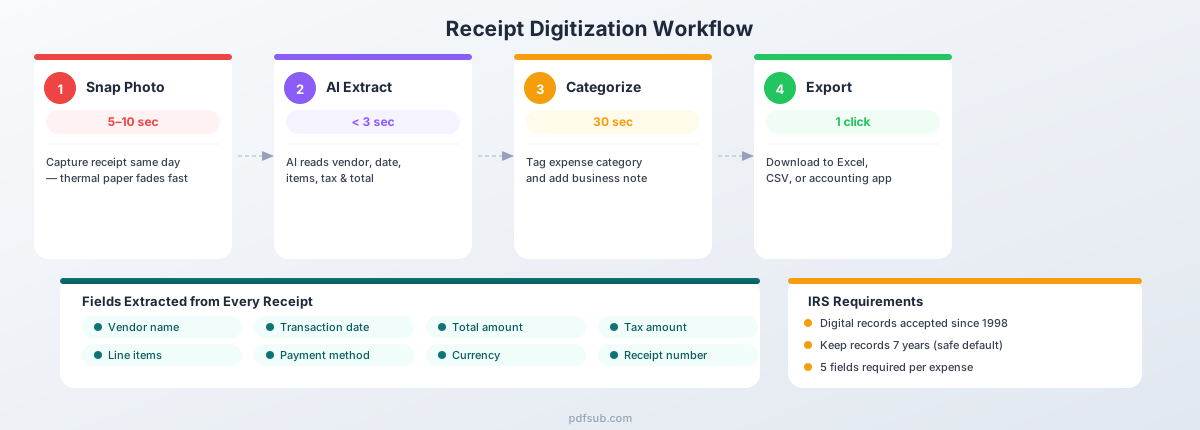
There are four main approaches to digitizing receipts, each with different tradeoffs in cost, speed, accuracy, and the quality of extracted data.
Method 1: Phone Camera
Cost: Free Speed: 5-10 seconds per receipt Data quality: Image only - no structured data extraction
The simplest method is to photograph each receipt with your phone. Photos include automatic timestamps and GPS metadata, and you can organize them into albums by month or category.
The limitation: a photo produces an image, not structured data. You still need to manually enter amounts, dates, and vendors into your accounting software. Image quality varies with lighting and angle, there is no automatic categorization, and managing thousands of receipt photos becomes unwieldy. A phone camera is better than nothing, but the data trapped inside the image still requires manual extraction.
Method 2: Dedicated Document Scanner
Cost: $200-$500 for a quality scanner Speed: 3-8 seconds per receipt (with automatic document feeder) Data quality: High-resolution scan, searchable PDF with OCR
Desktop document scanners with automatic document feeders produce consistently high-quality scans and built-in OCR makes the text searchable. The tradeoff: upfront hardware cost ($200-$500), you need to be at your desk, and OCR makes text searchable but does not extract structured data fields - you still need manual categorization and data entry. Best for bookkeepers processing high volumes at a fixed location.
Method 3: Receipt Scanning Apps
Cost: Free to $10/month Speed: 5-15 seconds per receipt Data quality: Basic data extraction - usually amount, date, and vendor
Apps like Expensify, Dext, and Shoeboxed combine camera capture with basic OCR and data extraction. They are mobile-first, include cloud backup, and many integrate with QuickBooks, Xero, and FreshBooks.
The downsides: extraction accuracy varies (amounts and dates are usually correct, but vendor names and line items often are not), most lock you into their ecosystem, your financial documents live on their servers, and non-English receipt support is limited. These apps are designed for corporate expense reporting workflows - if your primary need is tax deduction documentation, you may be paying for features you do not use.
Method 4: AI-Powered Data Extraction
Cost: Varies - PDFSub offers a 7-day free trial Speed: Seconds per receipt Data quality: Structured data extraction - all fields parsed into organized output
AI-powered receipt scanning goes beyond simple OCR. Instead of converting pixels to text characters, AI extraction understands the semantic structure of a receipt - it knows that the number after "Total" is the amount, that the text at the top is typically the vendor name, and that dates follow specific formatting patterns.
The result: structured, categorized data that handles varying receipt formats, layouts, and languages - including faded or wrinkled paper. Output is ready for spreadsheets and accounting software with no manual data entry required for most receipts. The tradeoff is that AI processing requires internet connectivity, and accuracy still depends on receipt quality for severely damaged documents.
The key difference: a phone photo gives you an image. OCR gives you searchable text. AI extraction gives you structured data - vendor name, date, total amount, tax amount, payment method, and individual line items - organized and ready to import into your accounting workflow.
What Data Needs to Be Captured
Not all receipt scans are created equal. To satisfy IRS requirements and make your records useful for tax preparation, each digitized receipt should capture these data points:
| Data Field | IRS Requirement | Example |
|---|---|---|
| Date | Required | 2026-02-15 |
| Vendor name | Required | Office Depot |
| Total amount | Required | $147.92 |
| Tax amount | Recommended | $12.38 |
| Payment method | Recommended | Visa ending 4521 |
| Line items | Recommended for mixed-use purchases | 2x toner cartridge, 1x paper |
| Business purpose | Required (you add this) | Office supplies for home office |
| Category | Recommended | Office Expenses (Schedule C, Line 18) |
The first three are the minimum for IRS compliance. The rest make your life significantly easier during tax preparation and in the event of an audit.
Pay special attention to mixed-use purchases - a single receipt from a big-box store that includes both business supplies and personal items. You can only deduct the business portion, and the IRS may ask you to demonstrate which line items were for business use. Having itemized data extraction rather than just a total amount makes this straightforward.
How AI Receipt Scanning Differs from Taking a Photo
When you photograph a receipt, you create a visual record - but the data is locked inside the image as pixels. To use it in a spreadsheet or accounting software, someone must read the image and type the values manually.
AI receipt scanning analyzes the receipt and extracts data as structured fields: merchant name and address, transaction date (even in non-standard formats like 15/02/2026), individual line items with quantities and prices, subtotal, tax, total, payment method, receipt number, and currency. The output is organized data ready for direct import into Excel, QuickBooks, or Xero.
The accuracy gap matters too. Simple OCR achieves 85-95% accuracy on clean receipts and drops sharply on faded paper. AI extraction pushes above 95% on clean receipts and maintains usable accuracy on degraded documents because the model understands receipt structure. If the total is partially faded but the subtotal and tax line are legible, AI can validate the total by calculation. Simple OCR cannot.
PDFSub Receipt Scanner
PDFSub's receipt scanner tool is designed specifically for extracting structured data from receipt PDFs and images. It is part of the broader PDFSub platform, which handles financial document processing across bank statements, invoices, and receipts.
How It Works
- Upload your receipt - Drag and drop a receipt PDF or scanned image.
- AI extraction - The receipt is analyzed and all data fields are extracted automatically: vendor, date, amounts, line items, tax, payment method.
- Review and edit - Check the extracted data in a structured preview. Correct any fields if needed.
- Export - Download the structured data as Excel, CSV, or JSON for import into your accounting software.
What Makes It Different
Financial document expertise. PDFSub is built for financial documents - receipts, invoices, bank statements. The extraction models understand financial formatting conventions: currency symbols, tax calculations, tipping conventions, and the way different countries format dates and numbers.
Multi-language support. Receipts from international travel or foreign vendors are handled automatically. PDFSub supports over 130 languages, including character sets that trip up most OCR tools - Chinese, Japanese, Korean, Arabic, and Cyrillic.
Privacy-first approach. For digital PDFs, processing happens in your browser. Files are not stored permanently on any server.
No per-receipt pricing. Unlike tools that charge $0.10-$0.50 per receipt scan, PDFSub's subscription includes receipt scanning alongside its full suite of PDF tools. For anyone processing more than a handful of receipts per month, this eliminates the anxiety of per-document costs.
Try it free. PDFSub offers a 7-day free trial so you can test receipt scanning on your actual documents before committing.
Organizing Your Digital Receipts
Digitizing receipts is step one. Organizing them so you can actually find what you need during tax season - or during an audit - is step two.
Folder Structure
Create a consistent folder hierarchy that mirrors your tax categories:
Receipts/
  2026/
    Office-Supplies/
    Travel/
    Meals-Entertainment/
    Professional-Services/
    Equipment/
    Software-Subscriptions/
    Vehicle-Expenses/
    Marketing-Advertising/
    Insurance/
    Miscellaneous/
Each top-level folder corresponds to a tax year. The subfolders align with common Schedule C categories. If your business has unique expense categories, add folders for those as well.
File Naming Convention
Consistent file naming is the difference between finding a receipt in 10 seconds and searching for 10 minutes. Use this format:
YYYY-MM-DD_Vendor_Amount_Description.pdfExamples:
2026-02-15_OfficeDepot_147.92_toner-paper.pdf2026-02-18_Delta_489.00_SFO-JFK-flight.pdf2026-02-20_Uber_34.50_client-meeting-transit.pdf2026-02-22_Zoom_14.99_monthly-subscription.pdf
This naming convention sorts files chronologically by default in any file system, includes the key data fields at a glance, and makes searching by vendor or amount trivial.
Matching Receipts to Bank Transactions
For bulletproof tax records, cross-reference your digitized receipts with your bank and credit card statements. This creates two independent records of each expense - the receipt showing what was purchased, and the bank statement showing the payment. PDFSub's bank statement converter can extract transaction data into Excel or CSV, making it straightforward to match receipts against statement line items.
Common Tax Deduction Categories That Require Receipts
Here are the most common Schedule C deduction categories for self-employed individuals and small business owners. Each has specific documentation requirements.
| Category | What Qualifies | Documentation Needed |
|---|---|---|
| Office Supplies & Equipment | Paper, ink, pens, desk accessories, small equipment | Receipt with date, vendor, items, amounts. Equipment over $2,500 (de minimis safe harbor): also document business use percentage |
| Business Travel | Airfare, hotel, rental car, parking, tolls, tips | Receipts for each expense plus a log of business purpose, dates, destinations. Lodging receipts required regardless of amount |
| Business Meals (50% deductible) | Meals with clients or associates where business is discussed | Receipt with date, restaurant, amount. Also record who attended and specific business purpose |
| Vehicle Expenses | Business use of personal vehicle: standard mileage (70 cents/mile 2025, 72.5 cents/mile 2026) or actual expenses | Contemporaneous mileage log (date, destination, purpose, miles). If actual method: receipts for gas, maintenance, insurance |
| Professional Services | Accounting, legal, consulting, bookkeeping, tax preparation fees | Invoices or receipts showing provider, date, services, amount |
| Software & Subscriptions | SaaS subscriptions, cloud storage, domain names, hosting | Receipts, invoices, or subscription confirmation emails |
| Home Office | Portion of rent/mortgage, utilities, insurance proportional to dedicated business space. Simplified: $5/sq ft up to 300 sq ft | Actual method: receipts for rent, utilities, insurance, repairs plus square footage records. Simplified: office square footage only |
| Marketing & Advertising | Website costs, online ads, business cards, trade show fees | Receipts and invoices. For ad platforms: monthly billing statements |
| Insurance | Business liability, E&O, cyber, commercial property | Policy declarations page and payment receipts |
Two categories deserve extra attention:
Business meals are the most audited deduction category. "Lunch" on a receipt is not sufficient documentation. "Lunch with Jane Smith (client) to review contract renewal" meets the IRS standard. Record the who and why at the time of the meal, not nine months later.
Vehicle expenses require a contemporaneous mileage log - meaning you record each trip as it happens, not from memory at year-end. The IRS has disallowed vehicle deductions in numerous cases where the taxpayer reconstructed a mileage log after the fact.
Best Practices for Receipt Digitization
Here are the habits that matter most, based on IRS requirements and the practical experience of accountants who manage thousands of receipts annually.
Digitize immediately. Capture receipts the same day you receive them. Thermal paper can begin fading in weeks. For digital receipts from email, forward them to your receipts folder right away.
Keep paper originals for the retention period. While the IRS accepts digital records as primary documentation, store original paper receipts in labeled envelopes by month and year, in a cool, dry location. At minimum, keep originals for one year after digitizing to confirm your digital copies are complete.
Follow the 3-2-1 backup rule. Maintain 3 copies of every receipt file on 2 different storage media with 1 copy offsite. Example: primary copy in cloud storage (Google Drive, Dropbox), secondary on an external hard drive backed up monthly, and the cloud copy serves as offsite. Digital records need to survive seven years - no single storage method is reliable over that timeframe.
Extract structured data, not just images. Photographing receipts is half the job. The real value comes from extracting date, vendor, amount, and category into a searchable spreadsheet. Build a master expense log where each row is one expense with columns for every required field. This spreadsheet becomes your primary tax preparation document, with individual receipt files as supporting evidence.
Annotate business purpose immediately. This trips up more taxpayers than any other documentation element. It is easy to remember why you bought something today. In nine months, that $127 restaurant charge will have no context. Add a business purpose note at the time of capture - your future self will thank you.
Reconcile monthly, not annually. Monthly reconciliation takes 30 to 60 minutes. Annual reconciliation takes 8 to 16 hours, produces worse results, and almost always misses deductions.
Separate business and personal expenses. Use dedicated business credit and debit cards for all business purchases. Mixed transactions on a single card create the most audit headaches.
Putting It All Together: A Complete System
Here is a receipt digitization workflow that satisfies IRS requirements and takes minimal time:
| Cadence | Time | Tasks |
|---|---|---|
| Daily | 2-3 min | Scan paper receipts, forward digital receipts to folder, add business purpose notes |
| Weekly | 10-15 min | Rename files, move to category folders, extract structured data with PDFSub's receipt scanner |
| Monthly | 30-60 min | Reconcile against bank statements, flag missing receipts, update master expense spreadsheet, backup |
| Quarterly | 1-2 hr | Review expense categories, calculate estimated tax payments, archive paper originals |
| Annually | 2-4 hr | Compile year-end summary, final reconciliation, verify backup integrity |
This system transforms receipt management from a dreaded annual ordeal into a background habit. Every deduction is documented, every record is indexed, and if the IRS sends a letter, you can produce what they need in minutes.
Start Digitizing Today
Every day you wait is another day receipts are fading, getting lost, and costing you deductions. The IRS has made it clear that digital records are fully acceptable. The tools to digitize quickly and accurately exist right now.
If you are processing receipts alongside other financial documents - bank statements, invoices, expense reports - PDFSub gives you a single platform that handles all of them. The receipt scanner extracts structured data from any receipt format, in over 130 languages, and exports directly to Excel, CSV, or JSON.
Start with the 7-day free trial and run your actual receipts through it. You will know within minutes whether it handles your specific receipt types and formats.
Your future self - sitting across from an IRS auditor or racing to finish a tax return - will be grateful you started today.