Best Wondershare PDFelement Alternative for PDF & Financial Docs (2026)
PDFelement's AI costs extra and financial tools are limited. See why PDFSub is the smarter choice.
PDFSub is best for:
- PDFelement users paying $80/yr base + $40/yr AI add-on who want everything included at $120/yr
- Users frustrated by perpetual license version-lock who want always-current browser-based tools
- Professionals who need specialized financial extraction (bank statements, invoices) not generic AI chat
- Cross-platform users tired of PDFelement's platform-locked desktop licenses
PDFSub is NOT best for:
- Users who prefer PDFelement's Word-like desktop editing interface for heavy document rewriting
- Anyone who values the perpetual license model and prefers a one-time purchase over subscriptions
- Users who need PDFelement's advanced form creation and batch PDF processing capabilities
Wondershare PDFelement has positioned itself as the "budget Adobe Acrobat" - a full-featured PDF editor at a fraction of Acrobat's price. With a perpetual license at $129.99, an annual subscription at $79.99/year, and a cross-platform option at $89.99/year, PDFelement offers solid PDF editing capabilities that genuinely rival more expensive competitors.
The feature list is impressive on paper: a Word-like editing interface, OCR across 30+ languages, form creation, batch processing, and - as of recent versions - AI features powered by multiple models including ChatGPT, DeepSeek, and Gemini. PDFelement serves over 150 million users globally and has become the go-to recommendation for anyone asking "what's a cheaper alternative to Adobe Acrobat?"
But dig beneath the surface and the trade-offs become clear. The AI features that headline the marketing require a separate subscription ($39.99/year for 12,000 uses) on top of the base license. The perpetual license locks you to a specific version - major upgrades cost extra. The desktop-first architecture means installation overhead, platform dependencies, and device-locked licenses. And for financial document workflows, PDFelement's generic conversion tools produce the same unusable output as every other traditional PDF editor.
If you've been considering PDFelement or looking to switch from it, this guide breaks down the real-world comparison.
Why People Look for PDFelement Alternatives
PDFelement's appeal is its price-to-feature ratio. The frustrations emerge in practice:
The AI Add-On Tax
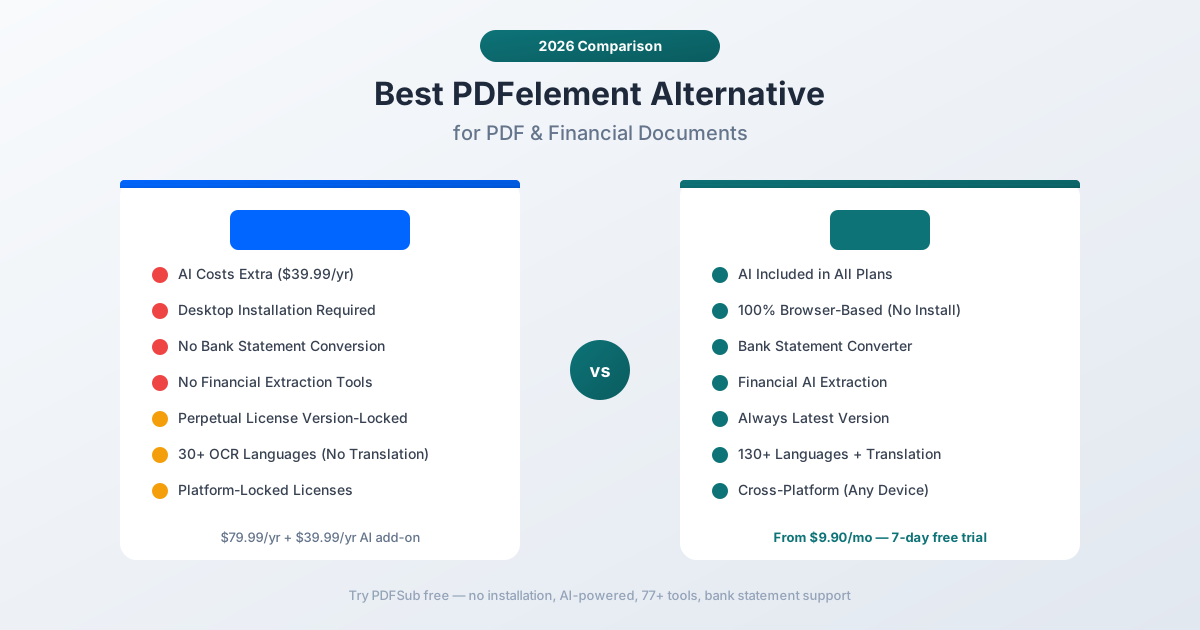
PDFelement's AI features are marketed heavily but cost extra. The base license ($79.99/year or $129.99 perpetual) includes 1,000 free AI uses to get you started. After that:
- Annual AI add-on: $39.99/year for 12,000 uses (1,000/month)
- Monthly AI option: $3.99/month for 1,000 uses/month
This means the actual cost of PDFelement with AI is $119.98/year ($79.99 + $39.99), not the $79.99 headline price. And 1,000 AI uses per month has a hard cap - once you exhaust them, you're either paying more or working without AI until next month.
The AI itself is a general-purpose document assistant: summarize, explain, rewrite, translate. It doesn't provide the specialized financial extraction that makes AI genuinely useful for document processing - no structured bank statement parsing, no invoice line-item extraction, no receipt data capture.
The Perpetual License Trap
PDFelement's $129.99 perpetual license sounds like a great deal, but it comes with significant fine print:
- Version-locked. The license covers the current major version (PDFelement 12) only. When PDFelement 13 ships, you're stuck on 12 unless you pay to upgrade.
- Minor updates only. You get free minor updates (12.1, 12.2, etc.) but not major version upgrades.
- No AI included long-term. The 1,000 free AI uses run out quickly, and the perpetual license doesn't include ongoing AI access.
- Platform-locked. The perpetual license is for a single platform (Windows OR Mac, not both).
Over a 3-year period, a perpetual license holder who wants current features and AI access ends up paying more than a subscriber: $129.99 + $39.99/year AI + upgrade costs for major versions.
Desktop Installation Required
PDFelement is fundamentally a desktop application. While there's mobile support (iOS, Android), the core editing experience requires installing software on Windows or Mac:
- IT deployment. Corporate environments need to provision, install, and maintain the software on each workstation.
- Platform-specific licenses. Windows and Mac licenses are separate. Cross-platform costs $89.99/year instead of $79.99.
- Update management. Desktop applications need regular updates, and PDFelement's update prompts can interrupt workflow.
- No Chromebook or Linux. Users on ChromeOS or Linux distributions have no access to the desktop app.
Generic Financial Conversion
PDFelement can convert PDFs to Excel, Word, and other formats. For standard documents, the conversion quality is decent - better than many competitors. But for financial documents, the conversion is generic:
- Bank statements convert to visually-similar spreadsheets with merged cells and misaligned columns, not structured transaction data
- Invoices convert to layout copies, not extracted fields (vendor, line items, totals)
- Receipts produce visual reproductions, not parsed data (merchant, items, amounts)
- No export to accounting formats (QBO, OFX, QIF)
PDFelement's OCR (95%+ accuracy across 30+ languages, according to Wondershare) is solid for text recognition, but recognizing characters is different from understanding document structure. Knowing that a cell says "$1,234.56" is different from knowing it's the closing balance on a bank statement.
30+ OCR Languages vs 130+ AI Languages
PDFelement supports OCR in 30+ languages - a respectable number for character recognition. But OCR only converts images to text. It doesn't translate, doesn't understand context across languages, and doesn't handle the nuances of financial documents in non-English formats.
For organizations processing documents in Arabic, Chinese, Japanese, Korean, Hindi, Thai, or other complex scripts, 30 OCR languages may not be enough - especially when translation is needed alongside extraction.
What to Look for in a PDFelement Alternative
Users switching from PDFelement typically want:
AI included in the price. No separate AI subscriptions, no per-use caps, no surprise add-on costs. AI should be part of the platform, not a bolt-on.
Financial document intelligence. Tools that don't just convert PDFs to Excel but actually understand bank statements, invoices, and receipts - producing structured, usable data.
Browser-based access. No installation, no platform dependencies, no IT deployment overhead. Work from any device, any operating system, any location.
Broader language support. Translation capabilities across 100+ languages, not just OCR character recognition for 30.
Transparent pricing. One price that includes everything. No perpetual-vs-subscription confusion, no AI add-on tax, no platform upcharges.
PDFSub: The Best PDFelement Alternative
PDFSub replaces PDFelement's desktop-centric PDF editing with a browser-first platform where AI is built in (not an add-on), financial document tools actually extract structured data, and pricing includes everything without hidden costs.
AI Included, Not Add-On
PDFSub's AI features are built into every plan. There's no separate subscription, no per-use caps (within your plan's credits), and no $39.99/year add-on charge:
- Chat with PDF - Ask questions about any document in natural language. The AI understands tables, data relationships, and document structure. "What were total expenses in January?" produces a grounded answer, not a generic summary.
- Extract Data - Pull structured information from any document type. Tables maintain column relationships, forms preserve field structure, and the output is immediately usable.
- Financial Report Analyzer - Analyze balance sheets, income statements, and cash flow documents with automated ratio calculations and trend identification.
- Summarize - Generate intelligent summaries that capture key information, not just the first paragraph.
- Translate - Translate documents across 130+ languages while maintaining formatting and layout structure.
Where PDFelement's AI is a general-purpose chat overlay, PDFSub's AI is a specialized extraction engine that understands financial documents, tables, and structured data.
Bank Statement Conversion
PDFSub's bank statement converter is the capability that no desktop PDF editor offers. It recognizes 20,000+ bank formats worldwide and exports structured transaction data to:
- Excel (.xlsx) - Clean columns for date, description, debit, credit, balance
- CSV and TSV - Universal format for any spreadsheet or database
- QBO - Direct import to QuickBooks Online
- OFX - Open Financial Exchange for accounting software
- QIF - Legacy QuickBooks interchange format
- JSON - For developers and automated data pipelines
This isn't generic PDF-to-Excel conversion. The converter understands bank-specific layouts, handles multi-page statements, continues transactions across page breaks, and correctly separates debits from credits. PDFelement's Excel export produces a visual layout copy - PDFSub produces usable financial data.
Invoice and Receipt Extraction
Purpose-built tools for the financial documents that drive business workflows:
- Invoice Extractor - Vendor name, invoice number, PO number, line items with descriptions and quantities, subtotals, tax amounts, totals, payment terms, and due dates. Structured output ready for accounting software.
- Receipt Scanner - Merchant name, date, individual items with prices, tax breakdown, payment method, tip amount, and total. Organized data for expense reporting.
- Financial Report Analyzer - Balance sheet components, income statement lines, cash flow items, with automated ratio calculations (liquidity, profitability, efficiency ratios).
PDFelement can convert these documents to Excel. PDFSub understands what they contain and extracts it intelligently.
100% Browser-Based
PDFSub runs entirely in the browser. No installation, no desktop client, no platform restrictions:
- Works on Windows, macOS, Linux, ChromeOS, tablets, and phones
- No IT deployment or provisioning needed
- No device-locked licenses
- No update management
- Consistent experience across every platform and device
For teams that include both Windows and Mac users, PDFSub eliminates the cross-platform licensing complexity that PDFelement introduces.
130+ Languages
PDFSub supports over 130 languages - not just for OCR, but for AI-powered translation, extraction, and document processing:
- OCR and text extraction across all 130+ languages
- AI translation that maintains document formatting
- Financial document extraction that handles international bank formats, date conventions, and number formatting
- Full support for RTL languages, CJK scripts, and complex writing systems
PDFelement's 30+ OCR languages handle character recognition. PDFSub's 130+ language support handles comprehension, translation, and extraction - a fundamentally different level of capability.
98+ Tools in One Platform
PDFSub's 98+ tools cover all standard PDF operations plus the AI and financial categories PDFelement lacks:
- Document manipulation: Merge, split, reorder, rotate, delete, extract pages
- Conversion: PDF to/from Word, Excel, PowerPoint, images, HTML
- Editing: Annotations, text additions, shapes, stamps, watermarks, redaction
- Security: Password protection, permissions, encryption, digital signatures
- Optimization: Compression, repair, linearization
- Financial: Bank statements, invoices, receipts, financial reports
- AI: Chat, extract, summarize, translate, analyze
Privacy-First Architecture
PDFSub runs editing tools entirely in your browser - merge, split, compress, and similar operations happen locally. Conversions and advanced processing are powered by the PDFSub Engine - an isolated service with no internet access. Files are processed in an isolated environment and auto-deleted.
PDFelement processes files on your desktop (local), which is good for privacy. But PDFelement's cloud features and AI processing send data to external servers. PDFSub provides transparency about when files are processed locally vs. server-side, and keeps client-side processing as the default.
Head-to-Head: PDFSub vs Wondershare PDFelement
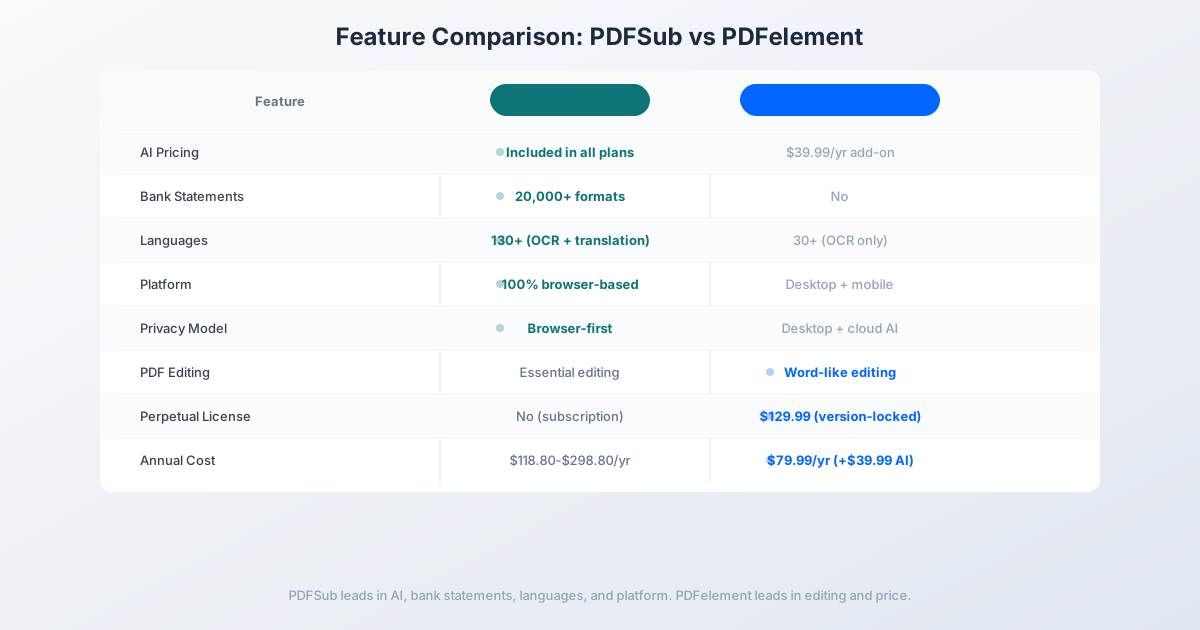
| Feature | PDFSub | PDFelement |
|---|---|---|
| Platform | 100% browser-based | Desktop (Windows/Mac) + mobile |
| AI features | Included in all plans | $39.99/yr add-on (after 1,000 free) |
| Bank statement conversion | 20,000+ formats | No (generic Excel export) |
| Invoice/receipt extraction | Dedicated tools | No structured extraction |
| Languages | 130+ (OCR + translation) | 30+ (OCR only) |
| Privacy model | Browser-first processing | Desktop + cloud AI |
| OCR quality | 4-tier extraction pipeline | 95%+ accuracy (30+ languages) |
| Direct PDF text editing | Essential editing | Full Word-like editing |
| Batch processing | Yes | Yes |
| Total tools | 98+ | Standard PDF suite |
| Pricing | $20/mo (annual; $25/mo monthly) (all features) | $79.99/yr + $39.99/yr AI |
| Perpetual option | No (subscription only) | $129.99 (version-locked) |
| Free trial | 7-day full access | Free with watermark |
Where PDFSub wins: AI included without add-on charges, financial document extraction (bank statements, invoices, receipts), 130+ language support with translation, browser-based deployment (zero IT overhead), and transparent all-inclusive pricing. For document processing, data extraction, and financial workflows, PDFSub provides capabilities PDFelement cannot match.
Where PDFelement wins: Desktop PDF editing depth. PDFelement's Word-like editing interface lets you modify text, images, and layout within PDFs with a level of control that browser-based tools don't match. The perpetual license option (even with its limitations) appeals to users who prefer one-time purchases. And PDFelement's OCR accuracy for the languages it supports (30+) is strong. For users whose primary workflow is editing PDF content on a desktop, PDFelement's editing experience is more polished.
The value calculation: PDFelement with AI costs $119.98/year ($79.99 + $39.99 AI add-on). PDFSub's All-In-One plan is $240/year ($20/mo annual; $25/mo monthly) - all 98+ tools, 500 AI credits/month, 500 bank statement pages/month, e-sign with no per-envelope fees, 50 GB storage; add unlimited team seats at the same per-user rate. PDFelement with AI is cheaper at $119.98/year, but PDFSub bundles capabilities (bank statement conversion across 20,000+ banks, invoice/receipt extraction, 130+ language translation, AI without per-use caps) that would require multiple additional subscriptions to replicate alongside PDFelement.
Other Alternatives Worth Considering
Adobe Acrobat Pro - $19.99/month ($239.88/year)
The industry standard:
- Strengths: Most comprehensive PDF editing, strong enterprise ecosystem, excellent form creation, wide plugin support
- Weaknesses: Expensive, desktop-centric, AI is basic (extra $4.99/mo), no financial document tools
- Best for: Organizations that need the most advanced PDF editing and are committed to the Adobe ecosystem
Foxit PDF Editor - $149/year
The mid-range desktop alternative:
- Strengths: Lighter than Acrobat, strong editing, good collaboration features, AI assistant included
- Weaknesses: Desktop application, no financial document tools, no bank statement conversion, complex licensing
- Best for: Desktop users who want solid PDF editing with AI features at a lower price than Acrobat
Sejda - $7.50/month
A browser-based PDF editor:
- Strengths: Direct PDF text editing in browser, low cost, free tier available, desktop app included
- Weaknesses: 3 tasks/hour free limit, no AI extraction, no financial tools, limited language support, 30+ tools only
- Best for: Users who primarily need browser-based PDF text editing at a low price
Frequently Asked Questions
Is Wondershare PDFelement worth the price?
For desktop PDF editing, PDFelement offers excellent value at $79.99/year - significantly cheaper than Adobe Acrobat ($239.88/year). The editing experience is genuinely good, and the OCR quality is strong. However, the AI features cost an additional $39.99/year, and there are no financial document extraction tools. If your primary need is editing PDFs on a desktop, PDFelement is a solid choice. If you need AI extraction or financial document processing, you'll need additional tools.
Does PDFelement's perpetual license include AI?
The perpetual license ($129.99) includes 1,000 free AI uses. After those are exhausted, you need the AI add-on subscription ($39.99/year or $3.99/month). The perpetual license does not include perpetual AI access - only perpetual access to the base PDF editing features of the current version.
Can PDFelement convert bank statements?
PDFelement can export a PDF to Excel, but the conversion is generic. Bank statements produce spreadsheets that mirror the visual layout - with merged cells, misaligned columns, and no understanding of transaction structure. You cannot export to accounting formats (QBO, OFX, QIF). For structured bank statement data, you need a dedicated converter.
Is PDFSub more expensive than PDFelement?
PDFSub's All-In-One plan ($20/month annual; $240/year) bundles everything for one price: all 98+ tools, 500 AI credits/month, 500 bank statement pages/month, e-sign, 50 GB storage. PDFelement with AI at $119.98/year is cheaper for that narrow comparison, but PDFSub includes bank statement conversion (20,000+ banks), invoice/receipt extraction, 130+ language translation, and AI features without per-use caps - capabilities that would require multiple additional subscriptions alongside PDFelement.
Does PDFSub offer a perpetual license?
No. PDFSub is subscription-only ($20/month annual or $25/month monthly). This means continuous access to the latest features, AI improvements, and platform updates. There's no version-lock risk and no paid upgrade cycles. The trade-off is ongoing monthly/annual cost versus PDFelement's one-time purchase option.
The Bottom Line
Wondershare PDFelement earned its reputation as the budget-friendly Adobe Acrobat alternative. For desktop PDF editing - modifying text, creating forms, converting documents, and OCR - it delivers genuine value at a competitive price.
But the document processing world has evolved beyond desktop editing. In 2026, the documents that need processing are bank statements that need structured extraction, invoices that need line-item parsing, and financial reports that need automated analysis. These workflows require AI intelligence, not just PDF manipulation - and PDFelement's AI is a general-purpose add-on, not a financial document specialist.
If your primary need is desktop PDF editing at a low price, PDFelement remains a strong choice. If your workflows involve financial documents, multi-language processing, or AI-powered extraction, PDFSub provides the capabilities that PDFelement - and every traditional desktop PDF editor - lacks.
Try PDFSub Free - full access to all 98+ tools, AI extraction, bank statement conversion, and browser-first privacy. No installation required. Cancel anytime.