Best Parsio Alternative for Email & Document Parsing (2026)
Compare Parsio vs PDFSub for document parsing. See template limits, OCR gaps, and better options.
PDFSub is best for:
- Users frustrated by template-based parsing that breaks when document layouts change
- Teams needing AI-powered extraction at $20/user/mo (annual) instead of Parsio's $49-299/mo credit system
- Scanned document workflows where Parsio's limited OCR falls short
- Long multi-page financial documents that exceed Parsio's 10-page processing limit
PDFSub is NOT best for:
- Teams needing automated email parsing that triggers extraction when documents arrive in an inbox
- Workflows requiring Zapier/Make integrations to auto-route parsed data to downstream systems
- Organizations that primarily parse email content (not PDF attachments) for structured data
Parsio is an email and document parsing platform that uses template-based extraction to pull structured data from emails, PDFs, and other document formats. The platform works by having users highlight fields on a sample document to create templates, after which Parsio automatically parses all incoming documents matching that layout. It connects to popular automation tools like Zapier, Make, and Google Sheets for seamless data routing. For businesses that receive large volumes of consistently formatted emails and documents, Parsio's template approach provides reliable, repeatable extraction.
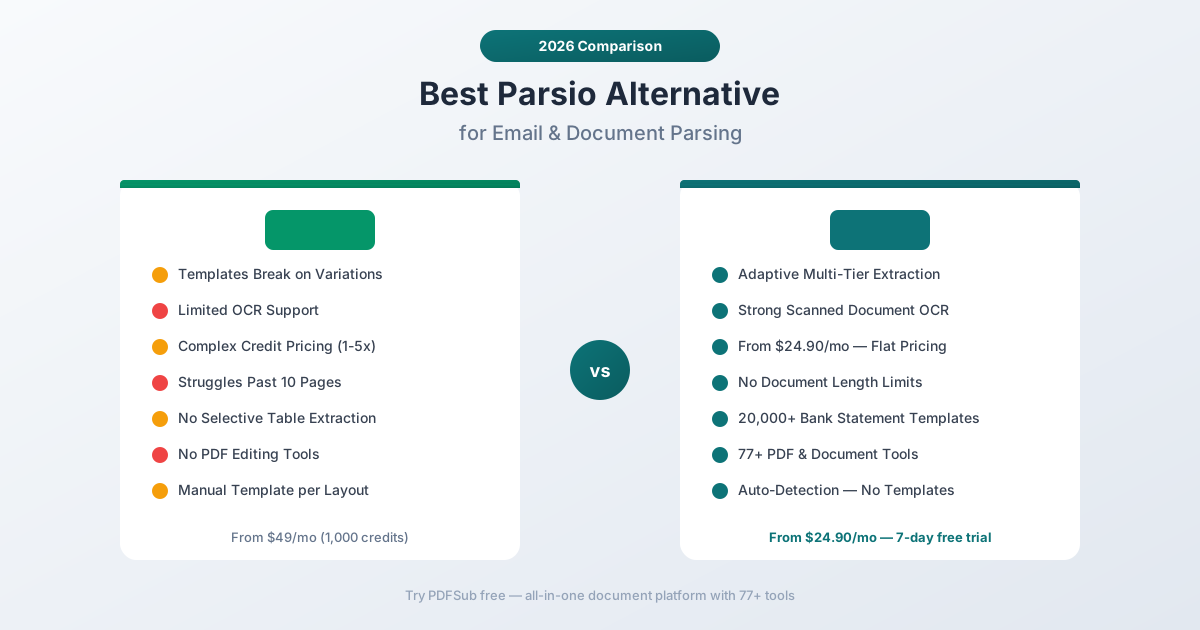
But Parsio has real limitations. Its OCR support is limited, making scanned documents harder to parse. Templates can break when document layouts change even slightly. It's not ideal for long documents exceeding 10 pages. And the credit-based pricing - where different parser types cost 1, 2, or 5 credits per page - makes cost prediction difficult. Plans start at $49/month for 1,000 credits and go to $299/month for 12,000 credits.
If you've been evaluating Parsio but find the template rigidity, OCR limitations, or credit complexity mismatched with your needs, this guide compares alternatives and identifies where you get the best value.
Why People Look for Parsio Alternatives
Parsio has a clean, intuitive interface and reviewers praise its ease of setup for simple use cases. The complaints center on template rigidity, OCR weaknesses, document length limitations, and confusing credit pricing.
Template-Based Extraction Breaks on Variations
Parsio's core approach is template matching - you highlight fields on a sample document, and the platform uses that template to extract data from similar documents. This works well when documents have identical layouts every time. But real-world documents vary:
- Banks update their statement formats periodically
- Different vendors send invoices with different layouts
- Even the same vendor may change invoice formatting between quarters
- International documents have different field positions
When a document doesn't match the template exactly, Parsio's extraction fails or produces incorrect data. Each new layout requires a separate template, and maintaining templates as formats evolve is ongoing manual work.
PDFSub uses a multi-tier extraction approach. Tier 1 (browser-based) uses pattern matching and column detection that adapts to different layouts. Tiers 3-4 use AI that reads documents like a human - no templates needed. For bank statements specifically, PDFSub has 20,000+ pre-built templates that auto-detect bank formats, eliminating the manual template creation burden.
Limited OCR for Scanned Documents
Multiple reviewers note that Parsio's OCR support is limited, making scanned files harder to parse. If you receive scanned bank statements, photographed receipts, or image-based PDFs, Parsio may not extract data accurately - or at all.
PDFSub's multi-tier architecture handles both digital and scanned documents. Digital PDFs are processed in the browser (Tier 1). Scanned documents route to server-side parsing and AI extraction (Tiers 2-4), which handle image-based content effectively.
Not Ideal for Long Documents
Parsio reviewers note that the platform is not ideal for long documents exceeding 10 pages. Quarterly bank statements, annual financial reports, and multi-page invoice packages regularly exceed this length. If your documents are longer than 10 pages, Parsio's performance and accuracy degrade.
PDFSub handles multi-page documents without arbitrary length restrictions. Upload a 50-page bank statement and get complete transaction extraction.
Confusing Credit Pricing
Parsio uses a credit system where different parser types consume different amounts of credits per page:
- Template-based parsing: 1 credit per page
- OCR parsing: 2 credits per page
- AI/GPT-powered parsing: 5 credits per page
This means a 10-page document costs 10 credits with template parsing, 20 credits with OCR, or 50 credits with AI parsing. The same document can cost 5x more depending on which parser it requires. This makes cost prediction difficult - you don't always know in advance which parser type a document will need.
Plans run:
- Sandbox (Free): 30 credits, 30 parsed documents
- Starter: $49/month for 1,000 credits
- Growth: $149/month for 5,000 credits
- Business: $299/month for 12,000 credits
PDFSub's pricing is simple per-user: $20/user/mo annual for the All-In-One plan ($240/yr, $25/mo monthly) - 500 AI credits and 500 BSC pages included. No per-page credit counting, no variable costs based on parsing method.
No Selective Extraction
Parsio doesn't allow you to select specific tables, pages, or sheets from a document. It processes everything together without filtering. If you only need transactions from page 3 of a multi-page statement, or a specific table from a financial report, Parsio extracts everything and leaves you to sort through the results.
No PDF Tools
Parsio is an extraction and parsing platform. It doesn't include document manipulation tools - no merging, splitting, compressing, converting, watermarking, or encrypting. If your workflow includes both data extraction and document operations, you need separate tools.
What to Look for in a Parsio Alternative
Adaptive extraction. The tool should handle layout variations without breaking. Template-free or AI-driven extraction adapts to different document formats automatically.
Strong OCR. Scanned documents and image-based PDFs should be first-class citizens, not afterthoughts.
No length limits. Real documents exceed 10 pages regularly. The tool should handle any document length.
Predictable pricing. Flat-rate pricing without variable credit costs per parsing method is easier to budget.
Bank statement specialization. For financial document workflows, deep bank format coverage eliminates manual template creation.
Bundled document tools. Merge, split, compress, convert, and other operations should be included, not separate subscriptions.
PDFSub: The Best Parsio Alternative
PDFSub replaces Parsio's template-based approach with multi-tier extraction that adapts to document variations, handles scanned documents, and includes 98+ PDF tools - all with flat-rate pricing and zero template maintenance.
Adaptive Extraction vs. Rigid Templates
Parsio requires you to create templates by highlighting fields on sample documents. When formats change, templates break. When you encounter a new document layout, you create a new template.
PDFSub's extraction is fundamentally different:
- Tier 1 (browser): Pattern matching and column detection that adapts to different bank statement layouts automatically
- Tier 2 (server): Server-side parsing with layout analysis for more complex documents
- Tier 3-4 (AI): Gemini-powered AI that reads documents like a human - no templates, no field highlighting, no layout assumptions
For bank statements specifically, PDFSub has 20,000+ pre-built templates covering institutions worldwide. You don't create templates - the system identifies your bank and applies the correct extraction logic automatically.
Strong OCR vs. Limited Scanning Support
Parsio's OCR is limited. PDFSub's multi-tier architecture routes scanned documents to server-side processing (Tier 2) and AI extraction (Tiers 3-4), both of which handle image-based content effectively. Photographed receipts, scanned statements, and image-only PDFs are all supported.
$15/Month vs. Complex Credit Pricing
PDFSub's pricing:
- All-In-One: $20/month annual ($240/year, saves $60 vs monthly; or $25/month billed monthly) - every PDF tool (98+), 500 AI credits, 500 bank statement pages, e-sign with no per-envelope fees, 50 GB storage, 365-day retention, unlimited team seats (each billed at the same per-user rate)
- Stackable add-on packs available for higher volume: 500 AI Credits, 500 Bank Statement Conversion Pages, 40 GB Storage, Priority Support
Parsio's pricing involves variable credit costs. A team processing 500 pages per month using AI parsing would consume 2,500 credits, requiring the Growth plan at $149/month. The same volume on PDFSub costs $20/month All-In-One (annual; includes 500 BSC pages) - an 87% cost reduction.
No Document Length Restrictions
Parsio struggles with documents exceeding 10 pages. PDFSub handles any document length. Quarterly bank statements with 30+ pages, annual financial reports, multi-page invoice packages - all processed completely.
20,000+ Bank Statement Templates
Parsio requires you to create bank statement templates manually - one for each bank format you encounter. PDFSub's bank statement converter has 20,000+ pre-built templates that auto-detect bank formats.
Upload a statement from Chase, HSBC, Barclays, DBS, Bank of India, Deutsche Bank, Commonwealth Bank, or thousands of other banks, and PDFSub identifies the format and extracts all transactions with date, description, amount, and running balance.
Export to 8 formats: Excel, CSV, TSV, JSON, QBO (QuickBooks), OFX (Xero/other accounting), QFX, and QIF.
98+ PDF Tools Included
PDFSub includes extraction plus comprehensive document operations:
- Merge and split PDFs for client document packages
- Compress large files for email or storage
- Convert between PDF, Word, Excel, PowerPoint, and image formats
- Watermark and stamp documents for confidential marking
- Encrypt and decrypt PDFs for security
- Translate documents across 130+ languages with AI
- Summarize long documents for quick review
- Compare two documents side by side
Parsio offers none of these. Having both extraction and document operations in a single platform eliminates the need for separate subscriptions.
130+ Languages with Auto-Detection
PDFSub supports 130+ languages with automatic detection - including all non-Latin scripts (Chinese, Japanese, Korean, Arabic, Hindi, Thai, Cyrillic). Parsio supports multiple document formats but language coverage for OCR and AI parsing varies by parser type.
Browser-First Privacy
PDFSub's Tier 1 extraction runs entirely in your browser - your document never leaves your device. For most digital PDFs, all processing happens client-side. Parsio processes documents on their servers (or via email ingestion), meaning all documents are uploaded to their infrastructure.
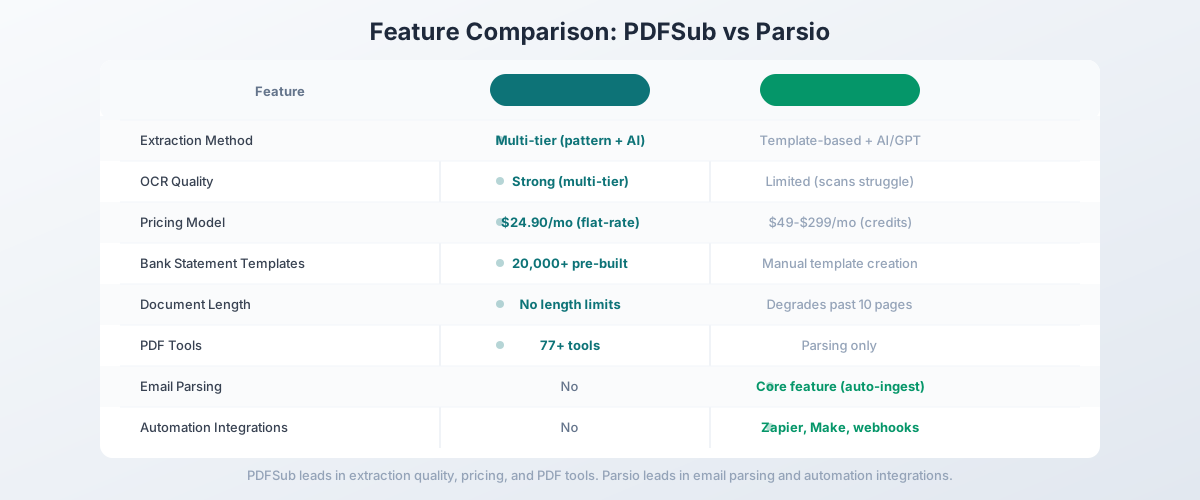
Side-by-Side Feature Comparison
| Feature | PDFSub | Parsio |
|---|---|---|
| Pricing | $20/user/mo (annual; $25/user/mo monthly) | $49-$299/mo (credit-based) |
| Extraction method | Multi-tier (pattern + AI) | Template-based + AI/GPT |
| OCR quality | Strong (multi-tier) | Limited (scans struggle) |
| Page limits | No arbitrary caps | Degrades past 10 pages |
| Bank statement templates | 20,000+ pre-built | Manual template creation |
| PDF tools | 98+ (merge, split, compress, etc.) | Parsing only |
| Languages | 130+ (auto-detected) | Varies by parser type |
| Privacy model | Browser-first (Tier 1) | Cloud-based |
| Email parsing | No | Yes (core feature) |
| Automation integrations | No (Google Drive / Dropbox storage integrations only) | Zapier, Make, webhooks |
| Data retention | 365 days on All-In-One (50 GB PDFSub Cloud) | 30-180 days by plan |
| Free trial | 7-day full access | Free sandbox (30 credits) |
When Parsio Is Still the Right Choice
Being honest: Parsio does things PDFSub doesn't. If these features are critical to your workflow, Parsio might still be the right tool:
You need email parsing. Parsio's core strength is parsing incoming emails automatically. Forward emails to a Parsio mailbox, and it extracts data from the email body and attachments. If your workflow depends on automated email ingestion - order confirmations, shipping notifications, lead capture forms - Parsio is purpose-built for this use case. PDFSub doesn't parse emails.
You need automation integrations. Parsio connects to Zapier, Make (Integromat), Google Sheets, and webhooks for automated data routing. If extracted data needs to flow automatically into your CRM, spreadsheet, or database without manual steps, Parsio's integration ecosystem enables this. PDFSub is designed for manual browser-based workflows.
You process highly consistent document formats. If your documents come from a single source with an unchanging layout (e.g., the same vendor sends identical invoice formats every month), Parsio's template approach is reliable and efficient. Template-based extraction works well when formats are predictable.
You need multi-format parsing. Parsio handles PDF, HTML, XLSX, CSV, DOCX, XML, and TXT files. If your data extraction spans multiple file formats beyond PDF, Parsio's format coverage is broader than PDFSub's PDF-focused approach.
You want a no-code template builder. For users comfortable with template-based extraction, Parsio's visual field highlighting is intuitive. Point and click to define extraction zones - no AI or pattern matching complexity.
Other Alternatives Worth Considering
PDFSub is our recommendation for the broadest value at an accessible price point, but other tools may fit specific needs:
Docparser - Cloud document parsing with Zonal OCR and template rules. Similar template-based approach to Parsio but with stronger OCR. $39-$159/month. Good if you need template-based extraction with better scanned document support.
Parseur - Email and document parser similar to Parsio. Template-based with automation integrations. Often compared directly to Parsio with slight feature differences.
Nanonets - AI extraction with pre-trained models and a visual model builder. More AI-driven than Parsio's template approach. Good middle ground between template-based and fully AI-powered extraction.
Docsumo - AI document extraction with both API and browser interface. More expensive ($500+/month) but handles layout variations better than template-based tools.
Mailparser - Dedicated email parsing tool. If email parsing is your only need, Mailparser focuses exclusively on this use case.
How to Switch from Parsio to PDFSub
If you're currently using Parsio or evaluating it alongside PDFSub, here's how to make the transition:
Step 1: Start a Free Trial
Go to PDFSub's pricing page and start a 7-day free trial with full functionality.
Step 2: Test Your Core Document Types
Process the document types that drive your workflow:
- Bank statements: Convert statements from your most common banks - verify that auto-detection matches or exceeds your manual Parsio templates
- Invoices: Test with invoices from your primary vendors - compare extraction accuracy against your Parsio templates
- Receipts: Upload receipts including scanned/photographed versions to test OCR quality
- Long documents: Test with documents exceeding 10 pages to verify complete extraction
Step 3: Evaluate Workflow Fit
If your Parsio usage is primarily document extraction (bank statements, invoices, receipts), PDFSub covers that workflow with less manual template maintenance. If you rely heavily on Parsio's email parsing and automation integrations, those capabilities won't be available in PDFSub.
Step 4: Compare Total Cost
Calculate your monthly credit usage on Parsio (remembering that AI parsing costs 5 credits per page) and compare it to PDFSub's per-user pricing. For most document-focused workflows, PDFSub costs significantly less.
Step 5: Identify What Stays
If you use Parsio for email parsing (automated email ingestion and extraction), keep Parsio running for that workflow while moving document extraction to PDFSub. You may be able to downgrade your Parsio plan since document parsing volume shifts to PDFSub.
Frequently Asked Questions
Is PDFSub as accurate as Parsio for document extraction?
For financial documents, PDFSub's multi-tier extraction often outperforms Parsio's template-based approach because it adapts to layout variations that would break Parsio templates. For highly consistent document formats where you've built a perfect template, Parsio's accuracy is good. The best test is to process your actual documents during PDFSub's 7-day free trial.
Does PDFSub parse emails?
No. PDFSub is a document extraction platform, not an email parser. If email parsing is a core requirement, Parsio, Parseur, or Mailparser are better options for that specific workflow.
Can PDFSub connect to Zapier or Make?
PDFSub is designed as a browser-first platform for manual document processing. It doesn't offer the webhook and automation integrations that Parsio provides. If automated data routing is essential, Parsio's integration ecosystem is more developed.
Does PDFSub handle non-PDF document formats?
PDFSub's primary focus is PDF documents, with AI extraction optimized for PDF-based financial documents. Parsio handles a broader range of formats including HTML, XLSX, CSV, DOCX, XML, and TXT. For multi-format extraction needs, Parsio's format coverage is wider.
How does PDFSub handle template creation?
PDFSub doesn't require manual template creation. For bank statements, 20,000+ templates are pre-built and auto-detected. For invoices and receipts, AI extraction reads the document without predefined templates. This eliminates the template maintenance burden.
Can I use both Parsio and PDFSub?
Yes. Many teams use Parsio for email parsing and automation workflows while using PDFSub for manual document extraction (bank statements, invoices). The tools serve different workflow types and complement each other well.
The Bottom Line
Parsio is a solid email and document parsing tool, but its template rigidity, limited OCR, document length restrictions, and complex credit pricing create friction for financial document extraction. You shouldn't need to manually create templates for every bank statement format or worry about credit costs varying 5x based on parsing method.
PDFSub delivers AI-powered extraction for bank statements, invoices, and receipts with adaptive multi-tier processing, no template maintenance, All-In-One per-user pricing at $20/user/mo (annual), and 98+ PDF tools included. Add 130+ language support, 20,000+ bank statement templates, no page limits, and browser-first privacy, and you get a platform that handles financial document extraction without the limitations.
Try PDFSub's bank statement converter free with a 7-day trial and process your actual documents. No templates to create, no credits to count, no page limits to worry about - just upload and extract.