Best Klippa Alternative for Document Digitization (2026)
Compare Klippa vs PDFSub for document processing. See enterprise pricing gaps and simpler options.
PDFSub is best for:
- Small teams who want transparent, published pricing instead of enterprise sales calls
- Non-technical users needing browser-based extraction without module configuration or API setup
- Firms outside the EU that don't need Klippa's GDPR-specific compliance infrastructure
- Users wanting AI document processing plus 98+ PDF tools at $20/mo annual
PDFSub is NOT best for:
- EU enterprises needing GDPR-certified document processing with on-premise deployment
- Organizations requiring identity verification, fraud detection, and passport/ID scanning
- Teams needing automated document classification across 50+ document categories
Klippa DocHorizon is a Dutch intelligent document processing (IDP) platform that uses AI-powered OCR to extract data, classify, verify, and digitize documents. It handles 50+ document types out of the box - invoices, receipts, credit card statements, passports, ID cards, delivery notes, medical forms, contracts, and more. For enterprise organizations processing thousands of documents monthly with complex compliance requirements, Klippa is a comprehensive solution.
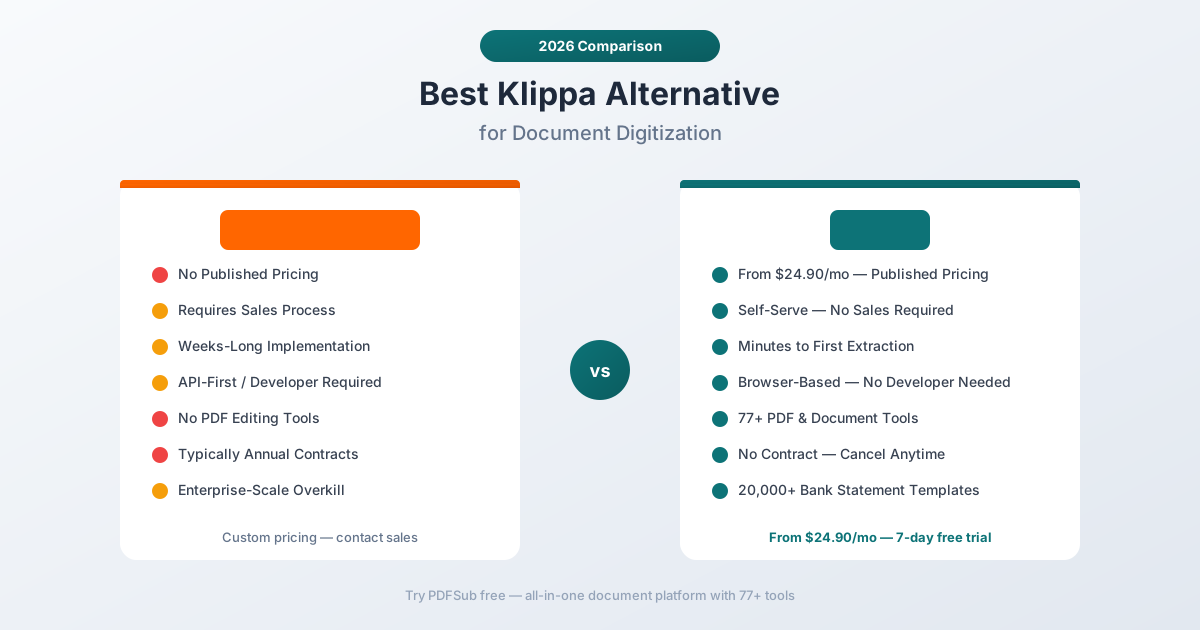
But Klippa is built for enterprises, and its pricing reflects that. There are no published prices - you need to contact their sales team for a custom quote based on your specific modules, volume, and integration requirements. For small-to-mid-sized accounting practices, bookkeepers, and businesses that need document extraction without a procurement process, Klippa's enterprise model creates an unnecessary barrier.
If you've been evaluating Klippa but find the sales-driven pricing, implementation complexity, or enterprise focus mismatched with your actual needs, this guide compares alternatives and identifies where you get the best value.
Why People Look for Klippa Alternatives
Klippa receives positive reviews - users praise its OCR accuracy, fast processing (1-5 seconds per document), and comprehensive feature set. The complaints tend to center on accessibility, pricing transparency, and the gap between what small teams need and what Klippa offers.
No Published Pricing
This is the most immediate barrier. Klippa doesn't publish pricing on their website. To learn what it costs, you need to:
- Contact their sales team
- Describe your use case, volume, and integration needs
- Wait for a custom quote
- Often negotiate an annual contract
For a small accounting practice that needs to convert bank statements and extract invoice data, a multi-step sales process to learn the price is excessive. When you can't evaluate cost before engaging with sales, you can't make informed comparisons.
PDFSub publishes all pricing on its pricing page. The All-In-One plan is $20/month annual ($240/year, saves $60) or $25/month billed monthly - includes 500 AI credits, 500 bank statement pages, 98+ tools, e-sign with no per-envelope fees, 50 GB cloud storage; add unlimited team seats at the same per-user rate. Stackable add-on packs available (500 BSC Pages, 500 AI Credits, 40 GB Storage, Priority Support). No sales calls, no custom quotes, no annual commitments required.
Enterprise Implementation Complexity
Klippa DocHorizon is designed as a platform that integrates into enterprise workflows. Implementation typically involves:
- Selecting which modules you need (OCR, classification, verification, fraud detection, anonymization)
- Configuring API integrations with your existing systems
- Setting up document workflows and routing rules
- Testing and validating extraction accuracy for your document types
- Training your team on the platform
For large organizations with dedicated IT teams, this structured implementation is appropriate. For a bookkeeper who needs to convert a bank statement to Excel right now, it's a barrier that adds weeks or months before you see any value.
PDFSub is browser-based and requires zero setup. Sign up, upload a document, get results. The entire process from account creation to first extraction takes minutes, not weeks.
Overkill for Financial Document Processing
Klippa's feature set is genuinely impressive: fraud detection, document anonymization, identity verification, compliance checking, multi-step classification workflows. But if your primary needs are bank statement conversion, invoice extraction, and receipt scanning, you're paying for capabilities you'll never use.
It's like buying a commercial airliner to commute to work. The engineering is magnificent, but it doesn't match the task. A tool scoped to financial document processing delivers the same extraction quality at a fraction of the cost and complexity.
Limited Feedback Loop on Accuracy
Several reviewers note that when Klippa's extraction produces errors, reporting those errors doesn't lead to visible improvements in the AI model. The feedback loop between users and model improvement feels disconnected. For teams that process documents with consistent formatting (same bank, same invoice layout), extraction errors that don't self-correct are frustrating.
PDFSub uses a multi-tier extraction architecture where Tier 1 (browser-based) and Tier 2 (server-side parsing) handle most standard financial documents without AI, using pattern matching and column detection. AI is the fallback for edge cases, which means fewer AI-dependent accuracy issues for standard documents.
API-Centric Design
Like many enterprise IDP platforms, Klippa is designed primarily as an API service. The platform integrates into existing systems via REST APIs, SDKs, and webhooks. This is excellent for automated document processing pipelines but less useful for teams that process documents manually through a user interface.
PDFSub provides a browser-based interface optimized for human-driven workflows. Upload, extract, review, export. No API setup, no developer involvement, no infrastructure management.
What to Look for in a Klippa Alternative
Transparent pricing. You should be able to see what a tool costs before committing to a sales conversation. Published pricing enables informed decision-making.
Minimal setup. The tool should deliver value immediately - sign up and start processing. Implementation projects measured in weeks are appropriate for ERP systems, not document extraction.
Right-sized for financial documents. If your needs are bank statements, invoices, and receipts, the tool should excel at those specific document types without the overhead of enterprise IDP features you won't use.
Browser-based interface. Manual document processing workflows need a good user interface, not just an API.
Broader document tools. Beyond extraction, you need PDF merge, split, compress, convert, and other document operations.
Language support. International clients and banks mean the tool needs comprehensive language and format support.
PDFSub: The Best Klippa Alternative
PDFSub replaces Klippa's enterprise document processing with an accessible, affordable platform - AI extraction for bank statements, invoices, and receipts, plus 98+ PDF tools, all with transparent flat pricing and zero setup.
Transparent Pricing vs. Custom Quotes
The difference starts at the pricing page. PDFSub publishes all plan details:
- All-In-One plan: $20/month (annual; $240/year, saves $60) or $25/month billed monthly - 98+ tools, 500 AI credits, 500 bank statement pages, e-sign with no per-envelope fees, 50 GB cloud storage, unlimited team seats (each billed at the same per-user rate)
- Stackable add-on packs: 500 AI Credits, 500 Bank Statement Conversion Pages, 40 GB Storage, Priority Support
- 7-day free trial with full access
Klippa requires a sales conversation and custom quote. The actual cost depends on modules selected, document volume, integration complexity, and contract length. Enterprise IDP platforms in Klippa's category typically run several hundred to several thousand dollars per month, depending on scale.
With PDFSub, you know the cost before you sign up. With Klippa, you don't know the cost until after the sales process.
Minutes to Value vs. Weeks to Implementation
PDFSub's onboarding:
- Sign up (2 minutes)
- Upload a document (30 seconds)
- Get extracted data (5-30 seconds depending on document type)
- Export to Excel, CSV, QBO, OFX, or other formats (10 seconds)
Klippa's onboarding:
- Contact sales and describe your requirements
- Receive and evaluate custom proposal
- Sign contract (often annual)
- Implementation and API integration (days to weeks)
- Configure document types and workflows
- Test and validate accuracy
- Train team on the platform
- Begin processing
For enterprises with complex document workflows, Klippa's structured implementation makes sense. For everyone else, PDFSub delivers extraction results in under 5 minutes from sign-up.
20,000+ Bank Statement Templates
Klippa handles bank statements as one of its 50+ supported document types. PDFSub specializes in financial document extraction with its bank statement converter, offering pre-built support for 20,000+ bank statement formats worldwide.
Upload a statement from virtually any bank - Chase, HSBC, DBS, Barclays, Bank of India, Deutsche Bank, Commonwealth Bank, and thousands more - and PDFSub auto-detects the format and extracts all transactions with date, description, amount, and running balance.
Export to 8 formats: Excel, CSV, TSV, JSON, QBO (QuickBooks), OFX (Xero/other accounting), QFX, and QIF. Each format is optimized for its target platform.
98+ PDF Tools Included
Klippa focuses on document data extraction, classification, and verification. PDFSub includes extraction plus a comprehensive document operations platform:
- Merge and split PDFs for client document packages
- Compress large files for email or storage
- Convert between PDF, Word, Excel, PowerPoint, and image formats
- Watermark and stamp documents for confidential marking
- Encrypt and decrypt PDFs for security
- Translate documents across 130+ languages with AI
- Summarize long documents for quick review
- Compare two documents side by side
For accounting practices, these document operations are daily tasks. Having them in the same platform as extraction eliminates the need for separate PDF tool subscriptions.
130+ Languages with Auto-Detection
PDFSub supports 130+ languages with automatic detection - including all non-Latin scripts (Chinese, Japanese, Korean, Arabic, Hindi, Thai, Cyrillic). Klippa also supports multiple languages through its OCR engine, but the exact language count and accuracy per language vary by module and document type.
Both platforms handle international document formats - date formats, number formats, and currency symbols. PDFSub's advantage is that language support works identically across all document types without per-language configuration.
Browser-First Privacy
PDFSub's Tier 1 extraction runs entirely in your browser - your document never leaves your device. For most digital bank statements, invoices, and receipts, all processing happens client-side.
Klippa processes all documents on their cloud servers. While Klippa is GDPR-compliant (important for their European customer base), the documents are still uploaded to and processed on remote servers. PDFSub's browser-first approach means financial documents with sensitive data stay on your device for the majority of processing operations.
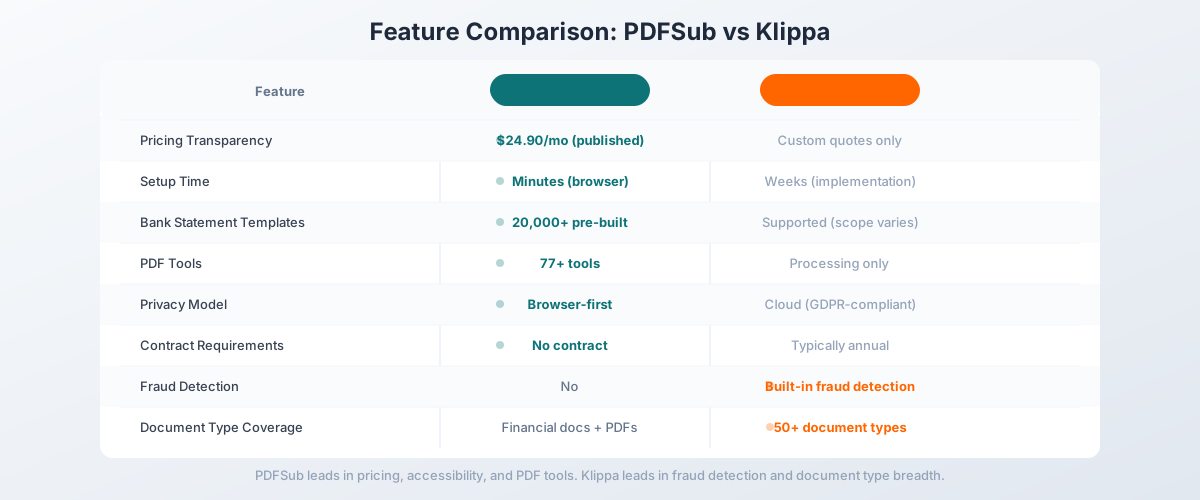
Side-by-Side Feature Comparison
| Feature | PDFSub | Klippa DocHorizon |
|---|---|---|
| Pricing | $10-$14/mo (published) | Custom quotes only |
| Setup time | Minutes (browser-based) | Weeks (implementation project) |
| Bank statement templates | 20,000+ pre-built | Supported (scope varies) |
| PDF tools | 98+ (merge, split, compress, etc.) | Document processing only |
| Languages | 130+ (auto-detected) | Multiple (module-dependent) |
| Privacy model | Browser-first (Tier 1) | Cloud-only (GDPR-compliant) |
| API access | Browser interface + HTML rendering API with 10 SDKs (extraction endpoints in follow-up phase) | API-first extraction platform |
| Fraud detection | No | Yes (built-in) |
| Identity verification | No | Yes (passports, IDs) |
| Document classification | Basic (financial docs) | Advanced (50+ types) |
| Annual contract required | No (cancel anytime) | Typically yes |
| Free trial | 7-day full access | Free trial available |
When Klippa Is Still the Right Choice
Being honest: Klippa does things PDFSub doesn't. If these features are critical to your workflow, Klippa might still be the right tool:
You need fraud detection. Klippa includes built-in fraud detection that identifies tampered documents, altered figures, and suspicious patterns. This is a specialized capability that PDFSub doesn't offer. If document fraud detection is a compliance requirement, Klippa's built-in fraud detection is a genuine advantage.
You need identity document verification. Klippa processes passports, ID cards, driver's licenses, and other identity documents with verification capabilities. PDFSub focuses on financial documents (bank statements, invoices, receipts) and general PDF operations. If ID verification is part of your workflow, Klippa covers it.
You process 50+ document types at enterprise scale. Klippa's support for invoices, receipts, credit card statements, purchase orders, delivery notes, medical forms, contracts, payslips, and dozens of other document types is genuinely comprehensive. If your organization processes a wide variety of document types at high volume, Klippa's breadth is valuable.
You need automated document classification. Klippa can automatically classify incoming documents - routing invoices to accounts payable, receipts to expense management, contracts to legal review, etc. PDFSub processes documents on demand through a browser interface without automated classification workflows.
You need data anonymization. Klippa includes document anonymization capabilities for GDPR compliance - masking personal data, redacting sensitive information. PDFSub doesn't have built-in anonymization features.
Your IT team wants an API platform. If you're building automated document processing pipelines with API integration into existing systems, Klippa's API-first architecture provides the integration infrastructure. PDFSub is designed for browser-based manual processing.
Other Alternatives Worth Considering
PDFSub is our recommendation for the broadest value at an accessible price point, but other tools may fit specific needs:
ABBYY Vantage - Another enterprise IDP platform with deep OCR capabilities. If you're evaluating Klippa, you've likely also looked at ABBYY. Similar enterprise pricing and complexity, but ABBYY has deeper OCR technology and a larger processing ecosystem.
Docsumo - AI document extraction starting at $500/month. More accessible than Klippa but still enterprise-priced. Good for organizations that need custom model training on specific document types. API-first like Klippa.
Nanonets - AI document extraction with a more accessible entry point than both Klippa and Docsumo. Pre-trained models for common documents, visual model builder. Good middle ground between enterprise platforms and consumer tools.
Dext Prepare - Receipt and invoice capture with direct accounting software integration. Much narrower scope than Klippa, but purpose-built for accounting practices. Per-client pricing ($25-55/month per client).
Google Document AI - Google's cloud-based document processing. Pay-per-page pricing. Requires Google Cloud infrastructure and API development. Good option for teams already in the Google Cloud ecosystem.
How to Switch from Klippa to PDFSub
If you're currently using Klippa or evaluating it alongside PDFSub, here's how to make the transition:
Step 1: Start a Free Trial
Go to PDFSub's pricing page and start a 7-day free trial. All plans include full functionality.
Step 2: Test Your Core Financial Documents
Process the document types that drive your workflow:
- Bank statements: Convert statements from your most common banks - verify transaction accuracy and export format compatibility
- Invoices: Test with invoices from your primary vendors - check header data and line item extraction
- Receipts: Upload receipts in various formats and languages
- International documents: Test with non-English documents to verify language support
Step 3: Evaluate Scope Match
If your Klippa usage is primarily financial document extraction (bank statements, invoices, receipts), PDFSub covers that workflow at a fraction of the cost. If you rely on Klippa's fraud detection, ID verification, or automated classification, those features won't be available in PDFSub.
Step 4: Compare Total Cost
Your Klippa contract amount versus PDFSub's published pricing. For most accounting practices and small businesses, the annual savings from switching to PDFSub can be substantial - often thousands of dollars per year.
Step 5: Plan the Transition
If you're on a Klippa annual contract, plan the switch for contract renewal. Start using PDFSub for financial documents while Klippa handles any remaining specialized workflows. Gradually shift volume as you validate PDFSub's quality and coverage.
Frequently Asked Questions
Is PDFSub as accurate as Klippa for document extraction?
For financial documents (bank statements, invoices, receipts), PDFSub's accuracy is competitive. Klippa's OCR claims up to 95% accuracy across its document types. PDFSub's multi-tier extraction - browser-based for digital PDFs, AI-powered for scanned documents - delivers strong accuracy for financial documents specifically. The best test is to process your actual documents during PDFSub's 7-day free trial.
Does PDFSub handle non-financial documents?
PDFSub's AI extraction is optimized for financial documents. However, the 98+ PDF tools (merge, split, compress, convert, translate, summarize, compare) work with any document type. For non-financial document data extraction (contracts, medical forms, etc.), Klippa's broader document type support is more comprehensive.
Can PDFSub process documents via API?
Yes. PDFSub ships a Developer API with 10 official SDKs (Node, Python, PHP, Go, Ruby, Java, .NET, Rust, C, C++). The v1 surface focuses on HTML-input rendering (HTML → PDF/PNG/JPEG/WEBP, HTML → text/markdown) with cloud delivery to Google Drive, Dropbox, S3, GCS, and Cloudflare R2. Extraction endpoints for the AI tools are planned for a follow-up phase. If your workflow requires API-first document extraction today, Klippa's extraction API is the more direct fit; for HTML rendering plus the in-browser AI extraction suite, PDFSub covers it.
Does PDFSub offer fraud detection?
No. PDFSub doesn't include document fraud detection capabilities. If fraud detection is a compliance requirement, Klippa's built-in fraud detection is a genuine advantage that PDFSub doesn't replicate.
How does PDFSub handle GDPR and SOC 2 compliance?
PDFSub's browser-first processing means most financial documents never leave your device (Tier 1 extraction). This is inherently privacy-friendly - data stays on your machine. When server-side processing is needed (Tier 2-4), documents are processed temporarily and not retained long-term. PDFSub is GDPR and CCPA compliant, and SOC 2 Ready. Klippa offers more formal GDPR compliance features including data anonymization and processing agreements.
Is Klippa worth the cost for small businesses?
Klippa is designed for enterprise organizations with complex document workflows. For small-to-mid-sized businesses focused primarily on financial document processing, PDFSub offers comparable extraction quality at a fraction of the cost with zero implementation overhead. Klippa's additional capabilities (fraud detection, ID verification, automated classification) justify the enterprise pricing only if you actually need those features.
The Bottom Line
Klippa DocHorizon is a comprehensive enterprise IDP platform - but its custom pricing, implementation complexity, and enterprise focus make it inaccessible for most accounting practices and small businesses. You shouldn't need a sales call and a multi-week implementation to extract transactions from a bank statement.
PDFSub delivers AI-powered extraction for bank statements, invoices, and receipts with transparent All-In-One pricing at $20/month annual ($240/year) or $25/month billed monthly, zero setup, and 98+ PDF tools included. Add 130+ language support, 20,000+ bank statement templates, and browser-first privacy, and you get a platform that handles the full financial document workflow without enterprise overhead.
Try PDFSub's bank statement converter free with a 7-day trial and process your actual financial documents. Compare the extraction quality and the total cost of ownership. For financial document processing without enterprise complexity, the value proposition is straightforward.