Best Hubdoc Alternative for Document Collection (2026)
Compare Hubdoc vs PDFSub for document processing. See features, limitations, and better options.
PDFSub is best for:
- Accountants frustrated by Hubdoc's accuracy problems and lack of line item extraction
- Non-Xero users who need document extraction without being locked into the Xero ecosystem
- Firms needing bank statement conversion - something Hubdoc doesn't handle
- Users wanting AI-powered extraction with 98+ PDF tools at $20/mo annual
PDFSub is NOT best for:
- Xero-only practices where Hubdoc's free bundled integration is sufficient
- Firms that need automatic document fetching from supplier portals and bank websites
- Teams requiring direct accounting software sync with auto-categorization rules
Hubdoc is a document collection and data capture tool that reads key information from bills and receipts - supplier names, amounts, invoice numbers, and due dates - and pushes it into accounting software. Acquired by Xero in 2018, it's now bundled free with Xero subscriptions, making it the default receipt capture tool for Xero users worldwide.
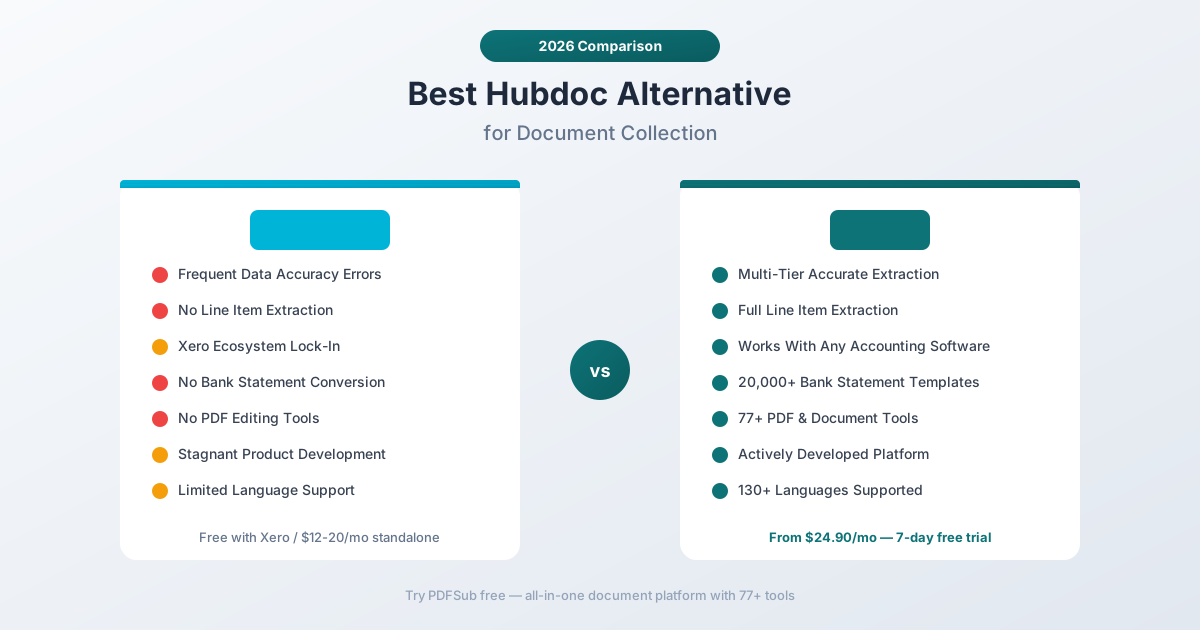
But "free with Xero" comes with significant limitations. Hubdoc only works well within the Xero ecosystem. It doesn't handle bank statements, has limited storage, struggles with accuracy on supplier names and figures, and still can't import line items - years after the Xero acquisition. For accountants who need more than basic receipt forwarding, Hubdoc's limitations become obvious quickly.
If you've been frustrated by Hubdoc's data accuracy issues, its inability to process bank statements, or the feeling that the product has stagnated under Xero ownership, this guide compares alternatives and identifies where you get the most value.
Why People Look for Hubdoc Alternatives
Hubdoc's G2 rating is 4.2 stars - decent but not outstanding. The product serves its narrow purpose, but the complaints from users paint a clear picture of what's missing.
Accuracy Problems with Data Extraction
This is the most common user complaint. Hubdoc frequently misreads supplier names, gets figures wrong, and doesn't remember previous corrections. Users report that the tool "struggles to read suppliers names (often just gets it wrong) and misreads figures." When your extraction tool regularly gives you wrong data, you're spending time fixing errors instead of saving time.
For an accounting tool, data accuracy isn't optional - it's the entire value proposition. If you have to manually verify every extraction result, the tool is generating work instead of eliminating it.
PDFSub uses a multi-tier extraction architecture: browser-based text extraction for digital PDFs, server-side parsing with column detection for complex layouts, and AI-powered extraction for scanned documents. This layered approach delivers consistent accuracy across document types, and the AI tier continuously improves.
No Line Item Extraction
Years after Xero acquired Hubdoc, the product still doesn't support automatic import of line items from invoices. It captures the header-level data (vendor, total, date, invoice number) but not the individual line items that make up the invoice.
For accountants who need to code individual line items to different accounts or track detailed cost breakdowns, this is a critical gap. You get a total from Hubdoc but still have to manually enter line items in your accounting software.
PDFSub's AI invoice extractor captures full line item details - description, quantity, unit price, total, and tax for each line - along with all header data. The complete invoice structure exports to Excel or CSV for easy review and import.
Xero Lock-In
Hubdoc's primary value is its integration with Xero. It also supports QuickBooks Online, but the Xero integration is deepest and most maintained. If you use Xero, Hubdoc is essentially free. If you don't, Hubdoc's value drops significantly.
This creates two problems:
- If you switch accounting software, Hubdoc becomes much less useful. The tool is optimized for Xero, and alternatives to Xero (Sage, FreshBooks, Wave, etc.) don't get the same integration depth.
- If you use multiple accounting platforms across different clients, Hubdoc only handles the Xero clients well. You need a different solution for non-Xero clients.
PDFSub exports to standard file formats (Excel, CSV, QBO, OFX, QFX, QIF) that work with any accounting software. No lock-in to a specific platform - the same workflow works whether your clients use Xero, QuickBooks, Sage, or anything else.
Limited Document Storage
Hubdoc provides document storage, but users report hitting storage limits that require additional fees. For practices with many clients generating high document volumes, storage costs can add up on top of the Xero subscription.
PDFSub's All-In-One plan includes 50 GB of PDFSub Cloud storage with 365-day retention. You can also connect Google Drive or Dropbox if you'd rather store documents in an existing system. Browser-first tools never upload files at all; server-side tools process temporarily.
No Bank Statement Conversion
Hubdoc captures bills and receipts. It doesn't convert bank statements. If a client sends you a PDF bank statement and you need to extract transactions into Excel, CSV, QBO, or OFX format, Hubdoc has nothing to offer. You need a separate bank statement converter - a separate tool, a separate subscription, a separate workflow.
PDFSub includes a bank statement converter that handles statements from 20,000+ banks worldwide with exports to 8 formats. It's included in every subscription at no extra charge.
Stagnant Product Development
Multiple reviewers note that Hubdoc hasn't improved significantly since the Xero acquisition. The core product - receipt and bill capture - works, but feature development has been minimal. No line item extraction, no bank statements, no expanded language support, no meaningful new capabilities.
When a product is "free with your existing subscription," there's less incentive for the parent company to invest in major improvements. Hubdoc feels maintained rather than actively developed.
What to Look for in a Hubdoc Alternative
Extraction accuracy. The tool should get vendor names, amounts, dates, and line items right consistently - not require manual verification on every document.
Line item support. Full invoice extraction including individual line items, not just header totals.
Platform independence. Your document processing tool shouldn't be tied to a specific accounting platform. Standard export formats ensure flexibility.
Bank statement conversion. For accounting practices, bank statement conversion is a daily need. The ideal tool handles both receipt/invoice extraction and bank statement conversion.
Broader document tools. Beyond extraction, you need PDF merge, split, compress, convert, and other document operations. One subscription, one platform.
Language support. International clients mean international documents. Comprehensive language support with auto-detection saves manual configuration time.
PDFSub: The Best Hubdoc Alternative
PDFSub replaces Hubdoc's limited document capture with a comprehensive platform - AI extraction for receipts, invoices, and bank statements, plus 98+ PDF tools, with accurate results across 130+ languages.
Accurate Extraction with Line Items
Where Hubdoc struggles with supplier names and figures, PDFSub's multi-tier extraction architecture delivers consistent accuracy:
Receipt scanning. The AI receipt scanner extracts merchant name, date, items, subtotal, tax, tip, and total. International formats, non-Latin scripts, and unusual receipt layouts are handled automatically.
Invoice extraction with line items. The AI invoice extractor captures the full invoice structure: vendor details, invoice number, dates, payment terms, AND every line item with description, quantity, unit price, and total. This is the feature Hubdoc still doesn't have.
Bank statement conversion. The bank statement converter extracts every transaction with date, description, amount, and running balance from statements covering 20,000+ banks worldwide.
Works With Any Accounting Software
Hubdoc works best with Xero and acceptably with QuickBooks Online. PDFSub works with everything. Export formats include:
- Excel and CSV - universal import format for any software
- QBO - native QuickBooks import with FITID duplicate detection
- OFX - standard format accepted by Xero, Sage, and most accounting platforms
- QFX and QIF - additional formats for specialized accounting tools
- TSV and JSON - for data processing and custom workflows
The same extraction, the same workflow, regardless of which accounting software your clients use. No platform lock-in.
98+ PDF Tools Beyond Extraction
Hubdoc does one thing: capture bills and receipts. PDFSub includes a comprehensive document platform:
- Merge and split PDFs for client document packages
- Compress large files for email or storage
- Convert between PDF, Word, Excel, PowerPoint, and image formats
- Watermark and stamp documents for confidential marking
- Encrypt and decrypt PDFs for security
- Translate documents across 130+ languages with AI
- Summarize long documents for quick review
- Compare two documents side by side
For accounting practices, these aren't extras - they're daily operations that currently require separate tools and separate subscriptions.
130+ Languages vs. Limited Support
PDFSub supports 130+ languages with automatic detection. Hubdoc supports a narrower set focused primarily on English and major European languages.
- Non-Latin scripts (Chinese, Japanese, Korean, Arabic, Hindi, Thai, Cyrillic) are fully supported
- International date formats are auto-detected
- Currency symbols from 100+ countries are recognized
- Number formats (European comma-decimal, Indian lakh system) are handled automatically
Browser-First Privacy
PDFSub's Tier 1 extraction runs entirely in your browser - your document never leaves your device. For most digital bank statements, invoices, and receipts, all processing happens client-side.
Hubdoc uploads all documents to cloud servers. Every bill, every receipt, every document goes through Hubdoc's (and by extension, Xero's) cloud infrastructure. For practices handling sensitive client financial data, browser-first processing is a meaningful privacy advantage.
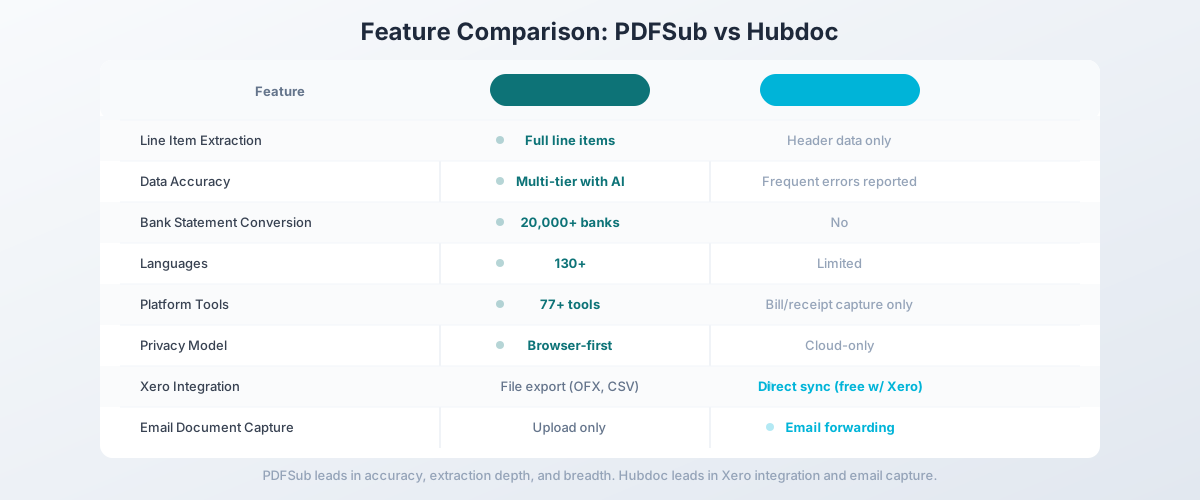
Side-by-Side Feature Comparison
| Feature | PDFSub | Hubdoc |
|---|---|---|
| Pricing | $20/mo (annual) (7-day free trial) | Free with Xero / $12-20/mo standalone |
| Line item extraction | Full line items (invoice extractor) | No - header data only |
| Bank statement conversion | 20,000+ banks, 8 formats | No |
| PDF tools | 98+ (merge, split, compress, convert, etc.) | None |
| Data accuracy | Multi-tier extraction with AI fallback | Frequent errors on names/figures |
| Languages | 130+ (auto-detected) | Limited (English + major EU) |
| Accounting platforms | Any (standard export formats) | Xero (best), QuickBooks (limited) |
| Privacy model | Browser-first (Tier 1 never uploads) | Cloud-only |
| Mobile app | Browser-based (works on mobile) | Dedicated iOS/Android app |
| Email document capture | No (upload/drag-drop) | Yes (email forwarding) |
| Document storage | 50 GB PDFSub Cloud (365-day retention) + Google Drive/Dropbox integrations | Cloud storage (limits apply) |
| Free trial | 7-day full access (subscription required after) | Free with Xero subscription |
When Hubdoc Is Still the Right Choice
Being honest: Hubdoc makes sense in specific situations. If these describe your workflow, Hubdoc might still be the right tool:
You're all-in on Xero and it's free. If you already pay for Xero and Hubdoc is included in your subscription, the marginal cost is zero. For basic receipt and bill capture within the Xero ecosystem, "free" is hard to beat. If your needs don't extend beyond what Hubdoc offers, the price is right.
You need email document forwarding. Hubdoc provides dedicated email addresses for automatic document capture. Forward a bill from a vendor, and it's automatically captured and processed. PDFSub requires manual upload. If automated email collection is central to your workflow, Hubdoc's email capture is genuinely useful.
You need a mobile capture app. Hubdoc has dedicated iOS and Android apps for photographing receipts and bills on the go. PDFSub works in a mobile browser but doesn't have a dedicated camera app. For field-based receipt capture, Hubdoc's mobile app is more polished.
You only need header-level data. If you don't need line item extraction, and your workflow only requires vendor name, total amount, date, and invoice number, Hubdoc captures that adequately (though with occasional accuracy issues).
Your practice is exclusively Xero-based. If every client uses Xero and you have no plans to work with other accounting platforms, Hubdoc's deep Xero integration creates a streamlined workflow. The direct sync eliminates the file export/import step.
Other Alternatives Worth Considering
PDFSub is our recommendation for the broadest value, but other tools may fit specific needs:
Dext Prepare - Receipt and invoice capture with direct accounting software sync (Xero, QuickBooks, Sage). Better extraction accuracy than Hubdoc, but per-client pricing ($25-55/mo per client) that scales painfully. Good if you need tight accounting integration and can absorb the cost.
AutoEntry - Similar to Dext but with credit-based pricing. $12-450/month depending on credit volume. 1-2 credits per document processed. Integrates with Sage, Xero, and QuickBooks. Good middle ground on pricing, but same limitations: no bank statements, no PDF tools.
Expensify - Expense management with receipt scanning. Better for corporate expense tracking than accounting practice use. Per-user pricing ($5-18/user/month). Strong at what it does but doesn't replace document extraction for accounting practices.
Receipt Bank (now Dext) - Former standalone product, now part of Dext Prepare. If you used Receipt Bank before the rebrand, the Dext Prepare product is the successor. See Dext comparison above for details.
How to Switch from Hubdoc to PDFSub
Switching is straightforward, though you'll need to adjust your document collection workflow since Hubdoc's email forwarding won't carry over.
Step 1: Start a Free Trial
Go to PDFSub's pricing page and start a 7-day free trial. All plans include full functionality during the trial.
Step 2: Test Extraction Quality
Process the document types you handle most:
- Invoices: Test with invoices from your most common vendors - verify both header data AND line items are extracted correctly
- Receipts: Upload receipts and compare accuracy against Hubdoc's output
- Bank statements: Convert a client bank statement to Excel or QBO and verify transaction accuracy
- Non-English documents: If you have international clients, test with their documents
Step 3: Establish New Document Collection Workflow
Since PDFSub uses upload rather than email forwarding, you'll need to adjust:
- Save vendor emails with attachments to a designated folder
- Download receipt images from your phone's camera
- Drag and drop files into PDFSub for processing
- Export results in the format your accounting software needs
Step 4: Compare Total Cost
Calculate your effective Hubdoc cost (free with Xero, or standalone pricing) and compare to PDFSub. Factor in tools you currently pay for separately (bank statement converter, PDF tools, etc.) that PDFSub would replace.
Step 5: Decide on Hubdoc
If PDFSub covers your workflow, you can stop using Hubdoc. If you're on a standalone Hubdoc plan, cancel it. If Hubdoc is bundled with Xero, there's no cancellation needed - you simply stop using it. Some practices keep Hubdoc for email forwarding and use PDFSub for extraction and bank statements.
Frequently Asked Questions
Is PDFSub free with Xero like Hubdoc?
No. PDFSub is an independent subscription platform with a single All-In-One plan at $20/month annual ($240/year, saves $60) or $25/month billed monthly. Every plan includes a 7-day free trial with full feature access. It's not bundled with any accounting software. The tradeoff is platform independence - PDFSub works with any accounting software, not just Xero.
Can PDFSub push data directly into Xero?
PDFSub exports OFX files that Xero imports natively, plus Excel and CSV files for manual import. It's one extra step compared to Hubdoc's direct push, but the OFX import in Xero is quick - upload the file and transactions appear automatically. PDFSub doesn't have a direct Xero API integration.
Does PDFSub have email document forwarding?
No. PDFSub requires you to upload documents directly (drag-and-drop or file picker). There's no email inbox feature. If email forwarding is essential, some practices keep Hubdoc for document collection and use PDFSub for extraction and bank statements.
Is PDFSub more accurate than Hubdoc?
Based on user reviews, Hubdoc has documented accuracy issues with supplier names and figures. PDFSub's multi-tier extraction (browser-based for digital PDFs, AI-powered for scanned documents) delivers more consistent accuracy. The best approach is to test both with your actual client documents during PDFSub's 7-day free trial.
Can I use both Hubdoc and PDFSub together?
Yes. Some practices use Hubdoc for email document collection (since it's free with Xero) and PDFSub for extraction, bank statement conversion, and PDF tools. This gives you Hubdoc's email forwarding plus PDFSub's superior extraction and broader capabilities.
Does PDFSub store my documents like Hubdoc?
PDFSub's All-In-One plan includes 50 GB of PDFSub Cloud storage with 365-day retention, plus Google Drive and Dropbox integrations if you prefer to keep files in your existing storage. Browser-first tools (Tier 1) process files locally and don't upload them at all; server-side tools (Tiers 2-4) process temporarily and respect your retention settings.
The Bottom Line
Hubdoc is a functional receipt and bill capture tool - but years under Xero ownership have left it with stagnant features, no line item extraction, no bank statement support, and accuracy issues that users consistently report. Its biggest advantage is being free with Xero, but "free" doesn't help when the data is wrong or the tool can't handle the documents you need to process.
PDFSub delivers accurate extraction with full line item support, bank statement conversion for 20,000+ banks, 98+ PDF tools, 130+ language support, and browser-first privacy - at $20/month annual ($240/year) or $25/month billed monthly, with no platform lock-in. Every plan includes a 7-day free trial with full feature access. Cancel anytime in one click.
Start your 7-day free trial and compare the extraction quality against Hubdoc. Test invoices (especially line items), bank statements, and non-English documents. When you see what accurate, comprehensive extraction looks like, the value of "free with Xero" looks different.