Best Foxit PDF Editor Alternative for PDF Processing (2026)
Looking for a Foxit PDF Editor alternative? Compare features, pricing, and privacy. See why teams switch to PDFSub.
PDFSub is best for:
- Foxit users frustrated by multi-tier licensing who want one plan with everything included
- Teams replacing desktop installs with browser-based tools that work on any device
- Users who need AI data extraction and bank statement conversion that Foxit lacks
- Small businesses choosing PDFSub's $240/yr (All-In-One annual) over Foxit's $149-179/yr - paying more but getting AI extraction, bank statement conversion, e-sign with no per-envelope fees, and 98+ tools
PDFSub is NOT best for:
- Users who need Foxit's deep desktop PDF text editing and reflow capabilities
- Organizations requiring offline batch processing on local machines
- Enterprises using Foxit's ConnectedPDF for document tracking and analytics
Foxit PDF Editor has been the go-to Adobe Acrobat alternative for over 20 years. It earned that position by being faster, lighter, and cheaper than Acrobat while covering most of the same PDF editing capabilities. For enterprises that needed desktop PDF editing without Adobe's premium pricing, Foxit was the obvious answer.
But the market has moved on from "cheaper Acrobat" as a value proposition.
Today, the question isn't whether you can edit PDFs on your desktop - it's whether you can extract data from financial documents in a browser, use AI to analyze reports, convert bank statements to accounting formats, and process documents in 130+ languages without installing anything.
If you've been paying for Foxit but find yourself using it mostly for basic operations, frustrated by the licensing complexity, or wishing it could actually understand the data inside your PDFs rather than just display it - this guide covers the alternatives that address those gaps.
Why People Look for Foxit Alternatives
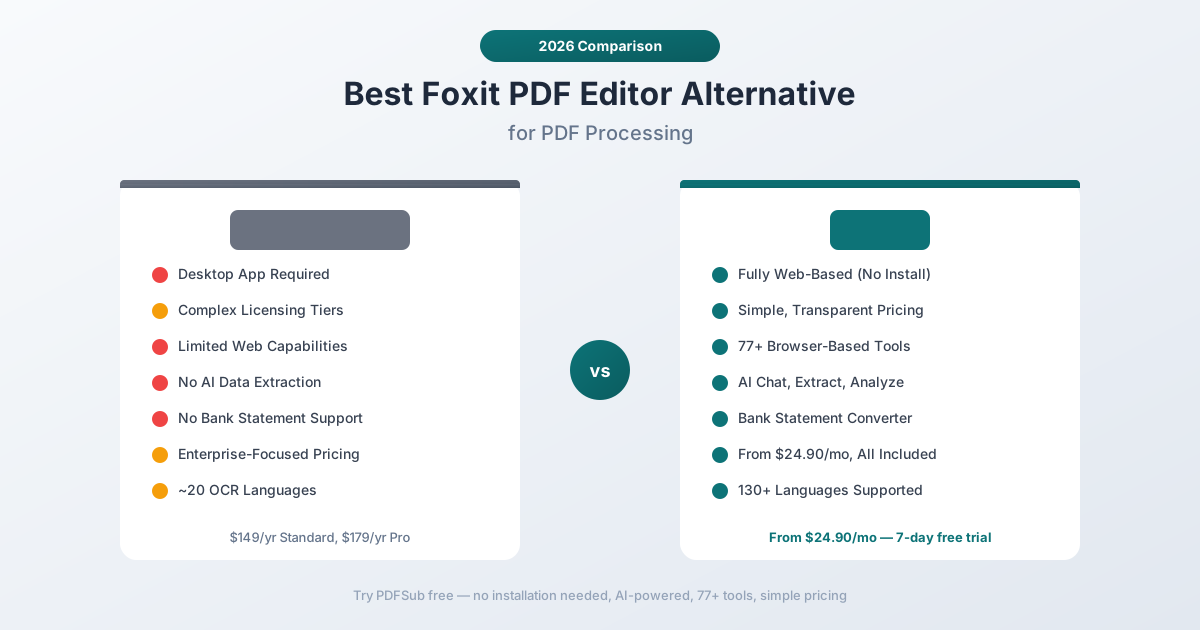
Foxit has genuine strengths - it's faster than Acrobat, costs less, and covers most PDF editing needs. The pain points that drive people to look elsewhere are specific:
Desktop Application in a Browser-First World
Foxit PDF Editor is fundamentally a desktop application. You download it, install it, activate a license, and use it on that specific machine. In 2026, this creates several friction points:
- IT deployment overhead. Every workstation needs Foxit installed and updated. For organizations with hundreds of employees, this is a significant IT burden.
- Device limitations. Your license typically covers 1-3 devices. Switch to a new laptop, work from a personal tablet on the weekend, or try to use it on a Chromebook - and you hit license walls.
- Remote work challenges. When your team works from home, personal devices, and various operating systems, a desktop application creates access inconsistency.
- Update management. Desktop applications need regular updates, and each update requires testing in enterprise environments before deployment.
Foxit does offer a web version (Foxit PDF Online), but it's a limited subset of the desktop capabilities - more of a companion than a replacement.
Complex, Multi-Tier Licensing
Foxit's licensing structure has grown complicated:
- Foxit PDF Editor Standard - $149/year. Covers basic editing but missing advanced features.
- Foxit PDF Editor Pro - $179/year. Adds advanced editing, redaction, and document comparison.
- Foxit PDF Editor Pro+ - Higher tier with additional cloud and AI features.
- Foxit PDF Editor Suite - Bundled with additional tools at enterprise pricing.
Each tier unlocks different features, and it's not always clear which tier includes the capability you need. Users on the Standard tier who discover they need redaction or document comparison have to upgrade. The pricing page has multiple comparison tables, footnotes, and "contact sales" buttons.
Compare this to a single subscription that includes everything.
No AI-Powered Data Extraction
Foxit added a "Foxit AI Assistant" that can answer questions about document content - a basic chat overlay similar to Adobe's implementation. But it doesn't include:
- Structured data extraction. You can't extract tables from a PDF into a clean spreadsheet with preserved column relationships.
- Financial document understanding. The AI doesn't know what a bank statement, invoice, or receipt looks like. It treats all documents as generic text.
- Multi-tier extraction. There's no cascading pipeline that tries browser extraction, server extraction, OCR, and vision AI in sequence.
- Specialized analyzers. No invoice extractor, receipt scanner, or financial report analyzer.
Foxit's AI is a chat tool, not an extraction engine. The distinction matters when you need usable data, not just answers to questions.
No Bank Statement Support
Foxit can convert a PDF to Excel using generic layout conversion, but it has zero awareness of bank statement structure. The output is a visual approximation of the PDF layout in spreadsheet form - not a structured extraction of transactions.
For accountants, bookkeepers, and financial professionals who process bank statements regularly, this is a significant gap. Each statement requires manual cleanup that can take 30-60 minutes. Multiply that by dozens of clients and monthly processing, and you're looking at hundreds of hours per year of avoidable manual work.
Limited Web Capabilities
Foxit's web platform (PDF Online) covers basic operations - viewing, commenting, signing, and simple editing. But the majority of Foxit's capabilities remain desktop-only:
- Advanced editing features require the desktop application
- OCR is a desktop feature
- Batch processing requires desktop installation
- Many format conversions are desktop-only
If you need web-based access for your team, Foxit's web offering is too limited to serve as a primary tool.
What to Look for in a Foxit Alternative
When moving away from Foxit, prioritize the capabilities that address its gaps while maintaining the functionality you depend on:
Browser-based access. Full functionality in a browser eliminates installation, licensing, and device management overhead. This is the single biggest simplification for teams.
AI extraction, not just AI chat. Look for tools that can extract structured data from documents - tables, financial fields, transaction data - not just answer questions about text content.
Financial document tools. Dedicated bank statement conversion, invoice extraction, and receipt scanning are increasingly essential for financial professionals.
Simple pricing. One plan, all features. No tiered licensing where you discover mid-project that you need an upgrade.
Language breadth. Foxit's OCR supports approximately 20 languages. If you work with international documents, look for 100+ language support.
Privacy model. Browser-first processing that keeps files on your device when server resources aren't needed.
PDFSub: The Best Foxit Alternative
PDFSub replaces Foxit for the majority of PDF workflows - document processing, conversion, AI extraction, and financial document tools - all from a browser with simple, transparent pricing.
Fully Web-Based - Zero Installation
PDFSub runs in your browser. There's nothing to install, no license to activate, no devices to manage. Every tool works on any device with a modern browser - Windows, Mac, Linux, ChromeOS, tablets, and phones.
For teams, this eliminates the IT deployment overhead entirely. Share a link, create an account, and start working. New employees get access in minutes, not days.
AI That Extracts, Not Just Chats
PDFSub's AI goes beyond conversational Q&A:
- Chat with PDF - Ask questions about any document with answers grounded in the actual content.
- Extract Data - Pull structured tables and data from any PDF with column relationships preserved. The output is a clean, usable dataset - not a paragraph of text.
- Extract Tables - Detect table boundaries, identify columns and rows, and export structured data to Excel.
- Summarize - Generate structured summaries of documents at any length.
- Translate - Translate documents across 130+ languages while preserving formatting.
The extraction pipeline uses 4 tiers: browser text extraction (fastest, most private), server text extraction, server OCR, and vision AI (handles the worst documents). Every document gets the right method automatically.
Bank Statement Conversion
This is the capability that desktop PDF editors have never addressed. PDFSub's bank statement converter handles:
- 20,000+ bank formats recognized worldwide - major banks, regional banks, credit unions, and international institutions
- Structured output with properly separated date, description, debit, credit, and balance columns
- Multiple export formats - Excel, CSV, TSV, JSON, QBO, OFX, QIF, and QFX
- Multi-page continuity - Transactions that span page breaks are handled automatically
- International statements - Processes statements in any language, any currency, any date format
For a bookkeeper processing 50 client bank statements per month, this single feature saves 25-50 hours of manual data entry compared to generic PDF-to-Excel conversion.
Financial Document Specialization
Beyond bank statements, PDFSub includes dedicated tools for:
- Invoice Extractor - Automatically identifies vendor name, invoice number, date, line items, subtotal, tax, total, and payment terms
- Receipt Scanner - Extracts merchant, date, items, quantities, prices, tax, tip, and total from printed, digital, or handwritten receipts
- Financial Report Analyzer - Analyzes balance sheets, income statements, and cash flow statements with ratio calculations
These aren't generic "convert to Excel" tools. They understand the structure of financial documents and extract data into properly categorized fields.
Simple, Transparent Pricing
PDFSub has one approach: all features included in every subscription. There's no Standard vs Pro vs Pro+ vs Suite. No feature gating. No "contact sales for pricing."
PDFSub has a single All-In-One plan at $20/month annual ($240/year, saves $60) or $25/month billed monthly - all 98+ tools, 500 AI credits monthly, 500 bank statement pages monthly, e-sign with no per-envelope fees, 50 GB cloud storage; add unlimited team seats at the same per-user rate. All plans include 130+ languages and browser-first privacy.
130+ Languages
Foxit's OCR supports approximately 20 languages, focused on Latin scripts and major languages. PDFSub supports 130+ languages natively, including:
- Right-to-left scripts - Arabic, Hebrew, Urdu, Farsi
- CJK characters - Chinese (simplified and traditional), Japanese, Korean
- Complex scripts - Hindi, Thai, Bengali, Tamil, Vietnamese
- European languages - All major and most minor European languages
This isn't just OCR language support. The AI features understand document content in its original language, so you can ask questions about a German financial report and get accurate answers.
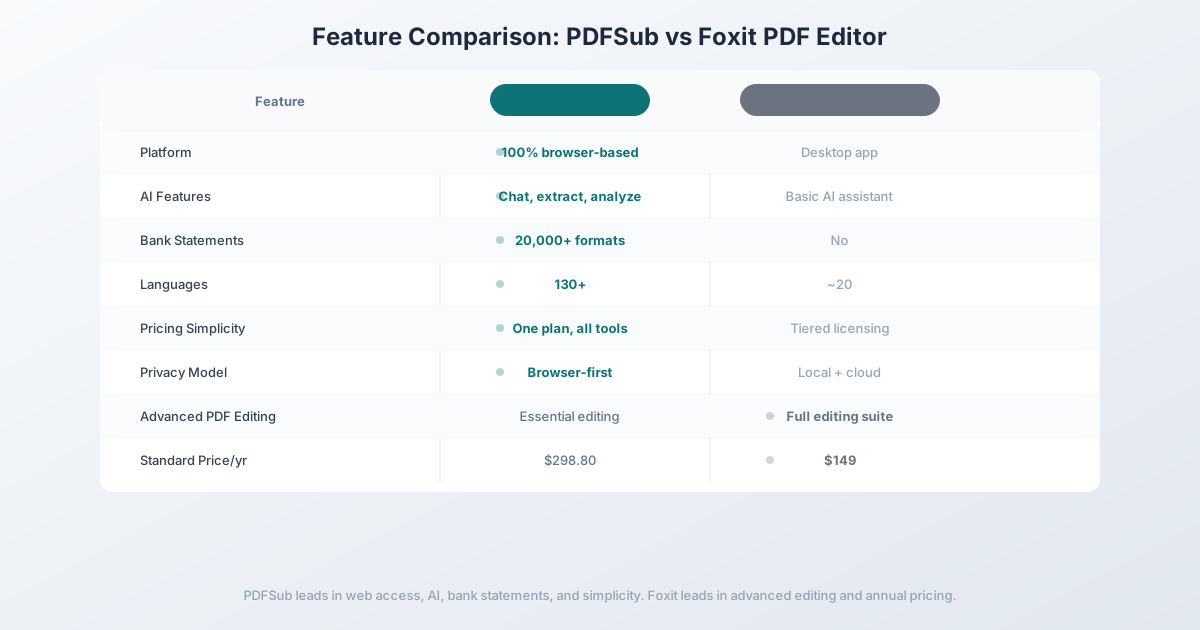
Head-to-Head: PDFSub vs Foxit PDF Editor
| Feature | PDFSub | Foxit PDF Editor |
|---|---|---|
| Platform | 100% browser-based | Desktop application |
| AI features | Chat, extract, analyze, translate | Basic AI chat |
| Bank statement conversion | 20,000+ formats | No |
| Invoice/receipt extraction | Dedicated tools | No |
| OCR quality | 4-tier + Vision AI | Desktop OCR (~20 languages) |
| Languages | 130+ | ~20 |
| Pricing model | One plan, all features | Tiered licensing |
| Privacy model | Browser-first | Desktop local + cloud |
| Installation | None required | Desktop install required |
| Advanced PDF editing | Essential editing + annotations | Full editing suite |
| Batch processing | Browser-based batch convert | Desktop batch processing |
| Free trial | 7-day full access | 14-day trial |
| Price | $20/mo annual ($240/yr, saves $60) or $25/mo monthly | $149/yr Standard, $179/yr Pro |
Where PDFSub wins: Browser-based access, AI extraction, financial document tools, bank statement conversion, language coverage, and pricing simplicity. For document processing, data extraction, and financial workflows, PDFSub provides capabilities Foxit doesn't have.
Where Foxit wins: Advanced PDF editing and annual pricing. Foxit's desktop editor handles in-place text editing, advanced form creation, and complex redaction better than any browser-based tool. At $149/year (Standard), Foxit is cheaper than PDFSub's All-In-One annual at $240/year - but Foxit lacks AI extraction, bank statement conversion, e-sign with no per-envelope fees, and financial document tools that PDFSub includes.
The value calculation: PDFSub's All-In-One at $240/year costs $91 more than Foxit Standard at $149/year - but includes 98+ tools, AI extraction, bank statement conversion, e-sign, and financial document processing that Foxit doesn't offer at any tier. For users who need any of those capabilities alongside PDF editing, PDFSub replaces multiple subscriptions at a lower combined cost.
Other Alternatives Worth Considering
Adobe Acrobat Pro - $19.99/month
The original PDF editor remains the industry standard:
- Strengths: Most comprehensive editing capabilities, deep enterprise integrations, strong OCR, large ecosystem of plugins
- Weaknesses: Expensive ($239.88/year), heavy desktop application, complex UI, no bank statement tools, AI Assistant costs extra ($4.99/month)
- Best for: Enterprises with existing Adobe ecosystem investments that need the most advanced PDF editing capabilities
Nitro PDF Pro - $179.99 (one-time)
Nitro offers a one-time purchase alternative:
- Strengths: No recurring subscription, solid editing and form capabilities, good Microsoft 365 integration, familiar ribbon interface
- Weaknesses: Windows-only, no AI features, no financial tools, one-time purchase means you eventually stop receiving updates
- Best for: Windows users who want to avoid subscriptions entirely and primarily need traditional PDF editing
Smallpdf - $12/month
Smallpdf takes the opposite approach - web-first simplicity:
- Strengths: Clean web interface, ~21 tools, no installation needed, basic AI assistant
- Weaknesses: Cloud-only processing, limited tools, no financial document support, basic OCR
- Best for: Users who want the simplest possible web-based PDF tools and don't need AI or financial features
Frequently Asked Questions
Is Foxit cheaper than Adobe Acrobat?
Yes. Foxit PDF Editor Standard costs $149/year compared to Acrobat Pro at $239.88/year. However, Foxit's Pro tier at $179/year narrows the gap, and neither Foxit nor Acrobat includes AI extraction or financial document tools in their base pricing.
Can Foxit convert bank statements to Excel?
Foxit can export any PDF to Excel using generic layout conversion, but it has no bank statement-specific features. The export doesn't understand transaction tables, date columns, or debit/credit separation. For structured bank statement extraction, you need a dedicated converter.
Does Foxit work in a browser?
Foxit offers "Foxit PDF Online" with basic web capabilities - viewing, commenting, signing, and simple editing. The full editing suite, OCR, batch processing, and advanced features require the desktop application.
Can PDFSub replace Foxit for PDF editing?
PDFSub handles common PDF editing tasks: annotations, text additions, shapes, watermarks, stamps, redaction, e-signatures, and form filling. It doesn't match Foxit for advanced in-place text editing, complex form creation, or desktop-specific workflows. If advanced editing is your primary use case, Foxit or Acrobat is the better choice. If document processing and data extraction are primary, PDFSub is stronger.
Is Foxit PDF Editor safe?
Foxit processes most operations locally on your desktop, which is inherently private since files don't leave your machine. Their cloud features (Foxit PDF Online, cloud storage integration) do involve server processing. For maximum privacy, PDFSub's browser-first approach processes in your browser for most operations, with server processing reserved for OCR and AI.
Switching from Foxit - What to Expect
There's no data to migrate - Foxit edits PDFs that already live on your disk. The transition is about replacing the editor habit, not moving data. Here's the typical 4-step path:
Step 1 - Day 1: Sign up for PDFSub while keeping Foxit installed. Start the 7-day trial. Don't uninstall Foxit yet - overlap is fine and you'll want both available for side-by-side comparison.
Step 2 - Days 1-3: Move your common workflows. Most Foxit users land on a small set of recurring tasks: merge, compress, convert to Word/Excel, sign, annotate. Run those through PDFSub. If you do inline text editing of existing PDFs, test that specifically - PDFSub covers annotations and overlays but doesn't match Foxit's byte-level paragraph rewriting.
Step 3 - Days 3-5: Try the capabilities Foxit doesn't have. Run a bank statement through the bank statement converter, translate a foreign-language PDF, extract structured data from an invoice. Each of these would require additional software on top of Foxit.
Step 4 - Days 5-7: Decide replace vs supplement. If your Foxit use is 80%+ merge/split/convert/sign/annotate, cancel the Foxit renewal at the next billing date. If you genuinely need inline editing or complex form authoring weekly, keep Foxit Standard at $129.99/yr as a specialty tool and use PDFSub for everything else.
Most users find they stop opening Foxit within the first week - except for the occasional deep edit.
The Bottom Line
Foxit PDF Editor is a solid desktop PDF editor at a fair price. For organizations that specifically need advanced PDF editing capabilities - in-place text editing, complex form creation, and desktop batch processing - Foxit delivers at roughly half the cost of Adobe Acrobat.
But the market is splitting into two categories: PDF editing tools (Foxit, Acrobat, Nitro) and document processing platforms (PDFSub and similar). If your primary need is understanding and extracting data from documents - particularly financial documents - rather than editing PDF layouts, the desktop editors are the wrong tool category.
PDFSub provides 98+ browser-based tools, AI-powered extraction, bank statement conversion across 20,000+ formats, and 130+ languages at a price point that's comparable when you factor in the financial tools and AI capabilities that Foxit doesn't offer at any price.
Try PDFSub Free - no installation, all 98+ tools, AI extraction, bank statement conversion, and simple pricing. See what document processing looks like without desktop software.
Still evaluating, not yet switching? This page is written for teams ready to leave Foxit. For a neutral feature-by-feature breakdown and pricing side-by-side, see the PDFSub vs Foxit comparison.