Best Docsumo Alternative for AI Document Extraction (2026)
Compare Docsumo vs PDFSub for AI document parsing. See pricing, features, and why teams switch.
PDFSub is best for:
- Small-to-mid accounting practices needing AI extraction at $20/user/mo (annual) instead of $500+/mo
- Users who want immediate results from a browser UI - no API setup or model training
- Multi-page document processing without Docsumo's 2-page and 4MB extraction limits
- Teams needing bank statement conversion, invoice extraction, and 98+ PDF tools in one subscription
PDFSub is NOT best for:
- Enterprise operations teams building automated AP pipelines with custom-trained models
- Organizations needing API-first integration into existing document processing systems
- High-volume workflows requiring human-in-the-loop validation queues and SLA guarantees
Docsumo is an AI-powered document processing platform built for enterprise operations teams. It uses machine learning to extract structured data from invoices, bank statements, insurance forms, and other unstructured documents. If you're running a large-scale document processing operation and need an API-first solution with custom model training, Docsumo delivers.
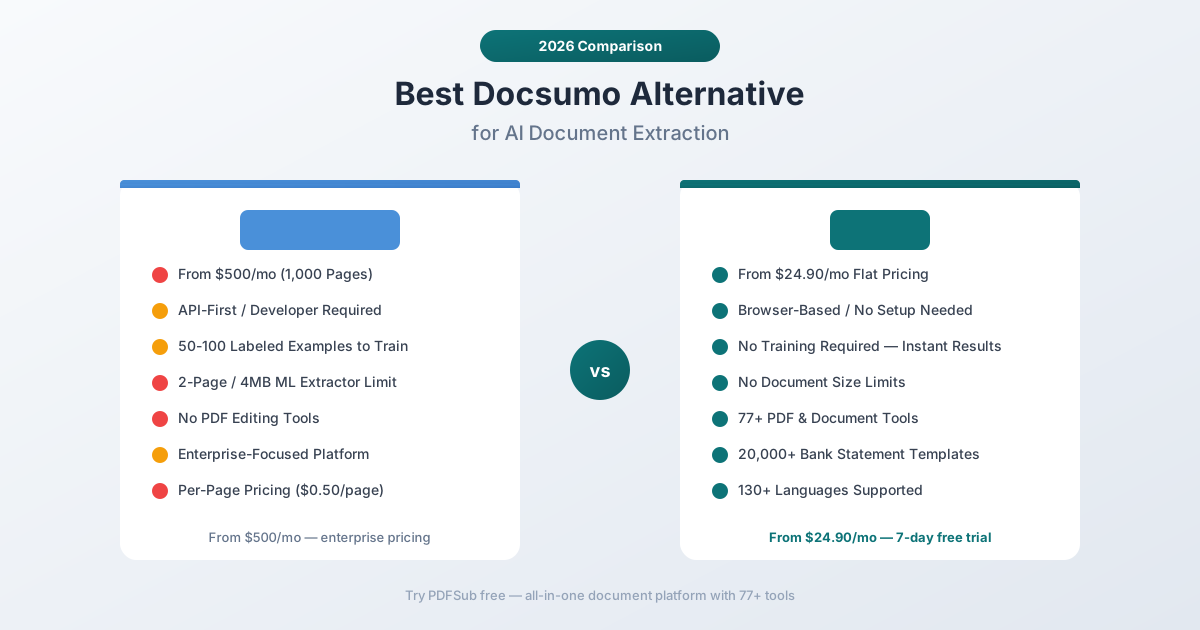
But Docsumo was built for enterprises with dedicated IT teams and substantial budgets. The Starter plan begins at $500/month for 1,000 pages, which works out to $0.50 per page. Custom training requires 50-100 labeled examples before the model performs well. And the ML Extractor has hard limits - 2 pages and 4MB per document. For small-to-mid-sized accounting practices, bookkeepers, and professionals who process financial documents daily, Docsumo's pricing and complexity are wildly disproportionate to the task.
If you've been searching for a Docsumo alternative that delivers AI-powered extraction without enterprise pricing, API overhead, or document size limits, this guide breaks down the options and identifies where you get the best value.
Why People Look for Docsumo Alternatives
Docsumo has solid capabilities - the AI extraction is genuinely good once trained. The complaints tend to center on cost, complexity, and the gap between what small teams need and what Docsumo offers.
Enterprise Pricing Shuts Out Smaller Teams
Docsumo's Starter plan costs $500/month for 1,000 pages. That's $0.50 per page - before you've trained any custom models or set up integrations. For an accounting practice processing 200 bank statements and 300 invoices per month, you're paying $500/month just for extraction, and that's assuming every document fits within the 2-page ML Extractor limit.
Scale to 2,000 or 5,000 pages per month and you're on custom pricing, which typically means talking to a sales team and negotiating annual contracts. For small practices, the entry point is simply too high.
PDFSub has a single All-In-One plan: $20/month (annual; $240/year, saves $60) or $25/month billed monthly - 500 AI credits, 500 bank statement pages, 98+ tools, e-sign with no per-envelope fees, 50 GB cloud storage; unlimited team seats (each billed at the same per-user rate) available at the same per-user rate. Stackable add-on packs available - 500 BSC Pages, 500 AI Credits, 40 GB Storage, Priority Support. No per-page pricing, no minimum commitments, no sales calls required.
API-First Design Adds Complexity
Docsumo is designed as an API platform. The typical workflow involves: set up API credentials, configure document types, train custom models with labeled data, build integration logic, and then process documents. For operations teams with developers, this makes sense. For an accountant who needs to convert a bank statement to Excel, it's massive overkill.
You shouldn't need to write API calls or train ML models to extract data from a PDF. PDFSub provides a browser-based interface where you upload a document and get results immediately. No API setup, no training period, no developer required.
Document Size and Page Limits
Docsumo's ML Extractor has a 2-page and 4MB size limit. Bank statements routinely exceed both - a three-month corporate bank statement can easily run 10-20 pages and 5MB+. When your extraction tool can't handle the documents you actually need to process, you're stuck splitting files manually or finding workarounds.
PDFSub handles multi-page documents natively. A 50-page bank statement processes the same way as a 2-page receipt - upload, extract, export. No artificial page limits on the extraction engine.
Training Requirements Slow Down Onboarding
Docsumo's custom models require 50-100 labeled examples before they reach acceptable accuracy. That means before you can reliably process a new document type, you need to manually label dozens of samples, wait for model training, test accuracy, and iterate. For standard financial documents, this training overhead is unnecessary.
PDFSub's extraction works out of the box with pre-built support for 20,000+ bank statement formats, standard invoice layouts, and receipt formats. No training, no labeling, no waiting. Upload a document and extract data immediately.
Limited PDF Tooling
Docsumo extracts data from documents. It doesn't edit, merge, split, compress, convert, translate, or do anything else with PDFs. If you need to combine extracted bank statement data with other document operations - merging client files, compressing for email, converting between formats - you need separate tools and separate subscriptions.
PDFSub includes 98+ PDF and document tools alongside its AI extraction capabilities. One platform, one subscription, one workflow.
What to Look for in a Docsumo Alternative
Accessible pricing. Enterprise pricing works for enterprises. Everyone else needs transparent, affordable monthly plans without per-page charges or annual commitments.
No-training extraction. The tool should work out of the box for common financial documents - bank statements, invoices, receipts. Custom model training is a bonus, not a prerequisite.
No document size limits. Real financial documents are often multi-page. Your extraction tool shouldn't artificially limit page count or file size.
Broader document operations. Extraction is one step in most workflows. The ideal tool also handles PDF editing, conversion, compression, translation, and other document operations.
Browser-based simplicity. Not everyone has a developer to set up API integrations. A drag-and-drop browser interface makes extraction accessible to everyone on the team.
Privacy options. Financial documents contain sensitive data. Browser-first processing (where files never leave your device) is a meaningful privacy advantage.
PDFSub: The Best Docsumo Alternative
PDFSub replaces Docsumo's enterprise-focused extraction with an accessible, affordable platform - AI extraction for bank statements, invoices, and receipts, plus 98+ PDF tools, all under flat monthly pricing.
$20/mo (annual; $25/mo monthly) vs. $500/mo
The pricing difference is the most striking. Docsumo's entry point is $500/month for 1,000 pages. PDFSub's All-In-One plan is $20/month (annual) or $25/month billed monthly with no per-page charges - less than 10% of Docsumo's cheapest option.
For an accounting practice processing a few hundred documents per month, the annual cost difference is staggering:
| Monthly Volume | Docsumo (est.) | PDFSub |
|---|---|---|
| 200 pages | $500/mo (min plan) | $25-$45/mo |
| 1,000 pages | $500/mo | $25-$45/mo |
| 2,000 pages | Custom pricing | $25-$45/mo |
| 5,000 pages | Custom pricing | $25-$45/mo |
That's potentially $5,700+ in annual savings at the lowest comparison point. At higher volumes, the gap widens further.
Instant Extraction vs. Model Training
Upload a bank statement to PDFSub's bank statement converter and you get extracted transactions immediately. Upload an invoice and you get structured data - vendor, amounts, line items, dates - within seconds. No model training, no labeled examples, no configuration.
PDFSub achieves this through a multi-tier extraction architecture:
- Tier 1 (browser): Text-based extraction runs entirely in your browser for digital PDFs. No upload required - your document never leaves your device.
- Tier 2 (server): For complex layouts, server-side parsing with column detection and pattern matching handles edge cases.
- Tier 3/4 (AI): Scanned or image-based documents use AI-powered extraction with Gemini for OCR and data structuring.
This tiered approach means most standard financial documents extract instantly without AI credits, while difficult documents still get processed accurately via AI fallback.
20,000+ Bank Statement Templates
Where Docsumo requires custom model training for each bank's statement format, PDFSub comes pre-loaded with templates for 20,000+ banks worldwide. Upload a statement from Chase, HSBC, DBS, Barclays, Bank of India, or virtually any bank, and the system auto-detects the format and extracts all transactions.
Export options include 8 formats: Excel, CSV, TSV, JSON, QBO (QuickBooks), OFX (Xero/other accounting), QFX, and QIF. Each format is optimized for its target platform - QBO files include FITIDs for duplicate detection, OFX files include proper date formatting.
98+ PDF Tools Included
Beyond extraction, PDFSub includes a comprehensive suite of document tools:
- Merge and split PDFs for client document packages
- Compress large files for email or storage
- Convert between PDF, Word, Excel, PowerPoint, and image formats
- Watermark and stamp documents for draft or confidential marking
- Encrypt and decrypt PDFs for security
- Translate documents across 130+ languages with AI
- Summarize long documents for quick review
- Compare two documents side by side
Docsumo is extraction-only. Every other document operation requires a separate tool. With PDFSub, extraction and document management live in the same platform.
130+ Languages with Auto-Detection
PDFSub supports 130+ languages with automatic detection - including all non-Latin scripts (Chinese, Japanese, Korean, Arabic, Hindi, Thai, Cyrillic). International date formats, number formats (European comma-decimal, Indian lakh system), and 100+ currency symbols are handled automatically.
Docsumo supports multiple languages through its OCR engine, but accuracy for non-English documents often requires additional model training and labeled examples. PDFSub's language support works out of the box.
Browser-First Privacy
PDFSub's Tier 1 extraction runs entirely in your browser - your document never leaves your device. For most digital bank statements, invoices, and receipts, all processing happens client-side with zero server upload.
Docsumo processes all documents on their cloud servers. Every PDF you process is uploaded, stored, and processed remotely. For financial documents containing account numbers, transaction details, and personal information, this is a meaningful privacy difference.
Side-by-Side Feature Comparison
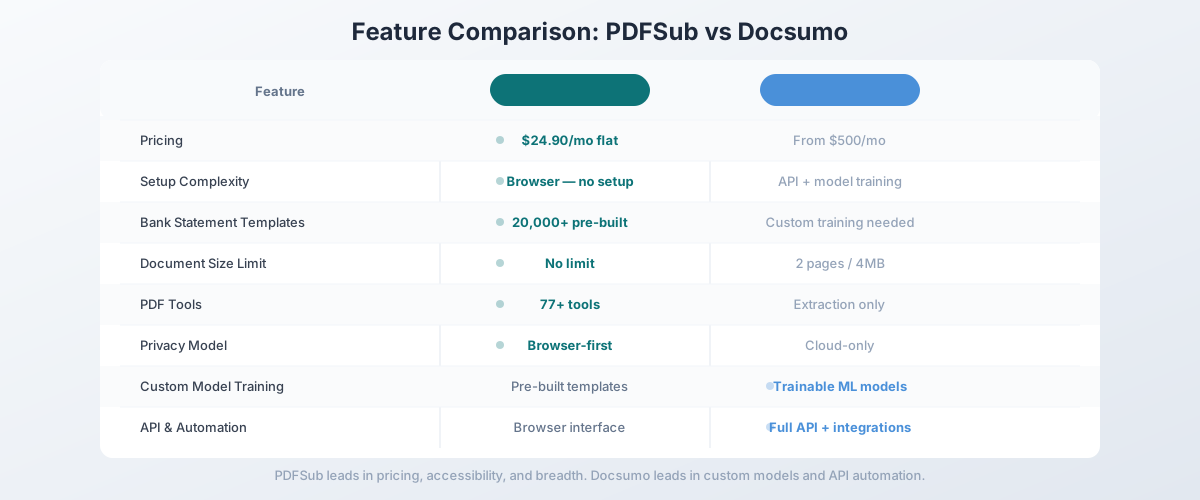
| Feature | PDFSub | Docsumo |
|---|---|---|
| Pricing | $20/user/mo (annual; $25/user/mo monthly) | From $500/mo (per-page) |
| Per-page cost | None | ~$0.50/page |
| Bank statement templates | 20,000+ pre-built | Requires custom training |
| Document size limit | None (multi-page native) | 2 pages / 4MB (ML Extractor) |
| Training required | None | 50-100 labeled examples |
| PDF tools | 98+ (merge, split, compress, etc.) | None |
| Languages | 130+ (auto-detected) | Multiple (training-dependent) |
| Privacy model | Browser-first (Tier 1) | Cloud-only |
| API access | Not required (browser UI) | API-first design |
| Export formats | Excel, CSV, QBO, OFX, QFX, QIF, TSV, JSON | CSV, JSON, API output |
| Setup time | Minutes (sign up and start) | Days/weeks (training + integration) |
| Free trial | 7-day full access | 14-day trial (1,000 pages) |
When Docsumo Is Still the Right Choice
Being honest: Docsumo does some things better than PDFSub. If these features are critical to your workflow, Docsumo might still be the right tool:
You need custom document model training. Docsumo's ability to train custom ML models on your specific document types is genuinely powerful. If you process non-standard document formats (specialized insurance forms, proprietary trade documents, custom compliance reports) at high volume, Docsumo's trainable models can deliver better accuracy than pre-built templates.
You need an API-first platform. If your workflow involves automated document processing pipelines - documents arriving via email or API, extraction happening automatically, and data flowing into downstream systems - Docsumo's API architecture is purpose-built for this. PDFSub is browser-first, designed for human-driven workflows.
You process 10,000+ pages per month. At very high volumes, Docsumo's enterprise pricing may become competitive on a per-page basis, especially with custom contracts. If you're an operations team processing tens of thousands of pages monthly, Docsumo's scalability and automation features may justify the cost.
You need agentic document workflows. Docsumo's agentic AI approach - where AI agents collaborate to classify, extract, validate, and route documents - is genuinely innovative for complex multi-step processing pipelines. PDFSub handles extraction but doesn't offer automated multi-step document workflows.
You need ERP/CRM integrations. Docsumo integrates with Salesforce, SAP, and other enterprise platforms. If you need extracted data flowing directly into your CRM or ERP system, Docsumo's integration ecosystem is more mature.
Other Alternatives Worth Considering
PDFSub is our recommendation for the broadest value, but other tools may fit specific needs:
Nanonets - Another AI document extraction platform with a more accessible entry point than Docsumo. Offers pre-trained models for common document types and a visual model builder. Good middle ground between Docsumo's enterprise approach and PDFSub's simplicity, though pricing can still be steep for small teams.
ABBYY Vantage - Enterprise-grade intelligent document processing with deep OCR capabilities. Excellent for organizations already in the ABBYY ecosystem. Very expensive and complex for small teams.
Parseur - Email parsing and data extraction focused on automated workflows. Good for extracting data from emails and email attachments. Doesn't handle bank statements or offer PDF tools.
Google Document AI - Google's cloud-based document processing API. Pay-per-page pricing ($0.01-$0.10/page depending on processor type). Requires Google Cloud setup and API development. Competitive for developers building custom solutions.
How to Switch from Docsumo to PDFSub
Switching is straightforward - there's no data migration needed since both tools process documents on demand rather than storing historical data.
Step 1: Start a Free Trial
Go to PDFSub's pricing page and start a 7-day free trial. All plans include full functionality during the trial period.
Step 2: Test Your Core Document Types
Process the document types you handle most frequently:
- Bank statements: Convert statements from your most common banks and verify transaction accuracy
- Invoices: Test with invoices from your primary vendors
- Receipts: Upload receipts and compare extracted data quality
- Non-English documents: If you handle international documents, test with your actual files
Step 3: Compare Output Quality
For bank statements, verify the exported QBO or OFX file imports cleanly into your accounting software. For invoices and receipts, compare PDFSub's extracted fields against what Docsumo produces. Pay attention to edge cases - unusual layouts, handwritten elements, multi-page documents.
Step 4: Calculate Total Cost
Add up your current Docsumo spend (monthly plan + any overage charges) and compare it to PDFSub's per-user rate. Factor in any additional tools you currently pay for separately (PDF editing, compression, format conversion) that PDFSub would replace.
Step 5: Cancel Docsumo
Once you've verified PDFSub handles your workflow, cancel your Docsumo subscription. If you're on an annual contract, check the cancellation terms and plan the transition accordingly.
Frequently Asked Questions
Is PDFSub as accurate as Docsumo for document extraction?
For standard financial documents - bank statements, invoices, receipts - PDFSub's accuracy is comparable. Docsumo's custom-trained models can achieve higher accuracy on specialized document types after sufficient training data is provided (50-100 labeled examples). For common financial documents, PDFSub's pre-built templates and AI extraction deliver strong results without any training period.
Does PDFSub offer API access like Docsumo?
Yes - PDFSub ships a Developer API with 10 official SDKs (Node, Python, PHP, Go, Ruby, Java, .NET, Rust, C, C++). The v1 surface focuses on HTML-input rendering (HTML → PDF/PNG/JPEG/WEBP, HTML → text/markdown) with cloud delivery to Google Drive, Dropbox, S3, GCS, and Cloudflare R2. Extraction endpoints for the AI tools are planned for a follow-up phase. Docsumo's API is extraction-first today, so if your workflow needs API-driven document extraction immediately, Docsumo's architecture is the more direct fit; for HTML rendering plus the in-browser AI extraction suite, PDFSub covers it.
Can PDFSub handle the same document volume as Docsumo?
PDFSub is designed for individual users and small-to-mid-sized teams processing documents through a browser interface. It doesn't offer the same batch processing and API throughput as Docsumo's enterprise platform. For high-volume automated processing (10,000+ pages/month), Docsumo's infrastructure is better suited.
Does PDFSub work with scanned documents?
Yes. PDFSub's multi-tier extraction handles both digital PDFs (Tier 1, browser-based) and scanned/image PDFs (Tier 3/4, AI-powered OCR). Digital PDFs extract faster and don't require server upload. Scanned documents are processed via AI with OCR capabilities.
Can I use PDFSub for document types other than financial?
Yes. While PDFSub excels at financial document extraction (bank statements, invoices, receipts), the AI extraction and 98+ PDF tools work with any document type. You can summarize legal documents, translate contracts, compare proposals, merge reports, and handle virtually any PDF operation.
The Bottom Line
Docsumo is a powerful enterprise document AI platform - but its $500/month entry point, API-first complexity, and model training requirements make it overkill for most accounting practices and small businesses. You're paying for enterprise infrastructure you don't need.
PDFSub delivers AI-powered extraction for bank statements, invoices, and receipts at a fraction of the cost - $20/month (annual; $240/year) or $25/month billed monthly with no per-page pricing, no model training, and no API setup required. Add in 98+ PDF tools, 130+ language support, 20,000+ bank statement templates, and browser-first privacy, and you get a platform that covers the full document workflow.
Try PDFSub's bank statement converter free with a 7-day trial and compare the extraction quality against Docsumo. Test your actual bank statements, invoices, and receipts. When you compare the output quality against a $500/month vs. $25/month price tag, the decision tends to make itself.