Best AI PDF Summarizer Tools (2026)
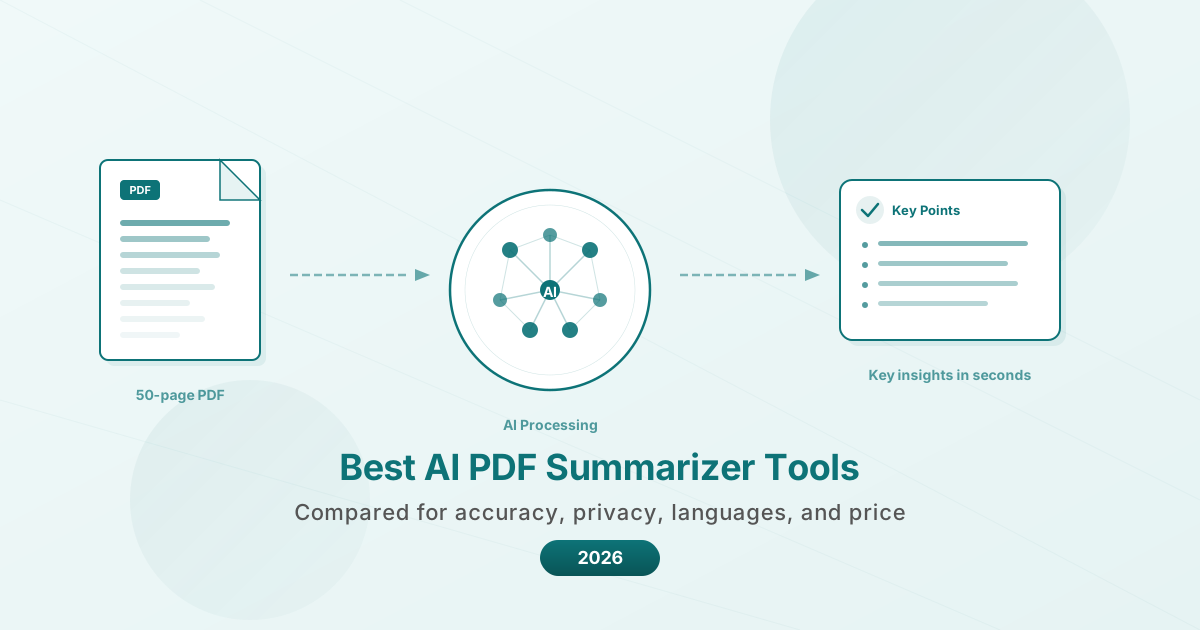
Need to quickly digest a 50-page report? These AI PDF summarizers extract key points in seconds. Here's how they compare on accuracy, privacy, languages, and price.
PDFSub is best for:
- Users who need AI summarization alongside translation, chat, data extraction, and 98+ PDF tools
- Multilingual document workflows - summarize PDFs in any of 130+ languages
- Financial professionals who also need bank statement conversion and invoice extraction
- Cost-conscious teams who want one $15-45/mo subscription instead of separate AI tools
PDFSub is NOT best for:
- Users who only need a free summarizer for occasional short documents (ChatPDF or Claude free tiers work)
- Researchers needing multi-document knowledge bases with citation management
- Power users who want unlimited AI queries without a credit system
A 50-page quarterly report lands in your inbox at 4:47 PM. The board meeting is at 5:30. You need the three numbers that matter and the two risks nobody wants to talk about -- not the 47 pages of boilerplate between them.
This is the daily reality for anyone who works with documents. Researchers wade through 30-page papers to find the methodology that matters. Lawyers scan 200-page contracts for the three clauses that could sink a deal. Financial analysts dig through earnings reports stacked five deep.
The Document AI market hit $19.3 billion in 2025 and is growing at over 60% annually, according to Research and Markets. That growth is driven by a simple truth: there is too much to read and not enough time to read it.
AI PDF summarizers promise to fix this. Upload a document, get the key points in seconds. But the tools vary enormously in accuracy, privacy, language support, and price. Some are purpose-built for summarization. Others are general AI assistants that happen to accept PDF uploads. And a few are full document platforms where summarization is one feature among many.
Here is an honest comparison of the best options available in 2026.
What Makes a Good AI PDF Summarizer
Before comparing tools, it helps to know what separates a useful summary from a mediocre one.
Accuracy and faithfulness. The summary should capture what the document actually says, not what the AI thinks it should say. Hallucinated statistics or misattributed conclusions are worse than no summary at all. The best tools cite specific sections so you can verify claims.
Document length handling. A tool that works on 5-page memos but chokes on 100-page reports is not solving the real problem. Context window size matters -- it determines how much of your document the AI can actually "see" at once.
Language support. If you work with documents in multiple languages, you need a summarizer that handles them natively rather than requiring you to translate first. This is especially important for international business, academic research, and legal work that crosses borders.
Privacy and data handling. Where does your document go? Some tools process entirely in your browser, meaning the file never leaves your device. Others upload to cloud servers for processing. For confidential financial documents, legal contracts, or medical records, this distinction matters.
Output flexibility. A one-paragraph summary is not always what you need. Sometimes you want bullet points. Sometimes you want a structured breakdown by section. The best tools let you control the output format and detail level.
Cost predictability. Per-page pricing, per-query limits, credit systems, and flat monthly fees all create different cost profiles. A tool that costs $0.05 per page is cheap for occasional use and expensive for daily batch processing.
The 8 Best AI PDF Summarizer Tools in 2026
1. ChatPDF -- Best for Quick, No-Fuss Summaries
ChatPDF does one thing well: you upload a PDF, it summarizes it, and you can ask follow-up questions. The side-by-side interface shows your chat alongside the document, with clickable citations that scroll to the source.
Pricing: Free tier allows 2 documents per day (120 pages max, 10 MB). The Plus plan costs $6.99/month for unlimited documents up to 2,000 pages and 32 MB.
Strengths:
- Extremely simple interface with no learning curve
- Clickable source citations for verification
- Folder organization for managing multiple documents
- Supports PDF, Word, and PowerPoint files
Limitations:
- No browser-based processing -- documents are uploaded to servers
- No additional PDF tools beyond chat and summarization
- Free tier is restrictive for regular use
- Primarily English-focused, though it supports 50+ languages
Best for: Individuals who need fast summaries without complexity. Students and casual users who do not need batch processing.
2. AskYourPDF -- Best for Multi-Document Research
AskYourPDF goes beyond single-document summaries. You can upload multiple PDFs and ask questions across all of them simultaneously, making it useful for literature reviews and comparative research.
Pricing: Free tier with basic features. Premium at $9.99/month, Pro at $14.99/month with unlimited chats and priority support.
Strengths:
- Multi-document querying across your entire library
- Chrome extension and ChatGPT plugin for flexible workflows
- OCR support for scanned documents
- API access for developers on higher tiers
Limitations:
- Interface can feel cluttered with multiple panels
- Cloud-based processing only
- Free tier is limited in document count and features
- No built-in PDF editing or conversion tools
Best for: Researchers comparing information across multiple papers or reports. Developers who need API access for custom integrations.
3. Scholarcy -- Best for Academic Research
Scholarcy was built specifically for academic papers. Rather than giving you a generic summary, it extracts structured information: key findings, methodology, limitations, and citations formatted for bibliography tools.
Pricing: Free browser extension with basic summaries. Scholarcy Library at $9.99/month (or $90/year) for unlimited summaries, enhanced output, and export features.
Strengths:
- Structured "flashcard" summaries tailored for research papers
- Automatic bibliography extraction in popular citation formats
- Literature matrix generation for comparing multiple papers
- Robo-Highlighter identifies key phrases automatically
Limitations:
- Designed for academic papers -- less effective on business documents, contracts, or financial reports
- English-centric with limited multilingual support
- No chat-with-document feature
- No PDF editing or conversion tools
- Acquired by Texthelp Group in late 2024, which may shift the product direction
Best for: Graduate students, postdocs, and research professionals reviewing academic literature. Not ideal for business or legal documents.
4. SciSpace -- Best for Scientific Literature
SciSpace (formerly Typeset) combines PDF summarization with a large scientific paper database. You can search for papers, read AI-generated explanations of complex passages, and discover related citations.
Pricing: Free Basic plan with daily limits. Premium at $12/month (or $20 monthly). Teams plan from $8/user/month billed annually.
Strengths:
- Built-in database of 200M+ scientific papers
- Highlight any passage to get a simplified AI explanation
- Discover related papers and citations automatically
- Teams plan with collaboration features
Limitations:
- Focused on scientific and academic content
- Less useful for business documents, legal contracts, or financial reports
- Premium pricing adds up for individual researchers
- Cloud-based processing only
Best for: Scientists and academic researchers who need both summarization and literature discovery. Teams doing systematic reviews.
5. Smallpdf -- Best for Occasional Use with Other PDF Tasks
Smallpdf is primarily known as a PDF utility suite (compress, convert, merge, edit), and its AI summarizer is a newer addition. It is convenient if you already use Smallpdf for other tasks.
Pricing: Free tier with 2 AI summaries per day. Pro at $12/month per user. Team plan at $11.24/month per user.
Strengths:
- 20+ PDF tools alongside summarization
- Familiar interface for existing Smallpdf users
- ISO/IEC certified and GDPR compliant
- Handles multiple file types including PPT and Word
Limitations:
- AI summarization is an add-on feature, not the core product
- Free tier is very limited (2 summaries per day)
- Cloud-based processing for all documents
- Summarization quality is not as refined as dedicated tools
- Per-user pricing makes team use expensive
Best for: Users who already rely on Smallpdf for PDF utilities and want basic summarization without adding another tool to their stack.
6. Humata -- Best for Enterprise Document Management
Humata positions itself as an enterprise-grade AI document platform. It emphasizes security features like role-based access and single sign-on, making it suitable for organizations handling sensitive documents.
Pricing: Free plan with limited pages (approximately 60 pages). Paid plans require contacting sales for pricing.
Strengths:
- Enterprise security features (SSO, role-based access)
- Unlimited storage on paid plans
- Compare documents side by side
- Webpage embedding for customer-facing document Q&A
- Fast processing even for multi-hundred-page PDFs
Limitations:
- Opaque pricing -- no public pricing for paid tiers
- Overkill for individual users or small teams
- Cloud-based processing only
- No PDF editing, conversion, or manipulation tools
Best for: Enterprise teams that need document AI with compliance-grade security. Organizations embedding document Q&A into customer-facing products.
7. Claude and ChatGPT -- Best Raw AI Power
Both Claude (by Anthropic) and ChatGPT (by OpenAI) accept PDF uploads and can generate detailed summaries. They are not purpose-built for PDF work, but their general AI capabilities are extremely strong.
Pricing: Both offer free tiers with limited uploads. Claude Pro and ChatGPT Plus cost $20/month each.
Strengths:
- Largest context windows (Claude: 200K tokens, ChatGPT: 128K tokens)
- Excellent reasoning for complex, nuanced documents
- Can handle any document type -- academic, legal, financial, technical
- Flexible output -- ask for bullet points, executive summary, detailed analysis, or any custom format
- Strong multilingual capabilities (95+ languages)
Limitations:
- Not optimized for PDF workflows -- no batch processing, no document library
- Requires prompt crafting for best results
- Cloud-based processing only
- $20/month is expensive if you only need summarization
- No additional PDF tools (merge, split, convert, etc.)
- No citation linking back to specific document sections
Best for: Power users who need flexible, high-quality analysis of complex documents and are comfortable writing prompts. Best when the document requires deep reasoning, not just extraction.
8. PDFSub -- Best All-in-One Document Platform
PDFSub is not a dedicated summarizer. It is a comprehensive document platform with 98+ tools -- and AI-powered summarization is one of them. The advantage is having summarization alongside chat, translation, data extraction, table extraction, invoice processing, and dozens of PDF manipulation tools in a single workspace.
Pricing: No free tier (7-day free trial only). The All-In-One plan is $20/user/mo (annual) or $25/user/mo (monthly).
Strengths:
- 98+ tools in one platform (summarize, translate, extract tables, convert bank statements, merge, split, compress, and more)
- Browser-based processing for many operations -- files stay on your device
- 130+ language support for translation and multilingual summarization
- Chat with your PDF for follow-up questions after summarizing
- Financial document specialization (bank statements, invoices, receipts)
- All tools accessible from a single Studio workspace
Limitations:
- Summarization is one feature among many, not the sole focus
- Dedicated summarization tools like ChatPDF or Scholarcy may produce more refined summaries for their specific niches
- AI features require credits
- Newer platform compared to established competitors
Best for: Users who need summarization alongside other document operations. Especially strong for financial professionals who also work with bank statements, invoices, and receipts. Teams that want to consolidate multiple PDF tools into one platform.
Feature Comparison
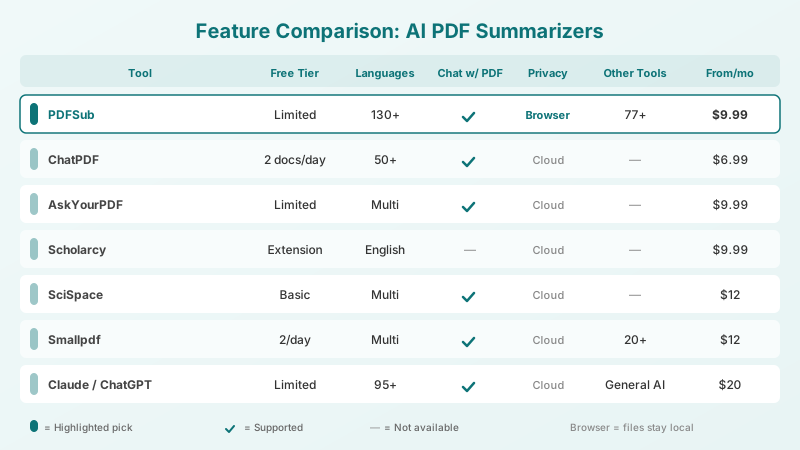
| Feature | ChatPDF | AskYourPDF | Scholarcy | SciSpace | Smallpdf | Humata | Claude/ChatGPT | PDFSub |
|---|---|---|---|---|---|---|---|---|
| AI Summarization | Yes | Yes | Yes | Yes | Yes | Yes | Yes | Yes |
| Chat with PDF | Yes | Yes | No | Yes | Yes | Yes | Yes | Yes |
| Multi-doc queries | Folders | Yes | Matrix | Yes | No | Yes | No | No |
| Source citations | Yes | Yes | Yes | Yes | No | Yes | No | No |
| Browser processing | No | No | No | No | No | No | No | Yes (partial) |
| Languages | 50+ | Multi | English | Multi | Multi | Multi | 95+ | 130+ |
| PDF editing tools | No | No | No | No | 20+ | No | No | 98+ |
| OCR / scanned PDFs | No | Yes | No | No | Yes | No | Yes | Yes |
| API access | No | Yes | No | Yes | No | Yes | Yes | No |
| Mobile app | No | Yes | No | No | Yes | No | Yes | No |
Pricing Comparison
| Tool | Free Tier | Paid From | Paid Tier Details |
|---|---|---|---|
| ChatPDF | 2 docs/day, 120 pages | $6.99/mo | Unlimited docs, 2,000 pages |
| AskYourPDF | Basic features | $9.99/mo | Unlimited chats, OCR, API |
| Scholarcy | Browser extension | $9.99/mo | Unlimited summaries, exports |
| SciSpace | Daily limits | $12/mo | Unlimited searches, AI writer |
| Smallpdf | 2 summaries/day | $12/mo | Per user, all PDF tools |
| Humata | ~60 pages | Contact sales | Enterprise features, SSO |
| Claude/ChatGPT | Limited uploads | $20/mo | Full AI capabilities |
| PDFSub | 7-day free trial | $20/user/mo annual | 98+ tools, 130+ languages, Bank statement conversion |
Best Tool for Each Use Case
Academic research: Scholarcy or SciSpace. Scholarcy excels at structured extraction from research papers. SciSpace adds literature discovery. If you need to summarize papers in multiple languages, PDFSub's 130+ language support fills a gap that Scholarcy's English focus cannot.
Legal document review: Claude or ChatGPT. Legal documents require nuanced reasoning -- understanding implications, identifying risks, and connecting clauses across sections. General AI assistants handle this better than tools optimized for extraction. PDFSub's chat feature is a solid alternative at a lower price point.
Business reports and memos: ChatPDF or PDFSub. For quick summaries of standard business documents, ChatPDF's simplicity is hard to beat. PDFSub adds value if you also need to extract tables, translate sections, or merge the report with other documents.
Financial documents: PDFSub. This is where the all-in-one approach genuinely wins. Summarize a financial report, then extract the tables into Excel, convert bank statements to accounting software formats, and process invoices -- all without switching tools. No other summarizer on this list offers that financial document workflow.
Enterprise and compliance: Humata. If your organization requires SSO, role-based access, and audit trails alongside document AI, Humata's enterprise focus is purpose-built for that. The tradeoff is opaque pricing and no self-serve signup.
High-volume batch processing: AskYourPDF (with API) or Claude/ChatGPT (with API). If you need to summarize hundreds of documents programmatically, API access is essential. Both AskYourPDF and the general AI assistants offer this.
Frequently Asked Questions
Are AI PDF summaries accurate enough for professional use?
For extracting key points and getting a quick overview, yes. For making decisions based solely on the summary without reading the source, proceed with caution. AI summaries can miss nuance, misinterpret ambiguous language, and occasionally hallucinate details. The best tools provide source citations so you can verify claims against the original document.
Can AI summarizers handle scanned PDFs?
Some can. AskYourPDF, Smallpdf, Claude, ChatGPT, and PDFSub support OCR (optical character recognition) for scanned documents. Scholarcy, ChatPDF, and SciSpace generally require text-based PDFs. If you regularly work with scanned documents, check OCR support before committing to a tool.
Is it safe to upload confidential documents to AI summarizers?
Most tools upload your document to cloud servers for processing. PDFSub processes many operations in the browser, meaning those files never leave your device. For its AI-powered features that do require server processing, files are processed in isolation and deleted after processing. If you handle highly sensitive documents (legal, medical, financial), check each tool's privacy policy and data retention practices.
Do I need a dedicated summarizer or can I use ChatGPT/Claude?
It depends on your workflow. ChatGPT and Claude produce excellent summaries but require manual prompt crafting and offer no document management features. Dedicated tools like ChatPDF or AskYourPDF provide better UX for document-specific work -- citation linking, document libraries, and batch processing. PDFSub is a middle ground: AI summarization with a full suite of PDF tools, but not as deep on the pure summarization UX as the dedicated options.
What about free AI PDF summarizers?
Every tool on this list offers a free tier, but all come with meaningful limits -- document count, page count, or daily usage caps. For occasional use (a few documents per week), free tiers are genuinely useful. For daily professional use, expect to pay $7-30/month.
Can these tools summarize documents in languages other than English?
Language support varies widely. PDFSub leads with 130+ languages. Claude and ChatGPT support 95+ languages with strong quality. ChatPDF, AskYourPDF, SciSpace, and Smallpdf support multiple languages but with varying quality. Scholarcy is primarily English-focused. If multilingual summarization is critical to your workflow, test your specific language pair before committing.
The Bottom Line
There is no single best AI PDF summarizer -- the right tool depends on what else you need to do with your documents.
If all you need is fast, clean summaries of English-language documents, ChatPDF delivers the simplest experience at the lowest price.
If you are deep in academic research, Scholarcy and SciSpace understand the structure of research papers in ways general tools do not.
If you need raw AI power for complex, nuanced documents, Claude and ChatGPT are hard to beat, though you pay a premium and lose document management features.
And if summarization is one part of a larger document workflow -- especially one involving financial documents, multilingual content, or multiple PDF operations -- PDFSub puts 98+ tools in one workspace so you are not jumping between five different platforms to get your work done.
Most of these tools offer free tiers. The best way to decide is to upload a document you actually work with and see which summary you trust.