Best AI Data Extraction Tools for PDFs (2026)
Need to pull structured data from invoices, contracts, or forms? Here are the best AI extraction tools - from simple to enterprise.
PDFSub is best for:
- Small teams and freelancers who need quick extraction without complex setup or per-page fees
- Users who want AI data extraction bundled with 98+ PDF tools in one subscription
- Financial document workflows - invoices, receipts, and bank statements in one platform
- Privacy-conscious users who prefer browser-based processing over cloud uploads
PDFSub is NOT best for:
- Enterprises needing IDP platforms with custom model training and ERP integrations
- Teams processing millions of documents per month with automated classification pipelines
- Organizations requiring on-premise deployment for regulatory compliance
Every business has the same problem: important data trapped in PDFs. Invoices arrive as PDFs. Contracts are signed as PDFs. Government forms, bank statements, insurance documents -- all PDFs. And someone has to manually type that data into a spreadsheet, an accounting system, or a database.
AI data extraction tools solve this by reading the PDF and pulling out structured data automatically. Upload an invoice, get back the vendor name, invoice number, line items, and total in a format your software can actually use.
But the market ranges from simple tools that cost $15-30/user/mo to enterprise platforms that start at $18,000/year. Here is how to find the right fit.
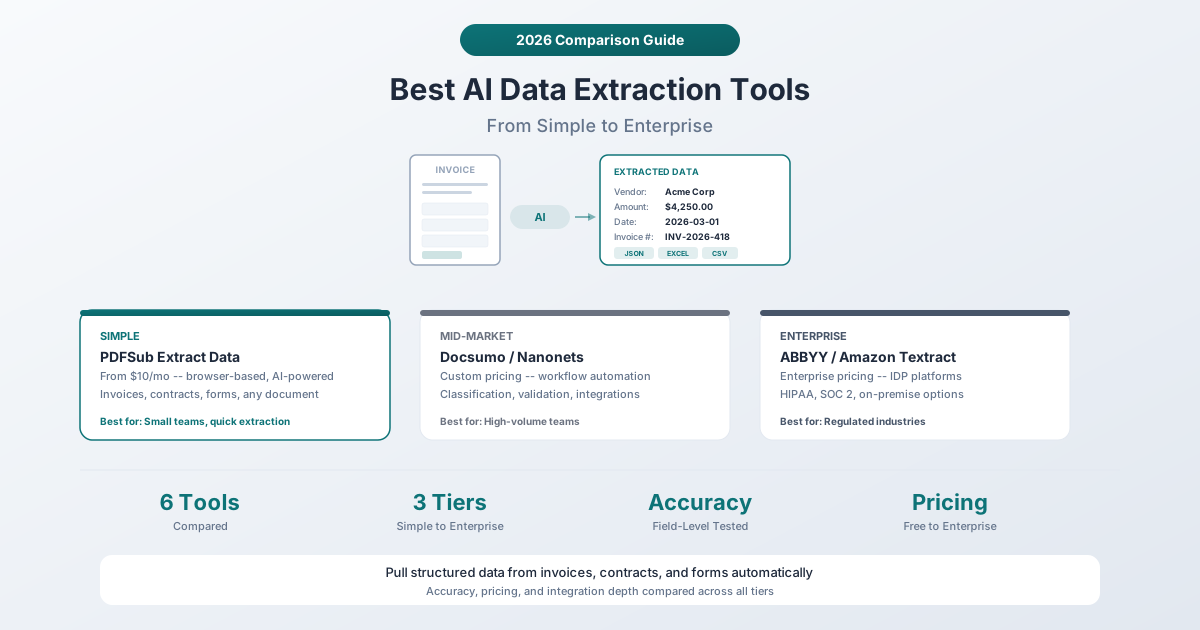
The Three Tiers of PDF Data Extraction
Before diving into individual tools, it helps to understand the market structure:
Simple tools ($10-30/month): Upload a PDF, get structured data back. Minimal setup, no workflow automation, good for occasional use or small teams. Think of these as smart copy-paste.
Mid-market platforms ($200-2,000/month): Workflow automation, classification, validation rules, integrations with business software. Good for teams processing hundreds or thousands of documents per month.
Enterprise IDP platforms ($18,000+/year): Intelligent Document Processing (IDP) with on-premise deployment options, compliance certifications, custom AI model training, and dedicated support teams. For regulated industries processing millions of documents.
Most small businesses and freelancers need a simple tool. Most mid-size companies need a mid-market platform. Enterprise IDP is for banks, insurance companies, and government agencies.
Simple Tier
1. PDFSub Extract Data
Best for: Small teams and individuals who need quick, accurate data extraction without complex setup.
PDFSub's Extract Data tool uses AI to pull structured data from any PDF document. Upload an invoice, contract, form, or report, and it returns key-value pairs -- vendor names, dates, amounts, addresses, line items -- in a clean, organized format.
Pricing: The All-In-One plan is $20/user/mo (annual) or $25/user/mo (monthly), including AI data extraction alongside 98+ other PDF tools. No per-page fees. A 7-day free trial is available with full functionality.
How it works: Upload a PDF, and the AI analyzes the document layout to identify and extract fields. For text-based PDFs, it uses the text layer directly. For scanned documents, it applies OCR first and then extracts. Results can be exported to Excel, CSV, or JSON.
Strengths:
- No setup or training required -- works on any document type immediately
- Part of a complete platform (merge, split, convert, sign, translate, summarize, etc.)
- Browser-based for standard tools; AI processing is server-side
- Includes specialized extractors for invoices, receipts, bank statements, and financial reports
- Supports 130+ languages with automatic detection
Limitations:
- Not designed for high-volume automated workflows (hundreds of documents per hour)
- No direct integrations with ERP or accounting software (you export data and import it)
- Best for ad-hoc extraction rather than continuous processing pipelines
2. Amazon Textract
Best for: Developers who want to build extraction into their own applications using AWS.
Amazon Textract is an AWS service that extracts text, forms, and tables from documents using machine learning. It is an API, not a user-facing application -- you need to write code (or use AWS tools) to integrate it.
Pricing: Pay-per-page. Standard text extraction starts at $1.50 per 1,000 pages. Form and table extraction starts at $50 per 1,000 pages. Pricing decreases at higher volumes.
Strengths:
- Extremely scalable (millions of documents)
- Integrates with the broader AWS ecosystem (S3, Lambda, Step Functions)
- Pre-trained for common document types (invoices, receipts, ID documents)
- HIPAA eligible, SOC compliant
Limitations:
- Requires developer skills to implement
- No user-facing interface -- it is purely an API
- Costs can add up quickly at high volumes with form/table extraction ($50/1,000 pages)
- Results require post-processing to be useful for business users
Mid-Market Tier
3. Nanonets
Best for: Teams processing hundreds to thousands of documents monthly who need workflow automation.
Nanonets has moved to a consumption-based pricing model. You get $200 in free credits to start, then pay per "block run" -- each step in your processing workflow. Simple formatting operations cost $0.02/run, while AI-powered extraction costs $0.30/run.
Pricing: Pay-as-you-go with $200 in free credits. Prepaid credit packages offer up to 20% discounts. Enterprise plans with SLAs and HIPAA compliance are available.
Strengths:
- Flexible pricing -- you pay for what you use
- Pre-trained models for common document types
- Workflow automation with classification, validation, and routing
- API access for integration with other systems
- Supports training custom models on your specific document formats
Limitations:
- The consumption-based model can be hard to predict costs for
- Requires some setup to define extraction workflows
- The $200 free credit goes quickly if you are experimenting with complex workflows
4. Docsumo
Best for: Finance and accounting teams that need validated extraction with human-in-the-loop review.
Docsumo focuses on financial documents -- invoices, bank statements, tax forms, insurance documents. It includes an AI document reviewer that flags uncertain extractions for human verification, which is critical when accuracy matters (and with financial documents, it always matters).
Pricing: Free trial with 1,000 pages. Business and Enterprise plans are custom-priced based on volume and document types. The pricing page does not list specific dollar amounts.
Strengths:
- AI document reviewer catches errors before they reach your systems
- Pre-built integrations with accounting software
- Auto-classification can sort incoming documents by type
- Continuous learning -- the system improves as you correct its mistakes
- Unlimited user licenses on Business plan
Limitations:
- Custom pricing makes it hard to budget in advance
- Primarily focused on financial documents (less flexible for other document types)
- Sales process required for pricing information
Enterprise Tier
5. ABBYY Vantage
Best for: Large enterprises in regulated industries that need on-premise options and compliance certifications.
ABBYY has been in the document processing business for decades. Vantage is their modern intelligent document processing platform with pre-trained "skills" for different document types. It supports cloud, on-premise, and hybrid deployment.
Pricing: Enterprise pricing -- contact sales. Historically, ABBYY contracts start in the tens of thousands per year and scale based on volume.
Strengths:
- Decades of OCR and document processing expertise
- On-premise deployment for organizations that cannot send documents to the cloud
- Pre-trained skills for 200+ document types
- Compliance certifications (SOC 2, GDPR, HIPAA)
- Marketplace of community-built document skills
Limitations:
- Enterprise pricing excludes small and mid-size businesses
- Implementation can take weeks or months
- The platform has a learning curve
- Overkill for teams processing fewer than thousands of documents per month
6. Rossum
Best for: Organizations that want AI-powered extraction with deep ERP integration (SAP, Oracle, Coupa).
Rossum focuses specifically on invoice and purchase order processing with deep integrations into enterprise procurement systems.
Pricing: Starts at $18,000/year for the Starter plan with unlimited seats. Business, Enterprise, and Ultimate plans are custom-priced with additional features like SSO, sandbox environments, and multi-document transaction support.
Strengths:
- Purpose-built for accounts payable workflows
- Direct integrations with SAP, Coupa, Workday, Oracle
- Intelligent email processing -- invoices sent to a dedicated email are automatically processed
- Duplicate detection and master data matching
- Translation support for international invoices
Limitations:
- $18,000/year starting price puts it firmly in enterprise territory
- Focused primarily on AP/procurement -- not a general-purpose extraction tool
- Requires implementation and configuration
Comparison Table
| Feature | PDFSub | Textract | Nanonets | Docsumo | ABBYY | Rossum |
|---|---|---|---|---|---|---|
| Starting Price | $15/mo | Pay-per-page | Pay-per-use | Custom | Enterprise | $18K/yr |
| Setup Required | None | Developer | Moderate | Moderate | Weeks | Weeks |
| Document Types | Any | Any | Any | Financial | 200+ | AP/PO |
| OCR Included | Yes | Yes | Yes | Yes | Yes | Yes |
| Workflow Automation | No | Via AWS | Yes | Yes | Yes | Yes |
| Accounting Integration | Export only | Via AWS | API | Yes | Yes | Deep ERP |
| Compliance | SOC 2 Ready | HIPAA, SOC | Enterprise | Enterprise | SOC 2, HIPAA | Enterprise |
| Other PDF Tools | 98+ | None | None | None | Limited | None |
How to Choose
You process a few documents a week and want a simple, affordable tool: PDFSub ($20/user/mo annual) handles ad-hoc extraction for any document type with no setup. You also get 98+ other PDF tools.
You are a developer building extraction into your application: Amazon Textract gives you a scalable API with pay-per-page pricing.
You process hundreds of documents monthly and need workflow automation: Nanonets or Docsumo offer the right balance of capability and cost.
You are in a regulated industry processing thousands of documents with compliance requirements: ABBYY Vantage or Rossum provide enterprise-grade solutions with on-premise options.
The key insight: do not buy an enterprise platform when a simple tool will do. A $15/month tool that takes 30 seconds to extract invoice data is perfectly fine if you process 20 invoices a week. Enterprise platforms make sense when you need automated workflows processing thousands of documents with validation, routing, and direct system integration.
Frequently Asked Questions
How accurate is AI data extraction compared to manual entry?
Modern AI extraction tools achieve 90-98% accuracy on well-formatted documents like invoices and receipts. The accuracy drops for handwritten content, heavily formatted layouts, or poor-quality scans. For most business documents, AI extraction is significantly faster than manual entry and comparable in accuracy -- especially when combined with a human review step for flagged items. PDFSub's extraction handles both text-based and scanned PDFs by applying OCR automatically when needed.
Can AI extraction tools handle documents in languages other than English?
Most tools support multiple languages, but the depth varies significantly. PDFSub supports 130+ languages with automatic language detection. Amazon Textract supports English, Spanish, German, Italian, Portuguese, and French natively. Nanonets and Docsumo support major languages but may require custom training for less common ones. ABBYY has historically strong multilingual support due to its OCR heritage.
What is the difference between OCR and AI data extraction?
OCR (Optical Character Recognition) converts images of text into machine-readable text. AI data extraction goes further -- it reads the text and understands the structure. OCR tells you "there is text here that says $4,250.00." AI extraction tells you "this is the invoice total, and it is $4,250.00, and the vendor is Acme Corp, and the invoice number is INV-2026-418." Most modern extraction tools include OCR as a preprocessing step.
Do I need to train the AI on my specific document types?
Simple tools like PDFSub and Amazon Textract work out of the box with no training. They use pre-trained models that handle common document formats. Mid-market and enterprise tools like Nanonets, Docsumo, and ABBYY allow custom model training, which improves accuracy for non-standard document formats. If your documents follow unusual layouts, custom training can improve results significantly.
Is it safe to upload sensitive financial documents for AI extraction?
All tools on this list use encrypted connections and server-side processing for AI features. For standard PDF operations, PDFSub processes files in your browser without uploading them. For AI extraction specifically, documents are sent to servers for processing. If you handle highly sensitive data, look for tools with SOC 2 certification (Humata Team, ABBYY) or on-premise deployment (ABBYY Vantage). PDFSub is SOC 2 Ready.
The Bottom Line
AI data extraction has reached the point where it genuinely saves time for anyone who regularly types data from PDFs into other systems. The technology works. The question is just which tier you need.
For most small businesses and freelancers, a simple tool like PDFSub's Extract Data -- which includes extraction as part of an 98+ tool platform at $20/user/mo (annual) -- is the right starting point. You can always scale up to enterprise tools if your volume demands it.