How to Analyze Financial Reports with AI
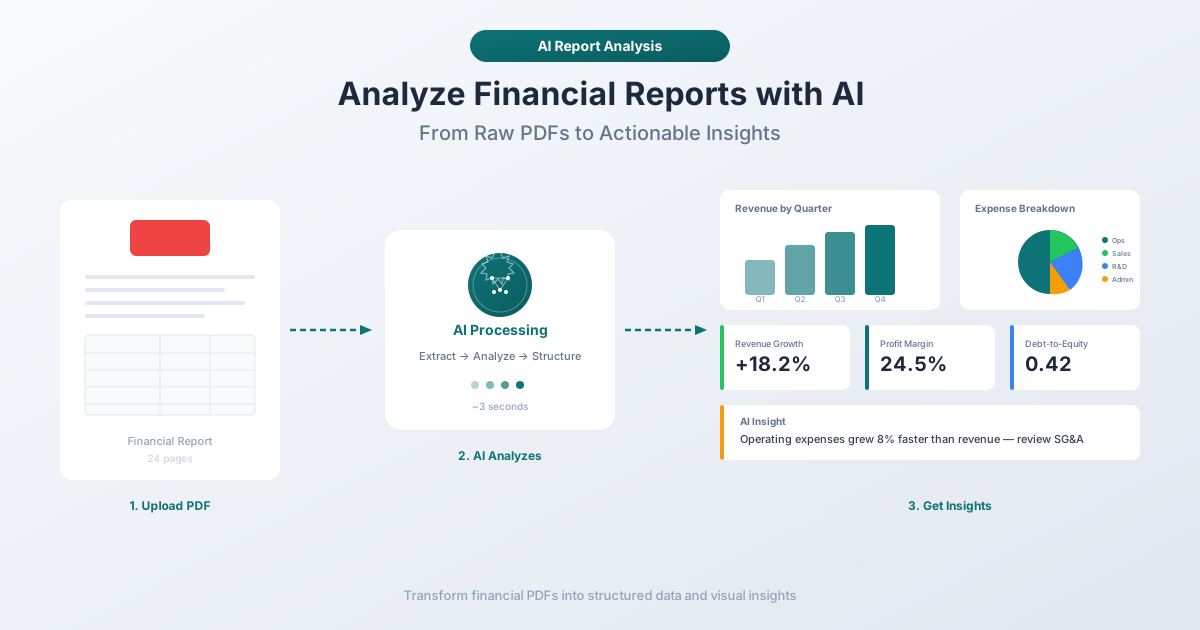
Analysts spend 8-12 hours reading a single annual report. AI cuts that to minutes - extracting revenue trends, profit margins, and debt ratios from 10-Ks, balance sheets, and income statements.
A public company's 10-K filing runs 100 to 300 pages. It contains audited financial statements, management's discussion and analysis, risk factors, executive compensation details, legal proceedings, and enough footnotes to fill a separate document. The SEC requires every company with more than $10 million in assets and a class of equity securities held by more than 2,000 owners to file one every year.
There are roughly 4,000 domestic companies listed on the NYSE and NASDAQ combined - each publishing a 10-K annually, a 10-Q every quarter, and 8-Ks whenever something material happens. For a single equity analyst covering 15 to 20 stocks, that's 60 to 80 quarterly filings per year, plus annual reports and hundreds of current event disclosures.
The sheer volume has outpaced what any human team can process manually. This is where AI financial analysis is changing the game - not by replacing the analyst's judgment, but by eliminating the hours spent hunting for numbers buried on page 147.
The Time Problem: Why Manual Analysis Can't Scale
Let's be honest about what financial report analysis actually involves.
A thorough read of a single 10-K takes an experienced analyst 8 to 12 hours. That's not skimming - that's reading the financial statements, cross-referencing footnotes, comparing year-over-year figures, checking risk factor disclosures for new language, and noting anything that needs follow-up.
For a first-time read of an unfamiliar company, it can take even longer. Some seasoned analysts report spending days on a single filing when they're building an initial position thesis.
Here's what that time investment looks like across a realistic workload:
| Task | Time per Document | Annual Volume (20 Stocks) | Total Annual Hours |
|---|---|---|---|
| 10-K annual report | 8-12 hours | 20 | 160-240 |
| 10-Q quarterly report | 3-5 hours | 60 | 180-300 |
| Earnings call transcripts | 1-2 hours | 80 | 80-160 |
| 8-K current reports | 30-60 minutes | 100+ | 50-100 |
| Total | 470-800 hours/year |
That's 12 to 20 full working weeks per year just reading filings. Not analyzing them - reading them. The analysis, modeling, and decision-making come after.
This is before you factor in competitive analysis, industry research, management interviews, and the actual investment recommendations that generate revenue. The reading is necessary, but it's the bottleneck.
What AI Can Actually Extract from Financial Reports
AI doesn't read a financial report the way an analyst does. It parses, categorizes, and structures. Here's what modern AI extraction handles reliably.
Revenue and Income Metrics
- Total revenue / net sales - pulled directly from the income statement, across multiple reporting periods
- Revenue by segment - geographic breakdowns, product lines, and business units when disclosed
- Cost of goods sold (COGS) - and the resulting gross profit and gross margin
- Operating income (EBIT) - with operating expense breakdowns
- Net income - including discontinued operations, extraordinary items, and per-share figures (basic and diluted EPS)
- EBITDA - calculated from operating income plus depreciation and amortization (often not reported directly, requiring the AI to compute it)
Balance Sheet Components
- Total assets, total liabilities, and shareholders' equity - the fundamental accounting equation
- Current assets - cash and equivalents, accounts receivable, inventory, prepaid expenses
- Current liabilities - accounts payable, accrued expenses, current portion of long-term debt, deferred revenue
- Long-term debt - bonds, term loans, credit facility balances, and maturity schedules
- Goodwill and intangibles - critical for assessing acquisition-heavy companies
- Working capital - calculated as current assets minus current liabilities
Cash Flow Analysis
- Operating cash flow - the most important number for assessing business quality
- Capital expenditures - maintenance vs. growth capex when disclosed
- Free cash flow - operating cash flow minus capex
- Financing activities - debt issuance, repayment, share buybacks, and dividend payments
- Investing activities - acquisitions, divestitures, and securities purchases
Calculated Ratios and Metrics
This is where AI goes beyond simple extraction. Once the raw numbers are parsed, AI can compute:
Profitability ratios:
- Gross margin (gross profit / revenue)
- Operating margin (operating income / revenue)
- Net profit margin (net income / revenue)
- Return on equity (net income / shareholders' equity)
- Return on assets (net income / total assets)
Liquidity ratios:
- Current ratio (current assets / current liabilities)
- Quick ratio (current assets minus inventory / current liabilities)
- Cash ratio (cash and equivalents / current liabilities)
Leverage ratios:
- Debt-to-equity (total debt / shareholders' equity)
- Debt-to-assets (total debt / total assets)
- Interest coverage (EBIT / interest expense)
Efficiency ratios:
- Asset turnover (revenue / total assets)
- Inventory turnover (COGS / average inventory)
- Days sales outstanding (accounts receivable / revenue x 365)
- Days payable outstanding (accounts payable / COGS x 365)
Valuation inputs:
- Earnings per share (basic and diluted)
- Book value per share
- Revenue growth rate (YoY and QoQ)
- Free cash flow yield
A human analyst calculates these too - but they're pulling numbers from different pages, opening a calculator, and building a spreadsheet. AI does it in seconds across the entire document.
Types of Financial Reports AI Can Handle
Not all financial documents are created equal. Different report types have different structures, and AI handles some better than others.
Income Statements (Profit & Loss)
These are the most straightforward for AI extraction. Income statements follow a consistent top-to-bottom structure: revenue at the top, expenses in the middle, net income at the bottom. Line items are clearly labeled, and the math is linear - each line is either a standalone figure or a subtotal.
AI reliability: High. Well-structured income statements from major public companies are extracted with near-perfect accuracy.
Balance Sheets
Balance sheets are slightly more complex because they present a snapshot rather than a flow. Assets on one side, liabilities and equity on the other. The challenge for AI is handling the nested hierarchy - current vs. non-current assets, short-term vs. long-term liabilities - and ensuring subtotals reconcile.
AI reliability: High for standard formats. Companies using XBRL-tagged filings (required for SEC filers) provide structured data that AI can validate against the visual presentation.
Cash Flow Statements
Cash flow statements are the trickiest of the three core financial statements. The indirect method - which most companies use - starts with net income and adds back non-cash items, changes in working capital, and one-time charges. The adjustments can span two pages and include items that aren't immediately obvious (deferred tax assets, stock-based compensation, impairment charges).
AI reliability: Moderate to high. The structure is consistent, but the adjustment line items vary widely between companies. AI handles the extraction but may need human verification for unusual items.
Annual Reports (10-K)
The 10-K is the comprehensive package. Beyond the three financial statements, it includes:
- Management's Discussion and Analysis (MD&A) - qualitative narrative about results, trends, and risks
- Risk Factors - a section that can run 20+ pages, often with boilerplate language that changes incrementally
- Notes to Financial Statements - 40 to 80 pages of detail on accounting policies, segment reporting, lease obligations, pension liabilities, legal contingencies, and more
AI excels at extracting structured data from the financial statements. It's also effective at summarizing the MD&A and flagging new or changed risk factors by comparing against prior filings. The footnotes are the hardest part - they're dense, interrelated, and require context that pure extraction doesn't provide.
Quarterly Reports (10-Q)
10-Qs are shorter (30 to 80 pages) and unaudited. They contain condensed financial statements and a limited MD&A. AI processes these faster than 10-Ks, and they're particularly useful for tracking quarter-over-quarter trends.
How AI Financial Analysis Actually Works
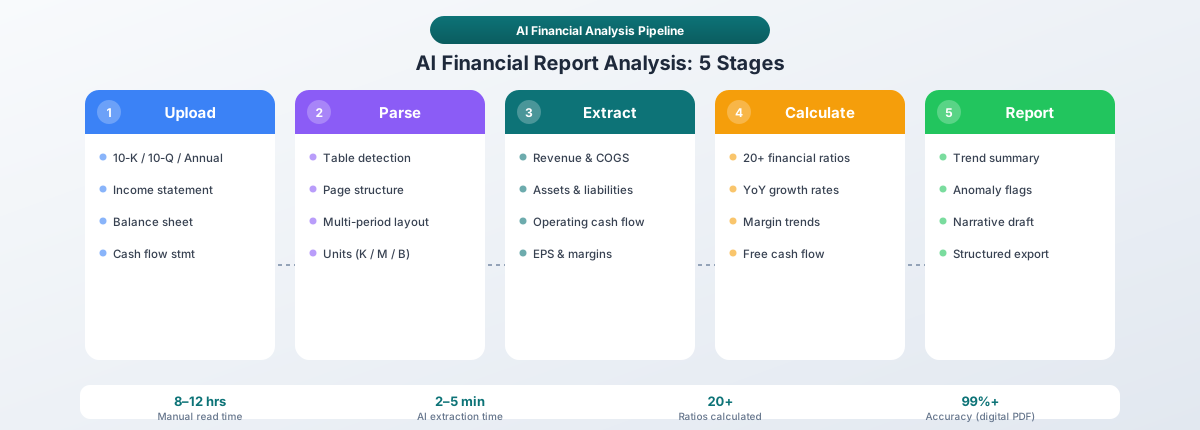
The process isn't magic - it's a pipeline with distinct stages.
Stage 1: Document Parsing
The AI ingests the PDF and determines its structure. For digitally-native PDFs (filed electronically with the SEC), this means reading the embedded text and identifying tables, headers, paragraphs, and page layouts. For scanned documents, OCR converts images to text first.
The parsing stage also identifies the document type - is this an income statement, a balance sheet, a full 10-K, or a quarterly earnings release? Different document types trigger different extraction logic.
Stage 2: Table Detection and Extraction
Financial statements are inherently tabular. The AI detects table boundaries, identifies column headers (period labels like "Year Ended December 31, 2025"), and maps each cell to its row-column position. Financial tables frequently span multiple pages, use merged cells for section headers, and include parenthetical notations for negative numbers - the extraction engine needs to handle all of these without confusing a subtotal with a line item.
Stage 3: Metric Identification and Classification
Once the numbers are extracted, the AI classifies each figure. "Revenue" might appear as "Net revenues," "Net sales," "Total revenues," or "Revenue from contracts with customers." The AI maps these variants to a standard taxonomy so that cross-company comparisons work.
This stage also handles unit detection. Is the number in thousands, millions, or billions? The header might say "(in millions)" on page 47, but you're looking at the number on page 48. AI tracks these contextual cues across pages.
Stage 4: Calculation and Cross-Referencing
The AI computes derived ratios, year-over-year growth rates, and margin trends. It cross-references figures across statements - does net income on the income statement match the starting point on the cash flow statement? Discrepancies get flagged, which can indicate rounding differences (benign), restatements (significant), or extraction errors (fixable).
Stage 5: Summarization and Insight Generation
The final stage produces human-readable output - structured summary tables, narrative analysis of key trends, or comparisons against prior periods. The best AI tools present the summary alongside the source data, so you can verify any figure by tracing it back to the original document.
PDFSub's Financial Report Analyzer
PDFSub's Financial Report Analyzer is built for exactly this workflow. Upload a financial report PDF - whether it's a 10-K, a quarterly earnings release, a standalone income statement, or a multi-year balance sheet - and the analyzer extracts, structures, and summarizes the financial data.
What It Does
- Extracts all financial statement data into structured, downloadable formats
- Identifies key metrics - revenue, net income, EBITDA, margins, and growth rates
- Calculates financial ratios - profitability, liquidity, leverage, and efficiency metrics
- Summarizes the narrative sections - MD&A highlights, risk factor changes, and management guidance
- Handles international formats - currency symbols, number formats (US vs. European), and date conventions across 130+ languages
How It Handles Different Document Types
PDFSub uses a multi-tier processing approach. For clean digital PDFs - the kind you download from the SEC's EDGAR system or a company's investor relations page - the extraction starts in your browser. No file upload, no server processing, no privacy risk. If the document is more complex (scanned, image-heavy, or unusually formatted), it escalates to server-side processing and AI extraction automatically.
This tiered approach means you get the fastest, most private processing path for straightforward documents, with AI power available when you need it.
Who Uses It
- Equity analysts processing quarterly filings across a coverage universe
- Private equity firms screening potential acquisitions and conducting due diligence
- CFOs and controllers benchmarking their own reports against competitors
- Auditors verifying reported figures against source documents
- Individual investors who want to go beyond the headline earnings number
You can try the Financial Report Analyzer with PDFSub's 7-day free trial - Cancel anytime.
Use Cases: Where AI Financial Analysis Delivers the Most Value
Investor Due Diligence
When evaluating a potential investment, you need three to five years of financial data, trended and compared. AI can process five years of 10-Ks in the time it takes a human to read the table of contents of one.
A typical due diligence workflow: upload the last five annual reports, extract all three financial statements from each, build a five-year trend table showing revenue, margins, cash flow, and debt levels, identify inflection points, and compare against competitors using the same process. What used to take a junior analyst a week can be done in an afternoon.
Competitive Analysis
Benchmarking against competitors requires apples-to-apples comparisons - but Company A reports "revenue from contracts with customers" while Company B reports "net sales." AI normalizes these differences, maps each company's reporting to a standard structure, and calculates comparable margins and growth rates. A CFO preparing a board presentation can generate competitive benchmarks from raw filings in minutes instead of days.
Audit Preparation
Auditors spend a significant portion of their time extracting and cross-referencing numbers from financial documents. AI can front-load this work:
- Extract all figures from the draft financial statements
- Cross-reference against prior year filings for consistency
- Flag unusual changes (a line item that tripled, an expense category that disappeared)
- Compare management's narrative claims against the actual numbers
This doesn't replace the auditor's professional judgment - but it lets them focus that judgment on the items that actually need scrutiny rather than spending hours confirming that the numbers carry forward correctly.
Mergers and Acquisitions
AI accelerates the M&A screening phase. A PE firm evaluating 50 potential acquisition targets can process all 50 annual reports in a day, creating standardized comparison sheets that highlight which targets meet their criteria (minimum revenue, acceptable leverage, margin thresholds). The deep-dive analysis of the shortlisted three to five targets still requires human expertise - but the initial 50-to-5 screening that used to take two weeks now takes one day.
Manual Analysis vs. AI-Assisted Analysis: An Honest Comparison
AI doesn't replace financial analysis. It changes where analysts spend their time.
| Dimension | Manual Analysis | AI-Assisted Analysis |
|---|---|---|
| Time to extract data from a 10-K | 3-5 hours | 2-5 minutes |
| Time to calculate 20+ ratios | 1-2 hours | Seconds |
| Year-over-year comparison (5 years) | 4-8 hours | 10-15 minutes |
| Coverage (stocks per analyst) | 15-20 | 40-60+ |
| Consistency | Varies with fatigue and experience | Identical methodology every time |
| Nuance and judgment | Strong | Weak - requires human review |
| Qualitative assessment | Strong (tone, context, intent) | Improving but still limited |
| Total analysis time per company | 20-40 hours/year | 4-8 hours/year |
AI excels at the structured, repetitive work - extraction, calculation, comparison, and flagging. Humans excel at the unstructured work - interpreting what the numbers mean, assessing management credibility, and making forward-looking judgments.
The best workflow combines both. Let AI do the first pass - extract all the data, calculate the ratios, flag the anomalies. Then the analyst focuses their time on the items that actually require expertise: understanding why margins compressed, whether the new risk factor language signals a real threat, and what the capital allocation strategy means for shareholder returns.
What AI Gets Wrong: Limitations You Should Know
AI financial analysis is powerful, but it's not infallible. Knowing the limitations helps you use it effectively.
Context-Dependent Metrics
AI can tell you that revenue grew 15% year-over-year. It can't always tell you that 12% of that growth came from an acquisition completed in Q2 and only 3% was organic. That context is usually buried in the MD&A narrative, and while AI is getting better at extracting qualitative insights, it doesn't always connect them to the quantitative figures.
One-Time Items and Adjustments
Companies love to report "adjusted" metrics that exclude restructuring charges, acquisition costs, and litigation settlements. AI can extract the reported GAAP figures reliably. Extracting and validating the non-GAAP adjustments - especially when they're scattered across the footnotes - is harder and less reliable.
Accounting Policy Differences
AI normalizes line item names when comparing companies. But it doesn't always catch that Company A capitalizes software development costs while Company B expenses them, or that one uses FIFO inventory accounting while the other uses weighted average. These policy differences affect comparability even when the labels match.
Forward-Looking Statements
AI can extract and summarize forward-looking language - revenue guidance, expansion plans, risk warnings - but it can't assess credibility. A CEO saying "we expect continued strong growth" could mean a pipeline of signed contracts or aspirational marketing. That distinction requires human judgment.
Unusual Document Formats
Not every financial report is a clean SEC filing. AI handles standardized formats (SEC filings, IFRS-formatted reports) well. Non-standard layouts - a startup's investor update, a municipality's CAFR with 400 pages of supplementary schedules - may need more manual guidance.
Getting Started: A Practical Playbook
If you're ready to integrate AI into your financial analysis workflow, here's where to begin.
Step 1: Start with What You Know
Pick a company whose financials you already understand well. Download their most recent 10-K from the SEC's EDGAR system (sec.gov/cgi-bin/browse-edgar). Run it through an AI analyzer and compare the output against your own understanding. This calibrates your trust in the tool - you'll see where it's accurate and where it needs human verification.
Step 2: Focus on the Core Three Statements First
Don't try to analyze the entire 10-K on day one. Start with:
- Income statement - Can the AI correctly extract revenue, gross profit, operating income, and net income? Do the margins calculate correctly?
- Balance sheet - Are total assets and total liabilities correct? Does shareholders' equity match? Is working capital calculated properly?
- Cash flow statement - Does operating cash flow match? Is free cash flow computed correctly?
If the AI handles these accurately for your test company, you can trust it for the structured extraction work across your coverage universe.
Step 3: Build Comparison Templates
The real power of AI analysis shows up in comparison. Once you've validated extraction accuracy, build your workflow:
- Extract this year's 10-K
- Extract last year's 10-K
- Generate a year-over-year comparison with growth rates and margin changes
- Repeat for two or three competitors
This gives you a standardized comparison framework that would have taken days to build manually.
Step 4: Layer in Qualitative Analysis
After the structured data is extracted, use AI summarization for the MD&A, risk factor changes, and segment discussion. Read these summaries, but always spot-check against the source. AI summarization is useful for triage - identifying which sections deserve your full attention - but it's not a substitute for reading the critical sections yourself.
Step 5: Establish a Review Cadence
Build a rhythm: AI extracts quarterly data on earnings day, does a full extraction and trend analysis for annual filings, and summarizes 8-Ks and proxy statements as they're filed. You focus your time on the flagged items and the strategic analysis that actually generates alpha.
Questions to Ask Your AI-Extracted Data
AI gives you data fast. But data without the right questions is just numbers. Here are the questions that turn extracted metrics into investment insight:
- Revenue quality: Is growth organic or acquisition-driven? What percentage is recurring vs. one-time? How concentrated is revenue across customers?
- Margin trajectory: Are gross margins expanding or contracting? Is operating leverage improving (SG&A growing slower than revenue)?
- Cash flow health: Is operating cash flow consistently higher than net income? Is the company funding growth from operations or debt?
- Balance sheet strength: Current ratio above 1.5? Debt-to-equity increasing or decreasing? Interest coverage above 3x?
- Capital allocation: Buybacks, dividends, or reinvestment? Is ROIC above the cost of capital? Are acquisitions creating or destroying value?
These questions guide your analysis from "what are the numbers" to "what do the numbers mean" - and that transition is where human expertise remains irreplaceable.
The Bottom Line
Financial report analysis isn't going away. If anything, the volume of financial data is growing - more companies filing, more frequent disclosures, more complex business models. The analyst who reads 15 10-Ks a year can't compete with one who reads 50, assuming the analysis quality is comparable.
AI makes the 50 possible. It handles the extraction, the math, the comparison, and the first-pass flagging. The analyst handles the judgment, the context, and the decision.
The firms that adopt this workflow aren't replacing their analysts. They're giving each analyst the coverage capacity of a team - with consistent methodology, faster turnaround, and fewer transcription errors.
If you're spending hours pulling numbers out of PDFs and punching them into spreadsheets, that time is available. PDFSub's Financial Report Analyzer processes income statements, balance sheets, cash flow statements, and full annual reports in minutes. Upload a PDF, get structured data and a summary.
Start with your 7-day free trial and test it on a filing you've already analyzed manually. Compare the output. See where it saves you time and where you'd still want to verify. That's the honest way to evaluate any tool - and we're confident the results will speak for themselves.