Najlepšia alternatíva k AutoEntry pre zadávanie údajov z faktúr (2026).sk.json ## CRITICAL RULES ### Accuracy & Quality - Produce native-quality translations that read as if originally written in Slovak - Use natural, idiomatic phrasing — NEVER produce word-for-word literal translations - Adapt sentence structure, word order, and phrasing to Slovak conventions - Match the tone and register of the source: professional yet approachable, clear and concise - For technical/SaaS content, use the terminology that Slovak speakers actually use in that industry ### SEO Optimization - Translate meta titles and descriptions with Slovak search intent in mind - Use keywords that Slovak speakers would actually search for - Keep meta titles under 60 characters and meta descriptions under 160 characters - Preserve the persuasive and action-oriented tone of CTAs ### What to Translate - Translate ALL string values in the JSON - Translate headings, descriptions, features, FAQs, CTAs, and all user-facing text - Adapt date formats, number formats, and measurement units to Slovak conventions if referenced ### What NOT to Translate (Keep Exactly As-Is) - JSON keys — never change any key names - Brand name "PDFSub" — always keep as "PDFSub" - Technical file formats: PDF, CSV, Excel, JSON, OFX, QFX, QIF, XLSX, DOCX, HTML, EPUB, RTF, ODT, SVG, TIFF, HEIC, WebP, PNG, JPG - Technical terms that are universally used in English: API, URL, OCR, AI, CTA, SEO, GDPR, SOC 2 - Product names: "PDFSub Engine" — always keep as "PDFSub Engine" - Code-like strings, URLs, email addresses - Numbers that are identifiers (not quantities) - Image placeholders like 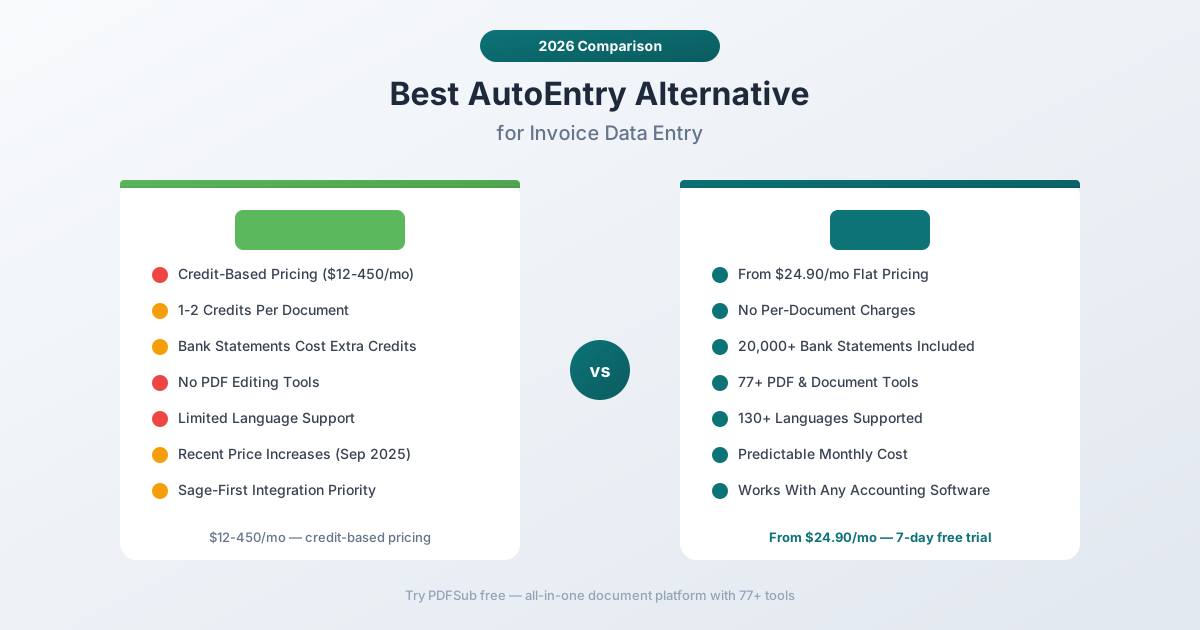, 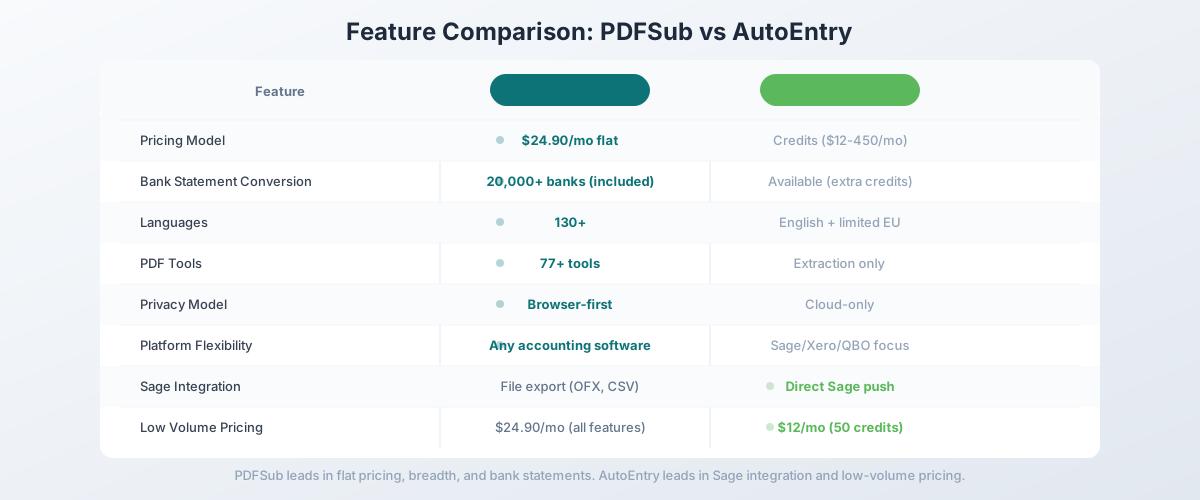, etc. — preserve EXACTLY as-is, do not translate, modify, or remove them - Markdown heading syntax (##, ###, etc.) — preserve the exact heading level markers ### Formatting - Preserve any HTML entities or markdown formatting in strings - Maintain the same list/array structure and count of items (EXCEPTION: bank name arrays — replace the values with local equivalents while keeping the same array length) - If the source has 6 features, the translation must have exactly 6 features - Return ONLY valid JSON — no explanations, no markdown code fences, no comments ### Cultural Adaptation - For Slovak, use the appropriate level of formality (e.g., formal "Sie" in German, polite "usted" in Spanish unless the source is casual) - Adapt idioms and metaphors to equivalents that resonate in Slovak culture - For RTL languages, no special formatting changes needed — just translate the text content ### Bank Name Localization (CRITICAL — DO NOT SKIP) Any array containing bank names (keys like "bankNames", "sampleBanks", or similar) MUST be replaced with banks that Slovak speakers recognize. Do NOT keep the English bank names. Replace them with a mix of well-known local banks and major international banks familiar in Slovak-speaking regions. Keep the same array length. Examples: - Russian: "Сбербанк", "Тинькофф", "ВТБ", "Альфа-Банк", "Газпромбанк", "Райффайзен", "Росбанк", "Открытие", "HSBC", "Deutsche Bank", "BNP Paribas", "UBS", "Santander", "ING", "ICBC", "Mizuho Bank", "State Bank of India", "Barclays", "Commonwealth Bank", "Standard Chartered", "Citibank" - Polish: "PKO BP", "mBank", "ING", "Santander", "BNP Paribas", "Pekao", "Alior Bank", etc. - German: "Deutsche Bank", "Commerzbank", "Sparkasse", "ING", "N26", "DKB", etc. - French: "BNP Paribas", "Société Générale", "Crédit Agricole", "LCL", "Boursorama", etc. - For non-Latin scripts, use native script: Arabic ("البنك الأهلي", "الراجحي"), Chinese ("中国工商银行", "中国建设银行"), Japanese ("三菱UFJ", "みずほ銀行"), etc. The bank list must feel native to Slovak speakers, not like a US-only product. ## CHUNK INFO This is part 1 of 2. Translate ONLY the keys in this JSON subset. ## JSON CONTENT TO TRANSLATE { "title": "Best AutoEntry Alternative for Invoice Data Entry (2026)", "excerpt": "Compare AutoEntry vs PDFSub for automated data entry. See credit costs, features, and alternatives.", "tags": [ "Comparison", "Accounting", "AutoEntry", "Alternatives" ], "metaDescription": "Compare AutoEntry vs PDFSub for automated data entry. See credit costs, features, and alternatives.", "body__0": "> **PDFSub is best for:** > - Accountants frustrated by AutoEntry's credit system who want flat-rate pricing at $15-45/mo > - Firms needing bank statement conversion and invoice extraction in one platform — not just receipt capture > - Users who want 77+ PDF tools (merge, split, translate, summarize) alongside financial extraction > - Browser-based document processing for privacy-sensitive financial data > > **PDFSub is NOT best for:** > - Practices that rely on direct auto-publish to Sage, Xero, or QuickBooks (PDFSub exports files for manual import) > - Firms needing automated chart-of-accounts coding and supplier rule matching > - Teams requiring a mobile app to snap and auto-process receipts on the go AutoEntry is a data entry automation tool owned by Sage that extracts data from invoices, receipts, and bank statements, then publishes it to accounting software. It uses OCR and AI to read financial documents and eliminate manual data entry. For bookkeepers and accountants running Sage, Xero, or QuickBooks practices, AutoEntry has been a reliable choice for years. But AutoEntry runs on a credit system that makes costs unpredictable. Each document costs 1-2 credits to process, and credit packages range from $12/month (50 credits) to $450/month (3,000+ credits). At 2 credits per invoice with line items, a practice processing 200 invoices per month burns through 400 credits — that's the $98/month Platinum plan. The credit math gets worse as your volume grows. If you've been frustrated by AutoEntry's credit system eating into your margins, its limited scope beyond invoice capture, or the September 2025 price increases, this guide compares alternatives and identifies where you get the best value. ", "body__1": "## Why People Look for AutoEntry Alternatives AutoEntry works well at what it does — the extraction quality for invoices and receipts is solid. The complaints center on pricing structure, scope limitations, and the growing cost burden as practices scale. ### Credit-Based Pricing Is Unpredictable AutoEntry's credit system works like this: - **1 credit** per simple invoice or receipt (header data only) - **2 credits** per invoice or receipt with line items - **More credits** for bank statements due to higher extraction volume Credit packages: | Plan | Credits/Month | Price/Month | Cost Per Credit | |------|--------------|-------------|-----------------| | Bronze | 50 | $12 | $0.24 | | Silver | 100 | $23 | $0.23 | | Gold | 200 | $44 | $0.22 | | Platinum | 500 | $98 | $0.20 | | Diamond | 1,500 | $285 | $0.19 | | Sapphire | 3,000+ | $450 | $0.15 | The problem isn't the unit cost — it's the unpredictability. A month with 180 invoices fits comfortably in Gold. A month with 250 invoices pushes you to Platinum. Seasonal variations, new clients, or a few multi-page documents can push you into a higher tier unexpectedly. And the September 2025 price increases made every tier more expensive, without adding new capabilities. PDFSub uses flat monthly pricing starting at **$25/month** for AI features (Professional, 250 AI credits) or **$45/month** (Business, 500 AI credits). No credits to count, no per-document charges, no surprises. Process 50 documents or 500 — the price stays the same. ### Invoice and Receipt Focused — Limited Scope AutoEntry handles invoices, receipts, and basic bank statement processing. But it doesn't: - Merge, split, or compress PDFs - Convert between document formats (Word, Excel, PowerPoint) - Translate documents between languages - Summarize or analyze documents with AI - Watermark or encrypt PDFs - Compare two documents side by side For accounting practices, document processing extends well beyond invoice capture. Combining client documents, compressing files for email, converting between formats, and managing PDFs are daily tasks. AutoEntry covers one piece of this workflow. PDFSub includes 77+ PDF and document tools alongside its AI extraction capabilities. One platform, one subscription, one workflow. ### Bank Statement Processing Costs More Credits AutoEntry can process bank statements, but the credit consumption is higher than for invoices because of the higher data volume per page. A 10-page bank statement with 150 transactions consumes significantly more credits than a single invoice. For bookkeepers who regularly convert bank statements, the credit burn rate on statements can consume a significant portion of your monthly allocation, leaving fewer credits for invoice processing. PDFSub's [bank statement converter](/tools/bank-statement-converter) handles statements from **20,000+ banks worldwide** with no per-statement or per-page charges. Convert as many statements as you need — the flat monthly price covers everything. ### Limited Language Support AutoEntry focuses primarily on English-language documents. It supports additional languages, but the accuracy for non-English text — particularly non-Latin scripts like Chinese, Japanese, Korean, Arabic, and Hindi — is inconsistent. For practices with international clients, this means manual data entry for documents AutoEntry can't handle accurately. PDFSub supports **133 languages** with automatic detection, including all non-Latin scripts. International date formats, number formats, and currency symbols are handled automatically. ### Sage Integration Priority As a Sage-owned product, AutoEntry's deepest integration is with Sage products. It also integrates with Xero and QuickBooks, but the Sage integration gets the most development attention. If you're not in the Sage ecosystem, you may not be getting the best experience. PDFSub exports to standard file formats (Excel, CSV, QBO, OFX, QFX, QIF) that work with any accounting software. No priority given to any specific platform — the same workflow works universally. ---
Ako prejsť z AutoEntry na PDFSub
Prechod je jednoduchý – nie je potrebná žiadna migrácia dát, pretože oba nástroje spracúvajú dokumenty na požiadanie.
Krok 1: Začnite bezplatnú skúšobnú verziu
Prejdite na stránku s cenami PDFSub a spustite 7-dňovú bezplatnú skúšobnú verziu. Všetky plány zahŕňajú plnú funkčnosť počas skúšobného obdobia.
Krok 2: Otestujte svoje kľúčové typy dokumentov
Spracujte dokumenty, s ktorými pracujete najčastejšie:
- Faktúry: Otestujte s faktúrami od vašich hlavných dodávateľov – overte hlavičkové údaje A extrakciu riadkových položiek
- Príjmové doklady: Nahrajte príjmové doklady a porovnajte kvalitu extrakcie
- Výpisy z účtu: Preveďte výpisy z účtu klientov a overte presnosť transakcií vo viacerých bankových formátoch
- Doklady v inom ako anglickom jazyku: Ak pracujete s medzinárodnými klientmi, otestujte ich dokumenty
Krok 3: Porovnajte kvalitu výstupu
Pri faktúrach porovnajte extrahované polia PDFSub s tým, čo produkuje AutoEntry. Pri výpisoch z účtu overte, či sa exportovaný súbor QBO alebo OFX úspešne naimportuje do vášho účtovného softvéru. Venujte pozornosť presnosti riadkových položiek – tu sa extrakčné nástroje líšia.
Krok 4: Vypočítajte celkové náklady
Sčítajte svoju skutočnú spotrebu kreditov AutoEntry za posledných 3-6 mesiacov. Vypočítajte priemerné mesačné náklady vrátane prípadných poplatkov za prekročenie limitu. Porovnajte s paušálnou sadzbou PDFSub. Zohľadnite nástroje, za ktoré platíte osobitne (úprava PDF, konverzia bankových výpisov za dodatočné náklady na kredity), ktoré by PDFSub konsolidoval.
Krok 5: Upravte svoj pracovný postup
Hlavnou zmenou pracovného postupu je prechod z priameho odosielania do účtovného softvéru (AutoEntry) na export a import súborov (PDFSub). Súbory QBO natívne fungujú s QuickBooks, súbory OFX fungujú so Xero a väčšinou iných platforiem, a súbory Excel/CSV sú univerzálne. Krok importu pridáva pár sekúnd na dávku, ale eliminuje náklady na kredity za dokument.
Krok 6: Zrušte AutoEntry
Keď overíte, že PDFSub pokrýva váš pracovný postup, zrušte svoje predplatné AutoEntry. AutoEntry ponúka zrušenie bez zmluvy, takže môžete zrušiť kedykoľvek.
Často kladené otázky
Je PDFSub rovnako presný ako AutoEntry pri extrakcii faktúr?
Oba nástroje poskytujú vysokú presnosť extrakcie pre štandardné faktúry. AutoEntry sa roky zameriava výlučne na extrakciu faktúr/príjmových dokladov, čo mu dáva rozsiahlu knižnicu naučených formátov. Viacúrovňová extrakcia PDFSub (v prehliadači pre digitálne PDF, poháňaná AI pre skenované dokumenty) poskytuje porovnateľnú presnosť pre väčšinu rozložení faktúr. Otestujte so svojimi skutočnými dokumentmi počas 7-dňovej bezplatnej skúšobnej verzie PDFSub.
Môže PDFSub odosielať dáta priamo do Sage?
Nie. PDFSub exportuje súbory v štandardných formátoch (QBO, OFX, Excel, CSV), ktoré manuálne importujete do svojho účtovného softvéru. Priama integrácia AutoEntry so Sage je skutočnou výhodou, ak ste v ekosystéme Sage. Kompromisom je, že exporty súborov PDFSub fungujú s akýmkoľvek účtovným softvérom, zatiaľ čo priame odosielanie AutoEntry je obmedzené na podporované platformy.
Ako PDFSub spracúva bankové výpisy v porovnaní s AutoEntry?
PDFSub je predinštalovaný so šablónami pre viac ako 20 000 bánk po celom svete. Nahrajte výpis a systém automaticky rozpozná formát banky a extrahuje všetky transakcie. Export do 8 formátov vrátane QBO a OFX. AutoEntry spracúva bankové výpisy, ale spotrebuje viac kreditov na výpis kvôli vyššiemu objemu dát. Paušálne ceny PDFSub znamenajú, že bankové výpisy nestoja nič navyše.
Bude PDFSub fungovať s mojím účtovným softvérom?
PDFSub exportuje do QBO (natívny pre QuickBooks), OFX (Xero, Sage a väčšina platforiem), Excel, CSV, TSV, JSON, QFX a QIF. Ak váš účtovný softvér dokáže importovať ktorýkoľvek z týchto štandardných formátov, PDFSub s ním bude fungovať. AutoEntry má priame integrácie s konkrétnymi platformami, čo je pohodlnejšie, ale menej flexibilné.
Je AutoEntry lacnejší ako PDFSub pri nízkom objeme?
Pri veľmi nízkom objeme je plán Bronze od AutoEntry (50 kreditov, 12 $/mesiac) lacnejší ako plán Professional od PDFSub (25 $/mesiac, 250 AI kreditov). PDFSub však zahŕňa viac ako 77 nástrojov na prácu s PDF a možnosť konverzie bankových výpisov na každej úrovni. Hodnota za peniaze uprednostňuje PDFSub, akonáhle potrebujete viac ako pár dokumentov.
Záver
AutoEntry je schopný nástroj na extrakciu faktúr a príjmových dokladov – ale jeho cenotvorba založená na kreditoch robí náklady nepredvídateľnými, bankové výpisy neúmerne míňajú kredity a zvýšenie cien v septembri 2025 zdražilo každú úroveň. Platíte za dokument vo svete, kde cenotvorba za dokument trestá rast praxe.
PDFSub poskytuje extrakciu poháňanú AI pre faktúry, príjmové doklady a bankové výpisy už od 15 $/mesiac – žiadne kredity, žiadne poplatky za dokument, žiadne prekvapenia. Pridajte viac ako 77 nástrojov na prácu s PDF, podporu 130+ jazykov, viac ako 20 000 šablón bankových výpisov a prehliadačové súkromie a získate komplexnú platformu, ktorá pokrýva celý pracovný postup s dokumentmi.
Vyskúšajte PDFSub zadarmo so 7-dňovou skúšobnou verziou a spracujte svoje skutočné faktúry, príjmové doklady a bankové výpisy. Porovnajte kvalitu extrakcie a vypočítajte, koľko by ste ušetrili oproti vašej súčasnej spotrebe kreditov AutoEntry. Matematika paušálnych cien býva presvedčivá.