PDFSub vs BankStatementConverter: Honest Comparison (2026)
PDFSub vs BankStatementConverter.com - features, pricing, output formats, and privacy compared.
PDFSub is best for:
- Professionals who need QBO, OFX, QFX, QIF export - not just BankStatementConverter's Excel/CSV
- Firms with multilingual clients needing 130+ languages vs BankStatementConverter's English focus
- Users who want 98+ PDF tools included alongside bank statement conversion
- Privacy-conscious users who want browser-based processing for digital PDFs
PDFSub is NOT best for:
- Users who want a permanent free tier (BankStatementConverter offers 5 free pages/day)
- Users who require a native desktop or mobile app for bank statement work
- Teams that only convert a few English-language statements to Excel and want the simplest possible tool
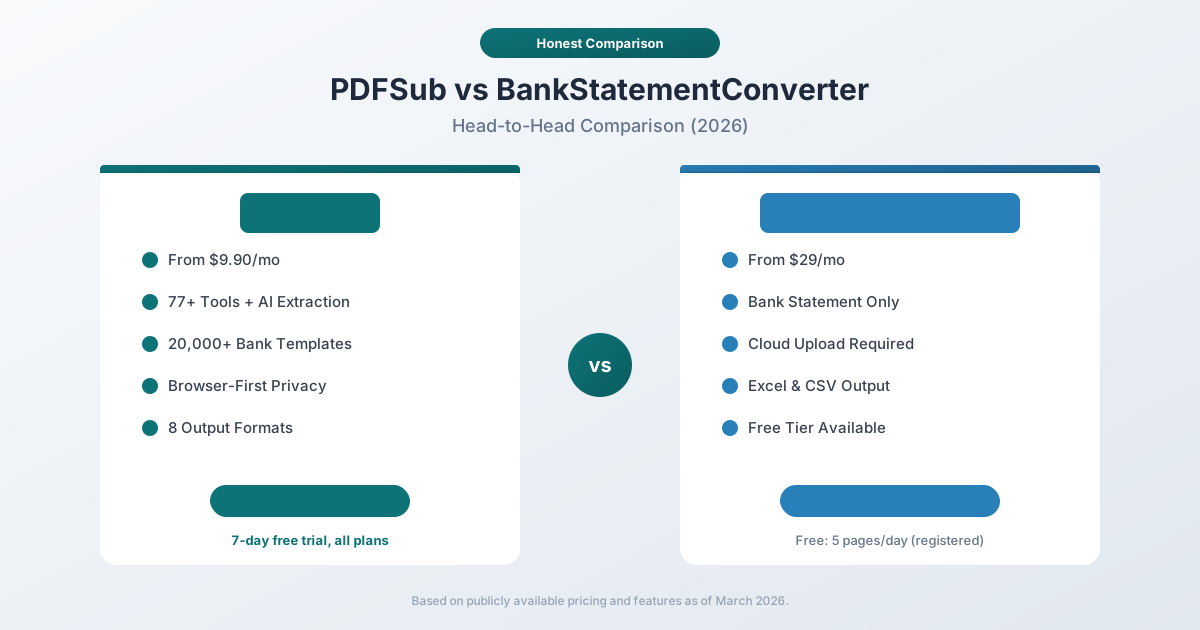
BankStatementConverter.com and PDFSub both convert PDF bank statements into spreadsheet-friendly formats. But they are fundamentally different products built for different audiences.
BankStatementConverter.com is a single-purpose cloud tool that converts bank statement PDFs to Excel and CSV. It has been around for years, offers a free tier, and charges $29-$99/month for higher-volume plans. It does one thing, and it does it reasonably well.
PDFSub is a full document platform with 98+ PDF tools, AI-powered extraction, bank statement conversion supporting 20,000+ financial institutions and 8 output formats, 130+ language support, and browser-first privacy. The All-In-One plan is $20/month annual ($25/month monthly) with a 7-day free trial.
This comparison covers where each tool excels and where it falls short.
Quick Verdict
The 30-second split.
Choose PDFSub if…
- You need accounting-native exports (QBO, OFX, QIF, QFX) - not just Excel and CSV.
- You also need to merge, compress, sign, translate, or extract from invoices and receipts - PDFSub covers all of that.
- You handle international statements where 130+ language support and automatic currency/date detection matter.
- You want browser-first processing for digital PDFs so files don't leave the device.
Choose BankStatementConverter.com if…
- You truly need a permanent free tier - 5 pages/day with a free account is genuinely useful at very low volume.
- You only need Excel/CSV output and never import into QuickBooks, Xero, or other accounting platforms that prefer QBO/OFX.
- You need direct bank-statement API access today - BSC ships a focused conversion API, while PDFSub's v1 API targets HTML→PDF/image conversion rather than bank statements.
- Your volume sits at 4,000+ pages/month, where BSC's Business tier becomes the cheaper per-page option (you'd need multiple PDFSub add-ons to match).
The core difference: BankStatementConverter.com is a single-purpose converter. PDFSub is a broader document platform where statement conversion is one of 98+ capabilities.
Company Overviews
PDFSub is a document platform offering 98+ tools for PDF processing, AI-powered document features (summarization, translation, data extraction, chat), and specialized bank statement conversion supporting 20,000+ financial institutions. Editing tools run entirely in your browser. Conversions and advanced processing are powered by the PDFSub Engine - an isolated service with no internet access. Files are processed in an isolated environment and auto-deleted. It is designed for individuals, small businesses, accountants, and bookkeepers who work with documents regularly.
BankStatementConverter.com is a cloud-based service focused exclusively on converting PDF bank statements into Excel (XLS/XLSX) and CSV formats. The service supports statements from thousands of banks worldwide and uses rule-based algorithms for extraction. It is run by a small team and has been operational for several years, serving financial professionals, accountants, and small businesses that need straightforward bank statement conversion.
Output Formats
This is one of the clearest differentiators.
PDFSub exports bank statement data in 8 formats:
- XLSX - Excel spreadsheet
- CSV - comma-separated values
- QBO - QuickBooks Online format
- OFX - Open Financial Exchange
- QIF - Quicken Interchange Format
- QFX - Quicken Financial Exchange
- TSV - tab-separated values
- JSON - structured data for developers
This matters for accountants and bookkeepers who import data directly into accounting software. QuickBooks, Xero, Sage, and other platforms accept QBO, OFX, and QIF formats natively. Converting to these formats eliminates the manual step of importing CSV and mapping columns.
BankStatementConverter.com exports to Excel (XLS) and CSV only. If you need to import data into QuickBooks, Xero, or another accounting platform, you will need to manually map columns or use a separate conversion tool to create QBO/OFX files.
For a bookkeeper managing 15 client accounts across multiple accounting platforms, the format difference alone can save hours per week.
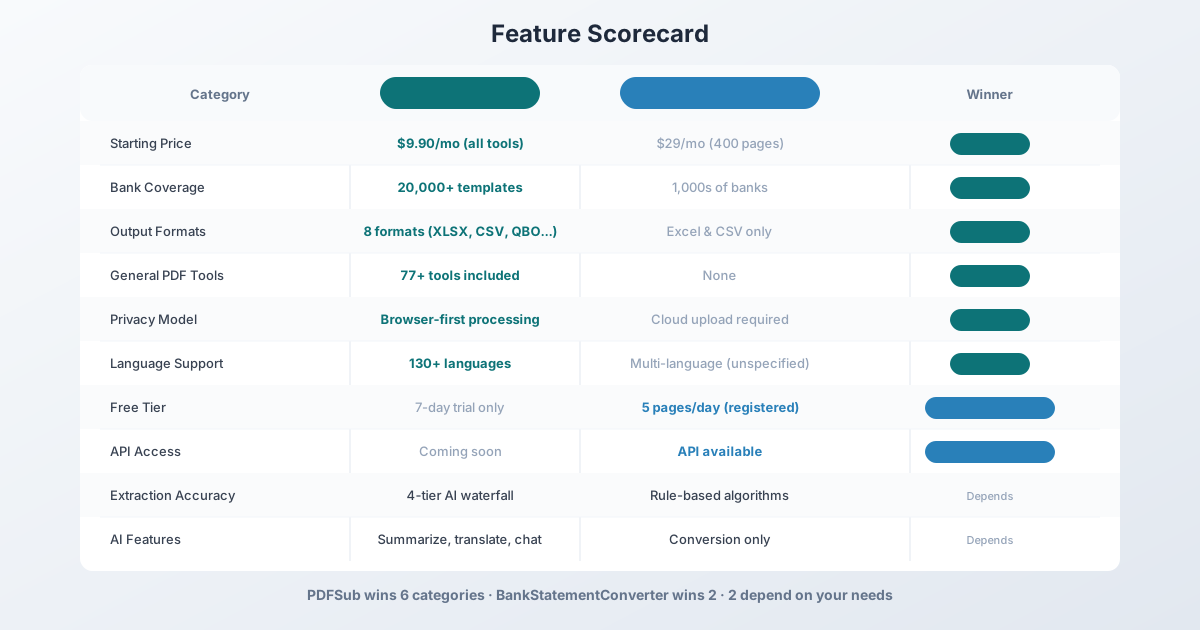
Winner: PDFSub - 8 output formats versus 2. Accounting-native formats (QBO, OFX, QIF) eliminate manual import steps.
Bank Coverage
PDFSub supports over 20,000 bank templates with a 4-tier extraction approach:
- Tier 1 - Coordinate-based extraction in your browser (no file upload)
- Tier 2 - Server-side coordinate extraction for complex layouts
- Tier 3 - OCR + AI for scanned documents
- Tier 4 - AI vision for the most challenging formats
This tiered system means that even if a bank statement format is unusual, the AI fallback layers can handle it. New bank formats are supported automatically through the AI tiers without requiring manual template updates.
BankStatementConverter.com supports statements from "thousands of banks worldwide" - the exact count is not publicly specified. It uses rule-based extraction algorithms that are continuously improved. When a statement format is not recognized, users can report the failure and the team adds support manually.
The practical difference: PDFSub's AI tiers provide a safety net for unusual or new bank formats. BankStatementConverter.com may fail on formats that have not been manually added to their system.
Winner: PDFSub - 20,000+ verified templates with AI fallback for unrecognized formats.
Pricing Comparison
Both tools have distinct pricing philosophies.
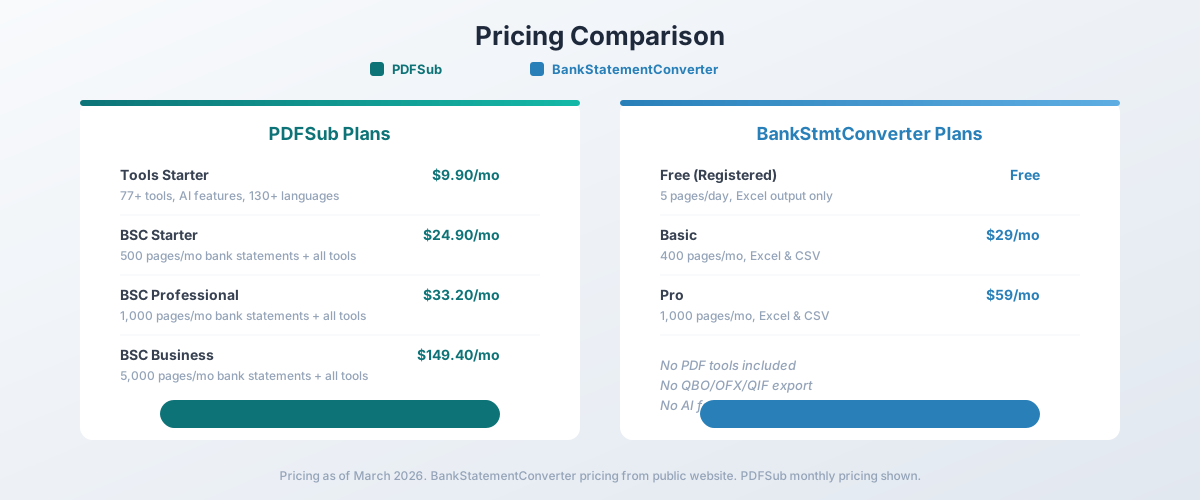
PDFSub Pricing
| Plan | Price | Key Features |
|---|---|---|
| All-In-One (annual) | $20/mo ($240/yr) | 98+ tools, 500 AI credits/mo, 500 bank statement pages/mo, e-sign + form filling, 50 GB cloud storage; unlimited team seats (each billed at the same per-user rate) available (each billed per-user); Google Drive + Dropbox |
| All-In-One (monthly) | $25/mo | Same as annual, billed monthly |
| Add-ons | Stackable | 500 AI credits, 500 bank statement pages, 40 GB storage, priority support |
PDFSub is subscription-only - every plan includes a 7-day free trial with full functionality. Cancel anytime in one click. Annual billing saves $60/year vs monthly.
BankStatementConverter.com Pricing
| Plan | Monthly Price | Key Features |
|---|---|---|
| Anonymous | Free | 1 page/day, no registration |
| Registered | Free | 5 pages/day, free signup |
| Basic | ~$29 | 400 pages/mo, Excel & CSV |
| Pro | ~$59 | 1,000 pages/mo, Excel & CSV |
| Business | ~$99 | 4,000 pages/mo, Excel & CSV |
BankStatementConverter.com's free tier is genuinely useful for very low-volume users. Five pages per day is enough for someone converting one or two statements per week.
The Math
At comparable page volumes, the value proposition favors PDFSub:
| Volume | PDFSub Cost | BSC Cost | PDFSub Advantage |
|---|---|---|---|
| 500 pages/mo | $20/mo (All-In-One annual) | ~$29/mo (Basic) | 31% cheaper + 98+ tools + 8 formats |
| 1,000 pages/mo | All-In-One + 1 BSC add-on | ~$59/mo (Pro) | Cheaper + all extras |
| 4,000 pages/mo | All-In-One + 7 BSC add-ons | ~$99/mo (Business) | More - but 98+ tools + 130+ languages |
At 500 and 1,000 pages per month, PDFSub costs less while providing dramatically more functionality. BankStatementConverter.com becomes cheaper at very high volumes (4,000+ pages), but you lose all the additional PDF tools, AI features, and accounting format exports.
Winner: PDFSub - better value at most volume tiers, plus 98+ additional tools included in every plan.
Pros and Cons of Each
PDFSub - Pros
- Accounting-native exports (QBO, OFX, QIF, QFX) import cleanly into QuickBooks, Xero, Quicken without column mapping
- 98+ general PDF tools plus AI summarization, translation, and chat in the same subscription
- Browser-first processing keeps clean digital PDFs on-device; isolated PDFSub Engine for the rest
PDFSub - Cons
- No free tier - only a 7-day free trial with full access (credit card required to start)
- Direct bank-statement API isn't part of v1 (PDFSub's developer API focuses on HTML→PDF/image)
- For pure "convert 4,000+ statements/month to CSV" workflows with no other needs, BSC's high-volume tier can be cheaper
BankStatementConverter.com - Pros
- Genuinely useful free tier: 5 pages/day with a free account, 1 page/day anonymous
- Direct, well-documented API for programmatic bank statement extraction
- Focused, single-purpose tool - minimal learning curve for occasional users
BankStatementConverter.com - Cons
- Only two output formats (Excel/CSV) - no QBO, OFX, QIF, or QFX for accounting imports
- No general PDF tools, AI, or document translation - if you need anything beyond conversion, you'll pay for it elsewhere
- Cloud-only: every file is uploaded for processing, with no browser-side path for digital PDFs
Privacy & Data Handling
PDFSub processes bank statement Tier 1 extraction in your browser for clean digital PDFs - the file never leaves your device. For scanned documents or complex layouts, processing is handled by the PDFSub Engine - an isolated service with no internet access. Files are processed in an isolated environment and auto-deleted after processing.
BankStatementConverter.com requires uploading every file to their cloud servers for processing. All bank statement data passes through their infrastructure. While the service uses secure connections, the fundamental model requires entrusting your financial data to a third-party server.
For accountants handling sensitive client financial data, the browser-first approach provides practical privacy that cloud-only processing cannot match. Some compliance frameworks and client agreements specifically restrict uploading financial documents to third-party services.
Winner: PDFSub - browser-based editing plus isolated PDFSub Engine processing with auto-deletion.
General PDF Tools
This category is not even close.
PDFSub includes 98+ PDF tools in every subscription:
- Merge, split, compress, rotate, reorder PDFs
- Convert PDF to Word, Excel, PowerPoint, images
- AI summarization, translation (130+ languages), chat with documents
- Invoice extraction, receipt scanning, financial report analysis
- Watermarks, page numbering, form filling, e-signatures (no per-envelope fees)
- PDF security: encrypt, decrypt, redact
BankStatementConverter.com converts bank statements to Excel and CSV. That is the entire feature set. There are no general PDF tools, no AI features, no document translation, and no file conversion capabilities.
If you also need to merge client PDFs, compress files for email, translate foreign documents, or summarize lengthy reports, BankStatementConverter.com requires you to subscribe to a separate service for every additional task.
With PDFSub, one subscription covers everything.
Winner: PDFSub - 98+ tools versus a single conversion function.
Language & International Support
PDFSub supports 130+ languages for document processing and AI translation. Date format detection, number format detection (comma vs. period decimal separators), and currency detection happen automatically. You can process bank statements from Deutsche Bank (German), ICBC (Chinese), Banco Santander (Spanish), or HDFC Bank (Hindi) without manual configuration.
BankStatementConverter.com supports bank statements from multiple countries, but the extent of language-specific handling is not clearly documented. The interface and documentation are English-only. Multi-language date and number format handling is implicit rather than explicitly advertised.
For international firms processing bank statements from multiple countries, PDFSub's explicit multi-language support and automatic format detection provide more reliable results.
Winner: PDFSub - 130+ languages with automatic format detection and built-in translation.
Free Tier & Trial
BankStatementConverter.com offers a genuinely useful free tier: 5 pages per day with a free registration, or 1 page per day without signing up. For someone who converts one or two bank statements per month, this may be sufficient at no cost.
PDFSub does not have a free tier for bank statement conversion. It offers a 7-day free trial with full access to all features on every plan (credit card required to start). After the trial, you choose a paid plan.
For ongoing low-volume use with no willingness to pay, BankStatementConverter.com wins. For evaluating which tool better fits your workflow, PDFSub's 7-day trial lets you test every feature at full capacity.
Winner: BankStatementConverter.com - a permanent free tier beats a time-limited trial for low-volume users.
API Access
BankStatementConverter.com offers API access for programmatic bank statement conversion. This allows developers to integrate statement conversion into automated workflows, accounting systems, or document processing pipelines.
PDFSub offers a developer API as a separate product, with 10 first-party SDKs (Node, Python, PHP, Go, Ruby, Java, .NET, Rust, C, C++) and 9 usage-credit tiers. The PDFSub API focuses on HTML/URL → PDF, HTML → PNG/JPEG/WEBP, and HTML → text/markdown conversion at v1, with additional tools planned for future phases. For programmatic bank statement conversion specifically, BankStatementConverter.com's API is currently more direct.
Winner: Depends - BankStatementConverter.com for direct bank statement API automation; PDFSub for general document and HTML conversion APIs with broader SDK coverage.
Extraction Accuracy
Both tools achieve good extraction accuracy, but through different mechanisms.
PDFSub uses a 4-tier extraction waterfall that progresses from browser-based coordinate extraction through AI-powered analysis. The system is designed to handle the widest possible range of bank statement formats, including unusual layouts, scanned documents, and international formats.
BankStatementConverter.com uses rule-based extraction algorithms that are continuously improved based on user feedback. When conversion accuracy is poor, users can flag the issue and the team updates the extraction rules. Independent benchmarks have reported high accuracy rates for supported bank formats.
Both approaches have strengths: PDFSub's AI tiers handle edge cases and new formats gracefully. BankStatementConverter.com's rule-based approach can be highly precise for formats it has been specifically tuned for. The best choice depends on whether your bank formats are well-supported by each service.
Winner: Depends - both achieve strong accuracy through different approaches. Test with your specific bank statements.
Who Should Choose PDFSub
PDFSub is the better choice if:
- You need more than bank statement conversion. 98+ PDF tools, AI features, and document translation in one subscription.
- You import into accounting software. QBO, OFX, QIF, and QFX exports eliminate manual column mapping.
- You process international bank statements. 130+ languages with automatic format detection.
- Privacy matters. Editing runs in your browser; conversions use the isolated PDFSub Engine with auto-deletion.
- You process 500-1,000 pages monthly. PDFSub is cheaper at these volumes and includes more features.
- You are an accountant or bookkeeper. The combination of bank statement conversion and general PDF tools replaces multiple subscriptions.
Who Should Choose BankStatementConverter.com
BankStatementConverter.com is the better choice if:
- You need free, ongoing conversion. 5 pages/day at no cost is sufficient for very low-volume users.
- You only need Excel or CSV output. No need for accounting-native formats like QBO or OFX.
- You need API access now. Automated bank statement processing via their API.
- You process 4,000+ pages monthly. Higher volume tiers may be cheaper for pure conversion.
- You want the simplest possible tool. Upload a PDF, download an Excel file. Nothing more.
The Bottom Line
BankStatementConverter.com is a solid single-purpose tool for converting bank statement PDFs to Excel and CSV. Its free tier is genuinely useful for low-volume users, and its API enables automated processing. But it does exactly one thing, and it only outputs two formats.
PDFSub is a complete document platform where bank statement conversion is one of 98+ capabilities. You get more output formats (including accounting-native QBO, OFX, QIF), more bank coverage (20,000+ templates), AI-powered extraction with fallback tiers, 130+ language support, browser-first privacy, and a full suite of PDF tools - all in a single subscription.
For most accountants, bookkeepers, and financial professionals, PDFSub provides dramatically more value per dollar. The question is whether you need just a converter or an entire document toolkit. If you hesitated, PDFSub's 7-day free trial lets you test the full platform before committing.
Frequently Asked Questions
Is BankStatementConverter.com free?
BankStatementConverter.com offers a free tier: 1 page per day without registration, or 5 pages per day with a free account. For higher volumes, paid plans start at approximately $29/month for 400 pages. PDFSub is subscription-only - every plan includes a 7-day free trial with full access, then the All-In-One plan at $20/month annual ($25/month monthly) covers all 98+ tools. The All-In-One plan already includes 500 bank statement pages every month, with stackable add-ons for more bank statement pages, more AI credits, more storage, or priority support. Cancel anytime in one click.
Can PDFSub export to Excel like BankStatementConverter.com?
Yes. PDFSub exports bank statement data to XLSX (Excel), CSV, QBO, OFX, QIF, QFX, TSV, and JSON - 8 formats total compared to BankStatementConverter.com's 2 formats (Excel and CSV).
Which tool has better accuracy?
Both achieve strong accuracy for well-supported bank formats. PDFSub uses a 4-tier extraction approach with AI fallback for challenging formats. BankStatementConverter.com uses rule-based algorithms tuned for specific bank formats. The best way to compare is to test both with your specific bank statements.
Does BankStatementConverter.com have PDF tools?
No. BankStatementConverter.com is exclusively a bank statement converter. It cannot merge, split, compress, translate, or otherwise modify PDFs. PDFSub includes 98+ PDF tools in every subscription.
Which tool is better for QuickBooks import?
PDFSub exports directly to QBO format, which QuickBooks can import natively without column mapping. BankStatementConverter.com exports to Excel and CSV only, requiring manual column mapping or a separate conversion step to create QBO files.
Can I switch from BankStatementConverter.com to PDFSub?
Yes. The workflow is similar - upload a bank statement PDF and get structured data. With PDFSub, you gain additional output formats, 98+ PDF tools, AI features, and browser-first privacy. The 7-day free trial lets you test the transition before committing.
Does BankStatementConverter.com have an API?
Yes. BankStatementConverter.com offers API access for automated bank statement processing. PDFSub offers a separate developer API product with 10 first-party SDKs (Node, Python, PHP, Go, Ruby, Java, .NET, Rust, C, C++) - its v1 scope focuses on HTML → PDF/image/text conversion rather than direct bank statement extraction, with more tools planned in future phases.
Already decided to switch? This page covers neutral side-by-side facts. For a migration-focused walkthrough - what to test first, how to verify QBO imports, and switching FAQ - see the best BankStatementConverter alternative guide.