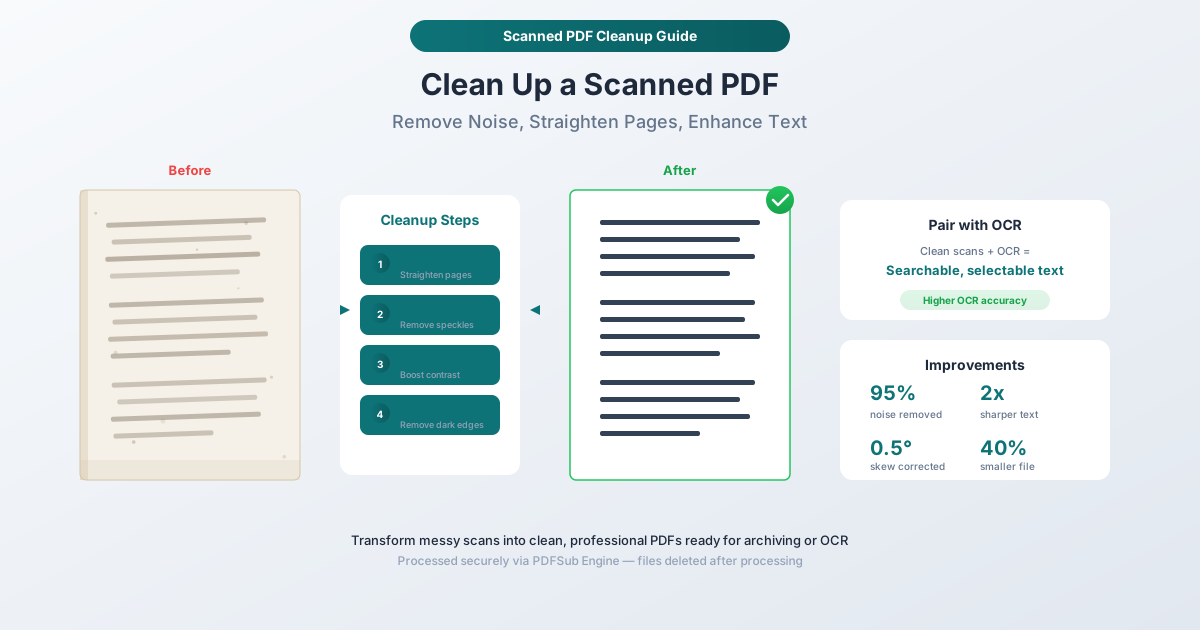
Sådan renser du en scannet PDF (Fjern støj, ret sider op) - PDFSub Hjælp & Support Center, Dansk Oversættelse, SEO Optimering, Tutorial, Scan, Clean, PDF, OCR, Meta Description, Tags, Body__0, Body__1, Body__2, Body__3, Body__4, Body__5, Body__6, Skew, Tilted Pages, Noise, Speckles and Dots, Faded Text, Dark Borders and Shadows, Uneven Background, The Four Cleanup Steps, Deskew, Straighten Pages, Denoise, Remove Speckles, Enhance Contrast, Clean Borders, Remove Dark Edges, How to Clean a Scanned PDF with PDFSub, Step-by-Step Instructions, Select cleanup options, Process, Review and download, When to Customize the Cleanup Steps, Disable deskew, Disable denoising, Reduce contrast enhancement, Disable border cleaning, Pairing Cleanup with OCR, The Accuracy Improvement, The Recommended Workflow, Common Scenarios, Office Document Scans, Book and Magazine Pages, Historical and Archival Documents, Receipts and Thermal Prints, Multi-Page Forms, Frequently Asked Questions, Will cleanup change the content of my document?, Can I clean up a PDF that isn't scanned?, How much does cleanup reduce file size?, Does cleanup work on color scans?, Can I undo the cleanup if I don't like the result?, PDFSub's Clean Scanned PDF tool, PDFSub's OCR tool, PDFSub Engine, PDFSub Hjælp & Support Center, Dansk Oversættelse, SEO Optimering, Tutorial, Scan, Clean, PDF, OCR, Meta Description, Tags, Body__0, Body__1, Body__2, Body__3, Body__4, Body__5, Body__6, Skew, Tilted Pages, Noise, Speckles and Dots, Faded Text, Dark Borders and Shadows, Uneven Background, The Four Cleanup Steps, Deskew, Straighten Pages, Denoise, Remove Speckles, Enhance Contrast, Clean Borders, Remove Dark Edges, How to Clean a Scanned PDF with PDFSub, Step-by-Step Instructions, Select cleanup options, Process, Review and download, When to Customize the Cleanup Steps, Disable deskew, Disable denoising, Reduce contrast enhancement, Disable border cleaning, Pairing Cleanup with OCR, The Accuracy Improvement, The Recommended Workflow, Common Scenarios, Office Document Scans, Book and Magazine Pages, Historical and Archival Documents, Receipts and Thermal Prints, Multi-Page Forms, Frequently Asked Questions, Will cleanup change the content of my document?, Can I clean up a PDF that isn't scanned?, How much does cleanup reduce file size?, Does cleanup work on color scans?, Can I undo the cleanup if I don't like the result?, PDFSub's Clean Scanned PDF tool, PDFSub's OCR tool, PDFSub Engine, PDFSub Hjælp & Support Center, Dansk Oversættelse, SEO Optimering, Tutorial, Scan, Clean, PDF, OCR, Meta Description, Tags, Body__0, Body__1, Body__2, Body__3, Body__4, Body__5, Body__6, Skew, Tilted Pages, Noise, Speckles and Dots, Faded Text, Dark Borders and Shadows, Uneven Background, The Four Cleanup Steps, Deskew, Straighten Pages, Denoise, Remove Speckles, Enhance Contrast, Clean Borders, Remove Dark Edges, How to Clean a Scanned PDF with PDFSub, Step-by-Step Instructions, Select cleanup options, Process, Review and download, When to Customize the Cleanup Steps, Disable deskew, Disable denoising, Reduce contrast enhancement, Disable border cleaning, Pairing Cleanup with OCR, The Accuracy Improvement, The Recommended Workflow, Common Scenarios, Office Document Scans, Book and Magazine Pages, Historical and Archival Documents, Receipts and Thermal Prints, Multi-Page Forms, Frequently Asked Questions, Will cleanup change the content of my document?, Can I clean up a PDF that isn't scanned?, How much does cleanup reduce file size?, Does cleanup work on color scans?, Can I undo the cleanup if I don't like the result?, PDFSub's Clean Scanned PDF tool, PDFSub's OCR tool, PDFSub Engine, PDFSub Hjælp & Support Center, Dansk Oversættelse, SEO Optimering, Tutorial, Scan, Clean, PDF, OCR, Meta Description, Tags, Body__0, Body__1, Body__2, Body__3, Body__4, Body__5, Body__6, Skew, Tilted Pages, Noise, Speckles and Dots, Faded Text, Dark Borders and Shadows, Uneven Background, The Four Cleanup Steps, Deskew, Straighten Pages, Denoise, Remove Speckles, Enhance Contrast, Clean Borders, Remove Dark Edges, How to Clean a Scanned PDF with PDFSub, Step-by-Step Instructions, Select cleanup options, Process, Review and download, When to Customize the Cleanup Steps, Disable deskew, Disable denoising, Reduce contrast enhancement, Disable border cleaning, Pairing Cleanup with OCR, The Accuracy Improvement, The Recommended Workflow, Common Scenarios, Office Document Scans, Book and Magazine Pages, Historical and Archival Documents, Receipts and Thermal Prints, Multi-Page Forms, Frequently Asked Questions, Will cleanup change the content of my document?, Can I clean up a PDF that isn't scanned?, How much does cleanup reduce file size?, Does cleanup work on color scans?, Can I undo the cleanup if I don't like the result?, PDFSub's Clean Scanned PDF tool, PDFSub's OCR tool, PDFSub Engine, PDFSub Hjælp & Support Center, Dansk Oversættelse, SEO Optimering, Tutorial, Scan, Clean, PDF, OCR, Meta Description, Tags, Body__0, Body__1, Body__2, Body__3, Body__4, Body__5, Body__6, Skew, Tilted Pages, Noise, Speckles and Dots, Faded Text, Dark Borders and Shadows, Uneven Background, The Four Cleanup Steps, Deskew, Straighten Pages, Denoise, Remove Speckles, Enhance Contrast, Clean Borders, Remove Dark Edges, How to Clean a Scanned PDF with PDFSub, Step-by-Step Instructions, Select cleanup options, Process, Review and download, When to Customize the Cleanup Steps, Disable deskew, Disable denoising, Reduce contrast enhancement, Disable border cleaning, Pairing Cleanup with OCR, The Accuracy Improvement, The Recommended Workflow, Common Scenarios, Office Document Scans, Book and Magazine Pages, Historical and Archival Documents, Receipts and Thermal Prints, Multi-Page Forms, Frequently Asked Questions, Will cleanup change the content of my document?, Can I clean up a PDF that isn't scanned?, How much does cleanup reduce file size?, Does cleanup work on color scans?, Can I undo the cleanup if I don't like the result?, PDFSub's Clean Scanned PDF tool, PDFSub's OCR tool, PDFSub Engine, PDFSub Hjælp & Support Center, Dansk Oversættelse, SEO Optimering, Tutorial, Scan, Clean, PDF, OCR, Meta Description, Tags, Body__0, Body__1, Body__2, Body__3, Body__4, Body__5, Body__6, Skew, Tilted Pages, Noise, Speckles and Dots, Faded Text, Dark Borders and Shadows, Uneven Background, The Four Cleanup Steps, Deskew, Straighten Pages, Denoise, Remove Speckles, Enhance Contrast, Clean Borders, Remove Dark Edges, How to Clean a Scanned PDF with PDFSub, Step-by-Step Instructions, Select cleanup options, Process, Review and download, When to Customize the Cleanup Steps, Disable deskew, Disable denoising, Reduce contrast enhancement, Disable border cleaning, Pairing Cleanup with OCR, The Accuracy Improvement, The Recommended Workflow, Common Scenarios, Office Document Scans, Book and Magazine Pages, Historical and Archival Documents, Receipts and Thermal Prints, Multi-Page Forms, Frequently Asked Questions, Will cleanup change the content of my document?, Can I clean up a PDF that isn't scanned?, How much does cleanup reduce file size?, Does cleanup work on color scans?, Can I undo the cleanup if I don't like the result?, PDFSub's Clean Scanned PDF tool, PDFSub's OCR tool, PDFSub Engine, PDFSub Hjælp & Support Center, Dansk Oversættelse, SEO Optimering, Tutorial, Scan, Clean, PDF, OCR, Meta Description, Tags, Body__0, Body__1, Body__2, Body__3, Body__4, Body__5, Body__6, Skew, Tilted Pages, Noise, Speckles and Dots, Faded Text, Dark Borders and Shadows, Uneven Background, The Four Cleanup Steps, Deskew, Straighten Pages, Denoise, Remove Speckles, Enhance Contrast, Clean Borders, Remove Dark Edges, How to Clean a Scanned PDF with PDFSub, Step-by-Step Instructions, Select cleanup options, Process, Review and download, When to Customize the Cleanup Steps, Disable deskew, Disable denoising, Reduce contrast enhancement, Disable border cleaning, Pairing Cleanup with OCR, The Accuracy Improvement, The Recommended Workflow, Common Scenarios, Office Document Scans, Book and Magazine Pages, Historical and Archival Documents, Receipts and Thermal Prints, Multi-Page Forms, Frequently Asked Questions, Will cleanup change the content of my document?, Can I clean up a PDF that isn't scanned?, How much does cleanup reduce file size?, Does cleanup work on color scans?, Can I undo the cleanup if I don't like the result?, PDFSub's Clean Scanned PDF tool, PDFSub's OCR tool, PDFSub Engine, PDFSub Hjælp & Support Center, Dansk Oversættelse, SEO Optimering, Tutorial, Scan, Clean, PDF, OCR, Meta Description, Tags, Body__0, Body__1, Body__2, Body__3, Body__4, Body__5, Body__6, Skew, Tilted Pages, Noise, Speckles and Dots, Faded Text, Dark Borders and Shadows, Uneven Background, The Four Cleanup Steps, Deskew, Straighten Pages, Denoise, Remove Speckles, Enhance Contrast, Clean Borders, Remove Dark Edges, How to Clean a Scanned PDF with PDFSub, Step-by-Step Instructions, Select cleanup options, Process, Review and download, When to Customize the Cleanup Steps, Disable deskew, Disable denoising, Reduce contrast enhancement, Disable border cleaning, Pairing Cleanup with OCR, The Accuracy Improvement, The Recommended Workflow, Common Scenarios, Office Document Scans, Book and Magazine Pages, Historical and Archival Documents, Receipts and Thermal Prints, Multi-Page Forms, Frequently Asked Questions, Will cleanup change the content of my document?, Can I clean up a PDF that isn't scanned?, How much does cleanup reduce file size?, Does cleanup work on color scans?, Can I undo the cleanup if I don't like the result?, PDFSub's Clean Scanned PDF tool, PDFSub's OCR tool, PDFSub Engine, PDFSub Hjælp & Support Center, Dansk Oversættelse, SEO Optimering, Tutorial, Scan, Clean, PDF, OCR, Meta Description, Tags, Body__0, Body__1, Body__2, Body__3, Body__4, Body__5, Body__6, Skew, Tilted Pages, Noise, Speckles and Dots, Faded Text, Dark Borders and Shadows, Uneven Background, The Four Cleanup Steps, Deskew, Straighten Pages, Denoise, Remove Speckles, Enhance Contrast, Clean Borders, Remove Dark Edges, How to Clean a Scanned PDF with PDFSub, Step-by-Step Instructions, Select cleanup options, Process, Review and download, When to Customize the Cleanup Steps, Disable deskew, Disable denoising, Reduce contrast enhancement, Disable border cleaning, Pairing Cleanup with OCR, The Accuracy Improvement, The Recommended Workflow, Common Scenarios, Office Document Scans, Book and Magazine Pages, Historical and Archival Documents, Receipts and Thermal Prints, Multi-Page Forms, Frequently Asked Questions, Will cleanup change the content of my document?, Can I clean up a PDF that isn't scanned?, How much does cleanup reduce file size?, Does cleanup work on color scans?, Can I undo the cleanup if I don't like the result?, PDFSub's Clean Scanned PDF tool, PDFSub's OCR tool, PDFSub Engine, PDFSub Hjælp & Support Center, Dansk Oversættelse, SEO Optimering, Tutorial, Scan, Clean, PDF, OCR, Meta Description, Tags, Body__0, Body__1, Body__2, Body__3, Body__4, Body__5, Body__6, Skew, Tilted Pages, Noise, Speckles and Dots, Faded Text, Dark Borders and Shadows, Uneven Background, The Four Cleanup Steps, Deskew, Straighten Pages, Denoise, Remove Speckles, Enhance Contrast, Clean Borders, Remove Dark Edges, How to Clean a Scanned PDF with PDFSub, Step-by-Step Instructions, Select cleanup options, Process, Review and download, When to Customize the Cleanup Steps, Disable deskew, Disable denoising, Reduce contrast enhancement, Disable border cleaning, Pairing Cleanup with OCR, The Accuracy Improvement, The Recommended Workflow, Common Scenarios, Office Document Scans, Book and Magazine Pages, Historical and Archival Documents, Receipts and Thermal Prints, Multi-Page Forms, Frequently Asked Questions, Will cleanup change the content of my document?, Can I clean up a PDF that isn't scanned?, How much does cleanup reduce file size?, Does cleanup work on color scans?, Can I undo the cleanup if I don't like the result?, PDFSub's Clean Scanned PDF tool, PDFSub's OCR tool, PDFSub Engine, PDFSub Hjælp & Support Center, Dansk Oversættelse, SEO Optimering, Tutorial, Scan, Clean, PDF, OCR, Meta Description, Tags, Body__0, Body__1, Body__2, Body__3, Body__4, Body__5, Body__6, Skew, Tilted Pages, Noise, Speckles and Dots, Faded Text, Dark Borders and Shadows, Uneven Background, The Four Cleanup Steps, Deskew, Straighten Pages, Denoise, Remove Speckles, Enhance Contrast, Clean Borders, Remove Dark Edges, How to Clean a Scanned PDF with PDFSub, Step-by-Step Instructions, Select cleanup options, Process, Review and download, When to Customize the Cleanup Steps, Disable deskew, Disable denoising, Reduce contrast enhancement, Disable border cleaning, Pairing Cleanup with OCR, The Accuracy Improvement, The Recommended Workflow, Common Scenarios, Office Document Scans, Book and Magazine Pages, Historical and Archival Documents, Receipts and Thermal Prints, Multi-Page Forms, Frequently Asked Questions, Will cleanup change the content of my document?, Can I clean up a PDF that isn't scanned?, How much does cleanup reduce file size?, Does cleanup work on color scans?, Can I undo the cleanup if I don't like the result?, PDFSub's Clean Scanned PDF tool, PDFSub's OCR tool, PDFSub Engine, PDFSub Hjælp & Support Center, Dansk Oversættelse, SEO Optimering, Tutorial, Scan, Clean, PDF, OCR, Meta Description, Tags, Body__0, Body__1, Body__2, Body__3, Body__4, Body__5, Body__6, Skew, Tilted Pages, Noise, Speckles and Dots, Faded Text, Dark Borders and Shadows, Uneven Background, The Four Cleanup Steps, Deskew, Straighten Pages, Denoise, Remove Speckles, Enhance Contrast, Clean Borders, Remove Dark Edges, How to Clean a Scanned PDF with PDFSub, Step-by-Step Instructions, Select cleanup options, Process, Review and download, When to Customize the Cleanup Steps, Disable deskew, Disable denoising, Reduce contrast enhancement, Disable border cleaning, Pairing Cleanup with OCR, The Accuracy Improvement, The Recommended Workflow, Common Scenarios, Office Document Scans, Book and Magazine Pages, Historical and Archival Documents, Receipts and Thermal Prints, Multi-Page Forms, Frequently Asked Questions, Will cleanup change the content of my document?, Can I clean up a PDF that isn't scanned?, How much does cleanup reduce file size?, Does cleanup work on color scans?, Can I undo the cleanup if I don't like the result?, PDFSub's Clean Scanned PDF tool, PDFSub's OCR tool, PDFSub Engine, PDFSub Hjælp & Support Center, Dansk Oversættelse, SEO Optimering, Tutorial, Scan, Clean, PDF, OCR, Meta Description, Tags, Body__0, Body__1, Body__2, Body__3, Body__4, Body__5, Body__6, Skew, Tilted Pages, Noise, Speckles and Dots, Faded Text, Dark Borders and Shadows, Uneven Background, The Four Cleanup Steps, Deskew, Straighten Pages, Denoise, Remove Speckles, Enhance Contrast, Clean Borders, Remove Dark Edges, How to Clean a Scanned PDF with PDFSub, Step-by-Step Instructions, Select cleanup options, Process, Review and download, When to Customize the Cleanup Steps, Disable deskew, Disable denoising, Reduce contrast enhancement, Disable border cleaning, Pairing Cleanup with OCR, The Accuracy Improvement, The Recommended Workflow, Common Scenarios, Office Document Scans, Book and Magazine Pages, Historical and Archival Documents, Receipts and Thermal Prints, Multi-Page Forms, Frequently Asked Questions, Will cleanup change the content of my document?, Can I clean up a PDF that isn't scanned?, How much does cleanup reduce file size?, Does cleanup work on color scans?, Can I undo the cleanup if I don't like the result?, PDFSub's Clean Scanned PDF tool, PDFSub's OCR tool, PDFSub Engine, PDFSub Hjælp & Support Center, Dansk Oversættelse, SEO Optimering, Tutorial, Scan, Clean, PDF, OCR, Meta Description, Tags, Body__0, Body__1, Body__2, Body__3, Body__4, Body__5, Body__6, Skew, Tilted Pages, Noise, Speckles and Dots, Faded Text, Dark Borders and Shadows, Uneven Background, The Four Cleanup Steps, Deskew, Straighten Pages, Denoise, Remove Speckles, Enhance Contrast, Clean Borders, Remove Dark Edges, How to Clean a Scanned PDF with PDFSub, Step-by-Step Instructions, Select cleanup options, Process, Review and download, When to Customize the Cleanup Steps, Disable deskew, Disable denoising, Reduce contrast enhancement, Disable border cleaning, Pairing Cleanup with OCR, The Accuracy Improvement, The Recommended Workflow, Common Scenarios, Office Document Scans, Book and Magazine Pages, Historical and Archival Documents, Receipts and Thermal Prints, Multi-Page Forms, Frequently Asked Questions, Will cleanup change the content of my document?, Can I clean up a PDF that isn't scanned?, How much does cleanup reduce file size?, Does cleanup work on color scans?, Can I undo the cleanup if I don't like the result?, PDFSub's Clean Scanned PDF tool, PDFSub's OCR tool, PDFSub Engine, PDFSub Hjælp & Support Center, Dansk Oversættelse, SEO Optimering, Tutorial, Scan, Clean, PDF, OCR, Meta Description, Tags, Body__0, Body__1, Body__2, Body__3, Body__4, Body__5, Body__6, Skew, Tilted Pages, Noise, Speckles and Dots, Faded Text, Dark Borders and Shadows, Uneven Background, The Four Cleanup Steps, Deskew, Straighten Pages, Denoise, Remove Speckles, Enhance Contrast, Clean Borders, Remove Dark Edges, How to Clean a Scanned PDF with PDFSub, Step-by-Step Instructions, Select cleanup options, Process, Review and download, When to Customize the Cleanup Steps, Disable deskew, Disable denoising, Reduce contrast enhancement, Disable border cleaning, Pairing Cleanup with OCR, The Accuracy Improvement, The Recommended Workflow, Common Scenarios, Office Document Scans, Book and Magazine Pages, Historical and Archival Documents, Receipts and Thermal Prints, Multi-Page Forms, Frequently Asked Questions, Will cleanup change the content of my document?, Can I clean up a PDF that isn't scanned?, How much does cleanup reduce file size?, Does cleanup work on color scans?, Can I undo the cleanup if I don't like the result?, PDFSub's Clean Scanned PDF tool, PDFSub's OCR tool, PDFSub Engine, PDFSub Hjælp & Support Center, Dansk Oversættelse, SEO Optimering, Tutorial, Scan, Clean, PDF, OCR, Meta Description, Tags, Body__0, Body__1, Body__2, Body__3, Body__4, Body__5, Body__6, Skew, Tilted Pages, Noise, Speckles and Dots, Faded Text, Dark Borders and Shadows, Uneven Background, The Four Cleanup Steps, Deskew, Straighten Pages, Denoise, Remove Speckles, Enhance Contrast, Clean Borders, Remove Dark Edges, How to Clean a Scanned PDF with PDFSub, Step-by-Step Instructions, Select cleanup options, Process, Review and download, When to Customize the Cleanup Steps, Disable deskew, Disable denoising, Reduce contrast enhancement, Disable border cleaning, Pairing Cleanup with OCR, The Accuracy Improvement, The Recommended Workflow, Common Scenarios, Office Document Scans, Book and Magazine Pages, Historical and Archival Documents, Receipts and Thermal Prints, Multi-Page Forms, Frequently Asked Questions, Will cleanup change the content of my document?, Can I clean up a PDF that isn't scanned?, How much does cleanup reduce file size?, Does cleanup work on color scans?, Can I undo the cleanup if I don't like the result?, PDFSub's Clean Scanned PDF tool, PDFSub's OCR tool, PDFSub Engine, PDFSub Hjælp & Support Center, Dansk Oversættelse, SEO Optimering, Tutorial, Scan, Clean, PDF, OCR, Meta Description, Tags, Body__0, Body__1, Body__2, Body__3, Body__4, Body__5, Body__6, Skew, Tilted Pages, Noise, Speckles and Dots, Faded Text, Dark Borders and Shadows, Uneven Background, The Four Cleanup Steps, Deskew, Straighten Pages, Denoise, Remove Speckles, Enhance Contrast, Clean Borders, Remove Dark Edges, How to Clean a Scanned PDF with PDFSub, Step-by-Step Instructions, Select cleanup options, Process, Review and download, When to Customize the Cleanup Steps, Disable deskew, Disable denoising, Reduce contrast enhancement, Disable border cleaning, Pairing Cleanup with OCR, The Accuracy Improvement, The Recommended Workflow, Common Scenarios, Office Document Scans, Book and Magazine Pages, Historical and Archival Documents, Receipts and Thermal Prints, Multi-Page Forms, Frequently Asked Questions, Will cleanup change the content of my document?, Can I clean up a PDF that isn't scanned?, How much does cleanup reduce file size?, Does cleanup work on color scans?, Can I undo the cleanup if I don't like the result?, PDFSub's Clean Scanned PDF tool, PDFSub's OCR tool, PDFSub Engine, PDFSub Hjælp & Support Center, Dansk Oversættelse, SEO Optimering, Tutorial, Scan, Clean, PDF, OCR, Meta Description, Tags, Body__0, Body__1, Body__2, Body__3, Body__4, Body__5, Body__6, Skew, Tilted Pages, Noise, Speckles and Dots, Faded Text, Dark Borders and Shadows, Uneven Background, The Four Cleanup Steps, Deskew, Straighten Pages, Denoise, Remove Speckles, Enhance Contrast, Clean Borders, Remove Dark Edges, How to Clean a Scanned PDF with PDFSub, Step-by-Step Instructions, Select cleanup options, Process, Review and download, When to Customize the Cleanup Steps, Disable deskew, Disable denoising, Reduce contrast enhancement, Disable border cleaning, Pairing Cleanup with OCR, The Accuracy Improvement, The Recommended Workflow, Common Scenarios, Office Document Scans, Book and Magazine Pages, Historical and Archival Documents, Receipts and Thermal Prints, Multi-Page Forms, Frequently Asked Questions, Will cleanup change the content of my document?, Can I clean up a PDF that isn't scanned?, How much does cleanup reduce file size?, Does cleanup work on color scans?, Can I undo the cleanup if I don't like the result?, PDFSub's Clean Scanned PDF tool, PDFSub's OCR tool, PDFSub Engine, PDFSub Hjælp & Support Center, Dansk Oversættelse, SEO Optimering, Tutorial, Scan, Clean, PDF, OCR, Meta Description, Tags, Body__0, Body__1, Body__2, Body__3, Body__4, Body__5, Body__6, Skew, Tilted Pages, Noise, Speckles and Dots, Faded Text, Dark Borders and Shadows, Uneven Background, The Four Cleanup Steps, Deskew, Straighten Pages, Denoise, Remove Speckles, Enhance Contrast, Clean Borders, Remove Dark Edges, How to Clean a Scanned PDF with PDFSub, Step-by-Step Instructions, Select cleanup options, Process, Review and download, When to Customize the Cleanup Steps, Disable deskew, Disable denoising, Reduce contrast enhancement, Disable border cleaning, Pairing Cleanup with OCR, The Accuracy Improvement, The Recommended Workflow, Common Scenarios, Office Document Scans, Book and Magazine Pages, Historical and Archival Documents, Receipts and Thermal Prints, Multi-Page Forms, Frequently Asked Questions, Will cleanup change the content of my document?, Can I clean up a PDF that isn't scanned?, How much does cleanup reduce file size?, Does cleanup work on color scans?, Can I undo the cleanup if I don't like the result?, PDFSub's Clean Scanned PDF tool, PDFSub's OCR tool, PDFSub Engine, PDFSub Hjælp & Support Center, Dansk Oversættelse, SEO Optimering, Tutorial, Scan, Clean, PDF, OCR, Meta Description, Tags, Body__0, Body__1, Body__2, Body__3, Body__4, Body__5, Body__6, Skew, Tilted Pages, Noise, Speckles and Dots, Faded Text, Dark Borders and Shadows, Uneven Background, The Four Cleanup Steps, Deskew, Straighten Pages, Denoise, Remove Speckles, Enhance Contrast, Clean Borders, Remove Dark Edges, How to Clean a Scanned PDF with PDFSub, Step-by-Step Instructions, Select cleanup options, Process, Review and download, When to Customize the Cleanup Steps, Disable deskew, Disable denoising, Reduce contrast enhancement, Disable border cleaning, Pairing Cleanup with OCR, The Accuracy Improvement, The Recommended Workflow, Common Scenarios, Office Document Scans, Book and Magazine Pages, Historical and Archival Documents, Receipts and Thermal Prints, Multi-Page Forms, Frequently Asked Questions, Will cleanup change the content of my document?, Can I clean up a PDF that isn't scanned?, How much does cleanup reduce file size?, Does cleanup work on color scans?, Can I undo the cleanup if I don't like the result?, PDFSub's Clean Scanned PDF tool, PDFSub's OCR tool, PDFSub Engine, PDFSub Hjælp & Support Center, Dansk Oversættelse, SEO Optimering, Tutorial, Scan, Clean, PDF, OCR, Meta Description, Tags, Body__0, Body__1, Body__2, Body__3, Body__4, Body__5, Body__6, Skew, Tilted Pages, Noise, Speckles and Dots, Faded Text, Dark Borders and Shadows, Uneven Background, The Four Cleanup Steps, Deskew, Straighten Pages, Denoise, Remove Speckles, Enhance Contrast, Clean Borders, Remove Dark Edges, How to Clean a Scanned PDF with PDFSub, Step-by-Step Instructions, Select cleanup options, Process, Review and download, When to Customize the Cleanup Steps, Disable deskew, Disable denoising, Reduce contrast enhancement, Disable border cleaning, Pairing Cleanup with OCR, The Accuracy Improvement, The Recommended Workflow, Common Scenarios, Office Document Scans, Book and Magazine Pages, Historical and Archival Documents, Receipts and Thermal Prints, Multi-Page Forms, Frequently Asked Questions, Will cleanup change the content of my document?, Can I clean up a PDF that isn't scanned?, How much does cleanup reduce file size?, Does cleanup work on color scans?, Can I undo the cleanup if I don't like the result?, PDFSub's Clean Scanned PDF tool, PDFSub's OCR tool, PDFSub Engine, PDFSub Hjælp & Support Center, Dansk Oversættelse, SEO Optimering, Tutorial, Scan, Clean, PDF, OCR, Meta Description, Tags, Body__0, Body__1, Body__2, Body__3, Body__4, Body__5, Body__6, Skew, Tilted Pages, Noise, Speckles and Dots, Faded Text, Dark Borders and Shadows, Uneven Background, The Four Cleanup Steps, Deskew, Straighten Pages, Denoise, Remove Speckles, Enhance Contrast, Clean Borders, Remove Dark Edges, How to Clean a Scanned PDF with PDFSub, Step-by-Step Instructions, Select cleanup options, Process, Review and download, When to Customize the Cleanup Steps, Disable deskew, Disable denoising, Reduce contrast enhancement, Disable border cleaning, Pairing Cleanup with OCR, The Accuracy Improvement, The Recommended Workflow, Common Scenarios, Office Document Scans, Book and Magazine Pages, Historical and Archival Documents, Receipts and Thermal Prints, Multi-Page Forms, Frequently Asked Questions, Will cleanup change the content of my document?, Can I clean up a PDF that isn't scanned?, How much does cleanup reduce file size?, Does cleanup work on color scans?, Can I undo the cleanup if I don't like the result?, PDFSub's Clean Scanned PDF tool, PDFSub's OCR tool, PDFSub Engine, PDFSub Hjælp & Support Center, Dansk Oversættelse, SEO Optimering, Tutorial, Scan, Clean, PDF, OCR, Meta Description, Tags, Body__0, Body__1, Body__2, Body__3, Body__4, Body__5, Body__6, Skew, Tilted Pages, Noise, Speckles and Dots, Faded Text, Dark Borders and Shadows, Uneven Background, The Four Cleanup Steps, Deskew, Straighten Pages, Denoise, Remove Speckles, Enhance Contrast, Clean Borders, Remove Dark Edges, How to Clean a Scanned PDF with PDFSub, Step-by-Step Instructions, Select cleanup options, Process, Review and download, When to Customize the Cleanup Steps, Disable deskew, Disable denoising, Reduce contrast enhancement, Disable border cleaning, Pairing Cleanup with OCR, The Accuracy Improvement, The Recommended Workflow, Common Scenarios, Office Document Scans, Book and Magazine Pages, Historical and Archival Documents, Receipts and Thermal Prints, Multi-Page Forms, Frequently Asked Questions, Will cleanup change the content of my document?, Can I clean up a PDF that isn't scanned?, How much does cleanup reduce file size?, Does cleanup work on color scans?, Can I undo the cleanup if I don't like the result?, PDFSub's Clean Scanned PDF tool, PDFSub's OCR tool, PDFSub Engine, PDFSub Hjælp & Support Center, Dansk Oversættelse, SEO Optimering, Tutorial, Scan, Clean, PDF, OCR, Meta Description, Tags, Body__0, Body__1, Body__2, Body__3, Body__4, Body__5, Body__6, Skew, Tilted Pages, Noise, Speckles and Dots, Faded Text, Dark Borders and Shadows, Uneven Background, The Four Cleanup Steps, Deskew, Straighten Pages, Denoise, Remove Speckles, Enhance Contrast, Clean Borders, Remove Dark Edges, How to Clean a Scanned PDF with PDFSub, Step-by-Step Instructions, Select cleanup options, Process, Review and download, When to Customize the Cleanup Steps, Disable deskew, Disable denoising, Reduce contrast enhancement, Disable border cleaning, Pairing Cleanup with OCR, The Accuracy Improvement, The Recommended Workflow, Common Scenarios, Office Document Scans, Book and Magazine Pages, Historical and Archival Documents, Receipts and Thermal Prints, Multi-Page Forms, Frequently Asked Questions, Will cleanup change the content of my document?, Can I clean up a PDF that isn't scanned?, How much does cleanup reduce file size?, Does cleanup work on color scans?, Can I undo the cleanup if I don't like the result?, PDFSub's Clean Scanned PDF tool, PDFSub's OCR tool, PDFSub Engine, PDFSub Hjælp & Support Center, Dansk Oversættelse, SEO Optimering, Tutorial, Scan, Clean, PDF, OCR, Meta Description, Tags, Body__0, Body__1, Body__2, Body__3, Body__4, Body__5, Body__6, Skew, Tilted Pages, Noise, Speckles and Dots, Faded Text, Dark Borders and Shadows, Uneven Background, The Four Cleanup Steps, Deskew, Straighten Pages, Denoise, Remove Speckles, Enhance Contrast, Clean Borders, Remove Dark Edges, How to Clean a Scanned PDF with PDFSub, Step-by-Step Instructions, Select cleanup options, Process, Review and download, When to Customize the Cleanup Steps, Disable deskew, Disable denoising, Reduce contrast enhancement, Disable border cleaning, Pairing Cleanup with OCR, The Accuracy Improvement, The Recommended Workflow, Common Scenarios, Office Document Scans, Book and Magazine Pages, Historical and Archival Documents, Receipts and Thermal Prints, Multi-Page Forms, Frequently Asked Questions, Will cleanup change the content of my document?, Can I clean up a PDF that isn't scanned?, How much does cleanup reduce file size?, Does cleanup work on color scans?, Can I undo the cleanup if I don't like the result?, PDFSub's Clean Scanned PDF tool, PDFSub's OCR tool, PDFSub Engine, PDFSub Hjælp & Support Center, Dansk Oversættelse, SEO Optimering, Tutorial, Scan, Clean, PDF, OCR, Meta Description, Tags, Body__0, Body__1, Body__2, Body__3, Body__4, Body__5, Body__6, Skew, Tilted Pages, Noise, Speckles and Dots, Faded Text, Dark Borders and Shadows, Uneven Background, The Four Cleanup Steps, Deskew, Straighten Pages, Denoise, Remove Speckles, Enhance Contrast, Clean Borders, Remove Dark Edges, How to Clean a Scanned PDF with PDFSub, Step-by-Step Instructions, Select cleanup options, Process, Review and download, When to Customize the Cleanup Steps, Disable deskew, Disable denoising, Reduce contrast enhancement, Disable border cleaning, Pairing Cleanup with OCR, The Accuracy Improvement, The Recommended Workflow, Common Scenarios, Office Document Scans, Book and Magazine Pages, Historical and Archival Documents, Receipts and Thermal Prints, Multi-Page Forms, Frequently Asked Questions, Will cleanup change the content of my document?, Can I clean up a PDF that isn't scanned?, How much does cleanup reduce file size?, Does cleanup work on color scans?, Can I undo the cleanup if I don't like the result?, PDFSub's Clean Scanned PDF tool, PDFSub's OCR tool, PDFSub Engine, PDFSub Hjælp & Support Center, Dansk Oversættelse, SEO Optimering, Tutorial, Scan, Clean, PDF, OCR, Meta Description, Tags, Body__0, Body__1, Body__2, Body__3, Body__4, Body__5, Body__6, Skew, Tilted Pages, Noise, Speckles and Dots, Faded Text, Dark Borders and Shadows, Uneven Background, The Four Cleanup Steps, Deskew, Straighten Pages, Denoise, Remove Speckles, Enhance Contrast, Clean Borders, Remove Dark Edges, How to Clean a Scanned PDF with PDFSub, Step-by-Step Instructions, Select cleanup options, Process, Review and download, When to Customize the Cleanup Steps, Disable deskew, Disable denoising, Reduce contrast enhancement, Disable border cleaning, Pairing Cleanup with OCR, The Accuracy Improvement, The Recommended Workflow, Common Scenarios, Office Document Scans, Book and Magazine Pages, Historical and Archival Documents, Receipts and Thermal Prints, Multi-Page Forms, Frequently Asked Questions, Will cleanup change the content of my document?, Can I clean up a PDF that isn't scanned?, How much does cleanup reduce file size?, Does cleanup work on color scans?, Can I undo the cleanup if I don't like the result?, PDFSub's Clean Scanned PDF tool, PDFSub's OCR tool, PDFSub Engine, PDFSub Hjælp & Support Center, Dansk Oversættelse, SEO Optimering, Tutorial, Scan, Clean, PDF, OCR, Meta Description, Tags, Body__0, Body__1, Body__2, Body__3, Body__4, Body__5, Body__6, Skew, Tilted Pages, Noise, Speckles and Dots, Faded Text, Dark Borders and Shadows, Uneven Background, The Four Cleanup Steps, Deskew, Straighten Pages, Denoise, Remove Speckles, Enhance Contrast, Clean Borders, Remove Dark Edges, How to Clean a Scanned PDF with PDFSub, Step-by-Step Instructions, Select cleanup options, Process, Review and download, When to Customize the Cleanup Steps, Disable deskew, Disable denoising, Reduce contrast enhancement, Disable border cleaning, Pairing Cleanup with OCR, The Accuracy Improvement, The Recommended Workflow, Common Scenarios, Office Document Scans, Book and Magazine Pages, Historical and Archival Documents, Receipts and Thermal Prints, Multi-Page Forms, Frequently Asked Questions, Will cleanup change the content of my document?, Can I clean up a PDF that isn't scanned?, How much does cleanup reduce file size?, Does cleanup work on color scans?, Can I undo the cleanup if I don't like the result?, PDFSub's Clean Scanned PDF tool, PDFSub's OCR tool, PDFSub Engine, PDFSub Hjælp & Support Center, Dansk Oversættelse, SEO Optimering, Tutorial, Scan, Clean, PDF, OCR, Meta Description, Tags, Body__0, Body__1, Body__2, Body__3, Body__4, Body__5, Body__6, Skew, Tilted Pages, Noise, Speckles and Dots, Faded Text, Dark Borders and Shadows, Uneven Background, The Four Cleanup Steps, Deskew, Straighten Pages, Denoise, Remove Speckles, Enhance Contrast, Clean Borders, Remove Dark Edges, How to Clean a Scanned PDF with PDFSub, Step-by-Step Instructions, Select cleanup options, Process, Review and download, When to Customize the Cleanup Steps, Disable deskew, Disable denoising, Reduce contrast enhancement, Disable border cleaning, Pairing Cleanup with OCR, The Accuracy Improvement, The Recommended Workflow, Common Scenarios, Office Document Scans, Book and Magazine Pages, Historical and Archival Documents, Receipts and Thermal Prints, Multi-Page Forms, Frequently Asked Questions, Will cleanup change the content of my document?, Can I clean up a PDF that isn't scanned?, How much does cleanup reduce file size?, Does cleanup work on color scans?, Can I undo the cleanup if I don't like the result?, PDFSub's Clean Scanned PDF tool, PDFSub's OCR tool, PDFSub Engine, PDFSub Hjælp & Support Center, Dansk Oversættelse, SEO Optimering, Tutorial, Scan, Clean, PDF, OCR, Meta Description, Tags, Body__0, Body__1, Body__2, Body__3, Body__4, Body__5, Body__6, Skew, Tilted Pages, Noise, Speckles and Dots, Faded Text, Dark Borders and Shadows, Uneven Background, The Four Cleanup Steps, Deskew, Straighten Pages, Denoise, Remove Speckles, Enhance Contrast, Clean Borders, Remove Dark Edges, How to Clean a Scanned PDF with PDFSub, Step-by-Step Instructions, Select cleanup options, Process, Review and download, When to Customize the Cleanup Steps, Disable deskew, Disable denoising, Reduce contrast enhancement, Disable border cleaning, Pairing Cleanup with OCR, The Accuracy Improvement, The Recommended Workflow, Common Scenarios, Office Document Scans, Book and Magazine Pages, Historical and Archival Documents, Receipts and Thermal Prints, Multi-Page Forms, Frequently Asked Questions, Will cleanup change the content of my document?, Can I clean up a PDF that isn't scanned?, How much does cleanup reduce file size?, Does cleanup work on color scans?, Can I undo the cleanup if I don't like the result?, PDFSub's Clean Scanned PDF tool, PDFSub's OCR tool, PDFSub Engine, PDFSub Hjælp & Support Center, Dansk Oversættelse, SEO Optimering, Tutorial, Scan, Clean, PDF, OCR, Meta Description, Tags, Body__0, Body__1, Body__2, Body__3, Body__4, Body__5, Body__6, Skew, Tilted Pages, Noise, Speckles and Dots, Faded Text, Dark Borders and Shadows, Uneven Background, The Four Cleanup Steps, Deskew, Straighten Pages, Denoise, Remove Speckles, Enhance Contrast, Clean Borders, Remove Dark Edges, How to Clean a Scanned PDF with PDFSub, Step-by-Step Instructions, Select cleanup options, Process, Review and download, When to Customize the Cleanup Steps, Disable deskew, Disable denoising, Reduce contrast enhancement, Disable border cleaning, Pairing Cleanup with OCR, The Accuracy Improvement, The Recommended Workflow, Common Scenarios, Office Document Scans, Book and Magazine Pages, Historical and Archival Documents, Receipts and Thermal Prints, Multi-Page Forms, Frequently Asked Questions, Will cleanup change the content of my document?, Can I clean up a PDF that isn't scanned?, How much does cleanup reduce file size?, Does cleanup work on color scans?, Can I undo the cleanup if I don't like the result?, PDFSub's Clean Scanned PDF tool, PDFSub's OCR tool, PDFSub Engine, PDFSub Hjælp & Support Center, Dansk Oversættelse, SEO Optimering, Tutorial, Scan, Clean, PDF, OCR, Meta Description, Tags, Body__0, Body__1, Body__2, Body__3, Body__4, Body__5, Body__6, Skew, Tilted Pages, Noise, Speckles and Dots, Faded Text, Dark Borders and Shadows, Uneven Background, The Four Cleanup Steps, Deskew, Straighten Pages, Denoise, Remove Speckles, Enhance Contrast, Clean Borders, Remove Dark Edges, How to Clean a Scanned PDF with PDFSub, Step-by-Step Instructions, Select cleanup options, Process, Review and download, When to Customize the Cleanup Steps, Disable deskew, Disable denoising, Reduce contrast enhancement, Disable border cleaning, Pairing Cleanup with OCR, The Accuracy Improvement, The Recommended Workflow, Common Scenarios, Office Document Scans, Book and Magazine Pages, Historical and Archival Documents, Receipts and Thermal Prints, Multi-Page Forms, Frequently Asked Questions, Will cleanup change the content of my document?, Can I clean up a PDF that isn't scanned?, How much does cleanup reduce file size?, Does cleanup work on color scans?, Can I undo the cleanup if I don't like the result?, PDFSub's Clean Scanned PDF tool, PDFSub's OCR tool, PDFSub Engine, PDFSub Hjælp & Support Center, Dansk Oversættelse, SEO Optimering, Tutorial, Scan, Clean, PDF, OCR, Meta Description, Tags, Body__0, Body__1, Body__2, Body__3, Body__4, Body__5, Body__6, Skew, Tilted Pages, Noise, Speckles and Dots, Faded Text, Dark Borders and Shadows, Uneven Background, The Four Cleanup Steps, Deskew, Straighten Pages, Denoise, Remove Speckles, Enhance Contrast, Clean Borders, Remove Dark Edges, How to Clean a Scanned PDF with PDFSub, Step-by-Step Instructions, Select cleanup options, Process, Review and download, When to Customize the Cleanup Steps, Disable deskew, Disable denoising, Reduce contrast enhancement, Disable border cleaning, Pairing Cleanup with OCR, The Accuracy Improvement, The Recommended Workflow, Common Scenarios, Office Document Scans, Book and Magazine Pages, Historical and Archival Documents, Receipts and Thermal Prints, Multi-Page Forms, Frequently Asked Questions, Will cleanup change the content of my document?, Can I clean up a PDF that isn't scanned?, How much does cleanup reduce file size?, Does cleanup work on color scans?, Can I undo the cleanup if I don't like the result?, PDFSub's Clean Scanned PDF tool, PDFSub's OCR tool, PDFSub Engine, PDFSub Hjælp & Support Center, Dansk Oversættelse, SEO Optimering, Tutorial, Scan, Clean, PDF, OCR, Meta Description, Tags, Body__0, Body__1, Body__2, Body__3, Body__4, Body__5, Body__6, Skew, Tilted Pages, Noise, Speckles and Dots, Faded Text, Dark Borders and Shadows, Uneven Background, The Four Cleanup Steps, Deskew, Straighten Pages, Denoise, Remove Speckles, Enhance Contrast, Clean Borders, Remove Dark Edges, How to Clean a Scanned PDF with PDFSub, Step-by-Step Instructions, Select cleanup options, Process, Review and download, When to Customize the Cleanup Steps, Disable deskew, Disable denoising, Reduce contrast enhancement, Disable border cleaning, Pairing Cleanup with OCR, The Accuracy Improvement, The Recommended Workflow, Common Scenarios, Office Document Scans, Book and Magazine Pages, Historical and Archival Documents, Receipts and Thermal Prints, Multi-Page Forms, Frequently Asked Questions, Will cleanup change the content of my document?, Can I clean up a PDF that isn't scanned?, How much does cleanup reduce file size?, Does cleanup work on color scans?, Can I undo the cleanup if I don't like the result?, PDFSub's Clean Scanned PDF tool, PDFSub's OCR tool, PDFSub Engine, PDFSub Hjælp & Support Center, Dansk Oversættelse, SEO Optimering, Tutorial, Scan, Clean, PDF, OCR, Meta Description, Tags, Body__0, Body__1, Body__2, Body__3, Body__4, Body__5, Body__6, Skew, Tilted Pages, Noise, Speckles and Dots, Faded Text, Dark Borders and Shadows, Uneven Background, The Four Cleanup Steps, Deskew, Straighten Pages, Denoise, Remove Speckles, Enhance Contrast, Clean Borders, Remove Dark Edges, How to Clean a Scanned PDF with PDFSub, Step-by-Step Instructions, Select cleanup options, Process, Review and download, When to Customize the Cleanup Steps, Disable deskew, Disable denoising, Reduce contrast enhancement, Disable border cleaning, Pairing Cleanup with OCR, The Accuracy Improvement, The Recommended Workflow, Common Scenarios, Office Document Scans, Book and Magazine Pages, Historical and Archival Documents, Receipts and Thermal Prints, Multi-Page Forms, Frequently Asked Questions, Will cleanup change the content of my document?, Can I clean up a PDF that isn't scanned?, How much does cleanup reduce file size?, Does cleanup work on color scans?, Can I undo the cleanup if I don't like the result?, PDFSub's Clean Scanned PDF tool, PDFSub's OCR tool, PDFSub Engine, PDFSub Hjælp & Support Center, Dansk Oversættelse, SEO Optimering, Tutorial, Scan, Clean, PDF, OCR, Meta Description, Tags, Body__0, Body__1, Body__2, Body__3, Body__4, Body__5, Body__6, Skew, Tilted Pages, Noise, Speckles and Dots, Faded Text, Dark Borders and Shadows, Uneven Background, The Four Cleanup Steps, Deskew, Straighten Pages, Denoise, Remove Speckles, Enhance Contrast, Clean Borders, Remove Dark Edges, How to Clean a Scanned PDF with PDFSub, Step-by-Step Instructions, Select cleanup options, Process, Review and download, When to Customize the Cleanup Steps, Disable deskew, Disable denoising, Reduce contrast enhancement, Disable border cleaning, Pairing Cleanup with OCR, The Accuracy Improvement, The Recommended Workflow, Common Scenarios, Office Document Scans, Book and Magazine Pages, Historical and Archival Documents, Receipts and Thermal Prints, Multi-Page Forms, Frequently Asked Questions, Will cleanup change the content of my document?, Can I clean up a PDF that isn't scanned?, How much does cleanup reduce file size?, Does cleanup work on color scans?, Can I undo the cleanup if I don't like the result?, PDFSub's Clean Scanned PDF tool, PDFSub's OCR tool, PDFSub Engine, PDFSub Hjælp & Support Center, Dansk Oversættelse, SEO Optimering, Tutorial, Scan, Clean, PDF, OCR, Meta Description, Tags, Body__0, Body__1, Body__2, Body__3, Body__4, Body__5, Body__6, Skew, Tilted Pages, Noise, Speckles and Dots, Faded Text, Dark Borders and Shadows, Uneven Background, The Four Cleanup Steps, Deskew, Straighten Pages, Denoise, Remove Speckles, Enhance Contrast, Clean Borders, Remove Dark Edges, How to Clean a Scanned PDF with PDFSub, Step-by-Step Instructions, Select cleanup options, Process, Review and download, When to Customize the Cleanup Steps, Disable deskew, Disable denoising, Reduce contrast enhancement, Disable border cleaning, Pairing Cleanup with OCR, The Accuracy Improvement, The Recommended Workflow, Common Scenarios, Office Document Scans, Book and Magazine Pages, Historical and Archival Documents, Receipts and Thermal Prints, Multi-Page Forms, Frequently Asked Questions, Will cleanup change the content of my document?, Can I clean up a PDF that isn't scanned?, How much does cleanup reduce file size?, Does cleanup work on color scans?, Can I undo the cleanup if I don't like the result?, PDFSub's Clean Scanned PDF tool, PDFSub's OCR tool, PDFSub Engine, PDFSub Hjælp & Support Center, Dansk Oversættelse, SEO Optimering, Tutorial, Scan, Clean, PDF, OCR, Meta Description, Tags, Body__0, Body__1, Body__2, Body__3, Body__4, Body__5, Body__6, Skew, Tilted Pages, Noise, Speckles and Dots, Faded Text, Dark Borders and Shadows, Uneven Background, The Four Cleanup Steps, Deskew, Straighten Pages, Denoise, Remove Speckles, Enhance Contrast, Clean Borders, Remove Dark Edges, How to Clean a Scanned PDF with PDFSub, Step-by-Step Instructions, Select cleanup options, Process, Review and download, When to Customize the Cleanup Steps, Disable deskew, Disable denoising, Reduce contrast enhancement, Disable border cleaning, Pairing Cleanup with OCR, The Accuracy Improvement, The Recommended Workflow, Common Scenarios, Office Document Scans, Book and Magazine Pages, Historical and Archival Documents, Receipts and Thermal Prints, Multi-Page Forms, Frequently Asked Questions, Will cleanup change the content of my document?, Can I clean up a PDF that isn't scanned?, How much does cleanup reduce file size?, Does cleanup work on color scans?, Can I undo the cleanup if I don't like the result?, PDFSub's Clean Scanned PDF tool, PDFSub's OCR tool, PDFSub Engine, PDFSub Hjælp & Support Center, Dansk Oversættelse, SEO Optimering, Tutorial, Scan, Clean, PDF, OCR, Meta Description, Tags, Body__0, Body__1, Body__2, Body__3, Body__4, Body__5, Body__6, Skew, Tilted Pages, Noise, Speckles and Dots, Faded Text, Dark Borders and Shadows, Uneven Background, The Four Cleanup Steps, Deskew, Straighten Pages, Denoise, Remove Speckles, Enhance Contrast, Clean Borders, Remove Dark Edges, How to Clean a Scanned PDF with PDFSub, Step-by-Step Instructions, Select cleanup options, Process, Review and download, When to Customize the Cleanup Steps, Disable deskew, Disable denoising, Reduce contrast enhancement, Disable border cleaning, Pairing Cleanup with OCR, The Accuracy Improvement, The Recommended Workflow, Common Scenarios, Office Document Scans, Book and Magazine Pages, Historical and Archival Documents, Receipts and Thermal Prints, Multi-Page Forms, Frequently Asked Questions, Will cleanup change the content of my document?, Can I clean up a PDF that isn't scanned?, How much does cleanup reduce file size?, Does cleanup work on color scans?, Can I undo the cleanup if I don't like the result?, PDFSub's Clean Scanned PDF tool, PDFSub's OCR tool, PDFSub Engine, PDFSub Hjælp & Support Center, Dansk Oversættelse, SEO Optimering, Tutorial, Scan, Clean, PDF, OCR, Meta Description, Tags, Body__0, Body__1, Body__2, Body__3, Body__4, Body__5, Body__6, Skew, Tilted Pages, Noise, Speckles and Dots, Faded Text, Dark Borders and Shadows, Uneven Background, The Four Cleanup Steps, Deskew, Straighten Pages, Denoise, Remove Speckles, Enhance Contrast, Clean Borders, Remove Dark Edges, How to Clean a Scanned PDF with PDFSub, Step-by-Step Instructions, Select cleanup options, Process, Review and download, When to Customize the Cleanup Steps, Disable deskew, Disable denoising, Reduce contrast enhancement, Disable border cleaning, Pairing Cleanup with OCR, The Accuracy Improvement, The Recommended Workflow, Common Scenarios, Office Document Scans, Book and Magazine Pages, Historical and Archival Documents, Receipts and Thermal Prints, Multi-Page Forms, Frequently Asked Questions, Will cleanup change the content of my document?, Can I clean up a PDF that isn't scanned?, How much does cleanup reduce file size?, Does cleanup work on color scans?, Can I undo the cleanup if I don't like the result?, PDFSub's Clean Scanned PDF tool, PDFSub's OCR tool, PDFSub Engine, PDFSub Hjælp & Support Center, Dansk Oversættelse, SEO Optimering, Tutorial, Scan, Clean, PDF, OCR, Meta Description, Tags, Body__0, Body__1, Body__2, Body__3, Body__4, Body__5, Body__6, Skew, Tilted Pages, Noise, Speckles and Dots, Faded Text, Dark Borders and Shadows, Uneven Background, The Four Cleanup Steps, Deskew, Straighten Pages, Denoise, Remove Speckles, Enhance Contrast, Clean Borders, Remove Dark Edges, How to Clean a Scanned PDF with PDFSub, Step-by-Step Instructions, Select cleanup options, Process, Review and download, When to Customize the Cleanup Steps, Disable deskew, Disable denoising, Reduce contrast enhancement, Disable border cleaning, Pairing Cleanup with OCR, The Accuracy Improvement, The Recommended Workflow, Common Scenarios, Office Document Scans, Book and Magazine Pages, Historical and Archival Documents, Receipts and Thermal Prints, Multi-Page Forms, Frequently Asked Questions, Will cleanup change the content of my document?, Can I clean up a PDF that isn't scanned?, How much does cleanup reduce file size?, Does cleanup work on color scans?, Can I undo the cleanup if I don't like the result?, PDFSub's Clean Scanned PDF tool, PDFSub's OCR tool, PDFSub Engine, PDFSub Hjælp & Support Center, Dansk Oversættelse, SEO Optimering, Tutorial, Scan, Clean, PDF, OCR, Meta Description, Tags, Body__0, Body__1, Body__2, Body__3, Body__4, Body__5, Body__6, Skew, Tilted Pages, Noise, Speckles and Dots, Faded Text, Dark Borders and Shadows, Uneven Background, The Four Cleanup Steps, Deskew, Straighten Pages, Denoise, Remove Speckles, Enhance Contrast, Clean Borders, Remove Dark Edges, How to Clean a Scanned PDF with PDFSub, Step-by-Step Instructions, Select cleanup options, Process, Review and download, When to Customize the Cleanup Steps, Disable deskew, Disable denoising, Reduce contrast enhancement, Disable border cleaning, Pairing Cleanup with OCR, The Accuracy Improvement, The Recommended Workflow, Common Scenarios, Office Document Scans, Book and Magazine Pages, Historical and Archival Documents, Receipts and Thermal Prints, Multi-Page Forms, Frequently Asked Questions, Will cleanup change the content of my document?, Can I clean up a PDF that isn't scanned?, How much does cleanup reduce file size?, Does cleanup work on color scans?, Can I undo the cleanup if I don't like the result?, PDFSub's Clean Scanned PDF tool, PDFSub's OCR tool, PDFSub Engine, PDFSub Hjælp & Support Center, Dansk Oversættelse, SEO Optimering, Tutorial, Scan, Clean, PDF, OCR, Meta Description, Tags, Body__0, Body__1, Body__2, Body__3, Body__4, Body__5, Body__6, Skew, Tilted Pages, Noise, Speckles and Dots, Faded Text, Dark Borders and Shadows, Uneven Background, The Four Cleanup Steps, Deskew, Straighten Pages, Denoise, Remove Speckles, Enhance Contrast, Clean Borders, Remove Dark Edges, How to Clean a Scanned PDF with PDFSub, Step-by-Step Instructions, Select cleanup options, Process, Review and download, When to Customize the Cleanup Steps, Disable deskew, Disable denoising, Reduce contrast enhancement, Disable border cleaning, Pairing Cleanup with OCR, The Accuracy Improvement, The Recommended Workflow, Common Scenarios, Office Document Scans, Book and Magazine Pages, Historical and Archival Documents, Receipts and Thermal Prints, Multi-Page Forms, Frequently Asked Questions, Will cleanup change the content of my document?, Can I clean up a PDF that isn't scanned?, How much does cleanup reduce file size?, Does cleanup work on color scans?, Can I undo the cleanup if I don't like the result?, PDFSub's Clean Scanned PDF tool, PDFSub's OCR tool, PDFSub Engine, PDFSub Hjælp & Support Center, Dansk Oversættelse, SEO Optimering, Tutorial, Scan, Clean, PDF, OCR, Meta Description, Tags, Body__0, Body__1, Body__2, Body__3, Body__4, Body__5, Body__6, Skew, Tilted Pages, Noise, Speckles and Dots, Faded Text, Dark Borders and Shadows, Uneven Background, The Four Cleanup Steps, Deskew, Straighten Pages, Denoise, Remove Speckles, Enhance Contrast, Clean Borders, Remove Dark Edges, How to Clean a Scanned PDF with PDFSub, Step-by-Step Instructions, Select cleanup options, Process, Review and download, When to Customize the Cleanup Steps, Disable deskew, Disable denoising, Reduce contrast enhancement, Disable border cleaning, Pairing Cleanup with OCR, The Accuracy Improvement, The Recommended Workflow, Common Scenarios, Office Document Scans, Book and Magazine Pages, Historical and Archival Documents, Receipts and Thermal Prints, Multi-Page Forms, Frequently Asked Questions, Will cleanup change the content of my document?, Can I clean up a PDF that isn't scanned?, How much does cleanup reduce file size?, Does cleanup work on color scans?, Can I undo the cleanup if I don't like the result?, PDFSub's Clean Scanned PDF tool, PDFSub's OCR tool, PDFSub Engine, PDFSub Hjælp & Support Center, Dansk Oversættelse, SEO Optimering, Tutorial, Scan, Clean, PDF, OCR, Meta Description, Tags, Body__0, Body__1, Body__2, Body__3, Body__4, Body__5, Body__6, Skew, Tilted Pages, Noise, Speckles and Dots, Faded Text, Dark Borders and Shadows, Uneven Background, The Four Cleanup Steps, Deskew, Straighten Pages, Denoise, Remove Speckles, Enhance Contrast, Clean Borders, Remove Dark Edges, How to Clean a Scanned PDF with PDFSub, Step-by-Step Instructions, Select cleanup options, Process, Review and download, When to Customize the Cleanup Steps, Disable deskew, Disable denoising, Reduce contrast enhancement, Disable border cleaning, Pairing Cleanup with OCR, The Accuracy Improvement, The Recommended Workflow, Common Scenarios, Office Document Scans, Book and Magazine Pages, Historical and Archival Documents, Receipts and Thermal Prints, Multi-Page Forms, Frequently Asked Questions, Will cleanup change the content of my document?, Can I clean up a PDF that isn't scanned?, How much does cleanup reduce file size?, Does cleanup work on color scans?, Can I undo the cleanup if I don't like the result?, PDFSub's Clean Scanned PDF tool, PDFSub's OCR tool, PDFSub Engine, PDFSub Hjælp & Support Center, Dansk Oversættelse, SEO Optimering, Tutorial, Scan, Clean, PDF, OCR, Meta Description, Tags, Body__0, Body__1, Body__2, Body__3, Body__4, Body__5, Body__6, Skew, Tilted Pages, Noise, Speckles and Dots, Faded Text, Dark Borders and Shadows, Uneven Background, The Four Cleanup Steps, Deskew, Straighten Pages, Denoise, Remove Speckles, Enhance Contrast, Clean Borders, Remove Dark Edges, How to Clean a Scanned PDF with PDFSub, Step-by-Step Instructions, Select cleanup options, Process, Review and download, When to Customize the Cleanup Steps, Disable deskew, Disable denoising, Reduce contrast enhancement, Disable border cleaning, Pairing Cleanup with OCR, The Accuracy Improvement, The Recommended Workflow, Common Scenarios, Office Document Scans, Book and Magazine Pages, Historical and Archival Documents, Receipts and Thermal Prints, Multi-Page Forms, Frequently Asked Questions, Will cleanup change the content of my document?, Can I clean up a PDF that isn't scanned?, How much does cleanup reduce file size?, Does cleanup work on color scans?, Can I undo the cleanup if I don't like the result?, PDFSub's Clean Scanned PDF tool, PDFSub's OCR tool, PDFSub Engine, PDFSub Hjælp & Support Center, Dansk Oversættelse, SEO Optimering, Tutorial, Scan, Clean, PDF, OCR, Meta Description, Tags, Body__0, Body__1, Body__2, Body__3, Body__4, Body__5, Body__6, Skew, Tilted Pages, Noise, Speckles and Dots, Faded Text, Dark Borders and Shadows, Uneven Background, The Four Cleanup Steps, Deskew, Straighten Pages, Denoise, Remove Speckles, Enhance Contrast, Clean Borders, Remove Dark Edges, How to Clean a Scanned PDF with PDFSub, Step-by-Step Instructions, Select cleanup options, Process, Review and download, When to Customize the Cleanup Steps, Disable deskew, Disable denoising, Reduce contrast enhancement, Disable border cleaning, Pairing Cleanup with OCR, The Accuracy Improvement, The Recommended Workflow, Common Scenarios, Office Document Scans, Book and Magazine Pages, Historical and Archival Documents, Receipts and Thermal Prints, Multi-Page Forms, Frequently Asked Questions, Will cleanup change the content of my document?, Can I clean up a PDF that isn't scanned?, How much does cleanup reduce file size?, Does cleanup work on color scans?, Can I undo the cleanup if I don't like the result?, PDFSub's Clean Scanned PDF tool, PDFSub's OCR tool, PDFSub Engine, PDFSub Hjælp & Support Center, Dansk Oversættelse, SEO Optimering, Tutorial, Scan, Clean, PDF, OCR, Meta Description, Tags, Body__0, Body__1, Body__2, Body__3, Body__4, Body__5, Body__6, Skew, Tilted Pages, Noise, Speckles and Dots, Faded Text, Dark Borders and Shadows, Uneven Background, The Four Cleanup Steps, Deskew, Straighten Pages, Denoise, Remove Speckles, Enhance Contrast, Clean Borders, Remove Dark Edges, How to Clean a Scanned PDF with PDFSub, Step-by-Step Instructions, Select cleanup options, Process, Review and download, When to Customize the Cleanup Steps, Disable deskew, Disable denoising, Reduce contrast enhancement, Disable border cleaning, Pairing Cleanup with OCR, The Accuracy Improvement, The Recommended Workflow, Common Scenarios, Office Document Scans, Book and Magazine Pages, Historical and Archival Documents, Receipts and Thermal Prints, Multi-Page Forms, Frequently Asked Questions, Will cleanup change the content of my document?, Can I clean up a PDF that isn't scanned?, How much does cleanup reduce file size?, Does cleanup work on color scans?, Can I undo the cleanup if I don't like the result?, PDFSub's Clean Scanned PDF tool, PDFSub's OCR tool, PDFSub Engine, PDFSub Hjælp & Support Center, Dansk Oversættelse, SEO Optimering, Tutorial, Scan, Clean, PDF, OCR, Meta Description, Tags, Body__0, Body__1, Body__2, Body__3, Body__4, Body__5, Body__6, Skew, Tilted Pages, Noise, Speckles and Dots, Faded Text, Dark Borders and Shadows, Uneven Background, The Four Cleanup Steps, Deskew, Straighten Pages, Denoise, Remove Speckles, Enhance Contrast, Clean Borders, Remove Dark Edges, How to Clean a Scanned PDF with PDFSub, Step-by-Step Instructions, Select cleanup options, Process, Review and download, When to Customize the Cleanup Steps, Disable deskew, Disable denoising, Reduce contrast enhancement, Disable border cleaning, Pairing Cleanup with OCR, The Accuracy Improvement, The Recommended Workflow, Common Scenarios, Office Document Scans, Book and Magazine Pages, Historical and Archival Documents, Receipts and Thermal Prints, Multi-Page Forms, Frequently Asked Questions, Will cleanup change the content of my document?, Can I clean up a PDF that isn't scanned?, How much does cleanup reduce file size?, Does cleanup work on color scans?, Can I undo the cleanup if I don't like the result?, PDFSub's Clean Scanned PDF tool, PDFSub's OCR tool, PDFSub Engine, PDFSub Hjælp & Support Center, Dansk Oversættelse, SEO Optimering, Tutorial, Scan, Clean, PDF, OCR, Meta Description, Tags, Body__0, Body__1, Body__2, Body__3, Body__4, Body__5, Body__6, Skew, Tilted Pages, Noise, Speckles and Dots, Faded Text, Dark Borders and Shadows, Uneven Background, The Four Cleanup Steps, Deskew, Straighten Pages, Denoise, Remove Speckles, Enhance Contrast, Clean Borders, Remove Dark Edges, How to Clean a Scanned PDF with PDFSub, Step-by-Step Instructions, Select cleanup options, Process, Review and download, When to Customize the Cleanup Steps, Disable deskew, Disable denoising, Reduce contrast enhancement, Disable border cleaning, Pairing Cleanup with OCR, The Accuracy Improvement, The Recommended Workflow, Common Scenarios, Office Document Scans, Book and Magazine Pages, Historical and Archival Documents, Receipts and Thermal Prints, Multi-Page Forms, Frequently Asked Questions, Will cleanup change the content of my document?, Can I clean up a PDF that isn't scanned?, How much does cleanup reduce file size?, Does cleanup work on color scans?, Can I undo the cleanup if I don't like the result?, PDFSub's Clean Scanned PDF tool, PDFSub's OCR tool, PDFSub Engine, PDFSub Hjælp & Support Center, Dansk Oversættelse, SEO Optimering, Tutorial, Scan, Clean, PDF, OCR, Meta Description, Tags, Body__0, Body__1, Body__2, Body__3, Body__4, Body__5, Body__6, Skew, Tilted Pages, Noise, Speckles and Dots, Faded Text, Dark Borders and Shadows, Uneven Background, The Four Cleanup Steps, Deskew, Straighten Pages, Denoise, Remove Speckles, Enhance Contrast, Clean Borders, Remove Dark Edges, How to Clean a Scanned PDF with PDFSub, Step-by-Step Instructions, Select cleanup options, Process, Review and download, When to Customize the Cleanup Steps, Disable deskew, Disable denoising, Reduce contrast enhancement, Disable border cleaning, Pairing Cleanup with OCR, The Accuracy Improvement, The Recommended Workflow, Common Scenarios, Office Document Scans, Book and Magazine Pages, Historical and Archival Documents, Receipts and Thermal Prints, Multi-Page Forms, Frequently Asked Questions, Will cleanup change the content of my document?, Can I clean up a PDF that isn't scanned?, How much does cleanup reduce file size?, Does cleanup work on color scans?, Can I undo the cleanup if I don't like the result?, PDFSub's Clean Scanned PDF tool, PDFSub's OCR tool, PDFSub Engine, PDFSub Hjælp & Support Center, Dansk Oversættelse, SEO Optimering, Tutorial, Scan, Clean, PDF, OCR, Meta Description, Tags, Body__0, Body__1, Body__2, Body__3, Body__4, Body__5, Body__6, Skew, Tilted Pages, Noise, Speckles and Dots, Faded Text, Dark Borders and Shadows, Uneven Background, The Four Cleanup Steps, Deskew, Straighten Pages, Denoise, Remove Speckles, Enhance Contrast, Clean Borders, Remove Dark Edges, How to Clean a Scanned PDF with PDFSub, Step-by-Step Instructions, Select cleanup options, Process, Review and download, When to Customize the Cleanup Steps, Disable deskew, Disable denoising, Reduce contrast enhancement, Disable border cleaning, Pairing Cleanup with OCR, The Accuracy Improvement, The Recommended Workflow, Common Scenarios, Office Document Scans, Book and Magazine Pages, Historical and Archival Documents, Receipts and Thermal Prints, Multi-Page Forms, Frequently Asked Questions, Will cleanup change the content of my document?, Can I clean up a PDF that isn't scanned?, How much does cleanup reduce file size?, Does cleanup work on color scans?, Can I undo the cleanup if I don't like the result?, PDFSub's Clean Scanned PDF tool, PDFSub's OCR tool, PDFSub Engine, PDFSub Hjælp & Support Center, Dansk Oversættelse, SEO Optimering, Tutorial, Scan, Clean, PDF, OCR, Meta Description, Tags, Body__0, Body__1, Body__2, Body__3, Body__4, Body__5, Body__6, Skew, Tilted Pages, Noise, Speckles and Dots, Faded Text, Dark Borders and Shadows, Uneven Background, The Four Cleanup Steps, Deskew, Straighten Pages, Denoise, Remove Speckles, Enhance Contrast, Clean Borders, Remove Dark Edges, How to Clean a Scanned PDF with PDFSub, Step-by-Step Instructions, Select cleanup options, Process, Review and download, When to Customize the Cleanup Steps, Disable deskew, Disable denoising, Reduce contrast enhancement, Disable border cleaning, Pairing Cleanup with OCR, The Accuracy Improvement, The Recommended Workflow, Common Scenarios, Office Document Scans, Book and Magazine Pages, Historical and Archival Documents, Receipts and Thermal Prints, Multi-Page Forms, Frequently Asked Questions, Will cleanup change the content of my document?, Can I clean up a PDF that isn't scanned?, How much does cleanup reduce file size?, Does cleanup work on color scans?, Can I undo the cleanup if I don't like the result?, PDFSub's Clean Scanned PDF tool, PDFSub's OCR tool, PDFSub Engine, PDFSub Hjælp & Support Center, Dansk Oversættelse, SEO Optimering, Tutorial, Scan, Clean, PDF, OCR, Meta Description, Tags, Body__0, Body__1, Body__2, Body__3, Body__4, Body__5, Body__6, Skew, Tilted Pages, Noise, Speckles and Dots, Faded Text, Dark Borders and Shadows, Uneven Background, The Four Cleanup Steps, Deskew, Straighten Pages, Denoise, Remove Speckles, Enhance Contrast, Clean Borders, Remove Dark Edges, How to Clean a Scanned PDF with PDFSub, Step-by-Step Instructions, Select cleanup options, Process, Review and download, When to Customize the Cleanup Steps, Disable deskew, Disable denoising, Reduce contrast enhancement, Disable border cleaning, Pairing Cleanup with OCR, The Accuracy Improvement, The Recommended Workflow, Common Scenarios, Office Document Scans, Book and Magazine Pages, Historical and Archival Documents, Receipts and Thermal Prints, Multi-Page Forms, Frequently Asked Questions, Will cleanup change the content of my document?, Can I clean up a PDF that isn't scanned?, How much does cleanup reduce file size?, Does cleanup work on color scans?, Can I undo the cleanup if I don't like the result?, PDFSub's Clean Scanned PDF tool, PDFSub's OCR tool, PDFSub Engine, PDFSub Hjælp & Support Center, Dansk Oversættelse, SEO Optimering, Tutorial, Scan, Clean, PDF, OCR, Meta Description, Tags, Body__0, Body__1, Body__2, Body__3, Body__4, Body__5, Body__6, Skew, Tilted Pages, Noise, Speckles and Dots, Faded Text, Dark Borders and Shadows, Uneven Background, The Four Cleanup Steps, Deskew, Straighten Pages, Denoise, Remove Speckles, Enhance Contrast, Clean Borders, Remove Dark Edges, How to Clean a Scanned PDF with PDFSub, Step-by-Step Instructions, Select cleanup options, Process, Review and download, When to Customize the Cleanup Steps, Disable deskew, Disable denoising, Reduce contrast enhancement, Disable border cleaning, Pairing Cleanup with OCR, The Accuracy Improvement, The Recommended Workflow, Common Scenarios, Office Document Scans, Book and Magazine Pages, Historical and Archival Documents, Receipts and Thermal Prints, Multi-Page Forms, Frequently Asked Questions, Will cleanup change the content of my document?, Can I clean up a PDF that isn't scanned?, How much does cleanup reduce file size?, Does cleanup work on color scans?, Can I undo the cleanup if I don't like the result?, PDFSub's Clean Scanned PDF tool, PDFSub's OCR tool, PDFSub Engine, PDFSub Hjælp & Support Center, Dansk Oversættelse, SEO Optimering, Tutorial, Scan, Clean, PDF, OCR, Meta Description, Tags, Body__0, Body__1, Body__2, Body__3, Body__4, Body__5, Body__6, Skew, Tilted Pages, Noise, Speckles and Dots, Faded Text, Dark Borders and Shadows, Uneven Background, The Four Cleanup Steps, Deskew, Straighten Pages, Denoise, Remove Speckles, Enhance Contrast, Clean Borders, Remove Dark Edges, How to Clean a Scanned PDF with PDFSub, Step-by-Step Instructions, Select cleanup options, Process, Review and download, When to Customize the Cleanup Steps, Disable deskew, Disable denoising, Reduce contrast enhancement, Disable border cleaning, Pairing Cleanup with OCR, The Accuracy Improvement, The Recommended Workflow, Common Scenarios, Office Document Scans, Book and Magazine Pages, Historical and Archival Documents, Receipts and Thermal Prints, Multi-Page Forms, Frequently Asked Questions, Will cleanup change the content of my document?, Can I clean up a PDF that isn't scanned?, How much does cleanup reduce file size?, Does cleanup work on color scans?, Can I undo the cleanup if I don't like the result?, PDFSub's Clean Scanned PDF tool, PDFSub's OCR tool, PDFSub Engine, PDFSub Hjælp & Support Center, Dansk Oversættelse, SEO Optimering, Tutorial, Scan, Clean, PDF, OCR, Meta Description, Tags, Body__0, Body__1, Body__2, Body__3, Body__4, Body__5, Body__6, Skew, Tilted Pages, Noise, Speckles and Dots, Faded Text, Dark Borders and Shadows, Uneven Background, The Four Cleanup Steps, Deskew, Straighten Pages, Denoise, Remove Speckles, Enhance Contrast, Clean Borders, Remove Dark Edges, How to Clean a Scanned PDF with PDFSub, Step-by-Step Instructions, Select cleanup options, Process, Review and download, When to Customize the Cleanup Steps, Disable deskew, Disable denoising, Reduce contrast enhancement, Disable border cleaning, Pairing Cleanup with OCR, The Accuracy Improvement, The Recommended Workflow, Common Scenarios, Office Document Scans, Book and Magazine Pages, Historical and Archival Documents, Receipts and Thermal Prints, Multi-Page Forms, Frequently Asked Questions, Will cleanup change the content of my document?, Can I clean up a PDF that isn't scanned?, How much does cleanup reduce file size?, Does cleanup work on color scans?, Can I undo the cleanup if I don't like the result?, PDFSub's Clean Scanned PDF tool, PDFSub's OCR tool, PDFSub Engine, PDFSub Hjælp & Support Center, Dansk Oversættelse, SEO Optimering, Tutorial, Scan, Clean, PDF, OCR, Meta Description, Tags, Body__0, Body__1, Body__2, Body__3, Body__4, Body__5, Body__6, Skew, Tilted Pages, Noise, Speckles and Dots, Faded Text, Dark Borders and Shadows, Uneven Background, The Four Cleanup Steps, Deskew, Straighten Pages, Denoise, Remove Speckles, Enhance Contrast, Clean Borders, Remove Dark Edges, How to Clean a Scanned PDF with PDFSub, Step-by-Step Instructions, Select cleanup options, Process, Review and download, When to Customize the Cleanup Steps, Disable deskew, Disable denoising, Reduce contrast enhancement, Disable border cleaning, Pairing Cleanup with OCR, The Accuracy Improvement, The Recommended Workflow, Common Scenarios, Office Document Scans, Book and Magazine Pages, Historical and Archival Documents, Receipts and Thermal Prints, Multi-Page Forms, Frequently Asked Questions, Will cleanup change the content of my document?, Can I clean up a PDF that isn't scanned?, How much does cleanup reduce file size?, Does cleanup work on color scans?, Can I undo the cleanup if I don't like the result?, PDFSub's Clean Scanned PDF tool, PDFSub's OCR tool, PDFSub Engine, PDFSub Hjælp & Support Center, Dansk Oversættelse, SEO Optimering, Tutorial, Scan, Clean, PDF, OCR, Meta Description, Tags, Body__0, Body__1, Body__2, Body__3, Body__4, Body__5, Body__6, Skew, Tilted Pages, Noise, Speckles and Dots, Faded Text, Dark Borders and Shadows, Uneven Background, The Four Cleanup Steps, Deskew, Straighten Pages, Denoise, Remove Speckles, Enhance Contrast, Clean Borders, Remove Dark Edges, How to Clean a Scanned PDF with PDFSub, Step-by-Step Instructions, Select cleanup options, Process, Review and download, When to Customize the Cleanup Steps, Disable deskew, Disable denoising, Reduce contrast enhancement, Disable border cleaning, Pairing Cleanup with OCR, The Accuracy Improvement, The Recommended Workflow, Common Scenarios, Office Document Scans, Book and Magazine Pages, Historical and Archival Documents, Receipts and Thermal Prints, Multi-Page Forms, Frequently Asked Questions, Will cleanup change the content of my document?, Can I clean up a PDF that isn't scanned?, How much does cleanup reduce file size?, Does cleanup work on color scans?, Can I undo the cleanup if I don't like the result?, PDFSub's Clean Scanned PDF tool, PDFSub's OCR tool, PDFSub Engine, PDFSub Hjælp & Support Center, Dansk Oversættelse, SEO Optimering, Tutorial, Scan, Clean, PDF, OCR, Meta Description, Tags, Body__0, Body__1, Body__2, Body__3, Body__4, Body__5, Body__6, Skew, Tilted Pages, Noise, Speckles and Dots, Faded Text, Dark Borders and Shadows, Uneven Background, The Four Cleanup Steps, Deskew, Straighten Pages, Denoise, Remove Speckles, Enhance Contrast, Clean Borders, Remove Dark Edges, How to Clean a Scanned PDF with PDFSub, Step-by-Step Instructions, Select cleanup options, Process, Review and download, When to Customize the Cleanup Steps, Disable deskew, Disable denoising, Reduce contrast enhancement, Disable border cleaning, Pairing Cleanup with OCR, The Accuracy Improvement, The Recommended Workflow, Common Scenarios, Office Document Scans, Book and Magazine Pages, Historical and Archival Documents, Receipts and Thermal Prints, Multi-Page Forms, Frequently Asked Questions, Will cleanup change the content of my document?, Can I clean up a PDF that isn't scanned?, How much does cleanup reduce file size?, Does cleanup work on color scans?, Can I undo the cleanup if I don't like the result?, PDFSub's Clean Scanned PDF tool, PDFSub's OCR tool, PDFSub Engine, PDFSub Hjælp & Support Center, Dansk Oversættelse, SEO Optimering, Tutorial, Scan, Clean, PDF, OCR, Meta Description, Tags, Body__0, Body__1, Body__2, Body__3, Body__4, Body__5, Body__6, Skew, Tilted Pages, Noise, Speckles and Dots, Faded Text, Dark Borders and Shadows, Uneven Background, The Four Cleanup Steps, Deskew, Straighten Pages, Denoise, Remove Speckles, Enhance Contrast, Clean Borders, Remove Dark Edges, How to Clean a Scanned PDF with PDFSub, Step-by-Step Instructions, Select cleanup options, Process, Review and download, When to Customize the Cleanup Steps, Disable deskew, Disable denoising, Reduce contrast enhancement, Disable border cleaning, Pairing Cleanup with OCR, The Accuracy Improvement, The Recommended Workflow, Common Scenarios, Office Document Scans, Book and Magazine Pages, Historical and Archival Documents, Receipts and Thermal Prints, Multi-Page Forms, Frequently Asked Questions, Will cleanup change the content of my document?, Can I clean up a PDF that isn't scanned?, How much does cleanup reduce file size?, Does cleanup work on color scans?, Can I undo the cleanup if I don't like the result?, PDFSub's Clean Scanned PDF tool, PDFSub's OCR tool, PDFSub Engine, PDFSub Hjælp & Support Center, Dansk Oversættelse, SEO Optimering, Tutorial, Scan, Clean, PDF, OCR, Meta Description, Tags, Body__0, Body__1, Body__2, Body__3, Body__4, Body__5, Body__6, Skew, Tilted Pages, Noise, Speckles and Dots, Faded Text, Dark Borders and Shadows, Uneven Background, The Four Cleanup Steps, Deskew, Straighten Pages, Denoise, Remove Speckles, Enhance Contrast, Clean Borders, Remove Dark Edges, How to Clean a Scanned PDF with PDFSub, Step-by-Step Instructions, Select cleanup options, Process, Review and download, When to Customize the Cleanup Steps, Disable deskew, Disable denoising, Reduce contrast enhancement, Disable border cleaning, Pairing Cleanup with OCR, The Accuracy Improvement, The Recommended Workflow, Common Scenarios, Office Document Scans, Book and Magazine Pages, Historical and Archival Documents, Receipts and Thermal Prints, Multi-Page Forms, Frequently Asked Questions, Will cleanup change the content of my document?, Can I clean up a PDF that isn't scanned?, How much does cleanup reduce file size?, Does cleanup work on color scans?, Can I undo the cleanup if I don't like the result?, PDFSub's Clean Scanned PDF tool, PDFSub's OCR tool, PDFSub Engine, PDFSub Hjælp & Support Center, Dansk Oversættelse, SEO Optimering, Tutorial, Scan, Clean, PDF, OCR, Meta Description, Tags, Body__0, Body__1, Body__2, Body__3, Body__4, Body__5, Body__6, Skew, Tilted Pages, Noise, Speckles and Dots, Faded Text, Dark Borders and Shadows, Uneven Background, The Four Cleanup Steps, Deskew, Straighten Pages, Denoise, Remove Speckles, Enhance Contrast, Clean Borders, Remove Dark Edges, How to Clean a Scanned PDF with PDFSub, Step-by-Step Instructions, Select cleanup options, Process, Review and download, When to Customize the Cleanup Steps, Disable deskew, Disable denoising, Reduce contrast enhancement, Disable border cleaning, Pairing Cleanup with OCR, The Accuracy Improvement, The Recommended Workflow, Common Scenarios, Office Document Scans, Book and Magazine Pages, Historical and Archival Documents, Receipts and Thermal Prints, Multi-Page Forms, Frequently Asked Questions, Will cleanup change the content of my document?, Can I clean up a PDF that isn't scanned?, How much does cleanup reduce file size?, Does cleanup work on color scans?, Can I undo the cleanup if I don't like the result?, PDFSub's Clean Scanned PDF tool, PDFSub's OCR tool, PDFSub Engine, PDFSub Hjælp & Support Center, Dansk Oversættelse, SEO Optimering, Tutorial, Scan, Clean, PDF, OCR, Meta Description, Tags, Body__0, Body__1, Body__2, Body__3, Body__4, Body__5, Body__6, Skew, Tilted Pages, Noise, Speckles and Dots, Faded Text, Dark Borders and Shadows, Uneven Background, The Four Cleanup Steps, Deskew, Straighten Pages, Denoise, Remove Speckles, Enhance Contrast, Clean Borders, Remove Dark Edges, How to Clean a Scanned PDF with PDFSub, Step-by-Step Instructions, Select cleanup options, Process, Review and download, When to Customize the Cleanup Steps, Disable deskew, Disable denoising, Reduce contrast enhancement, Disable border cleaning, Pairing Cleanup with OCR, The Accuracy Improvement, The Recommended Workflow, Common Scenarios, Office Document Scans, Book and Magazine Pages, Historical and Archival Documents, Receipts and Thermal Prints, Multi-Page Forms, Frequently Asked Questions, Will cleanup change the content of my document?, Can I clean up a PDF that isn't scanned?, How much does cleanup reduce file size?, Does cleanup work on color scans?, Can I undo the cleanup if I don't like the result?, PDFSub's Clean Scanned PDF tool, PDFSub's OCR tool, PDFSub Engine, PDFSub Hjælp & Support Center, Dansk Oversættelse, SEO Optimering, Tutorial, Scan, Clean, PDF, OCR, Meta Description, Tags, Body__0, Body__1, Body__2, Body__3, Body__4, Body__5, Body__6, Skew, Tilted Pages, Noise, Speckles and Dots, Faded Text, Dark Borders and Shadows, Uneven Background, The Four Cleanup Steps, Deskew, Straighten Pages, Denoise, Remove Speckles, Enhance Contrast, Clean Borders, Remove Dark Edges, How to Clean a Scanned PDF with PDFSub, Step-by-Step Instructions, Select cleanup options, Process, Review and download, When to Customize the Cleanup Steps, Disable deskew, Disable denoising, Reduce contrast enhancement, Disable border cleaning, Pairing Cleanup with OCR, The Accuracy Improvement, The Recommended Workflow, Common Scenarios, Office Document Scans, Book and Magazine Pages, Historical and Archival Documents, Receipts and Thermal Prints, Multi-Page Forms, Frequently Asked Questions, Will cleanup change the content of my document?, Can I clean up a PDF that isn't scanned?, How much does cleanup reduce file size?, Does cleanup work on color scans?, Can I undo the cleanup if I don't like the result?, PDFSub's Clean Scanned PDF tool, PDFSub's OCR tool, PDFSub Engine, PDFSub Hjælp & Support Center, Dansk Oversættelse, SEO Optimering, Tutorial, Scan, Clean, PDF, OCR, Meta Description, Tags, Body__0, Body__1, Body__2, Body__3, Body__4, Body__5, Body__6, Skew, Tilted Pages, Noise, Speckles and Dots, Faded Text, Dark Borders and Shadows, Uneven Background, The Four Cleanup Steps, Deskew, Straighten Pages, Denoise, Remove Speckles, Enhance Contrast, Clean Borders, Remove Dark Edges, How to Clean a Scanned PDF with PDFSub, Step-by-Step Instructions, Select cleanup options, Process, Review and download, When to Customize the Cleanup Steps, Disable deskew, Disable denoising, Reduce contrast enhancement, Disable border cleaning, Pairing Cleanup with OCR, The Accuracy Improvement, The Recommended Workflow, Common Scenarios, Office Document Scans, Book and Magazine Pages, Historical and Archival Documents, Receipts and Thermal Prints, Multi-Page Forms, Frequently Asked Questions, Will cleanup change the content of my document?, Can I clean up a PDF that isn't scanned?, How much does cleanup reduce file size?, Does cleanup work on color scans?, Can I undo the cleanup if I don't like the result?, PDFSub's Clean Scanned PDF tool, PDFSub's OCR tool, PDFSub Engine, PDFSub Hjælp & Support Center, Dansk Oversættelse, SEO Optimering, Tutorial, Scan, Clean, PDF, OCR, Meta Description, Tags, Body__0, Body__1, Body__2, Body__3, Body__4, Body__5, Body__6, Skew, Tilted Pages, Noise, Speckles and Dots, Faded Text, Dark Borders and Shadows, Uneven Background, The Four Cleanup Steps, Deskew, Straighten Pages, Denoise, Remove Speckles, Enhance Contrast, Clean Borders, Remove Dark Edges, How to Clean a Scanned PDF with PDFSub, Step-by-Step Instructions, Select cleanup options, Process, Review and download, When to Customize the Cleanup Steps, Disable deskew, Disable denoising, Reduce contrast enhancement, Disable border cleaning, Pairing Cleanup with OCR, The Accuracy Improvement, The Recommended Workflow, Common Scenarios, Office Document Scans, Book and Magazine Pages, Historical and Archival Documents, Receipts and Thermal Prints, Multi-Page Forms, Frequently Asked Questions, Will cleanup change the content of my document?, Can I clean up a PDF that isn't scanned?, How much does cleanup reduce file size?, Does cleanup work on color scans?, Can I undo the cleanup if I don't like the result?, PDFSub's Clean Scanned PDF tool, PDFSub's OCR tool, PDFSub Engine, PDFSub Hjælp & Support Center, Dansk Oversættelse, SEO Optimering, Tutorial, Scan, Clean, PDF, OCR, Meta Description, Tags, Body__0, Body__1, Body__2, Body__3, Body__4, Body__5, Body__6, Skew, Tilted Pages, Noise, Speckles and Dots, Faded Text, Dark Borders and Shadows, Uneven Background, The Four Cleanup Steps, Deskew, Straighten Pages, Denoise, Remove Speckles, Enhance Contrast, Clean Borders, Remove Dark Edges, How to Clean a Scanned PDF with PDFSub, Step-by-Step Instructions, Select cleanup options, Process, Review and download, When to Customize the Cleanup Steps, Disable deskew, Disable denoising, Reduce contrast enhancement, Disable border cleaning, Pairing Cleanup with OCR, The Accuracy Improvement, The Recommended Workflow, Common Scenarios, Office Document Scans, Book and Magazine Pages, Historical and Archival Documents, Receipts and Thermal Prints, Multi-Page Forms, Frequently Asked Questions, Will cleanup change the content of my document?, Can I clean up a PDF that isn't scanned?, How much does cleanup reduce file size?, Does cleanup work on color scans?, Can I undo the cleanup if I don't like the result?, PDFSub's Clean Scanned PDF tool, PDFSub's OCR tool, PDFSub Engine, PDFSub Hjælp & Support Center, Dansk Oversættelse, SEO Optimering, Tutorial, Scan, Clean, PDF, OCR, Meta Description, Tags, Body__0, Body__1, Body__2, Body__3, Body__4, Body__5, Body__6, Skew, Tilted Pages, Noise, Speckles and Dots, Faded Text, Dark Borders and Shadows, Uneven Background, The Four Cleanup Steps, Deskew, Straighten Pages, Denoise, Remove Speckles, Enhance Contrast, Clean Borders, Remove Dark Edges, How to Clean a Scanned PDF with PDFSub, Step-by-Step Instructions, Select cleanup options, Process, Review and download, When to Customize the Cleanup Steps, Disable deskew, Disable denoising, Reduce contrast enhancement, Disable border cleaning, Pairing Cleanup with OCR, The Accuracy Improvement, The Recommended Workflow, Common Scenarios, Office Document Scans, Book and Magazine Pages, Historical and Archival Documents, Receipts and Thermal Prints, Multi-Page Forms, Frequently Asked Questions, Will cleanup change the content of my document?, Can I clean up a PDF that isn't scanned?, How much does cleanup reduce file size?, Does cleanup work on color scans?, Can I undo the cleanup if I don't like the result?, PDFSub's Clean Scanned PDF tool, PDFSub's OCR tool, PDFSub Engine, PDFSub Hjælp & Support Center, Dansk Oversættelse, SEO Optimering, Tutorial, Scan, Clean, PDF, OCR, Meta Description, Tags, Body__0, Body__1, Body__2, Body__3, Body__4, Body__5, Body__6, Skew, Tilted Pages, Noise, Speckles and Dots, Faded Text, Dark Borders and Shadows, Uneven Background, The Four Cleanup Steps, Deskew, Straighten Pages, Denoise, Remove Speckles, Enhance Contrast, Clean Borders, Remove Dark Edges, How to Clean a Scanned PDF with PDFSub, Step-by-Step Instructions, Select cleanup options, Process, Review and download, When to Customize the Cleanup Steps, Disable deskew, Disable denoising, Reduce contrast enhancement, Disable border cleaning, Pairing Cleanup with OCR, The Accuracy Improvement, The Recommended Workflow, Common Scenarios, Office Document Scans, Book and Magazine Pages, Historical and Archival Documents, Receipts and Thermal Prints, Multi-Page Forms, Frequently Asked Questions, Will cleanup change the content of my document?, Can I clean up a PDF that isn't scanned?, How much does cleanup reduce file size?, Does cleanup work on color scans?, Can I undo the cleanup if I don't like the result?, PDFSub's Clean Scanned PDF tool, PDFSub's OCR tool, PDFSub Engine, PDFSub Hjælp & Support Center, Dansk Oversættelse, SEO Optimering, Tutorial, Scan, Clean, PDF, OCR, Meta Description, Tags, Body__0, Body__1, Body__2, Body__3, Body__4, Body__5, Body__6, Skew, Tilted Pages, Noise, Speckles and Dots, Faded Text, Dark Borders and Shadows, Uneven Background, The Four Cleanup Steps, Deskew, Straighten Pages, Denoise, Remove Speckles, Enhance Contrast, Clean Borders, Remove Dark Edges, How to Clean a Scanned PDF with PDFSub, Step-by-Step Instructions, Select cleanup options, Process, Review and download, When to Customize the Cleanup Steps, Disable deskew, Disable denoising, Reduce contrast enhancement, Disable border cleaning, Pairing Cleanup with OCR, The Accuracy Improvement, The Recommended Workflow, Common Scenarios, Office Document Scans, Book and Magazine Pages, Historical and Archival Documents, Receipts and Thermal Prints, Multi-Page Forms, Frequently Asked Questions, Will cleanup change the content of my document?, Can I clean up a PDF that isn't scanned?, How much does cleanup reduce file size?, Does cleanup work on color scans?, Can I undo the cleanup if I don't like the result?, PDFSub's Clean Scanned PDF tool, PDFSub's OCR tool, PDFSub Engine, PDFSub Hjælp & Support Center, Dansk Oversættelse, SEO Optimering, Tutorial, Scan, Clean, PDF, OCR, Meta Description, Tags, Body__0, Body__1, Body__2, Body__3, Body__4, Body__5, Body__6, Skew, Tilted Pages, Noise, Speckles and Dots, Faded Text, Dark Borders and Shadows, Uneven Background, The Four Cleanup Steps, Deskew, Straighten Pages, Denoise, Remove Speckles, Enhance Contrast, Clean Borders, Remove Dark Edges, How to Clean a Scanned PDF with PDFSub, Step-by-Step Instructions, Select cleanup options, Process, Review and download, When to Customize the Cleanup Steps, Disable deskew, Disable denoising, Reduce contrast enhancement, Disable border cleaning, Pairing Cleanup with OCR, The Accuracy Improvement, The Recommended Workflow, Common Scenarios, Office Document Scans, Book and Magazine Pages, Historical and Archival Documents, Receipts and Thermal Prints, Multi-Page Forms, Frequently Asked Questions, Will cleanup change the content of my document?, Can I clean up a PDF that isn't scanned?, How much does cleanup reduce file size?, Does cleanup work on color scans?, Can I undo the cleanup if I don't like the result?, PDFSub's Clean Scanned PDF tool, PDFSub's OCR tool, PDFSub Engine, PDFSub Hjælp & Support Center, Dansk Oversættelse, SEO Optimering, Tutorial, Scan, Clean, PDF, OCR, Meta Description, Tags, Body__0, Body__1, Body__2, Body__3, Body__4, Body__5, Body__6, Skew, Tilted Pages, Noise, Speckles and Dots, Faded Text, Dark Borders and Shadows, Uneven Background, The Four Cleanup Steps, Deskew, Straighten Pages, Denoise, Remove Speckles, Enhance Contrast, Clean Borders, Remove Dark Edges, How to Clean a Scanned PDF with PDFSub, Step-by-Step Instructions, Select cleanup options, Process, Review and download, When to Customize the Cleanup Steps, Disable deskew, Disable denoising, Reduce contrast enhancement, Disable border cleaning, Pairing Cleanup with OCR, The Accuracy Improvement, The Recommended Workflow, Common Scenarios, Office Document Scans, Book and Magazine Pages, Historical and Archival Documents, Receipts and Thermal Prints, Multi-Page Forms, Frequently Asked Questions, Will cleanup change the content of my document?, Can I clean up a PDF that isn't scanned?, How much does cleanup reduce file size?, Does cleanup work on color scans?, Can I undo the cleanup if I don't like the result?, PDFSub's Clean Scanned PDF tool, PDFSub's OCR tool, PDFSub Engine, PDFSub Hjælp & Support Center, Dansk Oversættelse, SEO Optimering, Tutorial, Scan, Clean, PDF, OCR, Meta Description, Tags, Body__0, Body__1, Body__2, Body__3, Body__4, Body__5, Body__6, Skew, Tilted Pages, Noise, Speckles and Dots, Faded Text, Dark Borders and Shadows, Uneven Background, The Four Cleanup Steps, Deskew, Straighten Pages, Denoise, Remove Speckles, Enhance Contrast, Clean Borders, Remove Dark Edges, How to Clean a Scanned PDF with PDFSub, Step-by-Step Instructions, Select cleanup options, Process, Review and download, When to Customize the Cleanup Steps, Disable deskew, Disable denoising, Reduce contrast enhancement, Disable border cleaning, Pairing Cleanup with OCR, The Accuracy Improvement, The Recommended Workflow, Common Scenarios, Office Document Scans, Book and Magazine Pages, Historical and Archival Documents, Receipts and Thermal Prints, Multi-Page Forms, Frequently Asked Questions, Will cleanup change the content of my document?, Can I clean up a PDF that isn't scanned?, How much does cleanup reduce file size?, Does cleanup work on color scans?, Can I undo the cleanup if I don't like the result?, PDFSub's Clean Scanned PDF tool, PDFSub's OCR tool, PDFSub Engine, PDFSub Hjælp & Support Center, Dansk Oversættelse, SEO Optimering, Tutorial, Scan, Clean, PDF, OCR, Meta Description, Tags, Body__0, Body__1, Body__2, Body__3, Body__4, Body__5, Body__6, Skew, Tilted Pages, Noise, Speckles and Dots, Faded Text, Dark Borders and Shadows, Uneven Background, The Four Cleanup Steps, Deskew, Straighten Pages, Denoise, Remove Speckles, Enhance Contrast, Clean Borders, Remove Dark Edges, How to Clean a Scanned PDF with PDFSub, Step-by-Step Instructions, Select cleanup options, Process, Review and download, When to Customize the Cleanup Steps, Disable deskew, Disable denoising, Reduce contrast enhancement, Disable border cleaning, Pairing Cleanup with OCR, The Accuracy Improvement, The Recommended Workflow, Common Scenarios, Office Document Scans, Book and Magazine Pages, Historical and Archival Documents, Receipts and Thermal Prints, Multi-Page Forms, Frequently Asked Questions, Will cleanup change the content of my document?, Can I clean up a PDF that isn't scanned?, How much does cleanup reduce file size?, Does cleanup work on color scans?, Can I undo the cleanup if I don't like the result?, PDFSub's Clean Scanned PDF tool, PDFSub's OCR tool, PDFSub Engine, PDFSub Hjælp & Support Center, Dansk Oversættelse, SEO Optimering, Tutorial, Scan, Clean, PDF, OCR, Meta Description, Tags, Body__0, Body__1, Body__2, Body__3, Body__4, Body__5, Body__6, Skew, Tilted Pages, Noise, Speckles and Dots, Faded Text, Dark Borders and Shadows, Uneven Background, The Four Cleanup Steps, Deskew, Straighten Pages, Denoise, Remove Speckles, Enhance Contrast, Clean Borders, Remove Dark Edges, How to Clean a Scanned PDF with PDFSub, Step-by-Step Instructions, Select cleanup options, Process, Review and download, When to Customize the Cleanup Steps, Disable deskew, Disable denoising, Reduce contrast enhancement, Disable border cleaning, Pairing Cleanup with OCR, The Accuracy Improvement, The Recommended Workflow, Common Scenarios, Office Document Scans, Book and Magazine Pages, Historical and Archival Documents, Receipts and Thermal Prints, Multi-Page Forms, Frequently Asked Questions, Will cleanup change the content of my document?, Can I clean up a PDF that isn't scanned?, How much does cleanup reduce file size?, Does cleanup work on color scans?, Can I undo the cleanup if I don't like the result?, PDFSub's Clean Scanned PDF tool, PDFSub's OCR tool, PDFSub Engine, PDFSub Hjælp & Support Center, Dansk Oversættelse, SEO Optimering, Tutorial, Scan, Clean, PDF, OCR, Meta Description, Tags, Body__0, Body__1, Body__2, Body__3, Body__4, Body__5, Body__6, Skew, Tilted Pages, Noise, Speckles and Dots, Faded Text, Dark Borders and Shadows, Uneven Background, The Four Cleanup Steps, Deskew, Straighten Pages, Denoise, Remove Speckles, Enhance Contrast, Clean Borders, Remove Dark Edges, How to Clean a Scanned PDF with PDFSub, Step-by-Step Instructions, Select cleanup options, Process, Review and download, When to Customize the Cleanup Steps, Disable deskew, Disable denoising, Reduce contrast enhancement, Disable border cleaning, Pairing Cleanup with OCR, The Accuracy Improvement, The Recommended Workflow, Common Scenarios, Office Document Scans, Book and Magazine Pages, Historical and Archival Documents, Receipts and Thermal Prints, Multi-Page Forms, Frequently Asked Questions, Will cleanup change the content of my document?, Can I clean up a PDF that isn't scanned?, How much does cleanup reduce file size?, Does cleanup work on color scans?, Can I undo the cleanup if I don't like the result?, PDFSub's Clean Scanned PDF tool, PDFSub's OCR tool, PDFSub Engine, PDFSub Hjælp & Support Center, Dansk Oversættelse, SEO Optimering, Tutorial, Scan, Clean, PDF, OCR, Meta Description, Tags, Body__0, Body__1, Body__2, Body__3, Body__4, Body__5, Body__6, Skew, Tilted Pages, Noise, Speckles and Dots, Faded Text, Dark Borders and Shadows, Uneven Background, The Four Cleanup Steps, Deskew, Straighten Pages, Denoise, Remove Speckles, Enhance Contrast, Clean Borders, Remove Dark Edges, How to Clean a Scanned PDF with PDFSub, Step-by-Step Instructions, Select cleanup options, Process, Review and download, When to Customize the Cleanup Steps, Disable deskew, Disable denoising, Reduce contrast enhancement, Disable border cleaning, Pairing Cleanup with OCR, The Accuracy Improvement, The Recommended Workflow, Common Scenarios, Office Document Scans, Book and Magazine Pages, Historical and Archival Documents, Receipts and Thermal Prints, Multi-Page Forms, Frequently Asked Questions, Will cleanup change the content of my document?, Can I clean up a PDF that isn't scanned?, How much does cleanup reduce file size?, Does cleanup work on color scans?, Can I undo the cleanup if I don't like the result?, PDFSub's Clean Scanned PDF tool, PDFSub's OCR tool, PDFSub Engine, PDFSub Hjælp & Support Center, Dansk Oversættelse, SEO Optimering, Tutorial, Scan, Clean, PDF, OCR, Meta Description, Tags, Body__0, Body__1, Body__2, Body__3, Body__4, Body__5, Body__6, Skew, Tilted Pages, Noise, Speckles and Dots, Faded Text, Dark Borders and Shadows, Uneven Background, The Four Cleanup Steps, Deskew, Straighten Pages, Denoise, Remove Speckles, Enhance Contrast, Clean Borders, Remove Dark Edges, How to Clean a Scanned PDF with PDFSub, Step-by-Step Instructions, Select cleanup options, Process, Review and download, When to Customize the Cleanup Steps, Disable deskew, Disable denoising, Reduce contrast enhancement, Disable border cleaning, Pairing Cleanup with OCR, The Accuracy Improvement, The Recommended Workflow, Common Scenarios, Office Document Scans, Book and Magazine Pages, Historical and Archival Documents, Receipts and Thermal Prints, Multi-Page Forms, Frequently Asked Questions, Will cleanup change the content of my document?, Can I clean up a PDF that isn't scanned?, How much does cleanup reduce file size?, Does cleanup work on color scans?, Can I undo the cleanup if I don't like the result?, PDFSub's Clean Scanned PDF tool, PDFSub's OCR tool, PDFSub Engine, PDFSub Hjælp & Support Center, Dansk Oversættelse, SEO Optimering, Tutorial, Scan, Clean, PDF, OCR, Meta Description, Tags, Body__0, Body__1, Body__2, Body__3, Body__4, Body__5, Body__6, Skew, Tilted Pages, Noise, Speckles and Dots, Faded Text, Dark Borders and Shadows, Uneven Background, The Four Cleanup Steps, Deskew, Straighten Pages, Denoise, Remove Speckles, Enhance Contrast, Clean Borders, Remove Dark Edges, How to Clean a Scanned PDF with PDFSub, Step-by-Step Instructions, Select cleanup options, Process, Review and download, When to Customize the Cleanup Steps, Disable deskew, Disable denoising, Reduce contrast enhancement, Disable border cleaning, Pairing Cleanup with OCR, The Accuracy Improvement, The Recommended Workflow, Common Scenarios, Office Document Scans, Book and Magazine Pages, Historical and Archival Documents, Receipts and Thermal Prints, Multi-Page Forms, Frequently Asked Questions, Will cleanup change the content of my document?, Can I clean up a PDF that isn't scanned?, How much does cleanup reduce file size?, Does cleanup work on color scans?, Can I undo the cleanup if I don't like the result?, PDFSub's Clean Scanned PDF tool, PDFSub's OCR tool, PDFSub Engine, PDFSub Hjælp & Support Center, Dansk Oversættelse, SEO Optimering, Tutorial, Scan, Clean, PDF, OCR, Meta Description, Tags, Body__0, Body__1, Body__2, Body__3, Body__4, Body__5, Body__6, Skew, Tilted Pages, Noise, Speckles and Dots, Faded Text, Dark Borders and Shadows, Uneven Background, The Four Cleanup Steps, Deskew, Straighten Pages, Denoise, Remove Speckles, Enhance Contrast, Clean Borders, Remove Dark Edges, How to Clean a Scanned PDF with PDFSub, Step-by-Step Instructions, Select cleanup options, Process, Review and download, When to Customize the Cleanup Steps, Disable deskew, Disable denoising, Reduce contrast enhancement, Disable border cleaning, Pairing Cleanup with OCR, The Accuracy Improvement, The Recommended Workflow, Common Scenarios, Office Document Scans, Book and Magazine Pages, Historical and Archival Documents, Receipts and Thermal Prints, Multi-Page Forms, Frequently Asked Questions, Will cleanup change the content of my document?, Can I clean up a PDF that isn't scanned?, How much does cleanup reduce file size?, Does cleanup work on color scans?, Can I undo the cleanup if I don't like the result?, PDFSub's Clean Scanned PDF tool, PDFSub's OCR tool, PDFSub Engine, PDFSub Hjælp & Support Center, Dansk Oversættelse, SEO Optimering, Tutorial, Scan, Clean, PDF, OCR, Meta Description, Tags, Body__0, Body__1, Body__2, Body__3, Body__4, Body__5, Body__6, Skew, Tilted Pages, Noise, Speckles and Dots, Faded Text, Dark Borders and Shadows, Uneven Background, The Four Cleanup Steps, Deskew, Straighten Pages, Denoise, Remove Speckles, Enhance Contrast, Clean Borders, Remove Dark Edges, How to Clean a Scanned PDF with PDFSub, Step-by-Step Instructions, Select cleanup options, Process, Review and download, When to Customize the Cleanup Steps, Disable deskew, Disable denoising, Reduce contrast enhancement, Disable border cleaning, Pairing Cleanup with OCR, The Accuracy Improvement, The Recommended Workflow, Common Scenarios, Office Document Scans, Book and Magazine Pages, Historical and Archival Documents, Receipts and Thermal Prints, Multi-Page Forms, Frequently Asked Questions, Will cleanup change the content of my document?, Can I clean up a PDF that isn't scanned?, How much does cleanup reduce file size?, Does cleanup work on color scans?, Can I undo the cleanup if I don't like the result?, PDFSub's Clean Scanned PDF tool, PDFSub's OCR tool, PDFSub Engine, PDFSub Hjælp & Support Center, Dansk Oversættelse, SEO Optimering, Tutorial, Scan, Clean, PDF, OCR, Meta Description, Tags, Body__0, Body__1, Body__2, Body__3, Body__4, Body__5, Body__6, Skew, Tilted Pages, Noise, Speckles and Dots, Faded Text, Dark Borders and Shadows, Uneven Background, The Four Cleanup Steps, Deskew, Straighten Pages, Denoise, Remove Speckles, Enhance Contrast, Clean Borders, Remove Dark Edges, How to Clean a Scanned PDF with PDFSub, Step-by-Step Instructions, Select cleanup options, Process, Review and download, When to Customize the Cleanup Steps, Disable deskew, Disable denoising, Reduce contrast enhancement, Disable border cleaning, Pairing Cleanup with OCR, The Accuracy Improvement, The Recommended Workflow, Common Scenarios, Office Document Scans, Book and Magazine Pages, Historical and Archival Documents, Receipts and Thermal Prints, Multi-Page Forms, Frequently Asked Questions, Will cleanup change the content of my document?, Can I clean up a PDF that isn't scanned?, How much does cleanup reduce file size?, Does cleanup work on color scans?, Can I undo the cleanup if I don't like the result?, PDFSub's Clean Scanned PDF tool, PDFSub's OCR tool, PDFSub Engine, PDFSub Hjælp & Support Center, Dansk Oversættelse, SEO Optimering, Tutorial, Scan, Clean, PDF, OCR, Meta Description, Tags, Body__0, Body__1, Body__2, Body__3, Body__4, Body__5, Body__6, Skew, Tilted Pages, Noise, Speckles and Dots, Faded Text, Dark Borders and Shadows, Uneven Background, The Four Cleanup Steps, Deskew, Straighten Pages, Denoise, Remove Speckles, Enhance Contrast, Clean Borders, Remove Dark Edges, How to Clean a Scanned PDF with PDFSub, Step-by-Step Instructions, Select cleanup options, Process, Review and download, When to Customize the Cleanup Steps, Disable deskew, Disable denoising, Reduce contrast enhancement, Disable border cleaning, Pairing Cleanup with OCR, The Accuracy Improvement, The Recommended Workflow, Common Scenarios, Office Document Scans, Book and Magazine Pages, Historical and Archival Documents, Receipts and Thermal Prints, Multi-Page Forms, Frequently Asked Questions, Will cleanup change the content of my document?, Can I clean up a PDF that isn't scanned?, How much does cleanup reduce file size?, Does cleanup work on color scans?, Can I undo the cleanup if I don't like the result?, PDFSub's Clean Scanned PDF tool, PDFSub's OCR tool, PDFSub Engine, PDFSub Hjælp & Support Center, Dansk Oversættelse, SEO Optimering, Tutorial, Scan, Clean, PDF, OCR, Meta Description, Tags, Body__0, Body__1, Body__2, Body__3, Body__4, Body__5, Body__6, Skew, Tilted Pages, Noise, Speckles and Dots, Faded Text, Dark Borders and Shadows, Uneven Background, The Four Cleanup Steps, Deskew, Straighten Pages, Denoise, Remove Speckles, Enhance Contrast, Clean Borders, Remove Dark Edges, How to Clean a Scanned PDF with PDFSub, Step-by-Step Instructions, Select cleanup options, Process, Review and download, When to Customize the Cleanup Steps, Disable deskew, Disable denoising, Reduce contrast enhancement, Disable border cleaning, Pairing Cleanup with OCR, The Accuracy Improvement, The Recommended Workflow, Common Scenarios, Office Document Scans, Book and Magazine Pages, Historical and Archival Documents, Receipts and Thermal Prints, Multi-Page Forms, Frequently Asked Questions, Will cleanup change the content of my document?, Can I clean up a PDF that isn't scanned?, How much does cleanup reduce file size?, Does cleanup work on color scans?, Can I undo the cleanup if I don't like the result?, PDFSub's Clean Scanned PDF tool, PDFSub's OCR tool, PDFSub Engine, PDFSub Hjælp & Support Center, Dansk Oversættelse, SEO Optimering, Tutorial, Scan, Clean, PDF, OCR, Meta Description, Tags, Body__0, Body__1, Body__2, Body__3, Body__4, Body__5, Body__6, Skew, Tilted Pages, Noise, Speckles and Dots, Faded Text, Dark Borders and Shadows, Uneven Background, The Four Cleanup Steps, Deskew, Straighten Pages, Denoise, Remove Speckles, Enhance Contrast, Clean Borders, Remove Dark Edges, How to Clean a Scanned PDF with PDFSub, Step-by-Step Instructions, Select cleanup options, Process, Review and download, When to Customize the Cleanup Steps, Disable deskew, Disable denoising, Reduce contrast enhancement, Disable border cleaning, Pairing Cleanup with OCR, The Accuracy Improvement, The Recommended Workflow, Common Scenarios, Office Document Scans, Book and Magazine Pages, Historical and Archival Documents, Receipts and Thermal Prints, Multi-Page Forms, Frequently Asked Questions, Will cleanup change the content of my document?, Can I clean up a PDF that isn't scanned?, How much does cleanup reduce file size?, Does cleanup work on color scans?, Can I undo the cleanup if I don't like the result?, PDFSub's Clean Scanned PDF tool, PDFSub's OCR tool, PDFSub Engine, PDFSub Hjælp & Support Center, Dansk Oversættelse, SEO Optimering, Tutorial, Scan, Clean, PDF, OCR, Meta Description, Tags, Body__0, Body__1, Body__2, Body__3, Body__4, Body__5, Body__6, Skew, Tilted Pages, Noise, Speckles and Dots, Faded Text, Dark Borders and Shadows, Uneven Background, The Four Cleanup Steps, Deskew, Straighten Pages, Denoise, Remove Speckles, Enhance Contrast, Clean Borders, Remove Dark Edges, How to Clean a Scanned PDF with PDFSub, Step-by-Step Instructions, Select cleanup options, Process, Review and download, When to Customize the Cleanup Steps, Disable deskew, Disable denoising, Reduce contrast enhancement, Disable border cleaning, Pairing Cleanup with OCR, The Accuracy Improvement, The Recommended Workflow, Common Scenarios, Office Document Scans, Book and Magazine Pages, Historical and Archival Documents, Receipts and Thermal Prints, Multi-Page Forms, Frequently Asked Questions, Will cleanup change the content of my document?, Can I clean up a PDF that isn't scanned?, How much does cleanup reduce file size?, Does cleanup work on color scans?, Can I undo the cleanup if I don't like the result?, PDFSub's Clean Scanned PDF tool, PDFSub's OCR tool, PDFSub Engine, PDFSub Hjælp & Support Center, Dansk Oversættelse, SEO Optimering, Tutorial, Scan, Clean, PDF, OCR, Meta Description, Tags, Body__0, Body__1, Body__2, Body__3, Body__4, Body__5, Body__6, Skew, Tilted Pages, Noise, Speckles and Dots, Faded Text, Dark Borders and Shadows, Uneven Background, The Four Cleanup Steps, Deskew, Straighten Pages, Denoise, Remove Speckles, Enhance Contrast, Clean Borders, Remove Dark Edges, How to Clean a Scanned PDF with PDFSub, Step-by-Step Instructions, Select cleanup options, Process, Review and download, When to Customize the Cleanup Steps, Disable deskew, Disable denoising, Reduce contrast enhancement, Disable border cleaning, Pairing Cleanup with OCR, The Accuracy Improvement, The Recommended Workflow, Common Scenarios, Office Document Scans, Book and Magazine Pages, Historical and Archival Documents, Receipts and Thermal Prints, Multi-Page Forms, Frequently Asked Questions, Will cleanup change the content of my document?, Can I clean up a PDF that isn't scanned?, How much does cleanup reduce file size?, Does cleanup work on color scans?, Can I undo the cleanup if I don't like the result?, PDFSub's Clean Scanned PDF tool, PDFSub's OCR tool, PDFSub Engine, PDFSub Hjælp & Support Center, Dansk Oversættelse, SEO Optimering, Tutorial, Scan, Clean, PDF, OCR, Meta Description, Tags, Body__0, Body__1, Body__2, Body__3, Body__4, Body__5, Body__6, Skew, Tilted Pages, Noise, Speckles and Dots, Faded Text, Dark Borders and Shadows, Uneven Background, The Four Cleanup Steps, Deskew, Straighten Pages, Denoise, Remove Speckles, Enhance Contrast, Clean Borders, Remove Dark Edges, How to Clean a Scanned PDF with PDFSub, Step-by-Step Instructions, Select cleanup options, Process, Review and download, When to Customize the Cleanup Steps, Disable deskew, Disable denoising, Reduce contrast enhancement, Disable border cleaning, Pairing Cleanup with OCR, The Accuracy Improvement, The Recommended Workflow, Common Scenarios, Office Document Scans, Book and Magazine Pages, Historical and Archival Documents, Receipts and Thermal Prints, Multi-Page Forms, Frequently Asked Questions, Will cleanup change the content of my document?, Can I clean up a PDF that isn't scanned?, How much does cleanup reduce file size?, Does cleanup work on color scans?, Can I undo the cleanup if I don't like the result?, PDFSub's Clean Scanned PDF tool, PDFSub's OCR tool, PDFSub Engine, PDFSub Hjælp & Support Center, Dansk Oversættelse, SEO Optimering, Tutorial, Scan, Clean, PDF, OCR, Meta Description, Tags, Body__0, Body__1, Body__2, Body__3, Body__4, Body__5, Body__6, Skew, Tilted Pages, Noise, Speckles and Dots, Faded Text, Dark Borders and Shadows, Uneven Background, The Four Cleanup Steps, Deskew, Straighten Pages, Denoise, Remove Speckles, Enhance Contrast, Clean Borders, Remove Dark Edges, How to Clean a Scanned PDF with PDFSub, Step-by-Step Instructions, Select cleanup options, Process, Review and download, When to Customize the Cleanup Steps, Disable deskew, Disable denoising, Reduce contrast enhancement, Disable border cleaning, Pairing Cleanup with OCR, The Accuracy Improvement, The Recommended Workflow, Common Scenarios, Office Document Scans, Book and Magazine Pages, Historical and Archival Documents, Receipts and Thermal Prints, Multi-Page Forms, Frequently Asked Questions, Will cleanup change the content of my document?, Can I clean up a PDF that isn't scanned?, How much does cleanup reduce file size?, Does cleanup work on color scans?, Can I undo the cleanup if I don't like the result?, PDFSub's Clean Scanned PDF tool, PDFSub's OCR tool, PDFSub Engine, PDFSub Hjælp & Support Center, Dansk Oversættelse, SEO Optimering, Tutorial, Scan, Clean, PDF, OCR, Meta Description, Tags, Body__0, Body__1, Body__2, Body__3, Body__4, Body__5, Body__6, Skew, Tilted Pages, Noise, Speckles and Dots, Faded Text, Dark Borders and Shadows, Uneven Background, The Four Cleanup Steps, Deskew, Straighten Pages, Denoise, Remove Speckles, Enhance Contrast, Clean Borders, Remove Dark Edges, How to Clean a Scanned PDF with PDFSub, Step-by-Step Instructions, Select cleanup options, Process, Review and download, When to Customize the Cleanup Steps, Disable deskew, Disable denoising, Reduce contrast enhancement, Disable border cleaning, Pairing Cleanup with OCR, The Accuracy Improvement, The Recommended Workflow, Common Scenarios, Office Document Scans, Book and Magazine Pages, Historical and Archival Documents, Receipts and Thermal Prints, Multi-Page Forms, Frequently Asked Questions, Will cleanup change the content of my document?, Can I clean up a PDF that isn't scanned?, How much does cleanup reduce file size?, Does cleanup work on color scans?, Can I undo the cleanup if I don't like the result?, PDFSub's Clean Scanned PDF tool, PDFSub's OCR tool, PDFSub Engine, PDFSub Hjælp & Support Center, Dansk Oversættelse, SEO Optimering, Tutorial, Scan, Clean, PDF, OCR, Meta Description, Tags, Body__0, Body__1, Body__2, Body__3, Body__4, Body__5, Body__6, Skew, Tilted Pages, Noise, Speckles and Dots, Faded Text, Dark Borders and Shadows, Uneven Background, The Four Cleanup Steps, Deskew, Straighten Pages, Denoise, Remove Speckles, Enhance Contrast, Clean Borders, Remove Dark Edges, How to Clean a Scanned PDF with PDFSub, Step-by-Step Instructions, Select cleanup options, Process, Review and download, When to Customize the Cleanup Steps, Disable deskew, Disable denoising, Reduce contrast enhancement, Disable border cleaning, Pairing Cleanup with OCR, The Accuracy Improvement, The Recommended Workflow, Common Scenarios, Office Document Scans, Book and Magazine Pages, Historical and Archival Documents, Receipts and Thermal Prints, Multi-Page Forms, Frequently Asked Questions, Will cleanup change the content of my document?, Can I clean up a PDF that isn't scanned?, How much does cleanup reduce file size?, Does cleanup work on color scans?, Can I undo the cleanup if I don't like the result?, PDFSub's Clean Scanned PDF tool, PDFSub's OCR tool, PDFSub Engine, PDFSub Hjælp & Support Center, Dansk Oversættelse, SEO Optimering, Tutorial, Scan, Clean, PDF, OCR, Meta Description, Tags, Body__0, Body__1, Body__2, Body__3, Body__4, Body__5, Body__6, Skew, Tilted Pages, Noise, Speckles and Dots, Faded Text, Dark Borders and Shadows, Uneven Background, The Four Cleanup Steps, Deskew, Straighten Pages, Denoise, Remove Speckles, Enhance Contrast, Clean Borders, Remove Dark Edges, How to Clean a Scanned PDF with PDFSub, Step-by-Step Instructions, Select cleanup options, Process, Review and download, When to Customize the Cleanup Steps, Disable deskew, Disable denoising, Reduce contrast enhancement, Disable border cleaning, Pairing Cleanup with OCR, The Accuracy Improvement, The Recommended Workflow, Common Scenarios, Office Document Scans, Book and Magazine Pages, Historical and Archival Documents, Receipts and Thermal Prints, Multi-Page Forms, Frequently Asked Questions, Will cleanup change the content of my document?, Can I clean up a PDF that isn't scanned?, How much does cleanup reduce file size?, Does cleanup work on color scans?, Can I undo the cleanup if I don't like the result?, PDFSub's Clean Scanned PDF tool, PDFSub's OCR tool, PDFSub Engine, PDFSub Hjælp & Support Center, Dansk Oversættelse, SEO Optimering, Tutorial, Scan, Clean, PDF, OCR, Meta Description, Tags, Body__0, Body__1, Body__2, Body__3, Body__4, Body__5, Body__6, Skew, Tilted Pages, Noise, Speckles and Dots, Faded Text, Dark Borders and Shadows, Uneven Background, The Four Cleanup Steps, Deskew, Straighten Pages, Denoise, Remove Speckles, Enhance Contrast, Clean Borders, Remove Dark Edges, How to Clean a Scanned PDF with PDFSub, Step-by-Step Instructions, Select cleanup options, Process, Review and download, When to Customize the Cleanup Steps, Disable deskew, Disable denoising, Reduce contrast enhancement, Disable border cleaning, Pairing Cleanup with OCR, The Accuracy Improvement, The Recommended Workflow, Common Scenarios, Office Document Scans, Book and Magazine Pages, Historical and Archival Documents, Receipts and Thermal Prints, Multi-Page Forms, Frequently Asked Questions, Will cleanup change the content of my document?, Can I clean up a PDF that isn't scanned?, How much does cleanup reduce file size?, Does cleanup work on color scans?, Can I undo the cleanup if I don't like the result?, PDFSub's Clean Scanned PDF tool, PDFSub's OCR tool, PDFSub Engine, PDFSub Hjælp & Support Center, Dansk Oversættelse, SEO Optimering, Tutorial, Scan, Clean, PDF, OCR, Meta Description, Tags, Body__0, Body__1, Body__2, Body__3, Body__4, Body__5, Body__6, Skew, Tilted Pages, Noise, Speckles and Dots, Faded Text, Dark Borders and Shadows, Uneven Background, The Four Cleanup Steps, Deskew, Straighten Pages, Denoise, Remove Speckles, Enhance Contrast, Clean Borders, Remove Dark Edges, How to Clean a Scanned PDF with PDFSub, Step-by-Step Instructions, Select cleanup options, Process, Review and download, When to Customize the Cleanup Steps, Disable deskew, Disable denoising, Reduce contrast enhancement, Disable border cleaning, Pairing Cleanup with OCR, The Accuracy Improvement, The Recommended Workflow, Common Scenarios, Office Document Scans, Book and Magazine Pages, Historical and Archival Documents, Receipts and Thermal Prints, Multi-Page Forms, Frequently Asked Questions, Will cleanup change the content of my document?, Can I clean up a PDF that isn't scanned?, How much does cleanup reduce file size?, Does cleanup work on color scans?, Can I undo the cleanup if I don't like the result?, PDFSub's Clean Scanned PDF tool, PDFSub's OCR tool, PDFSub Engine, PDFSub Hjælp & Support Center, Dansk Oversættelse, SEO Optimering, Tutorial, Scan, Clean, PDF, OCR, Meta Description, Tags, Body__0, Body__1, Body__2, Body__3, Body__4, Body__5, Body__6, Skew, Tilted Pages, Noise, Speckles and Dots, Faded Text, Dark Borders and Shadows, Uneven Background, The Four Cleanup Steps, Deskew, Straighten Pages, Denoise, Remove Speckles, Enhance Contrast, Clean Borders, Remove Dark Edges, How to Clean a Scanned PDF with PDFSub, Step-by-Step Instructions, Select cleanup options, Process, Review and download, When to Customize the Cleanup Steps, Disable deskew, Disable denoising, Reduce contrast enhancement, Disable border cleaning, Pairing Cleanup with OCR, The Accuracy Improvement, The Recommended Workflow, Common Scenarios, Office Document Scans, Book and Magazine Pages, Historical and Archival Documents, Receipts and Thermal Prints, Multi-Page Forms, Frequently Asked Questions, Will cleanup change the content of my document?, Can I clean up a PDF that isn't scanned?, How much does cleanup reduce file size?, Does cleanup work on color scans?, Can I undo the cleanup if I don't like the result?, PDFSub's Clean Scanned PDF tool, PDFSub's OCR tool, PDFSub Engine, PDFSub Hjælp & Support Center, Dansk Oversættelse, SEO Optimering, Tutorial, Scan, Clean, PDF, OCR, Meta Description, Tags, Body__0, Body__1, Body__2, Body__3, Body__4, Body__5, Body__6, Skew, Tilted Pages, Noise, Speckles and Dots, Faded Text, Dark Borders and Shadows, Uneven Background, The Four Cleanup Steps, Deskew, Straighten Pages, Denoise, Remove Speckles, Enhance Contrast, Clean Borders, Remove Dark Edges, How to Clean a Scanned PDF with PDFSub, Step-by-Step Instructions, Select cleanup options, Process, Review and download, When to Customize the Cleanup Steps, Disable deskew, Disable denoising, Reduce contrast enhancement, Disable border cleaning, Pairing Cleanup with OCR, The Accuracy Improvement, The Recommended Workflow, Common Scenarios, Office Document Scans, Book and Magazine Pages, Historical and Archival Documents, Receipts and Thermal Prints, Multi-Page Forms, Frequently Asked Questions, Will cleanup change the content of my document?, Can I clean up a PDF that isn't scanned?, How much does cleanup reduce file size?, Does cleanup work on color scans?, Can I undo the cleanup if I don't like the result?, PDFSub's Clean Scanned PDF tool, PDFSub's OCR tool, PDFSub Engine, PDFSub Hjælp & Support Center, Dansk Oversættelse, SEO Optimering, Tutorial, Scan, Clean, PDF, OCR, Meta Description, Tags, Body__0, Body__1, Body__2, Body__3, Body__4, Body__5, Body__6, Skew, Tilted Pages, Noise, Speckles and Dots, Faded Text, Dark Borders and Shadows, Uneven Background, The Four Cleanup Steps, Deskew, Straighten Pages, Denoise, Remove Speckles, Enhance Contrast, Clean Borders, Remove Dark Edges, How to Clean a Scanned PDF with PDFSub, Step-by-Step Instructions, Select cleanup options, Process, Review and download, When to Customize the Cleanup Steps, Disable deskew, Disable denoising, Reduce contrast enhancement, Disable border cleaning, Pairing Cleanup with OCR, The Accuracy Improvement, The Recommended Workflow, Common Scenarios, Office Document Scans, Book and Magazine Pages, Historical and Archival Documents, Receipts and Thermal Prints, Multi-Page Forms, Frequently Asked Questions, Will cleanup change the content of my document?, Can I clean up a PDF that isn't scanned?, How much does cleanup reduce file size?, Does cleanup work on color scans?, Can I undo the cleanup if I don't like the result?, PDFSub's Clean Scanned PDF tool, PDFSub's OCR tool, PDFSub Engine, PDFSub Hjælp & Support Center, Dansk Oversættelse, SEO Optimering, Tutorial, Scan, Clean, PDF, OCR, Meta Description, Tags, Body__0, Body__1, Body__2, Body__3, Body__4, Body__5, Body__6, Skew, Tilted Pages, Noise, Speckles and Dots, Faded Text, Dark Borders and Shadows, Uneven Background, The Four Cleanup Steps, Deskew, Straighten Pages, Denoise, Remove Speckles, Enhance Contrast, Clean Borders, Remove Dark Edges, How to Clean a Scanned PDF with PDFSub, Step-by-Step Instructions, Select cleanup options, Process, Review and download, When to Customize the Cleanup Steps, Disable deskew, Disable denoising, Reduce contrast enhancement, Disable border cleaning, Pairing Cleanup with OCR, The Accuracy Improvement, The Recommended Workflow, Common Scenarios, Office Document Scans, Book and Magazine Pages, Historical and Archival Documents, Receipts and Thermal Prints, Multi-Page Forms, Frequently Asked Questions, Will cleanup change the content of my document?, Can I clean up a PDF that isn't scanned?, How much does cleanup reduce file size?, Does cleanup work on color scans?, Can I undo the cleanup if I don't like the result?, PDFSub's Clean Scanned PDF tool, PDFSub's OCR tool, PDFSub Engine, PDFSub Hjælp & Support Center, Dansk Oversættelse, SEO Optimering, Tutorial, Scan, Clean, PDF, OCR, Meta Description, Tags, Body__0, Body__1, Body__2, Body__3, Body__4, Body__5, Body__6, Skew, Tilted Pages, Noise, Speckles and Dots, Faded Text, Dark Borders and Shadows, Uneven Background, The Four Cleanup Steps, Deskew, Straighten Pages, Denoise, Remove Speckles, Enhance Contrast, Clean Borders, Remove Dark Edges, How to Clean a Scanned PDF with PDFSub, Step-by-Step Instructions, Select cleanup options, Process, Review and download, When to Customize the Cleanup Steps, Disable deskew, Disable denoising, Reduce contrast enhancement, Disable border cleaning, Pairing Cleanup with OCR, The Accuracy Improvement, The Recommended Workflow, Common Scenarios, Office Document Scans, Book and Magazine Pages, Historical and Archival Documents, Receipts and Thermal Prints, Multi-Page Forms, Frequently Asked Questions, Will cleanup change the content of my document?, Can I clean up a PDF that isn't scanned?, How much does cleanup reduce file size?, Does cleanup work on color scans?, Can I undo the cleanup if I don't like the result?, PDFSub's Clean Scanned PDF tool, PDFSub's OCR tool, PDFSub Engine, PDFSub Hjælp & Support Center, Dansk Oversættelse, SEO Optimering, Tutorial, Scan, Clean, PDF, OCR, Meta Description, Tags, Body__0, Body__1, Body__2, Body__3, Body__4, Body__5, Body__6, Skew, Tilted Pages, Noise, Speckles and Dots, Faded Text, Dark Borders and Shadows, Uneven Background, The Four Cleanup Steps, Deskew, Straighten Pages, Denoise, Remove Speckles, Enhance Contrast, Clean Borders, Remove Dark Edges, How to Clean a Scanned PDF with PDFSub, Step-by-Step Instructions, Select cleanup options, Process, Review and download, When to Customize the Cleanup Steps, Disable deskew, Disable denoising, Reduce contrast enhancement, Disable border cleaning, Pairing Cleanup with OCR, The Accuracy Improvement, The Recommended Workflow, Common Scenarios, Office Document Scans, Book and Magazine Pages, Historical and Archival Documents, Receipts and Thermal Prints, Multi-Page Forms, Frequently Asked Questions, Will cleanup change the content of my document?, Can I clean up a PDF that isn't scanned?, How much does cleanup reduce file size?, Does cleanup work on color scans?, Can I undo the cleanup if I don't like the result?, PDFSub's Clean Scanned PDF tool, PDFSub's OCR tool, PDFSub Engine, PDFSub Hjælp & Support Center, Dansk Oversættelse, SEO Optimering, Tutorial, Scan, Clean, PDF, OCR, Meta Description, Tags, Body__0, Body__1, Body__2, Body__3, Body__4, Body__5, Body__6, Skew, Tilted Pages, Noise, Speckles and Dots, Faded Text, Dark Borders and Shadows, Uneven Background, The Four Cleanup Steps, Deskew, Straighten Pages, Denoise, Remove Speckles, Enhance Contrast, Clean Borders, Remove Dark Edges, How to Clean a Scanned PDF with PDFSub, Step-by-Step Instructions, Select cleanup options, Process, Review and download, When to Customize the Cleanup Steps, Disable deskew, Disable denoising, Reduce contrast enhancement, Disable border cleaning, Pairing Cleanup with OCR, The Accuracy Improvement, The Recommended Workflow, Common Scenarios, Office Document Scans, Book and Magazine Pages, Historical and Archival Documents, Receipts and Thermal Prints, Multi-Page Forms, Frequently Asked Questions, Will cleanup change the content of my document?, Can I clean up a PDF that isn't scanned?, How much does cleanup reduce file size?, Does cleanup work on color scans?, Can I undo the cleanup if I don't like the result?, PDFSub's Clean Scanned PDF tool, PDFSub's OCR tool, PDFSub Engine, PDFSub Hjælp & Support Center, Dansk Oversættelse, SEO Optimering, Tutorial, Scan, Clean, PDF, OCR, Meta Description, Tags, Body__0, Body__1, Body__2, Body__3, Body__4, Body__5, Body__6, Skew, Tilted Pages, Noise, Speckles and Dots, Faded Text, Dark Borders and Shadows, Uneven Background, The Four Cleanup Steps, Deskew, Straighten Pages, Denoise, Remove Speckles, Enhance Contrast, Clean Borders, Remove Dark Edges, How to Clean a Scanned PDF with PDFSub, Step-by-Step Instructions, Select cleanup options, Process, Review and download, When to Customize the Cleanup Steps, Disable deskew, Disable denoising, Reduce contrast enhancement, Disable border cleaning, Pairing Cleanup with OCR, The Accuracy Improvement, The Recommended Workflow, Common Scenarios, Office Document Scans, Book and Magazine Pages, Historical and Archival Documents, Receipts and Thermal Prints, Multi-Page Forms, Frequently Asked Questions, Will cleanup change the content of my document?, Can I clean up a PDF that isn't scanned?, How much does cleanup reduce file size?, Does cleanup work on color scans?, Can I undo the cleanup if I don't like the result?, PDFSub's Clean Scanned PDF tool, PDFSub's OCR tool, PDFSub Engine, PDFSub Hjælp & Support Center, Dansk Oversættelse, SEO Optimering, Tutorial, Scan, Clean, PDF, OCR, Meta Description, Tags, Body__0, Body__1, Body__2, Body__3, Body__4, Body__5, Body__6, Skew, Tilted Pages, Noise, Speckles and Dots, Faded Text, Dark Borders and Shadows, Uneven Background, The Four Cleanup Steps, Deskew, Straighten Pages, Denoise, Remove Speckles, Enhance Contrast, Clean Borders, Remove Dark Edges, How to Clean a Scanned PDF with PDFSub, Step-by-Step Instructions, Select cleanup options, Process, Review and download, When to Customize the Cleanup Steps, Disable deskew, Disable denoising, Reduce contrast enhancement, Disable border cleaning, Pairing Cleanup with OCR, The Accuracy Improvement, The Recommended Workflow, Common Scenarios, Office Document Scans, Book and Magazine Pages, Historical and Archival Documents, Receipts and Thermal Prints, Multi-Page Forms, Frequently Asked Questions, Will cleanup change the content of my document?, Can I clean up a PDF that isn't scanned?, How much does cleanup reduce file size?, Does cleanup work on color scans?, Can I undo the cleanup if I don't like the result?, PDFSub's Clean Scanned PDF tool, PDFSub's OCR tool, PDFSub Engine, PDFSub Hjælp & Support Center, Dansk Oversættelse, SEO Optimering, Tutorial, Scan, Clean, PDF, OCR, Meta Description, Tags, Body__0, Body__1, Body__2, Body__3, Body__4, Body__5, Body__6, Skew, Tilted Pages, Noise, Speckles and Dots, Faded Text, Dark Borders and Shadows, Uneven Background, The Four Cleanup Steps, Deskew, Straighten Pages, Denoise, Remove Speckles, Enhance Contrast, Clean Borders, Remove Dark Edges, How to Clean a Scanned PDF with PDFSub, Step-by-Step Instructions, Select cleanup options, Process, Review and download, When to Customize the Cleanup Steps, Disable deskew, Disable denoising, Reduce contrast enhancement, Disable border cleaning, Pairing Cleanup with OCR, The Accuracy Improvement, The Recommended Workflow, Common Scenarios, Office Document Scans, Book and Magazine Pages, Historical and Archival Documents, Receipts and Thermal Prints, Multi-Page Forms, Frequently Asked Questions, Will cleanup change the content of my document?, Can I clean up a PDF that isn't scanned?, How much does cleanup reduce file size?, Does cleanup work on color scans?, Can I undo the cleanup if I don't like the result?, PDFSub's Clean Scanned PDF tool, PDFSub's OCR tool, PDFSub Engine, PDFSub Hjælp & Support Center, Dansk Oversættelse, SEO Optimering, Tutorial, Scan, Clean, PDF, OCR, Meta Description, Tags, Body__0, Body__1, Body__2, Body__3, Body__4, Body__5, Body__6, Skew, Tilted Pages, Noise, Speckles and Dots, Faded Text, Dark Borders and Shadows, Uneven Background, The Four Cleanup Steps, Deskew, Straighten Pages, Denoise, Remove Speckles, Enhance Contrast, Clean Borders, Remove Dark Edges, How to Clean a Scanned PDF with PDFSub, Step-by-Step Instructions, Select cleanup options, Process, Review and download, When to Customize the Cleanup Steps, Disable deskew, Disable denoising, Reduce contrast enhancement, Disable border cleaning, Pairing Cleanup with OCR, The Accuracy Improvement, The Recommended Workflow, Common Scenarios, Office Document Scans, Book and Magazine Pages, Historical and Archival Documents, Receipts and Thermal Prints, Multi-Page Forms, Frequently Asked Questions, Will cleanup change the content of my document?, Can I clean up a PDF that isn't scanned?, How much does cleanup reduce file size?, Does cleanup work on color scans?, Can I undo the cleanup if I don't like the result?, PDFSub's Clean Scanned PDF tool, PDFSub's OCR tool, PDFSub Engine, PDFSub Hjælp & Support Center, Dansk Oversættelse, SEO Optimering, Tutorial, Scan, Clean, PDF, OCR, Meta Description, Tags, Body__0, Body__1, Body__2, Body__3, Body__4, Body__5, Body__6, Skew, Tilted Pages, Noise, Speckles and Dots, Faded Text, Dark Borders and Shadows, Uneven Background, The Four Cleanup Steps, Deskew, Straighten Pages, Denoise, Remove Speckles, Enhance Contrast, Clean Borders, Remove Dark Edges, How to Clean a Scanned PDF with PDFSub, Step-by-Step Instructions, Select cleanup options, Process, Review and download, When to Customize the Cleanup Steps, Disable deskew, Disable denoising, Reduce contrast enhancement, Disable border cleaning, Pairing Cleanup with OCR, The Accuracy Improvement, The Recommended Workflow, Common Scenarios, Office Document Scans, Book and Magazine Pages, Historical and Archival Documents, Receipts and Thermal Prints, Multi-Page Forms, Frequently Asked Questions, Will cleanup change the content of my document?, Can I clean up a PDF that isn't scanned?, How much does cleanup reduce file size?, Does cleanup work on color scans?, Can I undo the cleanup if I don't like the result?, PDFSub's Clean Scanned PDF tool, PDFSub's OCR tool, PDFSub Engine, PDFSub Hjælp & Support Center, Dansk Oversættelse, SEO Optimering, Tutorial, Scan, Clean, PDF, OCR, Meta Description, Tags, Body__0, Body__1, Body__2, Body__3, Body__4, Body__5, Body__6, Skew, Tilted Pages, Noise, Speckles and Dots, Faded Text, Dark Borders and Shadows, Uneven Background, The Four Cleanup Steps, Deskew, Straighten Pages, Denoise, Remove Speckles, Enhance Contrast, Clean Borders, Remove Dark Edges, How to Clean a Scanned PDF with PDFSub, Step-by-Step Instructions, Select cleanup options, Process, Review and download, When to Customize the Cleanup Steps, Disable deskew, Disable denoising, Reduce contrast enhancement, Disable border cleaning, Pairing Cleanup with OCR, The Accuracy Improvement, The Recommended Workflow, Common Scenarios, Office Document Scans, Book and Magazine Pages, Historical and Archival Documents, Receipts and Thermal Prints, Multi-Page Forms, Frequently Asked Questions, Will cleanup change the content of my document?, Can I clean up a PDF that isn't scanned?, How much does cleanup reduce file size?, Does cleanup work on color scans?, Can I undo the cleanup if I don't like the result?, PDFSub's Clean Scanned PDF tool, PDFSub's OCR tool, PDFSub Engine, PDFSub Hjælp & Support Center, Dansk Oversættelse, SEO Optimering, Tutorial, Scan, Clean, PDF, OCR, Meta Description, Tags, Body__0, Body__1, Body__2, Body__3, Body__4, Body__5, Body__6, Skew, Tilted Pages, Noise, Speckles and Dots, Faded Text, Dark Borders and Shadows, Uneven Background, The Four Cleanup Steps, Deskew, Straighten Pages, Denoise, Remove Speckles, Enhance Contrast, Clean Borders, Remove Dark Edges, How to Clean a Scanned PDF with PDFSub, Step-by-Step Instructions, Select cleanup options, Process, Review and download, When to Customize the Cleanup Steps, Disable deskew, Disable denoising, Reduce contrast enhancement, Disable border cleaning, Pairing Cleanup with OCR, The Accuracy Improvement, The Recommended Workflow, Common Scenarios, Office Document Scans, Book and Magazine Pages, Historical and Archival Documents, Receipts and Thermal Prints, Multi-Page Forms, Frequently Asked Questions, Will cleanup change the content of my document?, Can I clean up a PDF that isn't scanned?, How much does cleanup reduce file size?, Does cleanup work on color scans?, Can I undo the cleanup if I don't like the result?, PDFSub's Clean Scanned PDF tool, PDFSub's OCR tool, PDFSub Engine, PDFSub Hjælp & Support Center, Dansk Oversættelse, SEO Optimering, Tutorial, Scan, Clean, PDF, OCR, Meta Description, Tags, Body__0, Body__1, Body__2, Body__3, Body__4, Body__5, Body__6, Skew, Tilted Pages, Noise, Speckles and Dots, Faded Text, Dark Borders and Shadows, Uneven Background, The Four Cleanup Steps, Deskew, Straighten Pages, Denoise, Remove Speckles, Enhance Contrast, Clean Borders, Remove Dark Edges, How to Clean a Scanned PDF with PDFSub, Step-by-Step Instructions, Select cleanup options, Process, Review and download, When to Customize the Cleanup Steps, Disable deskew, Disable denoising, Reduce contrast enhancement, Disable border cleaning, Pairing Cleanup with OCR, The Accuracy Improvement, The Recommended Workflow, Common Scenarios, Office Document Scans, Book and Magazine Pages, Historical and Archival Documents, Receipts and Thermal Prints, Multi-Page Forms, Frequently Asked Questions, Will cleanup change the content of my document?, Can I clean up a PDF that isn't scanned?, How much does cleanup reduce file size?, Does cleanup work on color scans?, Can I undo the cleanup if I don't like the result?, PDFSub's Clean Scanned PDF tool, PDFSub's OCR tool, PDFSub Engine, PDFSub Hjælp & Support Center, Dansk Oversættelse, SEO Optimering, Tutorial, Scan, Clean, PDF, OCR, Meta Description, Tags, Body__0, Body__1, Body__2, Body__3, Body__4, Body__5, Body__6, Skew, Tilted Pages, Noise, Speckles and Dots, Faded Text, Dark Borders and Shadows, Uneven Background, The Four Cleanup Steps, Deskew, Straighten Pages, Denoise, Remove Speckles, Enhance Contrast, Clean Borders, Remove Dark Edges, How to Clean a Scanned PDF with PDFSub, Step-by-Step Instructions, Select cleanup options, Process, Review and download, When to Customize the Cleanup Steps, Disable deskew, Disable denoising, Reduce contrast enhancement, Disable border cleaning, Pairing Cleanup with OCR, The Accuracy Improvement, The Recommended Workflow, Common Scenarios, Office Document Scans, Book and Magazine Pages, Historical and Archival Documents, Receipts and Thermal Prints, Multi-Page Forms, Frequently Asked Questions, Will cleanup change the content of my document?, Can I clean up a PDF that isn't scanned?, How much does cleanup reduce file size?, Does cleanup work on color scans?, Can I undo the cleanup if I don't like the result?, PDFSub's Clean Scanned PDF tool, PDFSub's OCR tool, PDFSub Engine, PDFSub Hjælp & Support Center, Dansk Oversættelse, SEO Optimering, Tutorial, Scan, Clean, PDF, OCR, Meta Description, Tags, Body__0, Body__1, Body__2, Body__3, Body__4, Body__5, Body__6, Skew, Tilted Pages, Noise, Speckles and Dots, Faded Text, Dark Borders and Shadows, Uneven Background, The Four Cleanup Steps, Deskew, Straighten Pages, Denoise, Remove Speckles, Enhance Contrast, Clean Borders, Remove Dark Edges, How to Clean a Scanned PDF with PDFSub, Step-by-Step Instructions, Select cleanup options, Process, Review and download, When to Customize the Cleanup Steps, Disable deskew, Disable denoising, Reduce contrast enhancement, Disable border cleaning, Pairing Cleanup with OCR, The Accuracy Improvement, The Recommended Workflow, Common Scenarios, Office Document Scans, Book and Magazine Pages, Historical and Archival Documents, Receipts and Thermal Prints, Multi-Page Forms, Frequently Asked Questions, Will cleanup change the content of my document?, Can I clean up a PDF that isn't scanned?, How much does cleanup reduce file size?, Does cleanup work on color scans?, Can I undo the cleanup if I don't like the result?, PDFSub's Clean Scanned PDF tool, PDFSub's OCR tool, PDFSub Engine, PDFSub Hjælp & Support Center, Dansk Oversættelse, SEO Optimering, Tutorial, Scan, Clean, PDF, OCR, Meta Description, Tags, Body__0, Body__1, Body__2, Body__3, Body__4, Body__5, Body__6, Skew, Tilted Pages, Noise, Speckles and Dots, Faded Text, Dark Borders and Shadows, Uneven Background, The Four Cleanup Steps, Deskew, Straighten Pages, Denoise, Remove Speckles, Enhance Contrast, Clean Borders, Remove Dark Edges, How to Clean a Scanned PDF with PDFSub, Step-by-Step Instructions, Select cleanup options, Process, Review and download, When to Customize the Cleanup Steps, Disable deskew, Disable denoising, Reduce contrast enhancement, Disable border cleaning, Pairing Cleanup with OCR, The Accuracy Improvement, The Recommended Workflow, Common Scenarios, Office Document Scans, Book and Magazine Pages, Historical and Archival Documents, Receipts and Thermal Prints, Multi-Page Forms, Frequently Asked Questions, Will cleanup change the content of my document?, Can I clean up a PDF that isn't scanned?, How much does cleanup reduce file size?, Does cleanup work on color scans?, Can I undo the cleanup if I don't like the result?, PDFSub's Clean Scanned PDF tool, PDFSub's OCR tool, PDFSub Engine, PDFSub Hjælp & Support Center, Dansk Oversættelse, SEO Optimering, Tutorial, Scan, Clean, PDF, OCR, Meta Description, Tags, Body__0, Body__1, Body__2, Body__3, Body__4, Body__5, Body__6, Skew, Tilted Pages, Noise, Speckles and Dots, Faded Text, Dark Borders and Shadows, Uneven Background, The Four Cleanup Steps, Deskew, Straighten Pages, Denoise, Remove Speckles, Enhance Contrast, Clean Borders, Remove Dark Edges, How to Clean a Scanned PDF with PDFSub, Step-by-Step Instructions, Select cleanup options, Process, Review and download, When to Customize the Cleanup Steps, Disable deskew, Disable denoising, Reduce contrast enhancement, Disable border cleaning, Pairing Cleanup with OCR, The Accuracy Improvement, The Recommended Workflow, Common Scenarios, Office Document Scans, Book and Magazine Pages, Historical and Archival Documents, Receipts and Thermal Prints, Multi-Page Forms, Frequently Asked Questions, Will cleanup change the content of my document?, Can I clean up a PDF that isn't scanned?, How much does cleanup reduce file size?, Does cleanup work on color scans?, Can I undo the cleanup if I don't like the result?, PDFSub's Clean Scanned PDF tool, PDFSub's OCR tool, PDFSub Engine, PDFSub Hjælp & Support Center, Dansk Oversættelse, SEO Optimering, Tutorial, Scan, Clean, PDF, OCR, Meta Description, Tags, Body__0, Body__1, Body__2, Body__3, Body__4, Body__5, Body__6, Skew, Tilted Pages, Noise, Speckles and Dots, Faded Text, Dark Borders and Shadows, Uneven Background, The Four Cleanup Steps, Deskew, Straighten Pages, Denoise, Remove Speckles, Enhance Contrast, Clean Borders, Remove Dark Edges, How to Clean a Scanned PDF with PDFSub, Step-by-Step Instructions, Select cleanup options, Process, Review and download, When to Customize the Cleanup Steps, Disable deskew, Disable denoising, Reduce contrast enhancement, Disable border cleaning, Pairing Cleanup with OCR, The Accuracy Improvement, The Recommended Workflow, Common Scenarios, Office Document Scans, Book and Magazine Pages, Historical and Archival Documents, Receipts and Thermal Prints, Multi-Page Forms, Frequently Asked Questions, Will cleanup change the content of my document?, Can I clean up a PDF that isn't scanned?, How much does cleanup reduce file size?, Does cleanup work on color scans?, Can I undo the cleanup if I don't like the result?, PDFSub's Clean Scanned PDF tool, PDFSub's OCR tool, PDFSub Engine, PDFSub Hjælp & Support Center, Dansk Oversættelse, SEO Optimering, Tutorial, Scan, Clean, PDF, OCR, Meta Description, Tags, Body__0, Body__1, Body__2, Body__3, Body__4, Body__5, Body__6, Skew, Tilted Pages, Noise, Speckles and Dots, Faded Text, Dark Borders and Shadows, Uneven Background, The Four Cleanup Steps, Deskew, Straighten Pages, Denoise, Remove Speckles, Enhance Contrast, Clean Borders, Remove Dark Edges, How to Clean a Scanned PDF with PDFSub, Step-by-Step Instructions, Select cleanup options, Process, Review and download, When to Customize the Cleanup Steps, Disable deskew, Disable denoising, Reduce contrast enhancement, Disable border cleaning, Pairing Cleanup with OCR, The Accuracy Improvement, The Recommended Workflow, Common Scenarios, Office Document Scans, Book and Magazine Pages, Historical and Archival Documents, Receipts and Thermal Prints, Multi-Page Forms, Frequently Asked Questions, Will cleanup change the content of my document?, Can I clean up a PDF that isn't scanned?, How much does cleanup reduce file size?, Does cleanup work on color scans?, Can I undo the cleanup if I don't like the result?, PDFSub's Clean Scanned PDF tool, PDFSub's OCR tool, PDFSub Engine, PDFSub Hjælp & Support Center, Dansk Oversættelse, SEO Optimering, Tutorial, Scan, Clean, PDF, OCR, Meta Description, Tags, Body__0, Body__1, Body__2, Body__3, Body__4, Body__5, Body__6, Skew, Tilted Pages, Noise, Speckles and Dots, Faded Text, Dark Borders and Shadows, Uneven Background, The Four Cleanup Steps, Deskew, Straighten Pages, Denoise, Remove Speckles, Enhance Contrast, Clean Borders, Remove Dark Edges, How to Clean a Scanned PDF with PDFSub, Step-by-Step Instructions, Select cleanup options, Process, Review and download, When to Customize the Cleanup Steps, Disable deskew, Disable denoising, Reduce contrast enhancement, Disable border cleaning, Pairing Cleanup with OCR, The Accuracy Improvement, The Recommended Workflow, Common Scenarios, Office Document Scans, Book and Magazine Pages, Historical and Archival Documents, Receipts and Thermal Prints, Multi-Page Forms, Frequently Asked Questions, Will cleanup change the content of my document?, Can I clean up a PDF that isn't scanned?, How much does cleanup reduce file size?, Does cleanup work on color scans?, Can I undo the cleanup if I don't like the result?, PDFSub's Clean Scanned PDF tool, PDFSub's OCR tool, PDFSub Engine, PDFSub Hjælp & Support Center, Dansk Oversættelse, SEO Optimering, Tutorial, Scan, Clean, PDF, OCR, Meta Description, Tags, Body__0, Body__1, Body__2, Body__3, Body__4, Body__5, Body__6, Skew, Tilted Pages, Noise, Speckles and Dots, Faded Text, Dark Borders and Shadows, Uneven Background, The Four Cleanup Steps, Deskew, Straighten Pages, Denoise, Remove Speckles, Enhance Contrast, Clean Borders, Remove Dark Edges, How to Clean a Scanned PDF with PDFSub, Step-by-Step Instructions, Select cleanup options, Process, Review and download, When to Customize the Cleanup Steps, Disable deskew, Disable denoising, Reduce contrast enhancement, Disable border cleaning, Pairing Cleanup with OCR, The Accuracy Improvement, The Recommended Workflow, Common Scenarios, Office Document Scans, Book and Magazine Pages, Historical and Archival Documents, Receipts and Thermal Prints, Multi-Page Forms, Frequently Asked Questions, Will cleanup change the content of my document?, Can I clean up a PDF that isn't scanned?, How much does cleanup reduce file size?, Does cleanup work on color scans?, Can I undo the cleanup if I don't like the result?, PDFSub's Clean Scanned PDF tool, PDFSub's OCR tool, PDFSub Engine, PDFSub Hjælp & Support Center, Dansk Oversættelse, SEO Optimering, Tutorial, Scan, Clean, PDF, OCR, Meta Description, Tags, Body__0, Body__1, Body__2, Body__3, Body__4, Body__5, Body__6, Skew, Tilted Pages, Noise, Speckles and Dots, Faded Text, Dark Borders and Shadows, Uneven Background, The Four Cleanup Steps, Deskew, Straighten Pages, Denoise, Remove Speckles, Enhance Contrast, Clean Borders, Remove Dark Edges, How to Clean a Scanned PDF with PDFSub, Step-by-Step Instructions, Select cleanup options, Process, Review and download, When to Customize the Cleanup Steps, Disable deskew, Disable denoising, Reduce contrast enhancement, Disable border cleaning, Pairing Cleanup with OCR, The Accuracy Improvement, The Recommended Workflow, Common Scenarios, Office Document Scans, Book and Magazine Pages, Historical and Archival Documents, Receipts and Thermal Prints, Multi-Page Forms, Frequently Asked Questions, Will cleanup change the content of my document?, Can I clean up a PDF that isn't scanned?, How much does cleanup reduce file size?, Does cleanup work on color scans?, Can I undo the cleanup if I don't like the result?, PDFSub's Clean Scanned PDF tool, PDFSub's OCR tool, PDFSub Engine, PDFSub Hjælp & Support Center, Dansk Oversættelse, SEO Optimering, Tutorial, Scan, Clean, PDF, OCR, Meta Description, Tags, Body__0, Body__1, Body__2, Body__3, Body__4, Body__5, Body__6, Skew, Tilted Pages, Noise, Speckles and Dots, Faded Text, Dark Borders and Shadows, Uneven Background, The Four Cleanup Steps, Deskew, Straighten Pages, Denoise, Remove Speckles, Enhance Contrast, Clean Borders, Remove Dark Edges, How to Clean a Scanned PDF with PDFSub, Step-by-Step Instructions, Select cleanup options, Process, Review and download, When to Customize the Cleanup Steps, Disable deskew, Disable denoising, Reduce contrast enhancement, Disable border cleaning, Pairing Cleanup with OCR, The Accuracy Improvement, The Recommended Workflow, Common Scenarios, Office Document Scans, Book and Magazine Pages, Historical and Archival Documents, Receipts and Thermal Prints, Multi-Page Forms, Frequently Asked Questions, Will cleanup change the content of my document?, Can I clean up a PDF that isn't scanned?, How much does cleanup reduce file size?, Does cleanup work on color scans?, Can I undo the cleanup if I don't like the result?, PDFSub's Clean Scanned PDF tool, PDFSub's OCR tool, PDFSub Engine, PDFSub Hjælp & Support Center, Dansk Oversættelse, SEO Optimering, Tutorial, Scan, Clean, PDF, OCR, Meta Description, Tags, Body__0, Body__1, Body__2, Body__3, Body__4, Body__5, Body__6, Skew, Tilted Pages, Noise, Speckles and Dots, Faded Text, Dark Borders and Shadows, Uneven Background, The Four Cleanup Steps, Deskew, Straighten Pages, Denoise, Remove Speckles, Enhance Contrast, Clean Borders, Remove Dark Edges, How to Clean a Scanned PDF with PDFSub, Step-by-Step Instructions, Select cleanup options, Process, Review and download, When to Customize the Cleanup Steps, Disable deskew, Disable denoising, Reduce contrast enhancement, Disable border cleaning, Pairing Cleanup with OCR, The Accuracy Improvement, The Recommended Workflow, Common Scenarios, Office Document Scans, Book and Magazine Pages, Historical and Archival Documents, Receipts and Thermal Prints, Multi-Page Forms, Frequently Asked Questions, Will cleanup change the content of my document?, Can I clean up a PDF that isn't scanned?, How much does cleanup reduce file size?, Does cleanup work on color scans?, Can I undo the cleanup if I don't like the result?, PDFSub's Clean Scanned PDF tool, PDFSub's OCR tool, PDFSub Engine, PDFSub Hjælp & Support Center, Dansk Oversættelse, SEO Optimering, Tutorial, Scan, Clean, PDF, OCR, Meta Description, Tags, Body__0, Body__1, Body__2, Body__3, Body__4, Body__5, Body__6, Skew, Tilted Pages, Noise, Speckles and Dots, Faded Text, Dark Borders and Shadows, Uneven Background, The Four Cleanup Steps, Deskew, Straighten Pages, Denoise, Remove Speckles, Enhance Contrast, Clean Borders, Remove Dark Edges, How to Clean a Scanned PDF with PDFSub, Step-by-Step Instructions, Select cleanup options, Process, Review and download, When to Customize the Cleanup Steps, Disable deskew, Disable denoising, Reduce contrast enhancement, Disable border cleaning, Pairing Cleanup with OCR, The Accuracy Improvement, The Recommended Workflow, Common Scenarios, Office Document Scans, Book and Magazine Pages, Historical and Archival Documents, Receipts and Thermal Prints, Multi-Page Forms, Frequently Asked Questions, Will cleanup change the content of my document?, Can I clean up a PDF that isn't scanned?, How much does cleanup reduce file size?, Does cleanup work on color scans?, Can I undo the cleanup if I don't like the result?, PDFSub's Clean Scanned PDF tool, PDFSub's OCR tool, PDFSub Engine, PDFSub Hjælp & Support Center, Dansk Oversættelse, SEO Optimering, Tutorial, Scan, Clean, PDF, OCR, Meta Description, Tags, Body__0, Body__1, Body__2, Body__3, Body__4, Body__5, Body__6, Skew, Tilted Pages, Noise, Speckles and Dots, Faded Text, Dark Borders and Shadows, Uneven Background, The Four Cleanup Steps, Deskew, Straighten Pages, Denoise, Remove Speckles, Enhance Contrast, Clean Borders, Remove Dark Edges, How to Clean a Scanned PDF with PDFSub, Step-by-Step Instructions, Select cleanup options, Process, Review and download, When to Customize the Cleanup Steps, Disable deskew, Disable denoising, Reduce contrast enhancement, Disable border cleaning, Pairing Cleanup with OCR, The Accuracy Improvement, The Recommended Workflow, Common Scenarios, Office Document Scans, Book and Magazine Pages, Historical and Archival Documents, Receipts and Thermal Prints, Multi-Page Forms, Frequently Asked Questions, Will cleanup change the content of my document?, Can I clean up a PDF that isn't scanned?, How much does cleanup reduce file size?, Does cleanup work on color scans?, Can I undo the cleanup if I don't like the result?, PDFSub's Clean Scanned PDF tool, PDFSub's OCR tool, PDFSub Engine, PDFSub Hjælp & Support Center, Dansk Oversættelse, SEO Optimering, Tutorial, Scan, Clean, PDF, OCR, Meta Description, Tags, Body__0, Body__1, Body__2, Body__3, Body__4, Body__5, Body__6, Skew, Tilted Pages, Noise, Speckles and Dots, Faded Text, Dark Borders and Shadows, Uneven Background, The Four Cleanup Steps, Deskew, Straighten Pages, Denoise, Remove Speckles, Enhance Contrast, Clean Borders, Remove Dark Edges, How to Clean a Scanned PDF with PDFSub, Step-by-Step Instructions, Select cleanup options, Process, Review and download, When to Customize the Cleanup Steps, Disable deskew, Disable denoising, Reduce contrast enhancement, Disable border cleaning, Pairing Cleanup with OCR, The Accuracy Improvement, The Recommended Workflow, Common Scenarios, Office Document Scans, Book and Magazine Pages, Historical and Archival Documents, Receipts and Thermal Prints, Multi-Page Forms, Frequently Asked Questions, Will cleanup change the content of my document?, Can I clean up a PDF that isn't scanned?, How much does cleanup reduce file size?, Does cleanup work on color scans?, Can I undo the cleanup if I don't like the result?, PDFSub's Clean Scanned PDF tool, PDFSub's OCR tool, PDFSub Engine, PDFSub Hjælp & Support Center, Dansk Oversættelse, SEO Optimering, Tutorial, Scan, Clean, PDF, OCR, Meta Description, Tags, Body__0, Body__1, Body__2, Body__3, Body__4, Body__5, Body__6, Skew, Tilted Pages, Noise, Speckles and Dots, Faded Text, Dark Borders and Shadows, Uneven Background, The Four Cleanup Steps, Deskew, Straighten Pages, Denoise, Remove Speckles, Enhance Contrast, Clean Borders, Remove Dark Edges, How to Clean a Scanned PDF with PDFSub, Step-by-Step Instructions, Select cleanup options, Process, Review and download, When to Customize the Cleanup Steps, Disable deskew, Disable denoising, Reduce contrast enhancement, Disable border cleaning, Pairing Cleanup with OCR, The Accuracy Improvement, The Recommended Workflow, Common Scenarios, Office Document Scans, Book and Magazine Pages, Historical and Archival Documents, Receipts and Thermal Prints, Multi-Page Forms, Frequently Asked Questions, Will cleanup change the content of my document?, Can I clean up a PDF that isn't scanned?, How much does cleanup reduce file size?, Does cleanup work on color scans?, Can I undo the cleanup if I don't like the result?, PDFSub's Clean Scanned PDF tool, PDFSub's OCR tool, PDFSub Engine, PDFSub Hjælp & Support Center, Dansk Oversættelse, SEO Optimering, Tutorial, Scan, Clean, PDF, OCR, Meta Description, Tags, Body__0, Body__1, Body__2, Body__3, Body__4, Body__5, Body__6, Skew, Tilted Pages, Noise, Speckles and Dots, Faded Text, Dark Borders and Shadows, Uneven Background, The Four Cleanup Steps, Deskew, Straighten Pages, Denoise, Remove Speckles, Enhance Contrast, Clean Borders, Remove Dark Edges, How to Clean a Scanned PDF with PDFSub, Step-by-Step Instructions, Select cleanup options, Process, Review and download, When to Customize the Cleanup Steps, Disable deskew, Disable denoising, Reduce contrast enhancement, Disable border cleaning, Pairing Cleanup with OCR, The Accuracy Improvement, The Recommended Workflow, Common Scenarios, Office Document Scans, Book and Magazine Pages, Historical and Archival Documents, Receipts and Thermal Prints, Multi-Page Forms, Frequently Asked Questions, Will cleanup change the content of my document?, Can I clean up a PDF that isn't scanned?, How much does cleanup reduce file size?, Does cleanup work on color scans?, Can I undo the cleanup if I don't like the result?, PDFSub's Clean Scanned PDF tool, PDFSub's OCR tool, PDFSub Engine, PDFSub Hjælp & Support Center, Dansk Oversættelse, SEO Optimering, Tutorial, Scan, Clean, PDF, OCR, Meta Description, Tags, Body__0, Body__1, Body__2, Body__3, Body__4, Body__5, Body__6, Skew, Tilted Pages, Noise, Speckles and Dots, Faded Text, Dark Borders and Shadows, Uneven Background, The Four Cleanup Steps, Deskew, Straighten Pages, Denoise, Remove Speckles, Enhance Contrast, Clean Borders, Remove Dark Edges, How to Clean a Scanned PDF with PDFSub, Step-by-Step Instructions, Select cleanup options, Process, Review and download, When to Customize the Cleanup Steps, Disable deskew, Disable denoising, Reduce contrast enhancement, Disable border cleaning, Pairing Cleanup with OCR, The Accuracy Improvement, The Recommended Workflow, Common Scenarios, Office Document Scans, Book and Magazine Pages, Historical and Archival Documents, Receipts and Thermal Prints, Multi-Page Forms, Frequently Asked Questions, Will cleanup change the content of my document?, Can I clean up a PDF that isn't scanned?, How much does cleanup reduce file size?, Does cleanup work on color scans?, Can I undo the cleanup if I don't like the result?, PDFSub's Clean Scanned PDF tool, PDFSub's OCR tool, PDFSub Engine, PDFSub Hjælp & Support Center, Dansk Oversættelse, SEO Optimering, Tutorial, Scan, Clean, PDF, OCR, Meta Description, Tags, Body__0, Body__1, Body__2, Body__3, Body__4, Body__5, Body__6, Skew, Tilted Pages, Noise, Speckles and Dots, Faded Text, Dark Borders and Shadows, Uneven Background, The Four Cleanup Steps, Deskew, Straighten Pages, Denoise, Remove Speckles, Enhance Contrast, Clean Borders, Remove Dark Edges, How to Clean a Scanned PDF with PDFSub, Step-by-Step Instructions, Select cleanup options, Process, Review and download, When to Customize the Cleanup Steps, Disable deskew, Disable denoising, Reduce contrast enhancement, Disable border cleaning, Pairing Cleanup with OCR, The Accuracy Improvement, The Recommended Workflow, Common Scenarios, Office Document Scans, Book and Magazine Pages, Historical and Archival Documents, Receipts and Thermal Prints, Multi-Page Forms, Frequently Asked Questions, Will cleanup change the content of my document?, Can I clean up a PDF that isn't scanned?, How much does cleanup reduce file size?, Does cleanup work on color scans?, Can I undo the cleanup if I don't like the result?, PDFSub's Clean Scanned PDF tool, PDFSub's OCR tool, PDFSub Engine, PDFSub Hjælp & Support Center, Dansk Oversættelse, SEO Optimering, Tutorial, Scan, Clean, PDF, OCR, Meta Description, Tags, Body__0, Body__1, Body__2, Body__3, Body__4, Body__5, Body__6, Skew, Tilted Pages, Noise, Speckles and Dots, Faded Text, Dark Borders and Shadows, Uneven Background, The Four Cleanup Steps, Deskew, Straighten Pages, Denoise, Remove Speckles, Enhance Contrast, Clean Borders, Remove Dark Edges, How to Clean a Scanned PDF with PDFSub, Step-by-Step Instructions, Select cleanup options, Process, Review and download, When to Customize the Cleanup Steps, Disable deskew, Disable denoising, Reduce contrast enhancement, Disable border cleaning, Pairing Cleanup with OCR, The Accuracy Improvement, The Recommended Workflow, Common Scenarios, Office Document Scans, Book and Magazine Pages, Historical and Archival Documents, Receipts and Thermal Prints, Multi-Page Forms, Frequently Asked Questions, Will cleanup change the content of my document?, Can I clean up a PDF that isn't scanned?, How much does cleanup reduce file size?, Does cleanup work on color scans?, Can I undo the cleanup if I don't like the result?, PDFSub's Clean Scanned PDF tool, PDFSub's OCR tool, PDFSub Engine, PDFSub Hjælp & Support Center, Dansk Oversættelse, SEO Optimering, Tutorial, Scan, Clean, PDF, OCR, Meta Description, Tags, Body__0, Body__1, Body__2, Body__3, Body__4, Body__5, Body__6, Skew, Tilted Pages, Noise, Speckles and Dots, Faded Text, Dark Borders and Shadows, Uneven Background, The Four Cleanup Steps, Deskew, Straighten Pages, Denoise, Remove Speckles, Enhance Contrast, Clean Borders, Remove Dark Edges, How to Clean a Scanned PDF with PDFSub, Step-by-Step Instructions, Select cleanup options, Process, Review and download, When to Customize the Cleanup Steps, Disable deskew, Disable denoising, Reduce contrast enhancement, Disable border cleaning, Pairing Cleanup with OCR, The Accuracy Improvement, The Recommended Workflow, Common Scenarios, Office Document Scans, Book and Magazine Pages, Historical and Archival Documents, Receipts and Thermal Prints, Multi-Page Forms, Frequently Asked Questions, Will cleanup change the content of my document?, Can I clean up a PDF that isn't scanned?, How much does cleanup reduce file size?, Does cleanup work on color scans?, Can I undo the cleanup if I don't like the result?, PDFSub's Clean Scanned PDF tool, PDFSub's OCR tool, PDFSub Engine, PDFSub Hjælp & Support Center, Dansk Oversættelse, SEO Optimering, Tutorial, Scan, Clean, PDF, OCR, Meta Description, Tags, Body__0, Body__1, Body__2, Body__3, Body__4, Body__5, Body__6, Skew, Tilted Pages, Noise, Speckles and Dots, Faded Text, Dark Borders and Shadows, Uneven Background, The Four Cleanup Steps, Deskew, Straighten Pages, Denoise, Remove Speckles, Enhance Contrast, Clean Borders, Remove Dark Edges, How to Clean a Scanned PDF with PDFSub, Step-by-Step Instructions, Select cleanup options, Process, Review and download, When to Customize the Cleanup Steps, Disable deskew, Disable denoising, Reduce contrast enhancement, Disable border cleaning, Pairing Cleanup with OCR, The Accuracy Improvement, The Recommended Workflow, Common Scenarios, Office Document Scans, Book and Magazine Pages, Historical and Archival Documents, Receipts and Thermal Prints, Multi-Page Forms, Frequently Asked Questions, Will cleanup change the content of my document?, Can I clean up a PDF that isn't scanned?, How much does cleanup reduce file size?, Does cleanup work on color scans?, Can I undo the cleanup if I don't like the result?, PDFSub's Clean Scanned PDF tool, PDFSub's OCR tool, PDFSub Engine, PDFSub Hjælp & Support Center, Dansk Oversættelse, SEO Optimering, Tutorial, Scan, Clean, PDF, OCR, Meta Description, Tags, Body__0, Body__1, Body__2, Body__3, Body__4, Body__5, Body__6, Skew, Tilted Pages, Noise, Speckles and Dots, Faded Text, Dark Borders and Shadows, Uneven Background, The Four Cleanup Steps, Deskew, Straighten Pages, Denoise, Remove Speckles, Enhance Contrast, Clean Borders, Remove Dark Edges, How to Clean a Scanned PDF with PDFSub, Step-by-Step Instructions, Select cleanup options, Process, Review and download, When to Customize the Cleanup Steps, Disable deskew, Disable denoising, Reduce contrast enhancement, Disable border cleaning, Pairing Cleanup with OCR, The Accuracy Improvement, The Recommended Workflow, Common Scenarios, Office Document Scans, Book and Magazine Pages, Historical and Archival Documents, Receipts and Thermal Prints, Multi-Page Forms, Frequently Asked Questions, Will cleanup change the content of my document?, Can I clean up a PDF that isn't scanned?, How much does cleanup reduce file size?, Does cleanup work on color scans?, Can I undo the cleanup if I don't like the result?, PDFSub's Clean Scanned PDF tool, PDFSub's OCR tool, PDFSub Engine, PDFSub Hjælp & Support Center, Dansk Oversættelse, SEO Optimering, Tutorial, Scan, Clean, PDF, OCR, Meta Description, Tags, Body__0, Body__1, Body__2, Body__3, Body__4, Body__5, Body__6, Skew, Tilted Pages, Noise, Speckles and Dots, Faded Text, Dark Borders and Shadows, Uneven Background, The Four Cleanup Steps, Deskew, Straighten Pages, Denoise, Remove Speckles, Enhance Contrast, Clean Borders, Remove Dark Edges, How to Clean a Scanned PDF with PDFSub, Step-by-Step Instructions, Select cleanup options, Process, Review and download, When to Customize the Cleanup Steps, Disable deskew, Disable denoising, Reduce contrast enhancement, Disable border cleaning, Pairing Cleanup with OCR, The Accuracy Improvement, The Recommended Workflow, Common Scenarios, Office Document Scans, Book and Magazine Pages, Historical and Archival Documents, Receipts and Thermal Prints, Multi-Page Forms, Frequently Asked Questions, Will cleanup change the content of my document?, Can I clean up a PDF that isn't scanned?, How much does cleanup reduce file size?, Does cleanup work on color scans?, Can I undo the cleanup if I don't like the result?, PDFSub's Clean Scanned PDF tool, PDFSub's OCR tool, PDFSub Engine, PDFSub Hjælp & Support Center, Dansk Oversættelse, SEO Optimering, Tutorial, Scan, Clean, PDF, OCR, Meta Description, Tags, Body__0, Body__1, Body__2, Body__3, Body__4, Body__5, Body__6, Skew, Tilted Pages, Noise, Speckles and Dots, Faded Text, Dark Borders and Shadows, Uneven Background, The Four Cleanup Steps, Deskew, Straighten Pages, Denoise, Remove Speckles, Enhance Contrast, Clean Borders, Remove Dark Edges, How to Clean a Scanned PDF with PDFSub, Step-by-Step Instructions, Select cleanup options, Process, Review and download, When to Customize the Cleanup Steps, Disable deskew, Disable denoising, Reduce contrast enhancement, Disable border cleaning, Pairing Cleanup with OCR, The Accuracy Improvement, The Recommended Workflow, Common Scenarios, Office Document Scans, Book and Magazine Pages, Historical and Archival Documents, Receipts and Thermal Prints, Multi-Page Forms, Frequently Asked Questions, Will cleanup change the content of my document?, Can I clean up a PDF that isn't scanned?, How much does cleanup reduce file size?, Does cleanup work on color scans?, Can I undo the cleanup if I don't like the result?, PDFSub's Clean Scanned PDF tool, PDFSub's OCR tool, PDFSub Engine, PDFSub Hjælp & Support Center, Dansk Oversættelse, SEO Optimering, Tutorial, Scan, Clean, PDF, OCR, Meta Description, Tags, Body__0, Body__1, Body__2, Body__3, Body__4, Body__5, Body__6, Skew, Tilted Pages, Noise, Speckles and Dots, Faded Text, Dark Borders and Shadows, Uneven Background, The Four Cleanup Steps, Deskew, Straighten Pages, Denoise, Remove Speckles, Enhance Contrast, Clean Borders, Remove Dark Edges, How to Clean a Scanned PDF with PDFSub, Step-by-Step Instructions, Select cleanup options, Process, Review and download, When to Customize the Cleanup Steps, Disable deskew, Disable denoising, Reduce contrast enhancement, Disable border cleaning, Pairing Cleanup with OCR, The Accuracy Improvement, The Recommended Workflow, Common Scenarios, Office Document Scans, Book and Magazine Pages, Historical and Archival Documents, Receipts and Thermal Prints, Multi-Page Forms, Frequently Asked Questions, Will cleanup change the content of my document?, Can I clean up a PDF that isn't scanned?, How much does cleanup reduce file size?, Does cleanup work on color scans?, Can I undo the cleanup if I don't like the result?, PDFSub's Clean Scanned PDF tool, PDFSub's OCR tool, PDFSub Engine, PDFSub Hjælp & Support Center, Dansk Oversættelse, SEO Optimering, Tutorial, Scan, Clean, PDF, OCR, Meta Description, Tags, Body__0, Body__1, Body__2, Body__3, Body__4, Body__5, Body__6, Skew, Tilted Pages, Noise, Speckles and Dots, Faded Text, Dark Borders and Shadows, Uneven Background, The Four Cleanup Steps, Deskew, Straighten Pages, Denoise, Remove Speckles, Enhance Contrast, Clean Borders, Remove Dark Edges, How to Clean a Scanned PDF with PDFSub, Step-by-Step Instructions, Select cleanup options, Process, Review and download, When to Customize the Cleanup Steps, Disable deskew, Disable denoising, Reduce contrast enhancement, Disable border cleaning, Pairing Cleanup with OCR, The Accuracy Improvement, The Recommended Workflow, Common Scenarios, Office Document Scans, Book and Magazine Pages, Historical and Archival Documents, Receipts and Thermal Prints, Multi-Page Forms, Frequently Asked Questions, Will cleanup change the content of my document?, Can I clean up a PDF that isn't scanned?, How much does cleanup reduce file size?, Does cleanup work on color scans?, Can I undo the cleanup if I don't like the result?, PDFSub's Clean Scanned PDF tool, PDFSub's OCR tool, PDFSub Engine, PDFSub Hjælp & Support Center, Dansk Oversættelse, SEO Optimering, Tutorial, Scan, Clean, PDF, OCR, Meta Description, Tags, Body__0, Body__1, Body__2, Body__3, Body__4, Body__5, Body__6, Skew, Tilted Pages, Noise, Speckles and Dots, Faded Text, Dark Borders and Shadows, Uneven Background, The Four Cleanup Steps, Deskew, Straighten Pages, Denoise, Remove Speckles, Enhance Contrast, Clean Borders, Remove Dark Edges, How to Clean a Scanned PDF with PDFSub, Step-by-Step Instructions, Select cleanup options, Process, Review and download, When to Customize the Cleanup Steps, Disable deskew, Disable denoising, Reduce contrast enhancement, Disable border cleaning, Pairing Cleanup with OCR, The Accuracy Improvement, The Recommended Workflow, Common Scenarios, Office Document Scans, Book and Magazine Pages, Historical and Archival Documents, Receipts and Thermal Prints, Multi-Page Forms, Frequently Asked Questions, Will cleanup change the content of my document?, Can I clean up a PDF that isn't scanned?, How much does cleanup reduce file size?,
PDFSub Team
Oversigt
Rengøring af scannede PDF'er er en fire-trins proces, der omdanner rodede scanninger til professionelle dokumenter:
| Trin | Hvad det retter | Effekt |
|---|---|---|
| Skævhed | Skæve sider | Lige, professionelt udseende |
| Støjreduktion | Pletter og prikker | Rene baggrunde, tydeligere tekst |
| Forbedring | Falmet tekst med lav kontrast | Læsbar, printbar output |
| Rens kanter | Mørke kanter og skygger | Ensartede margener, ingen artefakter |
Hvert trin er uafhængigt og kan slås til eller fra. For de fleste scannede dokumenter giver kørsel af alle fire trin det bedste resultat. Den rensede output har en mindre filstørrelse, et mere professionelt udseende og giver dramatisk bedre OCR-resultater, hvis du senere har brug for søgbar tekst.
Klar til at rense dine scanninger? Prøv PDFSubs værktøj til rensning af scannede PDF'er — upload din scannede PDF og få et rent, professionelt resultat på få sekunder.