วิธีรวมไฟล์ PDF: 3 วิธีฟรี (ฉบับสมบูรณ์) | PDFSub THAI TRANSLATION NEEDED HERE FOR TITLE AND EXCERPT AND TAGS AND META DESCRIPTION AND BODY__0. This is part 1 of 2. Translate ONLY the keys in this JSON subset. Translate headings, descriptions, features, FAQs, CTAs, and all user-facing text. Adapt date formats, number formats, and measurement units to Thai conventions if referenced. Preserve any HTML entities or markdown formatting in strings. Maintain the same list/array structure and count of items (EXCEPTION: bank name arrays — replace the values with local equivalents while keeping the same array length). If the source has 6 features, the translation must have exactly 6 features. Return ONLY valid JSON — no explanations, no markdown code fences, no comments. For Thai, use the appropriate level of formality (e.g., formal "Sie" in German, polite "usted" in Spanish unless the source is casual). Adapt idioms and metaphors to equivalents that resonate in Thai culture. For RTL languages, no special formatting changes needed — just translate the text content. Any array containing bank names (keys like "bankNames", "sampleBanks", or similar) MUST be replaced with banks that Thai speakers recognize. Do NOT keep the English bank names. Replace them with a mix of well-known local banks and major international banks familiar in Thai-speaking regions. Keep the same array length. Examples: - Russian: "Сбербанк", "Тинькофф", "ВТБ", "Альфа-Банк", "Газпромбанк", "Райффайзен", "Росбанк", "Открытие", "HSBC", "Deutsche Bank", "BNP Paribas", "UBS", "Santander", "ING", "ICBC", "Mizuho Bank", "State Bank of India", "Barclays", "Commonwealth Bank", "Standard Chartered", "Citibank" - Polish: "PKO BP", "mBank", "ING", "Santander", "BNP Paribas", "Pekao", "Alior Bank", etc. - German: "Deutsche Bank", "Commerzbank", "Sparkasse", "ING", "N26", "DKB", etc. - French: "BNP Paribas", "Société Générale", "Crédit Agricole", "LCL", "Boursorama", etc. - For non-Latin scripts, use native script: Arabic ("البنك الأهلي", "الراجحي"), Chinese ("中国工商银行", "中国建设银行"), Japanese ("三菱UFJ", "みずほ銀行"), etc. The bank list must feel native to Thai speakers, not like a US-only product. CRITICAL RULES Accuracy & Quality - Produce native-quality translations that read as if originally written in Thai - Use natural, idiomatic phrasing — NEVER produce word-for-word literal translations - Adapt sentence structure, word order, and phrasing to Thai conventions - Match the tone and register of the source: professional yet approachable, clear and concise - For technical/SaaS content, use the terminology that Thai speakers actually use in that industry SEO Optimization - Translate meta titles and descriptions with Thai search intent in mind - Use keywords that Thai speakers would actually search for - Keep meta titles under 60 characters and meta descriptions under 160 characters - Preserve the persuasive and action-oriented tone of CTAs What to Translate - Translate ALL string values in the JSON - Translate headings, descriptions, features, FAQs, CTAs, and all user-facing text - Adapt date formats, number formats, and measurement units to Thai conventions if referenced What NOT to Translate (Keep Exactly As-Is) - JSON keys — never change any key names - Brand name "PDFSub" — always keep as "PDFSub" - Technical file formats: PDF, CSV, Excel, JSON, OFX, QFX, QIF, XLSX, DOCX, HTML, EPUB, RTF, ODT, SVG, TIFF, HEIC, WebP, PNG, JPG - Technical terms that are universally used in English: API, URL, OCR, AI, CTA, SEO, GDPR, SOC 2 - Product names: "PDFSub Engine" — always keep as "PDFSub Engine" - Code-like strings, URLs, email addresses - Numbers that are identifiers (not quantities) - Image placeholders like , 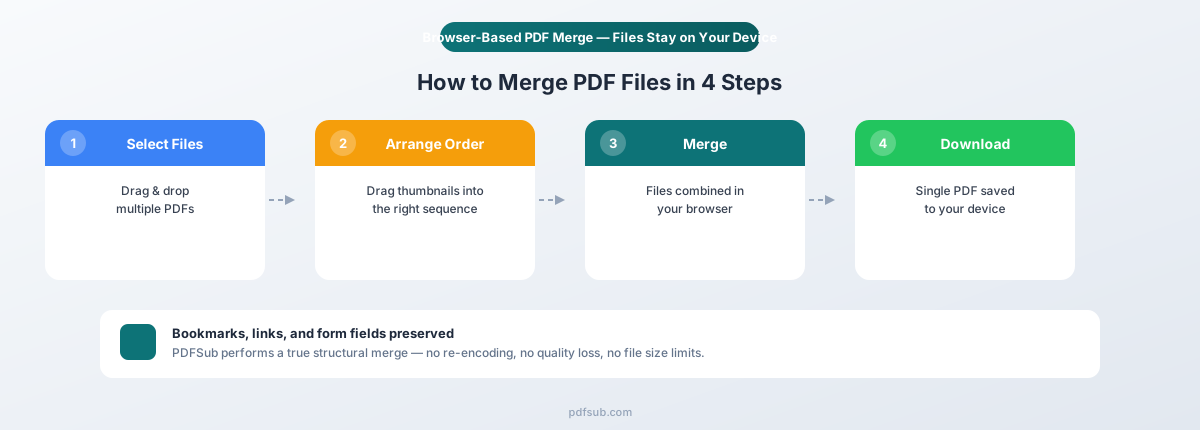, etc. — preserve EXACTLY as-is, do not translate, modify, or remove them - Markdown heading syntax (##, ###, etc.) — preserve the exact heading level markers Formatting - Preserve any HTML entities or markdown formatting in strings - Maintain the same list/array structure and count of items (EXCEPTION: bank name arrays — replace the values with local equivalents while keeping the same array length) - If the source has 6 features, the translation must have exactly 6 features - Return ONLY valid JSON — no explanations, no markdown code fences, no comments Cultural Adaptation - For Thai, use the appropriate level of formality (e.g., formal "Sie" in German, polite "usted" in Spanish unless the source is casual) - Adapt idioms and metaphors to equivalents that resonate in Thai culture - For RTL languages, no special formatting changes needed — just translate the text content Bank Name Localization (CRITICAL — DO NOT SKIP) Any array containing bank names (keys like "bankNames", "sampleBanks", or similar) MUST be replaced with banks that Thai speakers recognize. Do NOT keep the English bank names. Replace them with a mix of well-known local banks and major international banks familiar in Thai-speaking regions. Keep the same array length. Examples: - Russian: "Сбербанк", "Тинькофф", "ВТБ", "Альфа-Банк", "Газпромбанк", "Райффайзен", "Росбанк", "Открытие", "HSBC", "Deutsche Bank", "BNP Paribas", "UBS", "Santander", "ING", "ICBC", "Mizuho Bank", "State Bank of India", "Barclays", "Commonwealth Bank", "Standard Chartered", "Citibank" - Polish: "PKO BP", "mBank", "ING", "Santander", "BNP Paribas", "Pekao", "Alior Bank", etc. - German: "Deutsche Bank", "Commerzbank", "Sparkasse", "ING", "N26", "DKB", etc. - French: "BNP Paribas", "Société Générale", "Crédit Agricole", "LCL", "Boursorama", etc. - For non-Latin scripts, use native script: Arabic ("البنك الأهلي", "الراجحي"), Chinese ("中国工商银行", "中国建设银行"), Japanese ("三菱UFJ", "みずほ銀行"), etc. The bank list must feel native to Thai speakers, not like a US-only product. CHUNK INFO This is part 1 of 2. Translate ONLY the keys in this JSON subset. JSON CONTENT TO TRANSLATE { "title": "How to Merge PDF Files: 3 Free Methods", "excerpt": "Need to combine multiple PDFs into one document? Here are three free methods to merge PDF files — from browser-based tools to built-in Mac software — with step-by-step instructions for each.", "tags": [ "Tutorial", "Merge PDF", "PDF Tools", "How-To" ], "metaDescription": "Need to combine multiple PDFs into one document? Here are three free methods to merge PDF files — from browser-based tools to built-in Mac software — wi...", "body__0": "You have five separate PDFs that need to be one document. Maybe it's a real estate closing package with the purchase agreement, inspection report, title search, mortgage documents, and disclosure forms. Maybe it's a quarterly report that exists as four separate monthly exports. Or maybe you just need to combine your resume and cover letter into a single file before submitting a job application. Whatever the reason, merging PDFs is one of the most common document tasks — and one of the most frustrating when you don't have the right tool. This guide covers three free ways to merge PDF files, with step-by-step instructions, honest assessments of each method's limitations, and tips for handling tricky merge scenarios. " } This is part 1 of 2. Translate ONLY the keys in this JSON subset. JSON CONTENT TO TRANSLATE { "title": "How to Merge PDF Files: 3 Free Methods", "excerpt": "Need to combine multiple PDFs into one document? Here are three free methods to merge PDF files — from browser-based tools to built-in Mac software — with step-by-step instructions for each.", "tags": [ "Tutorial", "Merge PDF", "PDF Tools", "How-To" ], "metaDescription": "Need to combine multiple PDFs into one document? Here are three free methods to merge PDF files — from browser-based tools to built-in Mac software — wi...", "body__0": "You have five separate PDFs that need to be one document. Maybe it's a real estate closing package with the purchase agreement, inspection report, title search, mortgage documents, and disclosure forms. Maybe it's a quarterly report that exists as four separate monthly exports. Or maybe you just need to combine your resume and cover letter into a single file before submitting a job application. Whatever the reason, merging PDFs is one of the most common document tasks — and one of the most frustrating when you don't have the right tool. This guide covers three free ways to merge PDF files, with step-by-step instructions, honest assessments of each method's limitations, and tips for handling tricky merge scenarios. " } This is part 1 of 2. Translate ONLY the keys in this JSON subset. JSON CONTENT TO TRANSLATE { "title": "How to Merge PDF Files: 3 Free Methods", "excerpt": "Need to combine multiple PDFs into one document? Here are three free methods to merge PDF files — from browser-based tools to built-in Mac software — with step-by-step instructions for each.", "tags": [ "Tutorial", "Merge PDF", "PDF Tools", "How-To" ], "metaDescription": "Need to combine multiple PDFs into one document? Here are three free methods to merge PDF files — from browser-based tools to built-in Mac software — wi...", "body__0": "You have five separate PDFs that need to be one document. Maybe it's a real estate closing package with the purchase agreement, inspection report, title search, mortgage documents, and disclosure forms. Maybe it's a quarterly report that exists as four separate monthly exports. Or maybe you just need to combine your resume and cover letter into a single file before submitting a job application. Whatever the reason, merging PDFs is one of the most common document tasks — and one of the most frustrating when you don't have the right tool. This guide covers three free ways to merge PDF files, with step-by-step instructions, honest assessments of each method's limitations, and tips for handling tricky merge scenarios. " } This is part 1 of 2. Translate ONLY the keys in this JSON subset. JSON CONTENT TO TRANSLATE { "title": "How to Merge PDF Files: 3 Free Methods", "excerpt": "Need to combine multiple PDFs into one document? Here are three free methods to merge PDF files — from browser-based tools to built-in Mac software — with step-by-step instructions for each.", "tags": [ "Tutorial", "Merge PDF", "PDF Tools", "How-To" ], "metaDescription": "Need to combine multiple PDFs into one document? Here are three free methods to merge PDF files — from browser-based tools to built-in Mac software — wi...", "body__0": "You have five separate PDFs that need to be one document. Maybe it's a real estate closing package with the purchase agreement, inspection report, title search, mortgage documents, and disclosure forms. Maybe it's a quarterly report that exists as four separate monthly exports. Or maybe you just need to combine your resume and cover letter into a single file before submitting a job application. Whatever the reason, merging PDFs is one of the most common document tasks — and one of the most frustrating when you don't have the right tool. This guide covers three free ways to merge PDF files, with step-by-step instructions, honest assessments of each method's limitations, and tips for handling tricky merge scenarios. " } This is part 1 of 2. Translate ONLY the keys in this JSON subset. JSON CONTENT TO TRANSLATE { "title": "How to Merge PDF Files: 3 Free Methods", "excerpt": "Need to combine multiple PDFs into one document? Here are three free methods to merge PDF files — from browser-based tools to built-in Mac software — with step-by-step instructions for each.", "tags": [ "Tutorial", "Merge PDF", "PDF Tools", "How-To" ], "metaDescription": "Need to combine multiple PDFs into one document? Here are three free methods to merge PDF files — from browser-based tools to built-in Mac software — wi...", "body__0": "You have five separate PDFs that need to be one document. Maybe it's a real estate closing package with the purchase agreement, inspection report, title search, mortgage documents, and disclosure forms. Maybe it's a quarterly report that exists as four separate monthly exports. Or maybe you just need to combine your resume and cover letter into a single file before submitting a job application. Whatever the reason, merging PDFs is one of the most common document tasks — and one of the most frustrating when you don't have the right tool. This guide covers three free ways to merge PDF files, with step-by-step instructions, honest assessments of each method's limitations, and tips for handling tricky merge scenarios. " } This is part 1 of 2. Translate ONLY the keys in this JSON subset. JSON CONTENT TO TRANSLATE { "title": "How to Merge PDF Files: 3 Free Methods", "excerpt": "Need to combine multiple PDFs into one document? Here are three free methods to merge PDF files — from browser-based tools to built-in Mac software — with step-by-step instructions for each.", "tags": [ "Tutorial", "Merge PDF", "PDF Tools", "How-To" ], "metaDescription": "Need to combine multiple PDFs into one document? Here are three free methods to merge PDF files — from browser-based tools to built-in Mac software — wi...", "body__0": "You have five separate PDFs that need to be one document. Maybe it's a real estate closing package with the purchase agreement, inspection report, title search, mortgage documents, and disclosure forms. Maybe it's a quarterly report that exists as four separate monthly exports. Or maybe you just need to combine your resume and cover letter into a single file before submitting a job application. Whatever the reason, merging PDFs is one of the most common document tasks — and one of the most frustrating when you don't have the right tool. This guide covers three free ways to merge PDF files, with step-by-step instructions, honest assessments of each method's limitations, and tips for handling tricky merge scenarios. " } This is part 1 of 2. Translate ONLY the keys in this JSON subset. JSON CONTENT TO TRANSLATE { "title": "How to Merge PDF Files: 3 Free Methods", "excerpt": "Need to combine multiple PDFs into one document? Here are three free methods to merge PDF files — from browser-based tools to built-in Mac software — with step-by-step instructions for each.", "tags": [ "Tutorial", "Merge PDF", "PDF Tools", "How-To" ], "metaDescription": "Need to combine multiple PDFs into one document? Here are three free methods to merge PDF files — from browser-based tools to built-in Mac software — wi...", "body__0": "You have five separate PDFs that need to be one document. Maybe it's a real estate closing package with the purchase agreement, inspection report, title search, mortgage documents, and disclosure forms. Maybe it's a quarterly report that exists as four separate monthly exports. Or maybe you just need to combine your resume and cover letter into a single file before submitting a job application. Whatever the reason, merging PDFs is one of the most common document tasks — and one of the most frustrating when you don't have the right tool. This guide covers three free ways to merge PDF files, with step-by-step instructions, honest assessments of each method's limitations, and tips for handling tricky merge scenarios. " } This is part 1 of 2. Translate ONLY the keys in this JSON subset. JSON CONTENT TO TRANSLATE { "title": "How to Merge PDF Files: 3 Free Methods", "excerpt": "Need to combine multiple PDFs into one document? Here are three free methods to merge PDF files — from browser-based tools to built-in Mac software — with step-by-step instructions for each.", "tags": [ "Tutorial", "Merge PDF", "PDF Tools", "How-To" ], "metaDescription": "Need to combine multiple PDFs into one document? Here are three free methods to merge PDF files — from browser-based tools to built-in Mac software — wi...", "body__0": "You have five separate PDFs that need to be one document. Maybe it's a real estate closing package with the purchase agreement, inspection report, title search, mortgage documents, and disclosure forms. Maybe it's a quarterly report that exists as four separate monthly exports. Or maybe you just need to combine your resume and cover letter into a single file before submitting a job application. Whatever the reason, merging PDFs is one of the most common document tasks — and one of the most frustrating when you don't have the right tool. This guide covers three free ways to merge PDF files, with step-by-step instructions, honest assessments of each method's limitations, and tips for handling tricky merge scenarios. " } This is part 1 of 2. Translate ONLY the keys in this JSON subset. JSON CONTENT TO TRANSLATE { "title": "How to Merge PDF Files: 3 Free Methods", "excerpt": "Need to combine multiple PDFs into one document? Here are three free methods to merge PDF files — from browser-based tools to built-in Mac software — with step-by-step instructions for each.", "tags": [ "Tutorial", "Merge PDF", "PDF Tools", "How-To" ], "metaDescription": "Need to combine multiple PDFs into one document? Here are three free methods to merge PDF files — from browser-based tools to built-in Mac software — wi...", "body__0": "You have five separate PDFs that need to be one document. Maybe it's a real estate closing package with the purchase agreement, inspection report, title search, mortgage documents, and disclosure forms. Maybe it's a quarterly report that exists as four separate monthly exports. Or maybe you just need to combine your resume and cover letter into a single file before submitting a job application. Whatever the reason, merging PDFs is one of the most common document tasks — and one of the most frustrating when you don't have the right tool. This guide covers three free ways to merge PDF files, with step-by-step instructions, honest assessments of each method's limitations, and tips for handling tricky merge scenarios. " } This is part 1 of 2. Translate ONLY the keys in this JSON subset. JSON CONTENT TO TRANSLATE { "title": "How to Merge PDF Files: 3 Free Methods", "excerpt": "Need to combine multiple PDFs into one document? Here are three free methods to merge PDF files — from browser-based tools to built-in Mac software — with step-by-step instructions for each.", "tags": [ "Tutorial", "Merge PDF", "PDF Tools", "How-To" ], "metaDescription": "Need to combine multiple PDFs into one document? Here are three free methods to merge PDF files — from browser-based tools to built-in Mac software — wi...", "body__0": "You have five separate PDFs that need to be one document. Maybe it's a real estate closing package with the purchase agreement, inspection report, title search, mortgage documents, and disclosure forms. Maybe it's a quarterly report that exists as four separate monthly exports. Or maybe you just need to combine your resume and cover letter into a single file before submitting a job application. Whatever the reason, merging PDFs is one of the most common document tasks — and one of the most frustrating when you don't have the right tool. This guide covers three free ways to merge PDF files, with step-by-step instructions, honest assessments of each method's limitations, and tips for handling tricky merge scenarios. " } This is part 1 of 2. Translate ONLY the keys in this JSON subset. JSON CONTENT TO TRANSLATE { "title": "How to Merge PDF Files: 3 Free Methods", "excerpt": "Need to combine multiple PDFs into one document? Here are three free methods to merge PDF files — from browser-based tools to built-in Mac software — with step-by-step instructions for each.", "tags": [ "Tutorial", "Merge PDF", "PDF Tools", "How-To" ], "metaDescription": "Need to combine multiple PDFs into one document? Here are three free methods to merge PDF files — from browser-based tools to built-in Mac software — wi...", "body__0": "You have five separate PDFs that need to be one document. Maybe it's a real estate closing package with the purchase agreement, inspection report, title search, mortgage documents, and disclosure forms. Maybe it's a quarterly report that exists as four separate monthly exports. Or maybe you just need to combine your resume and cover letter into a single file before submitting a job application. Whatever the reason, merging PDFs is one of the most common document tasks — and one of the most frustrating when you don't have the right tool. This guide covers three free ways to merge PDF files, with step-by-step instructions, honest assessments of each method's limitations, and tips for handling tricky merge scenarios. " } This is part 1 of 2. Translate ONLY the keys in this JSON subset. JSON CONTENT TO TRANSLATE { "title": "How to Merge PDF Files: 3 Free Methods", "excerpt": "Need to combine multiple PDFs into one document? Here are three free methods to merge PDF files — from browser-based tools to built-in Mac software — with step-by-step instructions for each.", "tags": [ "Tutorial", "Merge PDF", "PDF Tools", "How-To" ], "metaDescription": "Need to combine multiple PDFs into one document? Here are three free methods to merge PDF files — from browser-based tools to built-in Mac software — wi...", "body__0": "You have five separate PDFs that need to be one document. Maybe it's a real estate closing package with the purchase agreement, inspection report, title search, mortgage documents, and disclosure forms. Maybe it's a quarterly report that exists as four separate monthly exports. Or maybe you just need to combine your resume and cover letter into a single file before submitting a job application. Whatever the reason, merging PDFs is one of the most common document tasks — and one of the most frustrating when you don't have the right tool. This guide covers three free ways to merge PDF files, with step-by-step instructions, honest assessments of each method's limitations, and tips for handling tricky merge scenarios. " } This is part 1 of 2. Translate ONLY the keys in this JSON subset. JSON CONTENT TO TRANSLATE { "title": "How to Merge PDF Files: 3 Free Methods", "excerpt": "Need to combine multiple PDFs into one document? Here are three free methods to merge PDF files — from browser-based tools to built-in Mac software — with step-by-step instructions for each.", "tags": [ "Tutorial", "Merge PDF", "PDF Tools", "How-To" ], "metaDescription": "Need to combine multiple PDFs into one document? Here are three free methods to merge PDF files — from browser-based tools to built-in Mac software — wi...", "body__0": "You have five separate PDFs that need to be one document. Maybe it's a real estate closing package with the purchase agreement, inspection report, title search, mortgage documents, and disclosure forms. Maybe it's a quarterly report that exists as four separate monthly exports. Or maybe you just need to combine your resume and cover letter into a single file before submitting a job application. Whatever the reason, merging PDFs is one of the most common document tasks — and one of the most frustrating when you don't have the right tool. This guide covers three free ways to merge PDF files, with step-by-step instructions, honest assessments of each method's limitations, and tips for handling tricky merge scenarios. " } This is part 1 of 2. Translate ONLY the keys in this JSON subset. JSON CONTENT TO TRANSLATE { "title": "How to Merge PDF Files: 3 Free Methods", "excerpt": "Need to combine multiple PDFs into one document? Here are three free methods to merge PDF files — from browser-based tools to built-in Mac software — with step-by-step instructions for each.", "tags": [ "Tutorial", "Merge PDF", "PDF Tools", "How-To" ], "metaDescription": "Need to combine multiple PDFs into one document? Here are three free methods to merge PDF files — from browser-based tools to built-in Mac software — wi...", "body__0": "You have five separate PDFs that need to be one document. Maybe it's a real estate closing package with the purchase agreement, inspection report, title search, mortgage documents, and disclosure forms. Maybe it's a quarterly report that exists as four separate monthly exports. Or maybe you just need to combine your resume and cover letter into a single file before submitting a job application. Whatever the reason, merging PDFs is one of the most common document tasks — and one of the most frustrating when you don't have the right tool. This guide covers three free ways to merge PDF files, with step-by-step instructions, honest assessments of each method's limitations, and tips for handling tricky merge scenarios. " } This is part 1 of 2. Translate ONLY the keys in this JSON subset. JSON CONTENT TO TRANSLATE { "title": "How to Merge PDF Files: 3 Free Methods", "excerpt": "Need to combine multiple PDFs into one document? Here are three free methods to merge PDF files — from browser-based tools to built-in Mac software — with step-by-step instructions for each.", "tags": [ "Tutorial", "Merge PDF", "PDF Tools", "How-To" ], "metaDescription": "Need to combine multiple PDFs into one document? Here are three free methods to merge PDF files — from browser-based tools to built-in Mac software — wi...", "body__0": "You have five separate PDFs that need to be one document. Maybe it's a real estate closing package with the purchase agreement, inspection report, title search, mortgage documents, and disclosure forms. Maybe it's a quarterly report that exists as four separate monthly exports. Or maybe you just need to combine your resume and cover letter into a single file before submitting a job application. Whatever the reason, merging PDFs is one of the most common document tasks — and one of the most frustrating when you don't have the right tool. This guide covers three free ways to merge PDF files, with step-by-step instructions, honest assessments of each method's limitations, and tips for handling tricky merge scenarios. " } This is part 1 of 2. Translate ONLY the keys in this JSON subset. JSON CONTENT TO TRANSLATE { "title": "How to Merge PDF Files: 3 Free Methods", "excerpt": "Need to combine multiple PDFs into one document? Here are three free methods to merge PDF files — from browser-based tools to built-in Mac software — with step-by-step instructions for each.", "tags": [ "Tutorial", "Merge PDF", "PDF Tools", "How-To" ], "metaDescription": "Need to combine multiple PDFs into one document? Here are three free methods to merge PDF files — from browser-based tools to built-in Mac software — wi...", "body__0": "You have five separate PDFs that need to be one document. Maybe it's a real estate closing package with the purchase agreement, inspection report, title search, mortgage documents, and disclosure forms. Maybe it's a quarterly report that exists as four separate monthly exports. Or maybe you just need to combine your resume and cover letter into a single file before submitting a job application. Whatever the reason, merging PDFs is one of the most common document tasks — and one of the most frustrating when you don't have the right tool. This guide covers three free ways to merge PDF files, with step-by-step instructions, honest assessments of each method's limitations, and tips for handling tricky merge scenarios. " } This is part 1 of 2. Translate ONLY the keys in this JSON subset. JSON CONTENT TO TRANSLATE { "title": "How to Merge PDF Files: 3 Free Methods", "excerpt": "Need to combine multiple PDFs into one document? Here are three free methods to merge PDF files — from browser-based tools to built-in Mac software — with step-by-step instructions for each.", "tags": [ "Tutorial", "Merge PDF", "PDF Tools", "How-To" ], "metaDescription": "Need to combine multiple PDFs into one document? Here are three free methods to merge PDF files — from browser-based tools to built-in Mac software — wi...", "body__0": "You have five separate PDFs that need to be one document. Maybe it's a real estate closing package with the purchase agreement, inspection report, title search, mortgage documents, and disclosure forms. Maybe it's a quarterly report that exists as four separate monthly exports. Or maybe you just need to combine your resume and cover letter into a single file before submitting a job application. Whatever the reason, merging PDFs is one of the most common document tasks — and one of the most frustrating when you don't have the right tool. This guide covers three free ways to merge PDF files, with step-by-step instructions, honest assessments of each method's limitations, and tips for handling tricky merge scenarios. " } This is part 1 of 2. Translate ONLY the keys in this JSON subset. JSON CONTENT TO TRANSLATE { "title": "How to Merge PDF Files: 3 Free Methods", "excerpt": "Need to combine multiple PDFs into one document? Here are three free methods to merge PDF files — from browser-based tools to built-in Mac software — with step-by-step instructions for each.", "tags": [ "Tutorial", "Merge PDF", "PDF Tools", "How-To" ], "metaDescription": "Need to combine multiple PDFs into one document? Here are three free methods to merge PDF files — from browser-based tools to built-in Mac software — wi...", "body__0": "You have five separate PDFs that need to be one document. Maybe it's a real estate closing package with the purchase agreement, inspection report, title search, mortgage documents, and disclosure forms. Maybe it's a quarterly report that exists as four separate monthly exports. Or maybe you just need to combine your resume and cover letter into a single file before submitting a job application. Whatever the reason, merging PDFs is one of the most common document tasks — and one of the most frustrating when you don't have the right tool. This guide covers three free ways to merge PDF files, with step-by-step instructions, honest assessments of each method's limitations, and tips for handling tricky merge scenarios. " } This is part 1 of 2. Translate ONLY the keys in this JSON subset. JSON CONTENT TO TRANSLATE { "title": "How to Merge PDF Files: 3 Free Methods", "excerpt": "Need to combine multiple PDFs into one document? Here are three free methods to merge PDF files — from browser-based tools to built-in Mac software — with step-by-step instructions for each.", "tags": [ "Tutorial", "Merge PDF", "PDF Tools", "How-To" ], "metaDescription": "Need to combine multiple PDFs into one document? Here are three free methods to merge PDF files — from browser-based tools to built-in Mac software — wi...", "body__0": "You have five separate PDFs that need to be one document. Maybe it's a real estate closing package with the purchase agreement, inspection report, title search, mortgage documents, and disclosure forms. Maybe it's a quarterly report that exists as four separate monthly exports. Or maybe you just need to combine your resume and cover letter into a single file before submitting a job application. Whatever the reason, merging PDFs is one of the most common document tasks — and one of the most frustrating when you don't have the right tool. This guide covers three free ways to merge PDF files, with step-by-step instructions, honest assessments of each method's limitations, and tips for handling tricky merge scenarios. " } This is part 1 of 2. Translate ONLY the keys in this JSON subset. JSON CONTENT TO TRANSLATE { "title": "How to Merge PDF Files: 3 Free Methods", "excerpt": "Need to combine multiple PDFs into one document? Here are three free methods to merge PDF files — from browser-based tools to built-in Mac software — with step-by-step instructions for each.", "tags": [ "Tutorial", "Merge PDF", "PDF Tools", "How-To" ], "metaDescription": "Need to combine multiple PDFs into one document? Here are three free methods to merge PDF files — from browser-based tools to built-in Mac software — wi...", "body__0": "You have five separate PDFs that need to be one document. Maybe it's a real estate closing package with the purchase agreement, inspection report, title search, mortgage documents, and disclosure forms. Maybe it's a quarterly report that exists as four separate monthly exports. Or maybe you just need to combine your resume and cover letter into a single file before submitting a job application. Whatever the reason, merging PDFs is one of the most common document tasks — and one of the most frustrating when you don't have the right tool. This guide covers three free ways to merge PDF files, with step-by-step instructions, honest assessments of each method's limitations, and tips for handling tricky merge scenarios. " } This is part 1 of 2. Translate ONLY the keys in this JSON subset. JSON CONTENT TO TRANSLATE { "title": "How to Merge PDF Files: 3 Free Methods", "excerpt": "Need to combine multiple PDFs into one document? Here are three free methods to merge PDF files — from browser-based tools to built-in Mac software — with step-by-step instructions for each.", "tags": [ "Tutorial", "Merge PDF", "PDF Tools", "How-To" ], "metaDescription": "Need to combine multiple PDFs into one document? Here are three free methods to merge PDF files — from browser-based tools to built-in Mac software — wi...", "body__0": "You have five separate PDFs that need to be one document. Maybe it's a real estate closing package with the purchase agreement, inspection report, title search, mortgage documents, and disclosure forms. Maybe it's a quarterly report that exists as four separate monthly exports. Or maybe you just need to combine your resume and cover letter into a single file before submitting a job application. Whatever the reason, merging PDFs is one of the most common document tasks — and one of the most frustrating when you don't have the right tool. This guide covers three free ways to merge PDF files, with step-by-step instructions, honest assessments of each method's limitations, and tips for handling tricky merge scenarios. " } This is part 1 of 2. Translate ONLY the keys in this JSON subset. JSON CONTENT TO TRANSLATE { "title": "How to Merge PDF Files: 3 Free Methods", "excerpt": "Need to combine multiple PDFs into one document? Here are three free methods to merge PDF files — from browser-based tools to built-in Mac software — with step-by-step instructions for each.", "tags": [ "Tutorial", "Merge PDF", "PDF Tools", "How-To" ], "metaDescription": "Need to combine multiple PDFs into one document? Here are three free methods to merge PDF files — from browser-based tools to built-in Mac software — wi...", "body__0": "You have five separate PDFs that need to be one document. Maybe it's a real estate closing package with the purchase agreement, inspection report, title search, mortgage documents, and disclosure forms. Maybe it's a quarterly report that exists as four separate monthly exports. Or maybe you just need to combine your resume and cover letter into a single file before submitting a job application. Whatever the reason, merging PDFs is one of the most common document tasks — and one of the most frustrating when you don't have the right tool. This guide covers three free ways to merge PDF files, with step-by-step instructions, honest assessments of each method's limitations, and tips for handling tricky merge scenarios. " } This is part 1 of 2. Translate ONLY the keys in this JSON subset. JSON CONTENT TO TRANSLATE { "title": "How to Merge PDF Files: 3 Free Methods", "excerpt": "Need to combine multiple PDFs into one document? Here are three free methods to merge PDF files — from browser-based tools to built-in Mac software — with step-by-step instructions for each.", "tags": [ "Tutorial", "Merge PDF", "PDF Tools", "How-To" ], "metaDescription": "Need to combine multiple PDFs into one document? Here are three free methods to merge PDF files — from browser-based tools to built-in Mac software — wi...", "body__0": "You have five separate PDFs that need to be one document. Maybe it's a real estate closing package with the purchase agreement, inspection report, title search, mortgage documents, and disclosure forms. Maybe it's a quarterly report that exists as four separate monthly exports. Or maybe you just need to combine your resume and cover letter into a single file before submitting a job application. Whatever the reason, merging PDFs is one of the most common document tasks — and one of the most frustrating when you don't have the right tool. This guide covers three free ways to merge PDF files, with step-by-step instructions, honest assessments of each method's limitations, and tips for handling tricky merge scenarios. " } This is part 1 of 2. Translate ONLY the keys in this JSON subset. JSON CONTENT TO TRANSLATE { "title": "How to Merge PDF Files: 3 Free Methods", "excerpt": "Need to combine multiple PDFs into one document? Here are three free methods to merge PDF files — from browser-based tools to built-in Mac software — with step-by-step instructions for each.", "tags": [ "Tutorial", "Merge PDF", "PDF Tools", "How-To" ], "metaDescription": "Need to combine multiple PDFs into one document? Here are three free methods to merge PDF files — from browser-based tools to built-in Mac software — wi...", "body__0": "You have five separate PDFs that need to be one document. Maybe it's a real estate closing package with the purchase agreement, inspection report, title search, mortgage documents, and disclosure forms. Maybe it's a quarterly report that exists as four separate monthly exports. Or maybe you just need to combine your resume and cover letter into a single file before submitting a job application. Whatever the reason, merging PDFs is one of the most common document tasks — and one of the most frustrating when you don't have the right tool. This guide covers three free ways to merge PDF files, with step-by-step instructions, honest assessments of each method's limitations, and tips for handling tricky merge scenarios. " } This is part 1 of 2. Translate ONLY the keys in this JSON subset. JSON CONTENT TO TRANSLATE { "title": "How to Merge PDF Files: 3 Free Methods", "excerpt": "Need to combine multiple PDFs into one document? Here are three free methods to merge PDF files — from browser-based tools to built-in Mac software — with step-by-step instructions for each.", "tags": [ "Tutorial", "Merge PDF", "PDF Tools", "How-To" ], "metaDescription": "Need to combine multiple PDFs into one document? Here are three free methods to merge PDF files — from browser-based tools to built-in Mac software — wi...", "body__0": "You have five separate PDFs that need to be one document. Maybe it's a real estate closing package with the purchase agreement, inspection report, title search, mortgage documents, and disclosure forms. Maybe it's a quarterly report that exists as four separate monthly exports. Or maybe you just need to combine your resume and cover letter into a single file before submitting a job application. Whatever the reason, merging PDFs is one of the most common document tasks — and one of the most frustrating when you don't have the right tool. This guide covers three free ways to merge PDF files, with step-by-step instructions, honest assessments of each method's limitations, and tips for handling tricky merge scenarios. " } This is part 1 of 2. Translate ONLY the keys in this JSON subset. JSON CONTENT TO TRANSLATE { "title": "How to Merge PDF Files: 3 Free Methods", "excerpt": "Need to combine multiple PDFs into one document? Here are three free methods to merge PDF files — from browser-based tools to built-in Mac software — with step-by-step instructions for each.", "tags": [ "Tutorial", "Merge PDF", "PDF Tools", "How-To" ], "metaDescription": "Need to combine multiple PDFs into one document? Here are three free methods to merge PDF files — from browser-based tools to built-in Mac software — wi...", "body__0": "You have five separate PDFs that need to be one document. Maybe it's a real estate closing package with the purchase agreement, inspection report, title search, mortgage documents, and disclosure forms. Maybe it's a quarterly report that exists as four separate monthly exports. Or maybe you just need to combine your resume and cover letter into a single file before submitting a job application. Whatever the reason, merging PDFs is one of the most common document tasks — and one of the most frustrating when you don't have the right tool. This guide covers three free ways to merge PDF files, with step-by-step instructions, honest assessments of each method's limitations, and tips for handling tricky merge scenarios. " } This is part 1 of 2. Translate ONLY the keys in this JSON subset. JSON CONTENT TO TRANSLATE { "title": "How to Merge PDF Files: 3 Free Methods", "excerpt": "Need to combine multiple PDFs into one document? Here are three free methods to merge PDF files — from browser-based tools to built-in Mac software — with step-by-step instructions for each.", "tags": [ "Tutorial", "Merge PDF", "PDF Tools", "How-To" ], "metaDescription": "Need to combine multiple PDFs into one document? Here are three free methods to merge PDF files — from browser-based tools to built-in Mac software — wi...", "body__0": "You have five separate PDFs that need to be one document. Maybe it's a real estate closing package with the purchase agreement, inspection report, title search, mortgage documents, and disclosure forms. Maybe it's a quarterly report that exists as four separate monthly exports. Or maybe you just need to combine your resume and cover letter into a single file before submitting a job application. Whatever the reason, merging PDFs is one of the most common document tasks — and one of the most frustrating when you don't have the right tool. This guide covers three free ways to merge PDF files, with step-by-step instructions, honest assessments of each method's limitations, and tips for handling tricky merge scenarios. " } This is part 1 of 2. Translate ONLY the keys in this JSON subset. JSON CONTENT TO TRANSLATE { "title": "How to Merge PDF Files: 3 Free Methods", "excerpt": "Need to combine multiple PDFs into one document? Here are three free methods to merge PDF files — from browser-based tools to built-in Mac software — with step-by-step instructions for each.", "tags": [ "Tutorial", "Merge PDF", "PDF Tools", "How-To" ], "metaDescription": "Need to combine multiple PDFs into one document? Here are three free methods to merge PDF files — from browser-based tools to built-in Mac software — wi...", "body__0": "You have five separate PDFs that need to be one document. Maybe it's a real estate closing package with the purchase agreement, inspection report, title search, mortgage documents, and disclosure forms. Maybe it's a quarterly report that exists as four separate monthly exports. Or maybe you just need to combine your resume and cover letter into a single file before submitting a job application. Whatever the reason, merging PDFs is one of the most common document tasks — and one of the most frustrating when you don't have the right tool. This guide covers three free ways to merge PDF files, with step-by-step instructions, honest assessments of each method's limitations, and tips for handling tricky merge scenarios. " } This is part 1 of 2. Translate ONLY the keys in this JSON subset. JSON CONTENT TO TRANSLATE { "title": "How to Merge PDF Files: 3 Free Methods", "excerpt": "Need to combine multiple PDFs into one document? Here are three free methods to merge PDF files — from browser-based tools to built-in Mac software — with step-by-step instructions for each.", "tags": [ "Tutorial", "Merge PDF", "PDF Tools", "How-To" ], "metaDescription": "Need to combine multiple PDFs into one document? Here are three free methods to merge PDF files — from browser-based tools to built-in Mac software — wi...", "body__0": "You have five separate PDFs that need to be one document. Maybe it's a real estate closing package with the purchase agreement, inspection report, title search, mortgage documents, and disclosure forms. Maybe it's a quarterly report that exists as four separate monthly exports. Or maybe you just need to combine your resume and cover letter into a single file before submitting a job application. Whatever the reason, merging PDFs is one of the most common document tasks — and one of the most frustrating when you don't have the right tool. This guide covers three free ways to merge PDF files, with step-by-step instructions, honest assessments of each method's limitations, and tips for handling tricky merge scenarios. " } This is part 1 of 2. Translate ONLY the keys in this JSON subset. JSON CONTENT TO TRANSLATE { "title": "How to Merge PDF Files: 3 Free Methods", "excerpt": "Need to combine multiple PDFs into one document? Here are three free methods to merge PDF files — from browser-based tools to built-in Mac software — with step-by-step instructions for each.", "tags": [ "Tutorial", "Merge PDF", "PDF Tools", "How-To" ], "metaDescription": "Need to combine multiple PDFs into one document? Here are three free methods to merge PDF files — from browser-based tools to built-in Mac software — wi...", "body__0": "You have five separate PDFs that need to be one document. Maybe it's a real estate closing package with the purchase agreement, inspection report, title search, mortgage documents, and disclosure forms. Maybe it's a quarterly report that exists as four separate monthly exports. Or maybe you just need to combine your resume and cover letter into a single file before submitting a job application. Whatever the reason, merging PDFs is one of the most common document tasks — and one of the most frustrating when you don't have the right tool. This guide covers three free ways to merge PDF files, with step-by-step instructions, honest assessments of each method's limitations, and tips for handling tricky merge scenarios. " } This is part 1 of 2. Translate ONLY the keys in this JSON subset. JSON CONTENT TO TRANSLATE { "title": "How to Merge PDF Files: 3 Free Methods", "excerpt": "Need to combine multiple PDFs into one document? Here are three free methods to merge PDF files — from browser-based tools to built-in Mac software — with step-by-step instructions for each.", "tags": [ "Tutorial", "Merge PDF", "PDF Tools", "How-To" ], "metaDescription": "Need to combine multiple PDFs into one document? Here are three free methods to merge PDF files — from browser-based tools to built-in Mac software — wi...", "body__0": "You have five separate PDFs that need to be one document. Maybe it's a real estate closing package with the purchase agreement, inspection report, title search, mortgage documents, and disclosure forms. Maybe it's a quarterly report that exists as four separate monthly exports. Or maybe you just need to combine your resume and cover letter into a single file before submitting a job application. Whatever the reason, merging PDFs is one of the most common document tasks — and one of the most frustrating when you don't have the right tool. This guide covers three free ways to merge PDF files, with step-by-step instructions, honest assessments of each method's limitations, and tips for handling tricky merge scenarios. " } This is part 1 of 2. Translate ONLY the keys in this JSON subset. JSON CONTENT TO TRANSLATE { "title": "How to Merge PDF Files: 3 Free Methods", "excerpt": "Need to combine multiple PDFs into one document? Here are three free methods to merge PDF files — from browser-based tools to built-in Mac software — with step-by-step instructions for each.", "tags": [ "Tutorial", "Merge PDF", "PDF Tools", "How-To" ], "metaDescription": "Need to combine multiple PDFs into one document? Here are three free methods to merge PDF files — from browser-based tools to built-in Mac software — wi...", "body__0": "You have five separate PDFs that need to be one document. Maybe it's a real estate closing package with the purchase agreement, inspection report, title search, mortgage documents, and disclosure forms. Maybe it's a quarterly report that exists as four separate monthly exports. Or maybe you just need to combine your resume and cover letter into a single file before submitting a job application. Whatever the reason, merging PDFs is one of the most common document tasks — and one of the most frustrating when you don't have the right tool. This guide covers three free ways to merge PDF files, with step-by-step instructions, honest assessments of each method's limitations, and tips for handling tricky merge scenarios. " } This is part 1 of 2. Translate ONLY the keys in this JSON subset. JSON CONTENT TO TRANSLATE { "title": "How to Merge PDF Files: 3 Free Methods", "excerpt": "Need to combine multiple PDFs into one document? Here are three free methods to merge PDF files — from browser-based tools to built-in Mac software — with step-by-step instructions for each.", "tags": [ "Tutorial", "Merge PDF", "PDF Tools", "How-To" ], "metaDescription": "Need to combine multiple PDFs into one document? Here are three free methods to merge PDF files — from browser-based tools to built-in Mac software — wi...", "body__0": "You have five separate PDFs that need to be one document. Maybe it's a real estate closing package with the purchase agreement, inspection report, title search, mortgage documents, and disclosure forms. Maybe it's a quarterly report that exists as four separate monthly exports. Or maybe you just need to combine your resume and cover letter into a single file before submitting a job application. Whatever the reason, merging PDFs is one of the most common document tasks — and one of the most frustrating when you don't have the right tool. This guide covers three free ways to merge PDF files, with step-by-step instructions, honest assessments of each method's limitations, and tips for handling tricky merge scenarios. " } This is part 1 of 2. Translate ONLY the keys in this JSON subset. JSON CONTENT TO TRANSLATE { "title": "How to Merge PDF Files: 3 Free Methods", "excerpt": "Need to combine multiple PDFs into one document? Here are three free methods to merge PDF files — from browser-based tools to built-in Mac software — with step-by-step instructions for each.", "tags": [ "Tutorial", "Merge PDF", "PDF Tools", "How-To" ], "metaDescription": "Need to combine multiple PDFs into one document? Here are three free methods to merge PDF files — from browser-based tools to built-in Mac software — wi...", "body__0": "You have five separate PDFs that need to be one document. Maybe it's a real estate closing package with the purchase agreement, inspection report, title search, mortgage documents, and disclosure forms. Maybe it's a quarterly report that exists as four separate monthly exports. Or maybe you just need to combine your resume and cover letter into a single file before submitting a job application. Whatever the reason, merging PDFs is one of the most common document tasks — and one of the most frustrating when you don't have the right tool. This guide covers three free ways to merge PDF files, with step-by-step instructions, honest assessments of each method's limitations, and tips for handling tricky merge scenarios. " } This is part 1 of 2. Translate ONLY the keys in this JSON subset. JSON CONTENT TO TRANSLATE { "title": "How to Merge PDF Files: 3 Free Methods", "excerpt": "Need to combine multiple PDFs into one document? Here are three free methods to merge PDF files — from browser-based tools to built-in Mac software — with step-by-step instructions for each.", "tags": [ "Tutorial", "Merge PDF", "PDF Tools", "How-To" ], "metaDescription": "Need to combine multiple PDFs into one document? Here are three free methods to merge PDF files — from browser-based tools to built-in Mac software — wi...", "body__0": "You have five separate PDFs that need to be one document. Maybe it's a real estate closing package with the purchase agreement, inspection report, title search, mortgage documents, and disclosure forms. Maybe it's a quarterly report that exists as four separate monthly exports. Or maybe you just need to combine your resume and cover letter into a single file before submitting a job application. Whatever the reason, merging PDFs is one of the most common document tasks — and one of the most frustrating when you don't have the right tool. This guide covers three free ways to merge PDF files, with step-by-step instructions, honest assessments of each method's limitations, and tips for handling tricky merge scenarios. " } This is part 1 of 2. Translate ONLY the keys in this JSON subset. JSON CONTENT TO TRANSLATE { "title": "How to Merge PDF Files: 3 Free Methods", "excerpt": "Need to combine multiple PDFs into one document? Here are three free methods to merge PDF files — from browser-based tools to built-in Mac software — with step-by-step instructions for each.", "tags": [ "Tutorial", "Merge PDF", "PDF Tools", "How-To" ], "metaDescription": "Need to combine multiple PDFs into one document? Here are three free methods to merge PDF files — from browser-based tools to built-in Mac software — wi...", "body__0": "You have five separate PDFs that need to be one document. Maybe it's a real estate closing package with the purchase agreement, inspection report, title search, mortgage documents, and disclosure forms. Maybe it's a quarterly report that exists as four separate monthly exports. Or maybe you just need to combine your resume and cover letter into a single file before submitting a job application. Whatever the reason, merging PDFs is one of the most common document tasks — and one of the most frustrating when you don't have the right tool. This guide covers three free ways to merge PDF files, with step-by-step instructions, honest assessments of each method's limitations, and tips for handling tricky merge scenarios. " } This is part 1 of 2. Translate ONLY the keys in this JSON subset. JSON CONTENT TO TRANSLATE { "title": "How to Merge PDF Files: 3 Free Methods", "excerpt": "Need to combine multiple PDFs into one document? Here are three free methods to merge PDF files — from browser-based tools to built-in Mac software — with step-by-step instructions for each.", "tags": [ "Tutorial", "Merge PDF", "PDF Tools", "How-To" ], "metaDescription": "Need to combine multiple PDFs into one document? Here are three free methods to merge PDF files — from browser-based tools to built-in Mac software — wi...", "body__0": "You have five separate PDFs that need to be one document. Maybe it's a real estate closing package with the purchase agreement, inspection report, title search, mortgage documents, and disclosure forms. Maybe it's a quarterly report that exists as four separate monthly exports. Or maybe you just need to combine your resume and cover letter into a single file before submitting a job application. Whatever the reason, merging PDFs is one of the most common document tasks — and one of the most frustrating when you don't have the right tool. This guide covers three free ways to merge PDF files, with step-by-step instructions, honest assessments of each method's limitations, and tips for handling tricky merge scenarios. " } This is part 1 of 2. Translate ONLY the keys in this JSON subset. JSON CONTENT TO TRANSLATE { "title": "How to Merge PDF Files: 3 Free Methods", "excerpt": "Need to combine multiple PDFs into one document? Here are three free methods to merge PDF files — from browser-based tools to built-in Mac software — with step-by-step instructions for each.", "tags": [ "Tutorial", "Merge PDF", "PDF Tools", "How-To" ], "metaDescription": "Need to combine multiple PDFs into one document? Here are three free methods to merge PDF files — from browser-based tools to built-in Mac software — wi...", "body__0": "You have five separate PDFs that need to be one document. Maybe it's a real estate closing package with the purchase agreement, inspection report, title search, mortgage documents, and disclosure forms. Maybe it's a quarterly report that exists as four separate monthly exports. Or maybe you just need to combine your resume and cover letter into a single file before submitting a job application. Whatever the reason, merging PDFs is one of the most common document tasks — and one of the most frustrating when you don't have the right tool. This guide covers three free ways to merge PDF files, with step-by-step instructions, honest assessments of each method's limitations, and tips for handling tricky merge scenarios. " } This is part 1 of 2. Translate ONLY the keys in this JSON subset. JSON CONTENT TO TRANSLATE { "title": "How to Merge PDF Files: 3 Free Methods", "excerpt": "Need to combine multiple PDFs into one document? Here are three free methods to merge PDF files — from browser-based tools to built-in Mac software — with step-by-step instructions for each.", "tags": [ "Tutorial", "Merge PDF", "PDF Tools", "How-To" ], "metaDescription": "Need to combine multiple PDFs into one document? Here are three free methods to merge PDF files — from browser-based tools to built-in Mac software — wi...", "body__0": "You have five separate PDFs that need to be one document. Maybe it's a real estate closing package with the purchase agreement, inspection report, title search, mortgage documents, and disclosure forms. Maybe it's a quarterly report that exists as four separate monthly exports. Or maybe you just need to combine your resume and cover letter into a single file before submitting a job application. Whatever the reason, merging PDFs is one of the most common document tasks — and one of the most frustrating when you don't have the right tool. This guide covers three free ways to merge PDF files, with step-by-step instructions, honest assessments of each method's limitations, and tips for handling tricky merge scenarios. " } This is part 1 of 2. Translate ONLY the keys in this JSON subset. JSON CONTENT TO TRANSLATE { "title": "How to Merge PDF Files: 3 Free Methods", "excerpt": "Need to combine multiple PDFs into one document? Here are three free methods to merge PDF files — from browser-based tools to built-in Mac software — with step-by-step instructions for each.", "tags": [ "Tutorial", "Merge PDF", "PDF Tools", "How-To" ], "metaDescription": "Need to combine multiple PDFs into one document? Here are three free methods to merge PDF files — from browser-based tools to built-in Mac software — wi...", "body__0": "You have five separate PDFs that need to be one document. Maybe it's a real estate closing package with the purchase agreement, inspection report, title search, mortgage documents, and disclosure forms. Maybe it's a quarterly report that exists as four separate monthly exports. Or maybe you just need to combine your resume and cover letter into a single file before submitting a job application. Whatever the reason, merging PDFs is one of the most common document tasks — and one of the most frustrating when you don't have the right tool. This guide covers three free ways to merge PDF files, with step-by-step instructions, honest assessments of each method's limitations, and tips for handling tricky merge scenarios. " } This is part 1 of 2. Translate ONLY the keys in this JSON subset. JSON CONTENT TO TRANSLATE { "title": "How to Merge PDF Files: 3 Free Methods", "excerpt": "Need to combine multiple PDFs into one document? Here are three free methods to merge PDF files — from browser-based tools to built-in Mac software — with step-by-step instructions for each.", "tags": [ "Tutorial", "Merge PDF", "PDF Tools", "How-To" ], "metaDescription": "Need to combine multiple PDFs into one document? Here are three free methods to merge PDF files — from browser-based tools to built-in Mac software — wi...", "body__0": "You have five separate PDFs that need to be one document. Maybe it's a real estate closing package with the purchase agreement, inspection report, title search, mortgage documents, and disclosure forms. Maybe it's a quarterly report that exists as four separate monthly exports. Or maybe you just need to combine your resume and cover letter into a single file before submitting a job application. Whatever the reason, merging PDFs is one of the most common document tasks — and one of the most frustrating when you don't have the right tool. This guide covers three free ways to merge PDF files, with step-by-step instructions, honest assessments of each method's limitations, and tips for handling tricky merge scenarios. " } This is part 1 of 2. Translate ONLY the keys in this JSON subset. JSON CONTENT TO TRANSLATE { "title": "How to Merge PDF Files: 3 Free Methods", "excerpt": "Need to combine multiple PDFs into one document? Here are three free methods to merge PDF files — from browser-based tools to built-in Mac software — with step-by-step instructions for each.", "tags": [ "Tutorial", "Merge PDF", "PDF Tools", "How-To" ], "metaDescription": "Need to combine multiple PDFs into one document? Here are three free methods to merge PDF files — from browser-based tools to built-in Mac software — wi...", "body__0": "You have five separate PDFs that need to be one document. Maybe it's a real estate closing package with the purchase agreement, inspection report, title search, mortgage documents, and disclosure forms. Maybe it's a quarterly report that exists as four separate monthly exports. Or maybe you just need to combine your resume and cover letter into a single file before submitting a job application. Whatever the reason, merging PDFs is one of the most common document tasks — and one of the most frustrating when you don't have the right tool. This guide covers three free ways to merge PDF files, with step-by-step instructions, honest assessments of each method's limitations, and tips for handling tricky merge scenarios. " } This is part 1 of 2. Translate ONLY the keys in this JSON subset. JSON CONTENT TO TRANSLATE { "title": "How to Merge PDF Files: 3 Free Methods", "excerpt": "Need to combine multiple PDFs into one document? Here are three free methods to merge PDF files — from browser-based tools to built-in Mac software — with step-by-step instructions for each.", "tags": [ "Tutorial", "Merge PDF", "PDF Tools", "How-To" ], "metaDescription": "Need to combine multiple PDFs into one document? Here are three free methods to merge PDF files — from browser-based tools to built-in Mac software — wi...", "body__0": "You have five separate PDFs that need to be one document. Maybe it's a real estate closing package with the purchase agreement, inspection report, title search, mortgage documents, and disclosure forms. Maybe it's a quarterly report that exists as four separate monthly exports. Or maybe you just need to combine your resume and cover letter into a single file before submitting a job application. Whatever the reason, merging PDFs is one of the most common document tasks — and one of the most frustrating when you don't have the right tool. This guide covers three free ways to merge PDF files, with step-by-step instructions, honest assessments of each method's limitations, and tips for handling tricky merge scenarios. " } This is part 1 of 2. Translate ONLY the keys in this JSON subset. JSON CONTENT TO TRANSLATE { "title": "How to Merge PDF Files: 3 Free Methods", "excerpt": "Need to combine multiple PDFs into one document? Here are three free methods to merge PDF files — from browser-based tools to built-in Mac software — with step-by-step instructions for each.", "tags": [ "Tutorial", "Merge PDF", "PDF Tools", "How-To" ], "metaDescription": "Need to combine multiple PDFs into one document? Here are three free methods to merge PDF files — from browser-based tools to built-in Mac software — wi...", "body__0": "You have five separate PDFs that need to be one document. Maybe it's a real estate closing package with the purchase agreement, inspection report, title search, mortgage documents, and disclosure forms. Maybe it's a quarterly report that exists as four separate monthly exports. Or maybe you just need to combine your resume and cover letter into a single file before submitting a job application. Whatever the reason, merging PDFs is one of the most common document tasks — and one of the most frustrating when you don't have the right tool. This guide covers three free ways to merge PDF files, with step-by-step instructions, honest assessments of each method's limitations, and tips for handling tricky merge scenarios. " } This is part 1 of 2. Translate ONLY the keys in this JSON subset. JSON CONTENT TO TRANSLATE { "title": "How to Merge PDF Files: 3 Free Methods", "excerpt": "Need to combine multiple PDFs into one document? Here are three free methods to merge PDF files — from browser-based tools to built-in Mac software — with step-by-step instructions for each.", "tags": [ "Tutorial", "Merge PDF", "PDF Tools", "How-To" ], "metaDescription": "Need to combine multiple PDFs into one document? Here are three free methods to merge PDF files — from browser-based tools to built-in Mac software — wi...", "body__0": "You have five separate PDFs that need to be one document. Maybe it's a real estate closing package with the purchase agreement, inspection report, title search, mortgage documents, and disclosure forms. Maybe it's a quarterly report that exists as four separate monthly exports. Or maybe you just need to combine your resume and cover letter into a single file before submitting a job application. Whatever the reason, merging PDFs is one of the most common document tasks — and one of the most frustrating when you don't have the right tool. This guide covers three free ways to merge PDF files, with step-by-step instructions, honest assessments of each method's limitations, and tips for handling tricky merge scenarios. " } This is part 1 of 2. Translate ONLY the keys in this JSON subset. JSON CONTENT TO TRANSLATE { "title": "How to Merge PDF Files: 3 Free Methods", "excerpt": "Need to combine multiple PDFs into one document? Here are three free methods to merge PDF files — from browser-based tools to built-in Mac software — with step-by-step instructions for each.", "tags": [ "Tutorial", "Merge PDF", "PDF Tools", "How-To" ], "metaDescription": "Need to combine multiple PDFs into one document? Here are three free methods to merge PDF files — from browser-based tools to built-in Mac software — wi...", "body__0": "You have five separate PDFs that need to be one document. Maybe it's a real estate closing package with the purchase agreement, inspection report, title search, mortgage documents, and disclosure forms. Maybe it's a quarterly report that exists as four separate monthly exports. Or maybe you just need to combine your resume and cover letter into a single file before submitting a job application. Whatever the reason, merging PDFs is one of the most common document tasks — and one of the most frustrating when you don't have the right tool. This guide covers three free ways to merge PDF files, with step-by-step instructions, honest assessments of each method's limitations, and tips for handling tricky merge scenarios. " } This is part 1 of 2. Translate ONLY the keys in this JSON subset. JSON CONTENT TO TRANSLATE { "title": "How to Merge PDF Files: 3 Free Methods", "excerpt": "Need to combine multiple PDFs into one document? Here are three free methods to merge PDF files — from browser-based tools to built-in Mac software — with step-by-step instructions for each.", "tags": [ "Tutorial", "Merge PDF", "PDF Tools", "How-To" ], "metaDescription": "Need to combine multiple PDFs into one document? Here are three free methods to merge PDF files — from browser-based tools to built-in Mac software — wi...", "body__0": "You have five separate PDFs that need to be one document. Maybe it's a real estate closing package with the purchase agreement, inspection report, title search, mortgage documents, and disclosure forms. Maybe it's a quarterly report that exists as four separate monthly exports. Or maybe you just need to combine your resume and cover letter into a single file before submitting a job application. Whatever the reason, merging PDFs is one of the most common document tasks — and one of the most frustrating when you don't have the right tool. This guide covers three free ways to merge PDF files, with step-by-step instructions, honest assessments of each method's limitations, and tips for handling tricky merge scenarios. " } This is part 1 of 2. Translate ONLY the keys in this JSON subset. JSON CONTENT TO TRANSLATE { "title": "How to Merge PDF Files: 3 Free Methods", "excerpt": "Need to combine multiple PDFs into one document? Here are three free methods to merge PDF files — from browser-based tools to built-in Mac software — with step-by-step instructions for each.", "tags": [ "Tutorial", "Merge PDF", "PDF Tools", "How-To" ], "metaDescription": "Need to combine multiple PDFs into one document? Here are three free methods to merge PDF files — from browser-based tools to built-in Mac software — wi...", "body__0": "You have five separate PDFs that need to be one document. Maybe it's a real estate closing package with the purchase agreement, inspection report, title search, mortgage documents, and disclosure forms. Maybe it's a quarterly report that exists as four separate monthly exports. Or maybe you just need to combine your resume and cover letter into a single file before submitting a job application. Whatever the reason, merging PDFs is one of the most common document tasks — and one of the most frustrating when you don't have the right tool. This guide covers three free ways to merge PDF files, with step-by-step instructions, honest assessments of each method's limitations
ทำไมต้องรวม PDF? กรณีใช้งานทั่วไป
ก่อนที่จะเจาะลึกถึงวิธีการต่างๆ ลองมาดูกันว่าทำไมผู้คนถึงรวม PDF เป็นไฟล์เดียวตั้งแต่แรก หากข้อใดข้อหนึ่งต่อไปนี้ฟังดูคุ้นเคย แสดงว่าคุณมาถูกที่แล้ว
การยื่นเอกสาร
ใบสมัครจำนวนมาก เช่น ใบสมัครสินเชื่อบ้าน การเคลมประกัน การสมัครเข้ามหาวิทยาลัย การสมัครวีซ่า หรือข้อเสนอโครงการ มักต้องการเอกสารประกอบทั้งหมดในรูปแบบ PDF ไฟล์เดียว การอัปโหลดไฟล์แยกกันห้าไฟล์ทั้งที่แบบฟอร์มมีช่องให้อัปโหลดเพียงช่องเดียว เป็นปัญหาที่การรวมไฟล์สามารถแก้ไขได้อย่างรวดเร็ว
การสร้างรายงานที่เป็นหนึ่งเดียว
รายงานทางการเงิน การอัปเดตโครงการ และชุดเอกสารสำหรับการประชุมคณะกรรมการ มักเริ่มต้นจากเอกสารแยกต่างหากที่สร้างโดยบุคคลต่างกัน หรือส่งออกจากระบบที่แตกต่างกัน การรวมเอกสารเหล่านั้นเป็น PDF ไฟล์เดียวตามลำดับหน้าที่สมเหตุสมผล จะสร้างเอกสารที่เป็นมืออาชีพและนำทางได้ง่าย
การรวบรวมสัญญาและชุดเอกสารทางกฎหมาย
งานด้านกฎหมายก่อให้เกิดเอกสารแยกต่างหากจำนวนมหาศาล: ข้อตกลงหลัก ภาคผนวก ตารางแนบท้าย การแก้ไขเพิ่มเติม หน้าลงนาม และใบรับรอง การรวมไฟล์เหล่านี้เป็น PDF ไฟล์เดียวจะช่วยให้ทุกอย่างอยู่รวมกัน ทำให้ง่ายต่อการอ้างอิงส่วนต่างๆ และรับประกันว่าจะไม่มีอะไรสูญหายเมื่อชุดเอกสารถูกส่งต่อไป
การจัดระเบียบเอกสาร
ช่วงเวลายื่นภาษีหมายถึงการรวบรวมเอกสาร W-2, 1099, ใบเสร็จรับเงิน และใบแจ้งยอดดอกเบี้ยจำนอง การรวมเอกสารเหล่านี้เป็น PDF ไฟล์เดียวชื่อ "เอกสารภาษี 2568" นั้นง่ายกว่าการจัดการไฟล์ 30 ไฟล์แยกกัน และง่ายกว่ามากในการส่งให้ผู้สอบบัญชีของคุณ
การรวมหน้าที่สแกน
หากคุณสแกนเอกสารหลายหน้าทีละหน้า คุณจะได้ไฟล์ PDF แยกสำหรับแต่ละหน้า การรวมไฟล์เหล่านั้นจะสร้างเอกสารฉบับสมบูรณ์ขึ้นมาใหม่
วิธีที่ 1: เครื่องมือรวม PDF ของ PDFSub (แนะนำ)
เครื่องมือรวม PDF ของ PDFSub เป็นวิธีที่เร็วและเป็นส่วนตัวที่สุดในการรวมไฟล์ PDF หลายไฟล์ เครื่องมือนี้ประมวลผลทุกอย่างโดยตรงในเบราว์เซอร์ของคุณ — ไฟล์ของคุณจะไม่ไปไหน และการทดลองใช้ฟรี 7 วันช่วยให้คุณเริ่มต้นได้โดยไม่ต้องผูกมัด
คำแนะนำทีละขั้นตอน
ขั้นตอนที่ 1: เปิดเครื่องมือรวม PDF ไปที่ pdfsub.com/tools/merge ไม่ต้องติดตั้งซอฟต์แวร์ — เริ่มต้นด้วยการทดลองใช้ฟรี 7 วัน
ขั้นตอนที่ 2: อัปโหลดไฟล์ PDF ของคุณ ลากและวางไฟล์ PDF หลายไฟล์ลงในพื้นที่อัปโหลด หรือคลิกเพื่อเรียกดูคอมพิวเตอร์ของคุณ คุณสามารถอัปโหลดไฟล์ได้มากเท่าที่ต้องการ — ไม่มีข้อจำกัดในการจำนวนเอกสาร
ขั้นตอนที่ 3: จัดลำดับไฟล์ของคุณ เมื่ออัปโหลดแล้ว ไฟล์ของคุณจะปรากฏในรายการ ลากและวางไฟล์เหล่านั้นตามลำดับที่คุณต้องการให้ปรากฏในเอกสารที่รวมเข้าด้วยกัน ไฟล์แรกในรายการจะกลายเป็นหน้าแรกของ PDF ที่รวมเข้าด้วยกัน ไฟล์ที่สองจะตามมา และอื่นๆ ใช้เวลาสักครู่เพื่อตรวจสอบลำดับ — การจัดลำดับใหม่ตอนนี้ง่ายกว่าการรวมใหม่ในภายหลัง
ขั้นตอนที่ 4: รวมไฟล์ คลิกปุ่มรวม เครื่องมือจะรวมไฟล์ทั้งหมดของคุณเป็น PDF ไฟล์เดียว สำหรับเอกสารส่วนใหญ่ จะใช้เวลาเพียงไม่กี่วินาที
ขั้นตอนที่ 5: ดาวน์โหลด PDF ที่รวมเข้าด้วยกันของคุณพร้อมให้ดาวน์โหลดแล้ว ไฟล์ต้นฉบับยังคงเดิม — การรวมไฟล์จะสร้างไฟล์ใหม่
ทำไมวิธีนี้ถึงดีที่สุด
ความเป็นส่วนตัวโดยการออกแบบ การดำเนินการรวมเกิดขึ้นทั้งหมดในเบราว์เซอร์ของคุณ ไฟล์ PDF ของคุณจะไม่ถูกอัปโหลดไปยังเซิร์ฟเวอร์ นี่เป็นสิ่งสำคัญเมื่อคุณทำงานกับเอกสารที่ละเอียดอ่อน — บันทึกทางการเงิน สัญญาทางกฎหมาย เอกสารทางการแพทย์ การยื่นภาษี หรือสิ่งใดก็ตามที่มีข้อมูลส่วนบุคคล ไม่จำเป็นต้องเชื่อใจอะไร เพราะไม่มีอะไรต้องส่ง
ไม่มีข้อจำกัดขนาดไฟล์ ต่างจากเครื่องมือออนไลน์หลายๆ ตัวที่จำกัดการอัปโหลดไว้ที่ 10MB หรือ 25MB, PDFSub จัดการไฟล์ขนาดใหญ่ได้ เอกสารหลายร้อยหน้า การสแกนความละเอียดสูง PDF ที่มีรูปภาพฝังอยู่ — ทั้งหมดนี้ใช้งานได้
รักษาความสมบูรณ์ของเอกสาร บุ๊กมาร์ก ลิงก์ภายใน ช่องกรอกแบบฟอร์ม และคำอธิบายประกอบจาก PDF ต้นฉบับของคุณจะยังคงอยู่เหมือนเดิมในผลลัพธ์ที่รวมเข้าด้วยกัน คุณจะไม่ได้รับเอกสารที่รวมเข้าด้วยกันซึ่งลิงก์ที่คลิกได้และรายการสารบัญทั้งหมดหายไป
ใช้งานได้บนทุกอุปกรณ์ เนื่องจากทำงานในเบราว์เซอร์ จึงใช้งานได้บน Windows, Mac, Linux, Chromebooks และแม้แต่แท็บเล็ต ไม่ต้องติดตั้งซอฟต์แวร์
จัดลำดับก่อนรวม อินเทอร์เฟซการจัดลำดับแบบลากและวางช่วยให้คุณจัดเรียงไฟล์ตามลำดับที่ถูกต้องก่อนที่จะรวมเข้าด้วยกัน สิ่งนี้ฟังดูง่าย แต่เป็นคุณสมบัติที่เครื่องมือระบบปฏิบัติการในตัวมักจะไม่มี
ทดลองใช้ฟรี PDFSub เสนอการทดลองใช้ฟรี 7 วันพร้อมสิทธิ์เข้าถึงเครื่องมือทั้งหมด รวมถึงการรวม PDF ซึ่งเพียงพอสำหรับจัดการโปรเจกต์รวมไฟล์ที่คุณต้องการ — และสำรวจชุดเครื่องมือ PDF ทั้งหมด
วิธีที่ 2: Preview บน Mac (มีมาให้และฟรี)
หากคุณใช้ Mac คุณมีเครื่องมือรวม PDF ติดตั้งอยู่แล้ว Preview — โปรแกรมดู PDF และรูปภาพเริ่มต้นใน macOS — สามารถรวม PDF ได้โดยใช้แถบด้านข้างขนาดย่อของรูปภาพ ไม่ต้องดาวน์โหลด ไม่ต้องลงทะเบียน ไม่ต้องใช้อินเทอร์เน็ต
คำแนะนำทีละขั้นตอน
ขั้นตอนที่ 1: เปิด PDF แรกใน Preview ดับเบิลคลิกที่ไฟล์ PDF หรือคลิกขวาแล้วเลือก เปิดด้วย > Preview หาก Preview ไม่ใช่โปรแกรมดู PDF เริ่มต้นของคุณ ให้ใช้วิธีคลิกขวา
ขั้นตอนที่ 2: แสดงแถบด้านข้างขนาดย่อ ไปที่ มุมมอง > ขนาดย่อ (หรือกด Cmd+Opt+2) แถบด้านข้างจะปรากฏขึ้นทางด้านซ้าย แสดงภาพขนาดย่อของแต่ละหน้า
ขั้นตอนที่ 3: เลือกตำแหน่งที่จะแทรก PDF ที่สอง ในแถบด้านข้างขนาดย่อ คลิกที่ภาพขนาดย่อของหน้าหลังจากที่คุณต้องการให้เอกสารที่สองปรากฏ หากคุณต้องการให้ PDF ที่สองปรากฏในตอนท้าย ให้คลิกที่ภาพขนาดย่อของหน้าสุดท้าย
ขั้นตอนที่ 4: แทรก PDF ที่สอง ไปที่ แก้ไข > แทรก > หน้าจากไฟล์ เลือกไฟล์ PDF ที่สอง หน้าของไฟล์นั้นจะถูกแทรกเข้าไปในเอกสารหลังจากหน้าที่คุณเลือกในขั้นตอนที่ 3
ขั้นตอนที่ 5: ทำซ้ำสำหรับไฟล์เพิ่มเติม หากคุณกำลังรวม PDF มากกว่าสองไฟล์ ให้ทำซ้ำขั้นตอนที่ 3 และ 4 สำหรับไฟล์เพิ่มเติมแต่ละไฟล์ เลือกจุดแทรกในแถบด้านข้างขนาดย่อ จากนั้นแทรกไฟล์ถัดไป
ขั้นตอนที่ 6: จัดเรียงหน้าใหม่หากจำเป็น คุณสามารถลากภาพขนาดย่อของหน้าขึ้นลงในแถบด้านข้างเพื่อจัดลำดับหน้าใหม่ได้ สิ่งนี้มีประโยชน์หากเอกสารอยู่ในลำดับที่ไม่ถูกต้อง หรือหากคุณต้องการแทรกหน้าจากแหล่งต่างๆ
ขั้นตอนที่ 7: บันทึกไฟล์ที่รวมเข้าด้วยกัน นี่คือขั้นตอนสำคัญ — และเป็นจุดที่คนส่วนใหญ่ทำผิดพลาด ไปที่ ไฟล์ > ส่งออกเป็น PDF เพื่อบันทึกเอกสารที่รวมเข้าด้วยกันเป็นไฟล์ใหม่ที่มีชื่อใหม่ อย่า ใช้ ไฟล์ > บันทึก (Cmd+S) เพราะจะเขียนทับ PDF แรกเดิมด้วยเวอร์ชันที่รวมเข้าด้วยกัน หากคุณบันทึกทับไฟล์เดิมโดยไม่ได้ตั้งใจ วิธีเดียวที่จะกู้คืนได้คือจากการสำรองข้อมูล
ข้อจำกัดของ Preview
เขียนทับไฟล์เดิมได้ง่าย ดังที่กล่าวไป การกด Cmd+S จะบันทึกเอกสารที่รวมเข้าด้วยกันทับ PDF แรกที่คุณเปิด สิ่งนี้ทำให้ผู้ใช้ Mac จำนวนมากสับสน ควรใช้ ส่งออกเป็น PDF เสมอเพื่อบันทึกเป็นไฟล์ใหม่
ไม่มีการดำเนินการเป็นชุด คุณสามารถแทรก PDF ได้ครั้งละหนึ่งไฟล์เท่านั้น หากคุณกำลังรวม 10 เอกสาร นั่นหมายถึงการทำซ้ำกระบวนการแทรก 10 ครั้ง สำหรับการรวมไฟล์จำนวนมาก สิ่งนี้จะน่าเบื่ออย่างรวดเร็ว
ไม่รองรับการลากและวางไฟล์หลายไฟล์ คุณสามารถลากไอคอน PDF จาก Finder ไปยังแถบด้านข้างขนาดย่อได้ แต่พฤติกรรมไม่น่าเชื่อถือและแตกต่างกันไปในแต่ละเวอร์ชันของ macOS
การจัดลำดับจำกัด คุณสามารถลากภาพขนาดย่อของหน้าทีละหน้าได้ แต่คุณไม่สามารถย้ายบล็อกหน้าทั้งหมดพร้อมกันได้ หากคุณแทรกเอกสาร 50 หน้าในตำแหน่งที่ไม่ถูกต้อง คุณจะต้องลากภาพขนาดย่อ 50 หน้าทีละหน้า — หรือเริ่มต้นใหม่
เฉพาะ Mac เท่านั้น หากคุณทำงานข้ามแพลตฟอร์ม วิธีนี้จะไม่สามารถใช้ได้
ไม่รับประกันการรักษา PDF ที่ซับซ้อนซึ่งมีช่องกรอกแบบฟอร์ม การดำเนินการ JavaScript หรือมัลติมีเดียฝังอยู่ อาจไม่รวมเข้าด้วยกันอย่างถูกต้อง PDF ที่มีข้อความและรูปภาพธรรมดาจะใช้ได้
วิธีที่ 3: เครื่องมือรวม PDF ออนไลน์ (หมวดหมู่ทั่วไป)
การค้นหาเว็บอย่างรวดเร็วสำหรับ "รวม PDF" จะแสดงเครื่องมือออนไลน์ฟรีหลายสิบรายการ เครื่องมือเหล่านี้ทั้งหมดทำงานตามรูปแบบเดียวกัน: อัปโหลด PDF ของคุณไปยังเว็บไซต์ คลิกเพื่อรวม และดาวน์โหลดผลลัพธ์ เครื่องมือเหล่านี้ใช้งานได้ แต่มาพร้อมกับข้อแลกเปลี่ยนที่สำคัญที่คุณควรรู้ก่อนใช้งาน
วิธีการทำงานทั่วไป
- อัปโหลดไฟล์ของคุณ คุณลากและวางหรือเลือกไฟล์ PDF จากคอมพิวเตอร์ของคุณ ไฟล์จะถูกอัปโหลดไปยังเซิร์ฟเวอร์ของผู้ให้บริการ
- จัดลำดับ เครื่องมือส่วนใหญ่จะให้คุณจัดลำดับไฟล์ใหม่ก่อนรวม
- คลิกเพื่อรวม เซิร์ฟเวอร์จะรวมไฟล์และสร้างลิงก์ดาวน์โหลด
- ดาวน์โหลด PDF ที่รวมเข้าด้วยกัน คุณดาวน์โหลดผลลัพธ์ และ (หวังว่า) ผู้ให้บริการจะลบไฟล์ของคุณออกจากเซิร์ฟเวอร์ของพวกเขา
ข้อกังวลด้านความเป็นส่วนตัว
เมื่อคุณอัปโหลด PDF ไปยังเครื่องมือรวม PDF ออนไลน์ ไฟล์ของคุณจะอยู่บนเซิร์ฟเวอร์ของผู้อื่น สำหรับชุดสูตรอาหาร อาจไม่เป็นไร แต่สำหรับงบการเงิน สัญญาทางกฎหมาย บันทึกทางการแพทย์ หรือเอกสารภาษี ถือเป็นความเสี่ยงที่แท้จริง
บริการส่วนใหญ่กล่าวอ้างว่าจะลบไฟล์หลังจากช่วงเวลาสั้นๆ — โดยปกติคือหนึ่งชั่วโมง แต่คุณไม่มีวิธีตรวจสอบ สิ่งที่คุณต้องทำคือเชื่อว่าเซิร์ฟเวอร์ของพวกเขามีความปลอดภัย ไฟล์ที่ถูกลบจะถูกลบออกจากระบบสำรองทั้งหมดจริงหรือไม่ และไม่มีใครสามารถเข้าถึงเอกสารที่อัปโหลดได้ นโยบายความเป็นส่วนตัวบางฉบับระบุไว้อย่างชัดเจนว่าไฟล์ที่อัปโหลดอาจถูกนำไปใช้เพื่อ "การปรับปรุงบริการ"
ภายใต้กฎระเบียบ เช่น GDPR, HIPAA และ FTC Safeguards Rule การอัปโหลดเอกสารของลูกค้าไปยังเซิร์ฟเวอร์ของบุคคลที่สามจะสร้างภาระผูกพันในการปฏิบัติตามกฎระเบียบ สำหรับผู้สอบบัญชีที่จัดการข้อมูลทางการเงินของลูกค้า กฎของ IRS กำหนดบทลงโทษทางอาญาสำหรับการเปิดเผยข้อมูลการยื่นภาษีโดยไม่ได้รับอนุญาต
ข้อจำกัดขนาดไฟล์
แผนบริการฟรีเกือบจะกำหนดข้อจำกัดขนาดไฟล์เสมอ — โดยทั่วไปคือ 10MB, 25MB หรือ 50MB ต่อไฟล์ ซึ่งฟังดูเหลือเฟือจนกระทั่งคุณต้องทำงานกับเอกสารที่สแกน (มักจะ 5–15MB ต่อหน้า) หรือสไลด์ที่มีรูปภาพจำนวนมาก สัญญาสแกน 30 หน้าอาจมีขนาดเกิน 100MB ได้อย่างง่ายดาย
ข้อจำกัดอื่นๆ
- ความเร็วขึ้นอยู่กับการเชื่อมต่ออินเทอร์เน็ตของคุณ การอัปโหลดและดาวน์โหลดไฟล์ขนาดใหญ่ต้องใช้เวลา เครื่องมือที่ทำงานในเบราว์เซอร์ซึ่งประมวลผลในเครื่องจะไม่มีคอขวดนี้
- ต้องใช้อินเทอร์เน็ต หากคุณทำงานแบบออฟไลน์ เครื่องมือออนไลน์จะไร้ประโยชน์
- คุณภาพไม่สม่ำเสมอ เครื่องมือออนไลน์บางตัวจะบีบอัดรูปภาพใหม่ระหว่างการรวม ทำให้คุณภาพของภาพลดลง บางเครื่องมือจะลบข้อมูลเมตา บุ๊กมาร์ก หรือช่องกรอกแบบฟอร์ม
- การขายเพิ่มที่ก้าวร้าว เครื่องมือฟรีหลายตัวจำกัดการรวมไฟล์ไว้ที่ 2–3 ครั้งต่อวัน หรือเพิ่มลายน้ำ จากนั้นจะผลักดันให้คุณสมัครแผนแบบชำระเงิน
เมื่อใดที่เครื่องมือออนไลน์จึงจะเหมาะสม
เครื่องมือรวม PDF ออนไลน์นั้นสมเหตุสมผลสำหรับเอกสารที่ไม่สำคัญและไม่ละเอียดอ่อน เมื่อคุณไม่มีตัวเลือกที่ดีกว่า การรวมข้อมูลสาธารณะไม่กี่หน้า การรวมการบ้านของโรงเรียนที่ไม่เป็นความลับ หรือการรวมไฟล์ที่ไม่มีข้อมูลส่วนบุคคล — เหล่านี้เป็นกรณีใช้งานที่เหมาะสมสำหรับเครื่องมือออนไลน์ทั่วไป
สำหรับสิ่งใดก็ตามที่เกี่ยวข้องกับข้อมูลที่ละเอียดอ่อน เป็นความลับ หรืออยู่ภายใต้กฎระเบียบ ให้ใช้วิธีการที่ไฟล์ของคุณยังคงอยู่ในอุปกรณ์ของคุณ
สถานการณ์การรวมไฟล์ทั่วไปและเคล็ดลับ
การรวมไฟล์ PDF ที่มีข้อความธรรมดาทำได้ง่าย ความท้าทายจะเกิดขึ้นเมื่อคุณต้องทำงานกับเอกสารประเภทผสม, รูปแบบหน้ากระดาษที่แตกต่างกัน, หรือไฟล์ที่มีการป้องกัน นี่คือวิธีจัดการกับสถานการณ์ที่ซับซ้อนที่สุด
การรวมเอกสารสแกนกับ PDF ดิจิทัล
เป็นเรื่องปกติที่จะมีทั้ง PDF ที่สร้างจากดิจิทัล (จาก Word, Excel หรือซอฟต์แวร์อื่น ๆ) และ PDF ที่สแกน (จากเครื่องสแกนจริงหรือกล้องโทรศัพท์) ไฟล์เหล่านี้สามารถรวมกันได้ แต่ผลลัพธ์อาจมีความไม่สอดคล้องกันในรูปลักษณ์
เคล็ดลับ:
- หน้าที่สแกนเป็นรูปภาพ ดังนั้นจึงมักมีขนาดไฟล์ใหญ่กว่าหน้าดิจิทัล หากไฟล์ที่รวมมีขนาดใหญ่เกินไป ให้พิจารณาการบีบอัด PDF หลังจากการรวม
- คุณภาพของหน้ากระดาษอาจแตกต่างกัน หน้าที่สแกนอาจดูเบลอเล็กน้อยหรือมีรอยจากการสแกนที่มองเห็นได้เมื่อเทียบกับหน้าดิจิทัลที่คมชัด ไม่มีการแก้ไขปัญหานี้ นอกจากการสแกนใหม่ด้วยความละเอียดที่สูงขึ้น
- หากคุณต้องการค้นหาข้อความในเอกสารที่รวมกัน หน้าที่สแกนจะไม่สามารถค้นหาได้ เว้นแต่คุณจะทำการ OCR (Optical Character Recognition) ก่อน เครื่องมือ OCR ของ PDFSub สามารถเพิ่มเลเยอร์ข้อความที่ค้นหาได้ให้กับหน้าสแกน
การรวม PDF ที่มีขนาดหน้ากระดาษหรือการวางแนวที่แตกต่างกัน
ขนาด Letter (8.5 x 11 นิ้ว), A4, Legal และหน้ากระดาษแนวนอนสามารถอยู่ร่วมกันได้ใน PDF ที่รวมไฟล์เดียว โปรแกรมดูส่วนใหญ่จัดการกับขนาดที่แตกต่างกันได้อย่างราบรื่นบนหน้าจอ
เคล็ดลับ:
- การพิมพ์คือจุดที่เกิดปัญหา ตั้งค่าเครื่องพิมพ์ของคุณเป็น "ปรับให้พอดีกับหน้า" หรือ "ปรับขนาดอัตโนมัติ" เพื่อหลีกเลี่ยงการตัดหรือการปรับขนาดที่ไม่คาดคิด
- หากคุณต้องการขนาดหน้ากระดาษที่สม่ำเสมอ ให้ใช้ เครื่องมือเปลี่ยนขนาดหน้ากระดาษของ PDFSub เพื่อปรับขนาดหน้าทั้งหมดให้เป็นมาตรฐานก่อนหรือหลังการรวม
การรวม PDF ที่มีการป้องกันด้วยรหัสผ่าน
หาก PDF ต้นฉบับใด ๆ ของคุณมีการป้องกันด้วยรหัสผ่าน คุณจะต้องลบการป้องกันออกก่อนทำการรวม เครื่องมือรวมส่วนใหญ่ รวมถึงเครื่องมือที่มีมาให้ เช่น Preview ไม่สามารถเปิดหรือประมวลผลไฟล์ที่ป้องกันด้วยรหัสผ่านได้
เคล็ดลับ:
- หากคุณทราบรหัสผ่าน ให้เปิด PDF และลบการป้องกันออกก่อน ใน Preview บน Mac ไปที่ ไฟล์ > ส่งออกเป็น PDF แล้วยกเลิกการเลือกตัวเลือก "เข้ารหัส" ใน Adobe Acrobat ไปที่ ไฟล์ > คุณสมบัติ > ความปลอดภัย และตั้งค่าวิธีการรักษาความปลอดภัยเป็น "ไม่มีความปลอดภัย"
- เครื่องมือปลดล็อก PDF ของ PDFSub สามารถลบรหัสผ่านได้ หากคุณทราบรหัสผ่าน — การประมวลผลจะเกิดขึ้นในเบราว์เซอร์ของคุณ
- หากคุณไม่ทราบรหัสผ่าน คุณจะไม่สามารถรวมไฟล์ได้ นี่เป็นไปตามการออกแบบ — การเข้ารหัส PDF มีไว้เพื่อป้องกันการเข้าถึงโดยไม่ได้รับอนุญาต
การเรียงลำดับหน้าใหม่ก่อนหรือหลังการรวม
บางครั้งคุณต้องการการควบคุมมากกว่าแค่การเรียงลำดับเอกสารทั้งหมด บางทีคุณอาจต้องการแทรกหน้าจากไฟล์ต่างๆ, ลบหน้าเฉพาะออกจากเอกสารหนึ่งก่อนการรวม, หรือจัดเรียงหน้าแต่ละหน้าในผลลัพธ์สุดท้ายใหม่
เคล็ดลับ:
- ก่อนการรวม: แยกเฉพาะหน้าที่คุณต้องการจาก PDF ต้นฉบับแต่ละไฟล์ จากนั้นรวมส่วนที่แยกออกมา เครื่องมือแยกหน้าของ PDFSub ช่วยให้คุณเลือกหน้าเฉพาะเพื่อบันทึกเป็น PDF ใหม่
- หลังการรวม: ใช้เครื่องมือจัดเรียงหน้าใหม่เพื่อจัดเรียงหน้าแต่ละหน้าในเอกสารที่รวมกัน เครื่องมือจัดเรียงหน้าของ PDFSub มีอินเทอร์เฟซแบบลากและวางสำหรับสิ่งนี้
- ลบหน้าที่ไม่ต้องการ: หาก PDF ที่รวมมีหน้าคุณไม่ต้องการ (หน้าปก, หน้าว่าง, หน้าซ้ำ) ให้ใช้ เครื่องมือลบหน้า เพื่อลบออกโดยไม่ต้องรวมใหม่
การรวมไฟล์จำนวนมาก
เมื่อคุณรวม 20, 50, หรือ 100+ ไฟล์ ประสิทธิภาพเป็นสิ่งสำคัญ
เคล็ดลับ:
- ตั้งชื่อไฟล์ด้วยคำนำหน้าตัวเลข (เช่น
001-cover-letter.pdf,002-resume.pdf) เครื่องมือรวมส่วนใหญ่จะเรียงลำดับตามตัวอักษร ดังนั้นคำนำหน้าตัวเลขจะช่วยให้แน่ใจว่าลำดับถูกต้อง - อัปโหลดไฟล์ทั้งหมดพร้อมกัน PDFSub รองรับการอัปโหลดเป็นชุดหลายไฟล์
- หลังจากการรวม ให้เพิ่มหมายเลขหน้าโดยใช้ เครื่องมือหมายเลขหน้าของ PDFSub เพื่อการอ้างอิงที่ง่าย
รวม PDF สำหรับอาชีพเฉพาะทาง
อาชีพต่างๆ มีความต้องการในการรวมไฟล์ที่แตกต่างกัน นี่คือวิธีการทำงานในบริบททางวิชาชีพทั่วไป
อสังหาริมทรัพย์
การปิดการขายอสังหาริมทรัพย์เกี่ยวข้องกับ 50–100 หน้าจากเอกสารหลายสิบฉบับ: สัญญาซื้อขาย, หนังสือยืนยันกรรมสิทธิ์, รายงานการตรวจสอบ, การประเมินราคา, เอกสารจำนอง และใบแจ้งยอดการปิดการขาย รวมเข้าเป็น PDF เดียวตามลำดับที่สมเหตุสมผลและเพิ่มหมายเลขหน้าสำหรับแพ็คเกจการปิดการขายที่เป็นมืออาชีพ บริษัทที่ดินหลายแห่งตอนนี้ต้องการรูปแบบนี้สำหรับการปิดการขายแบบอิเล็กทรอนิกส์
กฎหมาย
ทนายความรวบรวมชุดเอกสารสำหรับการยื่นฟ้องต่อศาล, การตรวจสอบสถานะ (due diligence), และการยื่นเอกสารต่อหน่วยงานกำกับดูแล รวมเอกสารตามลำดับที่ศาลหรือรายการตรวจสอบการทำธุรกรรมกำหนด เพิ่มหมายเลข Bates หรือหมายเลขหน้าเพื่อการอ้างอิงที่ง่าย สำหรับการยื่นฟ้องต่อศาล ให้ตรวจสอบว่า PDF ที่รวมนั้นเป็นไปตามข้อกำหนดการยื่นเอกสารทางอิเล็กทรอนิกส์หรือไม่ — ศาลบางแห่งมีกฎเฉพาะเกี่ยวกับขนาดหน้าหรือรูปแบบ
การเตรียมภาษี
ผู้เชี่ยวชาญด้านภาษีรวบรวม W-2, 1099, K-1, ใบแจ้งยอดดอกเบี้ยจำนอง, ใบเสร็จรับเงินบริจาค และแบบแสดงรายการภาษีปีก่อน สร้าง PDF ที่รวมเป็นหนึ่งเดียวต่อลูกค้าซึ่งประกอบด้วยเอกสารต้นฉบับทั้งหมด เรียงตามประเภทแบบฟอร์ม สิ่งนี้จะกลายเป็นบันทึกถาวรสำหรับปีภาษีนั้น — จัดการได้ง่ายกว่าไฟล์เดี่ยวๆ หลายสิบไฟล์มาก
การเงินและการบัญชี
นักบัญชีและผู้จัดทำบัญชีรวมงบการเงิน, การกระทบยอดธนาคาร, เอกสารการตรวจสอบ (audit workpapers), และเอกสารส่งมอบให้ลูกค้าเป็นชุดเอกสารที่มีระเบียบ
แนวทางปฏิบัติที่ดีที่สุด: รวมเอกสารประกอบตามลำดับที่อ้างอิงในดัชนีเอกสารงานหรือรายการตรวจสอบเอกสารส่งมอบ เมื่อรวมใบแจ้งยอดธนาคารเพื่อกระทบยอด ให้เก็บไว้ตามลำดับเวลาและตรวจสอบว่าไม่มีเดือนใดขาดหายไปก่อนเริ่มดำเนินการ
คำถามที่พบบ่อย
มีข้อจำกัดขนาดไฟล์สูงสุดสำหรับการรวม PDF หรือไม่?
ด้วย PDFSub ไม่มีข้อจำกัดขนาดไฟล์ที่ตายตัว — ข้อจำกัดคือหน่วยความจำที่อุปกรณ์ของคุณมี เนื่องจากกระบวนการเกิดขึ้นในเบราว์เซอร์ ในทางปฏิบัติ หมายความว่าคุณสามารถรวมไฟล์ที่มีขนาดรวมกันหลายร้อยเมกะไบต์ได้โดยไม่มีปัญหาบนคอมพิวเตอร์สมัยใหม่ส่วนใหญ่ เครื่องมือออนไลน์มักจำกัดขนาดไฟล์แต่ละไฟล์ไว้ที่ 10–50MB ในระดับฟรี
มีข้อจำกัดจำนวนหน้าสำหรับ PDF ที่รวมหรือไม่?
ไม่มีข้อจำกัดในทางปฏิบัติ ข้อกำหนดของ PDF รองรับหน้าหลายล้านหน้า และเอกสารที่รวมกันหลายพันหน้าก็ใช้งานได้ดี ข้อจำกัดที่แท้จริงคือขนาดไฟล์และความเร็วที่โปรแกรมดู PDF ของคุณสามารถแสดงผลเอกสารได้
การรวมไฟล์รักษาช่องกรอกแบบฟอร์มไว้หรือไม่?
ขึ้นอยู่กับเครื่องมือ PDFSub จะรักษาช่องกรอกแบบฟอร์ม (ช่องป้อนข้อความ, ช่องทำเครื่องหมาย, รายการดรอปดาวน์) จาก PDF ต้นฉบับไว้ในผลลัพธ์ที่รวมกัน Preview บน Mac มีพฤติกรรมที่ไม่สอดคล้องกันกับช่องกรอกแบบฟอร์ม — แบบฟอร์มธรรมดามักจะคงอยู่ แต่แบบฟอร์มที่ซับซ้อนซึ่งมี JavaScript validation หรือช่องคำนวณอาจไม่คงอยู่ เครื่องมือออนไลน์มีความหลากหลายมาก
ฉันสามารถรวมเฉพาะบางหน้าจาก PDF ต่างๆ แทนที่จะเป็นทั้งไฟล์ได้หรือไม่?
ได้ วิธีที่มีประสิทธิภาพที่สุดคือการแยกเฉพาะหน้าที่คุณต้องการจาก PDF ต้นฉบับแต่ละไฟล์ก่อน จากนั้นจึงรวมส่วนที่แยกออกมา ด้วย PDFSub ให้ใช้ เครื่องมือแยกหน้า เพื่อดึงหน้าเฉพาะจากแต่ละไฟล์ จากนั้นใช้ เครื่องมือรวม เพื่อรวมเข้าด้วยกัน วิธีนี้จะหลีกเลี่ยงการรวมเอกสารทั้งหมดแล้วจึงลบหน้าคุณไม่ต้องการออก
ฉันสามารถรวม PDF บนโทรศัพท์หรือแท็บเล็ตได้หรือไม่?
ได้ หากคุณใช้เครื่องมือที่ทำงานบนเบราว์เซอร์ PDFSub ทำงานได้ในเบราว์เซอร์สมัยใหม่ทุกตัว รวมถึงเบราว์เซอร์บนมือถือใน iOS และ Android อัปโหลดไฟล์ จัดเรียงใหม่ รวม และดาวน์โหลด — เวิร์กโฟลว์เหมือนกับบนเดสก์ท็อป
การรวม PDF ทำให้คุณภาพลดลงหรือไม่?
ไม่ควร การรวมที่ถูกต้องจะรวมโครงสร้างภายในของ PDF ต้นฉบับเข้าด้วยกันโดยไม่ต้องเข้ารหัสใหม่หรือบีบอัดเนื้อหาใหม่ ข้อความยังคงเป็นข้อความ รูปภาพยังคงมีความละเอียดเดิม และกราฟิกแบบเวกเตอร์ยังคงความแม่นยำ หากคุณสังเกตเห็นความเสื่อมคุณภาพ เครื่องมืออาจกำลังประมวลผลเนื้อหาใหม่โดยไม่จำเป็น — ให้เปลี่ยนไปใช้เครื่องมือที่ทำการรวมโครงสร้างที่แท้จริง
ฉันสามารถรวม PDF ที่มีการวางแนว (แนวตั้งและแนวนอน) ที่แตกต่างกันได้หรือไม่?
ได้ แต่ละหน้าจะคงการวางแนวเดิมไว้ในไฟล์ที่รวมกัน และโปรแกรมดู PDF จะหมุนการแสดงผลตามลำดับเมื่อคุณเลื่อนดู สิ่งนี้ถูกต้องตามข้อกำหนดของ PDF และใช้งานได้ในโปรแกรมดูมาตรฐานทั้งหมด
ฉันจะรวม PDF ตามลำดับที่ต้องการได้อย่างไร?
ใน PDFSub ให้ลากและวางภาพขนาดย่อของไฟล์ตามลำดับที่คุณต้องการก่อนคลิกปุ่มรวม ใน Preview บน Mac ลำดับการแทรกจะเป็นตัวกำหนดลำดับหน้า สำหรับการรวมจำนวนมาก การตั้งชื่อไฟล์ด้วยคำนำหน้าตัวเลข (001, 002, 003...) ก่อนอัปโหลดจะช่วยให้แน่ใจว่าไฟล์จะถูกเรียงลำดับอย่างถูกต้อง
การรวม PDF ที่มีข้อมูลละเอียดอ่อนปลอดภัยหรือไม่?
ขึ้นอยู่กับเครื่องมือ ด้วย PDFSub การรวมจะเกิดขึ้นในเบราว์เซอร์ของคุณ — ไฟล์จะไม่ไปไหนจากอุปกรณ์ของคุณ ด้วยเครื่องมือออนไลน์ ไฟล์จะถูกอัปโหลดไปยังเซิร์ฟเวอร์ภายนอก ซึ่งสร้างความเสี่ยงด้านความเป็นส่วนตัวและการปฏิบัติตามข้อกำหนด สำหรับเอกสารที่ละเอียดอ่อน ให้ใช้เครื่องมือที่ประมวลผลภายในเครื่อง
ฉันสามารถยกเลิกการรวมได้หรือไม่?
การรวมจะสร้างไฟล์ใหม่ — ไม่ได้เปลี่ยนแปลงไฟล์ต้นฉบับ คุณสามารถรวมใหม่ตามลำดับที่แตกต่างกันได้เสมอ ข้อยกเว้นคือ Preview บน Mac ซึ่งการกด Cmd+S จะเขียนทับไฟล์ต้นฉบับ ควรใช้ ส่งออกเป็น PDF ใน Preview เสมอ
คุณควรใช้วิธีใด?
นี่คือการเปรียบเทียบอย่างรวดเร็วเพื่อช่วยคุณตัดสินใจ:
| คุณสมบัติ | PDFSub | Preview (Mac) | เครื่องมือออนไลน์ |
|---|---|---|---|
| แพลตฟอร์ม | ใดก็ได้ (ทำงานบนเบราว์เซอร์) | เฉพาะ Mac | ใดก็ได้ (ทำงานบนเบราว์เซอร์) |
| ความเป็นส่วนตัว | ไฟล์อยู่บนอุปกรณ์ของคุณ | ไฟล์อยู่บนอุปกรณ์ของคุณ | ไฟล์ถูกอัปโหลดไปยังเซิร์ฟเวอร์ |
| ข้อจำกัดขนาดไฟล์ | ไม่มีข้อจำกัดตายตัว | ไม่มีข้อจำกัดตายตัว | โดยทั่วไป 10–50MB (ฟรี) |
| อัปโหลดหลายไฟล์ | ใช่ | ทีละไฟล์ | โดยทั่วไปใช่ |
| จัดเรียงก่อนรวม | ลากและวาง | ลากหน้าด้วยตนเอง | โดยทั่วไปใช่ |
| รักษาบุ๊กมาร์ก | ใช่ | ไม่สม่ำเสมอ | แตกต่างกันไป |
| รักษาช่องกรอกแบบฟอร์ม | ใช่ | ไม่สม่ำเสมอ | แตกต่างกันไป |
| ใช้งานออฟไลน์ | ใช่ (หลังจากโหลดหน้า) | ใช่ | ไม่ |
| ค่าใช้จ่าย | ทดลองใช้ฟรี 7 วัน | ฟรี (รวมอยู่ใน Mac) | ระดับฟรีพร้อมข้อจำกัด |
สำหรับคนส่วนใหญ่ PDFSub คือตัวเลือกที่ดีที่สุด — มันรวมความเป็นส่วนตัวของการประมวลผลภายในเครื่องเข้ากับความสะดวกของเครื่องมือที่ทำงานบนเบราว์เซอร์ ใช้งานได้กับทุกแพลตฟอร์ม จัดการไฟล์ขนาดใหญ่ และรักษาคุณสมบัติเอกสารที่วิธีอื่นอาจสูญเสียไป
หากคุณใช้ Mac และกำลังรวม PDF ง่ายๆ สองไฟล์ Preview ก็ใช้งานได้ — เพียงจำไว้ว่าให้ใช้ ส่งออกเป็น PDF แทนการบันทึก
หากเอกสารของคุณไม่ละเอียดอ่อนและคุณไม่รังเกียจที่จะอัปโหลดไปยังเซิร์ฟเวอร์ของบุคคลที่สาม เครื่องมือออนไลน์ ก็เพียงพอสำหรับการใช้งานเป็นครั้งคราว
เริ่มต้นรวมไฟล์
พร้อมที่จะรวมไฟล์ PDF ของคุณแล้วหรือยัง? เปิดเครื่องมือรวม PDF และลากไฟล์ของคุณเข้ามา การประมวลผลเกิดขึ้นในเบราว์เซอร์ของคุณ — เอกสารของคุณไม่เคยออกจากอุปกรณ์ของคุณ ไม่ต้องลงทะเบียนเพื่อเริ่มต้น และ PDFSub เสนอการทดลองใช้ฟรี 7 วัน พร้อมสิทธิ์เข้าถึงเครื่องมือทั้งหมดอย่างเต็มที่