การปฏิบัติตาม GDPR สำหรับเครื่องมือ PDF: สิ่งที่ควรมองหา (GDPR Compliance for PDF Tools: What to Look For) (Guide, GDPR, Privacy, Compliance, PDF Tools, Security) (Meta Description: PDFs carry personal data — names, addresses, financials, health records. If your PDF tool uploads files to a server, GDPR applies. Here’s what complianc... ) (Excerpt: PDFs carry personal data — names, addresses, financials, health records. If your PDF tool uploads files to a server, GDPR applies. Here’s what compliance actually requires and how to evaluate any tool.) (Body 0: Every time you merge a contract, redact an invoice, or convert a bank statement to Excel using an online PDF tool, there is a question most people never think to ask: where did that file just go? PDFs are not harmless formatting containers. They carry names, addresses, bank account numbers, salaries, medical diagnoses, and legal agreements. The EU's General Data Protection Regulation (GDPR) does not care whether you intended to "process personal data" — it cares whether you did. And if your PDF tool uploaded that file to a server, the answer is yes. This guide breaks down how GDPR applies to PDF tools, what compliance requires from tool providers, and how to evaluate any tool before trusting it with sensitive documents. 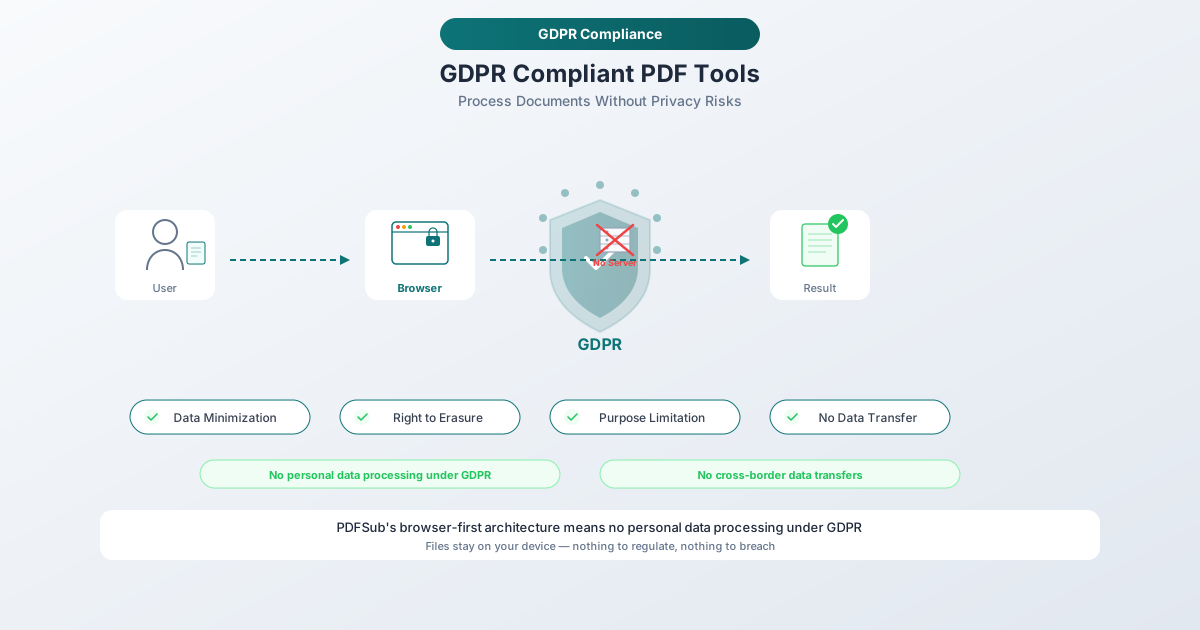 ) (Body 1: ## Why GDPR Matters for PDF Tools The average business handles thousands of PDFs every month. Internal HR documents, client contracts, bank statements, invoices, tax forms, medical records, legal correspondence — virtually all of them contain personal data as defined by the GDPR. Article 4(1) of the GDPR defines personal data broadly: "any information relating to an identified or identifiable natural person." That includes: Names and contact details found on invoices, contracts, and correspondence Financial data including account numbers, transaction histories, salaries, and tax information on bank statements and payslips Health information in medical records, insurance documents, and disability assessments Government identifiers such as national ID numbers, tax IDs, and social security numbers Legal information in contracts, court documents, and compliance reports When you open a PDF containing any of this data and process it through an online tool — merging, splitting, converting, compressing, or editing — you are processing personal data. That processing is subject to GDPR regardless of whether extracting personal data was your intent. The consequences are not theoretical. According to the DLA Piper GDPR Fines and Data Breach Survey (January 2026), aggregate fines since GDPR took effect reached EUR 7.1 billion, with EUR 1.2 billion issued in 2025 alone. Non-compliance with general data processing principles — the category most relevant to how PDF tools handle your files — accounts for five of the ten largest fines ever issued. --- ) (Body 2: ## GDPR Basics for Non-Lawyers Before evaluating PDF tools through a compliance lens, you need to understand four core concepts. This section skips the legal jargon and focuses on what each concept means in practice. Personal Data Any information that can identify a person, directly or indirectly. A name on a contract is personal data. A bank account number on a statement is personal data. An email address in a PDF form is personal data. Even data that only identifies someone when combined with other information counts — a postcode plus a date of birth, for instance. If the PDF you are processing contains information about any identifiable person, you are handling personal data. Data Controller vs. Data Processor The data controller decides why and how personal data is processed. If you are a business choosing to use a PDF tool to convert your client bank statements, you are the controller. The data processor processes data on behalf of the controller. The PDF tool provider is the processor — they handle the data according to your instructions (convert this file, merge these documents, extract this table). This distinction matters because GDPR imposes obligations on both roles. Controllers must choose processors that offer "sufficient guarantees" of compliance (Article 28). Processors must follow controller instructions and implement appropriate security measures. If your PDF tool provider fails to protect personal data, both of you may be liable. Lawful Basis for Processing Article 6 requires a lawful basis for processing personal data. For most business use of PDF tools, the relevant bases are legitimate interests (a genuine business reason, such as converting bank statements for accounting), contract performance (processing needed to fulfill a contractual obligation), or consent (less common in B2B workflows). The lawful basis must exist before processing begins. Data Subject Rights Individuals whose data appears in those PDFs have rights under GDPR. The most relevant for PDF tool usage are the right of access (Article 15 — request a copy of personal data), the right to erasure (Article 17 — request deletion when data is no longer necessary or consent is withdrawn), and the right to data portability (Article 20 — request data in a machine-readable format). Controllers must respond within one month. If your PDF tool provider has retained copies of documents containing that person's data, you must be able to ensure those copies are deleted too. --- ) (Body 3: ## When Using a PDF Tool Triggers GDPR Not every use of a PDF tool creates GDPR obligations. The distinction is simple but critically important. Scenario 1: Browser-Based Processing (No Transfer) You open a PDF tool in your browser, select a file, and it processes entirely using client-side code. The file never leaves your device. In this scenario, the PDF tool provider is not a data processor under GDPR. No personal data was transferred. No DPA is needed. This is the cleanest possible approach from a compliance perspective. Scenario 2: Cloud-Based Processing (Transfer to Processor) You upload a PDF to an online tool's server. The server processes the file — converting, merging, splitting, extracting, or whatever operation you selected — and returns the result. During this time, the file existed on the provider's infrastructure. In this scenario, the PDF tool provider is a data processor under GDPR. You, as the controller, have transferred personal data to a processor. This triggers a cascade of legal requirements: A Data Processing Agreement (DPA) must be in place before the transfer The processor must implement appropriate technical and organizational measures to protect the data If the processor is outside the EU/EEA, the transfer is an international data transfer subject to additional safeguards Scenario 3: AI-Powered Processing (Additional Considerations) Some PDF tools use AI or machine learning to process documents — for OCR, data extraction, summarization, or translation. If this involves sending your file to a third-party AI service (Google's Gemini, OpenAI's GPT, etc.), the AI provider is a sub-processor. The chain of obligations extends further: The PDF tool provider needs your authorization to use sub-processors The sub-processor must be bound by equivalent data protection obligations You should know which AI services are being used and where they process data There must be clear commitments that your files are not used for AI model training --- ) (Body 4: ## Key GDPR Requirements for PDF Tool Providers 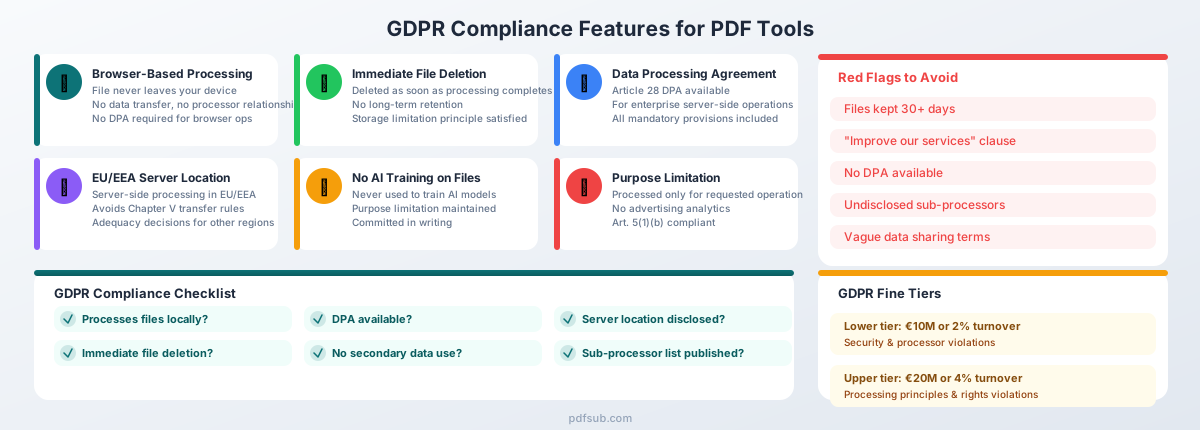 If a PDF tool does process files on its servers — making it a data processor — the GDPR imposes specific requirements. Here is what to look for. Data Processing Agreement (DPA) Article 28 of the GDPR makes this non-negotiable. Any data processor must have a written DPA with each controller. The DPA must specify the nature and purpose of processing, types of personal data, categories of data subjects, processor obligations on security and confidentiality, sub-processor rules, data deletion requirements upon termination, and controller audit rights. A PDF tool provider that does not offer a DPA is a compliance risk. Any legitimate cloud-based processor should have a standard DPA available. Purpose Limitation Article 5(1)(b) of the GDPR states that personal data must be "collected for specified, explicit and legitimate purposes and not further processed in a manner that is incompatible with those purposes." For a PDF tool, the purpose is clear: you uploaded a file to be converted, merged, split, or otherwise transformed. The provider may only process your file for that stated purpose. They cannot analyze your documents for advertising insights. They cannot use your file contents to train AI models. They cannot share your data with partners for marketing purposes. If a tool's privacy policy includes language about using uploaded files "to improve our services" or "for research purposes," that is a purpose limitation violation waiting to happen. Data Minimization Article 5(1)(c) requires that personal data be "adequate, relevant and limited to what is necessary in relation to the purposes for which they are processed." In practice, this means a PDF tool should only access the parts of your file needed for the requested operation. It should not extract metadata, log document contents, or retain information beyond what is necessary to complete the task. The strongest form of data minimization is not collecting the data at all — which is exactly what browser-based processing achieves. Security Measures Article 32 requires "appropriate technical and organisational measures" proportionate to the risk. For a PDF tool, this means encryption in transit (TLS/HTTPS), encryption at rest, proper access controls, secure hosting environments, and regular security testing. A provider that cannot articulate their security architecture should not be handling your files. File Retention and Deletion This is where many PDF tools fail. The GDPR principle of storage limitation (Article 5(1)(e)) requires that personal data be "kept in a form which permits identification of data subjects for no longer than is necessary." For a PDF tool, the necessary duration is the time it takes to complete the processing operation and deliver the result. Once you have downloaded your converted file, the provider should have no reason to retain the original or the output. Some tools retain files for 24 hours, 7 days, or even 30 days. Ask yourself: why? Convenience for the user is not a lawful basis for retaining personal data. Extended retention creates risk without corresponding benefit. The best practice is immediate deletion after processing completes. International Data Transfers If the PDF tool provider or its sub-processors are outside the EU/EEA, Chapter V of the GDPR requires additional safeguards: an adequacy decision (the Commission has determined the destination country provides adequate protection — as of early 2026, this includes the UK, Japan, South Korea, Canada, and the US under the EU-US Data Privacy Framework), Standard Contractual Clauses (SCCs), or Binding Corporate Rules (BCRs). The EU-US Data Privacy Framework survived a legal challenge in September 2025, but commentators note that 2026 may bring fresh scrutiny. Organizations relying on this framework should monitor developments. Breach Notification Article 33 requires controllers to notify the supervisory authority within 72 hours of becoming aware of a breach. For PDF tool providers, this means they must notify you (the controller) without undue delay so you can meet your own obligations. The DPA should include clear breach notification commitments and timelines. --- ) (Body 5: ## Red Flags in PDF Tool Privacy Policies Privacy policies are often long and deliberately vague. Here are specific phrases and practices that should trigger concern. "We may share data with third parties for business purposes" Vague sharing terms violate the transparency principle. You need to know exactly which third parties receive data, for what purpose, and under what legal basis. "Business purposes" is not a lawful basis — it is an evasion. "Files are stored for up to 30 days" Excessive retention without justification. If the tool's purpose is to convert a PDF, why does it need your bank statement for a month? Long retention periods increase breach risk and are difficult to reconcile with the storage limitation principle. "We use uploaded files to improve our services" This is the biggest red flag. If a tool provider uses your documents — containing your clients' personal data — to train AI models or improve their algorithms, they are processing personal data for a purpose you did not authorize. This violates purpose limitation, likely lacks a lawful basis, and may constitute a secondary processing activity requiring separate consent. No DPA available If a cloud-based PDF tool cannot provide a Data Processing Agreement, it is not GDPR-compliant. Full stop. Article 28 is unambiguous on this point. No DPA means no lawful basis for them to process personal data on your behalf. Server location not disclosed If the provider will not tell you where your files are processed, you cannot assess whether the transfer requires additional safeguards under Chapter V. Transparency about infrastructure is a baseline requirement. No sub-processor list GDPR requires processors to inform controllers about sub-processors. If the tool uses third-party services to process your files (cloud hosting, AI APIs, CDNs) and does not disclose them, you cannot perform adequate due diligence. --- ) (Body 6: ## Green Flags: What Compliant PDF Tools Look Like The inverse of each red flag above is a green flag. But a few deserve emphasis: Browser-based processing is the single strongest privacy feature a PDF tool can offer. When a file never leaves your device, the provider never becomes a data processor. No transfer of personal data, no DPA needed for that operation, no server-side retention risk. This is not a theoretical distinction — client-side processing genuinely eliminates an entire category of compliance risk. Immediate file deletion after processing completes. Any retention beyond that needs justification. DPA publicly available or obtainable without an enterprise sales call. EU-based servers or clearly documented transfer mechanisms (adequacy decision, SCCs, BCRs) for servers outside the EU/EEA. No secondary use of file contents — committed in writing, in both the privacy policy and DPA. Transparent sub-processor list with a notification mechanism when sub-processors change (Article 28(2)). --- ) (Tags: Guide, GDPR, Privacy, Compliance, PDF Tools, Security) (Meta Description: PDFs carry personal data — names, addresses, financials, health records. If your PDF tool uploads files to a server, GDPR applies. Here’s what complianc...) (Excerpt: PDFs carry personal data — names, addresses, financials, health records. If your PDF tool uploads files to a server, GDPR applies. Here’s what compliance actually requires and how to evaluate any tool.) (Title: GDPR Compliance for PDF Tools: What to Look For) (Body__0: Every time you merge a contract, redact an invoice, or convert a bank statement to Excel using an online PDF tool, there is a question most people never think to ask: where did that file just go? PDFs are not harmless formatting containers. They carry names, addresses, bank account numbers, salaries, medical diagnoses, and legal agreements. The EU's General Data Protection Regulation (GDPR) does not care whether you intended to "process personal data" — it cares whether you did. And if your PDF tool uploaded that file to a server, the answer is yes. This guide breaks down how GDPR applies to PDF tools, what compliance requires from tool providers, and how to evaluate any tool before trusting it with sensitive documents. ) (Body__1: ## Why GDPR Matters for PDF Tools The average business handles thousands of PDFs every month. Internal HR documents, client contracts, bank statements, invoices, tax forms, medical records, legal correspondence — virtually all of them contain personal data as defined by the GDPR. Article 4(1) of the GDPR defines personal data broadly: "any information relating to an identified or identifiable natural person." That includes: - **Names and contact details** found on invoices, contracts, and correspondence - **Financial data** including account numbers, transaction histories, salaries, and tax information on bank statements and payslips - **Health information** in medical records, insurance documents, and disability assessments - **Government identifiers** such as national ID numbers, tax IDs, and social security numbers - **Legal information** in contracts, court documents, and compliance reports When you open a PDF containing any of this data and process it through an online tool — merging, splitting, converting, compressing, or editing — you are processing personal data. That processing is subject to GDPR regardless of whether extracting personal data was your intent. The consequences are not theoretical. According to the DLA Piper GDPR Fines and Data Breach Survey (January 2026), aggregate fines since GDPR took effect reached EUR 7.1 billion, with EUR 1.2 billion issued in 2025 alone. Non-compliance with general data processing principles — the category most relevant to how PDF tools handle your files — accounts for five of the ten largest fines ever issued. ---) (Body__2: ## GDPR Basics for Non-Lawyers Before evaluating PDF tools through a compliance lens, you need to understand four core concepts. This section skips the legal jargon and focuses on what each concept means in practice. ### Personal Data Any information that can identify a person, directly or indirectly. A name on a contract is personal data. A bank account number on a statement is personal data. An email address in a PDF form is personal data. Even data that only identifies someone when combined with other information counts — a postcode plus a date of birth, for instance. If the PDF you are processing contains information about any identifiable person, you are handling personal data. ### Data Controller vs. Data Processor The **data controller** decides why and how personal data is processed. If you are a business choosing to use a PDF tool to convert your client bank statements, you are the controller. The **data processor** processes data on behalf of the controller. The PDF tool provider is the processor — they handle the data according to your instructions (convert this file, merge these documents, extract this table). This distinction matters because GDPR imposes obligations on both roles. Controllers must choose processors that offer "sufficient guarantees" of compliance (Article 28). Processors must follow controller instructions and implement appropriate security measures. If your PDF tool provider fails to protect personal data, both of you may be liable. ### Lawful Basis for Processing Article 6 requires a lawful basis for processing personal data. For most business use of PDF tools, the relevant bases are **legitimate interests** (a genuine business reason, such as converting bank statements for accounting), **contract performance** (processing needed to fulfill a contractual obligation), or **consent** (less common in B2B workflows). The lawful basis must exist before processing begins. ### Data Subject Rights Individuals whose data appears in those PDFs have rights under GDPR. The most relevant for PDF tool usage are the **right of access** (Article 15 — request a copy of personal data), the **right to erasure** (Article 17 — request deletion when data is no longer necessary or consent is withdrawn), and the **right to data portability** (Article 20 — request data in a machine-readable format). Controllers must respond within one month. If your PDF tool provider has retained copies of documents containing that person's data, you must be able to ensure those copies are deleted too. ---) (Body__3: ## When Using a PDF Tool Triggers GDPR Not every use of a PDF tool creates GDPR obligations. The distinction is simple but critically important. ### Scenario 1: Browser-Based Processing (No Transfer) You open a PDF tool in your browser, select a file, and it processes entirely using client-side code. The file never leaves your device. In this scenario, the PDF tool provider is **not** a data processor under GDPR. No personal data was transferred. No DPA is needed. This is the cleanest possible approach from a compliance perspective. ### Scenario 2: Cloud-Based Processing (Transfer to Processor) You upload a PDF to an online tool's server. The server processes the file — converting, merging, splitting, extracting, or whatever operation you selected — and returns the result. During this time, the file existed on the provider's infrastructure. In this scenario, the PDF tool provider **is** a data processor under GDPR. You, as the controller, have transferred personal data to a processor. This triggers a cascade of legal requirements: - A **Data Processing Agreement (DPA)** must be in place before the transfer - The processor must implement **appropriate technical and organizational measures** to protect the data - If the processor is outside the EU/EEA, the transfer is an **international data transfer** subject to additional safeguards ### Scenario 3: AI-Powered Processing (Additional Considerations) Some PDF tools use AI or machine learning to process documents — for OCR, data extraction, summarization, or translation. If this involves sending your file to a third-party AI service (Google's Gemini, OpenAI's GPT, etc.), the AI provider is a **sub-processor**. The chain of obligations extends further: - The PDF tool provider needs your authorization to use sub-processors - The sub-processor must be bound by equivalent data protection obligations - You should know which AI services are being used and where they process data - There must be clear commitments that your files are not used for AI model training ---) (Body__4: ## Key GDPR Requirements for PDF Tool Providers  If a PDF tool does process files on its servers — making it a data processor — the GDPR imposes specific requirements. Here is what to look for. ### Data Processing Agreement (DPA) Article 28 of the GDPR makes this non-negotiable. Any data processor must have a written DPA with each controller. The DPA must specify the nature and purpose of processing, types of personal data, categories of data subjects, processor obligations on security and confidentiality, sub-processor rules, data deletion requirements upon termination, and controller audit rights. A PDF tool provider that does not offer a DPA is a compliance risk. Any legitimate cloud-based processor should have a standard DPA available. ### Purpose Limitation Article 5(1)(b) of the GDPR states that personal data must be "collected for specified, explicit and legitimate purposes and not further processed in a manner that is incompatible with those purposes." For a PDF tool, the purpose is clear: you uploaded a file to be converted, merged, split, or otherwise transformed. The provider may only process your file for that stated purpose. They cannot analyze your documents for advertising insights. They cannot use your file contents to train AI models. They cannot share your data with partners for marketing purposes. If a tool's privacy policy includes language about using uploaded files "to improve our services" or "for research purposes," that is a purpose limitation violation waiting to happen. ### Data Minimization Article 5(1)(c) requires that personal data be "adequate, relevant and limited to what is necessary in relation to the purposes for which they are processed." In practice, this means a PDF tool should only access the parts of your file needed for the requested operation. It should not extract metadata, log document contents, or retain information beyond what is necessary to complete the task. The strongest form of data minimization is not collecting the data at all — which is exactly what browser-based processing achieves. ### Security Measures Article 32 requires "appropriate technical and organisational measures" proportionate to the risk. For a PDF tool, this means encryption in transit (TLS/HTTPS), encryption at rest, proper access controls, secure hosting environments, and regular security testing. A provider that cannot articulate their security architecture should not be handling your files. ### File Retention and Deletion This is where many PDF tools fail. The GDPR principle of storage limitation (Article 5(1)(e)) requires that personal data be "kept in a form which permits identification of data subjects for no longer than is necessary." For a PDF tool, the necessary duration is the time it takes to complete the processing operation and deliver the result. Once you have downloaded your converted file, the provider should have no reason to retain the original or the output. Some tools retain files for 24 hours, 7 days, or even 30 days. Ask yourself: why? Convenience for the user is not a lawful basis for retaining personal data. Extended retention creates risk without corresponding benefit. The best practice is immediate deletion after processing completes. ### International Data Transfers If the PDF tool provider or its sub-processors are outside the EU/EEA, Chapter V of the GDPR requires additional safeguards: an **adequacy decision** (the Commission has determined the destination country provides adequate protection — as of early 2026, this includes the UK, Japan, South Korea, Canada, and the US under the EU-US Data Privacy Framework), **Standard Contractual Clauses (SCCs)**, or **Binding Corporate Rules (BCRs)**. The EU-US Data Privacy Framework survived a legal challenge in September 2025, but commentators note that 2026 may bring fresh scrutiny. Organizations relying on this framework should monitor developments. ### Breach Notification Article 33 requires controllers to notify the supervisory authority within 72 hours of becoming aware of a breach. For PDF tool providers, this means they must notify you (the controller) without undue delay so you can meet your own obligations. The DPA should include clear breach notification commitments and timelines. ---) (Body__5: ## Red Flags in PDF Tool Privacy Policies Privacy policies are often long and deliberately vague. Here are specific phrases and practices that should trigger concern. ### "We may share data with third parties for business purposes" Vague sharing terms violate the transparency principle. You need to know exactly which third parties receive data, for what purpose, and under what legal basis. "Business purposes" is not a lawful basis — it is an evasion. ### "Files are stored for up to 30 days" Excessive retention without justification. If the tool's purpose is to convert a PDF, why does it need your bank statement for a month? Long retention periods increase breach risk and are difficult to reconcile with the storage limitation principle. ### "We use uploaded files to improve our services" This is the biggest red flag. If a tool provider uses your documents — containing your clients' personal data — to train AI models or improve their algorithms, they are processing personal data for a purpose you did not authorize. This violates purpose limitation, likely lacks a lawful basis, and may constitute a secondary processing activity requiring separate consent. ### No DPA available If a cloud-based PDF tool cannot provide a Data Processing Agreement, it is not GDPR-compliant. Full stop. Article 28 is unambiguous on this point. No DPA means no lawful basis for them to process personal data on your behalf. ### Server location not disclosed If the provider will not tell you where your files are processed, you cannot assess whether the transfer requires additional safeguards under Chapter V. Transparency about infrastructure is a baseline requirement. ### No sub-processor list GDPR requires processors to inform controllers about sub-processors. If the tool uses third-party services to process your files (cloud hosting, AI APIs, CDNs) and does not disclose them, you cannot perform adequate due diligence. ---) (Body__6: ## Green Flags: What Compliant PDF Tools Look Like The inverse of each red flag above is a green flag. But a few deserve emphasis: - **Browser-based processing** is the single strongest privacy feature a PDF tool can offer. When a file never leaves your device, the provider never becomes a data processor. No transfer of personal data, no DPA needed for that operation, no server-side retention risk. This is not a theoretical distinction — client-side processing genuinely eliminates an entire category of compliance risk. - **Immediate file deletion** after processing completes. Any retention beyond that needs justification. - **DPA publicly available** or obtainable without an enterprise sales call. - **EU-based servers** or clearly documented transfer mechanisms (adequacy decision, SCCs, BCRs) for servers outside the EU/EEA. - **No secondary use of file contents** — committed in writing, in both the privacy policy and DPA. - **Transparent sub-processor list** with a notification mechanism when sub-processors change (Article 28(2)). ---)
PDFSub จัดการการปฏิบัติตาม GDPR อย่างไร
PDFSub ถูกสร้างขึ้นด้วยสถาปัตยกรรมที่ให้ความสำคัญกับความเป็นส่วนตัว ซึ่งจัดการข้อกำหนด GDPR โดยการออกแบบ ไม่ใช่สิ่งที่มาคิดทีหลัง PDFSub เป็นไปตามข้อกำหนด GDPR และ CCPA และพร้อมสำหรับ SOC 2
การประมวลผลในเบราว์เซอร์เป็นค่าเริ่มต้น
สำหรับการดำเนินการแก้ไข — การรวม, การแยก, การบีบอัด, การหมุน — PDFSub ประมวลผลไฟล์ในเบราว์เซอร์ของคุณ การแปลงและการประมวลผลขั้นสูงขับเคลื่อนโดย PDFSub Engine ซึ่งเป็นบริการที่แยกออกมาโดยไม่มีการเข้าถึงอินเทอร์เน็ต ไฟล์จะถูกประมวลผลในสภาพแวดล้อมที่แยกออกมาและจะถูกลบโดยอัตโนมัติหลังจากการประมวลผล
นี่ไม่ใช่คำกล่าวทางการตลาด — นี่คือการตัดสินใจเชิงสถาปัตยกรรม การประมวลผลฝั่งไคลเอ็นต์ช่วยขจัดความสัมพันธ์ของตัวประมวลผลข้อมูลออกไปทั้งหมดสำหรับการดำเนินการเหล่านี้ ไม่จำเป็นต้องมี DPA ไม่มีความเสี่ยงในการถ่ายโอนข้อมูลระหว่างประเทศ ไม่มีการเก็บรักษาข้อมูลฝั่งเซิร์ฟเวอร์
เมื่อจำเป็นต้องมีการประมวลผลบนเซิร์ฟเวอร์
บางการดำเนินการจำเป็นต้องมีการประมวลผลบนเซิร์ฟเวอร์: OCR สำหรับเอกสารที่สแกน, การดึงข้อมูลด้วย AI สำหรับเอกสารทางการเงินที่ซับซ้อน และการแปลงขั้นสูงบางประเภท เมื่อสิ่งนี้เกิดขึ้น PDFSub จะปฏิบัติตามโปรโตคอลที่เข้มงวด:
- การเข้ารหัสระหว่างการส่งข้อมูล — การถ่ายโอนไฟล์ทั้งหมดใช้การเข้ารหัส TLS
- การประมวลผลที่แยกออกมา — ไฟล์จะถูกประมวลผลในสภาพแวดล้อมที่แยกออกมาโดยไม่มีการเข้าถึงอินเทอร์เน็ต
- การลบทันที — ไฟล์จะถูกลบทันทีที่การประมวลผลเสร็จสมบูรณ์
- ไม่มีการฝึกอบรมจากไฟล์ของผู้ใช้ — เอกสารที่อัปโหลดจะไม่ถูกนำไปใช้เพื่อฝึกโมเดล AI หรือปรับปรุงอัลกอริทึม
- การจำกัดวัตถุประสงค์ — ไฟล์จะถูกประมวลผลเฉพาะสำหรับการดำเนินการที่ร้องขอเท่านั้น
DPA สำหรับลูกค้าองค์กร
PDFSub มีข้อตกลงการประมวลผลข้อมูล (Data Processing Agreement) สำหรับลูกค้าองค์กรที่ต้องการเอกสารอย่างเป็นทางการเกี่ยวกับความสัมพันธ์ของตัวประมวลผล ซึ่งครอบคลุมสถานการณ์การประมวลผลบนเซิร์ฟเวอร์และรวมถึงข้อกำหนดที่จำเป็นทั้งหมดตามมาตรา 28
โปร่งใสเกี่ยวกับสิ่งที่เกิดขึ้น
แนวทางความเป็นส่วนตัวของ PDFSub นั้นตรงไปตรงมา: ประมวลผลในเครื่องเมื่อเป็นไปได้ และเมื่อจำเป็นต้องมีการประมวลผลบนเซิร์ฟเวอร์ ให้ลดการเปิดเผยข้อมูลให้น้อยที่สุดผ่านการเข้ารหัสและการลบทันที ไม่มีข้อกำหนด "วัตถุประสงค์ทางธุรกิจ" ที่คลุมเครือ ไม่มีวัตถุประสงค์รองในการใช้ข้อมูลของคุณ
คุณสามารถเรียกดู 77+ เครื่องมือ ของ PDFSub และทดลอง ทดลองใช้ฟรี 7 วัน เพื่อตรวจสอบรูปแบบการประมวลผลในเบราว์เซอร์ด้วยตนเองก่อนตัดสินใจ
รายการตรวจสอบการปฏิบัติตาม GDPR สำหรับการเลือกเครื่องมือ PDF
ใช้รายการตรวจสอบนี้เมื่อประเมินเครื่องมือ PDF ใดๆ เพื่อการปฏิบัติตาม GDPR เครื่องมือที่ทำงานในเบราว์เซอร์จะข้ามหมวดหมู่หลายรายการไปโดยสิ้นเชิง แต่สำหรับเครื่องมือที่ทำงานบนคลาวด์ ทุกรายการมีความสำคัญ
| # | คำถาม | สิ่งที่ควรมองหา |
|---|---|---|
| 1 | มีการประมวลผลไฟล์ในเครื่องหรือไม่? | การประมวลผลในเบราว์เซอร์ = ไม่มีการถ่ายโอนข้อมูล = ไม่มีความสัมพันธ์กับตัวประมวลผล ตรวจสอบโดยการตรวจสอบการรับส่งข้อมูลเครือข่ายในเครื่องมือสำหรับนักพัฒนาเบราว์เซอร์ |
| 2 | มี DPA ให้หรือไม่? | ควรจะได้รับโดยไม่ต้องมีการโทรศัพท์ขายระดับองค์กร ต้องรวมข้อกำหนดที่จำเป็นทั้งหมดตามมาตรา 28 |
| 3 | เซิร์ฟเวอร์ตั้งอยู่ที่ไหน? | การประมวลผลใน EU/EEA ช่วยหลีกเลี่ยงความซับซ้อนในการถ่ายโอน หากอยู่นอก EU ให้ตรวจสอบการตัดสินใจที่เพียงพอ, SCCs, หรือ BCRs |
| 4 | นโยบายการเก็บรักษาไฟล์คืออะไร? | การลบทันทีเป็นแนวทางปฏิบัติที่ดีที่สุด การเก็บรักษาใดๆ เกินกว่าการประมวลผลจะเสร็จสมบูรณ์จำเป็นต้องมีเหตุผล |
| 5 | มีการใช้ข้อมูลเพื่อวัตถุประสงค์รองหรือไม่? | นโยบายความเป็นส่วนตัวควรงดเว้นการฝึก AI, การวิเคราะห์, และการใช้เนื้อหาไฟล์เพื่อการโฆษณาอย่างชัดเจน |
| 6 | มีการจัดการคำขอของเจ้าของข้อมูลอย่างไร? | ต้องสามารถยืนยันการลบสำเนาที่เก็บรักษาไว้ได้เมื่อเจ้าของข้อมูลใช้สิทธิ์ในการลบ |
| 7 | มีผู้ประมวลผลรองเกี่ยวข้องหรือไม่? | รายการที่เผยแพร่พร้อมคำอธิบาย, สถานที่ตั้ง, และกลไกการแจ้งเตือนเมื่อผู้ประมวลผลรองเปลี่ยนแปลง |
| 8 | มีมาตรการรักษาความปลอดภัยอะไรบ้าง? | การเข้ารหัสระหว่างการส่งข้อมูลและเมื่อจัดเก็บ, การควบคุมการเข้าถึง, การรับรองที่เกี่ยวข้อง (ISO 27001, SOC 2) |
| 9 | มีข้อผูกพันในการแจ้งเตือนการละเมิดอย่างไร? | การแจ้งเตือนภายใน 72 ชั่วโมง (หรือเร็วกว่านั้น) พร้อมจุดติดต่อเฉพาะสำหรับเหตุการณ์ด้านความปลอดภัย |
| 10 | สามารถตรวจสอบการปฏิบัติตามข้อกำหนดได้หรือไม่? | DPA ควรรวมสิทธิ์ในการตรวจสอบ ผู้ให้บริการควรแบ่งปันเอกสารการปฏิบัติตามข้อกำหนดและแต่งตั้ง DPO |
ต้นทุนของการทำผิด: ค่าปรับ GDPR ในบริบท
ค่าปรับ GDPR ถูกออกแบบมาเพื่อให้เกิดการยับยั้ง ระดับล่าง (มาตรา 83(4)) อนุญาตให้ปรับได้สูงสุด 10 ล้านยูโร หรือ 2% ของรายได้ทั่วโลกต่อปี สำหรับการละเมิดตัวประมวลผลและความปลอดภัย ระดับบน (มาตรา 83(5)) อนุญาตให้ปรับได้สูงสุด 20 ล้านยูโร หรือ 4% ของรายได้ทั่วโลกต่อปี สำหรับการละเมิดหลักการประมวลผลข้อมูลและสิทธิ์ของเจ้าของข้อมูล
แนวโน้มการบังคับใช้เป็นที่ชัดเจน ในปี 2025 การไม่มีฐานทางกฎหมายที่เพียงพอสำหรับการประมวลผลข้อมูลคิดเป็น 90% ของมูลค่าค่าปรับทั้งหมด (ประมาณ 1.03 พันล้านยูโร) TikTok ได้รับค่าปรับ 530 ล้านยูโรในเดือนพฤษภาคม 2025 สำหรับการถ่ายโอนข้อมูลผู้ใช้ EU ไปยังจีนอย่างผิดกฎหมายโดยไม่มีมาตรการคุ้มครองที่เพียงพอ องค์กรขนาดเล็กก็ไม่รอดพ้น — หน่วยงานกำกับดูแลได้ปรับ SMEs สำหรับ DPA ที่ไม่เพียงพอ, ความปลอดภัยที่ไม่เพียงพอ, และการเก็บรักษาที่มากเกินไป
ต้นทุนด้านชื่อเสียงอาจสูงกว่าค่าปรับทางการเงิน การละเมิดข้อมูลที่เกี่ยวข้องกับใบแจ้งยอดธนาคารของลูกค้าหรือเวชระเบียน ทำให้ความไว้วางใจเสียหายในแบบที่การชำระค่าปรับไม่สามารถซ่อมแซมได้