पीडीएफ टूल्स के लिए जीडीपीआर अनुपालन: क्या देखें - PDFSub Engine Hindi Translation Guide for SEO and Website Content Translation Experts for Multilingual Websites and SEO Specialists, Part 1 of 2. Accuracy & Quality: Produce native-quality translations that read as if originally written in Hindi. Use natural, idiomatic phrasing — NEVER produce word-for-word literal translations. Adapt sentence structure, word order, and phrasing to Hindi conventions. Match the tone and register of the source: professional yet approachable, clear and concise. For technical/SaaS content, use the terminology that Hindi speakers actually use in that industry. SEO Optimization: Translate meta titles and descriptions with Hindi search intent in mind. Use keywords that Hindi speakers would actually search for. Keep meta titles under 60 characters and meta descriptions under 160 characters. Preserve the persuasive and action-oriented tone of CTAs. What to Translate: Translate ALL string values in the JSON. Translate headings, descriptions, features, FAQs, CTAs, and all user-facing text. Adapt date formats, number formats, and measurement units to Hindi conventions if referenced. What NOT to Translate (Keep Exactly As-Is): JSON keys — never change any key names. Brand name "PDFSub" — always keep as "PDFSub". Technical file formats: PDF, CSV, Excel, JSON, OFX, QFX, QIF, XLSX, DOCX, HTML, EPUB, RTF, ODT, SVG, TIFF, HEIC, WebP, PNG, JPG. Technical terms that are universally used in English: API, URL, OCR, AI, CTA, SEO, GDPR, SOC 2. Product names: "PDFSub Engine" — always keep as "PDFSub Engine". Code-like strings, URLs, email addresses. Numbers that are identifiers (not quantities). Image placeholders like 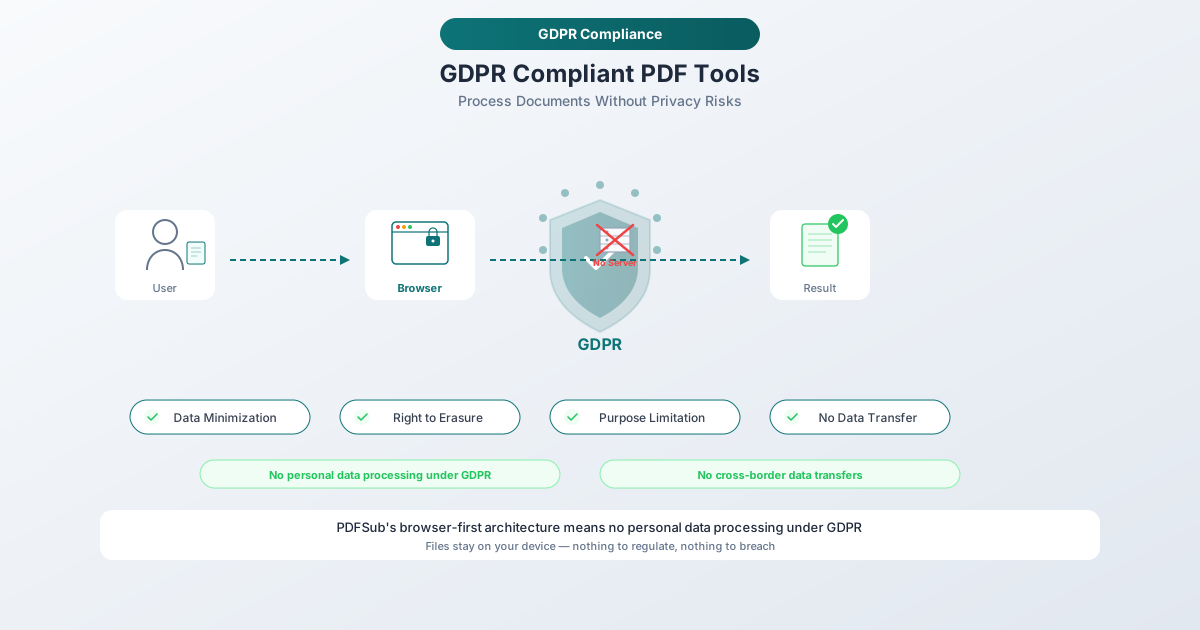, 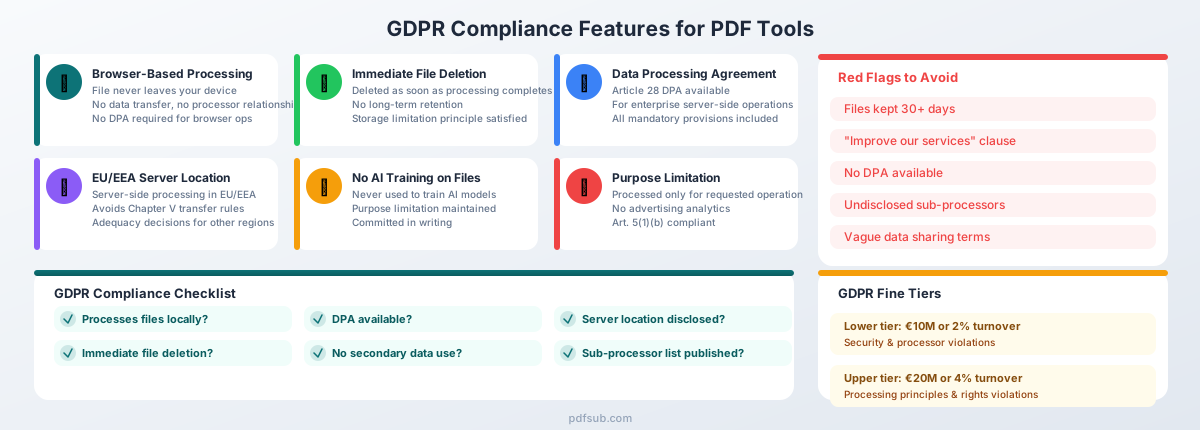, etc. — preserve EXACTLY as-is, do not translate, modify, or remove them. Markdown heading syntax (##, ###, etc.) — preserve the exact heading level markers. Formatting: Preserve any HTML entities or markdown formatting in strings. Maintain the same list/array structure and count of items (EXCEPTION: bank name arrays — replace the values with local equivalents while keeping the same array length). If the source has 6 features, the translation must have exactly 6 features. Return ONLY valid JSON — no explanations, no markdown code fences, no comments. Cultural Adaptation: For Hindi, use the appropriate level of formality (e.g., formal "Sie" in German, polite "usted" in Spanish unless the source is casual). Adapt idioms and metaphors to equivalents that resonate in Hindi culture. For RTL languages, no special formatting changes needed — just translate the text content. Bank Name Localization (CRITICAL — DO NOT SKIP) Any array containing bank names (keys like "bankNames", "sampleBanks", or similar) MUST be replaced with banks that Hindi speakers recognize. Do NOT keep the English bank names. Replace them with a mix of well-known local banks and major international banks familiar in Hindi-speaking regions. Keep the same array length. Examples: - Russian: "Сбербанк", "Тинькофф", "ВТБ", "Альфа-Банк", "Газпромбанк", "Райффайзен", "Росбанк", "Открытие", "HSBC", "Deutsche Bank", "BNP Paribas", "UBS", "Santander", "ING", "ICBC", "Mizuho Bank", "State Bank of India", "Barclays", "Commonwealth Bank", "Standard Chartered", "Citibank" - Polish: "PKO BP", "mBank", "ING", "Santander", "BNP Paribas", "Pekao", "Alior Bank", etc. - German: "Deutsche Bank", "Commerzbank", "Sparkasse", "ING", "N26", "DKB", etc. - French: "BNP Paribas", "Société Générale", "Crédit Agricole", "LCL", "Boursorama", etc. - For non-Latin scripts, use native script: Arabic ("البنك الأهلي", "الراجحي"), Chinese ("中国工商银行", "中国建设银行"), Japanese ("三菱UFJ", "みずほ銀行"), etc. The bank list must feel native to Hindi speakers, not like a US-only product. CRITICAL RULES Accuracy & Quality Produce native-quality translations that read as if originally written in Hindi Use natural, idiomatic phrasing — NEVER produce word-for-word literal translations Adapt sentence structure, word order, and phrasing to Hindi conventions Match the tone and register of the source: professional yet approachable, clear and concise For technical/SaaS content, use the terminology that Hindi speakers actually use in that industry SEO Optimization Translate meta titles and descriptions with Hindi search intent in mind Use keywords that Hindi speakers would actually search for Keep meta titles under 60 characters and meta descriptions under 160 characters Preserve the persuasive and action-oriented tone of CTAs What to Translate Translate ALL string values in the JSON Translate headings, descriptions, features, FAQs, CTAs, and all user-facing text Adapt date formats, number formats, and measurement units to Hindi conventions if referenced What NOT to Translate (Keep Exactly As-Is) JSON keys — never change any key names Brand name "PDFSub" — always keep as "PDFSub" Technical file formats: PDF, CSV, Excel, JSON, OFX, QFX, QIF, XLSX, DOCX, HTML, EPUB, RTF, ODT, SVG, TIFF, HEIC, WebP, PNG, JPG Technical terms that are universally used in English: API, URL, OCR, AI, CTA, SEO, GDPR, SOC 2 Product names: "PDFSub Engine" — always keep as "PDFSub Engine" Code-like strings, URLs, email addresses Numbers that are identifiers (not quantities) Image placeholders like , , etc. — preserve EXACTLY as-is, do not translate, modify, or remove them Markdown heading syntax (##, ###, etc.) — preserve the exact heading level markers Formatting Preserve any HTML entities or markdown formatting in strings Maintain the same list/array structure and count of items (EXCEPTION: bank name arrays — replace the values with local equivalents while keeping the same array length) If the source has 6 features, the translation must have exactly 6 features Return ONLY valid JSON — no explanations, no markdown code fences, no comments Cultural Adaptation For Hindi, use the appropriate level of formality (e.g., formal "Sie" in German, polite "usted" in Spanish unless the source is casual) Adapt idioms and metaphors to equivalents that resonate in Hindi culture For RTL languages, no special formatting changes needed — just translate the text content Bank Name Localization (CRITICAL — DO NOT SKIP) Any array containing bank names (keys like "bankNames", "sampleBanks", or similar) MUST be replaced with banks that Hindi speakers recognize. Do NOT keep the English bank names. Replace them with a mix of well-known local banks and major international banks familiar in Hindi-speaking regions. Keep the same array length. Examples: - Russian: "Сбербанк", "Тинькофф", "ВТБ", "Альфа-Банк", "Газпромбанк", "Райффайзен", "Росбанк", "Открытие", "HSBC", "Deutsche Bank", "BNP Paribas", "UBS", "Santander", "ING", "ICBC", "Mizuho Bank", "State Bank of India", "Barclays", "Commonwealth Bank", "Standard Chartered", "Citibank" - Polish: "PKO BP", "mBank", "ING", "Santander", "BNP Paribas", "Pekao", "Alior Bank", etc. - German: "Deutsche Bank", "Commerzbank", "Sparkasse", "ING", "N26", "DKB", etc. - French: "BNP Paribas", "Société Générale", "Crédit Agricole", "LCL", "Boursorama", etc. - For non-Latin scripts, use native script: Arabic ("البنك الأهلي", "الراجحي"), Chinese ("中国工商银行", "中国建设银行"), Japanese ("三菱UFJ", "みずほ銀行"), etc. The bank list must feel native to Hindi speakers, not like a US-only product. CHUNK INFO This is part 1 of 2. Translate ONLY the keys in this JSON subset. JSON CONTENT TO TRANSLATE { "title": "GDPR Compliance for PDF Tools: What to Look For", "excerpt": "PDFs carry personal data — names, addresses, financials, health records. If your PDF tool uploads files to a server, GDPR applies. Here’s what compliance actually requires and how to evaluate any tool.", "tags": [ "Guide", "GDPR", "Privacy", "Compliance", "PDF Tools", "Security" ], "metaDescription": "PDFs carry personal data — names, addresses, financials, health records. If your PDF tool uploads files to a server, GDPR applies. Here’s what complianc...", "body__0": "Every time you merge a contract, redact an invoice, or convert a bank statement to Excel using an online PDF tool, there is a question most people never think to ask: where did that file just go?\n\nPDFs are not harmless formatting containers. They carry names, addresses, bank account numbers, salaries, medical diagnoses, and legal agreements. The EU's General Data Protection Regulation (GDPR) does not care whether you intended to \"process personal data\" — it cares whether you did. And if your PDF tool uploaded that file to a server, the answer is yes.\n\nThis guide breaks down how GDPR applies to PDF tools, what compliance requires from tool providers, and how to evaluate any tool before trusting it with sensitive documents.\n\n", "body__1": "## Why GDPR Matters for PDF Tools\n\nThe average business handles thousands of PDFs every month. Internal HR documents, client contracts, bank statements, invoices, tax forms, medical records, legal correspondence — virtually all of them contain personal data as defined by the GDPR.\n\nArticle 4(1) of the GDPR defines personal data broadly: \"any information relating to an identified or identifiable natural person.\" That includes:\n\n- **Names and contact details** found on invoices, contracts, and correspondence\n- **Financial data** including account numbers, transaction histories, salaries, and tax information on bank statements and payslips\n- **Health information** in medical records, insurance documents, and disability assessments\n- **Government identifiers** such as national ID numbers, tax IDs, and social security numbers\n- **Legal information** in contracts, court documents, and compliance reports\n\nWhen you open a PDF containing any of this data and process it through an online tool — merging, splitting, converting, compressing, or editing — you are processing personal data. That processing is subject to GDPR regardless of whether extracting personal data was your intent.\n\nThe consequences are not theoretical. According to the DLA Piper GDPR Fines and Data Breach Survey (January 2026), aggregate fines since GDPR took effect reached EUR 7.1 billion, with EUR 1.2 billion issued in 2025 alone. Non-compliance with general data processing principles — the category most relevant to how PDF tools handle your files — accounts for five of the ten largest fines ever issued.\n\n---", "body__2": "## GDPR Basics for Non-Lawyers\n\nBefore evaluating PDF tools through a compliance lens, you need to understand four core concepts. This section skips the legal jargon and focuses on what each concept means in practice.\n\n### Personal Data\n\nAny information that can identify a person, directly or indirectly. A name on a contract is personal data. A bank account number on a statement is personal data. An email address in a PDF form is personal data. Even data that only identifies someone when combined with other information counts — a postcode plus a date of birth, for instance.\n\nIf the PDF you are processing contains information about any identifiable person, you are handling personal data.\n\n### Data Controller vs. Data Processor\n\nThe **data controller** decides why and how personal data is processed. If you are a business choosing to use a PDF tool to convert your client bank statements, you are the controller.\n\nThe **data processor** processes data on behalf of the controller. The PDF tool provider is the processor — they handle the data according to your instructions (convert this file, merge these documents, extract this table).\n\nThis distinction matters because GDPR imposes obligations on both roles. Controllers must choose processors that offer \"sufficient guarantees\" of compliance (Article 28). Processors must follow controller instructions and implement appropriate security measures. If your PDF tool provider fails to protect personal data, both of you may be liable.\n\n### Lawful Basis for Processing\n\nArticle 6 requires a lawful basis for processing personal data. For most business use of PDF tools, the relevant bases are **legitimate interests** (a genuine business reason, such as converting bank statements for accounting), **contract performance** (processing needed to fulfill a contractual obligation), or **consent** (less common in B2B workflows). The lawful basis must exist before processing begins.\n\n### Data Subject Rights\n\nIndividuals whose data appears in those PDFs have rights under GDPR. The most relevant for PDF tool usage are the **right of access** (Article 15 — request a copy of personal data), the **right to erasure** (Article 17 — request deletion when data is no longer necessary or consent is withdrawn), and the **right to data portability** (Article 20 — request data in a machine-readable format).\n\nControllers must respond within one month. If your PDF tool provider has retained copies of documents containing that person's data, you must be able to ensure those copies are deleted too.\n\n---", "body__3": "## When Using a PDF Tool Triggers GDPR\n\nNot every use of a PDF tool creates GDPR obligations. The distinction is simple but critically important.\n\n### Scenario 1: Browser-Based Processing (No Transfer)\n\nYou open a PDF tool in your browser, select a file, and it processes entirely using client-side code. The file never leaves your device.\n\nIn this scenario, the PDF tool provider is **not** a data processor under GDPR. No personal data was transferred. No DPA is needed. This is the cleanest possible approach from a compliance perspective.\n\n### Scenario 2: Cloud-Based Processing (Transfer to Processor)\n\nYou upload a PDF to an online tool's server. The server processes the file — converting, merging, splitting, or whatever operation you selected — and returns the result. During this time, the file existed on the provider's infrastructure.\n\nIn this scenario, the PDF tool provider **is** a data processor under GDPR. You, as the controller, have transferred personal data to a processor. This triggers a cascade of legal requirements:\n\n- A **Data Processing Agreement (DPA)** must be in place before the transfer\n- The processor must implement **appropriate technical and organizational measures** to protect the data\n- If the processor is outside the EU/EEA, the transfer is an **international data transfer** subject to additional safeguards\n\n### Scenario 3: AI-Powered Processing (Additional Considerations)\n\nSome PDF tools use AI or machine learning to process documents — for OCR, data extraction, summarization, or translation. If this involves sending your file to a third-party AI service (Google's Gemini, OpenAI's GPT, etc.), the AI provider is a **sub-processor**. The chain of obligations extends further:\n\n- The PDF tool provider needs your authorization to use sub-processors\n- The sub-processor must be bound by equivalent data protection obligations\n- You should know which AI services are being used and where they process data\n- There must be clear commitments that your files are not used for AI model training\n\n---", "body__4": "## Key GDPR Requirements for PDF Tool Providers\n\n\n\nIf a PDF tool does process files on its servers — making it a data processor — the GDPR imposes specific requirements. Here is what to look for.\n\n### Data Processing Agreement (DPA)\n\nArticle 28 of the GDPR makes this non-negotiable. Any data processor must have a written DPA with each controller. The DPA must specify the nature and purpose of processing, types of personal data, categories of data subjects, processor obligations on security and confidentiality, sub-processor rules, data deletion requirements upon termination, and controller audit rights.\n\nA PDF tool provider that does not offer a DPA is a compliance risk. Any legitimate cloud-based processor should have a standard DPA available.\n\n### Purpose Limitation\n\nArticle 5(1)(b) of the GDPR states that personal data must be \"collected for specified, explicit and legitimate purposes and not further processed in a manner that is incompatible with those purposes.\"\n\nFor a PDF tool, the purpose is clear: you uploaded a file to be converted, merged, split, or otherwise transformed. The provider may only process your file for that stated purpose. They cannot analyze your documents for advertising insights. They cannot use your file contents to train AI models. They cannot share your data with partners for marketing purposes.\n\nIf a tool's privacy policy includes language about using uploaded files \"to improve our services\" or \"for research purposes,\" that is a purpose limitation violation waiting to happen.\n\n### Data Minimization\n\nArticle 5(1)(c) requires that personal data be \"adequate, relevant and limited to what is necessary in relation to the purposes for which they are processed.\"\n\nIn practice, this means a PDF tool should only access the parts of your file needed for the requested operation. It should not extract metadata, log document contents, or retain information beyond what is necessary to complete the task.\n\nThe strongest form of data minimization is not collecting the data at all — which is exactly what browser-based processing achieves.\n\n### Security Measures\n\nArticle 32 requires \"appropriate technical and organisational measures\" proportionate to the risk. For a PDF tool, this means encryption in transit (TLS/HTTPS), encryption at rest, proper access controls, secure hosting environments, and regular security testing. A provider that cannot articulate their security architecture should not be handling your files.\n\n### File Retention and Deletion\n\nThis is where many PDF tools fail. The GDPR principle of storage limitation (Article 5(1)(e)) requires that personal data be \"kept in a form which permits identification of data subjects for no longer than is necessary.\"\n\nFor a PDF tool, the necessary duration is the time it takes to complete the processing operation and deliver the result. Once you have downloaded your converted file, the provider should have no reason to retain the original or the output.\n\nSome tools retain files for 24 hours, 7 days, or even 30 days. Ask yourself: why? Convenience for the user is not a lawful basis for retaining personal data. Extended retention creates risk without corresponding benefit.\n\nThe best practice is immediate deletion after processing completes.\n\n### International Data Transfers\n\nIf the PDF tool provider or its sub-processors are outside the EU/EEA, Chapter V of the GDPR requires additional safeguards: an **adequacy decision** (the Commission has determined the destination country provides adequate protection — as of early 2026, this includes the UK, Japan, South Korea, Canada, and the US under the EU-US Data Privacy Framework), **Standard Contractual Clauses (SCCs)**, or **Binding Corporate Rules (BCRs)**.\n\nThe EU-US Data Privacy Framework survived a legal challenge in September 2025, but commentators note that 2026 may bring fresh scrutiny. Organizations relying on this framework should monitor developments.\n\n### Breach Notification\n\nArticle 33 requires controllers to notify the supervisory authority within 72 hours of becoming aware of a breach. For PDF tool providers, this means they must notify you (the controller) without undue delay so you can meet your own obligations. The DPA should include clear breach notification commitments and timelines.\n\n---", "body__5": "## Red Flags in PDF Tool Privacy Policies\n\nPrivacy policies are often long and deliberately vague. Here are specific phrases and practices that should trigger concern.\n\n### \"We may share data with third parties for business purposes\"\n\nVague sharing terms violate the transparency principle. You need to know exactly which third parties receive data, for what purpose, and under what legal basis. \"Business purposes\" is not a lawful basis — it is an evasion.\n\n### \"Files are stored for up to 30 days\"\n\nExcessive retention without justification. If the tool's purpose is to convert a PDF, why does it need your bank statement for a month? Long retention periods increase breach risk and are difficult to reconcile with the storage limitation principle.\n\n### \"We use uploaded files to improve our services\"\n\nThis is the biggest red flag. If a tool provider uses your documents — containing your clients' personal data — to train AI models or improve their algorithms, they are processing personal data for a purpose you did not authorize. This violates purpose limitation, likely lacks a lawful basis, and may constitute a secondary processing activity requiring separate consent.\n\n### No DPA available\n\nIf a cloud-based PDF tool cannot provide a Data Processing Agreement, it is not GDPR-compliant. Full stop. Article 28 is unambiguous on this point. No DPA means no lawful basis for them to process personal data on your behalf.\n\n### Server location not disclosed\n\nIf the provider will not tell you where your files are processed, you cannot assess whether the transfer requires additional safeguards under Chapter V. Transparency about infrastructure is a baseline requirement.\n\n### No sub-processor list\n\nGDPR requires processors to inform controllers about sub-processors. If the tool uses third-party services to process your files (cloud hosting, AI APIs, CDNs) and does not disclose them, you cannot perform adequate due diligence.\n\n---", "body__6": "## Green Flags: What Compliant PDF Tools Look Like\n\nThe inverse of each red flag above is a green flag. But a few deserve emphasis:\n\n- **Browser-based processing** is the single strongest privacy feature a PDF tool can offer. When a file never leaves your device, the provider never becomes a data processor. No transfer of personal data, no DPA needed for that operation, no server-side retention risk. This is not a theoretical distinction — client-side processing genuinely eliminates an entire category of compliance risk.\n- **Immediate file deletion** after processing completes. Any retention beyond that needs justification.\n- **DPA publicly available** or obtainable without an enterprise sales call.\n- **EU-based servers** or clearly documented transfer mechanisms (adequacy decision, SCCs, BCRs) for servers outside the EU/EEA.\n- **No secondary use of file contents** — committed in writing, in both the privacy policy and DPA.\n- **Transparent sub-processor list** with a notification mechanism when sub-processors change (Article 28(2)).\n\n---" }
PDFSub GDPR अनुपालन कैसे संभालता है
PDFSub को एक गोपनीयता-प्रथम आर्किटेक्चर के साथ बनाया गया था जो डिज़ाइन द्वारा GDPR आवश्यकताओं को संबोधित करता है, बाद में नहीं। PDFSub GDPR और CCPA अनुपालन है, और SOC 2 रेडी है।
डिफ़ॉल्ट रूप से ब्राउज़र-आधारित प्रोसेसिंग
संपादन संचालन के लिए — मर्ज करना, स्प्लिट करना, कंप्रेस करना, रोटेट करना — PDFSub आपकी ब्राउज़र में फ़ाइलों को प्रोसेस करता है। रूपांतरण और उन्नत प्रोसेसिंग PDFSub Engine द्वारा संचालित होते हैं — एक अलग सेवा जिसका कोई इंटरनेट एक्सेस नहीं है। फ़ाइलें एक अलग वातावरण में प्रोसेस की जाती हैं और प्रोसेसिंग के बाद स्वचालित रूप से हटा दी जाती हैं।
यह कोई मार्केटिंग दावा नहीं है — यह एक आर्किटेक्चरल निर्णय है। क्लाइंट-साइड प्रोसेसिंग इन ऑपरेशनों के लिए डेटा प्रोसेसर संबंध को पूरी तरह से समाप्त कर देती है। किसी DPA की आवश्यकता नहीं। कोई अंतर्राष्ट्रीय स्थानांतरण जोखिम नहीं। कोई सर्वर-साइड प्रतिधारण नहीं।
जब सर्वर प्रोसेसिंग आवश्यक हो
कुछ ऑपरेशनों के लिए सर्वर-साइड प्रोसेसिंग की आवश्यकता होती है: स्कैन किए गए दस्तावेज़ों के लिए OCR, जटिल वित्तीय दस्तावेज़ों के लिए AI-संचालित एक्सट्रैक्शन, और कुछ उन्नत रूपांतरण। जब ऐसा होता है, तो PDFSub सख्त प्रोटोकॉल का पालन करता है:
- ट्रांज़िट में एन्क्रिप्शन — सभी फ़ाइल ट्रांसफर TLS एन्क्रिप्शन का उपयोग करते हैं
- अलग प्रोसेसिंग — फ़ाइलें बिना इंटरनेट एक्सेस वाले एक अलग वातावरण में प्रोसेस की जाती हैं
- तत्काल विलोपन — प्रोसेसिंग पूरी होते ही फ़ाइलें हटा दी जाती हैं
- उपयोगकर्ता फ़ाइलों पर कोई प्रशिक्षण नहीं — अपलोड किए गए दस्तावेज़ों का उपयोग कभी भी AI मॉडल को प्रशिक्षित करने या एल्गोरिदम को बेहतर बनाने के लिए नहीं किया जाता है
- उद्देश्य सीमा — फ़ाइलें केवल अनुरोधित ऑपरेशन के लिए प्रोसेस की जाती हैं
एंटरप्राइज़ ग्राहकों के लिए DPA उपलब्ध
PDFSub उन एंटरप्राइज़ ग्राहकों के लिए एक डेटा प्रोसेसिंग एग्रीमेंट प्रदान करता है जिन्हें प्रोसेसर संबंध के औपचारिक दस्तावेज़ीकरण की आवश्यकता होती है। यह सर्वर-साइड प्रोसेसिंग परिदृश्यों को कवर करता है और इसमें सभी अनुच्छेद 28 अनिवार्य प्रावधान शामिल हैं।
क्या होता है इस बारे में पारदर्शी
PDFSub का गोपनीयता दृष्टिकोण सीधा है: जब भी संभव हो स्थानीय रूप से प्रोसेस करें, और जब सर्वर प्रोसेसिंग आवश्यक हो, तो एन्क्रिप्शन और तत्काल विलोपन के माध्यम से डेटा एक्सपोज़र को कम करें। कोई अस्पष्ट "व्यावसायिक उद्देश्य" खंड नहीं हैं। आपके डेटा का कोई द्वितीयक उपयोग नहीं है।
आप PDFSub के 77+ टूल ब्राउज़ कर सकते हैं और प्रतिबद्धता से पहले ब्राउज़र-आधारित प्रोसेसिंग मॉडल को स्वयं सत्यापित करने के लिए 7-दिवसीय निःशुल्क परीक्षण
PDF टूल चुनने के लिए GDPR अनुपालन चेकलिस्ट
GDPR अनुपालन के लिए किसी भी PDF टूल का मूल्यांकन करते समय इस चेकलिस्ट का उपयोग करें। ब्राउज़र-आधारित टूल कई श्रेणियों को पूरी तरह से दरकिनार कर देते हैं, लेकिन किसी भी क्लाउड-आधारित टूल के लिए, हर आइटम मायने रखता है।
| # | प्रश्न | क्या देखें |
|---|---|---|
| 1 | क्या यह स्थानीय रूप से फ़ाइलों को प्रोसेस करता है? | ब्राउज़र-आधारित प्रोसेसिंग = कोई डेटा ट्रांसफर नहीं = कोई प्रोसेसर संबंध नहीं। ब्राउज़र देव टूल में नेटवर्क ट्रैफ़िक की जाँच करके सत्यापित करें। |
| 2 | क्या DPA उपलब्ध है? | एंटरप्राइज़ बिक्री कॉल के बिना प्राप्त करने योग्य होना चाहिए। सभी अनुच्छेद 28 अनिवार्य प्रावधान शामिल होने चाहिए। |
| 3 | सर्वर कहाँ स्थित हैं? | EU/EEA प्रोसेसिंग स्थानांतरण जटिलताओं से बचाती है। यदि EU के बाहर है, तो पर्याप्तता निर्णय, SCCs, या BCRs की जाँच करें। |
| 4 | फ़ाइल प्रतिधारण नीति क्या है? | तत्काल विलोपन सर्वोत्तम अभ्यास है। प्रोसेसिंग पूरा होने के बाद किसी भी प्रतिधारण के लिए औचित्य की आवश्यकता होती है। |
| 5 | क्या डेटा का उपयोग किसी द्वितीयक उद्देश्य के लिए किया जाता है? | गोपनीयता नीति में स्पष्ट रूप से AI प्रशिक्षण, एनालिटिक्स और फ़ाइल सामग्री के विज्ञापन उपयोग को बाहर रखा जाना चाहिए। |
| 6 | डेटा विषय अनुरोधों को कैसे संभाला जाता है? | जब कोई डेटा विषय मिटाने के अधिकार का प्रयोग करता है तो प्रतिधारण प्रतियों के विलोपन की पुष्टि करने में सक्षम होना चाहिए। |
| 7 | कौन से उप-प्रोसेसर शामिल हैं? | विवरण, स्थानों और उप-प्रोसेसरों के बदलने पर एक अधिसूचना तंत्र के साथ प्रकाशित सूची। |
| 8 | क्या सुरक्षा उपाय मौजूद हैं? | ट्रांज़िट और रेस्ट में एन्क्रिप्शन, एक्सेस कंट्रोल, प्रासंगिक प्रमाणन (ISO 27001, SOC 2)। |
| 9 | क्या उल्लंघन अधिसूचना प्रतिबद्धताएं हैं? | 72 घंटों के भीतर (या पहले) अधिसूचना, सुरक्षा घटनाओं के लिए एक समर्पित संपर्क बिंदु के साथ। |
| 10 | क्या आप अनुपालन का ऑडिट कर सकते हैं? | DPA में ऑडिट अधिकार शामिल होने चाहिए। प्रदाता को अनुपालन दस्तावेज़ साझा करने और DPO नामित करने में सक्षम होना चाहिए। |
गलत होने की कीमत: GDPR जुर्माना संदर्भ में
GDPR जुर्माना निवारक होने के लिए डिज़ाइन किए गए हैं। निचला स्तर (अनुच्छेद 83(4)) प्रोसेसर और सुरक्षा उल्लंघनों के लिए EUR 10 मिलियन या वार्षिक वैश्विक टर्नओवर के 2% तक के जुर्माने की अनुमति देता है। ऊपरी स्तर (अनुच्छेद 83(5)) डेटा प्रोसेसिंग सिद्धांतों और डेटा विषय अधिकारों के उल्लंघन के लिए EUR 20 मिलियन या वार्षिक वैश्विक टर्नओवर के 4% तक के जुर्माने की अनुमति देता है।
प्रवर्तन प्रवृत्ति स्पष्ट है। 2025 में, डेटा प्रोसेसिंग के लिए अपर्याप्त कानूनी आधार कुल जुर्माने के मूल्य (लगभग EUR 1.03 बिलियन) का 90% था। टिकटॉक को मई 2025 में अपर्याप्त सुरक्षा उपायों के बिना अवैध रूप से EU उपयोगकर्ता डेटा को चीन में स्थानांतरित करने के लिए EUR 530 मिलियन का जुर्माना मिला। छोटी संस्थाएं अछूती नहीं हैं — पर्यवेक्षी प्राधिकरणों ने अपर्याप्त DPAs, अपर्याप्त सुरक्षा और अत्यधिक प्रतिधारण के लिए SMEs पर जुर्माना लगाया है।
प्रतिष्ठा की लागत वित्तीय दंड से अधिक हो सकती है। क्लाइंट बैंक स्टेटमेंट या मेडिकल रिकॉर्ड से जुड़े डेटा ब्रीच से विश्वास को नुकसान पहुंचता है जिसे कोई भी जुर्माना भुगतान ठीक नहीं कर सकता।